Solved BSOD 0x3B and 0x1E

5-6 Hours Ago

Formatted then installed Windows with SP1 from ISO image DVD.

Installed all updates on Windows Update.

Installed MSE then Installed MBAM Pro.

Updated Graphics drivers.

Installed more Updates from Windows.

Installed Teamspeak 3 then Steam.

Thats about it...

I'm at a loss as well. I have never had this much trouble out of a computer. I am not, in any way, an expert on computers but I'm not a novice either. All I can guess is something is conflicting somewhere or something in my computer is "dying". It is almost midnight here so I am shutting this thing down to get some sleep and will see if I can get it into the shop tomorrow.
 

My Computer My Computer

At a glance

Windows 7 Home Premium 64bit SP1Intel Core i5-4430 Haswell 3.0GHz LGA 11508 gigs (2x4g)PNY GeForce GTX 660 2GB
Computer type
PC/Desktop
Computer Manufacturer/Model Number
Custom Build
OS
Windows 7 Home Premium 64bit SP1
CPU
Intel Core i5-4430 Haswell 3.0GHz LGA 1150
Motherboard
MSI Z87-GD65 LGA 1150
Memory
8 gigs (2x4g)
Graphics Card(s)
PNY GeForce GTX 660 2GB
Sound Card
High Definition Audio Device
Monitor(s) Displays
Asus Monitor
Screen Resolution
1920x1080 64bit 60Hz
Hard Drives
Western Digital WD10EZEX-00BN5A0 ATA 1 Tera
Western Digital WD5000AAKS 00V1A0 500GB
PSU
CORSAIR HX Series HX750 750W ATX12V 2.3 Modular
Case
Rosewill BLACKHAWK ATX Mid Tower
Cooling
6 Bearing Fans
Keyboard
Natural Ergonomic Keyboard 4000
Mouse
Logitech Darkfield Performance MX
Internet Speed
Cable
Antivirus
Microsoft Essentials
Browser
Aurora
Really only 5 or 6 hours ago.

Then I'm puzzled why this is the first and last entries in your logs. Taking your computer to a professional shop sounds like a good idea.

txt.gif
SEKITA-PC.txt (111.0 KB, 0 views)
zip.gif
SekitaSF_02-01-2014.zip (245.6 KB, 0 views)

Event[0]:
Log Name: System
Source: Service Control Manager
Date: 2010-11-20T15:57:42.323
Event ID: 7036
Task: N/A
Level: Information
Opcode: N/A
Keyword: Classic
User: N/A
User Name: N/A
Computer: 37L4247F27-08
Description:
The Volume Shadow Copy service entered the stopped state.


Event[2986]:
Log Name: System
Source: Service Control Manager
Event[0]:
Log Name: System
Source: Service Control Manager
Date: 2010-11-20T15:57:42.323
Event ID: 7036
Task: N/A
Level: Information
Opcode: N/A
Keyword: Classic
User: N/A
User Name: N/A
Computer: 37L4247F27-08
Description:
The Volume Shadow Copy service entered the stopped state.


Event[2986]:
Log Name: System
Source: Service Control Manager
Date: 2014-01-02T21:45:23.258
Event ID: 7036
Task: N/A
Level: Information
Opcode: N/A
Keyword: Classic
User: N/A
User Name: N/A
Computer: Sekita-PC
Description:
The Portable Device Enumerator Service service entered the stopped state.


Event ID: 7036
Task: N/A
Level: Information
Opcode: N/A
Keyword: Classic
User: N/A
User Name: N/A
Computer: Sekita-PC
Description:
The Portable Device Enumerator Service service entered the stopped state.
 

My Computer My Computer

At a glance

Windows 10 Pro. 64/ version 1709 Windows 7 Pr...Intel i7-6800K @ 4.3Corsair Platinum 16 gig @2400EVGA GTX 1070 OC
Computer type
PC/Desktop
Computer Manufacturer/Model Number
Home made Desktop
OS
Windows 10 Pro. 64/ version 1709 Windows 7 Pro/64
CPU
Intel i7-6800K @ 4.3
Motherboard
ASUS X-99 Deluxe II
Memory
Corsair Platinum 16 gig @2400
Graphics Card(s)
EVGA GTX 1070 OC
Monitor(s) Displays
Asus 27" LED LCD/VE278Q
Screen Resolution
1920-1080 or 1280-720 HDMI
Hard Drives
INTEL SSD 730-240 Gb Sata 3.0/
PSU
EVGA Platium 1200W
Case
Phanteks Luxe Tempered Glass 8 fans/ one radiator
Cooling
XSPC/ Water Cooled CPU
Keyboard
Das 4 Professional
Mouse
Logitech M705/MX Anywhere 2-S
Internet Speed
100 mbits
Antivirus
Microsoft Security Essentials/ Malwarebytes Premium 3.0/ SAS
Browser
I.E. 11 default/Firefox/ ISP Time Warner Cable/Spectrum
Other Info
LG BluRay Burner/
Sound system-KLipsch-THX/
Icy Dock ssd Hot Swap bays.
Update JMicron RAID driver from Driver Reference Table - jraid.sys.

Get rid of intel rapid storage. First uninstall it from Control Panel > Programs and Features. Then Uninstall the driver from device manager.

  1. Right click on "my computer" icon and click "manage" on the context menu.
  2. It will open the "computer management" window.
  3. Select "Device Manager" in the left pane, It will list all the existing devices up.
  4. Expand "IDE ATA/ATAPI controllers" by clicking on the triangle in front of it.
  5. Select one Intel device item under it, right click, uninstall.
  6. Continue the process for all Intel items under "IDE ATA/ATAPI controllers"
  7. Now restart the computer. At restart, windows will auto configure the appropriate native system driver.
You should not have installed these things at the first place.
 

My Computer My Computer

At a glance

Microsoft Windows 10 Pro Insider Preview 64-bitIntel(R) Core(TM) i3-4130 CPU @ 3.40GHzCorsair Vengence 4GB x2 (8.00GB Dual-Channel ...2047MB GeForce GTS 450 (ZOTAC International)
Computer type
PC/Desktop
Computer Manufacturer/Model Number
Self Assembled
OS
Microsoft Windows 10 Pro Insider Preview 64-bit
CPU
Intel(R) Core(TM) i3-4130 CPU @ 3.40GHz
Motherboard
Gigabyte Technology Co., Ltd. B85M-D3H
Memory
Corsair Vengence 4GB x2 (8.00GB Dual-Channel DDR3 @ 798MHz)
Graphics Card(s)
2047MB GeForce GTS 450 (ZOTAC International)
Sound Card
Onboard (Realtek High Definition Audio)
Monitor(s) Displays
LG Flatron E2040T
Screen Resolution
1600x900
Hard Drives
Western Digital 1 TB
Seagate 500 GB
PSU
Corsair VS550
Case
Cooler Master K380
Cooling
Cooler Master Seidon 120V Plus
Keyboard
Logitech MK260r
Mouse
Logitech MK260r
Internet Speed
PMPL Broadband
Antivirus
Windows Defender + MBAM
Browser
Firefox
Other Info
Dell Studio 15" Laptop
Wow, shows I should know more about my comp before using Driver Navigator.

Alright, I have uninstalled Intel Rapid Storage. The Micron site doesn't want to work for me. Going to try it with IE. (Didn't work there either)

UPDATE: Driver Navigator sets a restore point with every driver installation/update. Since Jraid was the last thing I installed from it, I just restored the computer to that update.

UPDATE: System has been up and running since I did the restore with no complications. No errors, BSOD, or conflicts. I will go ahead and mark this as solved.

Once again, Thank you Arc for all your patience and advice.

Thank you Layback for your input as well.

I felt like Alice in the rabbit hole (hence the sig and avvie)
 
Last edited:

My Computer My Computer

At a glance

Windows 7 Home Premium 64bit SP1Intel Core i5-4430 Haswell 3.0GHz LGA 11508 gigs (2x4g)PNY GeForce GTX 660 2GB
Computer type
PC/Desktop
Computer Manufacturer/Model Number
Custom Build
OS
Windows 7 Home Premium 64bit SP1
CPU
Intel Core i5-4430 Haswell 3.0GHz LGA 1150
Motherboard
MSI Z87-GD65 LGA 1150
Memory
8 gigs (2x4g)
Graphics Card(s)
PNY GeForce GTX 660 2GB
Sound Card
High Definition Audio Device
Monitor(s) Displays
Asus Monitor
Screen Resolution
1920x1080 64bit 60Hz
Hard Drives
Western Digital WD10EZEX-00BN5A0 ATA 1 Tera
Western Digital WD5000AAKS 00V1A0 500GB
PSU
CORSAIR HX Series HX750 750W ATX12V 2.3 Modular
Case
Rosewill BLACKHAWK ATX Mid Tower
Cooling
6 Bearing Fans
Keyboard
Natural Ergonomic Keyboard 4000
Mouse
Logitech Darkfield Performance MX
Internet Speed
Cable
Antivirus
Microsoft Essentials
Browser
Aurora
And of course as SOON as I mark it as solved.. it crashes. It still says the Jraid is installed =/

[FONT=Segoe UI, Arial]On Fri 1/3/2014 3:41:06 AM GMT your computer crashed
crash dump file: C:\Windows\memory.dmp
This was probably caused by the following module: [FONT=Segoe UI, Arial]win32k.sys[/FONT] (win32k!EngUnmapFontFileFD+0x1AA6D)
Bugcheck code: 0x8E (0xFFFFFFFFC0000005, 0xFFFFFFFF93F187B1, 0xFFFFFFFFA6532C34, 0x0)
Error: [FONT=Segoe UI, Arial]KERNEL_MODE_EXCEPTION_NOT_HANDLED[/FONT]
file path: C:\Windows\system32\win32k.sys
product: [FONT=Segoe UI, Arial]Microsoft® Windows® Operating System[/FONT]
company: [FONT=Segoe UI, Arial]Microsoft Corporation[/FONT]
description: Multi-User Win32 Driver
Bug check description: This bug check indicates that a kernel-mode application generated an exception that the error handler did not catch.
The crash took place in a standard Microsoft module. Your system configuration may be incorrect. Possibly this problem is caused by another driver on your system that cannot be identified at this time.


[/FONT]
 
Last edited:

My Computer My Computer

At a glance

Windows 7 Home Premium 64bit SP1Intel Core i5-4430 Haswell 3.0GHz LGA 11508 gigs (2x4g)PNY GeForce GTX 660 2GB
Computer type
PC/Desktop
Computer Manufacturer/Model Number
Custom Build
OS
Windows 7 Home Premium 64bit SP1
CPU
Intel Core i5-4430 Haswell 3.0GHz LGA 1150
Motherboard
MSI Z87-GD65 LGA 1150
Memory
8 gigs (2x4g)
Graphics Card(s)
PNY GeForce GTX 660 2GB
Sound Card
High Definition Audio Device
Monitor(s) Displays
Asus Monitor
Screen Resolution
1920x1080 64bit 60Hz
Hard Drives
Western Digital WD10EZEX-00BN5A0 ATA 1 Tera
Western Digital WD5000AAKS 00V1A0 500GB
PSU
CORSAIR HX Series HX750 750W ATX12V 2.3 Modular
Case
Rosewill BLACKHAWK ATX Mid Tower
Cooling
6 Bearing Fans
Keyboard
Natural Ergonomic Keyboard 4000
Mouse
Logitech Darkfield Performance MX
Internet Speed
Cable
Antivirus
Microsoft Essentials
Browser
Aurora

My Computer My Computer

At a glance

Microsoft Windows 10 Pro Insider Preview 64-bitIntel(R) Core(TM) i3-4130 CPU @ 3.40GHzCorsair Vengence 4GB x2 (8.00GB Dual-Channel ...2047MB GeForce GTS 450 (ZOTAC International)
Computer type
PC/Desktop
Computer Manufacturer/Model Number
Self Assembled
OS
Microsoft Windows 10 Pro Insider Preview 64-bit
CPU
Intel(R) Core(TM) i3-4130 CPU @ 3.40GHz
Motherboard
Gigabyte Technology Co., Ltd. B85M-D3H
Memory
Corsair Vengence 4GB x2 (8.00GB Dual-Channel DDR3 @ 798MHz)
Graphics Card(s)
2047MB GeForce GTS 450 (ZOTAC International)
Sound Card
Onboard (Realtek High Definition Audio)
Monitor(s) Displays
LG Flatron E2040T
Screen Resolution
1600x900
Hard Drives
Western Digital 1 TB
Seagate 500 GB
PSU
Corsair VS550
Case
Cooler Master K380
Cooling
Cooler Master Seidon 120V Plus
Keyboard
Logitech MK260r
Mouse
Logitech MK260r
Internet Speed
PMPL Broadband
Antivirus
Windows Defender + MBAM
Browser
Firefox
Other Info
Dell Studio 15" Laptop
Reformatted and Re-installed Win 7 with the -correct- ISO this time. ( I was using 32 instead of 64) I was tired when I made the ISO image, so another lesson learned. Be awake, and have coffee before trying to tune your PC. My hard drive arrived yesterday so I went ahead and installed it. I will be formatting the old one into a backup drive once the bay adapter gets here.

I have only had one BSOD and I think that was due to updates as I was doing them in batches.

I didn't use Driver Navigator, everything has been downloaded from manufacturer or an authorized source. I keep waiting, expecting a BSOD, and every little hang has me holding my breath. Is there anything you can see that I missed or need to be concerned about?

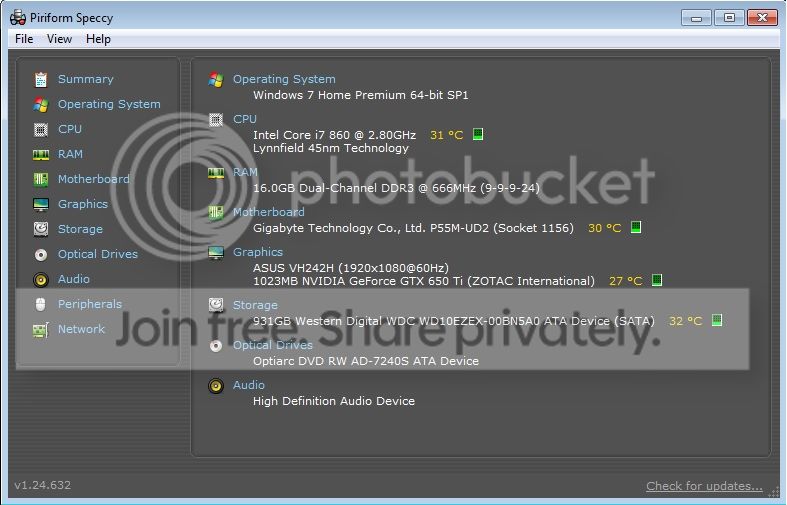
Speccypic.jpg
 

My Computer My Computer

At a glance

Windows 7 Home Premium 64bit SP1Intel Core i5-4430 Haswell 3.0GHz LGA 11508 gigs (2x4g)PNY GeForce GTX 660 2GB
Computer type
PC/Desktop
Computer Manufacturer/Model Number
Custom Build
OS
Windows 7 Home Premium 64bit SP1
CPU
Intel Core i5-4430 Haswell 3.0GHz LGA 1150
Motherboard
MSI Z87-GD65 LGA 1150
Memory
8 gigs (2x4g)
Graphics Card(s)
PNY GeForce GTX 660 2GB
Sound Card
High Definition Audio Device
Monitor(s) Displays
Asus Monitor
Screen Resolution
1920x1080 64bit 60Hz
Hard Drives
Western Digital WD10EZEX-00BN5A0 ATA 1 Tera
Western Digital WD5000AAKS 00V1A0 500GB
PSU
CORSAIR HX Series HX750 750W ATX12V 2.3 Modular
Case
Rosewill BLACKHAWK ATX Mid Tower
Cooling
6 Bearing Fans
Keyboard
Natural Ergonomic Keyboard 4000
Mouse
Logitech Darkfield Performance MX
Internet Speed
Cable
Antivirus
Microsoft Essentials
Browser
Aurora
No BSOD yet, as per the zip, and it appears to be a better installation than the last one.

I didn't use Driver Navigator,
Never use such a stuff. In a previous post you told that program pointed 20 (or something similar) drivers to be updated. You did not have 20 drivers at all that may be updated without of windows updates. Those programs are much more fool than a dumb user.

As you have a previous bad experience with storage stuff, I would suggest you to not use Acronis; at least upto that time when it is determined to be stable.

Now use the computer as it is .... if needed the network drivers may need be updated. But dont attempt for it without asking us. Will go for it only and only if it causes any problem, otherwise not.
 

My Computer My Computer

At a glance

Microsoft Windows 10 Pro Insider Preview 64-bitIntel(R) Core(TM) i3-4130 CPU @ 3.40GHzCorsair Vengence 4GB x2 (8.00GB Dual-Channel ...2047MB GeForce GTS 450 (ZOTAC International)
Computer type
PC/Desktop
Computer Manufacturer/Model Number
Self Assembled
OS
Microsoft Windows 10 Pro Insider Preview 64-bit
CPU
Intel(R) Core(TM) i3-4130 CPU @ 3.40GHz
Motherboard
Gigabyte Technology Co., Ltd. B85M-D3H
Memory
Corsair Vengence 4GB x2 (8.00GB Dual-Channel DDR3 @ 798MHz)
Graphics Card(s)
2047MB GeForce GTS 450 (ZOTAC International)
Sound Card
Onboard (Realtek High Definition Audio)
Monitor(s) Displays
LG Flatron E2040T
Screen Resolution
1600x900
Hard Drives
Western Digital 1 TB
Seagate 500 GB
PSU
Corsair VS550
Case
Cooler Master K380
Cooling
Cooler Master Seidon 120V Plus
Keyboard
Logitech MK260r
Mouse
Logitech MK260r
Internet Speed
PMPL Broadband
Antivirus
Windows Defender + MBAM
Browser
Firefox
Other Info
Dell Studio 15" Laptop
Only had one but it was in the middle of updating so I imagine that had something to do with it.

[FONT=Segoe UI, Arial]On Sat 1/4/2014 12:25:26 PM GMT your computer crashed
crash dump file: C:\Windows\memory.dmp
This was probably caused by the following module: [FONT=Segoe UI, Arial]Unknown[/FONT] (0xFFFFFFFFC0000005)
Bugcheck code: 0x1E (0xFFFFFFFFC0000005, 0xFFFFF8800111A23C, 0x1, 0x9)
Error: [FONT=Segoe UI, Arial]KMODE_EXCEPTION_NOT_HANDLED[/FONT]
Bug check description: This indicates that a kernel-mode program generated an exception which the error handler did not catch.
This appears to be a typical software driver bug and is not likely to be caused by a hardware problem.
A third party driver was identified as the probable root cause of this system error.
Google query: [FONT=Segoe UI, Arial]KMODE_EXCEPTION_NOT_HANDLED[/FONT]


I have not used Acronis. It was suggested on the WD installation site (My HD was shipped bare) so I saved it to a disk "JIC" before reformatting. Had no use for it when I looked at it. I'm glad you mentioned the current instability
[/FONT][FONT=Segoe UI, Arial][FONT=Segoe UI, Arial] (I think you meant my computer)[/FONT] might cause issues or I might have tried to use Acronis to format the 500GB HD for backup once the adapter got here. =/

Forgot to turn on mini dump.. it's active now.
[/FONT]
 
Last edited:

My Computer My Computer

At a glance

Windows 7 Home Premium 64bit SP1Intel Core i5-4430 Haswell 3.0GHz LGA 11508 gigs (2x4g)PNY GeForce GTX 660 2GB
Computer type
PC/Desktop
Computer Manufacturer/Model Number
Custom Build
OS
Windows 7 Home Premium 64bit SP1
CPU
Intel Core i5-4430 Haswell 3.0GHz LGA 1150
Motherboard
MSI Z87-GD65 LGA 1150
Memory
8 gigs (2x4g)
Graphics Card(s)
PNY GeForce GTX 660 2GB
Sound Card
High Definition Audio Device
Monitor(s) Displays
Asus Monitor
Screen Resolution
1920x1080 64bit 60Hz
Hard Drives
Western Digital WD10EZEX-00BN5A0 ATA 1 Tera
Western Digital WD5000AAKS 00V1A0 500GB
PSU
CORSAIR HX Series HX750 750W ATX12V 2.3 Modular
Case
Rosewill BLACKHAWK ATX Mid Tower
Cooling
6 Bearing Fans
Keyboard
Natural Ergonomic Keyboard 4000
Mouse
Logitech Darkfield Performance MX
Internet Speed
Cable
Antivirus
Microsoft Essentials
Browser
Aurora
Alright... here we go again. I am making an appt today with Geek Squad.

[FONT=Segoe UI, Arial]On Sat 1/4/2014 5:40:14 PM GMT your computer crashed
crash dump file: C:\Windows\Minidump\010414-24601-01.dmp
This was probably caused by the following module: [FONT=Segoe UI, Arial]ntfs.sys[/FONT] (Ntfs+0x4688)
Bugcheck code: 0x24 (0x1904FB, 0xFFFFF880090E2C98, 0xFFFFF880090E24F0, 0xFFFFF88001248F37)
Error: [FONT=Segoe UI, Arial]NTFS_FILE_SYSTEM[/FONT]
file path: C:\Windows\system32\drivers\ntfs.sys
product: [FONT=Segoe UI, Arial]Microsoft® Windows® Operating System[/FONT]
company: [FONT=Segoe UI, Arial]Microsoft Corporation[/FONT]
description: NT File System Driver
Bug check description: This indicates a problem occurred in the NTFS file system.
The crash took place in a standard Microsoft module. Your system configuration may be incorrect. Possibly this problem is caused by another driver on your system that cannot be identified at this time.

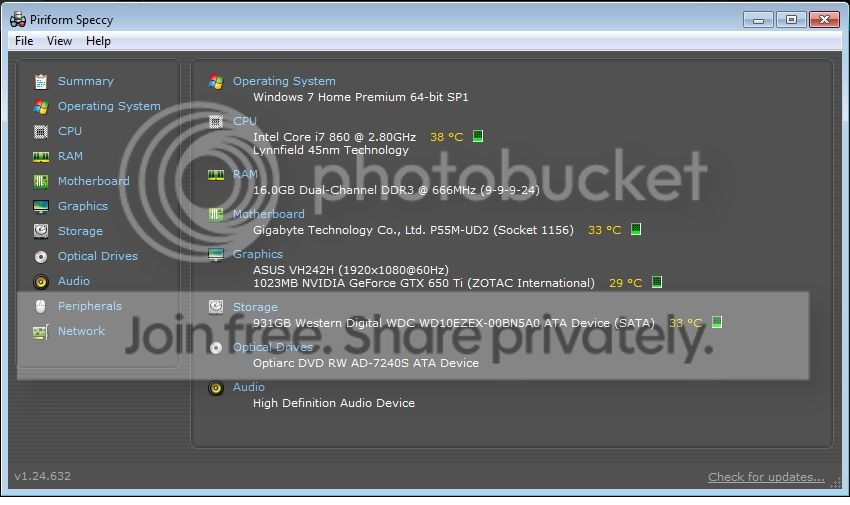
SpeccyPic2.jpg


[/FONT]
 

My Computer My Computer

At a glance

Windows 7 Home Premium 64bit SP1Intel Core i5-4430 Haswell 3.0GHz LGA 11508 gigs (2x4g)PNY GeForce GTX 660 2GB
Computer type
PC/Desktop
Computer Manufacturer/Model Number
Custom Build
OS
Windows 7 Home Premium 64bit SP1
CPU
Intel Core i5-4430 Haswell 3.0GHz LGA 1150
Motherboard
MSI Z87-GD65 LGA 1150
Memory
8 gigs (2x4g)
Graphics Card(s)
PNY GeForce GTX 660 2GB
Sound Card
High Definition Audio Device
Monitor(s) Displays
Asus Monitor
Screen Resolution
1920x1080 64bit 60Hz
Hard Drives
Western Digital WD10EZEX-00BN5A0 ATA 1 Tera
Western Digital WD5000AAKS 00V1A0 500GB
PSU
CORSAIR HX Series HX750 750W ATX12V 2.3 Modular
Case
Rosewill BLACKHAWK ATX Mid Tower
Cooling
6 Bearing Fans
Keyboard
Natural Ergonomic Keyboard 4000
Mouse
Logitech Darkfield Performance MX
Internet Speed
Cable
Antivirus
Microsoft Essentials
Browser
Aurora
I am not shocked. As there was a continuous series of Ntfs corruption, you should not have installed Acronis at the first place.
Code:
Use !analyze -v to get detailed debugging information.

BugCheck 24, {1904fb, fffff880090e2c98, fffff880090e24f0, fffff88001248f37}

Probably caused by : memory_corruption

Followup: memory_corruption
-------------------------------------------------------------------------------
CHKIMG_EXTENSION: !chkimg -lo 50 -d !Ntfs
    fffff88001248f2f - Ntfs![COLOR=Red]Ntfs[B]Snapshot[/B]ScbInternal[/COLOR]+12f
    [ 83:c3 ]
[COLOR=Red]1 error : !Ntfs (fffff88001248f2f)[/COLOR]
Uninstall Acronis right now.

Display driver is failing.
Code:
fffff880`090e1f38  fffff880`0f232c7eUnable to load image nvlddmkm.sys, Win32 error 0n2
*** WARNING: Unable to verify timestamp for nvlddmkm.sys
[COLOR=Red]*** ERROR: Module load completed but symbols could not be loaded for nvlddmkm.sys[/COLOR]
 nvlddmkm+0x1abc7e
Follow Post #18 for it once again.

Network driver is failing, too. You know, I told about it in the earlier post.
Code:
fffff880`090e2168  fffff880`0f05cf12Unable to load image Rt64win7.sys, Win32 error 0n2
*** WARNING: Unable to verify timestamp for Rt64win7.sys
[COLOR=Red]*** ERROR: Module load completed but symbols could not be loaded for Rt64win7.sys[/COLOR]
 Rt64win7+0x16f12
Get it from Realtek. Download the first one from the list: Win7 and WinServer 2008 R2 Driver. Install it by following: http://www.sevenforums.com/tutorials/97061-driver-install-device-manager.html .

If the Ntfs BSODs continue to occur even after uninstalling Acronis, change the SATA cables. Then apply it in another SATA port on the motherboard.

And, dont do anything else other than the suggestions. We need to concentrate on one thing only, that is to find out the root cause behind the Ntfs errors; and nothing else.
 

My Computer My Computer

At a glance

Microsoft Windows 10 Pro Insider Preview 64-bitIntel(R) Core(TM) i3-4130 CPU @ 3.40GHzCorsair Vengence 4GB x2 (8.00GB Dual-Channel ...2047MB GeForce GTS 450 (ZOTAC International)
Computer type
PC/Desktop
Computer Manufacturer/Model Number
Self Assembled
OS
Microsoft Windows 10 Pro Insider Preview 64-bit
CPU
Intel(R) Core(TM) i3-4130 CPU @ 3.40GHz
Motherboard
Gigabyte Technology Co., Ltd. B85M-D3H
Memory
Corsair Vengence 4GB x2 (8.00GB Dual-Channel DDR3 @ 798MHz)
Graphics Card(s)
2047MB GeForce GTS 450 (ZOTAC International)
Sound Card
Onboard (Realtek High Definition Audio)
Monitor(s) Displays
LG Flatron E2040T
Screen Resolution
1600x900
Hard Drives
Western Digital 1 TB
Seagate 500 GB
PSU
Corsair VS550
Case
Cooler Master K380
Cooling
Cooler Master Seidon 120V Plus
Keyboard
Logitech MK260r
Mouse
Logitech MK260r
Internet Speed
PMPL Broadband
Antivirus
Windows Defender + MBAM
Browser
Firefox
Other Info
Dell Studio 15" Laptop
I uninstalled Acronis as soon as you said it was not a good idea to use it. I installed the 314.22 Nvidia driver first off after all the updates and got a Nvidia crash that Driver Verifier caught, so I updated it. Is there a chance the Nvidia card could be going bad? I mean it has memory on it and I don't seem to have problems until I install the drivers for it. With 4 Win 7 re-installs, it is probably a good chance it is hardware failure, right? I do have a new Sata cord but that will have to wait until I get it back.

I got tired of fooling with it and I know you are frustrated with trying to help me. I sure would be, as this thread is now 6 pages. I'm either doing something COMPLETELY wrong or I need a professional to take a look at it. My spring semester starts on Jan 16, so I need the computer stable. I am currently on my husbands computer so I could let you know what's going on with it. I dropped the computer off with the Geek Squad around 4 this afternoon. I told them all the info I had including symptoms, BSOD errors, steps we took to try to fix it and gave them the link to this thread. They said it will be ready by the 9th but maybe sooner and they would call me if they ran into any serious issues. I have a 1 year plan with them, so I figured it was worth a shot.
 

My Computer My Computer

At a glance

Windows 7 Home Premium 64bit SP1Intel Core i5-4430 Haswell 3.0GHz LGA 11508 gigs (2x4g)PNY GeForce GTX 660 2GB
Computer type
PC/Desktop
Computer Manufacturer/Model Number
Custom Build
OS
Windows 7 Home Premium 64bit SP1
CPU
Intel Core i5-4430 Haswell 3.0GHz LGA 1150
Motherboard
MSI Z87-GD65 LGA 1150
Memory
8 gigs (2x4g)
Graphics Card(s)
PNY GeForce GTX 660 2GB
Sound Card
High Definition Audio Device
Monitor(s) Displays
Asus Monitor
Screen Resolution
1920x1080 64bit 60Hz
Hard Drives
Western Digital WD10EZEX-00BN5A0 ATA 1 Tera
Western Digital WD5000AAKS 00V1A0 500GB
PSU
CORSAIR HX Series HX750 750W ATX12V 2.3 Modular
Case
Rosewill BLACKHAWK ATX Mid Tower
Cooling
6 Bearing Fans
Keyboard
Natural Ergonomic Keyboard 4000
Mouse
Logitech Darkfield Performance MX
Internet Speed
Cable
Antivirus
Microsoft Essentials
Browser
Aurora
Hello!

I picked up my computer today. The computer was supposed to be repaired by 1/9/14 but he had not found the problem and called me several times. He finally called me today and said one of my ram sticks was bad (he tested them individually after testing them in pairs and coming up with nothing as I did) and he said he corrected some type of error from not connecting to service. Said it had not BSOD for 12 hours after that and to come get it. He did mention that if I continued having problems that he suspect I had corrupted BIOS even though mine is updated to latest or motherboard is having issues. ( I am not sure, but I "think" my motherboard has dual bios..)

I came home and set everything up. Not really expecting the problem to be fixed I started the comp up, ran my FFXIV ARR game and just let it sit while I did some chores. I came back to find it on the log in screen and a error message came up in Whocrashed after windows booted up.

I have uninstalled, cleaned up, and installed Nvidia drivers as mentioned in post #18. I have installed the Realtek network driver as instructed. I am going to shut down the computer and change out the SATA cord then wait and see if it BSOD again.

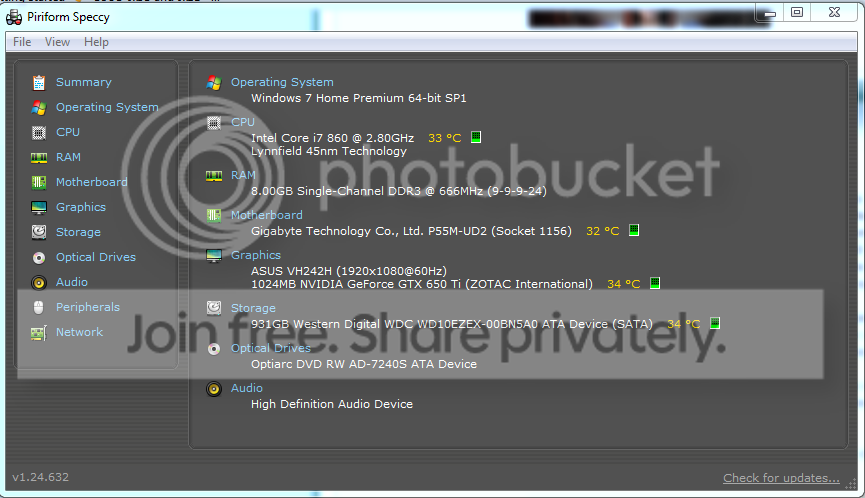
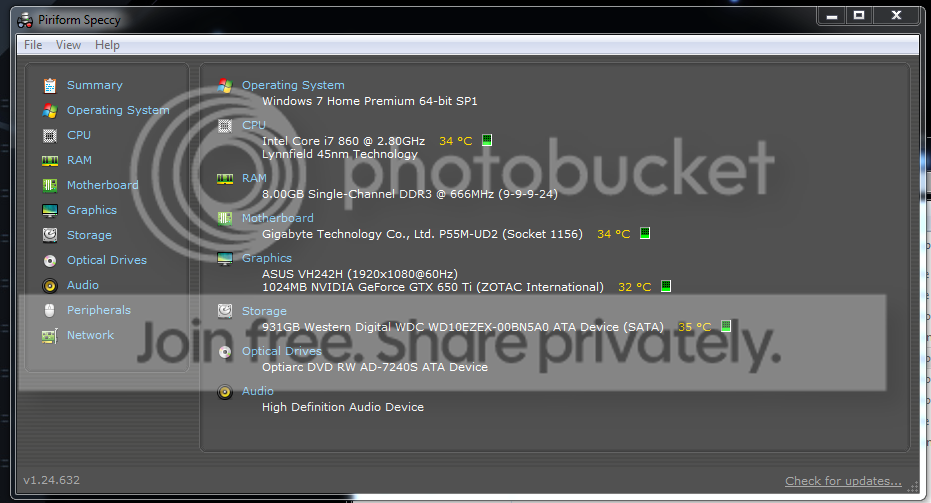
UPDATE: I have switched out the SATA cord and changed to another port. This is current SF, Speccy and Screenshot after all the changes. Starting my game back up again to see if it BSOD again.

Speccy.png
 
Last edited:

My Computer My Computer

At a glance

Windows 7 Home Premium 64bit SP1Intel Core i5-4430 Haswell 3.0GHz LGA 11508 gigs (2x4g)PNY GeForce GTX 660 2GB
Computer type
PC/Desktop
Computer Manufacturer/Model Number
Custom Build
OS
Windows 7 Home Premium 64bit SP1
CPU
Intel Core i5-4430 Haswell 3.0GHz LGA 1150
Motherboard
MSI Z87-GD65 LGA 1150
Memory
8 gigs (2x4g)
Graphics Card(s)
PNY GeForce GTX 660 2GB
Sound Card
High Definition Audio Device
Monitor(s) Displays
Asus Monitor
Screen Resolution
1920x1080 64bit 60Hz
Hard Drives
Western Digital WD10EZEX-00BN5A0 ATA 1 Tera
Western Digital WD5000AAKS 00V1A0 500GB
PSU
CORSAIR HX Series HX750 750W ATX12V 2.3 Modular
Case
Rosewill BLACKHAWK ATX Mid Tower
Cooling
6 Bearing Fans
Keyboard
Natural Ergonomic Keyboard 4000
Mouse
Logitech Darkfield Performance MX
Internet Speed
Cable
Antivirus
Microsoft Essentials
Browser
Aurora
A bad RAM may cause those issues, undoubtedly. But I am not 100% sure that replacing RAM will do. Noted that you applied SATA cable to another port. It is definitely a good step.

Let us know how things go. Best of luck.
 

My Computer My Computer

At a glance

Microsoft Windows 10 Pro Insider Preview 64-bitIntel(R) Core(TM) i3-4130 CPU @ 3.40GHzCorsair Vengence 4GB x2 (8.00GB Dual-Channel ...2047MB GeForce GTS 450 (ZOTAC International)
Computer type
PC/Desktop
Computer Manufacturer/Model Number
Self Assembled
OS
Microsoft Windows 10 Pro Insider Preview 64-bit
CPU
Intel(R) Core(TM) i3-4130 CPU @ 3.40GHz
Motherboard
Gigabyte Technology Co., Ltd. B85M-D3H
Memory
Corsair Vengence 4GB x2 (8.00GB Dual-Channel DDR3 @ 798MHz)
Graphics Card(s)
2047MB GeForce GTS 450 (ZOTAC International)
Sound Card
Onboard (Realtek High Definition Audio)
Monitor(s) Displays
LG Flatron E2040T
Screen Resolution
1600x900
Hard Drives
Western Digital 1 TB
Seagate 500 GB
PSU
Corsair VS550
Case
Cooler Master K380
Cooling
Cooler Master Seidon 120V Plus
Keyboard
Logitech MK260r
Mouse
Logitech MK260r
Internet Speed
PMPL Broadband
Antivirus
Windows Defender + MBAM
Browser
Firefox
Other Info
Dell Studio 15" Laptop
A bad RAM may cause those issues, undoubtedly. But I am not 100% sure that replacing RAM will do. Noted that you applied SATA cable to another port. It is definitely a good step.

Let us know how things go. Best of luck.

I haven't replaced the RAM as of yet, just removed the bad stick +1 good one. Thanks for the well wishes. I have also updated my System Specs.
 

My Computer My Computer

At a glance

Windows 7 Home Premium 64bit SP1Intel Core i5-4430 Haswell 3.0GHz LGA 11508 gigs (2x4g)PNY GeForce GTX 660 2GB
Computer type
PC/Desktop
Computer Manufacturer/Model Number
Custom Build
OS
Windows 7 Home Premium 64bit SP1
CPU
Intel Core i5-4430 Haswell 3.0GHz LGA 1150
Motherboard
MSI Z87-GD65 LGA 1150
Memory
8 gigs (2x4g)
Graphics Card(s)
PNY GeForce GTX 660 2GB
Sound Card
High Definition Audio Device
Monitor(s) Displays
Asus Monitor
Screen Resolution
1920x1080 64bit 60Hz
Hard Drives
Western Digital WD10EZEX-00BN5A0 ATA 1 Tera
Western Digital WD5000AAKS 00V1A0 500GB
PSU
CORSAIR HX Series HX750 750W ATX12V 2.3 Modular
Case
Rosewill BLACKHAWK ATX Mid Tower
Cooling
6 Bearing Fans
Keyboard
Natural Ergonomic Keyboard 4000
Mouse
Logitech Darkfield Performance MX
Internet Speed
Cable
Antivirus
Microsoft Essentials
Browser
Aurora
Well no BSOD's per say, but the monitor will turn off and the keyboard will lose power but the tower is on. No warning. It has happened twice. No messages on "Who Crashed". All lights will be on within the case on the motherboard (green and red). None are on atm.
 

My Computer My Computer

At a glance

Windows 7 Home Premium 64bit SP1Intel Core i5-4430 Haswell 3.0GHz LGA 11508 gigs (2x4g)PNY GeForce GTX 660 2GB
Computer type
PC/Desktop
Computer Manufacturer/Model Number
Custom Build
OS
Windows 7 Home Premium 64bit SP1
CPU
Intel Core i5-4430 Haswell 3.0GHz LGA 1150
Motherboard
MSI Z87-GD65 LGA 1150
Memory
8 gigs (2x4g)
Graphics Card(s)
PNY GeForce GTX 660 2GB
Sound Card
High Definition Audio Device
Monitor(s) Displays
Asus Monitor
Screen Resolution
1920x1080 64bit 60Hz
Hard Drives
Western Digital WD10EZEX-00BN5A0 ATA 1 Tera
Western Digital WD5000AAKS 00V1A0 500GB
PSU
CORSAIR HX Series HX750 750W ATX12V 2.3 Modular
Case
Rosewill BLACKHAWK ATX Mid Tower
Cooling
6 Bearing Fans
Keyboard
Natural Ergonomic Keyboard 4000
Mouse
Logitech Darkfield Performance MX
Internet Speed
Cable
Antivirus
Microsoft Essentials
Browser
Aurora

My Computer My Computer

At a glance

Microsoft Windows 10 Pro Insider Preview 64-bitIntel(R) Core(TM) i3-4130 CPU @ 3.40GHzCorsair Vengence 4GB x2 (8.00GB Dual-Channel ...2047MB GeForce GTS 450 (ZOTAC International)
Computer type
PC/Desktop
Computer Manufacturer/Model Number
Self Assembled
OS
Microsoft Windows 10 Pro Insider Preview 64-bit
CPU
Intel(R) Core(TM) i3-4130 CPU @ 3.40GHz
Motherboard
Gigabyte Technology Co., Ltd. B85M-D3H
Memory
Corsair Vengence 4GB x2 (8.00GB Dual-Channel DDR3 @ 798MHz)
Graphics Card(s)
2047MB GeForce GTS 450 (ZOTAC International)
Sound Card
Onboard (Realtek High Definition Audio)
Monitor(s) Displays
LG Flatron E2040T
Screen Resolution
1600x900
Hard Drives
Western Digital 1 TB
Seagate 500 GB
PSU
Corsair VS550
Case
Cooler Master K380
Cooling
Cooler Master Seidon 120V Plus
Keyboard
Logitech MK260r
Mouse
Logitech MK260r
Internet Speed
PMPL Broadband
Antivirus
Windows Defender + MBAM
Browser
Firefox
Other Info
Dell Studio 15" Laptop
Hmm I thought that didn't kick in until you were idle. Turned both to "Never"
 

My Computer My Computer

At a glance

Windows 7 Home Premium 64bit SP1Intel Core i5-4430 Haswell 3.0GHz LGA 11508 gigs (2x4g)PNY GeForce GTX 660 2GB
Computer type
PC/Desktop
Computer Manufacturer/Model Number
Custom Build
OS
Windows 7 Home Premium 64bit SP1
CPU
Intel Core i5-4430 Haswell 3.0GHz LGA 1150
Motherboard
MSI Z87-GD65 LGA 1150
Memory
8 gigs (2x4g)
Graphics Card(s)
PNY GeForce GTX 660 2GB
Sound Card
High Definition Audio Device
Monitor(s) Displays
Asus Monitor
Screen Resolution
1920x1080 64bit 60Hz
Hard Drives
Western Digital WD10EZEX-00BN5A0 ATA 1 Tera
Western Digital WD5000AAKS 00V1A0 500GB
PSU
CORSAIR HX Series HX750 750W ATX12V 2.3 Modular
Case
Rosewill BLACKHAWK ATX Mid Tower
Cooling
6 Bearing Fans
Keyboard
Natural Ergonomic Keyboard 4000
Mouse
Logitech Darkfield Performance MX
Internet Speed
Cable
Antivirus
Microsoft Essentials
Browser
Aurora
[FONT=Segoe UI, Arial]It just did it again, after turning off hibernate earlier, but this time there was a crash log.

UPDATE: Ran a Admin cmd Chkdsk /f /r and it completed but then didn't want to finish booting. Ran startup recovery and it BSOD with "Referencer by Pointer" 0x18 error but wiped the crash dump with system restore.


On Sun 1/12/2014 9:44:06 PM GMT your computer crashed

crash dump file: C:\Windows\Minidump\011214-10764-01.dmp
This was probably caused by the following module: [FONT=Segoe UI, Arial]ntoskrnl.exe[/FONT] (nt+0x75BC0)
Bugcheck code: 0x50 (0xFFFFF0800ABB61A8, 0x0, 0xFFFFF80002A5221B, 0x7)
Error: [FONT=Segoe UI, Arial]PAGE_FAULT_IN_NONPAGED_AREA[/FONT]
file path: C:\Windows\system32\ntoskrnl.exe
product: [FONT=Segoe UI, Arial]Microsoft® Windows® Operating System[/FONT]
company: [FONT=Segoe UI, Arial]Microsoft Corporation[/FONT]
description: NT Kernel & System
Bug check description: This indicates that invalid system memory has been referenced.
This appears to be a typical software driver bug and is not likely to be caused by a hardware problem.
The crash took place in the Windows kernel. Possibly this problem is caused by another driver that cannot be identified at this time.

Screenshot_1.png

[/FONT]
 
Last edited:

My Computer My Computer

At a glance

Windows 7 Home Premium 64bit SP1Intel Core i5-4430 Haswell 3.0GHz LGA 11508 gigs (2x4g)PNY GeForce GTX 660 2GB
Computer type
PC/Desktop
Computer Manufacturer/Model Number
Custom Build
OS
Windows 7 Home Premium 64bit SP1
CPU
Intel Core i5-4430 Haswell 3.0GHz LGA 1150
Motherboard
MSI Z87-GD65 LGA 1150
Memory
8 gigs (2x4g)
Graphics Card(s)
PNY GeForce GTX 660 2GB
Sound Card
High Definition Audio Device
Monitor(s) Displays
Asus Monitor
Screen Resolution
1920x1080 64bit 60Hz
Hard Drives
Western Digital WD10EZEX-00BN5A0 ATA 1 Tera
Western Digital WD5000AAKS 00V1A0 500GB
PSU
CORSAIR HX Series HX750 750W ATX12V 2.3 Modular
Case
Rosewill BLACKHAWK ATX Mid Tower
Cooling
6 Bearing Fans
Keyboard
Natural Ergonomic Keyboard 4000
Mouse
Logitech Darkfield Performance MX
Internet Speed
Cable
Antivirus
Microsoft Essentials
Browser
Aurora
:cry:Should I just go ahead and buy a Motherboard + CPU combo?

[FONT=Segoe UI, Arial]On Sun 1/12/2014 11:40:03 PM GMT your computer crashed
crash dump file: C:\Windows\Minidump\011214-14071-01.dmp
This was probably caused by the following module: [FONT=Segoe UI, Arial]ntoskrnl.exe[/FONT] (nt+0x75BC0)
Bugcheck code: 0xD1 (0x0, 0x2, 0x1, 0xFFFFFA800792D000)
Error: [FONT=Segoe UI, Arial]DRIVER_IRQL_NOT_LESS_OR_EQUAL[/FONT]
file path: C:\Windows\system32\ntoskrnl.exe
product: [FONT=Segoe UI, Arial]Microsoft® Windows® Operating System[/FONT]
company: [FONT=Segoe UI, Arial]Microsoft Corporation[/FONT]
description: NT Kernel & System
Bug check description: This indicates that a kernel-mode driver attempted to access pageable memory at a process IRQL that was too high.
This appears to be a typical software driver bug and is not likely to be caused by a hardware problem.
The crash took place in the Windows kernel. Possibly this problem is caused by another driver that cannot be identified at this time.

[/FONT][FONT=Segoe UI, Arial]On Mon 1/13/2014 10:05:11 AM GMT your computer crashed
crash dump file: C:\Windows\Minidump\011314-17175-01.dmp
This was probably caused by the following module: [FONT=Segoe UI, Arial]ntoskrnl.exe[/FONT] (nt+0x75BC0)
Bugcheck code: 0x109 (0xA3A039D898482588, 0xB3B7465EEAC4F4DE, 0xFFFFF80002E31F80, 0x1)
Error: [FONT=Segoe UI, Arial]CRITICAL_STRUCTURE_CORRUPTION[/FONT]
file path: C:\Windows\system32\ntoskrnl.exe
product: [FONT=Segoe UI, Arial]Microsoft® Windows® Operating System[/FONT]
company: [FONT=Segoe UI, Arial]Microsoft Corporation[/FONT]
description: NT Kernel & System
Bug check description: This indicates that the kernel has detected critical kernel code or data corruption.
This might be a case of memory corruption. More often memory corruption happens because of software errors in buggy drivers, not because of faulty RAM modules.
The crash took place in the Windows kernel. Possibly this problem is caused by another driver that cannot be identified at this time.
[/FONT]
 
Last edited:

My Computer My Computer

At a glance

Windows 7 Home Premium 64bit SP1Intel Core i5-4430 Haswell 3.0GHz LGA 11508 gigs (2x4g)PNY GeForce GTX 660 2GB
Computer type
PC/Desktop
Computer Manufacturer/Model Number
Custom Build
OS
Windows 7 Home Premium 64bit SP1
CPU
Intel Core i5-4430 Haswell 3.0GHz LGA 1150
Motherboard
MSI Z87-GD65 LGA 1150
Memory
8 gigs (2x4g)
Graphics Card(s)
PNY GeForce GTX 660 2GB
Sound Card
High Definition Audio Device
Monitor(s) Displays
Asus Monitor
Screen Resolution
1920x1080 64bit 60Hz
Hard Drives
Western Digital WD10EZEX-00BN5A0 ATA 1 Tera
Western Digital WD5000AAKS 00V1A0 500GB
PSU
CORSAIR HX Series HX750 750W ATX12V 2.3 Modular
Case
Rosewill BLACKHAWK ATX Mid Tower
Cooling
6 Bearing Fans
Keyboard
Natural Ergonomic Keyboard 4000
Mouse
Logitech Darkfield Performance MX
Internet Speed
Cable
Antivirus
Microsoft Essentials
Browser
Aurora
Back
Top