BSoD 0xf4 after a few minutes, safe mode working

dooey123

New member
Local time
12:08 PM
Messages
2
Hi, I have been experiencing BSOD the last 3 days for no apparent reason (no hardware or major software changes).

The PC will boot into the desktop and seem to be working normally then within a few minutes the system will become unresponsive and give a BSOD 0xf4 CRITICAL_OBJECT_TERMINATION, apparently caused by ntoskrnl.exe. When it automatically reboots the post screen shows that it doesn't detect the primary SSD connected to SATA Port5 (but can detect the secondary HD and Disc drive) and so just goes to a blank screen with flashing cursor until I hard power off.

When I boot into safe mode with networking the system is fine and stable.

I have performed a chkdsk /f on the primary SSD and it did come up with "File record segment 536352 is unreadable" 4 bad file records processed. I have also double checked for viruses/ malware, BSOD still occurs the same.
 

My Computer My Computer

At a glance

Windows 7 Pro x64Intel Core i7 2600K, Quad Core @ 3.40GHz4 x 4GB Kingston HyperX 1600MHz DDR3AMD Radeon HD6950 2GB
Computer type
PC/Desktop
Computer Manufacturer/Model Number
Arbico custom build
OS
Windows 7 Pro x64
CPU
Intel Core i7 2600K, Quad Core @ 3.40GHz
Motherboard
Asus P8P67 Pro - LGA 1155 Sandy Bridge
Memory
4 x 4GB Kingston HyperX 1600MHz DDR3
Graphics Card(s)
AMD Radeon HD6950 2GB
Hard Drives
Primary HD: 160GB OCZ Vertex 2 SSD SATA
Secondary HD: 2TB Hitachi HDS5C3020ALA632 SATA
AHCI config
Antivirus
Microsoft Security Essentials
Browser
Chrome
Hi,

F4 and 7A are related to disk, storage usually. They can also be related to RAM and virus infection :

Code:
[FONT=Verdana][COLOR=#323232][FONT=Verdana][COLOR=#323232][COLOR=#323232][FONT=Verdana][COLOR=#323232][FONT=Verdana]*******************************************************************************[/FONT][/COLOR]
[FONT=Verdana][COLOR=#323232]*                                                                             *[/COLOR][/FONT]
[FONT=Verdana][COLOR=#323232]*                        Bugcheck Analysis                                    *[/COLOR][/FONT]
[FONT=Verdana][COLOR=#323232]*                                                                             *[/COLOR][/FONT]
[FONT=Verdana][COLOR=#323232]*******************************************************************************[/COLOR][/FONT][/FONT][/COLOR]
[COLOR=#323232][FONT=Verdana][COLOR=#323232][FONT=Verdana]Use !analyze -v to get detailed debugging information.[/FONT][/COLOR][/FONT][/COLOR]
[COLOR=#323232][FONT=Verdana][COLOR=#323232][FONT=Verdana]BugCheck [COLOR=red]F4,[/COLOR] {3, fffffa800ee8a4d0, fffffa800ee8a7b0, fffff80006f85350}[/FONT][/COLOR][/FONT][/COLOR]
[COLOR=#323232][FONT=Verdana][COLOR=#323232][FONT=Verdana]Probably caused by : csrss.exe[/FONT][/COLOR][/FONT][/COLOR]
[COLOR=#323232][FONT=Verdana][COLOR=#323232][FONT=Verdana]Followup: MachineOwner[/FONT][/COLOR]
[FONT=Verdana][COLOR=#323232]---------[/COLOR][/FONT][/FONT][/COLOR]
[COLOR=#323232][FONT=Verdana][COLOR=#323232][FONT=Verdana]0: kd> !analyze -v[/FONT][/COLOR]
[FONT=Verdana][COLOR=#323232]*******************************************************************************[/COLOR][/FONT]
[FONT=Verdana][COLOR=#323232]*                                                                             *[/COLOR][/FONT]
[FONT=Verdana][COLOR=#323232]*                        Bugcheck Analysis                                    *[/COLOR][/FONT]
[FONT=Verdana][COLOR=#323232]*                                                                             *[/COLOR][/FONT]
[FONT=Verdana][COLOR=#323232]*******************************************************************************[/COLOR][/FONT][/FONT][/COLOR]
[COLOR=#323232][FONT=Verdana][COLOR=#323232][FONT=Verdana]CRITICAL_OBJECT_TERMINATION (f4)[/FONT][/COLOR]
[/FONT][/COLOR]
[COLOR=#323232][FONT=Verdana][COLOR=#323232][FONT=Verdana]FAILURE_BUCKET_ID:  X64_0xF4_IOERR_VRF_IMAGE_csrss.exe[/FONT][/COLOR][/FONT][/COLOR]
[COLOR=#323232][FONT=Verdana][COLOR=#323232][FONT=Verdana]BUCKET_ID:  X64_0xF4_IOERR_VRF_IMAGE_csrss.exe[/FONT][/COLOR]
 
[COLOR=#323232][FONT=Verdana]BUGCHECK_STR:  [COLOR=red]0xF4_IOERR[/COLOR][/FONT][/COLOR][/FONT][/COLOR][/COLOR][/FONT][/COLOR][/FONT]

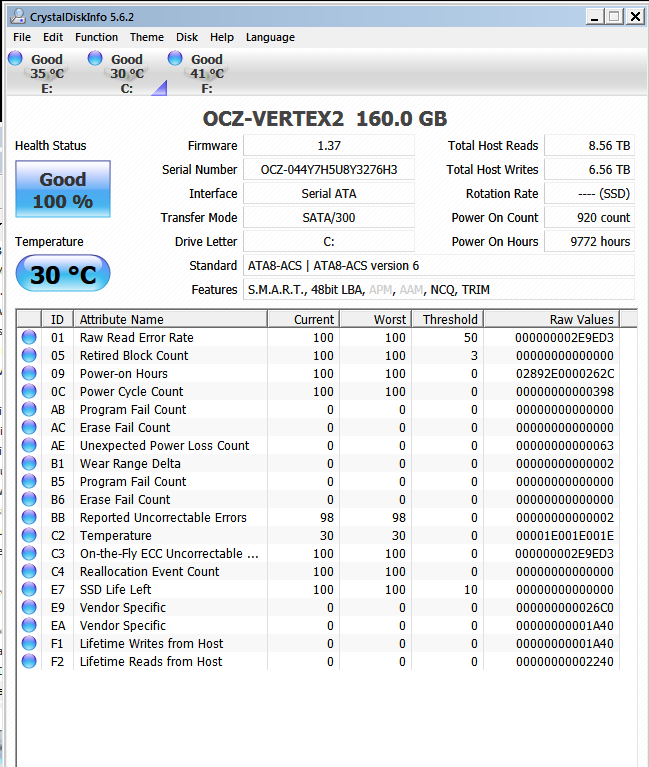
Post a screenshot of your hard drive using Crystal Disk Info:

:ar: CrystalDiskInfo

Test your hard drive:

Perform a :ar: Hard Drive Diagnostic

Scan the system for possible virus infection:

:ar: http://www.sevenforums.com/tutorials/166445-windows-defender-offline.html
:ar: http://support.kaspersky.com/5350?vs=s88446#s88446

Run memtest. Run for 8 passes and test each stick in a know good slot for an additional 6 passes.

:ar: http://www.sevenforums.com/tutorials/105647-ram-test-memtest86.html
   Tip
Run these tests overnight, pay particular attention to #3 in tutorial


Cheers

Dave
 

My Computer My Computer

At a glance

Windows 7 Professional 64bitAMD Athlon (tm) X2 5200+ Dual Core 2712 Mhz4GBNividia GeForce 8600 GTS- DIED 25/7/2013 R.I.P
Computer type
PC/Desktop
OS
Windows 7 Professional 64bit
CPU
AMD Athlon (tm) X2 5200+ Dual Core 2712 Mhz
Motherboard
Asus
Memory
4GB
Graphics Card(s)
Nividia GeForce 8600 GTS- DIED 25/7/2013 R.I.P
Sound Card
None
Monitor(s) Displays
22" Yuraku LCD (Dont ask)
Screen Resolution
1280x960
Hard Drives
2TB WD Caviar green
PSU
Windy up type
Case
Scout cm Storm
Cooling
Hair dryer on full cool power ;-)
Keyboard
QWERTY
Mouse
Microsoft Special
Internet Speed
BT Infinity 9.38Mb/s Wheeeeeeeeeeeeeeee!!
Antivirus
MSE
Browser
Internet Explore 10 and Chrome
Other Info
Don't shout...I've got a Hangover!
Try updating your SSD firmware .

Current Firmware Version: v1.37
 

My Computer My Computer

At a glance

Windows 7 Ultimate 32-Bit & Windows 7 Ultimat...Intel Core i7 CPU 950 @ 3.07GHzOCZ 6GB (3 x 2GB) 240-Pin DDR3 SDRAM DDR3 160...ATI Radeon HD 5700 Series
Computer Manufacturer/Model Number
Custom Built
OS
Windows 7 Ultimate 32-Bit & Windows 7 Ultimate 64-Bit
CPU
Intel Core i7 CPU 950 @ 3.07GHz
Motherboard
ASUS P6T DELUXE V2
Memory
OCZ 6GB (3 x 2GB) 240-Pin DDR3 SDRAM DDR3 1600 OCZ3X1600R2
Graphics Card(s)
ATI Radeon HD 5700 Series
Sound Card
OnBoard
Hard Drives
WD6400AACS-00M3B0 (640GB SATA )
PSU
CORSAIR 850w
Case
NZXT LEXA
Cooling
Intel Stock Heatsink Fan
Keyboard
Microsoft Wireless Laser Keyboard 7000
Mouse
Microsoft Wireless Laser Mouse 7000
Just as an update I have updated the OCZ SSD firmware to 1.37 and also tried running with one memory stick at a time (in the slot recommended by ASUS) going through all four of them and I'm still getting the the same crashes.
85TrXS3.png

I have also scanned for viruses with MS essentials.

I managed to make it crash in safe mode - I ran a utilty called HD Tune Pro and did an error check on the SSD and after about 6 blocks it got stuck and eventually BSoD to an F4.
 
Last edited:

My Computer My Computer

At a glance

Windows 7 Pro x64Intel Core i7 2600K, Quad Core @ 3.40GHz4 x 4GB Kingston HyperX 1600MHz DDR3AMD Radeon HD6950 2GB
Computer type
PC/Desktop
Computer Manufacturer/Model Number
Arbico custom build
OS
Windows 7 Pro x64
CPU
Intel Core i7 2600K, Quad Core @ 3.40GHz
Motherboard
Asus P8P67 Pro - LGA 1155 Sandy Bridge
Memory
4 x 4GB Kingston HyperX 1600MHz DDR3
Graphics Card(s)
AMD Radeon HD6950 2GB
Hard Drives
Primary HD: 160GB OCZ Vertex 2 SSD SATA
Secondary HD: 2TB Hitachi HDS5C3020ALA632 SATA
AHCI config
Antivirus
Microsoft Security Essentials
Browser
Chrome
The F4 are hard drive issues . Have you tested the other hard drive ? 2TB one ? Upload the new dmp files .
 

My Computer My Computer

At a glance

Windows 7 Ultimate 32-Bit & Windows 7 Ultimat...Intel Core i7 CPU 950 @ 3.07GHzOCZ 6GB (3 x 2GB) 240-Pin DDR3 SDRAM DDR3 160...ATI Radeon HD 5700 Series
Computer Manufacturer/Model Number
Custom Built
OS
Windows 7 Ultimate 32-Bit & Windows 7 Ultimate 64-Bit
CPU
Intel Core i7 CPU 950 @ 3.07GHz
Motherboard
ASUS P6T DELUXE V2
Memory
OCZ 6GB (3 x 2GB) 240-Pin DDR3 SDRAM DDR3 1600 OCZ3X1600R2
Graphics Card(s)
ATI Radeon HD 5700 Series
Sound Card
OnBoard
Hard Drives
WD6400AACS-00M3B0 (640GB SATA )
PSU
CORSAIR 850w
Case
NZXT LEXA
Cooling
Intel Stock Heatsink Fan
Keyboard
Microsoft Wireless Laser Keyboard 7000
Mouse
Microsoft Wireless Laser Mouse 7000
Hi,

I would suggest to uninstall your Marvell Storage Controller.

Navigate to Start>Control Panel> Programs and Features and uninstall Marvell Storage Controller/ 9xx:
Then once uninstalled, use :ar: Driver Sweeper to clean up any left over files.

Disable Hibernate:
Hibernate or sleep is not needed for a desktop PC, as it runs on an external power source
and not on the battery, so it is best to disable hibernate and sleep.

:ar: Enable or Disable Hibernate

Hard Disk Space - Free Up and Recover to at least 15GB:

:ar: Free up and Recover Hard Disk Space

Also navigate to:

C:\windows\system32\drivers and look for hiberfile.sys, right click and delete.

Look to update your Jmicron storage controller:

Update Website: :ar: Driver
Or Copy and Paste in to your browser: :ar: ftp://driver.jmicron.com.tw/SATA_Controller/Windows/

Cheers

Dave
 

My Computer My Computer

At a glance

Windows 7 Professional 64bitAMD Athlon (tm) X2 5200+ Dual Core 2712 Mhz4GBNividia GeForce 8600 GTS- DIED 25/7/2013 R.I.P
Computer type
PC/Desktop
OS
Windows 7 Professional 64bit
CPU
AMD Athlon (tm) X2 5200+ Dual Core 2712 Mhz
Motherboard
Asus
Memory
4GB
Graphics Card(s)
Nividia GeForce 8600 GTS- DIED 25/7/2013 R.I.P
Sound Card
None
Monitor(s) Displays
22" Yuraku LCD (Dont ask)
Screen Resolution
1280x960
Hard Drives
2TB WD Caviar green
PSU
Windy up type
Case
Scout cm Storm
Cooling
Hair dryer on full cool power ;-)
Keyboard
QWERTY
Mouse
Microsoft Special
Internet Speed
BT Infinity 9.38Mb/s Wheeeeeeeeeeeeeeee!!
Antivirus
MSE
Browser
Internet Explore 10 and Chrome
Other Info
Don't shout...I've got a Hangover!
Back
Top