Solved BSOD 116 just started

Emsisoft Emergency scan found 6 registry files, which I quarantined and the Command line scans were clear and didn't find anything mate.

Could the registry changes of been from the 3rd party Windows 7 Theme or changes made by TuneUp Utilities 2014? (which I uninstalled yesterday to test)
 

My Computer My Computer

Computer type
PC/Desktop
Computer Manufacturer/Model Number
Dell/Alienware Aurora ALX R4
OS
Windows 7 Ultimate x64
CPU
Intel(R) Core(TM) i7-3970X
Motherboard
Alienware: 07JNHO - A10 BIOS
Memory
32 MB
Graphics Card(s)
Nvidia GTX 690
Sound Card
Soundblaster Recon3D PCIe
Monitor(s) Displays
Dell S2440L Generic PnP Monitor
Screen Resolution
1920 x 1080
Hard Drives
Main:
Seagate: ATA ST31000524AS SCSI Disc Device
Model Number: ST31000524AS
Serial Number: 5VPAWSM6

Secondary for Gaming:
Samsung 840 Pro 256 SSD
PSU
850
Case
Alienware Aurora ALX R4 with Active Venting
Cooling
Alienware Liquid Cooling
Keyboard
Alienware TactX
Mouse
Alienware TactX
Antivirus
Microsoft Security Essentials
Browser
IE11 and Chrome
Emsisoft Emergency scan found 6 registry files, which I quarantined and the Command line scans were clear and didn't find anything mate.

Could the registry changes of been from the 3rd party Windows 7 Theme or changes made by TuneUp Utilities 2014? (which I uninstalled yesterday to test)
To answer Emsisoft is a software that has in th past been of not much use but in the last two years has grown into quite a formidable (in my mind) AV. Plus I am super paranoid with what I use not to say I ma the great expert of course and use nay old thing.

Any third party software I never use unless one of the senior members in here says it is ok for example CCleaner. MBAM, and SAS for what they do.:)
Personally I like to ask even on pain of appearing a little simple because I rather tend toward caution and be safe than sorry.
 

My Computer My Computer

Computer type
PC/Desktop
Computer Manufacturer/Model Number
Own build (new) Desk1 / Asus ROG Win 7 / Desk2 1st build
OS
Desk1 7 Home Prem / Desk2 10 Pro / Main lap Asus ROG 10 Pro 2 laptop Toshiba 7 Pro Asus P2520 7 & 10
CPU
Desk1 i5 3750K / Laptop i7 GTX 860M / Desk2 i5 2500
Motherboard
Desk1 Asus P877-V / Desk2 Gigabyte H67 UD3H / Laptop ?
Memory
Desk1 8GB (1866) / Desk2 16GB (1333) / Laptop 8Gb DDR3
Graphics Card(s)
Desk 1& 2NVidia GTX 650 & Laptops on board Intel
Sound Card
Desk 1 & 2 -XONAR DG Realtek High Def audio Laptop
Monitor(s) Displays
Desk 1 Benq HD 2450 / Desk2 Philips 24" / Laptop 17.5"
Screen Resolution
1920x1080 D1 & D2 & Laptop 1
Hard Drives
Desk1 Samsung 120GB 830 SSD
Asus ROG 256GB 850 Pro SSD
Desk2 Samsung 840 256 SSD
Toshiba 120GB EVO
PSU
Desk 1 Corsair HX 1050/ Laptop ? / Desk 2 Corsair HX 650
Case
Desk 1 Cooler HAF XM ? Toshiba laptop / Desk2 Coolermaster
Cooling
Fans on all Desk1 -2 Desk2 - all Coolermasters 5 Laptop ?
Keyboard
Desk 1 MS Sidewinder X6 Desk 2 MS Sidewinder X 4
Mouse
Desk 1&2 - Gigabyte MS 900 gamer - laptop - Logitec wireless
Internet Speed
ADSL2+
Other Info
One other Desktop (tester) and spare Toshba laptop both with SSD's
Running Kaspersky 2016 ISS on all machines config'd identically
Logitec audio stereo systems on each machine (x3)
Canon MG5250MFC
Router/modem TP-Link running WPA2SK
IC - On the side, if saying you are the great expert is playing it safe, I'd hate to see what you do for excitement. :p
 

My Computer My Computer

Computer type
PC/Desktop
Computer Manufacturer/Model Number
Custome Built
OS
Microsoft Windows 7 Ultimate 64-bit 7601 Multiprocessor Free Service Pack 1
CPU
Intel(R) Core(TM) i7 CPU 950 @ 3.07GHz
Motherboard
ASUSTeK Computer INC. SABERTOOTH X58 (LGA1366)
Memory
16.0GB Dual-Channel DDR3 @ 534MHz (8-8-8-20)
Graphics Card(s)
1023MB NVIDIA GeForce GTX 650 (EVGA)
Sound Card
(1) NVIDIA High Definition Audio (2) High Definition Audio
Monitor(s) Displays
HP W2072a LED Backlit
Screen Resolution
1920x1080@60Hz
Hard Drives
(1) SAMSUNG MMCRE28G5MXP-0VB SCSI Disk Device
(2) ST1000DM 003-1CH162 SCSI Disk Device
(3) WDC WD10EURX-73FH1Y0 SCSI Disk Device
PSU
XION XON-1000P14F
Cooling
Fans
Antivirus
Windows Security Essentials
Browser
Mozilla Firefox
Other Info
BIOS Version/Date
American Megatrends Inc. 1402, 8/9/2012
SMBIOS Version 2.5
Don't want to hijack this thread, But i've been getting the same issue with a ATI card..


Have you Tried uninstalling windows display driver updates?

There are usually some really random ones that it downloads and then referrences for no obvious reason.


As for that AScan result, That is most likely malware related as they effectively disable required system resources when you need to debug. You might be better off actually deleting the keys (Backup first...) Rebooting and seeing if there are any problems afterwords.
 

My Computer My Computer

Computer type
PC/Desktop
Computer Manufacturer/Model Number
Custom Build
OS
Windows 8.1
CPU
Intel i5 3750k OC'd 4.0Ghz
Motherboard
P8Z77-V LX3
Memory
16GB Vengence Corsair
Graphics Card(s)
GTX 770 OC 2GB Windforce
Sound Card
C-Media 7.1 Surround Card
Monitor(s) Displays
Asus 3D 23" & BenQ 24" & LG 19"
Screen Resolution
1920*1080, 1920*1080, 1440*900
Hard Drives
Crucial 512GB SSD
WD 1.5 TB
WD 500Gb
PSU
850MW Silverstone
Case
inWin DragonRider
Cooling
4 * 140mm LED Akasa, One 140mm Fan Akasa
Keyboard
Corsair k95
Mouse
R.A.T 7 Contagion
Internet Speed
152 Mb Fiber Optic
Antivirus
ESET Nod32
Browser
Waterfox x64 / Chrome x64
Other Info
Freenas / Plex Media server
Q6600
6Gb DDR3
6TB ZFS Raid
500W PSu
2 x Intel NIC's
Emsisoft Emergency scan found 6 registry files, which I quarantined and the Command line scans were clear and didn't find anything mate.

Could the registry changes of been from the 3rd party Windows 7 Theme or changes made by TuneUp Utilities 2014? (which I uninstalled yesterday to test)
To answer Emsisoft is a software that has in th past been of not much use but in the last two years has grown into quite a formidable (in my mind) AV. Plus I am super paranoid with what I use not to say I ma the great expert of course and use nay old thing.

Any third party software I never use unless one of the senior members in here says it is ok for example CCleaner. MBAM, and SAS for what they do.:)
Personally I like to ask even on pain of appearing a little simple because I rather tend toward caution and be safe than sorry.

I have had mixed reviews from techs about 3rd party software that optimize your PC, some say just use windows tools and they are more than enough and other say programs like TuneUp Utilities are ok as long as you make exceptions to avoid mismanaging certain files etc.

I personally have never really had a problem with TuneUp Utilities and it seems to keep the PC clean and fast with a range of tools to access things with ease but again, my PC health comes first and I uninstalled it to test and make absolutely sure that it was not the problem.

I am also very skeptical and hesitant to use 3rd party programs without thoroughly checking them out and getting advice first, I learned the hard way many years and PCs ago! lol

The Windows theme i admit, I took a risk on but I won't be doing that again.

I am still having the crash issue though, so I now have a dell tech looking over the Dump Files that were posted in this thread and sent him the link to see what I have tried so far, as my PC is still under warranty and doesn;t seem to want to cooperate at the moment with this 116 BSOD.

I can rule out:

GPU Temperature
Drivers
Stress test
Virus/Malware/Adware/Worm/Trojan

I seem to only crash while the GPU is under load, like watching a movie, playing a game etc, I can browse the forums here without issues (so far) but yet on start up after a night of rest,the PC can crash while loading windows, under no graphicall stress at all and a stress test doesn;t seem to push it into a crash.

Which leads me to believe it is a compatibility issue or the graphics card itself has a problem but everything I have tried doesn't reflect this.

It seems to be the same BSOD every time, with the same numbers, not just 116 but even the lines below are identical or very similar, so I cannot understand what those numbers mean but it makes it hard when they are not very specific.
 

My Computer My Computer

Computer type
PC/Desktop
Computer Manufacturer/Model Number
Dell/Alienware Aurora ALX R4
OS
Windows 7 Ultimate x64
CPU
Intel(R) Core(TM) i7-3970X
Motherboard
Alienware: 07JNHO - A10 BIOS
Memory
32 MB
Graphics Card(s)
Nvidia GTX 690
Sound Card
Soundblaster Recon3D PCIe
Monitor(s) Displays
Dell S2440L Generic PnP Monitor
Screen Resolution
1920 x 1080
Hard Drives
Main:
Seagate: ATA ST31000524AS SCSI Disc Device
Model Number: ST31000524AS
Serial Number: 5VPAWSM6

Secondary for Gaming:
Samsung 840 Pro 256 SSD
PSU
850
Case
Alienware Aurora ALX R4 with Active Venting
Cooling
Alienware Liquid Cooling
Keyboard
Alienware TactX
Mouse
Alienware TactX
Antivirus
Microsoft Security Essentials
Browser
IE11 and Chrome
Don't want to hijack this thread, But i've been getting the same issue with a ATI card..


Have you Tried uninstalling windows display driver updates?

There are usually some really random ones that it downloads and then referrences for no obvious reason.


As for that AScan result, That is most likely malware related as they effectively disable required system resources when you need to debug. You might be better off actually deleting the keys (Backup first...) Rebooting and seeing if there are any problems afterwords.

Thanks WS, I did a quarantine and reboot just incase I needed to revert but all seems ok after that so I will take your advice and backup and delete them.

I have not checked Windows updates, but I also have not updated from windows as I have it set to only tell me about updates and not download or install until I tell it too, to save my Samsung Galaxy S3 from installing junk everytime I plug it in to charge it lol

The only things I had done prior to this all starting to happen with the first crash a week ago was install the new Nvidia driver and the windows themes a week or so before the first crash.

Plus I installed an MMORPG game (which I don't seem to crash in yet after playing short 5-10 min sessions to test)
 

My Computer My Computer

Computer type
PC/Desktop
Computer Manufacturer/Model Number
Dell/Alienware Aurora ALX R4
OS
Windows 7 Ultimate x64
CPU
Intel(R) Core(TM) i7-3970X
Motherboard
Alienware: 07JNHO - A10 BIOS
Memory
32 MB
Graphics Card(s)
Nvidia GTX 690
Sound Card
Soundblaster Recon3D PCIe
Monitor(s) Displays
Dell S2440L Generic PnP Monitor
Screen Resolution
1920 x 1080
Hard Drives
Main:
Seagate: ATA ST31000524AS SCSI Disc Device
Model Number: ST31000524AS
Serial Number: 5VPAWSM6

Secondary for Gaming:
Samsung 840 Pro 256 SSD
PSU
850
Case
Alienware Aurora ALX R4 with Active Venting
Cooling
Alienware Liquid Cooling
Keyboard
Alienware TactX
Mouse
Alienware TactX
Antivirus
Microsoft Security Essentials
Browser
IE11 and Chrome
Thanks WS, I did a quarantine and reboot just incase I needed to revert but all seems ok after that so I will take your advice and backup and delete them.

That's fine, just do make sure you export your registry to back it up. There are two keys which obviously stand out there, for the others i would have to do a back check on.

Windows updates disabled?! What madness is this?

Have you got the correct chipset information installed? As in the recent intel chipset drivers?

Quick question that i noticed noone in here has mentioned, have you tried looking through the system event viewer?


Let me see if i can find the guide for it,

http://www.sevenforums.com/tutorials/226084-event-viewer-open-use-windows-7-a.html


Check in the system logs for any error codes, and could you post them here?
 

My Computer My Computer

Computer type
PC/Desktop
Computer Manufacturer/Model Number
Custom Build
OS
Windows 8.1
CPU
Intel i5 3750k OC'd 4.0Ghz
Motherboard
P8Z77-V LX3
Memory
16GB Vengence Corsair
Graphics Card(s)
GTX 770 OC 2GB Windforce
Sound Card
C-Media 7.1 Surround Card
Monitor(s) Displays
Asus 3D 23" & BenQ 24" & LG 19"
Screen Resolution
1920*1080, 1920*1080, 1440*900
Hard Drives
Crucial 512GB SSD
WD 1.5 TB
WD 500Gb
PSU
850MW Silverstone
Case
inWin DragonRider
Cooling
4 * 140mm LED Akasa, One 140mm Fan Akasa
Keyboard
Corsair k95
Mouse
R.A.T 7 Contagion
Internet Speed
152 Mb Fiber Optic
Antivirus
ESET Nod32
Browser
Waterfox x64 / Chrome x64
Other Info
Freenas / Plex Media server
Q6600
6Gb DDR3
6TB ZFS Raid
500W PSu
2 x Intel NIC's
Yes I had actually had a look but I noticed big gaps when the crashes occurred, it would report before and a few mins after to say it recovered but I couldn't see the actual problem.

I thought the event viewer log was included in the first post I made, when i had to attach it as per the forum rules for BSOD posts?

Thanks WS and let me know if the format is incorrect.

P.S.

I found this one under "Applications" which points to hardware:

taskhost (1568) WebCacheLocal: A request to write to the file "C:\Users\A5ASIN\AppData\Local\Microsoft\Windows\WebCache\WebCacheV01.dat" at offset 20578304 (0x00000000013a0000) for 32768 (0x00008000) bytes succeeded, but took an abnormally long time (61 seconds) to be serviced by the OS. This problem is likely due to faulty hardware. Please contact your hardware vendor for further assistance diagnosing the problem.
 

My Computer My Computer

Computer type
PC/Desktop
Computer Manufacturer/Model Number
Dell/Alienware Aurora ALX R4
OS
Windows 7 Ultimate x64
CPU
Intel(R) Core(TM) i7-3970X
Motherboard
Alienware: 07JNHO - A10 BIOS
Memory
32 MB
Graphics Card(s)
Nvidia GTX 690
Sound Card
Soundblaster Recon3D PCIe
Monitor(s) Displays
Dell S2440L Generic PnP Monitor
Screen Resolution
1920 x 1080
Hard Drives
Main:
Seagate: ATA ST31000524AS SCSI Disc Device
Model Number: ST31000524AS
Serial Number: 5VPAWSM6

Secondary for Gaming:
Samsung 840 Pro 256 SSD
PSU
850
Case
Alienware Aurora ALX R4 with Active Venting
Cooling
Alienware Liquid Cooling
Keyboard
Alienware TactX
Mouse
Alienware TactX
Antivirus
Microsoft Security Essentials
Browser
IE11 and Chrome
Yes I had actually had a look but I noticed big gaps when the crashes occurred, it would report before and a few mins after to say it recovered but I couldn't see the actual problem.

I thought the event viewer log was included in the first post I made, when i had to attach it as per the forum rules for BSOD posts?

You might have done, though i usually miss these things....

Thanks WS and let me know if the format is incorrect.

P.S.

I found this one under "Applications" which points to hardware:

taskhost (1568) WebCacheLocal: A request to write to the file "C:\Users\A5ASIN\AppData\Local\Microsoft\Windows\WebCache\WebCacheV01.dat" at offset 20578304 (0x00000000013a0000) for 32768 (0x00008000) bytes succeeded, but took an abnormally long time (61 seconds) to be serviced by the OS. This problem is likely due to faulty hardware. Please contact your hardware vendor for further assistance diagnosing the problem.


Alot of your errors in the event viewer are regarding drivers failing to initialise properly. Specifically this
-- Driver\WUDFRd failed to load --

which is pointing at some USB storage device, do you have your phone plugged in when your machine crashes?
 

My Computer My Computer

Computer type
PC/Desktop
Computer Manufacturer/Model Number
Custom Build
OS
Windows 8.1
CPU
Intel i5 3750k OC'd 4.0Ghz
Motherboard
P8Z77-V LX3
Memory
16GB Vengence Corsair
Graphics Card(s)
GTX 770 OC 2GB Windforce
Sound Card
C-Media 7.1 Surround Card
Monitor(s) Displays
Asus 3D 23" & BenQ 24" & LG 19"
Screen Resolution
1920*1080, 1920*1080, 1440*900
Hard Drives
Crucial 512GB SSD
WD 1.5 TB
WD 500Gb
PSU
850MW Silverstone
Case
inWin DragonRider
Cooling
4 * 140mm LED Akasa, One 140mm Fan Akasa
Keyboard
Corsair k95
Mouse
R.A.T 7 Contagion
Internet Speed
152 Mb Fiber Optic
Antivirus
ESET Nod32
Browser
Waterfox x64 / Chrome x64
Other Info
Freenas / Plex Media server
Q6600
6Gb DDR3
6TB ZFS Raid
500W PSu
2 x Intel NIC's
Yes I had actually had a look but I noticed big gaps when the crashes occurred, it would report before and a few mins after to say it recovered but I couldn't see the actual problem.

I thought the event viewer log was included in the first post I made, when i had to attach it as per the forum rules for BSOD posts?

You might have done, though i usually miss these things....

Thanks WS and let me know if the format is incorrect.

P.S.

I found this one under "Applications" which points to hardware:

taskhost (1568) WebCacheLocal: A request to write to the file "C:\Users\A5ASIN\AppData\Local\Microsoft\Windows\WebCache\WebCacheV01.dat" at offset 20578304 (0x00000000013a0000) for 32768 (0x00008000) bytes succeeded, but took an abnormally long time (61 seconds) to be serviced by the OS. This problem is likely due to faulty hardware. Please contact your hardware vendor for further assistance diagnosing the problem.


Alot of your errors in the event viewer are regarding drivers failing to initialise properly. Specifically this
-- Driver\WUDFRd failed to load --

which is pointing at some USB storage device, do you have your phone plugged in when your machine crashes?

My PC has crashed more times with the phone unplugged over the last week since it's started, i have not had any issues recently with the phone being plugged in since I stopped Windows Auto updating quite a few months ago now, when I was having all the issues with BSODs related to USB 3.0 host controller and both 2.0 and 3.0 USB ports.

I do remember the last 4 or more crashes happened without my phone being plugged though.

I sometimes plug in an external hard drive (Western Digital 2 TB Passport) which I keep all my movies and backup files on and come to think of it, I used it recently was about a week ago when I downloaded a few movies.

Other than that I am trying to think what else would be storage other than my Samsung SSD 840 Pro 256, that is pretty much the only 3 things that I use with my PC regularly.
 

My Computer My Computer

Computer type
PC/Desktop
Computer Manufacturer/Model Number
Dell/Alienware Aurora ALX R4
OS
Windows 7 Ultimate x64
CPU
Intel(R) Core(TM) i7-3970X
Motherboard
Alienware: 07JNHO - A10 BIOS
Memory
32 MB
Graphics Card(s)
Nvidia GTX 690
Sound Card
Soundblaster Recon3D PCIe
Monitor(s) Displays
Dell S2440L Generic PnP Monitor
Screen Resolution
1920 x 1080
Hard Drives
Main:
Seagate: ATA ST31000524AS SCSI Disc Device
Model Number: ST31000524AS
Serial Number: 5VPAWSM6

Secondary for Gaming:
Samsung 840 Pro 256 SSD
PSU
850
Case
Alienware Aurora ALX R4 with Active Venting
Cooling
Alienware Liquid Cooling
Keyboard
Alienware TactX
Mouse
Alienware TactX
Antivirus
Microsoft Security Essentials
Browser
IE11 and Chrome
IC - On the side, if saying you are the great expert is playing it safe, I'd hate to see what you do for excitement. :p
Oops I should have proof read what I wrote (in hurry to get to work) I am not the great expert as I think you will know ;)

I am I will admit a bit gung ho when doing things hence my blooper:cool:
 

My Computer My Computer

Computer type
PC/Desktop
Computer Manufacturer/Model Number
Own build (new) Desk1 / Asus ROG Win 7 / Desk2 1st build
OS
Desk1 7 Home Prem / Desk2 10 Pro / Main lap Asus ROG 10 Pro 2 laptop Toshiba 7 Pro Asus P2520 7 & 10
CPU
Desk1 i5 3750K / Laptop i7 GTX 860M / Desk2 i5 2500
Motherboard
Desk1 Asus P877-V / Desk2 Gigabyte H67 UD3H / Laptop ?
Memory
Desk1 8GB (1866) / Desk2 16GB (1333) / Laptop 8Gb DDR3
Graphics Card(s)
Desk 1& 2NVidia GTX 650 & Laptops on board Intel
Sound Card
Desk 1 & 2 -XONAR DG Realtek High Def audio Laptop
Monitor(s) Displays
Desk 1 Benq HD 2450 / Desk2 Philips 24" / Laptop 17.5"
Screen Resolution
1920x1080 D1 & D2 & Laptop 1
Hard Drives
Desk1 Samsung 120GB 830 SSD
Asus ROG 256GB 850 Pro SSD
Desk2 Samsung 840 256 SSD
Toshiba 120GB EVO
PSU
Desk 1 Corsair HX 1050/ Laptop ? / Desk 2 Corsair HX 650
Case
Desk 1 Cooler HAF XM ? Toshiba laptop / Desk2 Coolermaster
Cooling
Fans on all Desk1 -2 Desk2 - all Coolermasters 5 Laptop ?
Keyboard
Desk 1 MS Sidewinder X6 Desk 2 MS Sidewinder X 4
Mouse
Desk 1&2 - Gigabyte MS 900 gamer - laptop - Logitec wireless
Internet Speed
ADSL2+
Other Info
One other Desktop (tester) and spare Toshba laptop both with SSD's
Running Kaspersky 2016 ISS on all machines config'd identically
Logitec audio stereo systems on each machine (x3)
Canon MG5250MFC
Router/modem TP-Link running WPA2SK
My PC has crashed more times with the phone unplugged over the last week since it's started, i have not had any issues recently with the phone being plugged in since I stopped Windows Auto updating quite a few months ago now, when I was having all the issues with BSODs related to USB 3.0 host controller and both 2.0 and 3.0 USB ports.

I do remember the last 4 or more crashes happened without my phone being plugged though.

I sometimes plug in an external hard drive (Western Digital 2 TB Passport) which I keep all my movies and backup files on and come to think of it, I used it recently was about a week ago when I downloaded a few movies.

Other than that I am trying to think what else would be storage other than my Samsung SSD 840 Pro 256, that is pretty much the only 3 things that I use with my PC regularly.[/QUOTE]

Hmm, ok then it was worth checking. But as you stated there is no error message on the shutdown event, which means it's not able to write it when it crashes.

I'll have a think and revisit this when I get in from work. But unless there is a circuit issue with the power, as in it's abruptly stopping for a few seconds, it looks to be a device issue.

Speaking of which, my machine only started playing this game after i changed the PSU....

Anyway i'll go have another think and get back with results.
 

My Computer My Computer

Computer type
PC/Desktop
Computer Manufacturer/Model Number
Custom Build
OS
Windows 8.1
CPU
Intel i5 3750k OC'd 4.0Ghz
Motherboard
P8Z77-V LX3
Memory
16GB Vengence Corsair
Graphics Card(s)
GTX 770 OC 2GB Windforce
Sound Card
C-Media 7.1 Surround Card
Monitor(s) Displays
Asus 3D 23" & BenQ 24" & LG 19"
Screen Resolution
1920*1080, 1920*1080, 1440*900
Hard Drives
Crucial 512GB SSD
WD 1.5 TB
WD 500Gb
PSU
850MW Silverstone
Case
inWin DragonRider
Cooling
4 * 140mm LED Akasa, One 140mm Fan Akasa
Keyboard
Corsair k95
Mouse
R.A.T 7 Contagion
Internet Speed
152 Mb Fiber Optic
Antivirus
ESET Nod32
Browser
Waterfox x64 / Chrome x64
Other Info
Freenas / Plex Media server
Q6600
6Gb DDR3
6TB ZFS Raid
500W PSu
2 x Intel NIC's
I just had another crash while playing The Elder Scrolls V: Skyrim via Steam, trying to reproduce the crash (which I can't seem to, it appears random but happens a lot while playing this particular game).

No Phone plugged in
No External Hard drive plugged in


Uploaded to SkyDrive: https://onedrive.live.com/?cid=F634...#cid=F95989B014D867BA&id=F95989B014D867BA!115

Problem signature:
Problem Event Name: BlueScreen
OS Version: 6.1.7601.2.1.0.256.1
Locale ID: 3081

Additional information about the problem:
BCCode: 116
BCP1: FFFFFA80552DF010
BCP2: FFFFF880067686AC
BCP3: FFFFFFFFC000009A
BCP4: 0000000000000004
OS Version: 6_1_7601
Service Pack: 1_0
Product: 256_1

Files that help describe the problem:
C:\Windows\Minidump\040814-38501-01.dmp
C:\Users\A5ASIN\AppData\Local\Temp\WER-70621-0.sysdata.xml

Read our privacy statement online:
Windows 7 Privacy Statement - Microsoft Windows

If the online privacy statement is not available, please read our privacy statement offline:
C:\Windows\system32\en-US\erofflps.txt
 

My Computer My Computer

Computer type
PC/Desktop
Computer Manufacturer/Model Number
Dell/Alienware Aurora ALX R4
OS
Windows 7 Ultimate x64
CPU
Intel(R) Core(TM) i7-3970X
Motherboard
Alienware: 07JNHO - A10 BIOS
Memory
32 MB
Graphics Card(s)
Nvidia GTX 690
Sound Card
Soundblaster Recon3D PCIe
Monitor(s) Displays
Dell S2440L Generic PnP Monitor
Screen Resolution
1920 x 1080
Hard Drives
Main:
Seagate: ATA ST31000524AS SCSI Disc Device
Model Number: ST31000524AS
Serial Number: 5VPAWSM6

Secondary for Gaming:
Samsung 840 Pro 256 SSD
PSU
850
Case
Alienware Aurora ALX R4 with Active Venting
Cooling
Alienware Liquid Cooling
Keyboard
Alienware TactX
Mouse
Alienware TactX
Antivirus
Microsoft Security Essentials
Browser
IE11 and Chrome
My PC has crashed more times with the phone unplugged over the last week since it's started, i have not had any issues recently with the phone being plugged in since I stopped Windows Auto updating quite a few months ago now, when I was having all the issues with BSODs related to USB 3.0 host controller and both 2.0 and 3.0 USB ports.

I do remember the last 4 or more crashes happened without my phone being plugged though.

I sometimes plug in an external hard drive (Western Digital 2 TB Passport) which I keep all my movies and backup files on and come to think of it, I used it recently was about a week ago when I downloaded a few movies.

Other than that I am trying to think what else would be storage other than my Samsung SSD 840 Pro 256, that is pretty much the only 3 things that I use with my PC regularly.

Hmm, ok then it was worth checking. But as you stated there is no error message on the shutdown event, which means it's not able to write it when it crashes.

I'll have a think and revisit this when I get in from work. But unless there is a circuit issue with the power, as in it's abruptly stopping for a few seconds, it looks to be a device issue.

Speaking of which, my machine only started playing this game after i changed the PSU....

Anyway i'll go have another think and get back with results.[/QUOTE]
well seeing as this started after the PSU was changed maybe it is worth looking at the PSU even though it is new..
Now I just know this will cause an outcry of not needed but I would be testing the via HW Info and a multimeter using these
HWiNFO, HWiNFO32/64 - Download

http://www.sevenforums.com/tutorials/86648-psu-jump-start.html and this for volts references especially the Power_Good at pin 8 on the 24 pin (grey cable)
Voltage Rails - Power Supply 101: A Reference Of Specifications
if it comes up ok at least it is eliminated.


p
 

My Computer My Computer

Computer type
PC/Desktop
Computer Manufacturer/Model Number
Own build (new) Desk1 / Asus ROG Win 7 / Desk2 1st build
OS
Desk1 7 Home Prem / Desk2 10 Pro / Main lap Asus ROG 10 Pro 2 laptop Toshiba 7 Pro Asus P2520 7 & 10
CPU
Desk1 i5 3750K / Laptop i7 GTX 860M / Desk2 i5 2500
Motherboard
Desk1 Asus P877-V / Desk2 Gigabyte H67 UD3H / Laptop ?
Memory
Desk1 8GB (1866) / Desk2 16GB (1333) / Laptop 8Gb DDR3
Graphics Card(s)
Desk 1& 2NVidia GTX 650 & Laptops on board Intel
Sound Card
Desk 1 & 2 -XONAR DG Realtek High Def audio Laptop
Monitor(s) Displays
Desk 1 Benq HD 2450 / Desk2 Philips 24" / Laptop 17.5"
Screen Resolution
1920x1080 D1 & D2 & Laptop 1
Hard Drives
Desk1 Samsung 120GB 830 SSD
Asus ROG 256GB 850 Pro SSD
Desk2 Samsung 840 256 SSD
Toshiba 120GB EVO
PSU
Desk 1 Corsair HX 1050/ Laptop ? / Desk 2 Corsair HX 650
Case
Desk 1 Cooler HAF XM ? Toshiba laptop / Desk2 Coolermaster
Cooling
Fans on all Desk1 -2 Desk2 - all Coolermasters 5 Laptop ?
Keyboard
Desk 1 MS Sidewinder X6 Desk 2 MS Sidewinder X 4
Mouse
Desk 1&2 - Gigabyte MS 900 gamer - laptop - Logitec wireless
Internet Speed
ADSL2+
Other Info
One other Desktop (tester) and spare Toshba laptop both with SSD's
Running Kaspersky 2016 ISS on all machines config'd identically
Logitec audio stereo systems on each machine (x3)
Canon MG5250MFC
Router/modem TP-Link running WPA2SK
My PC has crashed more times with the phone unplugged over the last week since it's started, i have not had any issues recently with the phone being plugged in since I stopped Windows Auto updating quite a few months ago now, when I was having all the issues with BSODs related to USB 3.0 host controller and both 2.0 and 3.0 USB ports.

I do remember the last 4 or more crashes happened without my phone being plugged though.

I sometimes plug in an external hard drive (Western Digital 2 TB Passport) which I keep all my movies and backup files on and come to think of it, I used it recently was about a week ago when I downloaded a few movies.

Other than that I am trying to think what else would be storage other than my Samsung SSD 840 Pro 256, that is pretty much the only 3 things that I use with my PC regularly.

Hmm, ok then it was worth checking. But as you stated there is no error message on the shutdown event, which means it's not able to write it when it crashes.

I'll have a think and revisit this when I get in from work. But unless there is a circuit issue with the power, as in it's abruptly stopping for a few seconds, it looks to be a device issue.

Speaking of which, my machine only started playing this game after i changed the PSU....

Anyway i'll go have another think and get back with results.
well seeing as this started after the PSU was changed maybe it is worth looking at the PSU even though it is new..
Now I just know this will cause an outcry of not needed but I would be testing the via HW Info and a multimeter using these
HWiNFO, HWiNFO32/64 - Download

http://www.sevenforums.com/tutorials/86648-psu-jump-start.html and this for volts references especially the Power_Good at pin 8 on the 24 pin (grey cable)
Voltage Rails - Power Supply 101: A Reference Of Specifications
if it comes up ok at least it is eliminated.


p[/QUOTE]

My power supply has never been changed in this PC, it is around 12 months old and everything was shipped from Dell and was a full Alienware package, it is all legit parts the only thing I have added to this PC is the Samsung 840 Pro 256 SSD a few months ago as a secondary storage for games, my main C drive is the factory 7200 3 TB seagate HDD which is where my OS is located.

When I tested the power supply initially, it came up ok and passed all scan tests and stress tests, it is the stock 850 PSU from Dell for this machine.

I can't figure out why the event viewer has gaps and misses the whole reason for the shut down in the first place, does anyone know why this happens?
 

My Computer My Computer

Computer type
PC/Desktop
Computer Manufacturer/Model Number
Dell/Alienware Aurora ALX R4
OS
Windows 7 Ultimate x64
CPU
Intel(R) Core(TM) i7-3970X
Motherboard
Alienware: 07JNHO - A10 BIOS
Memory
32 MB
Graphics Card(s)
Nvidia GTX 690
Sound Card
Soundblaster Recon3D PCIe
Monitor(s) Displays
Dell S2440L Generic PnP Monitor
Screen Resolution
1920 x 1080
Hard Drives
Main:
Seagate: ATA ST31000524AS SCSI Disc Device
Model Number: ST31000524AS
Serial Number: 5VPAWSM6

Secondary for Gaming:
Samsung 840 Pro 256 SSD
PSU
850
Case
Alienware Aurora ALX R4 with Active Venting
Cooling
Alienware Liquid Cooling
Keyboard
Alienware TactX
Mouse
Alienware TactX
Antivirus
Microsoft Security Essentials
Browser
IE11 and Chrome
ProdigyGamer said:
My PC has crashed more times with the phone unplugged over the last week since it's started, i have not had any issues recently with the phone being plugged in since I stopped Windows Auto updating quite a few months ago now, when I was having all the issues with BSODs related to USB 3.0 host controller and both 2.0 and 3.0 USB ports.

I do remember the last 4 or more crashes happened without my phone being plugged though.

I sometimes plug in an external hard drive (Western Digital 2 TB Passport) which I keep all my movies and backup files on and come to think of it, I used it recently was about a week ago when I downloaded a few movies.

Other than that I am trying to think what else would be storage other than my Samsung SSD 840 Pro 256, that is pretty much the only 3 things that I use with my PC regularly.

Hmm, ok then it was worth checking. But as you stated there is no error message on the shutdown event, which means it's not able to write it when it crashes.

I'll have a think and revisit this when I get in from work. But unless there is a circuit issue with the power, as in it's abruptly stopping for a few seconds, it looks to be a device issue.

Speaking of which, my machine only started playing this game after i changed the PSU....

Anyway i'll go have another think and get back with results.
well seeing as this started after the PSU was changed maybe it is worth looking at the PSU even though it is new..
Now I just know this will cause an outcry of not needed but I would be testing the via HW Info and a multimeter using these
HWiNFO, HWiNFO32/64 - Download

http://www.sevenforums.com/tutorials/86648-psu-jump-start.html and this for volts references especially the Power_Good at pin 8 on the 24 pin (grey cable)
Voltage Rails - Power Supply 101: A Reference Of Specifications
if it comes up ok at least it is eliminated.

My power supply has never been changed in this PC, it is around 12 months old and everything was shipped from Dell and was a full Alienware package, it is all legit parts the only thing I have added to this PC is the Samsung 840 Pro 256 SSD a few months ago as a secondary storage for games, my main C drive is the factory 7200 3 TB seagate HDD which is where my OS is located.

When I tested the power supply initially, it came up ok and passed all scan tests and stress tests, it is the stock 850 PSU from Dell for this machine.

I can't figure out why the event viewer has gaps and misses the whole reason for the shut down in the first place, does anyone know why this happens?

For one i fixed that stupid quote bug that made it seem i was replying to myself.

That last dump just confirms that the system is not writing the logs correctly when it stops..

But yes, try running the tools that ICIT2 suggested.


You're not overclocking are you?
 

My Computer My Computer

Computer type
PC/Desktop
Computer Manufacturer/Model Number
Custom Build
OS
Windows 8.1
CPU
Intel i5 3750k OC'd 4.0Ghz
Motherboard
P8Z77-V LX3
Memory
16GB Vengence Corsair
Graphics Card(s)
GTX 770 OC 2GB Windforce
Sound Card
C-Media 7.1 Surround Card
Monitor(s) Displays
Asus 3D 23" & BenQ 24" & LG 19"
Screen Resolution
1920*1080, 1920*1080, 1440*900
Hard Drives
Crucial 512GB SSD
WD 1.5 TB
WD 500Gb
PSU
850MW Silverstone
Case
inWin DragonRider
Cooling
4 * 140mm LED Akasa, One 140mm Fan Akasa
Keyboard
Corsair k95
Mouse
R.A.T 7 Contagion
Internet Speed
152 Mb Fiber Optic
Antivirus
ESET Nod32
Browser
Waterfox x64 / Chrome x64
Other Info
Freenas / Plex Media server
Q6600
6Gb DDR3
6TB ZFS Raid
500W PSu
2 x Intel NIC's
Also, this WMI Application error shows up a lot too, usually after a crash when the PC is loading windows or possibly when the desktop it loading.


Event filter with query "SELECT * FROM __InstanceModificationEvent WITHIN 60 WHERE TargetInstance ISA "Win32_Processor" AND TargetInstance.LoadPercentage > 99" could not be reactivated in namespace "//./root/CIMV2" because of error 0x80041003. Events cannot be delivered through this filter until the problem is corrected.
 

My Computer My Computer

Computer type
PC/Desktop
Computer Manufacturer/Model Number
Dell/Alienware Aurora ALX R4
OS
Windows 7 Ultimate x64
CPU
Intel(R) Core(TM) i7-3970X
Motherboard
Alienware: 07JNHO - A10 BIOS
Memory
32 MB
Graphics Card(s)
Nvidia GTX 690
Sound Card
Soundblaster Recon3D PCIe
Monitor(s) Displays
Dell S2440L Generic PnP Monitor
Screen Resolution
1920 x 1080
Hard Drives
Main:
Seagate: ATA ST31000524AS SCSI Disc Device
Model Number: ST31000524AS
Serial Number: 5VPAWSM6

Secondary for Gaming:
Samsung 840 Pro 256 SSD
PSU
850
Case
Alienware Aurora ALX R4 with Active Venting
Cooling
Alienware Liquid Cooling
Keyboard
Alienware TactX
Mouse
Alienware TactX
Antivirus
Microsoft Security Essentials
Browser
IE11 and Chrome
Hi ProdigyGamer.

A stop 0x116 is a display/graphics related issue.

Stress test the Graphics Card using Furmark.
Video Card - Stress Test with Furmark
Run Furmark on both the GPU, one by one.

Check if the Power Supply Unit (PSU) supplying adequate power to the computer or not.
eXtreme Power Supply Calculator
Also let us know the wattage of the computer. It must be sufficient as I guess, still.

Is the computer hot? Report us the heat of the computer after a couple of hours of your normal usage. Upload a screenshot of the summery tab of Speccy. Alternatively, you can publish a Speccy snapshot too: http://www.sevenforums.com/tutorials/311593-speccy-publish-snapshot-your-system-specs.html .

Install the NVIDIA DRIVERS 314.22WHQL only, at least as a test about how the computer is running with this driver. This test is needed to determine whether it is a hardware or a software related issue.

  • Uninstall All nvidia items in Control Panel > Programs and features
    • 3D Vision Control Driver
    • 3D Vision Driver
    • Graphics Driver
    • HD Audio Driver
    • PhysX
    • nvidia Update
    (Are you using nvidia chipset drivers? If so, dont uninstall anything other than those are listed).
  • Now follow Drivers - Clean Left over Files after Uninstalling
  • Download 314.22 WHQL. While installing, Select Custom (Advanced) install. In the next page, follow this settings:
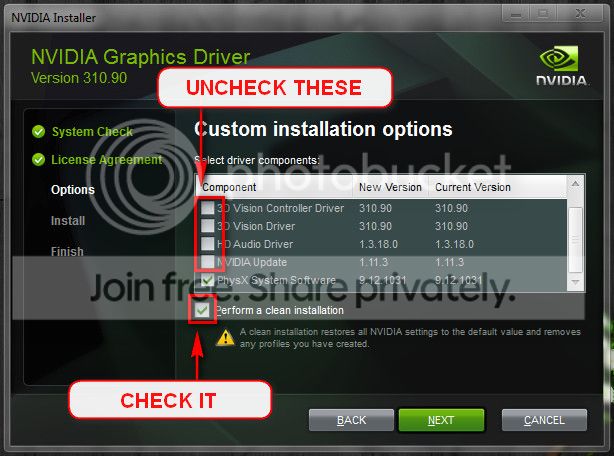
Let us know the results.
______________________________________
Code:
*******************************************************************************
*                                                                             *
*                        Bugcheck Analysis                                    *
*                                                                             *
*******************************************************************************

Use !analyze -v to get detailed debugging information.

BugCheck 116, {fffffa8023cc9010, fffff8801029ce2c, ffffffffc000009a, 4}

Unable to load image nvlddmkm.sys, Win32 error 0n2
*** WARNING: Unable to verify timestamp for nvlddmkm.sys
*** ERROR: Module load completed but symbols could not be loaded for nvlddmkm.sys
Probably caused by : nvlddmkm.sys ( nvlddmkm+9bbe2c )

Followup: MachineOwner
---------

11: kd> !analyze -v
*******************************************************************************
*                                                                             *
*                        Bugcheck Analysis                                    *
*                                                                             *
*******************************************************************************

VIDEO_TDR_FAILURE (116)
Attempt to reset the display driver and recover from timeout failed.
Arguments:
Arg1: fffffa8023cc9010, Optional pointer to internal TDR recovery context (TDR_RECOVERY_CONTEXT).
Arg2: fffff8801029ce2c, The pointer into responsible device driver module (e.g. owner tag).
Arg3: ffffffffc000009a, Optional error code (NTSTATUS) of the last failed operation.
Arg4: 0000000000000004, Optional internal context dependent data.

Debugging Details:
------------------


FAULTING_IP: 
nvlddmkm+9bbe2c
fffff880`1029ce2c ??              ???

DEFAULT_BUCKET_ID:  GRAPHICS_DRIVER_TDR_FAULT

CUSTOMER_CRASH_COUNT:  1

BUGCHECK_STR:  0x116

PROCESS_NAME:  System

CURRENT_IRQL:  0

ANALYSIS_VERSION: 6.3.9600.16384 (debuggers(dbg).130821-1623) amd64fre

STACK_TEXT:  
fffff880`0416ea48 fffff880`058f8140 : 00000000`00000116 fffffa80`23cc9010 fffff880`1029ce2c ffffffff`c000009a : nt!KeBugCheckEx
fffff880`0416ea50 fffff880`058cb867 : fffff880`1029ce2c fffffa80`24cc3000 00000000`00000000 ffffffff`c000009a : dxgkrnl!TdrBugcheckOnTimeout+0xec
fffff880`0416ea90 fffff880`058f7f4f : fffffa80`ffffd84d ffffffff`fffe7960 fffffa80`23cc9010 00000000`00000000 : dxgkrnl!DXGADAPTER::Reset+0x2a3
fffff880`0416eb40 fffff880`059c703d : fffffa80`23d9a740 00000000`00000080 00000000`00000000 fffffa80`24cc2410 : dxgkrnl!TdrResetFromTimeout+0x23
fffff880`0416ebc0 fffff800`033162ea : 00000000`07bc0e71 fffffa80`23931060 fffffa80`19409b30 fffffa80`23931060 : dxgmms1!VidSchiWorkerThread+0x101
fffff880`0416ec00 fffff800`0306a8e6 : fffff880`03b42180 fffffa80`23931060 fffff880`03b4d1c0 00000000`00000000 : nt!PspSystemThreadStartup+0x5a
fffff880`0416ec40 00000000`00000000 : fffff880`0416f000 fffff880`04169000 fffff880`0416e480 00000000`00000000 : nt!KxStartSystemThread+0x16


STACK_COMMAND:  .bugcheck ; kb

FOLLOWUP_IP: 
nvlddmkm+9bbe2c
fffff880`1029ce2c ??              ???

SYMBOL_NAME:  nvlddmkm+9bbe2c

FOLLOWUP_NAME:  MachineOwner

MODULE_NAME: nvlddmkm

IMAGE_NAME:  nvlddmkm.sys

DEBUG_FLR_IMAGE_TIMESTAMP:  5315b408

FAILURE_BUCKET_ID:  X64_0x116_IMAGE_nvlddmkm.sys

BUCKET_ID:  X64_0x116_IMAGE_nvlddmkm.sys

ANALYSIS_SOURCE:  KM

FAILURE_ID_HASH_STRING:  km:x64_0x116_image_nvlddmkm.sys

FAILURE_ID_HASH:  {1f9e0448-3238-5868-3678-c8e526bb1edc}

Followup: MachineOwner
---------

11: kd> lmvm nvlddmkm
start             end                 module name
fffff880`0f8e1000 fffff880`10539000   nvlddmkm T (no symbols)           
    Loaded symbol image file: nvlddmkm.sys
    Image path: nvlddmkm.sys
    Image name: nvlddmkm.sys
    Timestamp:        Tue Mar 04 16:37:52 2014 (5315B408)
    CheckSum:         00C20523
    ImageSize:        00C58000
    Translations:     0000.04b0 0000.04e4 0409.04b0 0409.04e4

This was the 3rd power test I did on the first page and it was showing well within the 850 limits for the stock PSU.

As I said, my PC isn't modified at all other than adding an SSD a few months ago.
 

My Computer My Computer

Computer type
PC/Desktop
Computer Manufacturer/Model Number
Dell/Alienware Aurora ALX R4
OS
Windows 7 Ultimate x64
CPU
Intel(R) Core(TM) i7-3970X
Motherboard
Alienware: 07JNHO - A10 BIOS
Memory
32 MB
Graphics Card(s)
Nvidia GTX 690
Sound Card
Soundblaster Recon3D PCIe
Monitor(s) Displays
Dell S2440L Generic PnP Monitor
Screen Resolution
1920 x 1080
Hard Drives
Main:
Seagate: ATA ST31000524AS SCSI Disc Device
Model Number: ST31000524AS
Serial Number: 5VPAWSM6

Secondary for Gaming:
Samsung 840 Pro 256 SSD
PSU
850
Case
Alienware Aurora ALX R4 with Active Venting
Cooling
Alienware Liquid Cooling
Keyboard
Alienware TactX
Mouse
Alienware TactX
Antivirus
Microsoft Security Essentials
Browser
IE11 and Chrome
Also, this WMI Application error shows up a lot too, usually after a crash when the PC is loading windows or possibly when the desktop it loading.


Event filter with query "SELECT * FROM __InstanceModificationEvent WITHIN 60 WHERE TargetInstance ISA "Win32_Processor" AND TargetInstance.LoadPercentage > 99" could not be reactivated in namespace "//./root/CIMV2" because of error 0x80041003. Events cannot be delivered through this filter until the problem is corrected.

That can be fixed by using this tool.

http://go.microsoft.com/?linkid=9775756
 

My Computer My Computer

Computer type
PC/Desktop
Computer Manufacturer/Model Number
Custom Build
OS
Windows 8.1
CPU
Intel i5 3750k OC'd 4.0Ghz
Motherboard
P8Z77-V LX3
Memory
16GB Vengence Corsair
Graphics Card(s)
GTX 770 OC 2GB Windforce
Sound Card
C-Media 7.1 Surround Card
Monitor(s) Displays
Asus 3D 23" & BenQ 24" & LG 19"
Screen Resolution
1920*1080, 1920*1080, 1440*900
Hard Drives
Crucial 512GB SSD
WD 1.5 TB
WD 500Gb
PSU
850MW Silverstone
Case
inWin DragonRider
Cooling
4 * 140mm LED Akasa, One 140mm Fan Akasa
Keyboard
Corsair k95
Mouse
R.A.T 7 Contagion
Internet Speed
152 Mb Fiber Optic
Antivirus
ESET Nod32
Browser
Waterfox x64 / Chrome x64
Other Info
Freenas / Plex Media server
Q6600
6Gb DDR3
6TB ZFS Raid
500W PSu
2 x Intel NIC's
ProdigyGamer said:
This was the 3rd power test I did on the first page and it was showing well within the 850 limits for the stock PSU.

As I said, my PC isn't modified at all other than adding an SSD a few months ago.

Yeah he's actually asking you to get volt checks, not the entire psu output. It could very well be a lose wire somewhere is being pushed by the fans and losing contact. (or something not as extreme :P)
 

My Computer My Computer

Computer type
PC/Desktop
Computer Manufacturer/Model Number
Custom Build
OS
Windows 8.1
CPU
Intel i5 3750k OC'd 4.0Ghz
Motherboard
P8Z77-V LX3
Memory
16GB Vengence Corsair
Graphics Card(s)
GTX 770 OC 2GB Windforce
Sound Card
C-Media 7.1 Surround Card
Monitor(s) Displays
Asus 3D 23" & BenQ 24" & LG 19"
Screen Resolution
1920*1080, 1920*1080, 1440*900
Hard Drives
Crucial 512GB SSD
WD 1.5 TB
WD 500Gb
PSU
850MW Silverstone
Case
inWin DragonRider
Cooling
4 * 140mm LED Akasa, One 140mm Fan Akasa
Keyboard
Corsair k95
Mouse
R.A.T 7 Contagion
Internet Speed
152 Mb Fiber Optic
Antivirus
ESET Nod32
Browser
Waterfox x64 / Chrome x64
Other Info
Freenas / Plex Media server
Q6600
6Gb DDR3
6TB ZFS Raid
500W PSu
2 x Intel NIC's
Back
Top