Solved BSOD after taking in PC to repair shop

I tested my memory again and it shows no problems...this is getting bad.

I don't understand how it could fail Memtest then pass.


trust me when I say this, it can and it does.

for example I had a compaq laptop that I bought memory for, the manufacture said it works in my laptop but guess what...I was getting the BSOD at random. windows had all kinds of crash reports on all kinds of different things. nothing ever really pointed to a memory problem.

but as soon as I put the stock memory back in it never crashed again.
 

My Computer My Computer

At a glance

windows 7 ultimate 64 bitamd athlon 64 X2 5000+4 gigs pc2 5300Nvidia GeForce 8600 GTS
OS
windows 7 ultimate 64 bit
CPU
amd athlon 64 X2 5000+
Motherboard
asus A8M2N-LA
Memory
4 gigs pc2 5300
Graphics Card(s)
Nvidia GeForce 8600 GTS
Sound Card
Realtek alc888 high def 8 channel
Monitor(s) Displays
17"samsung syncMaster and 32" LCD panasonic viera tv
Hard Drives
300 gb Hitachi sata 7200rpm
1T seagate Barracuda sata 7200rpm
150 gb WD PATA
250gb WD my passport USB 2.0
PSU
Antec
Other Info
Altec lansing ATP3 3 pc speaker system(these things rock!)
I tried some old memory (2gb) and my pc still crashed..

At this point i'm thinking of just going back to the repair shop and tell them to take another look.
 

My Computer My Computer

At a glance

Windows 7 Professional x64AMD Phenom II X2 550 Black Edition Dual Core ...Mushkin Enhanced Silverline Stiletto 8GB 2X4G...XFX 5770 1gb video card
OS
Windows 7 Professional x64
CPU
AMD Phenom II X2 550 Black Edition Dual Core Processor
Motherboard
ASUS M4A78T-E ATX
Memory
Mushkin Enhanced Silverline Stiletto 8GB 2X4GB PC3-10666
Graphics Card(s)
XFX 5770 1gb video card
Sound Card
Integrated
Monitor(s) Displays
Asus VE208
Screen Resolution
1600 x 900
Hard Drives
Western Digital Caviar Black 640GB 7200RPM
PSU
OCZ ModXStream Pro 500W
Case
Antec Three Hundred Mini Tower Gaming Case 300 ATX
Keyboard
Labtec PS/2
Mouse
Logitech MX518
If the problem isn't with the memory, I'd expect that the motherboard is faulty. While PSU issues can also cause errors in Memtest86, the motherboard is much more likely seeing as the PSU has already been replaced.
 

My Computer My Computer

At a glance

Windows 7 Professional x64Intel i7 2600K OC'd @ 4620 MHz16GB GSkill Sniper 2133 Mhz (4x4GB)EVGA GeForce GTX 480 SuperClocked+
Computer Manufacturer/Model Number
Custom
OS
Windows 7 Professional x64
CPU
Intel i7 2600K OC'd @ 4620 MHz
Motherboard
Asus P8Z68-V Pro
Memory
16GB GSkill Sniper 2133 Mhz (4x4GB)
Graphics Card(s)
EVGA GeForce GTX 480 SuperClocked+
Sound Card
Realtek High Definition Audio
Monitor(s) Displays
2x Acer S273HLbmii 27"
Screen Resolution
2 x 1920x1080
Hard Drives
64GB Crucial M4 SSD

Storage: Hitachi 1TB 5400RPM, Samsung 1.5TB 5400RPM
PSU
Corsair HW Series 750w (modular)
Case
Cooler Master HAF 932 Advanced Blue Edition
Cooling
CM Hyper 212+ CPU cooler, 3x 230mm + 1x 140mm case fans
Keyboard
Logitech MK320 (wireless)
Mouse
Logitech MK320 (wireless)
Internet Speed
30 Mb/s : 2 Mb/s
Im going to side with Mr. King on this one. That ram is rated at 1.5 V, if the voltage increase did not eliminate the bsod, and your psu has been replaced(your current psu could almost run 2 of your systems), then it must be something else.

I am not an expert on minidump analyzing so I cannot clearly tell you what it is from that(others can). But I have had situations where I tried everything, for over a month, and it ended up being the mother board. Unfortunately the MoBo is hard to test directly.
 

My Computer My Computer

At a glance

Win 7 64bit UltimatePhenom ii 955 OC'd to 3.7ghzGskill RipjawsX 8gb 1600 8-8-8HIS iceq Radeon Hd 7950 1gb 1000/1475
Computer Manufacturer/Model Number
Home Built
OS
Win 7 64bit Ultimate
CPU
Phenom ii 955 OC'd to 3.7ghz
Motherboard
Gigabyte 880g-ud3h
Memory
Gskill RipjawsX 8gb 1600 8-8-8
Graphics Card(s)
HIS iceq Radeon Hd 7950 1gb 1000/1475
Sound Card
Integrated
Monitor(s) Displays
ASUS VS248h-p, LG Flatron 21.5
Screen Resolution
Both 1080P and both 2 ms
Hard Drives
samsung f3 1tb 7200rpm
PSU
XFX 750W XXX edition
Case
Antec 300
Cooling
7 120mm fans, Coolermaster 212+ with push pull
Mouse
Death adder 3500 dpi
Internet Speed
15 mb/s
I tried some old memory (2gb) and my pc still crashed..

At this point i'm thinking of just going back to the repair shop and tell them to take another look.

Have you been checking your temperatures?
Use Core Temp , to check the CPU temps when at idle, under load and/or testing.
Let us know the minimum and maximum temps you get.

Also, here are the voltages:

CPU = 0.8000V
CPU/NB = 0.8000V
CPU VDDA = 2.50V
DRAM = 1.50V

Are your RAM cards installed in the first two slots, counting from the CPU, slots A1 and B1?

Go to your BIOS, to the CPU/NB voltage to 'Manual' and 1.250v.
Try to simulate the crash scenario, play a game etc.

Let us know if you get another crash, there will likely be a couple of voltage increases. You want to find the lowest voltages that your system will run stable on, this will keep your system running cooler.


Your memory controller is integrated in the CPU, this might need a voltage bump.

Go to your BIOS and change the CPU/NB voltage to 'Manual' and 1.250v.


It is quite common for memtest86+ to show no errors and then on a subsequent test show many error, this is just a fact of electronics, anytime memtest86+ shows errors it means the motherboard slots or RAM is bad, or the settings need adjusting.

If you try adjusting the RAM setting and you still get BSoDs, from the info in this thread I would suspect the motherboard.

Let us know your progress.
 

My Computer My Computer

At a glance

Windows 7 Ult x64 - SP1/ Windows 8 Pro x64Intel Core i5-3570K 4.6GHz8GB (2X4GB) DDR3 1600 Corsair Vengeance CL8 1.5vSapphire HD 7770 Vapor-X OC 1GB DDR5
Computer type
PC/Desktop
Computer Manufacturer/Model Number
76~2.0
OS
Windows 7 Ult x64 - SP1/ Windows 8 Pro x64
CPU
Intel Core i5-3570K 4.6GHz
Motherboard
Gigabyte GA-Z77X UD3H, f18
Memory
8GB (2X4GB) DDR3 1600 Corsair Vengeance CL8 1.5v
Graphics Card(s)
Sapphire HD 7770 Vapor-X OC 1GB DDR5
Sound Card
Onboard VIA VT2021
Monitor(s) Displays
22" LCD Dell
Screen Resolution
1680x1050
Hard Drives
Samsung 840Pro 128GB SSD,
Seagate Barracuda 500GB SATA2 7200rpm 32MB cache, Seagate Barracuda 1TB SATA2 7200rpm 32MB cache,
PSU
Corsair HX650W
Case
Cooler Master Storm Scout
Cooling
Corsair H80 2x12cm Noctua NF P12 , 2x14cm case fans
Keyboard
Logitech Wave
Mouse
CM Sentinel
Internet Speed
Dismal
Antivirus
Avast
Browser
Opera Next
Other Info
Haswell laptop: HP Envy 17t-j, i7-4700MQ, GeForce 740M 2GB DDR3, 17.3" Full HD 1920x1080, 16GB RAM, Samsung 840 Pro 128GB, 1TB Hitachi 7200 HDD,
Desktop: eSATA ports,
External eSATA Seagate 500GB SATA2 7200rpm,
External WD USB 500GB
I took my PC to the repair shop a week ago and I got an email saying they couldn't find a problem!!!!!

I'm <name>, I'm the technician looking at your computer. I am emailing in regards to the computer you have here at <PC repair place> for service. i have completed testing and i was unable to find any issue with the system. all hardware diagnostics come back good. I am able to boot and run in windows without any issues.

it is possible that the issue is caused by a device that is being connected such as an external hard drive, iPod or any other USB device. it could also be caused by a power issue, like dirty power (spikes and drops in voltage) from a wall socket or faulty surge protector.

if you have any questions or concerns feel free to reply to this email, call us at <number> or come talk to us in store.

Thank you,


I am going bananas here!
 

My Computer My Computer

At a glance

Windows 7 Professional x64AMD Phenom II X2 550 Black Edition Dual Core ...Mushkin Enhanced Silverline Stiletto 8GB 2X4G...XFX 5770 1gb video card
OS
Windows 7 Professional x64
CPU
AMD Phenom II X2 550 Black Edition Dual Core Processor
Motherboard
ASUS M4A78T-E ATX
Memory
Mushkin Enhanced Silverline Stiletto 8GB 2X4GB PC3-10666
Graphics Card(s)
XFX 5770 1gb video card
Sound Card
Integrated
Monitor(s) Displays
Asus VE208
Screen Resolution
1600 x 900
Hard Drives
Western Digital Caviar Black 640GB 7200RPM
PSU
OCZ ModXStream Pro 500W
Case
Antec Three Hundred Mini Tower Gaming Case 300 ATX
Keyboard
Labtec PS/2
Mouse
Logitech MX518
After reading this thread I’d proceed in the following order based on cost:

  • Purchase 2Gig of inexpensive, but reputable ram; crucial, corsair, gskill or whatever your MB manufacturer recommends. Test again with memtest and then run box for testing BSOD. If the problem is gone you have a solution, if not, you have little invested and now have future testing parts.
  • Replace PS. Do have a friend or someone that you can borrow one from for testing?
  • If the problem still exist, Good Bye motherboard... Replace.
I realize that none of these are attractive options, but Dave and Greg have taken you through all the reasonable options.
Good luck with it…
 

My Computer My Computer

At a glance

Windows 7 Ultimate (64)i7-2600KG.SKILL Ripjaws X Series 8GB (2 x 4GB)ATI 5750
Computer Manufacturer/Model Number
Home Grown
OS
Windows 7 Ultimate (64)
CPU
i7-2600K
Motherboard
Asus P8P67-M Pro
Memory
G.SKILL Ripjaws X Series 8GB (2 x 4GB)
Graphics Card(s)
ATI 5750
Sound Card
On-Board
Monitor(s) Displays
LG W2486L
Screen Resolution
1920X1080
Hard Drives
Intel X-25M 80 Gig SSD | Intel X-25M 160 Gig SSD | WD Black 500MB - External eSata
PSU
Zalman ZM770-XT 770 Watts
Case
Antec 180 mini
Cooling
Cooler Master V8
Internet Speed
15MB - Cable
Other Info
Sissy OC - 4.6 @ 1.3175 24/7 | 18' Idle - 55' Load
What exactly do you have plugged into the PC normally?

Just my monitor(DVI), Mouse (USB), Keyboard (PS/2) and ethernet cable.

I tried it at another workstation in the house and it still crashed.
 

My Computer My Computer

At a glance

Windows 7 Professional x64AMD Phenom II X2 550 Black Edition Dual Core ...Mushkin Enhanced Silverline Stiletto 8GB 2X4G...XFX 5770 1gb video card
OS
Windows 7 Professional x64
CPU
AMD Phenom II X2 550 Black Edition Dual Core Processor
Motherboard
ASUS M4A78T-E ATX
Memory
Mushkin Enhanced Silverline Stiletto 8GB 2X4GB PC3-10666
Graphics Card(s)
XFX 5770 1gb video card
Sound Card
Integrated
Monitor(s) Displays
Asus VE208
Screen Resolution
1600 x 900
Hard Drives
Western Digital Caviar Black 640GB 7200RPM
PSU
OCZ ModXStream Pro 500W
Case
Antec Three Hundred Mini Tower Gaming Case 300 ATX
Keyboard
Labtec PS/2
Mouse
Logitech MX518
I noticed that whenever my PC is connected to the internet I get a BSOD, but when I disconnect the ethernet cable it's ok...

Is it possible for an internet connection to cause BSOD?
 

My Computer My Computer

At a glance

Windows 7 Professional x64AMD Phenom II X2 550 Black Edition Dual Core ...Mushkin Enhanced Silverline Stiletto 8GB 2X4G...XFX 5770 1gb video card
OS
Windows 7 Professional x64
CPU
AMD Phenom II X2 550 Black Edition Dual Core Processor
Motherboard
ASUS M4A78T-E ATX
Memory
Mushkin Enhanced Silverline Stiletto 8GB 2X4GB PC3-10666
Graphics Card(s)
XFX 5770 1gb video card
Sound Card
Integrated
Monitor(s) Displays
Asus VE208
Screen Resolution
1600 x 900
Hard Drives
Western Digital Caviar Black 640GB 7200RPM
PSU
OCZ ModXStream Pro 500W
Case
Antec Three Hundred Mini Tower Gaming Case 300 ATX
Keyboard
Labtec PS/2
Mouse
Logitech MX518
If the Ethernet driver is bad, definitely. If you already installed the latest version, reverting to an earlier one might help.
 

My Computer My Computer

At a glance

Windows 7 Professional SP1 32-bitIntel Core 2 Duo E6600 2.4GHz4GB DDR2-667 (4x1GB in dual-channel config)nVidia GeForce 9800 GT
Computer type
PC/Desktop
Computer Manufacturer/Model Number
Custom-built
OS
Windows 7 Professional SP1 32-bit
CPU
Intel Core 2 Duo E6600 2.4GHz
Motherboard
Asus PL5D2
Memory
4GB DDR2-667 (4x1GB in dual-channel config)
Graphics Card(s)
nVidia GeForce 9800 GT
Sound Card
Creative X-Fi XtremeMusic
Monitor(s) Displays
Acer P236H
Screen Resolution
1920x1200 (DVI)
Hard Drives
OCZ SSD Vertex Plus 60GB SATA (Firmware 3.55), 64MB cache
Hitachi HD321KJ SATA, 320GB, 7200rpm, 16MB cache
PSU
Antec TruePower 2.0
Case
Cooler Master Centurion
Cooling
Too many fans
Keyboard
Standard
Mouse
Microsoft wireless optical mouse
Internet Speed
AT&T U-verse (18mbit/sec)
Antivirus
Microsoft Security Essentials
Browser
Firefox
Other Info
Other devices:
Compaq CQ-60 laptop
Google Nexus 7 (2012) tablet
Nvidia SHIELD tablet (US/LTE)
Hardkernel ODROID-XU single-board computer (Samsung Exynos 5420)
I mean a network connection, not the network adapter.

It seemed to have worked fine at the pc repair place, but when connected here it crashes.
 

My Computer My Computer

At a glance

Windows 7 Professional x64AMD Phenom II X2 550 Black Edition Dual Core ...Mushkin Enhanced Silverline Stiletto 8GB 2X4G...XFX 5770 1gb video card
OS
Windows 7 Professional x64
CPU
AMD Phenom II X2 550 Black Edition Dual Core Processor
Motherboard
ASUS M4A78T-E ATX
Memory
Mushkin Enhanced Silverline Stiletto 8GB 2X4GB PC3-10666
Graphics Card(s)
XFX 5770 1gb video card
Sound Card
Integrated
Monitor(s) Displays
Asus VE208
Screen Resolution
1600 x 900
Hard Drives
Western Digital Caviar Black 640GB 7200RPM
PSU
OCZ ModXStream Pro 500W
Case
Antec Three Hundred Mini Tower Gaming Case 300 ATX
Keyboard
Labtec PS/2
Mouse
Logitech MX518
So I took my video card out and plugged my monitor into my motherboard, using the integrated Ati 3200 gpu.

The PC worked fine all day yesterday and most of today until I put in an old 9800 gt video card into the system.

It crashed so i'm guessing it isn't the video card that is the problem but the PCI-E slot or power supply?

Where should I go from here?
 

My Computer My Computer

At a glance

Windows 7 Professional x64AMD Phenom II X2 550 Black Edition Dual Core ...Mushkin Enhanced Silverline Stiletto 8GB 2X4G...XFX 5770 1gb video card
OS
Windows 7 Professional x64
CPU
AMD Phenom II X2 550 Black Edition Dual Core Processor
Motherboard
ASUS M4A78T-E ATX
Memory
Mushkin Enhanced Silverline Stiletto 8GB 2X4GB PC3-10666
Graphics Card(s)
XFX 5770 1gb video card
Sound Card
Integrated
Monitor(s) Displays
Asus VE208
Screen Resolution
1600 x 900
Hard Drives
Western Digital Caviar Black 640GB 7200RPM
PSU
OCZ ModXStream Pro 500W
Case
Antec Three Hundred Mini Tower Gaming Case 300 ATX
Keyboard
Labtec PS/2
Mouse
Logitech MX518
Installed a new power supply (Coolermaster 500w), played a few minutes of World of Warcraft and it crashed.

What should I do now?
 

My Computer My Computer

At a glance

Windows 7 Professional x64AMD Phenom II X2 550 Black Edition Dual Core ...Mushkin Enhanced Silverline Stiletto 8GB 2X4G...XFX 5770 1gb video card
OS
Windows 7 Professional x64
CPU
AMD Phenom II X2 550 Black Edition Dual Core Processor
Motherboard
ASUS M4A78T-E ATX
Memory
Mushkin Enhanced Silverline Stiletto 8GB 2X4GB PC3-10666
Graphics Card(s)
XFX 5770 1gb video card
Sound Card
Integrated
Monitor(s) Displays
Asus VE208
Screen Resolution
1600 x 900
Hard Drives
Western Digital Caviar Black 640GB 7200RPM
PSU
OCZ ModXStream Pro 500W
Case
Antec Three Hundred Mini Tower Gaming Case 300 ATX
Keyboard
Labtec PS/2
Mouse
Logitech MX518
Have you clean reinstalled since the problem started to eliminate the OS as possible cause?

If not read over these steps to get a Perfect Reinstall to ask back any questions.
 
Yes of course I did.
 

My Computer My Computer

At a glance

Windows 7 Professional x64AMD Phenom II X2 550 Black Edition Dual Core ...Mushkin Enhanced Silverline Stiletto 8GB 2X4G...XFX 5770 1gb video card
OS
Windows 7 Professional x64
CPU
AMD Phenom II X2 550 Black Edition Dual Core Processor
Motherboard
ASUS M4A78T-E ATX
Memory
Mushkin Enhanced Silverline Stiletto 8GB 2X4GB PC3-10666
Graphics Card(s)
XFX 5770 1gb video card
Sound Card
Integrated
Monitor(s) Displays
Asus VE208
Screen Resolution
1600 x 900
Hard Drives
Western Digital Caviar Black 640GB 7200RPM
PSU
OCZ ModXStream Pro 500W
Case
Antec Three Hundred Mini Tower Gaming Case 300 ATX
Keyboard
Labtec PS/2
Mouse
Logitech MX518
Been using my integrated gpu for a few days now...still crashed a few times but not as much as before.

As soon as I reinstalled my PCI-E video card, the problems keep coming back.

Crashed as soon as Windows started, then it said something about checksum not being the same.

I'm just going to go ahead and buy a new motherboard.

Can someone recommend one that's similar to mine under $100?

I'm buying from ncix.com.
 

My Computer My Computer

At a glance

Windows 7 Professional x64AMD Phenom II X2 550 Black Edition Dual Core ...Mushkin Enhanced Silverline Stiletto 8GB 2X4G...XFX 5770 1gb video card
OS
Windows 7 Professional x64
CPU
AMD Phenom II X2 550 Black Edition Dual Core Processor
Motherboard
ASUS M4A78T-E ATX
Memory
Mushkin Enhanced Silverline Stiletto 8GB 2X4GB PC3-10666
Graphics Card(s)
XFX 5770 1gb video card
Sound Card
Integrated
Monitor(s) Displays
Asus VE208
Screen Resolution
1600 x 900
Hard Drives
Western Digital Caviar Black 640GB 7200RPM
PSU
OCZ ModXStream Pro 500W
Case
Antec Three Hundred Mini Tower Gaming Case 300 ATX
Keyboard
Labtec PS/2
Mouse
Logitech MX518
So I was going through my BIOS settings and it said that my onboard graphics were "enabled".

I disabled the onboard graphics and when my system is about to log into Windows 7, the screen is black, can't see anything at all.

Is my motherboard borked?
 

My Computer My Computer

At a glance

Windows 7 Professional x64AMD Phenom II X2 550 Black Edition Dual Core ...Mushkin Enhanced Silverline Stiletto 8GB 2X4G...XFX 5770 1gb video card
OS
Windows 7 Professional x64
CPU
AMD Phenom II X2 550 Black Edition Dual Core Processor
Motherboard
ASUS M4A78T-E ATX
Memory
Mushkin Enhanced Silverline Stiletto 8GB 2X4GB PC3-10666
Graphics Card(s)
XFX 5770 1gb video card
Sound Card
Integrated
Monitor(s) Displays
Asus VE208
Screen Resolution
1600 x 900
Hard Drives
Western Digital Caviar Black 640GB 7200RPM
PSU
OCZ ModXStream Pro 500W
Case
Antec Three Hundred Mini Tower Gaming Case 300 ATX
Keyboard
Labtec PS/2
Mouse
Logitech MX518
Go back into BIOS setup to renable onboard graphics.

See if there is a setting in that area which could affect the graphics card favorably. What is the exact problem when you install it?
 
Go back into BIOS setup to renable onboard graphics.

See if there is a setting in that area which could affect the graphics card favorably. What is the exact problem when you install it?

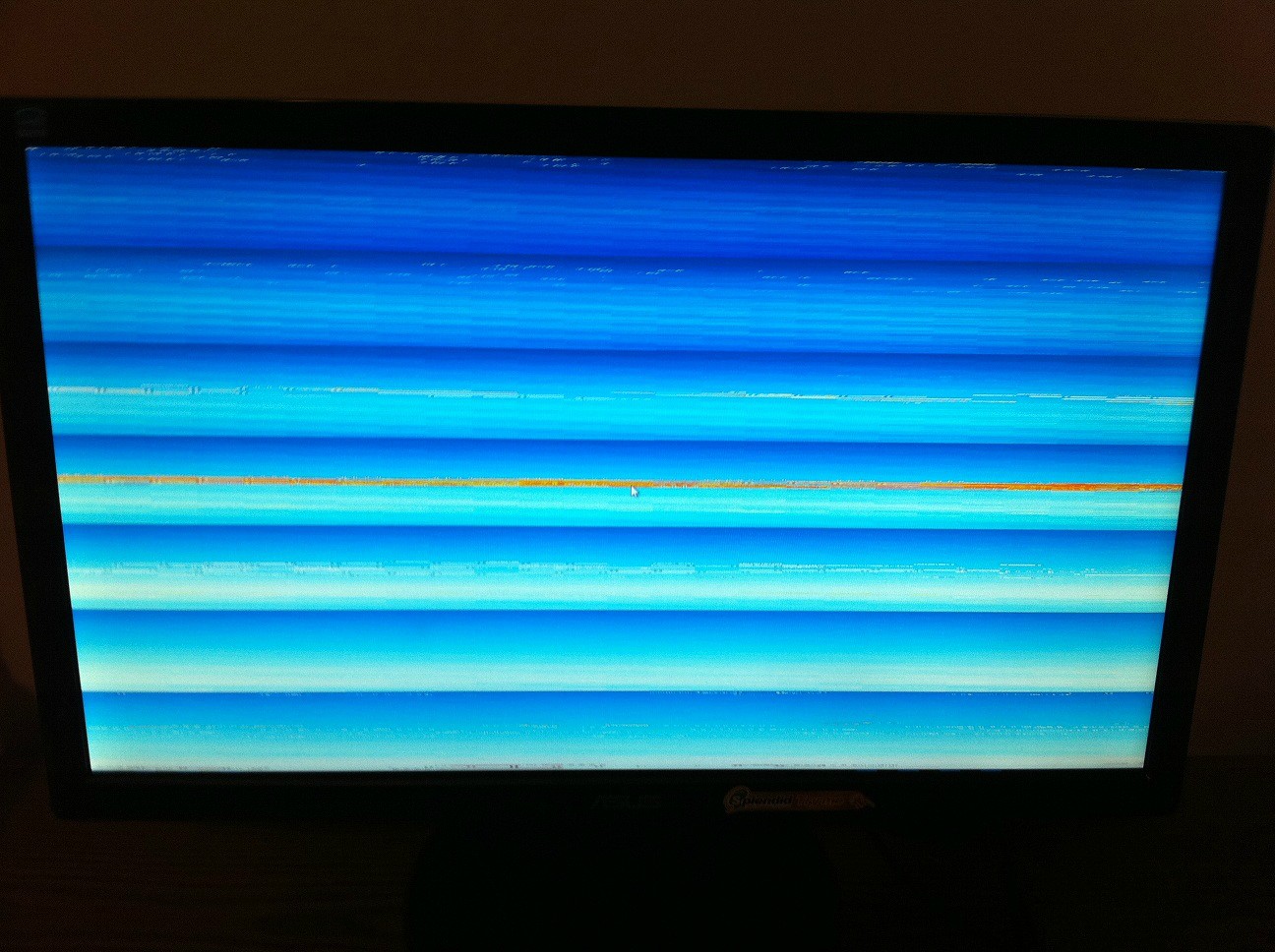
The screen glitches out like this and then shows a BSOD:

4Tybx.jpg


Doesn't matter which PCI-E video card I install.

Then my crashes a few time trying to log into Windows and then it shows "BOOTMGR is CORRUPT CHECKSUM DOES NOT EQUAL" something similar to that.
 

My Computer My Computer

At a glance

Windows 7 Professional x64AMD Phenom II X2 550 Black Edition Dual Core ...Mushkin Enhanced Silverline Stiletto 8GB 2X4G...XFX 5770 1gb video card
OS
Windows 7 Professional x64
CPU
AMD Phenom II X2 550 Black Edition Dual Core Processor
Motherboard
ASUS M4A78T-E ATX
Memory
Mushkin Enhanced Silverline Stiletto 8GB 2X4GB PC3-10666
Graphics Card(s)
XFX 5770 1gb video card
Sound Card
Integrated
Monitor(s) Displays
Asus VE208
Screen Resolution
1600 x 900
Hard Drives
Western Digital Caviar Black 640GB 7200RPM
PSU
OCZ ModXStream Pro 500W
Case
Antec Three Hundred Mini Tower Gaming Case 300 ATX
Keyboard
Labtec PS/2
Mouse
Logitech MX518
Back
Top