

Dread86
New member
Having the same problem with symbols:
Code:
Microsoft (R) Windows Debugger Version 6.2.9200.16384 X86
Copyright (c) Microsoft Corporation. All rights reserved.


Loading Dump File [C:\Windows\Minidump\090212-19437-01.dmp]
Mini Kernel Dump File: Only registers and stack trace are available

Symbol search path is: SRV*c:\symbols*http://msdl.microsoft.com/download/symbols
Executable search path is:
Windows 7 Kernel Version 7601 (Service Pack 1) MP (8 procs) Free x64
Product: WinNt, suite: TerminalServer SingleUserTS Personal
Built by: 7601.17835.amd64fre.win7sp1_gdr.120503-2030
Machine Name:
Kernel base = 0xfffff800`03812000 PsLoadedModuleList = 0xfffff800`03a56670
Debug session time: Sun Sep  2 20:14:49.867 2012 (UTC - 4:00)
System Uptime: 0 days 1:15:37.929
Loading Kernel Symbols
...............................................................
................................................................
..............................
Loading User Symbols
Loading unloaded module list
........
*******************************************************************************
*                                                                             *
*                        Bugcheck Analysis                                    *
*                                                                             *
*******************************************************************************

Use !analyze -v to get detailed debugging information.

BugCheck 1E, {0, 0, 0, 0}

*************************************************************************
***                                                                   ***
***                                                                   ***
***    Either you specified an unqualified symbol, or your debugger   ***
***    doesn't have full symbol information.  Unqualified symbol      ***
***    resolution is turned off by default. Please either specify a   ***
***    fully qualified symbol module!symbolname, or enable resolution ***
***    of unqualified symbols by typing ".symopt- 100". Note that   ***
***    enabling unqualified symbol resolution with network symbol     ***
***    server shares in the symbol path may cause the debugger to     ***
***    appear to hang for long periods of time when an incorrect      ***
***    symbol name is typed or the network symbol server is down.     ***
***                                                                   ***
***    For some commands to work properly, your symbol path           ***
***    must point to .pdb files that have full type information.      ***
***                                                                   ***
***    Certain .pdb files (such as the public OS symbols) do not      ***
***    contain the required information.  Contact the group that      ***
***    provided you with these symbols if you need this command to    ***
***    work.                                                          ***
***                                                                   ***
***    Type referenced: ExceptionRecord                               ***
***                                                                   ***
*************************************************************************
*************************************************************************
***                                                                   ***
***                                                                   ***
***    Either you specified an unqualified symbol, or your debugger   ***
***    doesn't have full symbol information.  Unqualified symbol      ***
***    resolution is turned off by default. Please either specify a   ***
***    fully qualified symbol module!symbolname, or enable resolution ***
***    of unqualified symbols by typing ".symopt- 100". Note that   ***
***    enabling unqualified symbol resolution with network symbol     ***
***    server shares in the symbol path may cause the debugger to     ***
***    appear to hang for long periods of time when an incorrect      ***
***    symbol name is typed or the network symbol server is down.     ***
***                                                                   ***
***    For some commands to work properly, your symbol path           ***
***    must point to .pdb files that have full type information.      ***
***                                                                   ***
***    Certain .pdb files (such as the public OS symbols) do not      ***
***    contain the required information.  Contact the group that      ***
***    provided you with these symbols if you need this command to    ***
***    work.                                                          ***
***                                                                   ***
***    Type referenced: ContextRecord                                 ***
***                                                                   ***
*************************************************************************
*************************************************************************
***                                                                   ***
***                                                                   ***
***    Either you specified an unqualified symbol, or your debugger   ***
***    doesn't have full symbol information.  Unqualified symbol      ***
***    resolution is turned off by default. Please either specify a   ***
***    fully qualified symbol module!symbolname, or enable resolution ***
***    of unqualified symbols by typing ".symopt- 100". Note that   ***
***    enabling unqualified symbol resolution with network symbol     ***
***    server shares in the symbol path may cause the debugger to     ***
***    appear to hang for long periods of time when an incorrect      ***
***    symbol name is typed or the network symbol server is down.     ***
***                                                                   ***
***    For some commands to work properly, your symbol path           ***
***    must point to .pdb files that have full type information.      ***
***                                                                   ***
***    Certain .pdb files (such as the public OS symbols) do not      ***
***    contain the required information.  Contact the group that      ***
***    provided you with these symbols if you need this command to    ***
***    work.                                                          ***
***                                                                   ***
***    Type referenced: ExceptionRecord                               ***
***                                                                   ***
*************************************************************************
*************************************************************************
***                                                                   ***
***                                                                   ***
***    Either you specified an unqualified symbol, or your debugger   ***
***    doesn't have full symbol information.  Unqualified symbol      ***
***    resolution is turned off by default. Please either specify a   ***
***    fully qualified symbol module!symbolname, or enable resolution ***
***    of unqualified symbols by typing ".symopt- 100". Note that   ***
***    enabling unqualified symbol resolution with network symbol     ***
***    server shares in the symbol path may cause the debugger to     ***
***    appear to hang for long periods of time when an incorrect      ***
***    symbol name is typed or the network symbol server is down.     ***
***                                                                   ***
***    For some commands to work properly, your symbol path           ***
***    must point to .pdb files that have full type information.      ***
***                                                                   ***
***    Certain .pdb files (such as the public OS symbols) do not      ***
***    contain the required information.  Contact the group that      ***
***    provided you with these symbols if you need this command to    ***
***    work.                                                          ***
***                                                                   ***
***    Type referenced: ContextRecord                                 ***
***                                                                   ***
*************************************************************************
*** WARNING: Unable to verify timestamp for win32k.sys
*** ERROR: Module load completed but symbols could not be loaded for win32k.sys
Probably caused by : ntkrnlmp.exe ( nt!KiKernelCalloutExceptionHandler+e )

Followup: MachineOwner
---------
My Computer
- Computer Manufacturer/Model Number
- CyberPower Inc
- OS
- Windows 7 Home Premium 64bit
- CPU
- AMD FX-8150 Eight-Core Processor 3.60Ghz
- Motherboard
- Gigabyte GA-970a-d3
- Memory
- 2x 8GB (16GB) DDR-5
- Graphics Card(s)
- Gigabyte HD7850 2GB Factory OC
- Sound Card
- Realtek HD Audio
- Monitor(s) Displays
- HP w2207h 22" Flat LCD
- Hard Drives
- Seagate Barracuda 2TB 7200RPM
- PSU
- Coonix 850w

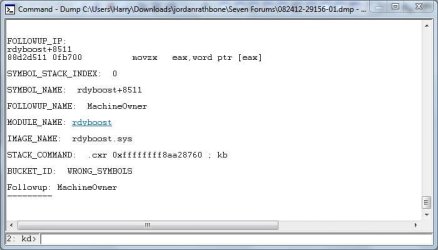



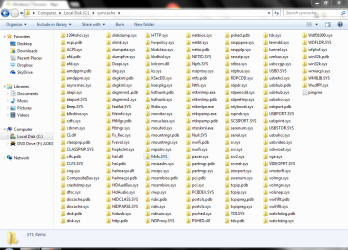


 This is like pulling teeth! I'm going to try Frederik's video's over the next few weeks and see if I can find the will to live through this stuff. The basic problem is I'm missing the fundamentals : I have no idea in which order I should proceed. I've grasped that Arg4 is important, but I don't know how to "tease" information from it (decipher the hexdecimal to mean something to me), or even if its the right information. For example:


