BSOD and crashing on fresh install

Well im back.

The freezing got worse so I did a format and re-installed a different windows 7 than what i used before to see if the install was the problem.

I only installed the drivers from acer's website for my laptop, but i didn't install the sound driver because that was causing the issues last time. After all the updates finished installing, and installing a few programs, there was no problems at all, everything was good.

It was running for a for hours idling then went black and unresponsive and i had to hold the power button to turn it off.
It happened a second time. I turned on driver verifier and it found no buggy drivers, but after the second reboot right when the desktop popped up, I got a system_service_exception BSOD.

I ran all the test in earlier posts, memtest, seagate, prime95, and driver verifier so it can't be hardware, but the crashes stick with each format I do. The BSOD is attached
 

My Computer My Computer

At a glance

Windows 7 Ultimate x64AMD Phenom II x4 N9706 GB DDR3ATI Mobility Radeon HD 4250
Computer type
Laptop
Computer Manufacturer/Model Number
Acer Aspire 5552
OS
Windows 7 Ultimate x64
CPU
AMD Phenom II x4 N970
Motherboard
Acer JE51_DN
Memory
6 GB DDR3
Graphics Card(s)
ATI Mobility Radeon HD 4250
Screen Resolution
1366x768
Hard Drives
Hitachi 500 GB
Well, its a stop 0x3B, hough the probably caused by line says that it is a hardware issue, it also appears that you installed the display driver that is too old.
Code:
fffff880`02d6d000 fffff880`02db8000   atikmpag   (deferred)             
    Image path: \SystemRoot\system32\DRIVERS\atikmpag.sys
[COLOR=Red]    Image name: atikmpag.sys
    Timestamp:        Thu Oct 28 20:33:39 2010 [/COLOR](4CC990CB)
    CheckSum:         0004E21D
    ImageSize:        0004B000
    Translations:     0000.04b0 0000.04e4 0409.04b0 0409.04e4
Try AMD Driver Autodetect . Also another option to try is the AMD Mobility Radeon™ Notebook Drivers in AMD Graphics Drivers & Software .

And all the teats you have planned is good. Let us know the results.
 

My Computer My Computer

At a glance

Microsoft Windows 10 Pro Insider Preview 64-bitIntel(R) Core(TM) i3-4130 CPU @ 3.40GHzCorsair Vengence 4GB x2 (8.00GB Dual-Channel ...2047MB GeForce GTS 450 (ZOTAC International)
Computer type
PC/Desktop
Computer Manufacturer/Model Number
Self Assembled
OS
Microsoft Windows 10 Pro Insider Preview 64-bit
CPU
Intel(R) Core(TM) i3-4130 CPU @ 3.40GHz
Motherboard
Gigabyte Technology Co., Ltd. B85M-D3H
Memory
Corsair Vengence 4GB x2 (8.00GB Dual-Channel DDR3 @ 798MHz)
Graphics Card(s)
2047MB GeForce GTS 450 (ZOTAC International)
Sound Card
Onboard (Realtek High Definition Audio)
Monitor(s) Displays
LG Flatron E2040T
Screen Resolution
1600x900
Hard Drives
Western Digital 1 TB
Seagate 500 GB
PSU
Corsair VS550
Case
Cooler Master K380
Cooling
Cooler Master Seidon 120V Plus
Keyboard
Logitech MK260r
Mouse
Logitech MK260r
Internet Speed
PMPL Broadband
Antivirus
Windows Defender + MBAM
Browser
Firefox
Other Info
Dell Studio 15" Laptop
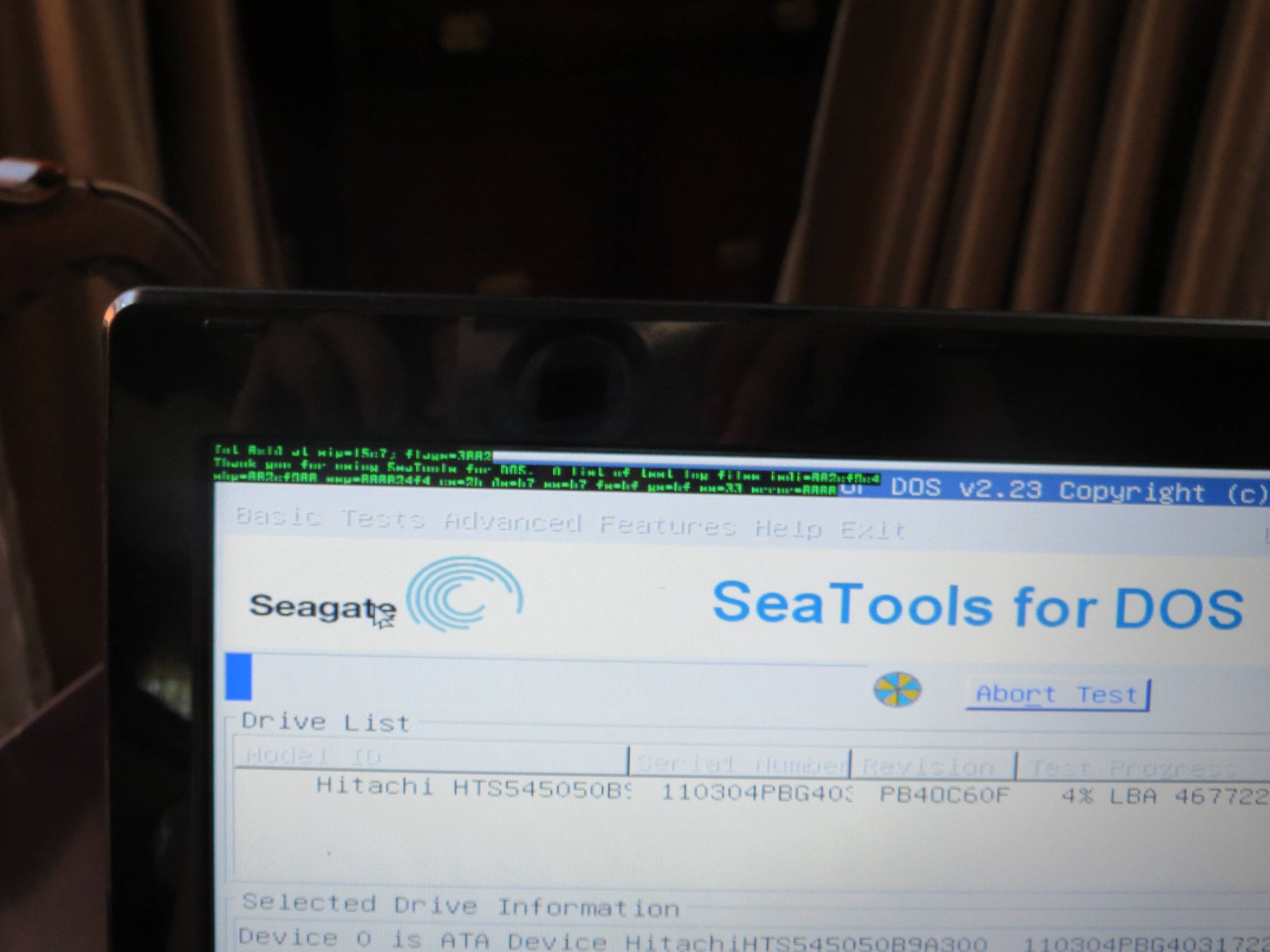
I ran the seagate test and at 4% it froze and these weird green letters appeared at the top of the screen.
PKBksVB.jpg


I also updated the video card drivers and the synaptic touch pad driver.
 

My Computer My Computer

At a glance

Windows 7 Ultimate x64AMD Phenom II x4 N9706 GB DDR3ATI Mobility Radeon HD 4250
Computer type
Laptop
Computer Manufacturer/Model Number
Acer Aspire 5552
OS
Windows 7 Ultimate x64
CPU
AMD Phenom II x4 N970
Motherboard
Acer JE51_DN
Memory
6 GB DDR3
Graphics Card(s)
ATI Mobility Radeon HD 4250
Screen Resolution
1366x768
Hard Drives
Hitachi 500 GB

My Computer My Computer

At a glance

Microsoft Windows 10 Pro Insider Preview 64-bitIntel(R) Core(TM) i3-4130 CPU @ 3.40GHzCorsair Vengence 4GB x2 (8.00GB Dual-Channel ...2047MB GeForce GTS 450 (ZOTAC International)
Computer type
PC/Desktop
Computer Manufacturer/Model Number
Self Assembled
OS
Microsoft Windows 10 Pro Insider Preview 64-bit
CPU
Intel(R) Core(TM) i3-4130 CPU @ 3.40GHz
Motherboard
Gigabyte Technology Co., Ltd. B85M-D3H
Memory
Corsair Vengence 4GB x2 (8.00GB Dual-Channel DDR3 @ 798MHz)
Graphics Card(s)
2047MB GeForce GTS 450 (ZOTAC International)
Sound Card
Onboard (Realtek High Definition Audio)
Monitor(s) Displays
LG Flatron E2040T
Screen Resolution
1600x900
Hard Drives
Western Digital 1 TB
Seagate 500 GB
PSU
Corsair VS550
Case
Cooler Master K380
Cooling
Cooler Master Seidon 120V Plus
Keyboard
Logitech MK260r
Mouse
Logitech MK260r
Internet Speed
PMPL Broadband
Antivirus
Windows Defender + MBAM
Browser
Firefox
Other Info
Dell Studio 15" Laptop
It doesn't detect my hard drive at all.

After all this hassle and the continuous crashes, I should have assumed it was a HDD failure. Even though sometimes the tests pass, some of them freeze or fail. If it isn't a driver or software that keeps on being installed that's causing the issue, I'm going to take it into a computer store and see if they can say 100% that the HDD is the cause of all these problems.
Or is there a way I can make sure its the HDD before I buy a new one?
 

My Computer My Computer

At a glance

Windows 7 Ultimate x64AMD Phenom II x4 N9706 GB DDR3ATI Mobility Radeon HD 4250
Computer type
Laptop
Computer Manufacturer/Model Number
Acer Aspire 5552
OS
Windows 7 Ultimate x64
CPU
AMD Phenom II x4 N970
Motherboard
Acer JE51_DN
Memory
6 GB DDR3
Graphics Card(s)
ATI Mobility Radeon HD 4250
Screen Resolution
1366x768
Hard Drives
Hitachi 500 GB
Before deciding that it is the HDD that is failing, take the following steps.

  • Plug the SATA cable in another port on the motherboard.
  • Change the SATA/Power cables.
  • Use the HDD on another computer you have access to. See if it is detected there or not.
If the HDD is failing, at least the test should detect the HDD. As it is not being detected, it may be not the HDD itself, but the cables ... or even something worst ... better it is not what I am thinking.
 

My Computer My Computer

At a glance

Microsoft Windows 10 Pro Insider Preview 64-bitIntel(R) Core(TM) i3-4130 CPU @ 3.40GHzCorsair Vengence 4GB x2 (8.00GB Dual-Channel ...2047MB GeForce GTS 450 (ZOTAC International)
Computer type
PC/Desktop
Computer Manufacturer/Model Number
Self Assembled
OS
Microsoft Windows 10 Pro Insider Preview 64-bit
CPU
Intel(R) Core(TM) i3-4130 CPU @ 3.40GHz
Motherboard
Gigabyte Technology Co., Ltd. B85M-D3H
Memory
Corsair Vengence 4GB x2 (8.00GB Dual-Channel DDR3 @ 798MHz)
Graphics Card(s)
2047MB GeForce GTS 450 (ZOTAC International)
Sound Card
Onboard (Realtek High Definition Audio)
Monitor(s) Displays
LG Flatron E2040T
Screen Resolution
1600x900
Hard Drives
Western Digital 1 TB
Seagate 500 GB
PSU
Corsair VS550
Case
Cooler Master K380
Cooling
Cooler Master Seidon 120V Plus
Keyboard
Logitech MK260r
Mouse
Logitech MK260r
Internet Speed
PMPL Broadband
Antivirus
Windows Defender + MBAM
Browser
Firefox
Other Info
Dell Studio 15" Laptop
Its a laptop so I took out and put the hard drive back in but it still didn't show up in the program. My external USB shows up so the program works at least.
I dont have another laptop to use the hard drive in, what's my best option here?
 

My Computer My Computer

At a glance

Windows 7 Ultimate x64AMD Phenom II x4 N9706 GB DDR3ATI Mobility Radeon HD 4250
Computer type
Laptop
Computer Manufacturer/Model Number
Acer Aspire 5552
OS
Windows 7 Ultimate x64
CPU
AMD Phenom II x4 N970
Motherboard
Acer JE51_DN
Memory
6 GB DDR3
Graphics Card(s)
ATI Mobility Radeon HD 4250
Screen Resolution
1366x768
Hard Drives
Hitachi 500 GB
The external HDDs are connected to the USB ports, so they are rightly visible. We need to know that if the HDD is being detected when connected to another SATA port on the motherboard. But as it is a laptop, it is difficult to do these tests personally. Specially if it is within warranty, those stuff may nullify the warranty. Better you take it to a servicing center, and get those tests done.

If it is within warranty, it is all good. Even it is out of warranty, take it to some ACER repair shop only, as the sata ports are motherboard element, and laptops usually have OEM licenses tagged with the motherboard. So the vendor should be concerned about your issue, that will be the best for you.

It will be good if you inform us about their findings.
 

My Computer My Computer

At a glance

Microsoft Windows 10 Pro Insider Preview 64-bitIntel(R) Core(TM) i3-4130 CPU @ 3.40GHzCorsair Vengence 4GB x2 (8.00GB Dual-Channel ...2047MB GeForce GTS 450 (ZOTAC International)
Computer type
PC/Desktop
Computer Manufacturer/Model Number
Self Assembled
OS
Microsoft Windows 10 Pro Insider Preview 64-bit
CPU
Intel(R) Core(TM) i3-4130 CPU @ 3.40GHz
Motherboard
Gigabyte Technology Co., Ltd. B85M-D3H
Memory
Corsair Vengence 4GB x2 (8.00GB Dual-Channel DDR3 @ 798MHz)
Graphics Card(s)
2047MB GeForce GTS 450 (ZOTAC International)
Sound Card
Onboard (Realtek High Definition Audio)
Monitor(s) Displays
LG Flatron E2040T
Screen Resolution
1600x900
Hard Drives
Western Digital 1 TB
Seagate 500 GB
PSU
Corsair VS550
Case
Cooler Master K380
Cooling
Cooler Master Seidon 120V Plus
Keyboard
Logitech MK260r
Mouse
Logitech MK260r
Internet Speed
PMPL Broadband
Antivirus
Windows Defender + MBAM
Browser
Firefox
Other Info
Dell Studio 15" Laptop
Back
Top