Hi PGFrank18,
Welcome to the 7forums.
Please remove Advanced SystemCare8, it is known for causing BSOD's.
Daemon tools, Alcohol 120% and Power Archiver Pro uses SCSI Pass Through Direct (SPTD), which is a well known cause for BSOD's.
Please remove both Daemon Tools Lite and Pro and run the SPTD pass through remover.
- Uninstall Daemon Tools
- Download the SPTD standalone installer and follow these steps:
- Double click the executable to open it
- Click on the button shown below
If the button is grayed out, like in the image, there is no more SPTD installation on your system, and you can close the window.
Please move some files from the C partition to increase the free space to at least 10-15%.
Every partition needs at least 10-15% free space so Windows can do its thing in the background.
Warning
Less free space could cause BSOD's
In case of
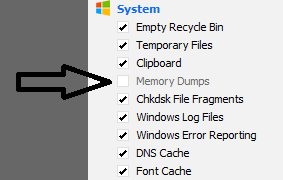
If you are using a program like Ccleaner please stop using it while troubleshooting.
This because programs like Ccleaner remove dump files that are needed to troubleshoot.
Or configure Ccleaner to not remove dump files:
It appears there is no delay between data from a bus of the motherboard.
This problem could be caused by the CPU, GPU, hard drive, PSU, RAM, motherboard and some other things like the BIOS and overclocking. Unfortunately there is no second dump in the zip for a more specific cause.
Please follow instructions below carefully and check the manufacturer of your motherboard for BIOS updates.
Code:
2: kd> !errrec fffffa800d0f9028
===============================================================================
Common Platform Error Record @ fffffa800d0f9028
-------------------------------------------------------------------------------
Record Id     : 01d0f644e244e7c6
Severity      : Fatal (1)
Length        : 928
Creator       : Microsoft
Notify Type   : Machine Check Exception
Timestamp     : 9/24/2015 0:32:41 (UTC)
Flags         : 0x00000000

===============================================================================
Section 0     : Processor Generic
-------------------------------------------------------------------------------
Descriptor    @ fffffa800d0f90a8
Section       @ fffffa800d0f9180
Offset        : 344
Length        : 192
Flags         : 0x00000001 Primary
Severity      : Fatal

Proc. Type    : x86/x64
Instr. Set    : x64
[COLOR="red"]Error Type    : BUS error[/COLOR]
Operation     : Generic
Flags         : 0x00
Level         : 3
CPU Version   : 0x0000000000610f01
Processor ID  : 0x0000000000000002

===============================================================================
Section 1     : x86/x64 Processor Specific
-------------------------------------------------------------------------------
Descriptor    @ fffffa800d0f90f0
Section       @ fffffa800d0f9240
Offset        : 536
Length        : 128
Flags         : 0x00000000
Severity      : Fatal

Local APIC Id : 0x0000000000000002
CPU Id        : 01 0f 61 00 00 08 04 02 - 0b 32 98 3e ff fb 8b 17
                00 00 00 00 00 00 00 00 - 00 00 00 00 00 00 00 00
                00 00 00 00 00 00 00 00 - 00 00 00 00 00 00 00 00

Proc. Info 0  @ fffffa800d0f9240

===============================================================================
Section 2     : x86/x64 MCA
-------------------------------------------------------------------------------
Descriptor    @ fffffa800d0f9138
Section       @ fffffa800d0f92c0
Offset        : 664
Length        : 264
Flags         : 0x00000000
Severity      : Fatal

[COLOR="Red"]Error         : BUSLG_GENERIC_ERR_*_NOTIMEOUT_ERR (Proc 2 Bank 5)[/COLOR]
  Status      : 0xb0800000000c0e0f
STOP 0x124 Troubleshooting
Read carefully before proceeding.
Warning
If you're overclocking your system, revert back to stock clocks now.
Note
Test the system once the overclock is removed before continuing with the steps outlined below.
Part One: CPU Stress Test
Part Two: MemTest86+ RAM Diagnostic
Part Three: Hard Drive Diagnostics
Part Four: GPU Stress Test
Run Prime95 to stress test your CPU.
Prime95 - Stress Test Your CPU - Windows 7 Help Forums
Warning
Your CPU temperatures will rise quickly while under this stress test. Keep a keen eye on them and abort the test if overheating occurs.
Run MemTest86+ to analyse your RAM.
MemTest86+ - Test RAM - Windows 7 Help Forums
Note
MemTest86+ needs to be run for at least 8 passes for conclusive results. Set it running before you go to bed and leave it overnight. We're looking for zero errors here. Even a single error will indicate RAM failure.
Run SeaTools to check the integrity of your HDD.
SeaTools - HDD test - Windows 7 Help Forums
Note
Do not run SeaTools on an SSD as the results will be invalid.
Run chkdsk
Chkdsk - HDD Test - Windows 7 Help Forums
Run Furmark to stress test your GPU.
FurMark - GPU Stress Test - Windows 7 Help Forums
Note
Run Furmark for around 30 minutes.
Warning
Your GPU temperatures will rise quickly while Furmark is running. Keep a keen eye on them and abort the test if overheating occurs.