BSOD Attempt to reset display driver failed

SniperDan

New member
Local time
2:15 AM
Messages
7
Hello I'm a new user to the forums, over the last few days I have been unable to start my Pc normally. If left to load after the "Starting Windows 7" screen, the Pc either BSODs with "Attempt to reset display driver failed" message appearing or my monitor shows "No signal from Pc". The only current work around for this I've found is to load the computer in safe mode then restart and let it load normally, it doesn't BSOD. If put into sleep mode, on waking up no signal is received, but I can still log in, as I can hear the sound through the speakers.
I am unsure as to whether this is a driver related issue or if it is due to my system now being pretty old.

Thanks for any help in advance :)
 

My Computer

Computer type
PC/Desktop
Computer Manufacturer/Model Number
Custom built
OS
Windows 7 Ultimate x64
CPU
Intel Core 2 Quad
Motherboard
Gigabyte
Memory
Kingston Hyper X DDR2 2x4Gb
Graphics Card(s)
Ati Sapphire Radeon HD4670
PSU
Jeantech 405w
Case
NZXT Lexa S (USB 2.0)
Antivirus
Avast! Malwarebytes Sophos
Browser
Firefox
Code:
BugCheck 116, {fffffa8005376010, fffff88004792efc, 0, 2}

Probably caused by : Unknown_Image ( ANALYSIS_INCONCLUSIVE )

Followup: MachineOwner
---------
When the computer refused to boot with a stop 0x116 but boots fine in safe mode, it is definitely a display related issue .... either the driver or the card.

We cannot check the card in safe mode. So first let us try another version of the display driver.

Uninstall the display driver using Display driver uninstaller. Then download and install 13.9 WHQL or 13.1 WHQL. Does it happen the same? Let us know.
 

My Computer

Computer type
PC/Desktop
Computer Manufacturer/Model Number
Self Assembled
OS
Microsoft Windows 10 Pro Insider Preview 64-bit
CPU
Intel(R) Core(TM) i3-4130 CPU @ 3.40GHz
Motherboard
Gigabyte Technology Co., Ltd. B85M-D3H
Memory
Corsair Vengence 4GB x2 (8.00GB Dual-Channel DDR3 @ 798MHz)
Graphics Card(s)
2047MB GeForce GTS 450 (ZOTAC International)
Sound Card
Onboard (Realtek High Definition Audio)
Monitor(s) Displays
LG Flatron E2040T
Screen Resolution
1600x900
Hard Drives
Western Digital 1 TB
Seagate 500 GB
PSU
Corsair VS550
Case
Cooler Master K380
Cooling
Cooler Master Seidon 120V Plus
Keyboard
Logitech MK260r
Mouse
Logitech MK260r
Internet Speed
PMPL Broadband
Antivirus
Windows Defender + MBAM
Browser
Firefox
Other Info
Dell Studio 15" Laptop
Removed the driver and reinstalled the legacy drivers, BSOD still happening. I can boot into normal mode on Windows, I just have to boot in safe mode first then restart, it will happily boot into normal mode from there.
 

My Computer

Computer type
PC/Desktop
Computer Manufacturer/Model Number
Custom built
OS
Windows 7 Ultimate x64
CPU
Intel Core 2 Quad
Motherboard
Gigabyte
Memory
Kingston Hyper X DDR2 2x4Gb
Graphics Card(s)
Ati Sapphire Radeon HD4670
PSU
Jeantech 405w
Case
NZXT Lexa S (USB 2.0)
Antivirus
Avast! Malwarebytes Sophos
Browser
Firefox
If you can boot into normal mode, supply some data.

Click on the button below ....


It will download the DM log collector. Right click on the application and run as administrator. It will generate a .zip file on your desktop. Upload the .zip.
http://www.sevenforums.com/tutorials/9733-screenshots-files-upload-post-seven-forums.html

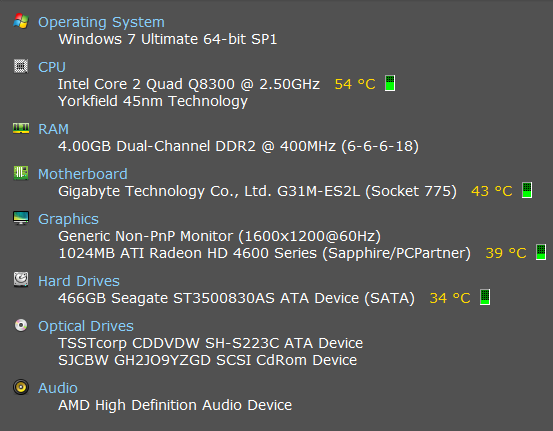
Report us the heat of the computer after a couple of hours of your normal usage. Upload a screenshot of the summery tab of Speccy. Alternatively, you can publish a Speccy snapshot too: http://www.sevenforums.com/tutorials/311593-speccy-publish-snapshot-your-system-specs.html .

Check if the Power Supply Unit (PSU) supplying adequate power to the computer or not.
eXtreme Power Supply Calculator - The most trusted PSU Wattage Calculator
Also let us know the wattage of the PSU.
 

My Computer

Computer type
PC/Desktop
Computer Manufacturer/Model Number
Self Assembled
OS
Microsoft Windows 10 Pro Insider Preview 64-bit
CPU
Intel(R) Core(TM) i3-4130 CPU @ 3.40GHz
Motherboard
Gigabyte Technology Co., Ltd. B85M-D3H
Memory
Corsair Vengence 4GB x2 (8.00GB Dual-Channel DDR3 @ 798MHz)
Graphics Card(s)
2047MB GeForce GTS 450 (ZOTAC International)
Sound Card
Onboard (Realtek High Definition Audio)
Monitor(s) Displays
LG Flatron E2040T
Screen Resolution
1600x900
Hard Drives
Western Digital 1 TB
Seagate 500 GB
PSU
Corsair VS550
Case
Cooler Master K380
Cooling
Cooler Master Seidon 120V Plus
Keyboard
Logitech MK260r
Mouse
Logitech MK260r
Internet Speed
PMPL Broadband
Antivirus
Windows Defender + MBAM
Browser
Firefox
Other Info
Dell Studio 15" Laptop
I thought I did post the .zip with my original post, or well atleast that's what I thought that program output, otherwise I have no idea where that Zip came from xD

9e1f4b4edc87026bc39f14a44f71c6a9.png


With the calculator my system power draw is roughly 300w and the power supply is 405w.
 

My Computer

Computer type
PC/Desktop
Computer Manufacturer/Model Number
Custom built
OS
Windows 7 Ultimate x64
CPU
Intel Core 2 Quad
Motherboard
Gigabyte
Memory
Kingston Hyper X DDR2 2x4Gb
Graphics Card(s)
Ati Sapphire Radeon HD4670
PSU
Jeantech 405w
Case
NZXT Lexa S (USB 2.0)
Antivirus
Avast! Malwarebytes Sophos
Browser
Firefox
With the calculator my system power draw is roughly 300w and the power supply is 405w.
405 watts is a poor power supply. I would suggest you to get one of at least 600 watts.

The zip attached with your original post is not the complete set of files. We need the complete DM Log to proceed with troubleshooting.
 

My Computer

Computer type
PC/Desktop
Computer Manufacturer/Model Number
Self Assembled
OS
Microsoft Windows 10 Pro Insider Preview 64-bit
CPU
Intel(R) Core(TM) i3-4130 CPU @ 3.40GHz
Motherboard
Gigabyte Technology Co., Ltd. B85M-D3H
Memory
Corsair Vengence 4GB x2 (8.00GB Dual-Channel DDR3 @ 798MHz)
Graphics Card(s)
2047MB GeForce GTS 450 (ZOTAC International)
Sound Card
Onboard (Realtek High Definition Audio)
Monitor(s) Displays
LG Flatron E2040T
Screen Resolution
1600x900
Hard Drives
Western Digital 1 TB
Seagate 500 GB
PSU
Corsair VS550
Case
Cooler Master K380
Cooling
Cooler Master Seidon 120V Plus
Keyboard
Logitech MK260r
Mouse
Logitech MK260r
Internet Speed
PMPL Broadband
Antivirus
Windows Defender + MBAM
Browser
Firefox
Other Info
Dell Studio 15" Laptop
No idea why it was only part of the files the first time, this should be all of them from a scan just now
 

My Computer

Computer type
PC/Desktop
Computer Manufacturer/Model Number
Custom built
OS
Windows 7 Ultimate x64
CPU
Intel Core 2 Quad
Motherboard
Gigabyte
Memory
Kingston Hyper X DDR2 2x4Gb
Graphics Card(s)
Ati Sapphire Radeon HD4670
PSU
Jeantech 405w
Case
NZXT Lexa S (USB 2.0)
Antivirus
Avast! Malwarebytes Sophos
Browser
Firefox

My Computer

Computer type
PC/Desktop
Computer Manufacturer/Model Number
Self Assembled
OS
Microsoft Windows 10 Pro Insider Preview 64-bit
CPU
Intel(R) Core(TM) i3-4130 CPU @ 3.40GHz
Motherboard
Gigabyte Technology Co., Ltd. B85M-D3H
Memory
Corsair Vengence 4GB x2 (8.00GB Dual-Channel DDR3 @ 798MHz)
Graphics Card(s)
2047MB GeForce GTS 450 (ZOTAC International)
Sound Card
Onboard (Realtek High Definition Audio)
Monitor(s) Displays
LG Flatron E2040T
Screen Resolution
1600x900
Hard Drives
Western Digital 1 TB
Seagate 500 GB
PSU
Corsair VS550
Case
Cooler Master K380
Cooling
Cooler Master Seidon 120V Plus
Keyboard
Logitech MK260r
Mouse
Logitech MK260r
Internet Speed
PMPL Broadband
Antivirus
Windows Defender + MBAM
Browser
Firefox
Other Info
Dell Studio 15" Laptop
Well I ran it for 20 mins, average fps of 3! and around 72°C under 99% load. I'll upload the Log files incase that's of any use
 

My Computer

Computer type
PC/Desktop
Computer Manufacturer/Model Number
Custom built
OS
Windows 7 Ultimate x64
CPU
Intel Core 2 Quad
Motherboard
Gigabyte
Memory
Kingston Hyper X DDR2 2x4Gb
Graphics Card(s)
Ati Sapphire Radeon HD4670
PSU
Jeantech 405w
Case
NZXT Lexa S (USB 2.0)
Antivirus
Avast! Malwarebytes Sophos
Browser
Firefox
I see that you have 13.9 WHQL installed throughout. I would suggest you to try 13.1 WHQL as a test.

Also, as the temps are not that high, and Furmark did not crash within 20 minutes, the scopes are very limited there.

Open the computer. Re-seat the graphics card. See if it changes anything there.
 

My Computer

Computer type
PC/Desktop
Computer Manufacturer/Model Number
Self Assembled
OS
Microsoft Windows 10 Pro Insider Preview 64-bit
CPU
Intel(R) Core(TM) i3-4130 CPU @ 3.40GHz
Motherboard
Gigabyte Technology Co., Ltd. B85M-D3H
Memory
Corsair Vengence 4GB x2 (8.00GB Dual-Channel DDR3 @ 798MHz)
Graphics Card(s)
2047MB GeForce GTS 450 (ZOTAC International)
Sound Card
Onboard (Realtek High Definition Audio)
Monitor(s) Displays
LG Flatron E2040T
Screen Resolution
1600x900
Hard Drives
Western Digital 1 TB
Seagate 500 GB
PSU
Corsair VS550
Case
Cooler Master K380
Cooling
Cooler Master Seidon 120V Plus
Keyboard
Logitech MK260r
Mouse
Logitech MK260r
Internet Speed
PMPL Broadband
Antivirus
Windows Defender + MBAM
Browser
Firefox
Other Info
Dell Studio 15" Laptop
Well turns out I'm being surprised with a holiday, not gonna have time to finish sorting this out before I go, thanks for the help so far though! I'll try reseating and the older drivers when I get back next week.
Thanks again!
 

My Computer

Computer type
PC/Desktop
Computer Manufacturer/Model Number
Custom built
OS
Windows 7 Ultimate x64
CPU
Intel Core 2 Quad
Motherboard
Gigabyte
Memory
Kingston Hyper X DDR2 2x4Gb
Graphics Card(s)
Ati Sapphire Radeon HD4670
PSU
Jeantech 405w
Case
NZXT Lexa S (USB 2.0)
Antivirus
Avast! Malwarebytes Sophos
Browser
Firefox
Back
Top