BSOD - Cant boot into safe mode

cjm18

New member
Local time
8:34 AM
Messages
12
Hello,

I would appreciate any input about this problem.

My set up is or was dual boot Windows 7 rc712 x64 and vista x64 on 2 partitions on the same drive. Suddenly bsod and looped rebooting with windows 7 and I can't even load windows 7 in safe mode. This ocurred after a video crashed in windows 7. I could not load safe mode but I could load vista x64 reguarly(it was a fresh OS I never used). I did a windows 7 upgrade install over the vista when I meant to reinstall on the windows 7.

I had tried to boot from windows 7 disk and couldn't repair the old windows 7 installation. How do I get back to my original windows 7?

Some other babkground info. Prior to all this but maybe unrelated were dreaded nvlddmkm.sys errors even after fresh installs of windows. This error was under my old 32 bit vista right after I changed video cards and occured after windows loads or windows media player opens. My solution was reinstall windows thus I upgraded to windows 7. My orginal windows 7 custom install(not upgrade) still had some errors though not as many errors and I could boot into safe mode, shut down, then everything was back to normal until the next error. XFX(my video card manufacturer thinks it is a software driver issue and not hardware)

Here is the text file created shortly after my first bsod.


Windows
Problem
Video hardware error
Date
6/28/2009 8:56 PM
Status
Not Reported
Description
A problem with your video hardware caused Windows to stop working correctly.
Problem signature
Problem Event Name: LiveKernelEvent
OS Version: 6.0.6001.2.1.0.768.3
Locale ID: 1033
Files that help describe the problem
WD-20090628-2056.dmp
sysdata.xml
Version.txt
Extra information about the problem
BCCode: 117
BCP1: FFFFFA80040AB010
BCP2: FFFFFA60030222F0
BCP3: 0000000000000000
BCP4: 0000000000000000
OS Version: 6_0_6001
Service Pack: 1_0
Product: 768_1

Thanks.
 

My Computer

OS
windows 7 rc7127
CPU
intel 2.5ghz core 2 duo
Motherboard
MSI p6n sli
Memory
4 gigs oca
Graphics Card(s)
xfx gtx260
Sound Card
onboard
PSU
700watts OCZ
Welcome to the sevenforums! cjm18

I think one of the main problems you are having now with that error is from it being a generic error and not a hardware problem. That file name comes up a lot when someone is running an NVida card while those running ATI cards run into the same with a different file name provided. "atikmdag stopped responding" is also what someone was taking note on at nvlddmkm stopped responding and has recovered.

Since the first 7 install was problematic you may simply seen a bad install that needed to be replaced or something simply didn't go on fully. For insuring the best results you may not like the answer depending on how you have the Vista/7 dual boot set up. Which version is on the first primary?

If 7 was installed onto the second primary with the 64bit Vista on the first the solution would be reformatting the 7 primary for a totally clean install of 7 to avoid passing on the problems from the present installation seeing a brand new registry to work with as well. It would seem the present installation is loaded down with headaches you want to get rid of rather then to continue on with.
 

My Computers

System One System Two

  • Computer type
    PC/Desktop
    Computer Manufacturer/Model Number
    Custom builds = 2
    OS
    W7 Ultimate x64/W10 Pro x64/W11 Pro Triple Boot - Main PC W7 Remote PC Micro ATX W7 Pro x64/W11 Pro
    CPU
    AMD Phenom II X4 975 Deneb 3.6ghz - 965 2nd remote pc
    Motherboard
    Gigabyte GA-790XTA-UD4-Gigabyte GA-880GM-D2H remote pc
    Memory
    Kingston Hyper X DDR3 1600 1.5v 16gb - Hyper X Fury 8gb 2nd
    Graphics Card(s)
    MSI HD Radeon 5750 1gb - MSI HD Radeon 6450 on mini tower
    Sound Card
    Creative Labs X-Fi Xtreme Audio P - Realtek onooard 2nd case
    Monitor(s) Displays
    ASUS VW199T-P 19" HP 2082a Main-HP 2082a 20" remote pc
    Screen Resolution
    Asus 1440x900 - HP 1600x900
    Hard Drives
    WD Black 1TB HD per OS W7, W10, and pending W11 presently on 500gb OS Drive - Pending Triple 1TB HDs for Spanned Storage/backup volume
    Single 2TB external USB enclosure, single 1TB System 7 Host/Boot drive, Pending 8TB external HD for system image b
    PSU
    Corsair 750TX - primary / Corsair CX600 - second
    Case
    Antec 900-2 - SSD compatible / NZXT Vulcan mini tower
    Cooling
    Zalman CNPS9900A
    Keyboard
    AZIO L70 Backlit Letters Gaming - ONN Cordless/USB
    Mouse
    MSI DS200 Programmable, Logitech Cordless
    Internet Speed
    30mbps upgrade - primary hard wired - mini tower usb WiFi
    Antivirus
    GFI VIPRE Internet Security 2014 on W7 2016 beta on W10,
    Browser
    Cyberfox, WaterFox 64bit FF variants, FireFox x64, Pale Moon
    Other Info
    Accomdata fan cooled usb 2.0 PIDE/Sata II, III external enclosure.
    Sambient usb/eSata PATA/Sata II, III external enclosure.
  • Computer type
    PC/Desktop
    System Manufacturer/Model Number
    CUSTOM ASSEMBLY
    OS
    W7 Pro x64/W11 Pro
    CPU
    AMD Deneb 3.6ghz - 965
    Motherboard
    Gigabyte GA-880GM-D2H remote pc
    Memory
    Kingston Hyper X Fury 8gb
    Graphics Card(s)
    MSI HD Radeon 6450 DVI Output
    Sound Card
    Realtek onooard Creative or Other separate PENDING
    Monitor(s) Displays
    VIZIO 32" LCD TV Separate LCD Pending
    Screen Resolution
    1600x1080
    Hard Drives
    WD 500GB OS Host/Boot WD Green 1TB Storage/Backup
    PSU
    Corsair 600W - THERMALTAKE 600W spare case
    Case
    NZXT Vulcan mini tower
    Cooling
    Twin 120mm Top Fans - 240mm Side Cover
    Keyboard
    ONN Cordless/USB Logitech Cordless
    Mouse
    ONN USB/Cordless - Logitech Cordless
    Internet Speed
    DSL 5G
    Browser
    MS Edge, FireFox, WaterFox x64, FireFox Nightly
    Other Info
    OS Testing-Remote Access to Main TeamViewer
I'm not at the computer now but I bet vista was and is the primary because it was installed before win7. However I find it odd that installing windows on a fresh drive didn't help. Perhaps I had the old 32 bit vista drive attatched and it copied some settings over.

I now get the error in the win7 that I installed over the vista 64 bit.

Assuming vista was the primary and I want to fix this forever, how do I do a clean install on the original win7 that I can't boot into. It's a 16 gig partition. How do I make it the primary. Use boot manager?

Thx for your help.
 

My Computer

OS
windows 7 rc7127
CPU
intel 2.5ghz core 2 duo
Motherboard
MSI p6n sli
Memory
4 gigs oca
Graphics Card(s)
xfx gtx260
Sound Card
onboard
PSU
700watts OCZ
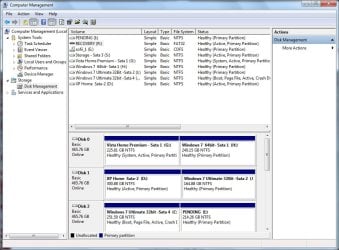
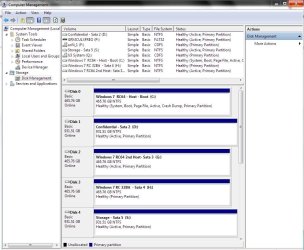
I would need to see a screenshot of the disk management view of your drives and partitions there or even a skech at how the drives are partitioned with each labeled to show how you set things up there. Then we can go from there to see things work out rather then seeing any confusion trying to go in two different directions.

The idea would be retracing your steps to find out what will work the best at this point. From there it wiill go a lot smoother in deciding which steps to take first as well as which drive you will want as the host.

The two screens here will show how things looked when the two 7 betas were set up with the previous XP/Vista dual boot across two drives and the present partitioning of course having added another drive in for two separate 64bit RC installs along with the 32bit RC seen on another drive allowing far more drive space for each install to work with.
 

Attachments

  • PARTITIONS PREVIOUS.jpg
    PARTITIONS PREVIOUS.jpg
    102.7 KB · Views: 48
  • PARTITIONS PRESENT.jpg
    PARTITIONS PRESENT.jpg
    108.4 KB · Views: 56

My Computers

System One System Two

  • Computer type
    PC/Desktop
    Computer Manufacturer/Model Number
    Custom builds = 2
    OS
    W7 Ultimate x64/W10 Pro x64/W11 Pro Triple Boot - Main PC W7 Remote PC Micro ATX W7 Pro x64/W11 Pro
    CPU
    AMD Phenom II X4 975 Deneb 3.6ghz - 965 2nd remote pc
    Motherboard
    Gigabyte GA-790XTA-UD4-Gigabyte GA-880GM-D2H remote pc
    Memory
    Kingston Hyper X DDR3 1600 1.5v 16gb - Hyper X Fury 8gb 2nd
    Graphics Card(s)
    MSI HD Radeon 5750 1gb - MSI HD Radeon 6450 on mini tower
    Sound Card
    Creative Labs X-Fi Xtreme Audio P - Realtek onooard 2nd case
    Monitor(s) Displays
    ASUS VW199T-P 19" HP 2082a Main-HP 2082a 20" remote pc
    Screen Resolution
    Asus 1440x900 - HP 1600x900
    Hard Drives
    WD Black 1TB HD per OS W7, W10, and pending W11 presently on 500gb OS Drive - Pending Triple 1TB HDs for Spanned Storage/backup volume
    Single 2TB external USB enclosure, single 1TB System 7 Host/Boot drive, Pending 8TB external HD for system image b
    PSU
    Corsair 750TX - primary / Corsair CX600 - second
    Case
    Antec 900-2 - SSD compatible / NZXT Vulcan mini tower
    Cooling
    Zalman CNPS9900A
    Keyboard
    AZIO L70 Backlit Letters Gaming - ONN Cordless/USB
    Mouse
    MSI DS200 Programmable, Logitech Cordless
    Internet Speed
    30mbps upgrade - primary hard wired - mini tower usb WiFi
    Antivirus
    GFI VIPRE Internet Security 2014 on W7 2016 beta on W10,
    Browser
    Cyberfox, WaterFox 64bit FF variants, FireFox x64, Pale Moon
    Other Info
    Accomdata fan cooled usb 2.0 PIDE/Sata II, III external enclosure.
    Sambient usb/eSata PATA/Sata II, III external enclosure.
  • Computer type
    PC/Desktop
    System Manufacturer/Model Number
    CUSTOM ASSEMBLY
    OS
    W7 Pro x64/W11 Pro
    CPU
    AMD Deneb 3.6ghz - 965
    Motherboard
    Gigabyte GA-880GM-D2H remote pc
    Memory
    Kingston Hyper X Fury 8gb
    Graphics Card(s)
    MSI HD Radeon 6450 DVI Output
    Sound Card
    Realtek onooard Creative or Other separate PENDING
    Monitor(s) Displays
    VIZIO 32" LCD TV Separate LCD Pending
    Screen Resolution
    1600x1080
    Hard Drives
    WD 500GB OS Host/Boot WD Green 1TB Storage/Backup
    PSU
    Corsair 600W - THERMALTAKE 600W spare case
    Case
    NZXT Vulcan mini tower
    Cooling
    Twin 120mm Top Fans - 240mm Side Cover
    Keyboard
    ONN Cordless/USB Logitech Cordless
    Mouse
    ONN USB/Cordless - Logitech Cordless
    Internet Speed
    DSL 5G
    Browser
    MS Edge, FireFox, WaterFox x64, FireFox Nightly
    Other Info
    OS Testing-Remote Access to Main TeamViewer
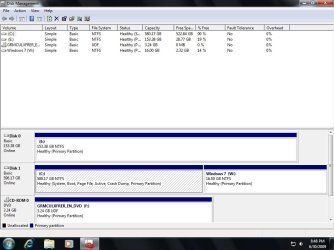
Here is the screen when booting from new win7 which was vista 64 bit. The 16 gig partition is the orginal win7.
 

Attachments

  • BootManagement.jpg
    BootManagement.jpg
    77.5 KB · Views: 236

My Computer

OS
windows 7 rc7127
CPU
intel 2.5ghz core 2 duo
Motherboard
MSI p6n sli
Memory
4 gigs oca
Graphics Card(s)
xfx gtx260
Sound Card
onboard
PSU
700watts OCZ
Your second drive there looks like a WD 640gb Cavier model if I'm nor mistaken. The first thing I would advise right off would be booting up with a GParted live cd and shrinking the first primary down a bit to provide more space for 7 to begin with.

Despite the MS "minimum" once you start installing various programs and adding files that tiny amount will fill right up too fast seeing Windows crash having no room left for virtual memory seen in the paging file. Once the first primary there is reduced the time conssuming part will be seen moving the second one back in order to see that expanded. You might just end up seeing the present 7 installation suddenly run again!

With the two storage drives now in here having everything already backed up I would simply reduce the first, nuke the second, and simply see a brand new primary for 7 much larger created for a nice fresh clean install. I've done that enough already for trying out different configurations. Any previous glitched would automatically be resolved.

Your other best option since the second drive is larger then the first would be splitting drives between the 64bit Vista and 64bit 7 with the second partition on drive #2 used for storage. You would still shrink the first down somewhat. But each version would end up on the first primary of each drive(which Windows loves to start with).

A 3rd option is available now as well. You have to consider if you will still be planning to run the 32bit Vista along with the other two or eliminate that from the equation entirely. You could then split the first drive for a dual boot between the 64bit Vista and 64bit 7 and leave the second larger drive aside as a storage and backup drive. Once everything is running good one the first drive between both 64bit editions you could then create backup images using a now free version of the Macrium Reflect program. Macrium Reflect FREE Edition - Information and download
 

My Computers

System One System Two

  • Computer type
    PC/Desktop
    Computer Manufacturer/Model Number
    Custom builds = 2
    OS
    W7 Ultimate x64/W10 Pro x64/W11 Pro Triple Boot - Main PC W7 Remote PC Micro ATX W7 Pro x64/W11 Pro
    CPU
    AMD Phenom II X4 975 Deneb 3.6ghz - 965 2nd remote pc
    Motherboard
    Gigabyte GA-790XTA-UD4-Gigabyte GA-880GM-D2H remote pc
    Memory
    Kingston Hyper X DDR3 1600 1.5v 16gb - Hyper X Fury 8gb 2nd
    Graphics Card(s)
    MSI HD Radeon 5750 1gb - MSI HD Radeon 6450 on mini tower
    Sound Card
    Creative Labs X-Fi Xtreme Audio P - Realtek onooard 2nd case
    Monitor(s) Displays
    ASUS VW199T-P 19" HP 2082a Main-HP 2082a 20" remote pc
    Screen Resolution
    Asus 1440x900 - HP 1600x900
    Hard Drives
    WD Black 1TB HD per OS W7, W10, and pending W11 presently on 500gb OS Drive - Pending Triple 1TB HDs for Spanned Storage/backup volume
    Single 2TB external USB enclosure, single 1TB System 7 Host/Boot drive, Pending 8TB external HD for system image b
    PSU
    Corsair 750TX - primary / Corsair CX600 - second
    Case
    Antec 900-2 - SSD compatible / NZXT Vulcan mini tower
    Cooling
    Zalman CNPS9900A
    Keyboard
    AZIO L70 Backlit Letters Gaming - ONN Cordless/USB
    Mouse
    MSI DS200 Programmable, Logitech Cordless
    Internet Speed
    30mbps upgrade - primary hard wired - mini tower usb WiFi
    Antivirus
    GFI VIPRE Internet Security 2014 on W7 2016 beta on W10,
    Browser
    Cyberfox, WaterFox 64bit FF variants, FireFox x64, Pale Moon
    Other Info
    Accomdata fan cooled usb 2.0 PIDE/Sata II, III external enclosure.
    Sambient usb/eSata PATA/Sata II, III external enclosure.
  • Computer type
    PC/Desktop
    System Manufacturer/Model Number
    CUSTOM ASSEMBLY
    OS
    W7 Pro x64/W11 Pro
    CPU
    AMD Deneb 3.6ghz - 965
    Motherboard
    Gigabyte GA-880GM-D2H remote pc
    Memory
    Kingston Hyper X Fury 8gb
    Graphics Card(s)
    MSI HD Radeon 6450 DVI Output
    Sound Card
    Realtek onooard Creative or Other separate PENDING
    Monitor(s) Displays
    VIZIO 32" LCD TV Separate LCD Pending
    Screen Resolution
    1600x1080
    Hard Drives
    WD 500GB OS Host/Boot WD Green 1TB Storage/Backup
    PSU
    Corsair 600W - THERMALTAKE 600W spare case
    Case
    NZXT Vulcan mini tower
    Cooling
    Twin 120mm Top Fans - 240mm Side Cover
    Keyboard
    ONN Cordless/USB Logitech Cordless
    Mouse
    ONN USB/Cordless - Logitech Cordless
    Internet Speed
    DSL 5G
    Browser
    MS Edge, FireFox, WaterFox x64, FireFox Nightly
    Other Info
    OS Testing-Remote Access to Main TeamViewer
Thanks. At this point I don't see a reason for vista at all - I like windows 7. I don't think I mentioned this but the original windows 7 was a clean install but it was installed after vista 64bit. Vista 64 bit was a clean install. I was getting a low disk space error on the original win7 partition.

Yes, the second drive there is a WD 640gb Cavier model. I am not familiar with GParted live cd (looks similar to windows diskmangement) but basically you suggest shrinking the first primary down to like 550gb and then what do you mean by "moving the second one back in order to see that expanded. You might just end up seeing the present 7 installation suddenly run again!" Do I Use the cd to 1) shrink the large partition and 2) expand the small partition? Then it might be able to boot into the original windows 7(small partition)?

"With the two storage drives now in here having everything already backed up I would simply reduce the first, nuke the second, and simply see a brand new primary for 7 much larger created for a nice fresh clean install. " Is it necessary to back everything up if the 16 gig partition(soon to be larger) is the only one that is being formatted(nuked)? Does the CD have that option? I have lots of data stored on the smaller drive. I have 95% of programs installed on the large partition of the WD Caviar.
 

My Computer

OS
windows 7 rc7127
CPU
intel 2.5ghz core 2 duo
Motherboard
MSI p6n sli
Memory
4 gigs oca
Graphics Card(s)
xfx gtx260
Sound Card
onboard
PSU
700watts OCZ
To show how things look now on the 640gb and how you can reshape the partitioning compare the three images made in paint to the first of the two images early of the disk management to see how the drives looked when split for dual boots there.

Unfortunately you can't write things out in paint so you'll have to excuse the penmanship. The "V" subs for Vista while the "7" is obvious with the first showing how the drive looks now.

The second shows how the 7 primary is moved towards the front of the drive once the Vista primary is reduced in size. The third space in total black is now raw empty drive space with nothing on it.

Now to do what is considered merging partitions the 7 primary once having no free space left inbetween that and the first Vista primary you simply expand the 16gb 7 primary into the empty drive space at the back end of the drive now seen to come out with the third image.

On a 640gb drive depending on how much free space is available on the Vista primary you'll want to leave at least a good 80gb free to prevent running out of room there as well as any new files added onto it. The new look for the 7 primary can easily see 100gb or more!

Unless you have tons of files on the Vista primary you'll want the new 7 theme to provide far more drive space and eventually you won't even want Vista on much longer once you get accustomed to 7! Here after a nice clean install of Vista with SP2 on I created an image to tuck away until the 32bit RC has had it's day with Vista having been the former resident OS there as you can see from the first image earlier.

And for dual booting two versions on two drives each should see all programs installed on it's own primary. That frees up the entire second drive for the next OS which just happens to be 7. The best place for a dual like this would be seeing 7 on the first partition of the second drive even if the drive is split up. The second would simply be a storage/backup partition in the event you end up reformatting either of the other two(Vista or 7 for any reason).

For getting familiar with booting from a live cd version of GParted or the full name Gnome Partition Editor review the information seen at GPARTED DOCUMENTATION - GENERALITIES

Some extra screens are seen at GParted -- Screenshots

For burning a live cd you will want the ISO not zip file download of the latest 0.4.5-2 release available at SourceForge.net: GParted: Files

First look over the first partition to see how much drive space is used. Once you know the percentage you can go by that to leave plenty of space while still seeing that one shrunk down. Moving a partition back however does take some time. But first read through the documentation.
 

Attachments

  • A1.jpg
    A1.jpg
    5.5 KB · Views: 11
  • A2.jpg
    A2.jpg
    6.7 KB · Views: 8
  • A3.jpg
    A3.jpg
    5.8 KB · Views: 5

My Computers

System One System Two

  • Computer type
    PC/Desktop
    Computer Manufacturer/Model Number
    Custom builds = 2
    OS
    W7 Ultimate x64/W10 Pro x64/W11 Pro Triple Boot - Main PC W7 Remote PC Micro ATX W7 Pro x64/W11 Pro
    CPU
    AMD Phenom II X4 975 Deneb 3.6ghz - 965 2nd remote pc
    Motherboard
    Gigabyte GA-790XTA-UD4-Gigabyte GA-880GM-D2H remote pc
    Memory
    Kingston Hyper X DDR3 1600 1.5v 16gb - Hyper X Fury 8gb 2nd
    Graphics Card(s)
    MSI HD Radeon 5750 1gb - MSI HD Radeon 6450 on mini tower
    Sound Card
    Creative Labs X-Fi Xtreme Audio P - Realtek onooard 2nd case
    Monitor(s) Displays
    ASUS VW199T-P 19" HP 2082a Main-HP 2082a 20" remote pc
    Screen Resolution
    Asus 1440x900 - HP 1600x900
    Hard Drives
    WD Black 1TB HD per OS W7, W10, and pending W11 presently on 500gb OS Drive - Pending Triple 1TB HDs for Spanned Storage/backup volume
    Single 2TB external USB enclosure, single 1TB System 7 Host/Boot drive, Pending 8TB external HD for system image b
    PSU
    Corsair 750TX - primary / Corsair CX600 - second
    Case
    Antec 900-2 - SSD compatible / NZXT Vulcan mini tower
    Cooling
    Zalman CNPS9900A
    Keyboard
    AZIO L70 Backlit Letters Gaming - ONN Cordless/USB
    Mouse
    MSI DS200 Programmable, Logitech Cordless
    Internet Speed
    30mbps upgrade - primary hard wired - mini tower usb WiFi
    Antivirus
    GFI VIPRE Internet Security 2014 on W7 2016 beta on W10,
    Browser
    Cyberfox, WaterFox 64bit FF variants, FireFox x64, Pale Moon
    Other Info
    Accomdata fan cooled usb 2.0 PIDE/Sata II, III external enclosure.
    Sambient usb/eSata PATA/Sata II, III external enclosure.
  • Computer type
    PC/Desktop
    System Manufacturer/Model Number
    CUSTOM ASSEMBLY
    OS
    W7 Pro x64/W11 Pro
    CPU
    AMD Deneb 3.6ghz - 965
    Motherboard
    Gigabyte GA-880GM-D2H remote pc
    Memory
    Kingston Hyper X Fury 8gb
    Graphics Card(s)
    MSI HD Radeon 6450 DVI Output
    Sound Card
    Realtek onooard Creative or Other separate PENDING
    Monitor(s) Displays
    VIZIO 32" LCD TV Separate LCD Pending
    Screen Resolution
    1600x1080
    Hard Drives
    WD 500GB OS Host/Boot WD Green 1TB Storage/Backup
    PSU
    Corsair 600W - THERMALTAKE 600W spare case
    Case
    NZXT Vulcan mini tower
    Cooling
    Twin 120mm Top Fans - 240mm Side Cover
    Keyboard
    ONN Cordless/USB Logitech Cordless
    Mouse
    ONN USB/Cordless - Logitech Cordless
    Internet Speed
    DSL 5G
    Browser
    MS Edge, FireFox, WaterFox x64, FireFox Nightly
    Other Info
    OS Testing-Remote Access to Main TeamViewer
update: new video card(7600gt) and no nvldmmkm.sys errors in the new win7 installation but still cant boot into the old win7. I think the prob is the card but ill have a tough time convincing XFX since they think it isnt. No errors during games.

Next I used gparted to shrink the partition but there was an error when enlarging the other parition. repair didnt work so that partition is gone i bet. Its 0 bytes and unformatted in my computer. It's okay, no important data on there.

Booted fine into the new win7. Computer has froze twice though but no blue screens:(
 

My Computer

OS
windows 7 rc7127
CPU
intel 2.5ghz core 2 duo
Motherboard
MSI p6n sli
Memory
4 gigs oca
Graphics Card(s)
xfx gtx260
Sound Card
onboard
PSU
700watts OCZ
And a third time. I only had Internet explorer open.

after gparted,windows ran chkdsk the first time I booted back into this new win 7 and found no errors

winload.exe was missing from the old win7 install (after using gparted)
 

My Computer

OS
windows 7 rc7127
CPU
intel 2.5ghz core 2 duo
Motherboard
MSI p6n sli
Memory
4 gigs oca
Graphics Card(s)
xfx gtx260
Sound Card
onboard
PSU
700watts OCZ
The first install was probably a bad install to start off with and ended up seeing the winload file lost during the process. Here I would have simply deleted the primary being too small to start with and seen a clean install of 7 on the new one once the Vista primary was reduced as seen originally for the 64bit beta shown in the first image above.

Once the 16gb filled up too fast you may have accidently removed that file while trying to free up some space without realizing it making it impossible to boot in safe mode. When simply going to resize a partition with GParted you won't see files removed from it.

You would have to reformat or delete the partition entirely to see files removed while too much of a resize might make some files unusable if that goes sideways on you. This is why you'll often hear the advice to make sure you back things up before making any large changes on a drive just in case something doesn't work out.
 

My Computers

System One System Two

  • Computer type
    PC/Desktop
    Computer Manufacturer/Model Number
    Custom builds = 2
    OS
    W7 Ultimate x64/W10 Pro x64/W11 Pro Triple Boot - Main PC W7 Remote PC Micro ATX W7 Pro x64/W11 Pro
    CPU
    AMD Phenom II X4 975 Deneb 3.6ghz - 965 2nd remote pc
    Motherboard
    Gigabyte GA-790XTA-UD4-Gigabyte GA-880GM-D2H remote pc
    Memory
    Kingston Hyper X DDR3 1600 1.5v 16gb - Hyper X Fury 8gb 2nd
    Graphics Card(s)
    MSI HD Radeon 5750 1gb - MSI HD Radeon 6450 on mini tower
    Sound Card
    Creative Labs X-Fi Xtreme Audio P - Realtek onooard 2nd case
    Monitor(s) Displays
    ASUS VW199T-P 19" HP 2082a Main-HP 2082a 20" remote pc
    Screen Resolution
    Asus 1440x900 - HP 1600x900
    Hard Drives
    WD Black 1TB HD per OS W7, W10, and pending W11 presently on 500gb OS Drive - Pending Triple 1TB HDs for Spanned Storage/backup volume
    Single 2TB external USB enclosure, single 1TB System 7 Host/Boot drive, Pending 8TB external HD for system image b
    PSU
    Corsair 750TX - primary / Corsair CX600 - second
    Case
    Antec 900-2 - SSD compatible / NZXT Vulcan mini tower
    Cooling
    Zalman CNPS9900A
    Keyboard
    AZIO L70 Backlit Letters Gaming - ONN Cordless/USB
    Mouse
    MSI DS200 Programmable, Logitech Cordless
    Internet Speed
    30mbps upgrade - primary hard wired - mini tower usb WiFi
    Antivirus
    GFI VIPRE Internet Security 2014 on W7 2016 beta on W10,
    Browser
    Cyberfox, WaterFox 64bit FF variants, FireFox x64, Pale Moon
    Other Info
    Accomdata fan cooled usb 2.0 PIDE/Sata II, III external enclosure.
    Sambient usb/eSata PATA/Sata II, III external enclosure.
  • Computer type
    PC/Desktop
    System Manufacturer/Model Number
    CUSTOM ASSEMBLY
    OS
    W7 Pro x64/W11 Pro
    CPU
    AMD Deneb 3.6ghz - 965
    Motherboard
    Gigabyte GA-880GM-D2H remote pc
    Memory
    Kingston Hyper X Fury 8gb
    Graphics Card(s)
    MSI HD Radeon 6450 DVI Output
    Sound Card
    Realtek onooard Creative or Other separate PENDING
    Monitor(s) Displays
    VIZIO 32" LCD TV Separate LCD Pending
    Screen Resolution
    1600x1080
    Hard Drives
    WD 500GB OS Host/Boot WD Green 1TB Storage/Backup
    PSU
    Corsair 600W - THERMALTAKE 600W spare case
    Case
    NZXT Vulcan mini tower
    Cooling
    Twin 120mm Top Fans - 240mm Side Cover
    Keyboard
    ONN Cordless/USB Logitech Cordless
    Mouse
    ONN USB/Cordless - Logitech Cordless
    Internet Speed
    DSL 5G
    Browser
    MS Edge, FireFox, WaterFox x64, FireFox Nightly
    Other Info
    OS Testing-Remote Access to Main TeamViewer
Update: I got zero bsod of with a different videocard and then I put my card back in and the computer ran fine.. no freezing, no bsod. I thought I was over the hump but then ....

I did a complete fresh install of windows 7 rc after reformatting my entire harddrive. It's all one partition now. I got into windows for the first time and pressed the internet explorer icon. Computer went to bsod and nvlddmkm.sys error. I think the fan on the video card had just started to speed up. The next time i got into windows, windows recovered the driver repeatedly. A description of the error (error log which I pasted below) came up but I couldnt scroll through it without artifacting and windows recovering the driver repeadtedly. It eventually stopped recovering and here I am typing.
I don't have access to the old video card anymore (which didnt cause any errors)so I ordered a cheap 20 dollar video card and I am looking forward to testing that.
drivers are 181.72 and here is the error.
Problem signature:
Problem Event Name: BlueScreen
OS Version: 6.1.7127.2.0.0.256.1
Locale ID: 1033
Additional information about the problem:
BCCode: 116
BCP1: FFFFFA80047704E0
BCP2: FFFFF880048C8FA0
BCP3: 0000000000000000
BCP4: 0000000000000002
OS Version: 6_1_7127
Service Pack: 0_0
Product: 256_1
Files that help describe the problem:
C:\Windows\Minidump\070909-16114-01.dmp
C:\Users\Alec\AppData\Local\Temp\WER-36831-0.sysdata.xml
Read our privacy statement online:
Windows 7 Pre-Release (Release Candidate) Privacy Statement Highlights
If the online privacy statement is not available, please read our privacy statement offline:
C:\Windows\system32\en-US\erofflps.txt

In the meantime I am going back and forth with XFX(the manufacturer of the video card) but they don't think it's hardware related.
 

My Computer

OS
windows 7 rc7127
CPU
intel 2.5ghz core 2 duo
Motherboard
MSI p6n sli
Memory
4 gigs oca
Graphics Card(s)
xfx gtx260
Sound Card
onboard
PSU
700watts OCZ
Interesting realization. The same video that I opened that caused me unable to boot into the original windows 7(no safe mode either) has done the same for my current windows 7 install(but I can boot into safe mode). It's a m4v video and I did not have codecs for it this time, don't think I did last time either. The video works with klite codecs. It caused bsod before upon bootup but now it's just a blank blue screen after logging into windows.

Time to reinstall windows :)
 

My Computer

OS
windows 7 rc7127
CPU
intel 2.5ghz core 2 duo
Motherboard
MSI p6n sli
Memory
4 gigs oca
Graphics Card(s)
xfx gtx260
Sound Card
onboard
PSU
700watts OCZ
You can opt for a repair install by simply running the installer. But your problem is stemming from the unsupported format the codec is in mainly for that I T unes player not WMP depending on what type of player you are using. M4V File Extension - Open .M4V files
 

My Computers

System One System Two

  • Computer type
    PC/Desktop
    Computer Manufacturer/Model Number
    Custom builds = 2
    OS
    W7 Ultimate x64/W10 Pro x64/W11 Pro Triple Boot - Main PC W7 Remote PC Micro ATX W7 Pro x64/W11 Pro
    CPU
    AMD Phenom II X4 975 Deneb 3.6ghz - 965 2nd remote pc
    Motherboard
    Gigabyte GA-790XTA-UD4-Gigabyte GA-880GM-D2H remote pc
    Memory
    Kingston Hyper X DDR3 1600 1.5v 16gb - Hyper X Fury 8gb 2nd
    Graphics Card(s)
    MSI HD Radeon 5750 1gb - MSI HD Radeon 6450 on mini tower
    Sound Card
    Creative Labs X-Fi Xtreme Audio P - Realtek onooard 2nd case
    Monitor(s) Displays
    ASUS VW199T-P 19" HP 2082a Main-HP 2082a 20" remote pc
    Screen Resolution
    Asus 1440x900 - HP 1600x900
    Hard Drives
    WD Black 1TB HD per OS W7, W10, and pending W11 presently on 500gb OS Drive - Pending Triple 1TB HDs for Spanned Storage/backup volume
    Single 2TB external USB enclosure, single 1TB System 7 Host/Boot drive, Pending 8TB external HD for system image b
    PSU
    Corsair 750TX - primary / Corsair CX600 - second
    Case
    Antec 900-2 - SSD compatible / NZXT Vulcan mini tower
    Cooling
    Zalman CNPS9900A
    Keyboard
    AZIO L70 Backlit Letters Gaming - ONN Cordless/USB
    Mouse
    MSI DS200 Programmable, Logitech Cordless
    Internet Speed
    30mbps upgrade - primary hard wired - mini tower usb WiFi
    Antivirus
    GFI VIPRE Internet Security 2014 on W7 2016 beta on W10,
    Browser
    Cyberfox, WaterFox 64bit FF variants, FireFox x64, Pale Moon
    Other Info
    Accomdata fan cooled usb 2.0 PIDE/Sata II, III external enclosure.
    Sambient usb/eSata PATA/Sata II, III external enclosure.
  • Computer type
    PC/Desktop
    System Manufacturer/Model Number
    CUSTOM ASSEMBLY
    OS
    W7 Pro x64/W11 Pro
    CPU
    AMD Deneb 3.6ghz - 965
    Motherboard
    Gigabyte GA-880GM-D2H remote pc
    Memory
    Kingston Hyper X Fury 8gb
    Graphics Card(s)
    MSI HD Radeon 6450 DVI Output
    Sound Card
    Realtek onooard Creative or Other separate PENDING
    Monitor(s) Displays
    VIZIO 32" LCD TV Separate LCD Pending
    Screen Resolution
    1600x1080
    Hard Drives
    WD 500GB OS Host/Boot WD Green 1TB Storage/Backup
    PSU
    Corsair 600W - THERMALTAKE 600W spare case
    Case
    NZXT Vulcan mini tower
    Cooling
    Twin 120mm Top Fans - 240mm Side Cover
    Keyboard
    ONN Cordless/USB Logitech Cordless
    Mouse
    ONN USB/Cordless - Logitech Cordless
    Internet Speed
    DSL 5G
    Browser
    MS Edge, FireFox, WaterFox x64, FireFox Nightly
    Other Info
    OS Testing-Remote Access to Main TeamViewer
reinstalled Os, still couldnt boot into it. Repaired and now I am able to boot into it but I cant access any files. I get this msg.

explorere.exe windows cannot access the specified device, path or file. you may not have the appropiate permissions to access this file.

repaired and still get this error. hate to have to reinstall again.

There is 100 mb reserved in disk manager on the drive. healthy system active primary partiiton with no drive letter
 

My Computer

OS
windows 7 rc7127
CPU
intel 2.5ghz core 2 duo
Motherboard
MSI p6n sli
Memory
4 gigs oca
Graphics Card(s)
xfx gtx260
Sound Card
onboard
PSU
700watts OCZ
Which version are you booted into when seeing the 100gb? With it seen as active you simply have to right click on the 100gb partition and select the change drive letter option and assign one to it.

With the original dual boot of XP with the 32bit RC here when 7 was first available the XP primary was seen as the boot sector until going into the disk management and providing D for the letter. Once provided a logical drive letter which then was seen in any explorer window I had full access to the XP Primary there.
 

My Computers

System One System Two

  • Computer type
    PC/Desktop
    Computer Manufacturer/Model Number
    Custom builds = 2
    OS
    W7 Ultimate x64/W10 Pro x64/W11 Pro Triple Boot - Main PC W7 Remote PC Micro ATX W7 Pro x64/W11 Pro
    CPU
    AMD Phenom II X4 975 Deneb 3.6ghz - 965 2nd remote pc
    Motherboard
    Gigabyte GA-790XTA-UD4-Gigabyte GA-880GM-D2H remote pc
    Memory
    Kingston Hyper X DDR3 1600 1.5v 16gb - Hyper X Fury 8gb 2nd
    Graphics Card(s)
    MSI HD Radeon 5750 1gb - MSI HD Radeon 6450 on mini tower
    Sound Card
    Creative Labs X-Fi Xtreme Audio P - Realtek onooard 2nd case
    Monitor(s) Displays
    ASUS VW199T-P 19" HP 2082a Main-HP 2082a 20" remote pc
    Screen Resolution
    Asus 1440x900 - HP 1600x900
    Hard Drives
    WD Black 1TB HD per OS W7, W10, and pending W11 presently on 500gb OS Drive - Pending Triple 1TB HDs for Spanned Storage/backup volume
    Single 2TB external USB enclosure, single 1TB System 7 Host/Boot drive, Pending 8TB external HD for system image b
    PSU
    Corsair 750TX - primary / Corsair CX600 - second
    Case
    Antec 900-2 - SSD compatible / NZXT Vulcan mini tower
    Cooling
    Zalman CNPS9900A
    Keyboard
    AZIO L70 Backlit Letters Gaming - ONN Cordless/USB
    Mouse
    MSI DS200 Programmable, Logitech Cordless
    Internet Speed
    30mbps upgrade - primary hard wired - mini tower usb WiFi
    Antivirus
    GFI VIPRE Internet Security 2014 on W7 2016 beta on W10,
    Browser
    Cyberfox, WaterFox 64bit FF variants, FireFox x64, Pale Moon
    Other Info
    Accomdata fan cooled usb 2.0 PIDE/Sata II, III external enclosure.
    Sambient usb/eSata PATA/Sata II, III external enclosure.
  • Computer type
    PC/Desktop
    System Manufacturer/Model Number
    CUSTOM ASSEMBLY
    OS
    W7 Pro x64/W11 Pro
    CPU
    AMD Deneb 3.6ghz - 965
    Motherboard
    Gigabyte GA-880GM-D2H remote pc
    Memory
    Kingston Hyper X Fury 8gb
    Graphics Card(s)
    MSI HD Radeon 6450 DVI Output
    Sound Card
    Realtek onooard Creative or Other separate PENDING
    Monitor(s) Displays
    VIZIO 32" LCD TV Separate LCD Pending
    Screen Resolution
    1600x1080
    Hard Drives
    WD 500GB OS Host/Boot WD Green 1TB Storage/Backup
    PSU
    Corsair 600W - THERMALTAKE 600W spare case
    Case
    NZXT Vulcan mini tower
    Cooling
    Twin 120mm Top Fans - 240mm Side Cover
    Keyboard
    ONN Cordless/USB Logitech Cordless
    Mouse
    ONN USB/Cordless - Logitech Cordless
    Internet Speed
    DSL 5G
    Browser
    MS Edge, FireFox, WaterFox x64, FireFox Nightly
    Other Info
    OS Testing-Remote Access to Main TeamViewer
100mb. I am in windows 7 which is the only OS on my system.

Note: Finally got XFX to RMA my card.
 

My Computer

OS
windows 7 rc7127
CPU
intel 2.5ghz core 2 duo
Motherboard
MSI p6n sli
Memory
4 gigs oca
Graphics Card(s)
xfx gtx260
Sound Card
onboard
PSU
700watts OCZ
First off, get the latest drivers for your card, you're using a well outdated driver, 181.72 is very old
186.18 are the newest W7 x64 driver - GeForce/ION Driver Release 186
 

My Computer

Computer Manufacturer/Model Number
Personal Build
OS
Vista Ult 64bit - Windows 7 Ult 7264 64bit
CPU
Intel Core 2 Duo E6750
Motherboard
Asus Commando
Memory
4 G's Crucial Ballistix Tracer
Graphics Card(s)
BFG Nvidia 8800 GTS 340
Sound Card
Creative Sound Blaster X-FI Platinum FATAL1TY
Monitor(s) Displays
2-22" HP W2207 LCD
Screen Resolution
1920 x 1080
Hard Drives
3 x 500G WD Caviar SATA II
PSU
Enermax Noise Taker II 600W
Case
NZXT Lexa Classic (dual doored & windowed)
Cooling
Zalman 9700 CPU cooler - 4 x 120mm, 1 x 90mm fans
Keyboard
Logitech MX 5500
Mouse
Logitech MX Revolution
Internet Speed
Blazing...
100mb. I am in windows 7 which is the only OS on my system.

Note: Finally got XFX to RMA my card.

Even with only one installation of 7 on the hard drive you still need to have a drive letter assigned to any other partition other then the one 7 is installed on unless you simply repartitioned the drive to see only one large single primary. You were mentioning the 100gb or so you didn't have access to.
 

My Computers

System One System Two

  • Computer type
    PC/Desktop
    Computer Manufacturer/Model Number
    Custom builds = 2
    OS
    W7 Ultimate x64/W10 Pro x64/W11 Pro Triple Boot - Main PC W7 Remote PC Micro ATX W7 Pro x64/W11 Pro
    CPU
    AMD Phenom II X4 975 Deneb 3.6ghz - 965 2nd remote pc
    Motherboard
    Gigabyte GA-790XTA-UD4-Gigabyte GA-880GM-D2H remote pc
    Memory
    Kingston Hyper X DDR3 1600 1.5v 16gb - Hyper X Fury 8gb 2nd
    Graphics Card(s)
    MSI HD Radeon 5750 1gb - MSI HD Radeon 6450 on mini tower
    Sound Card
    Creative Labs X-Fi Xtreme Audio P - Realtek onooard 2nd case
    Monitor(s) Displays
    ASUS VW199T-P 19" HP 2082a Main-HP 2082a 20" remote pc
    Screen Resolution
    Asus 1440x900 - HP 1600x900
    Hard Drives
    WD Black 1TB HD per OS W7, W10, and pending W11 presently on 500gb OS Drive - Pending Triple 1TB HDs for Spanned Storage/backup volume
    Single 2TB external USB enclosure, single 1TB System 7 Host/Boot drive, Pending 8TB external HD for system image b
    PSU
    Corsair 750TX - primary / Corsair CX600 - second
    Case
    Antec 900-2 - SSD compatible / NZXT Vulcan mini tower
    Cooling
    Zalman CNPS9900A
    Keyboard
    AZIO L70 Backlit Letters Gaming - ONN Cordless/USB
    Mouse
    MSI DS200 Programmable, Logitech Cordless
    Internet Speed
    30mbps upgrade - primary hard wired - mini tower usb WiFi
    Antivirus
    GFI VIPRE Internet Security 2014 on W7 2016 beta on W10,
    Browser
    Cyberfox, WaterFox 64bit FF variants, FireFox x64, Pale Moon
    Other Info
    Accomdata fan cooled usb 2.0 PIDE/Sata II, III external enclosure.
    Sambient usb/eSata PATA/Sata II, III external enclosure.
  • Computer type
    PC/Desktop
    System Manufacturer/Model Number
    CUSTOM ASSEMBLY
    OS
    W7 Pro x64/W11 Pro
    CPU
    AMD Deneb 3.6ghz - 965
    Motherboard
    Gigabyte GA-880GM-D2H remote pc
    Memory
    Kingston Hyper X Fury 8gb
    Graphics Card(s)
    MSI HD Radeon 6450 DVI Output
    Sound Card
    Realtek onooard Creative or Other separate PENDING
    Monitor(s) Displays
    VIZIO 32" LCD TV Separate LCD Pending
    Screen Resolution
    1600x1080
    Hard Drives
    WD 500GB OS Host/Boot WD Green 1TB Storage/Backup
    PSU
    Corsair 600W - THERMALTAKE 600W spare case
    Case
    NZXT Vulcan mini tower
    Cooling
    Twin 120mm Top Fans - 240mm Side Cover
    Keyboard
    ONN Cordless/USB Logitech Cordless
    Mouse
    ONN USB/Cordless - Logitech Cordless
    Internet Speed
    DSL 5G
    Browser
    MS Edge, FireFox, WaterFox x64, FireFox Nightly
    Other Info
    OS Testing-Remote Access to Main TeamViewer
Yes, I repartitioned the drive to see only one large single primary so I am not so sure where the 100mb came from. Here is the answer http://www.mydigitallife.info/2009/...m-been-created-during-windows-7-installation/

I get bsod with any drivers. My friend brought up a good idea that worked. Disable the card in device manager in the control panel. no more bsod but of course it only masks the problem until I get a new card.

To fix my explorer.exe problem, I just deleted the windows logon account and renamed the adminstrator.
 

My Computer

OS
windows 7 rc7127
CPU
intel 2.5ghz core 2 duo
Motherboard
MSI p6n sli
Memory
4 gigs oca
Graphics Card(s)
xfx gtx260
Sound Card
onboard
PSU
700watts OCZ
Back
Top