Solved BSOD caused by GeForce GT 635M with a Code 43

Thank you very much, I really appreciate it.
I know that feeling of wishing the day had more than 24 hours. :rolleyes:
Good luck mate.
 

My Computer My Computer

At a glance

Windows 7 Ultimate x64Intel Core i5-4200M @ 2.50GHz8,00 GB Dual Channel DDR3 @ 800MHzNvidia GeForce GT 745M
Computer type
Laptop
Computer Manufacturer/Model Number
Lenovo IDEAPAD Z710 59407652 17.3''
OS
Windows 7 Ultimate x64
CPU
Intel Core i5-4200M @ 2.50GHz
Motherboard
Intel HM86 (Lynx Point)
Memory
8,00 GB Dual Channel DDR3 @ 800MHz
Graphics Card(s)
Nvidia GeForce GT 745M
Screen Resolution
1600 x 900
Hard Drives
Samsung SSD 850 EVO 250GB
Cooling
Cooler Master Notepal Ergostand
Mouse
Roccat Kova[+]
Antivirus
Avast! Free Antivirus
Browser
Google Chrome
OK, give the one below a try using the link I provided earlier in the thread to perform a clean install.


Download


My Computer My Computer

At a glance

W7 Pro x64 SP1 | W10 Pro IP x64 | W8.1 Pro x6...i7-4790k @ 4GHz (4.4GHz Boost)16GB DDR3 Kingston HyperX Fury @ 1600MHz CL 9...EVGA GTX 980 Classified
Computer type
PC/Desktop
Computer Manufacturer/Model Number
Custom Build
OS
W7 Pro x64 SP1 | W10 Pro IP x64 | W8.1 Pro x64 VM | Linux Mint VM
CPU
i7-4790k @ 4GHz (4.4GHz Boost)
Motherboard
ASUS Sabertooth Z87 (BIOS Rev 2004)
Memory
16GB DDR3 Kingston HyperX Fury @ 1600MHz CL 9-9-9-27
Graphics Card(s)
EVGA GTX 980 Classified
Sound Card
Realtek Onboard
Monitor(s) Displays
Samsung S27D390
Screen Resolution
1920 x 1080
Hard Drives
240GB Intel 520 Series SSD |
Samsung 850 EVO 120GB SSD |
2TB WD Caviar Black |
2TB WD Caviar Green
PSU
Corsair HX850-80 Gold Modular
Case
Cooler Master Silencio 650
Cooling
Corsair H80i w/2 x Corsair SP120 | 2 x 120mm Noctua NF-S12B
Keyboard
Microsoft Sidewinder X4
Mouse
Gigabyte M6900 optical
Internet Speed
152mb
Antivirus
F-Secure
Browser
Firefox 38.0
Other Info
Backup Rig: Win 7 Pro 64-bit | AMD A10-5800k | ASUS F2A85-V Pro | 8GB Samsung DDR3 @1600MHz | 120GB Toshiba SDD | 2TB Seagate HDD | Cooler Master Silencio 550
So, update since yesterday:
I went on and installed 334.89 as instructed in the guide you have provided me. No yellow exclamation marks, no code 43, nothing at all. Everything was going well and thought that I had finally solved this problem. Keep in note that when I uninstalled and installed the 334.89 driver, I was OFF the internet.
(My laptop has a dual purpose, both business and pleasure. And I did this while I was at work and OFF network.)
I thought that I would burn my eyes out when I returned home (so many months away from gaming) but...
When I turned on my laptop at home (and it automatically connected on my Wi-Fi network), yellow exclamation mark and code 43, here we go again.
This morning, I turned on my laptop here in the office (NOT connected on a network) and the yellow exclamation mark has vanished (again!) along with his compadre, Code 43.
GeForce Experience says I have updates but I will ignore them anyhow.
Any ideas why this is happening?
 

My Computer My Computer

At a glance

Windows 7 Ultimate x64Intel Core i5-4200M @ 2.50GHz8,00 GB Dual Channel DDR3 @ 800MHzNvidia GeForce GT 745M
Computer type
Laptop
Computer Manufacturer/Model Number
Lenovo IDEAPAD Z710 59407652 17.3''
OS
Windows 7 Ultimate x64
CPU
Intel Core i5-4200M @ 2.50GHz
Motherboard
Intel HM86 (Lynx Point)
Memory
8,00 GB Dual Channel DDR3 @ 800MHz
Graphics Card(s)
Nvidia GeForce GT 745M
Screen Resolution
1600 x 900
Hard Drives
Samsung SSD 850 EVO 250GB
Cooling
Cooler Master Notepal Ergostand
Mouse
Roccat Kova[+]
Antivirus
Avast! Free Antivirus
Browser
Google Chrome
Not off the top of my head but I will look into it for you and ask another couple of bods to drop by and see if it rings any bells with them. We will get you sorted, however long it takes.
 

My Computer My Computer

At a glance

W7 Pro x64 SP1 | W10 Pro IP x64 | W8.1 Pro x6...i7-4790k @ 4GHz (4.4GHz Boost)16GB DDR3 Kingston HyperX Fury @ 1600MHz CL 9...EVGA GTX 980 Classified
Computer type
PC/Desktop
Computer Manufacturer/Model Number
Custom Build
OS
W7 Pro x64 SP1 | W10 Pro IP x64 | W8.1 Pro x64 VM | Linux Mint VM
CPU
i7-4790k @ 4GHz (4.4GHz Boost)
Motherboard
ASUS Sabertooth Z87 (BIOS Rev 2004)
Memory
16GB DDR3 Kingston HyperX Fury @ 1600MHz CL 9-9-9-27
Graphics Card(s)
EVGA GTX 980 Classified
Sound Card
Realtek Onboard
Monitor(s) Displays
Samsung S27D390
Screen Resolution
1920 x 1080
Hard Drives
240GB Intel 520 Series SSD |
Samsung 850 EVO 120GB SSD |
2TB WD Caviar Black |
2TB WD Caviar Green
PSU
Corsair HX850-80 Gold Modular
Case
Cooler Master Silencio 650
Cooling
Corsair H80i w/2 x Corsair SP120 | 2 x 120mm Noctua NF-S12B
Keyboard
Microsoft Sidewinder X4
Mouse
Gigabyte M6900 optical
Internet Speed
152mb
Antivirus
F-Secure
Browser
Firefox 38.0
Other Info
Backup Rig: Win 7 Pro 64-bit | AMD A10-5800k | ASUS F2A85-V Pro | 8GB Samsung DDR3 @1600MHz | 120GB Toshiba SDD | 2TB Seagate HDD | Cooler Master Silencio 550
Thank you very much for your time, I really appreciate it.
The only thing that worries me is if this whole mess is a hardware error 'cause my warranty (for immediate replacement) ends as of 01/08/2013.
Let's hope is not.
 

My Computer My Computer

At a glance

Windows 7 Ultimate x64Intel Core i5-4200M @ 2.50GHz8,00 GB Dual Channel DDR3 @ 800MHzNvidia GeForce GT 745M
Computer type
Laptop
Computer Manufacturer/Model Number
Lenovo IDEAPAD Z710 59407652 17.3''
OS
Windows 7 Ultimate x64
CPU
Intel Core i5-4200M @ 2.50GHz
Motherboard
Intel HM86 (Lynx Point)
Memory
8,00 GB Dual Channel DDR3 @ 800MHz
Graphics Card(s)
Nvidia GeForce GT 745M
Screen Resolution
1600 x 900
Hard Drives
Samsung SSD 850 EVO 250GB
Cooling
Cooler Master Notepal Ergostand
Mouse
Roccat Kova[+]
Antivirus
Avast! Free Antivirus
Browser
Google Chrome
FYI, I just tried to load a game installed that does not require an internet connection to play and it didn't open up. Instead, the laptop froze, mouse wasn't working, ctrl+alt+delete wouldn't come up, everything was stuck. I had to power it down hard.
So, after rebooting, yellow exclamation mark and code 43 came up again.
Seems like the internet connection was playing a somewhat different kind of role.
 

My Computer My Computer

At a glance

Windows 7 Ultimate x64Intel Core i5-4200M @ 2.50GHz8,00 GB Dual Channel DDR3 @ 800MHzNvidia GeForce GT 745M
Computer type
Laptop
Computer Manufacturer/Model Number
Lenovo IDEAPAD Z710 59407652 17.3''
OS
Windows 7 Ultimate x64
CPU
Intel Core i5-4200M @ 2.50GHz
Motherboard
Intel HM86 (Lynx Point)
Memory
8,00 GB Dual Channel DDR3 @ 800MHz
Graphics Card(s)
Nvidia GeForce GT 745M
Screen Resolution
1600 x 900
Hard Drives
Samsung SSD 850 EVO 250GB
Cooling
Cooler Master Notepal Ergostand
Mouse
Roccat Kova[+]
Antivirus
Avast! Free Antivirus
Browser
Google Chrome
Look I don't know if it is of any significance and I don't know if Boozad agrees but seems to me that something maybe wrong with the GPU itself how a bout running a test on it? if you haven't already?
FurMark: VGA Stress Test, Graphics Card and GPU Stability Test, Burn-in Test, OpenGL Benchmark and GPU Temperature | oZone3D.Net I ma not sure exactly how to run this mind you.

Another thought is check the volts on the PSU use this

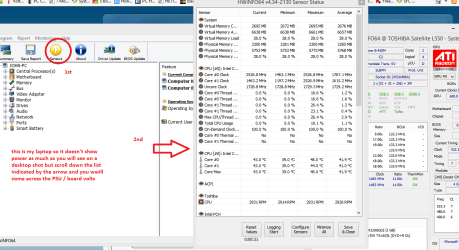
Using HW Info

DownloadHW Info and pick the right bit version - HWiNFO, HWiNFO32/64 - Download -(copy and paste this site into the search bar) If you do not need the runninginformation in the smaller right hand panel close it. In the left hand windowclick on the + for the individual device groupings and they will open out tothe various components.

Goon opening out further until you get to the device itself. click on it and itwill highlight. In the right hand window there will be a very detaileddescription of that device as in brand, speeds model number etc etc These arevery detailed and are just what is needed for searching for drivers etc.

Seemy pic for an example - in this I have shown my power but it is a laptop and a desktop will show more details if you scroll down that listing.
 

Attachments

  • HWINFO-POWER.PNG
    HWINFO-POWER.PNG
    50.5 KB · Views: 1

My Computer My Computer

At a glance

Desk1 7 Home Prem / Desk2 10 Pro / Main lap A...Desk1 i5 3750K / Laptop i7 GTX 860M / Desk2 i...Desk1 8GB (1866) / Desk2 16GB (1333) / Laptop...Desk 1& 2NVidia GTX 650 & Laptops on board Intel
Computer type
PC/Desktop
Computer Manufacturer/Model Number
Own build (new) Desk1 / Asus ROG Win 7 / Desk2 1st build
OS
Desk1 7 Home Prem / Desk2 10 Pro / Main lap Asus ROG 10 Pro 2 laptop Toshiba 7 Pro Asus P2520 7 & 10
CPU
Desk1 i5 3750K / Laptop i7 GTX 860M / Desk2 i5 2500
Motherboard
Desk1 Asus P877-V / Desk2 Gigabyte H67 UD3H / Laptop ?
Memory
Desk1 8GB (1866) / Desk2 16GB (1333) / Laptop 8Gb DDR3
Graphics Card(s)
Desk 1& 2NVidia GTX 650 & Laptops on board Intel
Sound Card
Desk 1 & 2 -XONAR DG Realtek High Def audio Laptop
Monitor(s) Displays
Desk 1 Benq HD 2450 / Desk2 Philips 24" / Laptop 17.5"
Screen Resolution
1920x1080 D1 & D2 & Laptop 1
Hard Drives
Desk1 Samsung 120GB 830 SSD
Asus ROG 256GB 850 Pro SSD
Desk2 Samsung 840 256 SSD
Toshiba 120GB EVO
PSU
Desk 1 Corsair HX 1050/ Laptop ? / Desk 2 Corsair HX 650
Case
Desk 1 Cooler HAF XM ? Toshiba laptop / Desk2 Coolermaster
Cooling
Fans on all Desk1 -2 Desk2 - all Coolermasters 5 Laptop ?
Keyboard
Desk 1 MS Sidewinder X6 Desk 2 MS Sidewinder X 4
Mouse
Desk 1&2 - Gigabyte MS 900 gamer - laptop - Logitec wireless
Internet Speed
ADSL2+
Other Info
One other Desktop (tester) and spare Toshba laptop both with SSD's
Running Kaspersky 2016 ISS on all machines config'd identically
Logitec audio stereo systems on each machine (x3)
Canon MG5250MFC
Router/modem TP-Link running WPA2SK
Hi SteelFighting.

First of all, update the Intel HD graphics driver.
Intel® Iris™ and HD graphics Driver for Windows* 7/8/8.1 64-bit.

Next, uninstall the display driver and Install the NVIDIA DRIVERS 314.22WHQL only.

  • Uninstall All nvidia items in Control Panel > Programs and features
    • 3D Vision Control Driver
    • 3D Vision Driver
    • Graphics Driver
    • HD Audio Driver
    • PhysX
    • nvidia Update
    • GeForce Experience
    (Are you using nvidia chipset drivers? If so, dont uninstall anything other than those are listed).
  • Now follow Drivers - Clean Left over Files after Uninstalling
  • Download 314.22 WHQL. While installing, Select Custom (Advanced) install. In the next page, follow this settings:

Simple uninstallation of the driver and the simple reinstallation will not serve the purpose. Do the entire that is suggested.

You may ask me why I am suggesting such an old driver. Because, almost all the driver version released by nvidia during the last year are somehow unstable. The last known stable version is the 314.22 WHQL. So it is important to know how the computer works with this version, because it never fails for itself only.

Any BSOD in the same line with this version installed will lead us to a conclusion that it is not the driver that is causing the BSODs.

Let us know the result.
 

My Computer My Computer

At a glance

Microsoft Windows 10 Pro Insider Preview 64-bitIntel(R) Core(TM) i3-4130 CPU @ 3.40GHzCorsair Vengence 4GB x2 (8.00GB Dual-Channel ...2047MB GeForce GTS 450 (ZOTAC International)
Computer type
PC/Desktop
Computer Manufacturer/Model Number
Self Assembled
OS
Microsoft Windows 10 Pro Insider Preview 64-bit
CPU
Intel(R) Core(TM) i3-4130 CPU @ 3.40GHz
Motherboard
Gigabyte Technology Co., Ltd. B85M-D3H
Memory
Corsair Vengence 4GB x2 (8.00GB Dual-Channel DDR3 @ 798MHz)
Graphics Card(s)
2047MB GeForce GTS 450 (ZOTAC International)
Sound Card
Onboard (Realtek High Definition Audio)
Monitor(s) Displays
LG Flatron E2040T
Screen Resolution
1600x900
Hard Drives
Western Digital 1 TB
Seagate 500 GB
PSU
Corsair VS550
Case
Cooler Master K380
Cooling
Cooler Master Seidon 120V Plus
Keyboard
Logitech MK260r
Mouse
Logitech MK260r
Internet Speed
PMPL Broadband
Antivirus
Windows Defender + MBAM
Browser
Firefox
Other Info
Dell Studio 15" Laptop
It may help to have an updated BSOD log run. Everything in the current files ends nearly 10 days ago.

With that said; In addition to what Arch has proposed, uninstall LogMeIn before reinstalling your drivers. If you MUST use this software, check for an update and install it AFTER you have established a stable system with the video drivers.

Also, your laptop is overheating. There are multiple throttling events logged indicating the processors are reaching critical temperatures and shutting down. A good cleaning of the interior and verifying the fan is functional is suggested.

There's also a few questionable activities occurring. These MAY be ok but they merit a review.

Below is a condensed extraction from the syslog.

Code:
Event[54795]:
    Description: 
[B]The master browser has received a server announcement from the computer Ê¿ÓÔÁò-PC that believes that it is the master browser for the domain on transport NetBT_Tcpip_{93EACEB5-438D-4F3C-8430-3FDF96774E2C}. The master browser is stopping or an election is being forced.[/B]
Event[55408]:
    Description: 
Processor 0 in group 0 exposes the following:
3 idle state(s)
14 performance state(s)
[B]8 throttle state(s)[/B]
Event[55409]:
    Description: 
Processor 1 in group 0 exposes the following:
3 idle state(s)
14 performance state(s)
[B]8 throttle state(s)[/B]
Event[55410]:
    Description: 
Processor 2 in group 0 exposes the following:
3 idle state(s)
14 performance state(s)
[B]8 throttle state(s)[/B]
Event[55411]:
    Description: 
Processor 3 in group 0 exposes the following:
3 idle state(s)
14 performance state(s)
[B]8 throttle state(s)[/B]

Event[55493]:
    Description: 
[B]Custom dynamic link libraries are being loaded for every application.[/B] The system administrator should review the list of libraries to ensure they are related to trusted applications.
Event[55510]:
   Description: 
[B]The application-specific permission settings do not grant Local Launch permission for the COM Server[/B] application with CLSID 
{C97FCC79-E628-407D-AE68-A06AD6D8B4D1}
 and APPID 
{344ED43D-D086-4961-86A6-1106F4ACAD9B}
 to the user NT AUTHORITY\SYSTEM SID (S-1-5-18) from address LocalHost (Using LRPC). This security permission can be modified using the Component Services administrative tool.
 

My Computer My Computer

At a glance

Windows 7 Pro-x64i7-2600 3.4GHz - 3.8GHz Turbo8Gb - 2x4GB, Muskin 991770 PC3-1333Integrated Intel HD 2000
Computer type
PC/Desktop
Computer Manufacturer/Model Number
Built 2/11/2011
OS
Windows 7 Pro-x64
CPU
i7-2600 3.4GHz - 3.8GHz Turbo
Motherboard
Intel DH67BL-B3
Memory
8Gb - 2x4GB, Muskin 991770 PC3-1333
Graphics Card(s)
Integrated Intel HD 2000
Sound Card
Integrated Intel 10.1 HD, RealTek ALC892
Monitor(s) Displays
Asus LCD VH222H, Haier HL24XSL2a
Screen Resolution
1920x1080, 1920x1080
Hard Drives
Crucial SSD C300-128Gb,
Western Digital WD5002AALX - 500Gb,
Western Digital WD7501AALS - 750Gb
PSU
Seasonic 650W 80+ Gold Modular
Case
Rosewill Defender
Cooling
Stock CPU, Four 120mm case fans, PCH fan added
Keyboard
Logitech EX100 Y-RBH94 Wireless
Mouse
Logitech EX100 M-RCE95 Wireless
Internet Speed
3.0/1.5 Mbs
Antivirus
Microsoft Security Essentials
Browser
Microsoft Internet Explorer 11
Other Info
Antec Veris Premier-Multimedia IR Station,
Cyber Accoustics-3602 Speakers,
AFT XM-5U Card Reader,
Hauppauge TV-HVR-2250,
Sony LX300 USB Turntable
Hi everybody and thank you all so much for helping me! :party:
Now:
1) ICit2lol, thanks for your advice but FurMark cannot "see" any other GPU except the Intel one. :( As for my PSU, I run a laptop :) So I don't know if it would be of any use any information that would arise from HW Info.

2) Arc, I had already updated my Intel HD Graphics Driver without any problems at all and works like a charm (thank God, at least I have that). I followed everything as instructed, including the proposal of carwiz regarding LogMeIn. Unfortunately, simply uninstalling that program WON'T uninstall the mirror driver. I have had some problems in the past (with another laptop) with this bug of a driver and had to disable it (and keep it that way) so I wouldn't get any freezes or BSOD's (which started to occur at some point). I went on and uninstalled manually through the device manager, after I had uninstalled the program itself of course.

3) DDU worked great in safe mode (it urged me to boot in it), everything looked fine. The only thing that troubled me after rebooting in normal mode is that Windows didn't recognize (as they did WITHOUT running DDU during my first tries guided by Boozad) my GPU as "NVIDIA GeForce GT 635M" but as a "Standard VGA Graphics Adapter". I suppose it has something to do with DDU.
Note: Windows, before running DDU, were always installing the 334.89 driver (just the driver, no PhysX, no Virtual Audio, etc.) and urged me to restart but I always went on with the installation of the NVIDIA package and then restarted.

4) I was really hoping to get a BSOD, just to make a case, by loading a game but I got Code 43 again on the card, both online and offline. So no BSOD's or freezes or crashes since everything's ran by my poor Intel HD at the moment :( .

5) carwiz, as for the overheating, fan is running properly but the truth is that it unleashes winds straight from the fiery depths of Moria. I will uncover and suck up any dust with the vacuum cleaner. As for the questionable activities you mention, I really don't understand (except the throttle states that you have already explained to me :) ) what the other mean.
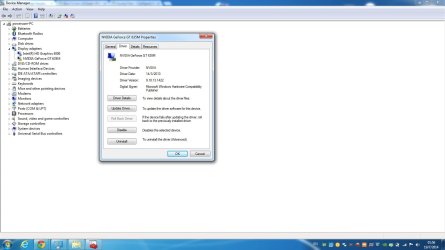
I ran a fresh dm log collector and attached it. I have also attached a thumbnail with the driver tab of the GT 635M properties, just in case. The General tab is as usual...

 

Attachments

My Computer My Computer

At a glance

Windows 7 Ultimate x64Intel Core i5-4200M @ 2.50GHz8,00 GB Dual Channel DDR3 @ 800MHzNvidia GeForce GT 745M
Computer type
Laptop
Computer Manufacturer/Model Number
Lenovo IDEAPAD Z710 59407652 17.3''
OS
Windows 7 Ultimate x64
CPU
Intel Core i5-4200M @ 2.50GHz
Motherboard
Intel HM86 (Lynx Point)
Memory
8,00 GB Dual Channel DDR3 @ 800MHz
Graphics Card(s)
Nvidia GeForce GT 745M
Screen Resolution
1600 x 900
Hard Drives
Samsung SSD 850 EVO 250GB
Cooling
Cooler Master Notepal Ergostand
Mouse
Roccat Kova[+]
Antivirus
Avast! Free Antivirus
Browser
Google Chrome
My mistake Steel was assuming it was a desktop:o Even so check out the adaptor mate it should be around 19v if well below then it is going south or if it is really hot to the touch.
 

My Computer My Computer

At a glance

Desk1 7 Home Prem / Desk2 10 Pro / Main lap A...Desk1 i5 3750K / Laptop i7 GTX 860M / Desk2 i...Desk1 8GB (1866) / Desk2 16GB (1333) / Laptop...Desk 1& 2NVidia GTX 650 & Laptops on board Intel
Computer type
PC/Desktop
Computer Manufacturer/Model Number
Own build (new) Desk1 / Asus ROG Win 7 / Desk2 1st build
OS
Desk1 7 Home Prem / Desk2 10 Pro / Main lap Asus ROG 10 Pro 2 laptop Toshiba 7 Pro Asus P2520 7 & 10
CPU
Desk1 i5 3750K / Laptop i7 GTX 860M / Desk2 i5 2500
Motherboard
Desk1 Asus P877-V / Desk2 Gigabyte H67 UD3H / Laptop ?
Memory
Desk1 8GB (1866) / Desk2 16GB (1333) / Laptop 8Gb DDR3
Graphics Card(s)
Desk 1& 2NVidia GTX 650 & Laptops on board Intel
Sound Card
Desk 1 & 2 -XONAR DG Realtek High Def audio Laptop
Monitor(s) Displays
Desk 1 Benq HD 2450 / Desk2 Philips 24" / Laptop 17.5"
Screen Resolution
1920x1080 D1 & D2 & Laptop 1
Hard Drives
Desk1 Samsung 120GB 830 SSD
Asus ROG 256GB 850 Pro SSD
Desk2 Samsung 840 256 SSD
Toshiba 120GB EVO
PSU
Desk 1 Corsair HX 1050/ Laptop ? / Desk 2 Corsair HX 650
Case
Desk 1 Cooler HAF XM ? Toshiba laptop / Desk2 Coolermaster
Cooling
Fans on all Desk1 -2 Desk2 - all Coolermasters 5 Laptop ?
Keyboard
Desk 1 MS Sidewinder X6 Desk 2 MS Sidewinder X 4
Mouse
Desk 1&2 - Gigabyte MS 900 gamer - laptop - Logitec wireless
Internet Speed
ADSL2+
Other Info
One other Desktop (tester) and spare Toshba laptop both with SSD's
Running Kaspersky 2016 ISS on all machines config'd identically
Logitec audio stereo systems on each machine (x3)
Canon MG5250MFC
Router/modem TP-Link running WPA2SK
The adaptor is 20V and 90W but it is not so hot to touch since I've got an energy management program called "Lenovo Energy Management 7.0" that keeps the battery charged at 60% and does not let the adaptor continuously charging the battery to ruin it.
 

My Computer My Computer

At a glance

Windows 7 Ultimate x64Intel Core i5-4200M @ 2.50GHz8,00 GB Dual Channel DDR3 @ 800MHzNvidia GeForce GT 745M
Computer type
Laptop
Computer Manufacturer/Model Number
Lenovo IDEAPAD Z710 59407652 17.3''
OS
Windows 7 Ultimate x64
CPU
Intel Core i5-4200M @ 2.50GHz
Motherboard
Intel HM86 (Lynx Point)
Memory
8,00 GB Dual Channel DDR3 @ 800MHz
Graphics Card(s)
Nvidia GeForce GT 745M
Screen Resolution
1600 x 900
Hard Drives
Samsung SSD 850 EVO 250GB
Cooling
Cooler Master Notepal Ergostand
Mouse
Roccat Kova[+]
Antivirus
Avast! Free Antivirus
Browser
Google Chrome
Yep you are right see this quite easily understood link The care and feeding of Li-Ion batteries - TechRepublic

There are more but the gist is in this one. My comment was really to see what the voltage was being accessed at the adaptor as a low reading might well have explained a few things.
 

My Computer My Computer

At a glance

Desk1 7 Home Prem / Desk2 10 Pro / Main lap A...Desk1 i5 3750K / Laptop i7 GTX 860M / Desk2 i...Desk1 8GB (1866) / Desk2 16GB (1333) / Laptop...Desk 1& 2NVidia GTX 650 & Laptops on board Intel
Computer type
PC/Desktop
Computer Manufacturer/Model Number
Own build (new) Desk1 / Asus ROG Win 7 / Desk2 1st build
OS
Desk1 7 Home Prem / Desk2 10 Pro / Main lap Asus ROG 10 Pro 2 laptop Toshiba 7 Pro Asus P2520 7 & 10
CPU
Desk1 i5 3750K / Laptop i7 GTX 860M / Desk2 i5 2500
Motherboard
Desk1 Asus P877-V / Desk2 Gigabyte H67 UD3H / Laptop ?
Memory
Desk1 8GB (1866) / Desk2 16GB (1333) / Laptop 8Gb DDR3
Graphics Card(s)
Desk 1& 2NVidia GTX 650 & Laptops on board Intel
Sound Card
Desk 1 & 2 -XONAR DG Realtek High Def audio Laptop
Monitor(s) Displays
Desk 1 Benq HD 2450 / Desk2 Philips 24" / Laptop 17.5"
Screen Resolution
1920x1080 D1 & D2 & Laptop 1
Hard Drives
Desk1 Samsung 120GB 830 SSD
Asus ROG 256GB 850 Pro SSD
Desk2 Samsung 840 256 SSD
Toshiba 120GB EVO
PSU
Desk 1 Corsair HX 1050/ Laptop ? / Desk 2 Corsair HX 650
Case
Desk 1 Cooler HAF XM ? Toshiba laptop / Desk2 Coolermaster
Cooling
Fans on all Desk1 -2 Desk2 - all Coolermasters 5 Laptop ?
Keyboard
Desk 1 MS Sidewinder X6 Desk 2 MS Sidewinder X 4
Mouse
Desk 1&2 - Gigabyte MS 900 gamer - laptop - Logitec wireless
Internet Speed
ADSL2+
Other Info
One other Desktop (tester) and spare Toshba laptop both with SSD's
Running Kaspersky 2016 ISS on all machines config'd identically
Logitec audio stereo systems on each machine (x3)
Canon MG5250MFC
Router/modem TP-Link running WPA2SK
Hi Steel. :)

Good to know that you are not having any BSOD right now, after applying the suggested drivers.

So now we can go for a further troubleshooting. To those things that John (ICit2lol) suggested. You need to stress test the dedicated GPU, but you cannot, as the GPU switch works only for some certain cases like gaming etc. Furmark is not supposed to switch the GPU from the integrated one to the dedicated one at its own. It will test the active/primary GPU (that is the integrated one) only.

So what now? Let us use the dedicated GPU as the primary one. Follow the video below:


Now you car run furmark on the dedicated nvidia GPU, as John suggested.
Stress test the Graphics Card using Furmark.
Video Card - Stress Test with Furmark

This test will make it certain whether the GPU is failing there or not.

Let us know the result. :)
 

My Computer My Computer

At a glance

Microsoft Windows 10 Pro Insider Preview 64-bitIntel(R) Core(TM) i3-4130 CPU @ 3.40GHzCorsair Vengence 4GB x2 (8.00GB Dual-Channel ...2047MB GeForce GTS 450 (ZOTAC International)
Computer type
PC/Desktop
Computer Manufacturer/Model Number
Self Assembled
OS
Microsoft Windows 10 Pro Insider Preview 64-bit
CPU
Intel(R) Core(TM) i3-4130 CPU @ 3.40GHz
Motherboard
Gigabyte Technology Co., Ltd. B85M-D3H
Memory
Corsair Vengence 4GB x2 (8.00GB Dual-Channel DDR3 @ 798MHz)
Graphics Card(s)
2047MB GeForce GTS 450 (ZOTAC International)
Sound Card
Onboard (Realtek High Definition Audio)
Monitor(s) Displays
LG Flatron E2040T
Screen Resolution
1600x900
Hard Drives
Western Digital 1 TB
Seagate 500 GB
PSU
Corsair VS550
Case
Cooler Master K380
Cooling
Cooler Master Seidon 120V Plus
Keyboard
Logitech MK260r
Mouse
Logitech MK260r
Internet Speed
PMPL Broadband
Antivirus
Windows Defender + MBAM
Browser
Firefox
Other Info
Dell Studio 15" Laptop
Hi everybody.

When I try to open the Nvidia Control Panel I get the message below. It seems logical since the GT 635M has a code 43 and "Windows has stopped this device because it has reported problems"...
Then, through BIOS, I have two options:
a) run only on the integrated Intel HD or
b) run on switchable graphics, Intel HD while I'm e.g. on desktop, working on Office and Nvidia GT 635M when I'm plugging an HDMI cable, playing games, etc.
So I'm out of options on making the GT 635M to work...
 

Attachments

  • Nvidia Control Panel.jpg
    Nvidia Control Panel.jpg
    136.2 KB · Views: 3

My Computer My Computer

At a glance

Windows 7 Ultimate x64Intel Core i5-4200M @ 2.50GHz8,00 GB Dual Channel DDR3 @ 800MHzNvidia GeForce GT 745M
Computer type
Laptop
Computer Manufacturer/Model Number
Lenovo IDEAPAD Z710 59407652 17.3''
OS
Windows 7 Ultimate x64
CPU
Intel Core i5-4200M @ 2.50GHz
Motherboard
Intel HM86 (Lynx Point)
Memory
8,00 GB Dual Channel DDR3 @ 800MHz
Graphics Card(s)
Nvidia GeForce GT 745M
Screen Resolution
1600 x 900
Hard Drives
Samsung SSD 850 EVO 250GB
Cooling
Cooler Master Notepal Ergostand
Mouse
Roccat Kova[+]
Antivirus
Avast! Free Antivirus
Browser
Google Chrome

My Computer My Computer

At a glance

Desk1 7 Home Prem / Desk2 10 Pro / Main lap A...Desk1 i5 3750K / Laptop i7 GTX 860M / Desk2 i...Desk1 8GB (1866) / Desk2 16GB (1333) / Laptop...Desk 1& 2NVidia GTX 650 & Laptops on board Intel
Computer type
PC/Desktop
Computer Manufacturer/Model Number
Own build (new) Desk1 / Asus ROG Win 7 / Desk2 1st build
OS
Desk1 7 Home Prem / Desk2 10 Pro / Main lap Asus ROG 10 Pro 2 laptop Toshiba 7 Pro Asus P2520 7 & 10
CPU
Desk1 i5 3750K / Laptop i7 GTX 860M / Desk2 i5 2500
Motherboard
Desk1 Asus P877-V / Desk2 Gigabyte H67 UD3H / Laptop ?
Memory
Desk1 8GB (1866) / Desk2 16GB (1333) / Laptop 8Gb DDR3
Graphics Card(s)
Desk 1& 2NVidia GTX 650 & Laptops on board Intel
Sound Card
Desk 1 & 2 -XONAR DG Realtek High Def audio Laptop
Monitor(s) Displays
Desk 1 Benq HD 2450 / Desk2 Philips 24" / Laptop 17.5"
Screen Resolution
1920x1080 D1 & D2 & Laptop 1
Hard Drives
Desk1 Samsung 120GB 830 SSD
Asus ROG 256GB 850 Pro SSD
Desk2 Samsung 840 256 SSD
Toshiba 120GB EVO
PSU
Desk 1 Corsair HX 1050/ Laptop ? / Desk 2 Corsair HX 650
Case
Desk 1 Cooler HAF XM ? Toshiba laptop / Desk2 Coolermaster
Cooling
Fans on all Desk1 -2 Desk2 - all Coolermasters 5 Laptop ?
Keyboard
Desk 1 MS Sidewinder X6 Desk 2 MS Sidewinder X 4
Mouse
Desk 1&2 - Gigabyte MS 900 gamer - laptop - Logitec wireless
Internet Speed
ADSL2+
Other Info
One other Desktop (tester) and spare Toshba laptop both with SSD's
Running Kaspersky 2016 ISS on all machines config'd identically
Logitec audio stereo systems on each machine (x3)
Canon MG5250MFC
Router/modem TP-Link running WPA2SK
Hello and sorry for my late response.
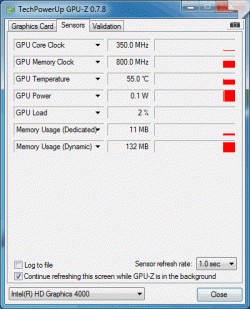
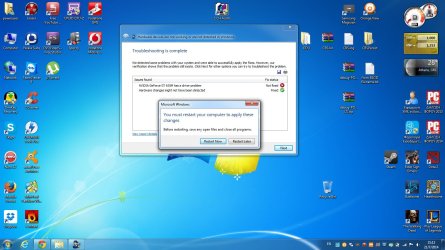
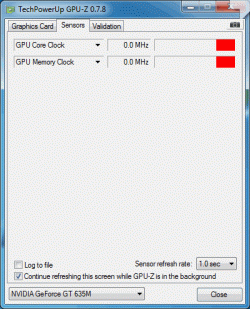
So, here are the screenshots of GPU-Z on both graphic cards and after running the Microsoft Fix.
As you can see, GPU-Z "sees" my GT 635M but there are no readings for it. Seems logical, since, after restarting as the Microsoft Fix suggested, I am still getting Code 43 and the usual yellow exclamation mark on my card. The readings on the Intel HD 4000 appear as they should be (frequencies, temp, etc.)
 

Attachments

  • GT 635M.gif
    GT 635M.gif
    14.7 KB · Views: 10
  • Intel HD 4000.gif
    Intel HD 4000.gif
    16.9 KB · Views: 10
  • Hardware devices are not working.jpg
    Hardware devices are not working.jpg
    153.8 KB · Views: 1

My Computer My Computer

At a glance

Windows 7 Ultimate x64Intel Core i5-4200M @ 2.50GHz8,00 GB Dual Channel DDR3 @ 800MHzNvidia GeForce GT 745M
Computer type
Laptop
Computer Manufacturer/Model Number
Lenovo IDEAPAD Z710 59407652 17.3''
OS
Windows 7 Ultimate x64
CPU
Intel Core i5-4200M @ 2.50GHz
Motherboard
Intel HM86 (Lynx Point)
Memory
8,00 GB Dual Channel DDR3 @ 800MHz
Graphics Card(s)
Nvidia GeForce GT 745M
Screen Resolution
1600 x 900
Hard Drives
Samsung SSD 850 EVO 250GB
Cooling
Cooler Master Notepal Ergostand
Mouse
Roccat Kova[+]
Antivirus
Avast! Free Antivirus
Browser
Google Chrome
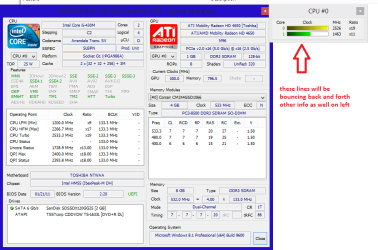
Hmm without going right back through the thread as it is late here try this - in the right hand panel you will se the data readout on the card and what is happening.

Using HW Info general components

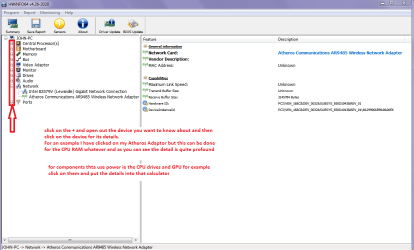
DownloadHW Info and pick the right bit version - HWiNFO, HWiNFO32/64 - Download - (copy andpaste this site into the search bar) If you do not need the running informationin the smaller right hand panel close it. In the left hand window click on the+ for the individual device groupings and they will open out to the variouscomponents.

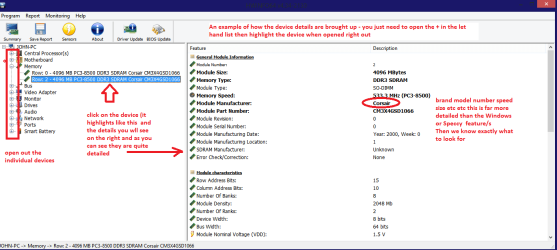
Goon opening out further until you get to the device itself. click on it and itwill highlight. In the right hand window there will be a very detaileddescription of that device as in brand, speeds model number etc etc These arevery detailed and are just what is needed for searching for drivers etc.

Seemy pic for an example - in this I have opened out my memory and thenhighlighted one of the sticks and you can see the detail.
But before you shut down that right hand panel on the right of it is the GPU stuff.
 

Attachments

  • HW INFO CORES.PNG
    HW INFO CORES.PNG
    30.3 KB · Views: 0
  • HW INFO DEVICES.PNG
    HW INFO DEVICES.PNG
    32.3 KB · Views: 0
  • HW DEVICES INFO  RAM.PNG
    HW DEVICES INFO RAM.PNG
    34.2 KB · Views: 0

My Computer My Computer

At a glance

Desk1 7 Home Prem / Desk2 10 Pro / Main lap A...Desk1 i5 3750K / Laptop i7 GTX 860M / Desk2 i...Desk1 8GB (1866) / Desk2 16GB (1333) / Laptop...Desk 1& 2NVidia GTX 650 & Laptops on board Intel
Computer type
PC/Desktop
Computer Manufacturer/Model Number
Own build (new) Desk1 / Asus ROG Win 7 / Desk2 1st build
OS
Desk1 7 Home Prem / Desk2 10 Pro / Main lap Asus ROG 10 Pro 2 laptop Toshiba 7 Pro Asus P2520 7 & 10
CPU
Desk1 i5 3750K / Laptop i7 GTX 860M / Desk2 i5 2500
Motherboard
Desk1 Asus P877-V / Desk2 Gigabyte H67 UD3H / Laptop ?
Memory
Desk1 8GB (1866) / Desk2 16GB (1333) / Laptop 8Gb DDR3
Graphics Card(s)
Desk 1& 2NVidia GTX 650 & Laptops on board Intel
Sound Card
Desk 1 & 2 -XONAR DG Realtek High Def audio Laptop
Monitor(s) Displays
Desk 1 Benq HD 2450 / Desk2 Philips 24" / Laptop 17.5"
Screen Resolution
1920x1080 D1 & D2 & Laptop 1
Hard Drives
Desk1 Samsung 120GB 830 SSD
Asus ROG 256GB 850 Pro SSD
Desk2 Samsung 840 256 SSD
Toshiba 120GB EVO
PSU
Desk 1 Corsair HX 1050/ Laptop ? / Desk 2 Corsair HX 650
Case
Desk 1 Cooler HAF XM ? Toshiba laptop / Desk2 Coolermaster
Cooling
Fans on all Desk1 -2 Desk2 - all Coolermasters 5 Laptop ?
Keyboard
Desk 1 MS Sidewinder X6 Desk 2 MS Sidewinder X 4
Mouse
Desk 1&2 - Gigabyte MS 900 gamer - laptop - Logitec wireless
Internet Speed
ADSL2+
Other Info
One other Desktop (tester) and spare Toshba laptop both with SSD's
Running Kaspersky 2016 ISS on all machines config'd identically
Logitec audio stereo systems on each machine (x3)
Canon MG5250MFC
Router/modem TP-Link running WPA2SK
Thank you ICit2lol for your quick response.
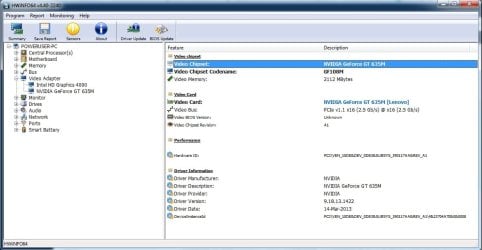
Here are the screenshots of HWiNFO, regarding GT 635M.
 

Attachments

  • GPU.jpg
    GPU.jpg
    80.8 KB · Views: 10
  • GPU details.jpg
    GPU details.jpg
    68.6 KB · Views: 0

My Computer My Computer

At a glance

Windows 7 Ultimate x64Intel Core i5-4200M @ 2.50GHz8,00 GB Dual Channel DDR3 @ 800MHzNvidia GeForce GT 745M
Computer type
Laptop
Computer Manufacturer/Model Number
Lenovo IDEAPAD Z710 59407652 17.3''
OS
Windows 7 Ultimate x64
CPU
Intel Core i5-4200M @ 2.50GHz
Motherboard
Intel HM86 (Lynx Point)
Memory
8,00 GB Dual Channel DDR3 @ 800MHz
Graphics Card(s)
Nvidia GeForce GT 745M
Screen Resolution
1600 x 900
Hard Drives
Samsung SSD 850 EVO 250GB
Cooling
Cooler Master Notepal Ergostand
Mouse
Roccat Kova[+]
Antivirus
Avast! Free Antivirus
Browser
Google Chrome
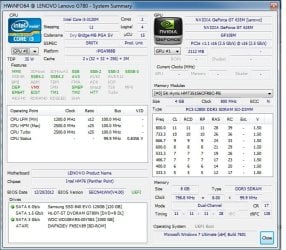
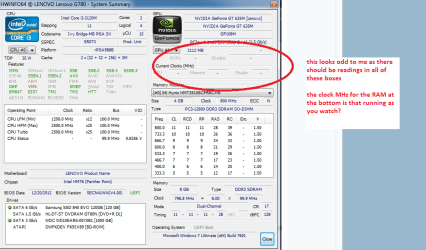
Thanks for the pics now look at the one I have sent and see what I have asked for as there should be figures in all of the top boxes and I am wondering at what speed the RAM is running at if it is showing a real time figure at all.
 

Attachments

  • GPU HW INFO.PNG
    GPU HW INFO.PNG
    150.3 KB · Views: 0

My Computer My Computer

At a glance

Desk1 7 Home Prem / Desk2 10 Pro / Main lap A...Desk1 i5 3750K / Laptop i7 GTX 860M / Desk2 i...Desk1 8GB (1866) / Desk2 16GB (1333) / Laptop...Desk 1& 2NVidia GTX 650 & Laptops on board Intel
Computer type
PC/Desktop
Computer Manufacturer/Model Number
Own build (new) Desk1 / Asus ROG Win 7 / Desk2 1st build
OS
Desk1 7 Home Prem / Desk2 10 Pro / Main lap Asus ROG 10 Pro 2 laptop Toshiba 7 Pro Asus P2520 7 & 10
CPU
Desk1 i5 3750K / Laptop i7 GTX 860M / Desk2 i5 2500
Motherboard
Desk1 Asus P877-V / Desk2 Gigabyte H67 UD3H / Laptop ?
Memory
Desk1 8GB (1866) / Desk2 16GB (1333) / Laptop 8Gb DDR3
Graphics Card(s)
Desk 1& 2NVidia GTX 650 & Laptops on board Intel
Sound Card
Desk 1 & 2 -XONAR DG Realtek High Def audio Laptop
Monitor(s) Displays
Desk 1 Benq HD 2450 / Desk2 Philips 24" / Laptop 17.5"
Screen Resolution
1920x1080 D1 & D2 & Laptop 1
Hard Drives
Desk1 Samsung 120GB 830 SSD
Asus ROG 256GB 850 Pro SSD
Desk2 Samsung 840 256 SSD
Toshiba 120GB EVO
PSU
Desk 1 Corsair HX 1050/ Laptop ? / Desk 2 Corsair HX 650
Case
Desk 1 Cooler HAF XM ? Toshiba laptop / Desk2 Coolermaster
Cooling
Fans on all Desk1 -2 Desk2 - all Coolermasters 5 Laptop ?
Keyboard
Desk 1 MS Sidewinder X6 Desk 2 MS Sidewinder X 4
Mouse
Desk 1&2 - Gigabyte MS 900 gamer - laptop - Logitec wireless
Internet Speed
ADSL2+
Other Info
One other Desktop (tester) and spare Toshba laptop both with SSD's
Running Kaspersky 2016 ISS on all machines config'd identically
Logitec audio stereo systems on each machine (x3)
Canon MG5250MFC
Router/modem TP-Link running WPA2SK
Back
Top