BSOD during gameplay

BlackArrow

New member
Local time
12:07 AM
Messages
7
Hi there,


I've been having BSOD for the past hour or so on the PC from my System Specs that you can see, it happens randomy during Fortnite gameplay, and only there, everything else is working just fine, I've followed the instructions from the "Windows 7: Blue Screen of Death (BSOD) Posting Instructions", please see the attachment, it's from the "DM Log Collector".


I haven't tried it with other games, and it's a fresh installation of Windows 7 Ultimate, and this started from the moment I've started the game for the first time on this new Windows installation, I've had it installed on the previous Windows 7 Ultimate on the same computer setup, and it was working wihtout a problem.


If you need any additional info, I'll provide it.


Thanks in advance.
 

My Computer

Computer type
PC/Desktop
OS
Windows 7 Ultimate x64
CPU
Intel Ivy Bridge i7-3770K
Motherboard
Asus P8Z77-V LE
Memory
32GB (4x8GB) Samsung DDR3
Graphics Card(s)
Gigabyte Aorus GeForce GTX 1060 Xtreme Edition 6G (rev. 2.0)
Monitor(s) Displays
Dell U2412M
Screen Resolution
1920x1200
Hard Drives
SSD: Samsung 850 Pro 256GB
HDD: Western Digital 2TB WD20EZRX
PSU
Cooler Master Silent Pro M2 620
Case
Cooler Master Silencio 550
Cooling
DeepCool Gammaxx GTE V2
Keyboard
Logitech Cordless Desktop EX110
Mouse
Logitech V550 Nano
Antivirus
Avast Free Antivirus
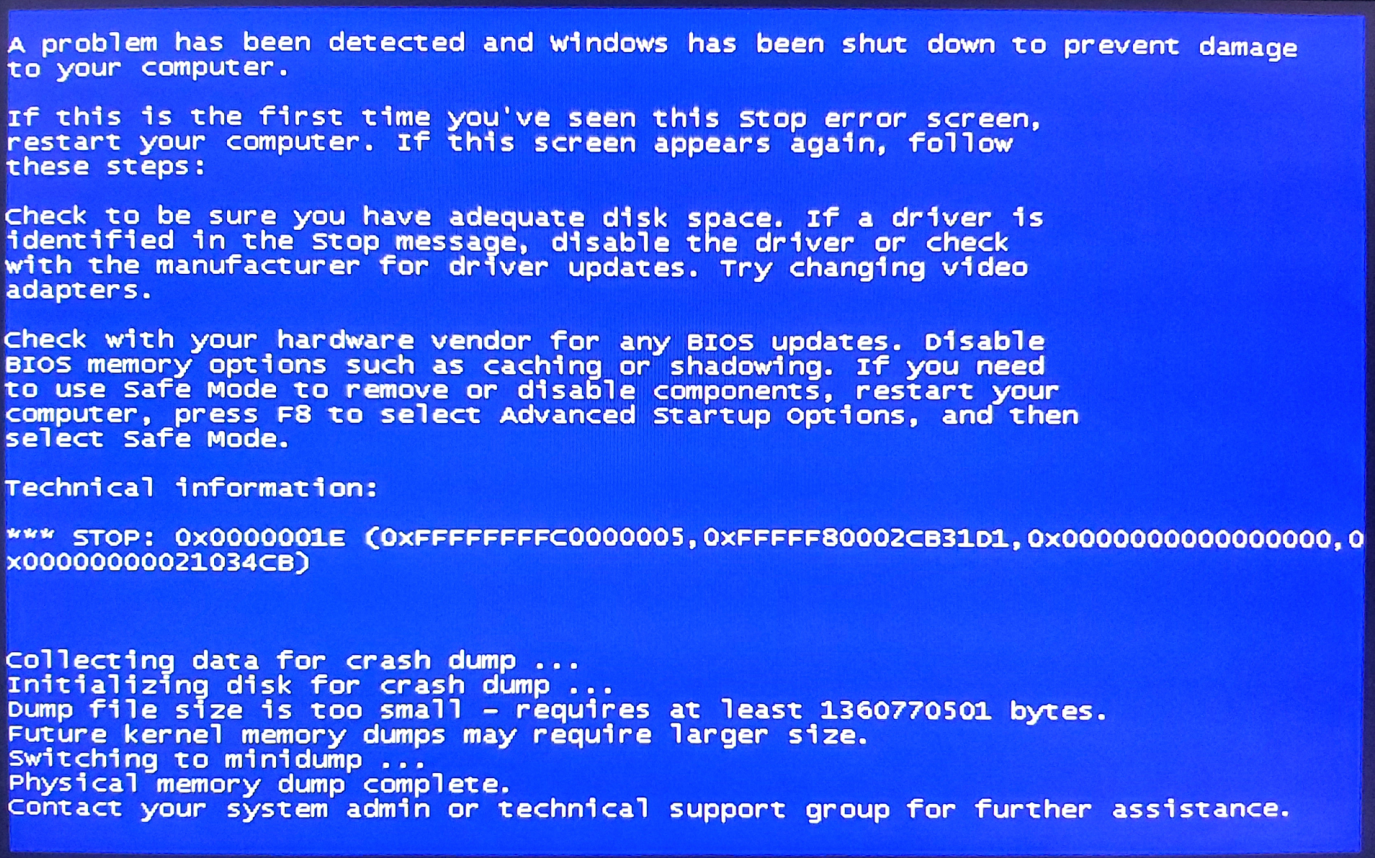
Here is some additional info if it helps, the actual BSOD is exactly the same every single time, only the last value in the brackets is different, that's why I've attached only one image of it... Also, when it gets the BSOD, the sound is stuck, like part of a second of the sound stuck in a loop... Here are the images:

mhTiW3U.png


2mdQIXa.png
 
Last edited:

My Computer

Computer type
PC/Desktop
OS
Windows 7 Ultimate x64
CPU
Intel Ivy Bridge i7-3770K
Motherboard
Asus P8Z77-V LE
Memory
32GB (4x8GB) Samsung DDR3
Graphics Card(s)
Gigabyte Aorus GeForce GTX 1060 Xtreme Edition 6G (rev. 2.0)
Monitor(s) Displays
Dell U2412M
Screen Resolution
1920x1200
Hard Drives
SSD: Samsung 850 Pro 256GB
HDD: Western Digital 2TB WD20EZRX
PSU
Cooler Master Silent Pro M2 620
Case
Cooler Master Silencio 550
Cooling
DeepCool Gammaxx GTE V2
Keyboard
Logitech Cordless Desktop EX110
Mouse
Logitech V550 Nano
Antivirus
Avast Free Antivirus
Hi John,

it would appear your installation is non-genuine
Retail motherboard with an OEM product key

forum rules dictate that no help can be provide in these cases.


Roy
 

My Computer

Computer type
PC/Desktop
Computer Manufacturer/Model Number
medionl/Aspire 6930G/acer x55a
OS
W7 home premium 32bit/W7HP 64bit/w10 tp insider ring
CPU
E5300 dual core
Motherboard
medion MS7366
Memory
3gb
Graphics Card(s)
Nvidia Geforce 7100 Nforce 630i
Monitor(s) Displays
avixc
Internet Speed
n (isp resticted to 72)
Antivirus
mse/pands
Browser
palemoon
Other Info
Belkin Fd7050 n USB using Railink RT2870 drivers, more upto date
Hi Roy,

Thanks for your reply.

The thing is that before posting this, I've tried couple of installations of Windows, trying to figure out what's the issue with the BSOD, and in order to avoid calling the local Microsoft support to help me out with the activation every time I reinstall it, I've decided to activate it the other way around until I figure out what's the issue, and when I get what's the issue, I'll reinstall it again, and activate it with my product key with help with the local Microsoft support. I did the exact same thing the last time I had other issues with BSOD.

If the activation is the issue for helping out, I can make the Windows trial again, and reattach the info from the "DM Log Collector", so will this be ok?

Thanks.
 

My Computer

Computer type
PC/Desktop
OS
Windows 7 Ultimate x64
CPU
Intel Ivy Bridge i7-3770K
Motherboard
Asus P8Z77-V LE
Memory
32GB (4x8GB) Samsung DDR3
Graphics Card(s)
Gigabyte Aorus GeForce GTX 1060 Xtreme Edition 6G (rev. 2.0)
Monitor(s) Displays
Dell U2412M
Screen Resolution
1920x1200
Hard Drives
SSD: Samsung 850 Pro 256GB
HDD: Western Digital 2TB WD20EZRX
PSU
Cooler Master Silent Pro M2 620
Case
Cooler Master Silencio 550
Cooling
DeepCool Gammaxx GTE V2
Keyboard
Logitech Cordless Desktop EX110
Mouse
Logitech V550 Nano
Antivirus
Avast Free Antivirus
Hii

Trialing and debugging w7 before activation, is not a problem.....


however from what i can see

the system has not yet fully updated, including drivers
the use of an activation exploit, carries the risk of also having other malware being included within it,
SO there is absolutely no point in trying to analyse it

And finaly your earlier BSOD thread also used the Activation Exploit

GO GENUINE for help

roy
 

My Computer

Computer type
PC/Desktop
Computer Manufacturer/Model Number
medionl/Aspire 6930G/acer x55a
OS
W7 home premium 32bit/W7HP 64bit/w10 tp insider ring
CPU
E5300 dual core
Motherboard
medion MS7366
Memory
3gb
Graphics Card(s)
Nvidia Geforce 7100 Nforce 630i
Monitor(s) Displays
avixc
Internet Speed
n (isp resticted to 72)
Antivirus
mse/pands
Browser
palemoon
Other Info
Belkin Fd7050 n USB using Railink RT2870 drivers, more upto date
Back
Top