Solved BSOD during gameplay.

dreid1011

New member
Local time
12:13 AM
Messages
10
Good evening,

I am also experiencing BSOD during gameplay. It started while I was at a near idle state playing a game, and since then it happens within 30 sec to 5 min of starting the game no matter what I am doing. I have seen errors straight from the game stating there were corrupted files. However, I have both reinstalled the game and repaired it after such errors. It is also not isolated to just this game.

I have tried many things to fix the issue:
Used a restore point
Checked to make sure all my drivers are up to date
Used the Driver Cleaner/Uninstaller for my graphics driver
Ran the Windows memory test and hdd check, both returned no errors
I tried to repair my installation of Windows, but it returned no errors
I flashed my BIOS

I hope the file I have attached provides enough information, my dump files do not exist after July of this year. The BSOD Stop information is:
0x000000F4 0x0000000000000003 0xFFFFFA800AD1B10 0xFFFFFA800AD1DF0 0xFFFFF800031CBE70

I also noticed an I/O error status 0xc000000e
 

My Computer

Computer type
PC/Desktop
Computer Manufacturer/Model Number
custom build
OS
Windows 7 Home Premium 64-bit
CPU
Intel(R) Core(TM) i5-2550K CPU @ 3.40GHz
Motherboard
ASUSTeK Computer INC. P8Z68-V LX Rev X.0x
Memory
8gb
Graphics Card(s)
NVIDIA GeForce GTX 650 Ti
Hard Drives
1TB HDD
Browser
Chrome
looks like your Gamer Mouse with Launch adn OSD Driver, you may have to go to your OEM to get the driver re-installed.
Code:
SYMBOL_NAME:  MS6Filter+4420

FOLLOWUP_NAME:  MachineOwner

MODULE_NAME: MS6Filter

IMAGE_NAME:  [COLOR="Red"]MS6Filter.sys[/COLOR]

DEBUG_FLR_IMAGE_TIMESTAMP:  4e363c6f

STACK_COMMAND:  .cxr 0x6483002824648348 ; kb

FAILURE_BUCKET_ID:  X64_0x1e_c0000046_MS6Filter+4420

BUCKET_ID:  X64_0x1e_c0000046_MS6Filter+4420

Followup: MachineOwner
---------
 

My Computer

Computer type
Laptop
Computer Manufacturer/Model Number
Dell
OS
Windows 7 Enterprise x64
CPU
Intel i5 Dual Core
Screen Resolution
1366x768
Keyboard
built in Keyboard
Antivirus
System Centre Endpoint Protection
Browser
Google Chrome, Firefox and Internet Explorer
I have used the repair option from the driver disk that was supplied with the mouse. I will test and see if the problem persists.

Edit: Now a complete uninstall/reinstall of the mouse software.
 

My Computer

Computer type
PC/Desktop
Computer Manufacturer/Model Number
custom build
OS
Windows 7 Home Premium 64-bit
CPU
Intel(R) Core(TM) i5-2550K CPU @ 3.40GHz
Motherboard
ASUSTeK Computer INC. P8Z68-V LX Rev X.0x
Memory
8gb
Graphics Card(s)
NVIDIA GeForce GTX 650 Ti
Hard Drives
1TB HDD
Browser
Chrome
Latest BSOD info:

KERNEL_DATA_IN PAGE_ERROR

0x0000007A 0xFFFFF6FC400072C0 0xFFFFFFFFC0000056 0x0000000109053860 0xFFFFF88000E58630

Partmgr.sys - Address FFFFF88000E58630 base at FFFFF88000E4A000 Datestamp 4f641bc1

This is after the mouse reinstall and an attempted repair on the game (it returned no repairs needed).

There is also a faint beeping sound coming from the case.
 
Last edited:

My Computer

Computer type
PC/Desktop
Computer Manufacturer/Model Number
custom build
OS
Windows 7 Home Premium 64-bit
CPU
Intel(R) Core(TM) i5-2550K CPU @ 3.40GHz
Motherboard
ASUSTeK Computer INC. P8Z68-V LX Rev X.0x
Memory
8gb
Graphics Card(s)
NVIDIA GeForce GTX 650 Ti
Hard Drives
1TB HDD
Browser
Chrome
Ok, I ran sfc /scannow and chkdsk /r. The results of chkdsk show some read failures. I have attached the .txt below. I will run memtest86+ tonight. Any help is much appreciated.

Update: I just ran SeaTools. The short generic test passed, but long generic failed.
Code:
--------------- SeaTools for Windows v1.4.0.2 ---------------
9/10/2015 5:34:56 PM
Model Number: WDC WD10EALX-009BA0
Serial Number: WD-WCATR9713729
Firmware Revision: 15.01H15
Short Generic - Started 9/10/2015 5:34:56 PM
Short Generic - Pass 9/10/2015 5:36:10 PM
Long Generic - Started 9/10/2015 5:36:21 PM
Long Generic - FAIL 9/10/2015 5:37:08 PM
Short Generic - Started 9/10/2015 5:40:32 PM
Short Generic - Pass 9/10/2015 5:41:46 PM
Long Generic - Started 9/10/2015 5:47:22 PM
Long Generic - FAIL 9/10/2015 5:48:06 PM
 
Last edited:

My Computer

Computer type
PC/Desktop
Computer Manufacturer/Model Number
custom build
OS
Windows 7 Home Premium 64-bit
CPU
Intel(R) Core(TM) i5-2550K CPU @ 3.40GHz
Motherboard
ASUSTeK Computer INC. P8Z68-V LX Rev X.0x
Memory
8gb
Graphics Card(s)
NVIDIA GeForce GTX 650 Ti
Hard Drives
1TB HDD
Browser
Chrome
don't know much about these tests, so i am calling in some extra help from the others.
 

My Computer

Computer type
Laptop
Computer Manufacturer/Model Number
Dell
OS
Windows 7 Enterprise x64
CPU
Intel i5 Dual Core
Screen Resolution
1366x768
Keyboard
built in Keyboard
Antivirus
System Centre Endpoint Protection
Browser
Google Chrome, Firefox and Internet Explorer
Awesome, thanks.

And Memtest86+ 5.01 ran great with 9 passes and no errors. At this point I am thinking my hard drive is done for. I had a BSOD trying to boot it once during all this mess, but that hasn't happened again so far.
 

My Computer

Computer type
PC/Desktop
Computer Manufacturer/Model Number
custom build
OS
Windows 7 Home Premium 64-bit
CPU
Intel(R) Core(TM) i5-2550K CPU @ 3.40GHz
Motherboard
ASUSTeK Computer INC. P8Z68-V LX Rev X.0x
Memory
8gb
Graphics Card(s)
NVIDIA GeForce GTX 650 Ti
Hard Drives
1TB HDD
Browser
Chrome
HDD corruption is one very primary cause of stop 0x000000F4 BSODs. When it is associated with stop 0x0000007A BSODs, it is almost certain that the HDD is causing the BSOD. And when the Seatools Long generic test failed, we can call it is a failing disc for sure.

Unfortunately Seatools (and no other mechanism that I am aware of) cannot attempt to recover the errors of a WD HDD. So there is no chance to get the disk repaired, too.

Replace the HDD. If it is still within warranty, RMA it. Otherwise get a new one.
 

My Computer

Computer type
PC/Desktop
Computer Manufacturer/Model Number
Self Assembled
OS
Microsoft Windows 10 Pro Insider Preview 64-bit
CPU
Intel(R) Core(TM) i3-4130 CPU @ 3.40GHz
Motherboard
Gigabyte Technology Co., Ltd. B85M-D3H
Memory
Corsair Vengence 4GB x2 (8.00GB Dual-Channel DDR3 @ 798MHz)
Graphics Card(s)
2047MB GeForce GTS 450 (ZOTAC International)
Sound Card
Onboard (Realtek High Definition Audio)
Monitor(s) Displays
LG Flatron E2040T
Screen Resolution
1600x900
Hard Drives
Western Digital 1 TB
Seagate 500 GB
PSU
Corsair VS550
Case
Cooler Master K380
Cooling
Cooler Master Seidon 120V Plus
Keyboard
Logitech MK260r
Mouse
Logitech MK260r
Internet Speed
PMPL Broadband
Antivirus
Windows Defender + MBAM
Browser
Firefox
Other Info
Dell Studio 15" Laptop
HDD corruption is one very primary cause of stop 0x000000F4 BSODs. When it is associated with stop 0x0000007A BSODs, it is almost certain that the HDD is causing the BSOD. And when the Seatools Long generic test failed, we can call it is a failing disc for sure.

Unfortunately Seatools (and no other mechanism that I am aware of) cannot attempt to recover the errors of a WD HDD. So there is no chance to get the disk repaired, too.

Replace the HDD. If it is still within warranty, RMA it. Otherwise get a new one.


Thanks for the information and confirming my suspicions. I was planning on a new HDD anyway. What better time than now! I will mark the thread after I install a new HDD.
 

My Computer

Computer type
PC/Desktop
Computer Manufacturer/Model Number
custom build
OS
Windows 7 Home Premium 64-bit
CPU
Intel(R) Core(TM) i5-2550K CPU @ 3.40GHz
Motherboard
ASUSTeK Computer INC. P8Z68-V LX Rev X.0x
Memory
8gb
Graphics Card(s)
NVIDIA GeForce GTX 650 Ti
Hard Drives
1TB HDD
Browser
Chrome

My Computer

Computer type
PC/Desktop
Computer Manufacturer/Model Number
Own build (new) Desk1 / Asus ROG Win 7 / Desk2 1st build
OS
Desk1 7 Home Prem / Desk2 10 Pro / Main lap Asus ROG 10 Pro 2 laptop Toshiba 7 Pro Asus P2520 7 & 10
CPU
Desk1 i5 3750K / Laptop i7 GTX 860M / Desk2 i5 2500
Motherboard
Desk1 Asus P877-V / Desk2 Gigabyte H67 UD3H / Laptop ?
Memory
Desk1 8GB (1866) / Desk2 16GB (1333) / Laptop 8Gb DDR3
Graphics Card(s)
Desk 1& 2NVidia GTX 650 & Laptops on board Intel
Sound Card
Desk 1 & 2 -XONAR DG Realtek High Def audio Laptop
Monitor(s) Displays
Desk 1 Benq HD 2450 / Desk2 Philips 24" / Laptop 17.5"
Screen Resolution
1920x1080 D1 & D2 & Laptop 1
Hard Drives
Desk1 Samsung 120GB 830 SSD
Asus ROG 256GB 850 Pro SSD
Desk2 Samsung 840 256 SSD
Toshiba 120GB EVO
PSU
Desk 1 Corsair HX 1050/ Laptop ? / Desk 2 Corsair HX 650
Case
Desk 1 Cooler HAF XM ? Toshiba laptop / Desk2 Coolermaster
Cooling
Fans on all Desk1 -2 Desk2 - all Coolermasters 5 Laptop ?
Keyboard
Desk 1 MS Sidewinder X6 Desk 2 MS Sidewinder X 4
Mouse
Desk 1&2 - Gigabyte MS 900 gamer - laptop - Logitec wireless
Internet Speed
ADSL2+
Other Info
One other Desktop (tester) and spare Toshba laptop both with SSD's
Running Kaspersky 2016 ISS on all machines config'd identically
Logitec audio stereo systems on each machine (x3)
Canon MG5250MFC
Router/modem TP-Link running WPA2SK
I'll give that a run just for kicks at this point. I think the evidence is mounting up enough to say for certain the drive is on it's way out. It's had fits these last 5 or 6 months as well, taking its sweet time to load and I can hear it get unusually loud until it evens out again.
 

My Computer

Computer type
PC/Desktop
Computer Manufacturer/Model Number
custom build
OS
Windows 7 Home Premium 64-bit
CPU
Intel(R) Core(TM) i5-2550K CPU @ 3.40GHz
Motherboard
ASUSTeK Computer INC. P8Z68-V LX Rev X.0x
Memory
8gb
Graphics Card(s)
NVIDIA GeForce GTX 650 Ti
Hard Drives
1TB HDD
Browser
Chrome

My Computer

Computer type
PC/Desktop
Computer Manufacturer/Model Number
Own build (new) Desk1 / Asus ROG Win 7 / Desk2 1st build
OS
Desk1 7 Home Prem / Desk2 10 Pro / Main lap Asus ROG 10 Pro 2 laptop Toshiba 7 Pro Asus P2520 7 & 10
CPU
Desk1 i5 3750K / Laptop i7 GTX 860M / Desk2 i5 2500
Motherboard
Desk1 Asus P877-V / Desk2 Gigabyte H67 UD3H / Laptop ?
Memory
Desk1 8GB (1866) / Desk2 16GB (1333) / Laptop 8Gb DDR3
Graphics Card(s)
Desk 1& 2NVidia GTX 650 & Laptops on board Intel
Sound Card
Desk 1 & 2 -XONAR DG Realtek High Def audio Laptop
Monitor(s) Displays
Desk 1 Benq HD 2450 / Desk2 Philips 24" / Laptop 17.5"
Screen Resolution
1920x1080 D1 & D2 & Laptop 1
Hard Drives
Desk1 Samsung 120GB 830 SSD
Asus ROG 256GB 850 Pro SSD
Desk2 Samsung 840 256 SSD
Toshiba 120GB EVO
PSU
Desk 1 Corsair HX 1050/ Laptop ? / Desk 2 Corsair HX 650
Case
Desk 1 Cooler HAF XM ? Toshiba laptop / Desk2 Coolermaster
Cooling
Fans on all Desk1 -2 Desk2 - all Coolermasters 5 Laptop ?
Keyboard
Desk 1 MS Sidewinder X6 Desk 2 MS Sidewinder X 4
Mouse
Desk 1&2 - Gigabyte MS 900 gamer - laptop - Logitec wireless
Internet Speed
ADSL2+
Other Info
One other Desktop (tester) and spare Toshba laptop both with SSD's
Running Kaspersky 2016 ISS on all machines config'd identically
Logitec audio stereo systems on each machine (x3)
Canon MG5250MFC
Router/modem TP-Link running WPA2SK
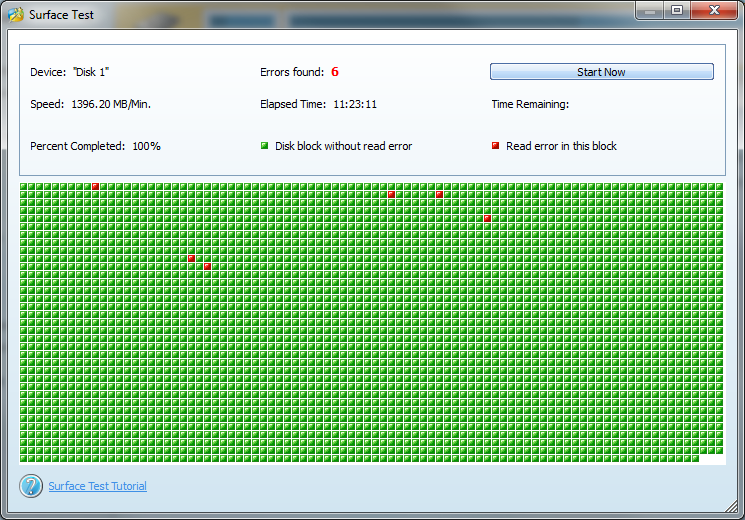
Surface test results:


Going to buy a new HDD today.
 

My Computer

Computer type
PC/Desktop
Computer Manufacturer/Model Number
custom build
OS
Windows 7 Home Premium 64-bit
CPU
Intel(R) Core(TM) i5-2550K CPU @ 3.40GHz
Motherboard
ASUSTeK Computer INC. P8Z68-V LX Rev X.0x
Memory
8gb
Graphics Card(s)
NVIDIA GeForce GTX 650 Ti
Hard Drives
1TB HDD
Browser
Chrome
Ok nothing much to see with that surface scan so have you tried the other test scans?
 

My Computer

Computer type
PC/Desktop
Computer Manufacturer/Model Number
Own build (new) Desk1 / Asus ROG Win 7 / Desk2 1st build
OS
Desk1 7 Home Prem / Desk2 10 Pro / Main lap Asus ROG 10 Pro 2 laptop Toshiba 7 Pro Asus P2520 7 & 10
CPU
Desk1 i5 3750K / Laptop i7 GTX 860M / Desk2 i5 2500
Motherboard
Desk1 Asus P877-V / Desk2 Gigabyte H67 UD3H / Laptop ?
Memory
Desk1 8GB (1866) / Desk2 16GB (1333) / Laptop 8Gb DDR3
Graphics Card(s)
Desk 1& 2NVidia GTX 650 & Laptops on board Intel
Sound Card
Desk 1 & 2 -XONAR DG Realtek High Def audio Laptop
Monitor(s) Displays
Desk 1 Benq HD 2450 / Desk2 Philips 24" / Laptop 17.5"
Screen Resolution
1920x1080 D1 & D2 & Laptop 1
Hard Drives
Desk1 Samsung 120GB 830 SSD
Asus ROG 256GB 850 Pro SSD
Desk2 Samsung 840 256 SSD
Toshiba 120GB EVO
PSU
Desk 1 Corsair HX 1050/ Laptop ? / Desk 2 Corsair HX 650
Case
Desk 1 Cooler HAF XM ? Toshiba laptop / Desk2 Coolermaster
Cooling
Fans on all Desk1 -2 Desk2 - all Coolermasters 5 Laptop ?
Keyboard
Desk 1 MS Sidewinder X6 Desk 2 MS Sidewinder X 4
Mouse
Desk 1&2 - Gigabyte MS 900 gamer - laptop - Logitec wireless
Internet Speed
ADSL2+
Other Info
One other Desktop (tester) and spare Toshba laptop both with SSD's
Running Kaspersky 2016 ISS on all machines config'd identically
Logitec audio stereo systems on each machine (x3)
Canon MG5250MFC
Router/modem TP-Link running WPA2SK
No, I did not run any other tests from that program. I ran multiple tests before that with other utilities. Besides that, the new drives are installed now, and I am setting everything up again.
 

My Computer

Computer type
PC/Desktop
Computer Manufacturer/Model Number
custom build
OS
Windows 7 Home Premium 64-bit
CPU
Intel(R) Core(TM) i5-2550K CPU @ 3.40GHz
Motherboard
ASUSTeK Computer INC. P8Z68-V LX Rev X.0x
Memory
8gb
Graphics Card(s)
NVIDIA GeForce GTX 650 Ti
Hard Drives
1TB HDD
Browser
Chrome
No probs then let us know how things turn out.
 

My Computer

Computer type
PC/Desktop
Computer Manufacturer/Model Number
Own build (new) Desk1 / Asus ROG Win 7 / Desk2 1st build
OS
Desk1 7 Home Prem / Desk2 10 Pro / Main lap Asus ROG 10 Pro 2 laptop Toshiba 7 Pro Asus P2520 7 & 10
CPU
Desk1 i5 3750K / Laptop i7 GTX 860M / Desk2 i5 2500
Motherboard
Desk1 Asus P877-V / Desk2 Gigabyte H67 UD3H / Laptop ?
Memory
Desk1 8GB (1866) / Desk2 16GB (1333) / Laptop 8Gb DDR3
Graphics Card(s)
Desk 1& 2NVidia GTX 650 & Laptops on board Intel
Sound Card
Desk 1 & 2 -XONAR DG Realtek High Def audio Laptop
Monitor(s) Displays
Desk 1 Benq HD 2450 / Desk2 Philips 24" / Laptop 17.5"
Screen Resolution
1920x1080 D1 & D2 & Laptop 1
Hard Drives
Desk1 Samsung 120GB 830 SSD
Asus ROG 256GB 850 Pro SSD
Desk2 Samsung 840 256 SSD
Toshiba 120GB EVO
PSU
Desk 1 Corsair HX 1050/ Laptop ? / Desk 2 Corsair HX 650
Case
Desk 1 Cooler HAF XM ? Toshiba laptop / Desk2 Coolermaster
Cooling
Fans on all Desk1 -2 Desk2 - all Coolermasters 5 Laptop ?
Keyboard
Desk 1 MS Sidewinder X6 Desk 2 MS Sidewinder X 4
Mouse
Desk 1&2 - Gigabyte MS 900 gamer - laptop - Logitec wireless
Internet Speed
ADSL2+
Other Info
One other Desktop (tester) and spare Toshba laptop both with SSD's
Running Kaspersky 2016 ISS on all machines config'd identically
Logitec audio stereo systems on each machine (x3)
Canon MG5250MFC
Router/modem TP-Link running WPA2SK
So far so good. The gameplay is unhindered and nothing bad happened so far. I will call it good for now. Thanks everyone.
 

My Computer

Computer type
PC/Desktop
Computer Manufacturer/Model Number
custom build
OS
Windows 7 Home Premium 64-bit
CPU
Intel(R) Core(TM) i5-2550K CPU @ 3.40GHz
Motherboard
ASUSTeK Computer INC. P8Z68-V LX Rev X.0x
Memory
8gb
Graphics Card(s)
NVIDIA GeForce GTX 650 Ti
Hard Drives
1TB HDD
Browser
Chrome
That is good mate and you know where to come if things get pear shaped again eh? :)
 

My Computer

Computer type
PC/Desktop
Computer Manufacturer/Model Number
Own build (new) Desk1 / Asus ROG Win 7 / Desk2 1st build
OS
Desk1 7 Home Prem / Desk2 10 Pro / Main lap Asus ROG 10 Pro 2 laptop Toshiba 7 Pro Asus P2520 7 & 10
CPU
Desk1 i5 3750K / Laptop i7 GTX 860M / Desk2 i5 2500
Motherboard
Desk1 Asus P877-V / Desk2 Gigabyte H67 UD3H / Laptop ?
Memory
Desk1 8GB (1866) / Desk2 16GB (1333) / Laptop 8Gb DDR3
Graphics Card(s)
Desk 1& 2NVidia GTX 650 & Laptops on board Intel
Sound Card
Desk 1 & 2 -XONAR DG Realtek High Def audio Laptop
Monitor(s) Displays
Desk 1 Benq HD 2450 / Desk2 Philips 24" / Laptop 17.5"
Screen Resolution
1920x1080 D1 & D2 & Laptop 1
Hard Drives
Desk1 Samsung 120GB 830 SSD
Asus ROG 256GB 850 Pro SSD
Desk2 Samsung 840 256 SSD
Toshiba 120GB EVO
PSU
Desk 1 Corsair HX 1050/ Laptop ? / Desk 2 Corsair HX 650
Case
Desk 1 Cooler HAF XM ? Toshiba laptop / Desk2 Coolermaster
Cooling
Fans on all Desk1 -2 Desk2 - all Coolermasters 5 Laptop ?
Keyboard
Desk 1 MS Sidewinder X6 Desk 2 MS Sidewinder X 4
Mouse
Desk 1&2 - Gigabyte MS 900 gamer - laptop - Logitec wireless
Internet Speed
ADSL2+
Other Info
One other Desktop (tester) and spare Toshba laptop both with SSD's
Running Kaspersky 2016 ISS on all machines config'd identically
Logitec audio stereo systems on each machine (x3)
Canon MG5250MFC
Router/modem TP-Link running WPA2SK
Seatools is the topmost disk check utility. There is no need for any other disk tests after it, as you will not ask an Olympic champion to swim in a pond to prove that he can swim.
 

My Computer

Computer type
PC/Desktop
Computer Manufacturer/Model Number
Self Assembled
OS
Microsoft Windows 10 Pro Insider Preview 64-bit
CPU
Intel(R) Core(TM) i3-4130 CPU @ 3.40GHz
Motherboard
Gigabyte Technology Co., Ltd. B85M-D3H
Memory
Corsair Vengence 4GB x2 (8.00GB Dual-Channel DDR3 @ 798MHz)
Graphics Card(s)
2047MB GeForce GTS 450 (ZOTAC International)
Sound Card
Onboard (Realtek High Definition Audio)
Monitor(s) Displays
LG Flatron E2040T
Screen Resolution
1600x900
Hard Drives
Western Digital 1 TB
Seagate 500 GB
PSU
Corsair VS550
Case
Cooler Master K380
Cooling
Cooler Master Seidon 120V Plus
Keyboard
Logitech MK260r
Mouse
Logitech MK260r
Internet Speed
PMPL Broadband
Antivirus
Windows Defender + MBAM
Browser
Firefox
Other Info
Dell Studio 15" Laptop
Seatools is the topmost disk check utility. There is no need for any other disk tests after it, as you will not ask an Olympic champion to swim in a pond to prove that he can swim.
I agree Archie except that the surface test with Partition Wizard does actually test out the physical surface and therefore by default the read / write heads;)
 

My Computer

Computer type
PC/Desktop
Computer Manufacturer/Model Number
Own build (new) Desk1 / Asus ROG Win 7 / Desk2 1st build
OS
Desk1 7 Home Prem / Desk2 10 Pro / Main lap Asus ROG 10 Pro 2 laptop Toshiba 7 Pro Asus P2520 7 & 10
CPU
Desk1 i5 3750K / Laptop i7 GTX 860M / Desk2 i5 2500
Motherboard
Desk1 Asus P877-V / Desk2 Gigabyte H67 UD3H / Laptop ?
Memory
Desk1 8GB (1866) / Desk2 16GB (1333) / Laptop 8Gb DDR3
Graphics Card(s)
Desk 1& 2NVidia GTX 650 & Laptops on board Intel
Sound Card
Desk 1 & 2 -XONAR DG Realtek High Def audio Laptop
Monitor(s) Displays
Desk 1 Benq HD 2450 / Desk2 Philips 24" / Laptop 17.5"
Screen Resolution
1920x1080 D1 & D2 & Laptop 1
Hard Drives
Desk1 Samsung 120GB 830 SSD
Asus ROG 256GB 850 Pro SSD
Desk2 Samsung 840 256 SSD
Toshiba 120GB EVO
PSU
Desk 1 Corsair HX 1050/ Laptop ? / Desk 2 Corsair HX 650
Case
Desk 1 Cooler HAF XM ? Toshiba laptop / Desk2 Coolermaster
Cooling
Fans on all Desk1 -2 Desk2 - all Coolermasters 5 Laptop ?
Keyboard
Desk 1 MS Sidewinder X6 Desk 2 MS Sidewinder X 4
Mouse
Desk 1&2 - Gigabyte MS 900 gamer - laptop - Logitec wireless
Internet Speed
ADSL2+
Other Info
One other Desktop (tester) and spare Toshba laptop both with SSD's
Running Kaspersky 2016 ISS on all machines config'd identically
Logitec audio stereo systems on each machine (x3)
Canon MG5250MFC
Router/modem TP-Link running WPA2SK
Back
Top