Solved BSOD during streaming videos, saving a file, or just randomly

brandough

New member
Local time
6:55 AM
Messages
31
I get the BSOD many times a day and it's getting very annoying. It would be very appreciated if someone could help me solve this problem.
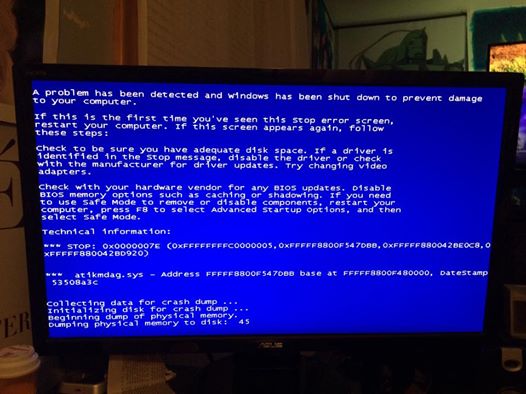
I have a picture of my BSOD.

viAC04D.jpg


I also ran the program from the "BSOD posting instructions" thread and attached it.

Thank you so much in advance for any help! :D
 

My Computer My Computer

At a glance

Windows 7 64 bit
Computer type
PC/Desktop
OS
Windows 7 64 bit
A stop 0x7C is network related, but there is no crash dump in the zip.

Follow it: http://www.sevenforums.com/tutorials/174459-dump-files-configure-windows-create-bsod.html
Go to Option Two, Point 2. Download the .reg file and merge it in registry by double clicking it.

Now wait for another BSOD. When it occurred, search the .dmp files manually in the default path: C:\Windows\Minidump or %SystemRoot%\Minidump. See if the crash dump is recorded or not (hopefully it will be recorded).Post it following the Blue Screen of Death (BSOD) Posting Instructions.

Dont run any disc cleanup utility before you upload another zip.
 

My Computer My Computer

At a glance

Microsoft Windows 10 Pro Insider Preview 64-bitIntel(R) Core(TM) i3-4130 CPU @ 3.40GHzCorsair Vengence 4GB x2 (8.00GB Dual-Channel ...2047MB GeForce GTS 450 (ZOTAC International)
Computer type
PC/Desktop
Computer Manufacturer/Model Number
Self Assembled
OS
Microsoft Windows 10 Pro Insider Preview 64-bit
CPU
Intel(R) Core(TM) i3-4130 CPU @ 3.40GHz
Motherboard
Gigabyte Technology Co., Ltd. B85M-D3H
Memory
Corsair Vengence 4GB x2 (8.00GB Dual-Channel DDR3 @ 798MHz)
Graphics Card(s)
2047MB GeForce GTS 450 (ZOTAC International)
Sound Card
Onboard (Realtek High Definition Audio)
Monitor(s) Displays
LG Flatron E2040T
Screen Resolution
1600x900
Hard Drives
Western Digital 1 TB
Seagate 500 GB
PSU
Corsair VS550
Case
Cooler Master K380
Cooling
Cooler Master Seidon 120V Plus
Keyboard
Logitech MK260r
Mouse
Logitech MK260r
Internet Speed
PMPL Broadband
Antivirus
Windows Defender + MBAM
Browser
Firefox
Other Info
Dell Studio 15" Laptop
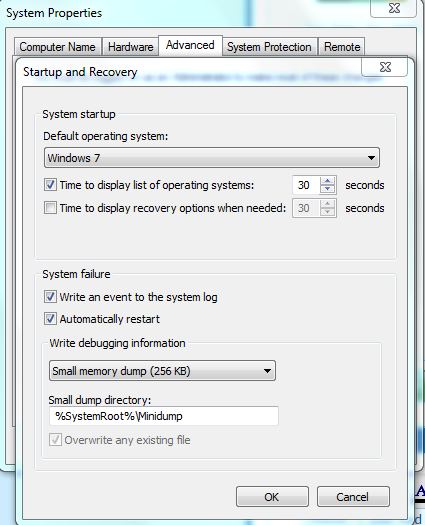
Hmm. I just had a BSOD but then I went to %SystemRoot%\Minidump and there was nothing in there.
I also checked my settings and it is set to record the information.

PG99wB1.png


I still uploaded the zip file, but I don't think the minidump information will be in there, and i'm not sure why.
 

My Computer My Computer

At a glance

Windows 7 64 bit
Computer type
PC/Desktop
OS
Windows 7 64 bit
Windows error reporting says it recorded a dump, it gives the name of the dump file too.
2/15/2015 8:44 AM Windows Error Reporting Fault bucket , type 0
Event Name: BlueScreen
Response: Not available
Cab Id: 0

Problem signature:
P1:
P2:
P3:
P4:
P5:
P6:
P7:
P8:
P9:
P10:

Attached files:
C:\Windows\Minidump\021515-26504-01.dmp

C:\Windows\Temp\WER-85722-0.sysdata.xml

These files may be available here:
C:\Users\Brandon\AppData\Local\Microsoft\Windows\WER\ReportArchive\Kernel_0_0_cab_0e11e4b3

Analysis symbol:
Rechecking for solution: 0
Report Id: 021515-26504-01
Report Status: 0
I think you have a cleaning mechanism that cleans the dumps up.
 

My Computer My Computer

At a glance

Microsoft Windows 10 Pro Insider Preview 64-bitIntel(R) Core(TM) i3-4130 CPU @ 3.40GHzCorsair Vengence 4GB x2 (8.00GB Dual-Channel ...2047MB GeForce GTS 450 (ZOTAC International)
Computer type
PC/Desktop
Computer Manufacturer/Model Number
Self Assembled
OS
Microsoft Windows 10 Pro Insider Preview 64-bit
CPU
Intel(R) Core(TM) i3-4130 CPU @ 3.40GHz
Motherboard
Gigabyte Technology Co., Ltd. B85M-D3H
Memory
Corsair Vengence 4GB x2 (8.00GB Dual-Channel DDR3 @ 798MHz)
Graphics Card(s)
2047MB GeForce GTS 450 (ZOTAC International)
Sound Card
Onboard (Realtek High Definition Audio)
Monitor(s) Displays
LG Flatron E2040T
Screen Resolution
1600x900
Hard Drives
Western Digital 1 TB
Seagate 500 GB
PSU
Corsair VS550
Case
Cooler Master K380
Cooling
Cooler Master Seidon 120V Plus
Keyboard
Logitech MK260r
Mouse
Logitech MK260r
Internet Speed
PMPL Broadband
Antivirus
Windows Defender + MBAM
Browser
Firefox
Other Info
Dell Studio 15" Laptop
I'm trying to figure out why it saves but then deletes, but while going through my files I found this.
Would this be helpful at all?
 

My Computer My Computer

At a glance

Windows 7 64 bit
Computer type
PC/Desktop
OS
Windows 7 64 bit
Probably not.

It just says that SlimWare Utilities failed. From the file you uploaded .....
Code:
ConsentKey=APPCRASH
AppName=DriverUpdate
AppPath=C:\Program Files (x86)\DriverUpdate\DriverUpdate.exe
Which means ..... from teh data you posted earlier ....
Code:
SlimWare Utilities, Inc.    c:\program files (x86)\driverupdate\driverupdate.exe
I would not suggest you to any such program. They dont do the right job.

Dont run any sort of disc cleanup mechanism; if there is any such program (Slimware may have it) that automates disc cleanup, stop it.
 

My Computer My Computer

At a glance

Microsoft Windows 10 Pro Insider Preview 64-bitIntel(R) Core(TM) i3-4130 CPU @ 3.40GHzCorsair Vengence 4GB x2 (8.00GB Dual-Channel ...2047MB GeForce GTS 450 (ZOTAC International)
Computer type
PC/Desktop
Computer Manufacturer/Model Number
Self Assembled
OS
Microsoft Windows 10 Pro Insider Preview 64-bit
CPU
Intel(R) Core(TM) i3-4130 CPU @ 3.40GHz
Motherboard
Gigabyte Technology Co., Ltd. B85M-D3H
Memory
Corsair Vengence 4GB x2 (8.00GB Dual-Channel DDR3 @ 798MHz)
Graphics Card(s)
2047MB GeForce GTS 450 (ZOTAC International)
Sound Card
Onboard (Realtek High Definition Audio)
Monitor(s) Displays
LG Flatron E2040T
Screen Resolution
1600x900
Hard Drives
Western Digital 1 TB
Seagate 500 GB
PSU
Corsair VS550
Case
Cooler Master K380
Cooling
Cooler Master Seidon 120V Plus
Keyboard
Logitech MK260r
Mouse
Logitech MK260r
Internet Speed
PMPL Broadband
Antivirus
Windows Defender + MBAM
Browser
Firefox
Other Info
Dell Studio 15" Laptop
Dont run any sort of disc cleanup mechanism; if there is any such program (Slimware may have it) that automates disc cleanup, stop it.

Thank you so much for the help!
I went though and deleted quite a few programs that I didn't need (Slimware included), so hopefully one of those were the problem with the dump files.
Now to wait for another BSOD.
 

My Computer My Computer

At a glance

Windows 7 64 bit
Computer type
PC/Desktop
OS
Windows 7 64 bit
Apparently one of the programs I deleted was the problem. I just had a BSOD and now I have a mini dump file! :D
 

My Computer My Computer

At a glance

Windows 7 64 bit
Computer type
PC/Desktop
OS
Windows 7 64 bit
It reports display failure.
Code:
BugCheck 1000007E, {ffffffffc0000005, fffff8800f547dbb, fffff880040aa0c8, fffff880040a9920}

[COLOR=Red]Probably caused by : atikmdag.sys[/COLOR] ( atikmdag+c7dbb )

Followup: MachineOwner
---------
Your installed display driver is a very good and stable one, the CCC 14.4 WHQL. So not blaming the driver at the first go.

First make it sure that any of the hardware components are not overclocked. As you are getting BSODs, you should stop overclocking and run all the hardware components like CPU, GPU and RAM to their default settings. Also set the BIOS to default, too. How To Clear CMOS (Reset BIOS)

Uninstall Gigabyte OC Guru too, as your computer is having BSODs.

When the hardware are set back to stock, stress test the Graphics Card using Furmark.Take a screenshot of the furmark window before closing it. Upload the screenshot for us. Also let us know if you have experienced any crash/BSOD and/or artifacts during the test.

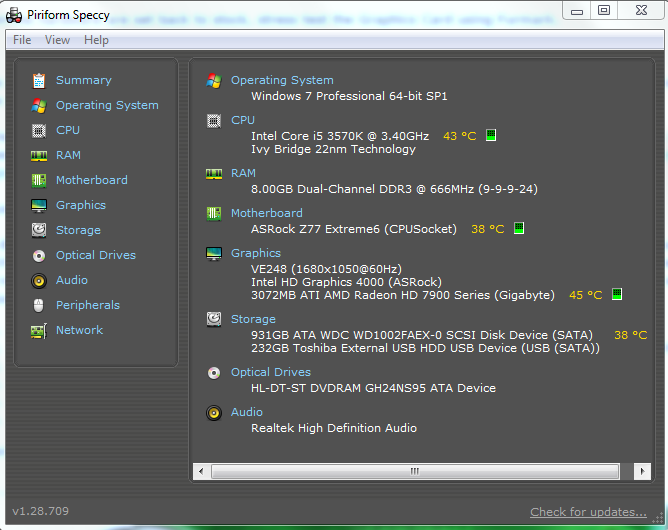
Is the computer hot? Report us the heat of the computer after a couple of hours of your normal usage. Upload a screenshot of the summery tab of Speccy. Alternatively, you can publish a Speccy snapshot too: http://www.sevenforums.com/tutorials/311593-speccy-publish-snapshot-your-system-specs.html .

Let us know the results.

Not directly related with the issue, but you are running too many unnecessary programs in the background always, which is sufficient to cause various sort of issues. There are 25 startup programs there, and in fact none of them are required to be there. Free up the startup. Windows does not need any other program to auto start with it, but the auto start programs often conflicts and causes various problems including BSODs.

  1. Click on the Start button
  2. Type “msconfig (without quotes), click the resulting link. It will open the System Configuration window.
  3. Select the “Startup” tab.
  4. Deselect all items other than the antivirus.
  5. Apply > OK
  6. Accept then restart.
When you need any of them, call them from Start > All programs.

 

My Computer My Computer

At a glance

Microsoft Windows 10 Pro Insider Preview 64-bitIntel(R) Core(TM) i3-4130 CPU @ 3.40GHzCorsair Vengence 4GB x2 (8.00GB Dual-Channel ...2047MB GeForce GTS 450 (ZOTAC International)
Computer type
PC/Desktop
Computer Manufacturer/Model Number
Self Assembled
OS
Microsoft Windows 10 Pro Insider Preview 64-bit
CPU
Intel(R) Core(TM) i3-4130 CPU @ 3.40GHz
Motherboard
Gigabyte Technology Co., Ltd. B85M-D3H
Memory
Corsair Vengence 4GB x2 (8.00GB Dual-Channel DDR3 @ 798MHz)
Graphics Card(s)
2047MB GeForce GTS 450 (ZOTAC International)
Sound Card
Onboard (Realtek High Definition Audio)
Monitor(s) Displays
LG Flatron E2040T
Screen Resolution
1600x900
Hard Drives
Western Digital 1 TB
Seagate 500 GB
PSU
Corsair VS550
Case
Cooler Master K380
Cooling
Cooler Master Seidon 120V Plus
Keyboard
Logitech MK260r
Mouse
Logitech MK260r
Internet Speed
PMPL Broadband
Antivirus
Windows Defender + MBAM
Browser
Firefox
Other Info
Dell Studio 15" Laptop
I have set the BIOS to default.
Uninstalled Gigabyte OC Guru.
Stopped all startup programs except my virus protection and TP Link (my wireless adapter).
Ran the Furmark stress test for 30 minutes.

cNA7WGD.jpg


The screenshot of the Speccy summary tab.

S8LNfaN.png
 

My Computer My Computer

At a glance

Windows 7 64 bit
Computer type
PC/Desktop
OS
Windows 7 64 bit
The Furmark screen looks odd .... and that means your graphics card is not rendering the proper thing. A running furmark should look like this:
356532d1429248479-bsod-whenever-computer-wakes-up-capture.jpg

I think it is enough to address it as a failure from the part of the graphics card. I would suggest you to apply any other graphics card there and see the situation.
 

My Computer My Computer

At a glance

Microsoft Windows 10 Pro Insider Preview 64-bitIntel(R) Core(TM) i3-4130 CPU @ 3.40GHzCorsair Vengence 4GB x2 (8.00GB Dual-Channel ...2047MB GeForce GTS 450 (ZOTAC International)
Computer type
PC/Desktop
Computer Manufacturer/Model Number
Self Assembled
OS
Microsoft Windows 10 Pro Insider Preview 64-bit
CPU
Intel(R) Core(TM) i3-4130 CPU @ 3.40GHz
Motherboard
Gigabyte Technology Co., Ltd. B85M-D3H
Memory
Corsair Vengence 4GB x2 (8.00GB Dual-Channel DDR3 @ 798MHz)
Graphics Card(s)
2047MB GeForce GTS 450 (ZOTAC International)
Sound Card
Onboard (Realtek High Definition Audio)
Monitor(s) Displays
LG Flatron E2040T
Screen Resolution
1600x900
Hard Drives
Western Digital 1 TB
Seagate 500 GB
PSU
Corsair VS550
Case
Cooler Master K380
Cooling
Cooler Master Seidon 120V Plus
Keyboard
Logitech MK260r
Mouse
Logitech MK260r
Internet Speed
PMPL Broadband
Antivirus
Windows Defender + MBAM
Browser
Firefox
Other Info
Dell Studio 15" Laptop
I thought it might have been just because I didn't check "dynamic background."
but I checked it and then ran it again.. and woah.. it looks very odd compared to your picture.

jKK3i3z.jpg


Sorry, it's probably a really basic answer, but.. how do I go about applying another graphics card there? >.<

Also, I don't know if this means anything but when I select either of the GPU benchmark preset settings (1080 or 720), it looks perfect just like in your screenshot. But if I select GPU stress test or GPU benchmark (user's settings) it looks all messed up like in my screenshots.
 

My Computer My Computer

At a glance

Windows 7 64 bit
Computer type
PC/Desktop
OS
Windows 7 64 bit
I get the same screen for all the tests.

If you can borrow a graphics card form your friends or family for a testing purpose only, you may apply that card and see if that causes the BSODs there or not.

But before that, I would like to wait and observe how it goes after the other things of post #10. If BSODs continue, further troubleshooting will be required.
 

My Computer My Computer

At a glance

Microsoft Windows 10 Pro Insider Preview 64-bitIntel(R) Core(TM) i3-4130 CPU @ 3.40GHzCorsair Vengence 4GB x2 (8.00GB Dual-Channel ...2047MB GeForce GTS 450 (ZOTAC International)
Computer type
PC/Desktop
Computer Manufacturer/Model Number
Self Assembled
OS
Microsoft Windows 10 Pro Insider Preview 64-bit
CPU
Intel(R) Core(TM) i3-4130 CPU @ 3.40GHz
Motherboard
Gigabyte Technology Co., Ltd. B85M-D3H
Memory
Corsair Vengence 4GB x2 (8.00GB Dual-Channel DDR3 @ 798MHz)
Graphics Card(s)
2047MB GeForce GTS 450 (ZOTAC International)
Sound Card
Onboard (Realtek High Definition Audio)
Monitor(s) Displays
LG Flatron E2040T
Screen Resolution
1600x900
Hard Drives
Western Digital 1 TB
Seagate 500 GB
PSU
Corsair VS550
Case
Cooler Master K380
Cooling
Cooler Master Seidon 120V Plus
Keyboard
Logitech MK260r
Mouse
Logitech MK260r
Internet Speed
PMPL Broadband
Antivirus
Windows Defender + MBAM
Browser
Firefox
Other Info
Dell Studio 15" Laptop
I don't think I can borrow a graphics card from anyone right now, but I can try to find someone if I need to.
I've had a few BSOD's since my last post, but for some reason it went back to not writing a dump file.

But I tried something out and restored to a past version of my graphics driver and then I updated it to the current one again. I then opened furmark to see if it looks any different and it now looks just like how it's supposed to look. Hmm..

ZXdtT0J.jpg


Didn't run it the whole time because I only wanted to show you how it looks now.
 

My Computer My Computer

At a glance

Windows 7 64 bit
Computer type
PC/Desktop
OS
Windows 7 64 bit
Yes, furmark looks fine now.
 

My Computer My Computer

At a glance

Microsoft Windows 10 Pro Insider Preview 64-bitIntel(R) Core(TM) i3-4130 CPU @ 3.40GHzCorsair Vengence 4GB x2 (8.00GB Dual-Channel ...2047MB GeForce GTS 450 (ZOTAC International)
Computer type
PC/Desktop
Computer Manufacturer/Model Number
Self Assembled
OS
Microsoft Windows 10 Pro Insider Preview 64-bit
CPU
Intel(R) Core(TM) i3-4130 CPU @ 3.40GHz
Motherboard
Gigabyte Technology Co., Ltd. B85M-D3H
Memory
Corsair Vengence 4GB x2 (8.00GB Dual-Channel DDR3 @ 798MHz)
Graphics Card(s)
2047MB GeForce GTS 450 (ZOTAC International)
Sound Card
Onboard (Realtek High Definition Audio)
Monitor(s) Displays
LG Flatron E2040T
Screen Resolution
1600x900
Hard Drives
Western Digital 1 TB
Seagate 500 GB
PSU
Corsair VS550
Case
Cooler Master K380
Cooling
Cooler Master Seidon 120V Plus
Keyboard
Logitech MK260r
Mouse
Logitech MK260r
Internet Speed
PMPL Broadband
Antivirus
Windows Defender + MBAM
Browser
Firefox
Other Info
Dell Studio 15" Laptop
Got another BSOD and this time it recorded the dump.
 

My Computer My Computer

At a glance

Windows 7 64 bit
Computer type
PC/Desktop
OS
Windows 7 64 bit
It seems that LucidLogix Virtu is playing there behind the issue.
Code:
BugCheck 116, {fffffa8009d5f260, fffff88004d9ce34, 0, 2}

Unable to load image VirtuWDDM.sys, Win32 error 0n2
*** WARNING: Unable to verify timestamp for VirtuWDDM.sys
*** ERROR: Module load completed but symbols could not be loaded for VirtuWDDM.sys
Probably caused by : VirtuWDDM.sys ( VirtuWDDM+8e34 )

Followup: MachineOwner
---------
I would suggest you to get rid of it and see how it goes.
 

My Computer My Computer

At a glance

Microsoft Windows 10 Pro Insider Preview 64-bitIntel(R) Core(TM) i3-4130 CPU @ 3.40GHzCorsair Vengence 4GB x2 (8.00GB Dual-Channel ...2047MB GeForce GTS 450 (ZOTAC International)
Computer type
PC/Desktop
Computer Manufacturer/Model Number
Self Assembled
OS
Microsoft Windows 10 Pro Insider Preview 64-bit
CPU
Intel(R) Core(TM) i3-4130 CPU @ 3.40GHz
Motherboard
Gigabyte Technology Co., Ltd. B85M-D3H
Memory
Corsair Vengence 4GB x2 (8.00GB Dual-Channel DDR3 @ 798MHz)
Graphics Card(s)
2047MB GeForce GTS 450 (ZOTAC International)
Sound Card
Onboard (Realtek High Definition Audio)
Monitor(s) Displays
LG Flatron E2040T
Screen Resolution
1600x900
Hard Drives
Western Digital 1 TB
Seagate 500 GB
PSU
Corsair VS550
Case
Cooler Master K380
Cooling
Cooler Master Seidon 120V Plus
Keyboard
Logitech MK260r
Mouse
Logitech MK260r
Internet Speed
PMPL Broadband
Antivirus
Windows Defender + MBAM
Browser
Firefox
Other Info
Dell Studio 15" Laptop
Hmm.. since deleting that I haven't had any BSOD's.
I even left my computer on for around 32 hours straight to see if it would crash during the night, and it was still the same when I woke up and during the day.
Going to give it a couple more days before I jinx myself, though.
Thanks for the help! I'll reply again in a couple days if there isn't any more BSOD's or before then if there was one..
 

My Computer My Computer

At a glance

Windows 7 64 bit
Computer type
PC/Desktop
OS
Windows 7 64 bit
No problem mate. Take the necessary time before letting us know about it.
 

My Computer My Computer

At a glance

Microsoft Windows 10 Pro Insider Preview 64-bitIntel(R) Core(TM) i3-4130 CPU @ 3.40GHzCorsair Vengence 4GB x2 (8.00GB Dual-Channel ...2047MB GeForce GTS 450 (ZOTAC International)
Computer type
PC/Desktop
Computer Manufacturer/Model Number
Self Assembled
OS
Microsoft Windows 10 Pro Insider Preview 64-bit
CPU
Intel(R) Core(TM) i3-4130 CPU @ 3.40GHz
Motherboard
Gigabyte Technology Co., Ltd. B85M-D3H
Memory
Corsair Vengence 4GB x2 (8.00GB Dual-Channel DDR3 @ 798MHz)
Graphics Card(s)
2047MB GeForce GTS 450 (ZOTAC International)
Sound Card
Onboard (Realtek High Definition Audio)
Monitor(s) Displays
LG Flatron E2040T
Screen Resolution
1600x900
Hard Drives
Western Digital 1 TB
Seagate 500 GB
PSU
Corsair VS550
Case
Cooler Master K380
Cooling
Cooler Master Seidon 120V Plus
Keyboard
Logitech MK260r
Mouse
Logitech MK260r
Internet Speed
PMPL Broadband
Antivirus
Windows Defender + MBAM
Browser
Firefox
Other Info
Dell Studio 15" Laptop
Back
Top