
BSOD error 0x00000116 ,atikmpag.sys dxgkrnl.sys dxgmms1.sys

Arashi

New member
Local time
10:21 PM
Messages
1
after update from Catalyst 14.12 Omega to 15.7 my computer gettng bsod randomly
my specs
MSI Z87 -GD65
i3 4160
2x4GB 1333
HIS R9270
Samsung EVO 850 250GB
Win7 Pro 64bit
while playing BD/DVD the screen turn black or flash for few secs then bsod
while playing game ( cpu load ~60% , gpu ~70% , temp 47-67C ) the shadow area getting lighting flash for 10s then bsod
uninstall 15.7 using DDU and reinstall 14.12 didnt help
I also tried to roll back to previous windows backup , still getting bsod
switched HIS R9270 with my old giga HD7770 , bsod happen right after i click the play button
here a screenshot from bluescreenview, hope i can get this fixed fast
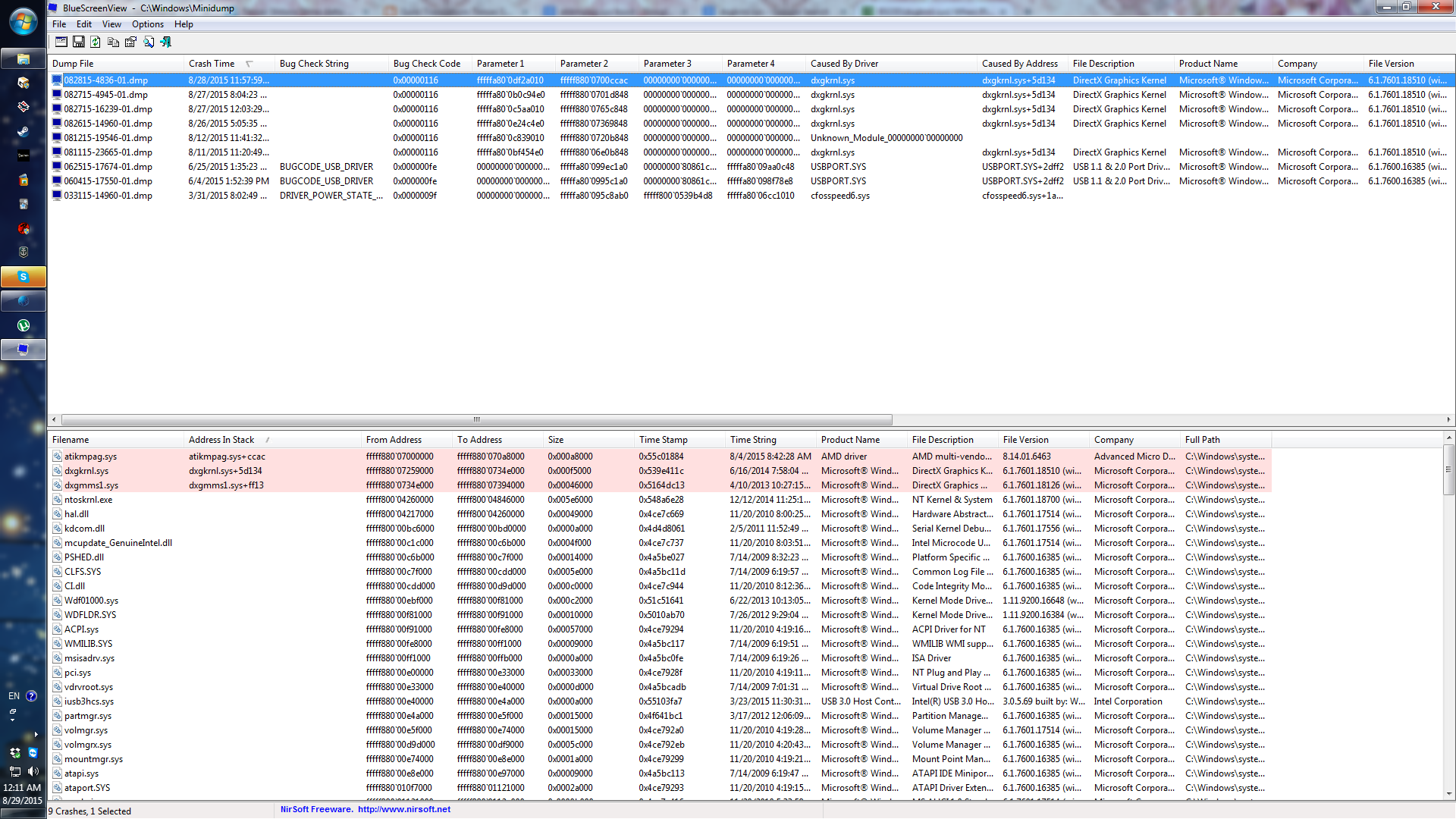
OQojuNu.png
 

My Computer My Computer

At a glance

Windows 7 Professional x64i3 41602x4GB 1333HIS R9270
Computer type
PC/Desktop
Computer Manufacturer/Model Number
custom
OS
Windows 7 Professional x64
CPU
i3 4160
Motherboard
MSI Z87 gd65
Memory
2x4GB 1333
Graphics Card(s)
HIS R9270
Sound Card
on-board
Hard Drives
Samsung EVO 850 250GB
PSU
AURUM PRO 1000W
Case
custom
Cooling
custom
Internet Speed
30Mbps
Browser
Nightly 43.0.1
Hello and welcome Arashi now the dumps are showing a problem with the graphics in particular the Catalyst CC which you say you just updated
Code:
ADDITIONAL_DEBUG_TEXT:  
You can run '.symfix; .reload' to try to fix the symbol path and load symbols.
FAULTING_MODULE: fffff80004217000 nt
DEBUG_FLR_IMAGE_TIMESTAMP:  546e9eb6
FAULTING_IP: 
atikmpag+b848
fffff880`0712c848 4883ec28        sub     rsp,28h
DEFAULT_BUCKET_ID:  [COLOR=red]GRAPHICS_DRIVER_TDR_FAULT[/COLOR]
CUSTOMER_CRASH_COUNT:  1
BUGCHECK_STR:  0x116
CURRENT_IRQL:  0
ANALYSIS_VERSION: 6.3.9600.17336 (debuggers(dbg).150226-1500) amd64fre
STACK_TEXT:  
fffff880`040c9888 fffff880`072ea134 : 00000000`00000116 fffffa80`0c8c84e0 fffff880`0712c848 00000000`00000000 : nt+0x76e80
fffff880`040c9890 00000000`00000116 : fffffa80`0c8c84e0 fffff880`0712c848 00000000`00000000 00000000`00000002 : dxgkrnl+0x5d134
fffff880`040c9898 fffffa80`0c8c84e0 : fffff880`0712c848 00000000`00000000 00000000`00000002 00000000`00000000 : 0x116
fffff880`040c98a0 fffff880`0712c848 : 00000000`00000000 00000000`00000002 00000000`00000000 00000000`00000000 : 0xfffffa80`0c8c84e0
fffff880`040c98a8 00000000`00000000 : 00000000`00000002 00000000`00000000 00000000`00000000 fffff880`072e9e3e : atikmpag+0xb848

STACK_COMMAND:  kb
FOLLOWUP_IP: 
atikmpag+b848
fffff880`0712c848 4883ec28        sub     rsp,28h
SYMBOL_STACK_INDEX:  4
SYMBOL_NAME:  atikmpag+b848
FOLLOWUP_NAME:  MachineOwner
MODULE_NAME: atikmpag
IMAGE_NAME:  [COLOR=red]atikmpag.sys[/COLOR]
BUCKET_ID:  WRONG_SYMBOLS
FAILURE_BUCKET_ID:  [COLOR=red]WRONG_SYMBOLS[/COLOR]
ANALYSIS_SOURCE:  KM
FAILURE_ID_HASH_STRING:  km:wrong_symbols
FAILURE_ID_HASH:  {70b057e8-2462-896f-28e7-ac72d4d365f8}
Followup: MachineOwner
---------
It is recommended that the CCC is uninstalled and just the GPU driver installed but if you want to keep it then uninstall it and then revert back to the version that was working ok before the problem update.
Personally I would try without it for a while.

Also I don't think these would go amiss too

http://www.sevenforums.com/tutorials/1538-sfc-scannow-command-system-file-checker.html

http://www.sevenforums.com/tutorials/433-disk-check.html< if necessary include the /f and /r in the command line as per Option2 >in safe mode if need be
 

My Computer My Computer

At a glance

Desk1 7 Home Prem / Desk2 10 Pro / Main lap A...Desk1 i5 3750K / Laptop i7 GTX 860M / Desk2 i...Desk1 8GB (1866) / Desk2 16GB (1333) / Laptop...Desk 1& 2NVidia GTX 650 & Laptops on board Intel
Computer type
PC/Desktop
Computer Manufacturer/Model Number
Own build (new) Desk1 / Asus ROG Win 7 / Desk2 1st build
OS
Desk1 7 Home Prem / Desk2 10 Pro / Main lap Asus ROG 10 Pro 2 laptop Toshiba 7 Pro Asus P2520 7 & 10
CPU
Desk1 i5 3750K / Laptop i7 GTX 860M / Desk2 i5 2500
Motherboard
Desk1 Asus P877-V / Desk2 Gigabyte H67 UD3H / Laptop ?
Memory
Desk1 8GB (1866) / Desk2 16GB (1333) / Laptop 8Gb DDR3
Graphics Card(s)
Desk 1& 2NVidia GTX 650 & Laptops on board Intel
Sound Card
Desk 1 & 2 -XONAR DG Realtek High Def audio Laptop
Monitor(s) Displays
Desk 1 Benq HD 2450 / Desk2 Philips 24" / Laptop 17.5"
Screen Resolution
1920x1080 D1 & D2 & Laptop 1
Hard Drives
Desk1 Samsung 120GB 830 SSD
Asus ROG 256GB 850 Pro SSD
Desk2 Samsung 840 256 SSD
Toshiba 120GB EVO
PSU
Desk 1 Corsair HX 1050/ Laptop ? / Desk 2 Corsair HX 650
Case
Desk 1 Cooler HAF XM ? Toshiba laptop / Desk2 Coolermaster
Cooling
Fans on all Desk1 -2 Desk2 - all Coolermasters 5 Laptop ?
Keyboard
Desk 1 MS Sidewinder X6 Desk 2 MS Sidewinder X 4
Mouse
Desk 1&2 - Gigabyte MS 900 gamer - laptop - Logitec wireless
Internet Speed
ADSL2+
Other Info
One other Desktop (tester) and spare Toshba laptop both with SSD's
Running Kaspersky 2016 ISS on all machines config'd identically
Logitec audio stereo systems on each machine (x3)
Canon MG5250MFC
Router/modem TP-Link running WPA2SK
Back
Top