BSoD from just gaming to browsing, BCCode: 116

johnratchet3

New member
Local time
9:27 PM
Messages
10
Hi, been crashing with increasing frequency for a few months now. All I see is a black screen with the sound on a short, never-ending loop, but after rebooting, windows reports it as a blue screen. BCCode 116, so I thoroughly purged the comp of dust, and have monitored both the GPU and CPU temperatures when gaming, and even just browsing. Lately, the crashes have gone from just gaming to even non-load crashes, so I'm looking for help to find a fix.

Here's the specs. Built the computer myself a bit over a year ago. Fantastic performance and stability for a long time, now the stability part is gone;

Windows 7 x64, full retail (I installed it on hard drive)
Intel i7 950 (stock cooler, re-applied thermal paste once after removing heat sink for proper dusting)
2x EVGA GTX 460 SC (so yeah, SLI. One card will always run 5-10 degrees higher when under equal load. Cant tell if GPU difference or just its position in comp.)
Gigabyte X5A-UD3R

(More detail on circumstances)

Originally, I was going to blame the freezing on overheating, but having just been playing LoL and Tribes lately, along with the most recent and thorough system clean, the vid cards have been running comparatively cool as to when I played a lot of Crysis. Neither have exceeded 90, and have not run into the mid 80s in either game. Crysis 2 used to push one of the cards up to the high 80s, yet the system would run stable, and I must say the visuals were amazingly smooth. And now of course, it's started BSoDing when not gaming. Browsing, opening a window from the background, and other misc. actions have triggered BSoD.

This led me to checking the CPU temp. The intel stock cooler is kind of pathetic imo, but idling at 55 degrees is in no way dangerous (as far as I know, feel free to teach me otherwise if not :confused: ). CPU refuses to exceed 76 degrees when I've tried to put it under load.

The last post-start-up report looked like this, and I'll collect a few more just in case:

Problem signature:
Problem Event Name: BlueScreen
OS Version: 6.1.7601.2.1.0.768.3
Locale ID: 3081

Additional information about the problem:
BCCode: 116
BCP1: FFFFFA800AA71010
BCP2: FFFFF8801011BAA4
BCP3: FFFFFFFFC000009A
BCP4: 0000000000000004
OS Version: 6_1_7601
Service Pack: 1_0
Product: 768_1

Files that help describe the problem:
C:\Windows\Minidump\030712-51589-01.dmp
C:\Users\John\AppData\Local\Temp\WER-414978-0.sysdata.xml

Thanks in advance to anyone who would look into the problem. The attached .zip contains 2 RPM reports, and the Windows_NT6_BSOD_jcgriff2. No idea why it cant detect my antivirus, Norton 360 is running live and fine in the background.
 

My Computer My Computer

At a glance

Windows 7 x64Intel i7 9503x 2GB Mushkin Enhanced2x EVGA GTX 460 SC EE
OS
Windows 7 x64
CPU
Intel i7 950
Motherboard
Gigabyte X58A, UD3R
Memory
3x 2GB Mushkin Enhanced
Graphics Card(s)
2x EVGA GTX 460 SC EE
PSU
Probably faulty Seasonic SS-850HT, 850W
Case
Antec 900 Two
Internet Speed
Australia standard horrible xD 6mb/s, 0.4mb/s
Hello,

You mentioned you get a black screen that after a reboot is reported as a bsod this make me think your graphics card has a problem.Try to check for updates by using windows update and specially look out for update for your hardware devices.If you can't find anything with windows update then try your hardware manucfacterer website(be sure to select the correct model).
 

My Computer My Computer

At a glance

Windows 7 Ultimate x64Intel Core i3 2.30 GHz4096mbnVidea GeForce GT630M (1024 MB dedicated memory)
Computer Manufacturer/Model Number
Medion Akoya p6634
OS
Windows 7 Ultimate x64
CPU
Intel Core i3 2.30 GHz
Motherboard
Medion® P6634
Memory
4096mb
Graphics Card(s)
nVidea GeForce GT630M (1024 MB dedicated memory)
Sound Card
Conexant Smart Audio (Dolby Advanced Audio)
Monitor(s) Displays
15,6 inch LCD
Screen Resolution
1366x768
Hard Drives
Seagate st9500325AS
Keyboard
azerty build in
Mouse
touchpad :-)
Internet Speed
100mbps
Hi,

Did you forget to attach the jcgriff file to your thread? Attach it, and also C:\Windows\Minidump\030712-51589-01.dmp

The BSOD analysts will require this information to troubleshoot.

Regards,
Golden
 

My Computer My Computer

At a glance

Windows 10 Pro x64 ; Xubuntu x64Intel i7 860 @ 2.80 GHz O/C'ed to 4.0GHz16GB Corsair Vengance DDR3 @ 661 MHz Dual Cha...EVGA NVidia GTX 560 1024MB
Computer type
PC/Desktop
Computer Manufacturer/Model Number
Golden Mk. I.4
OS
Windows 10 Pro x64 ; Xubuntu x64
CPU
Intel i7 860 @ 2.80 GHz O/C'ed to 4.0GHz
Motherboard
Gigabyte P55A-UD3R Rev.1. Award BIOS F13
Memory
16GB Corsair Vengance DDR3 @ 661 MHz Dual Channel (9-9-9-24)
Graphics Card(s)
EVGA NVidia GTX 560 1024MB
Sound Card
Realtek Integrated
Monitor(s) Displays
Dual Samsung SyncMaster 2494HS
Screen Resolution
1920*1080 and 1920*1080
Hard Drives
1*Samsung 840 EVO 120GB SSD;
1*OCZ Vertex 2 60GB SSD;
2*Samsung F3 SpinPoint 1TB in RAID0;
1*Samsung F1 SpinPoint 1TB;
2*Western Digital 1TB External USB 3.0
1*Western Digital 500GB External USB 3.0
1*Seagate 500GB External USB 2.0
PSU
Thermaltake ToughPower QFan 750W
Case
Thermaltake Element S VK60001W2Z
Cooling
Corsair H60 Water Cooling, 2*230mm and 2*80mm case fans
Keyboard
Logitech G110
Mouse
Logitech MX518
Oh whoops, I thought I attached it, sorry about that. Trying again

@ Erikbe, I agree, it's probably the vid card. Been changing drivers a LOT in the last month or so hoping for an improvement. Gone from older betas, to a couple of new betas, to WHQ stable release of what WAS my older betas... lol. No improvement unfortunately. Currently on 295.73 WHQL.

Ahh, I forgot to press 'upload' in manage attachments. Sorry about that :confused: added the dmp file too, thanks for telling me.
 

My Computer My Computer

At a glance

Windows 7 x64Intel i7 9503x 2GB Mushkin Enhanced2x EVGA GTX 460 SC EE
OS
Windows 7 x64
CPU
Intel i7 950
Motherboard
Gigabyte X58A, UD3R
Memory
3x 2GB Mushkin Enhanced
Graphics Card(s)
2x EVGA GTX 460 SC EE
PSU
Probably faulty Seasonic SS-850HT, 850W
Case
Antec 900 Two
Internet Speed
Australia standard horrible xD 6mb/s, 0.4mb/s
Possible out of date drivers:
Code:
jraid	fffff880`00eb0000	fffff880`00ec5000	Wed Jun 13 09:47:03 2007 (46701177)	0001207b		jraid.sys
MTiCtwl	fffff880`01a4d000	fffff880`01a56000	Tue Nov 04 00:40:50 2008 (490ffc82)	0000b926		MTiCtwl.sys
gdrv	fffff880`0a16d000	fffff880`0a176000	Thu Mar 12 21:22:29 2009 (49b9d175)	000105ce		gdrv.sys
lirsgt	fffff880`0964f000	fffff880`0965c000	Sun May 17 07:06:57 2009 (4a100bf1)	0000f1b4		lirsgt.sys
atksgt	fffff880`09600000	fffff880`0964f000	Sun May 17 07:36:34 2009 (4a1012e2)	0004fc56		atksgt.sys
LHidFilt	fffff880`06d33000	fffff880`06d46000	Wed Jun 17 10:49:39 2009 (4a391ea3)	00014ede		LHidFilt.Sys
LMouFilt	fffff880`06d46000	fffff880`06d5a000	Wed Jun 17 10:49:43 2009 (4a391ea7)	0001d7ff		LMouFilt.Sys
LEqdUsb	fffff880`06cf9000	fffff880`06d10000	Wed Jun 17 10:49:54 2009 (4a391eb2)	00019cc3		LEqdUsb.Sys
LHidEqd	fffff880`06d2b000	fffff880`06d33000	Wed Jun 17 10:49:56 2009 (4a391eb4)	0000f0de		LEqdUsb.Sys
jraid.sys
MTiCtwl.sys
gdrv.sys
lirsgt.sys
atksgt.sys
LHidFilt.Sys
LMouFilt.Sys
LEqdUsb.Sys
LEqdUsb.Sys


Code:
Loading Dump File [D:\Kingston\BSODDmpFiles\johnratchet3\Windows_NT6_BSOD_jcgriff2\030712-51589-01.dmp]
Mini Kernel Dump File: Only registers and stack trace are available

Symbol search path is: SRV*c:\symbols*http://msdl.microsoft.com/download/symbols
Executable search path is: 
Windows 7 Kernel Version 7601 (Service Pack 1) MP (8 procs) Free x64
Product: WinNt, suite: TerminalServer SingleUserTS Personal
Built by: 7601.17640.amd64fre.win7sp1_gdr.110622-1506
Machine Name:
Kernel base = 0xfffff800`03c18000 PsLoadedModuleList = 0xfffff800`03e5d670
Debug session time: Wed Mar  7 00:41:39.703 2012 (UTC - 7:00)
System Uptime: 0 days 21:45:57.718
Loading Kernel Symbols
...............................................................
................................................................
............................................
Loading User Symbols
Loading unloaded module list
.............
*******************************************************************************
*                                                                             *
*                        Bugcheck Analysis                                    *
*                                                                             *
*******************************************************************************

Use !analyze -v to get detailed debugging information.

BugCheck 116, {fffffa800aa71010, fffff8801011baa4, ffffffffc000009a, 4}

Unable to load image \SystemRoot\system32\DRIVERS\nvlddmkm.sys, Win32 error 0n2
*** WARNING: Unable to verify timestamp for nvlddmkm.sys
*** ERROR: Module load completed but symbols could not be loaded for nvlddmkm.sys
Probably caused by : nvlddmkm.sys ( nvlddmkm+ca1aa4 )

Followup: MachineOwner
---------

7: kd> !analyze -v
*******************************************************************************
*                                                                             *
*                        Bugcheck Analysis                                    *
*                                                                             *
*******************************************************************************

VIDEO_TDR_FAILURE (116)
Attempt to reset the display driver and recover from timeout failed.
Arguments:
Arg1: fffffa800aa71010, Optional pointer to internal TDR recovery context (TDR_RECOVERY_CONTEXT).
Arg2: fffff8801011baa4, The pointer into responsible device driver module (e.g. owner tag).
Arg3: ffffffffc000009a, Optional error code (NTSTATUS) of the last failed operation.
Arg4: 0000000000000004, Optional internal context dependent data.

Debugging Details:
------------------


FAULTING_IP: 
nvlddmkm+ca1aa4
fffff880`1011baa4 4883ec28        sub     rsp,28h

DEFAULT_BUCKET_ID:  GRAPHICS_DRIVER_TDR_FAULT

CUSTOMER_CRASH_COUNT:  1

BUGCHECK_STR:  0x116

PROCESS_NAME:  System

CURRENT_IRQL:  0

STACK_TEXT:  
fffff880`05bc4b88 fffff880`0305d000 : 00000000`00000116 fffffa80`0aa71010 fffff880`1011baa4 ffffffff`c000009a : nt!KeBugCheckEx
fffff880`05bc4b90 fffff880`03030867 : fffff880`1011baa4 fffffa80`09160000 00000000`00000000 ffffffff`c000009a : dxgkrnl!TdrBugcheckOnTimeout+0xec
fffff880`05bc4bd0 fffff880`0305ce0f : fffffa80`ffffd84d 00000000`00000000 fffffa80`0aa71010 00000000`00000000 : dxgkrnl!DXGADAPTER::Reset+0x2a3
fffff880`05bc4c80 fffff880`101d4ec1 : fffffa80`07d33d50 00000000`00000080 00000000`00000000 fffffa80`0915e010 : dxgkrnl!TdrResetFromTimeout+0x23
fffff880`05bc4d00 fffff800`03f2ffee : 00000000`067880ea fffffa80`091888c0 fffffa80`05312990 fffffa80`091888c0 : dxgmms1!VidSchiWorkerThread+0x101
fffff880`05bc4d40 fffff800`03c865e6 : fffff800`03e0ae80 fffffa80`091888c0 fffff800`03e18cc0 fffff880`01428384 : nt!PspSystemThreadStartup+0x5a
fffff880`05bc4d80 00000000`00000000 : 00000000`00000000 00000000`00000000 00000000`00000000 00000000`00000000 : nt!KxStartSystemThread+0x16


STACK_COMMAND:  .bugcheck ; kb

FOLLOWUP_IP: 
nvlddmkm+ca1aa4
fffff880`1011baa4 4883ec28        sub     rsp,28h

SYMBOL_NAME:  nvlddmkm+ca1aa4

FOLLOWUP_NAME:  MachineOwner

MODULE_NAME: nvlddmkm

IMAGE_NAME:  nvlddmkm.sys

DEBUG_FLR_IMAGE_TIMESTAMP:  4f347ad2

FAILURE_BUCKET_ID:  X64_0x116_IMAGE_nvlddmkm.sys

BUCKET_ID:  X64_0x116_IMAGE_nvlddmkm.sys

Followup: MachineOwner
---------
These are all stop 0x116 VIDEO_TDR_FAILURE conditions.

It's not a true crash, in the sense that the bluescreen was initiated only because the combination of video driver and video hardware was being unresponsive, and not because of any synchronous processing exception.

Since Vista, the "Timeout Detection and Recovery" (TDR) components of the OS video subsystem have been capable of doing some truly impressive things to try to recover from issues which would have caused earlier OSs like XP to crash. As a last resort, the TDR subsystem sends the video driver a "please restart yourself now!" command and waits a few seconds. If there's no response, the OS concludes that the video driver/hardware combo has truly collapsed in a heap, and it fires off that stop 0x116 BSOD.

If playing with video driver versions hasn't helped, make sure the box is not overheating. Try removing a side panel and aiming a big mains fan straight at the motherboard and GPU. Run it like that for a few hours or days - long enough to ascertain whether cooler temperatures make a difference. If so, it might be as simple as dust buildup and subsequently inadequate cooling.

The above quote was taken from http://www.sevenforums.com/crashes-debugging/25912-bsod.html#post280172, which is linked to in usasma's thread about this error. Closely follow the first three posts of usasma's thread outlining http://www.sevenforums.com/crash-lo...op-0x116-video_tdr_error-troubleshooting.html and proceed through each step. Let us know if you need further help.


Remove Gigabyte Easy Saver - mobo power utility as it is known to cause crashes for older versions.
 

My Computer My Computer

At a glance

Windows 7 Home Premium 64 BitIntel(R) Core(TM)2 Quad CPU Q9550 @ 2.83GHz6.00 GB Hundai HMT125U6BFR8C-H9ATI Radeon HD 4850
Computer Manufacturer/Model Number
HP Pavilion e9110t
OS
Windows 7 Home Premium 64 Bit
CPU
Intel(R) Core(TM)2 Quad CPU Q9550 @ 2.83GHz
Motherboard
Pegatron IPIEL-LA3
Memory
6.00 GB Hundai HMT125U6BFR8C-H9
Graphics Card(s)
ATI Radeon HD 4850
Sound Card
Realtek High Definition Audio/ATI High Definition Audio
Monitor(s) Displays
Acer AL2216W
Screen Resolution
1680x1050
Hard Drives
Hitachi HDP725050GLA360 ATA Device 500 GB
PSU
Unknown/installed by HP
Case
HP generic case
Cooling
Intel Stock Cooling
Keyboard
HP Keyboard
Mouse
HP Mouse
Internet Speed
Download: 19.15 Mbps Upload: 1.67 Mbps
Other Info
Network Adapter Realtek RTL8168D/8111D Family PCI-E Gigabit Ethernet NIC (NDIS 6.20)
Network Adapter 802.11n Wireless PCI Express Card LAN Adapter
Thanks for the help, updated the drivers you linked. Just gone through 2 LoL bot games, no crashes, seems good at initial examination. Massive thanks :D
 

My Computer My Computer

At a glance

Windows 7 x64Intel i7 9503x 2GB Mushkin Enhanced2x EVGA GTX 460 SC EE
OS
Windows 7 x64
CPU
Intel i7 950
Motherboard
Gigabyte X58A, UD3R
Memory
3x 2GB Mushkin Enhanced
Graphics Card(s)
2x EVGA GTX 460 SC EE
PSU
Probably faulty Seasonic SS-850HT, 850W
Case
Antec 900 Two
Internet Speed
Australia standard horrible xD 6mb/s, 0.4mb/s
You're welcome. Do your normal routine for a few days and post back how the system is responding. :)
 

My Computer My Computer

At a glance

Windows 7 Home Premium 64 BitIntel(R) Core(TM)2 Quad CPU Q9550 @ 2.83GHz6.00 GB Hundai HMT125U6BFR8C-H9ATI Radeon HD 4850
Computer Manufacturer/Model Number
HP Pavilion e9110t
OS
Windows 7 Home Premium 64 Bit
CPU
Intel(R) Core(TM)2 Quad CPU Q9550 @ 2.83GHz
Motherboard
Pegatron IPIEL-LA3
Memory
6.00 GB Hundai HMT125U6BFR8C-H9
Graphics Card(s)
ATI Radeon HD 4850
Sound Card
Realtek High Definition Audio/ATI High Definition Audio
Monitor(s) Displays
Acer AL2216W
Screen Resolution
1680x1050
Hard Drives
Hitachi HDP725050GLA360 ATA Device 500 GB
PSU
Unknown/installed by HP
Case
HP generic case
Cooling
Intel Stock Cooling
Keyboard
HP Keyboard
Mouse
HP Mouse
Internet Speed
Download: 19.15 Mbps Upload: 1.67 Mbps
Other Info
Network Adapter Realtek RTL8168D/8111D Family PCI-E Gigabit Ethernet NIC (NDIS 6.20)
Network Adapter 802.11n Wireless PCI Express Card LAN Adapter
Well, the prelim was good. Now it's been crashing with disturbing frequency without gaming, and reliably when trying :cry: . Seemed to start when gigabyte re-installed/updated ET6 when I had it uninstalled. It all seemed to go to hell after that. Tried to uninstall it. Couldn't find it, doesn't exist in the programs list. System restore to after the fixing, and before the 'update'. Comp still crashing :/ . Gonna go through the list you gave again in case the sys restore somehow undid it.
 

My Computer My Computer

At a glance

Windows 7 x64Intel i7 9503x 2GB Mushkin Enhanced2x EVGA GTX 460 SC EE
OS
Windows 7 x64
CPU
Intel i7 950
Motherboard
Gigabyte X58A, UD3R
Memory
3x 2GB Mushkin Enhanced
Graphics Card(s)
2x EVGA GTX 460 SC EE
PSU
Probably faulty Seasonic SS-850HT, 850W
Case
Antec 900 Two
Internet Speed
Australia standard horrible xD 6mb/s, 0.4mb/s
Well, I went through the installs again, and decided to try running the comp with the case off while gaming, to see what happened. Played a round of LoL the hotter card stayed at 67 degrees, no worries there, but LoL never put much pressure on the vid card anyway. Pull out Tribes: Ascend, which used to keep the hotter card at 83 degrees. Ran on a steady 74 with the case open, and no crashes were had for an hour and a half of gameplay. Maybe the issue WAS temperature, despite Crysis 2 running both cards hotter, longer, and stable in previous months.

Then I decided to open skype (which I had closed on the desktop since I'd been using a laptop to chat with my mates through all the crashing/restarting). Go to open skype and-

Boom. Computer freezes within 3 seconds of double clicking the skype logo.

While this was a different freeze than previously (screen froze, no black screen), I deeply suspect skype has some sort of part of it, because I have had skype running through each and every one of the previous crashes.

So my question is this; anyone know how skype can crash a computer? Could skype somehow result in a BSoD with bccode 116 (the previous crashes)? Or could there be a combination of problems?
 

My Computer My Computer

At a glance

Windows 7 x64Intel i7 9503x 2GB Mushkin Enhanced2x EVGA GTX 460 SC EE
OS
Windows 7 x64
CPU
Intel i7 950
Motherboard
Gigabyte X58A, UD3R
Memory
3x 2GB Mushkin Enhanced
Graphics Card(s)
2x EVGA GTX 460 SC EE
PSU
Probably faulty Seasonic SS-850HT, 850W
Case
Antec 900 Two
Internet Speed
Australia standard horrible xD 6mb/s, 0.4mb/s
Have you run the graphics card tests in that link I gave to the thread by usasma?

Also, if Skype is involved, I would have to know how you are using it to provide possible suggestions. Is it only audio, or are you doing video Skype as well?
 

My Computer My Computer

At a glance

Windows 7 Home Premium 64 BitIntel(R) Core(TM)2 Quad CPU Q9550 @ 2.83GHz6.00 GB Hundai HMT125U6BFR8C-H9ATI Radeon HD 4850
Computer Manufacturer/Model Number
HP Pavilion e9110t
OS
Windows 7 Home Premium 64 Bit
CPU
Intel(R) Core(TM)2 Quad CPU Q9550 @ 2.83GHz
Motherboard
Pegatron IPIEL-LA3
Memory
6.00 GB Hundai HMT125U6BFR8C-H9
Graphics Card(s)
ATI Radeon HD 4850
Sound Card
Realtek High Definition Audio/ATI High Definition Audio
Monitor(s) Displays
Acer AL2216W
Screen Resolution
1680x1050
Hard Drives
Hitachi HDP725050GLA360 ATA Device 500 GB
PSU
Unknown/installed by HP
Case
HP generic case
Cooling
Intel Stock Cooling
Keyboard
HP Keyboard
Mouse
HP Mouse
Internet Speed
Download: 19.15 Mbps Upload: 1.67 Mbps
Other Info
Network Adapter Realtek RTL8168D/8111D Family PCI-E Gigabit Ethernet NIC (NDIS 6.20)
Network Adapter 802.11n Wireless PCI Express Card LAN Adapter
Probably irrelevant now, but I've only run skype with audio. Just ran furmark. Computer died when the hotter card reached 86-87 degrees. This worries me, since it has definitely been stable under slightly higher temperatures in the past, and the temperature hadn't seemed even close to peaking in the furmark. So one or maybe even both of the video card are essentially half-dead in some way :/

Not too happy with that. They're both a little over a year old. Will do individual furmarks with 1 card at a time, which might rule out a power issue. Sorry for wasting your time with a vid card(s?) problem.

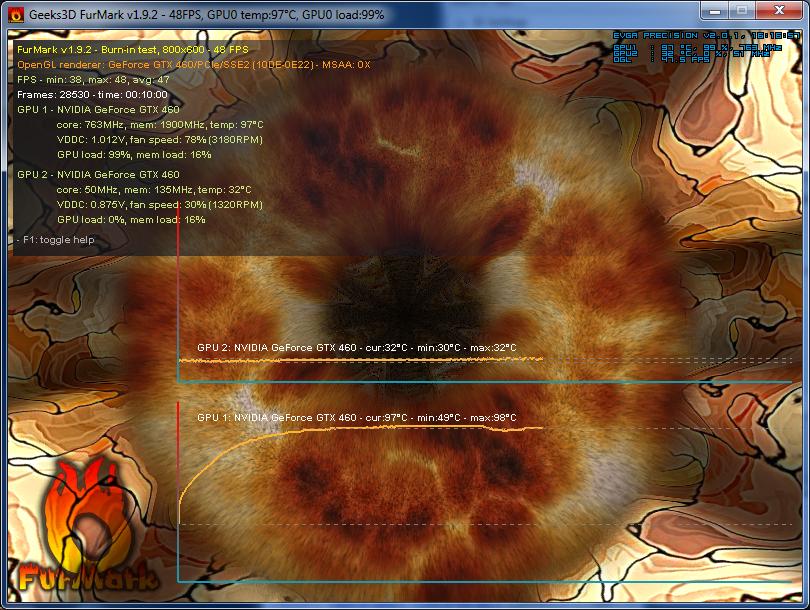
Edit1; Ran FurMark on one video card (other video card is literally out of the comp). Let it run for 10 minutes, temperature maxed out at 94 degrees. I think(/hope) that this was the hotter card. Running the next one shortly.

41Oc5.png
 
Last edited:

My Computer My Computer

At a glance

Windows 7 x64Intel i7 9503x 2GB Mushkin Enhanced2x EVGA GTX 460 SC EE
OS
Windows 7 x64
CPU
Intel i7 950
Motherboard
Gigabyte X58A, UD3R
Memory
3x 2GB Mushkin Enhanced
Graphics Card(s)
2x EVGA GTX 460 SC EE
PSU
Probably faulty Seasonic SS-850HT, 850W
Case
Antec 900 Two
Internet Speed
Australia standard horrible xD 6mb/s, 0.4mb/s
Not wasting my time. We're here to help. Let us know how things go with one card at a time. You may also consider running without the SLI bridge. Sometimes the bridge can fail, too.
 

My Computer My Computer

At a glance

Windows 7 Home Premium 64 BitIntel(R) Core(TM)2 Quad CPU Q9550 @ 2.83GHz6.00 GB Hundai HMT125U6BFR8C-H9ATI Radeon HD 4850
Computer Manufacturer/Model Number
HP Pavilion e9110t
OS
Windows 7 Home Premium 64 Bit
CPU
Intel(R) Core(TM)2 Quad CPU Q9550 @ 2.83GHz
Motherboard
Pegatron IPIEL-LA3
Memory
6.00 GB Hundai HMT125U6BFR8C-H9
Graphics Card(s)
ATI Radeon HD 4850
Sound Card
Realtek High Definition Audio/ATI High Definition Audio
Monitor(s) Displays
Acer AL2216W
Screen Resolution
1680x1050
Hard Drives
Hitachi HDP725050GLA360 ATA Device 500 GB
PSU
Unknown/installed by HP
Case
HP generic case
Cooling
Intel Stock Cooling
Keyboard
HP Keyboard
Mouse
HP Mouse
Internet Speed
Download: 19.15 Mbps Upload: 1.67 Mbps
Other Info
Network Adapter Realtek RTL8168D/8111D Family PCI-E Gigabit Ethernet NIC (NDIS 6.20)
Network Adapter 802.11n Wireless PCI Express Card LAN Adapter
Thanks, that's really nice of you. GPU 1 results are above, and I just ran GPU 2 through 20 minutes of FurMark under the same conditions.

7vIzy.jpg


There's a few interesting things I noticed. Firstly, neither vid card crashed. GPU 1 only went through 10 minutes of testing, but hey, in SLI the comp didn't even reach the 2 minute mark. This points to a power supply issue, perhaps one that's evolved from the PSU becoming aged and falling to a point where it can't run both GPUs under high load. This doesn't FEEL right to me, but it makes some sense.

Something I noticed; GPU 1 has a slightly higher voltage of something; VDDC 1.012V against GPU 2's VDDC 1.000V. GPU 2 ran slightly cooler, would that explain a slightly different voltage? I ran them both in their native positions in the case, with the case open. This meant slightly different positioning, and both were on their usual supplementary power cables.

I'm not sure how to proceed from here. Can't find the 2nd SLI bridge, dimly recall wondering where it was when unpacking one of the vid cards. Any ideas on what to investigate next?

Edit; found the PSU model; Seasonic SS-850HT. It's 850W, and from memory, the amps are more than sufficient.
 
Last edited:

My Computer My Computer

At a glance

Windows 7 x64Intel i7 9503x 2GB Mushkin Enhanced2x EVGA GTX 460 SC EE
OS
Windows 7 x64
CPU
Intel i7 950
Motherboard
Gigabyte X58A, UD3R
Memory
3x 2GB Mushkin Enhanced
Graphics Card(s)
2x EVGA GTX 460 SC EE
PSU
Probably faulty Seasonic SS-850HT, 850W
Case
Antec 900 Two
Internet Speed
Australia standard horrible xD 6mb/s, 0.4mb/s
850 W is sufficient assuming it is running as it should. However, if the PSU is failing, it can start to exhibit odd behavior. The best way to find out is to swap out a PSU that is rated similarly and see if you still have the same problems. If you have any friends with a good PSU ~850 W or better, that would be the best test.

A higher voltage will result in greater temperatures; the voltage increase is actually why overclocking requires better cooling. Not sure if voltages that are that small in difference should exhibit that behavior, but it may be an explanation. Depends on how much of a temperature difference we are speaking of. The 3 C in the pictures is pretty small and probably is attributed at least in part to the voltage difference. One card may also have more dust in it (you cannot always see the dust since it can get in the crevices) and the manufacturing cannot be exactly identical, so there are other contributing factors to temperature, as well.

Can you run the two cards together without the bridge, or does it still crash?
 

My Computer My Computer

At a glance

Windows 7 Home Premium 64 BitIntel(R) Core(TM)2 Quad CPU Q9550 @ 2.83GHz6.00 GB Hundai HMT125U6BFR8C-H9ATI Radeon HD 4850
Computer Manufacturer/Model Number
HP Pavilion e9110t
OS
Windows 7 Home Premium 64 Bit
CPU
Intel(R) Core(TM)2 Quad CPU Q9550 @ 2.83GHz
Motherboard
Pegatron IPIEL-LA3
Memory
6.00 GB Hundai HMT125U6BFR8C-H9
Graphics Card(s)
ATI Radeon HD 4850
Sound Card
Realtek High Definition Audio/ATI High Definition Audio
Monitor(s) Displays
Acer AL2216W
Screen Resolution
1680x1050
Hard Drives
Hitachi HDP725050GLA360 ATA Device 500 GB
PSU
Unknown/installed by HP
Case
HP generic case
Cooling
Intel Stock Cooling
Keyboard
HP Keyboard
Mouse
HP Mouse
Internet Speed
Download: 19.15 Mbps Upload: 1.67 Mbps
Other Info
Network Adapter Realtek RTL8168D/8111D Family PCI-E Gigabit Ethernet NIC (NDIS 6.20)
Network Adapter 802.11n Wireless PCI Express Card LAN Adapter
Times have changed it seems; can't activate SLI without the bridge. For the sake of it, ran another FurMark on GPU1 with GPU2 in place and idling in the background. TLDR; Disturbing temperature, surprising stability.

qdTyL.jpg


10 minute FurMark, most of it was spent at 97 degrees. Typing this out in the same session; comp didn't crash. Problem is, can't do an SLI FurMark without an alternate SLI bridge. I found a rigid Gigabyte 3-way SLI bridge that doesn't fit, because it has 2 adaptors for each card. Looks like this;

http://www.overclockzone.com/zolkorn/year2008/11/gigabyte_ex58ud5p/IMG_0238.JPG

Until I find some way to have an alternate PSU test the comp, what do you think the odds are that cutting the bridge up the middle would result in a working alternate? xD I doubt I'd ever use 3-way SLI after experiencing the trouble behind 2-way, so I'm quite tempted try it out and see if it's just 2x tri bridge stuck together.
 

My Computer My Computer

At a glance

Windows 7 x64Intel i7 9503x 2GB Mushkin Enhanced2x EVGA GTX 460 SC EE
OS
Windows 7 x64
CPU
Intel i7 950
Motherboard
Gigabyte X58A, UD3R
Memory
3x 2GB Mushkin Enhanced
Graphics Card(s)
2x EVGA GTX 460 SC EE
PSU
Probably faulty Seasonic SS-850HT, 850W
Case
Antec 900 Two
Internet Speed
Australia standard horrible xD 6mb/s, 0.4mb/s
Not sure if that will work. I am concerned with how hot your cards are getting, though. They max at 104 C, so you are getting very close to that mark. Do they have any dust in them, or is it normal for them to run that hot?
 

My Computer My Computer

At a glance

Windows 7 Home Premium 64 BitIntel(R) Core(TM)2 Quad CPU Q9550 @ 2.83GHz6.00 GB Hundai HMT125U6BFR8C-H9ATI Radeon HD 4850
Computer Manufacturer/Model Number
HP Pavilion e9110t
OS
Windows 7 Home Premium 64 Bit
CPU
Intel(R) Core(TM)2 Quad CPU Q9550 @ 2.83GHz
Motherboard
Pegatron IPIEL-LA3
Memory
6.00 GB Hundai HMT125U6BFR8C-H9
Graphics Card(s)
ATI Radeon HD 4850
Sound Card
Realtek High Definition Audio/ATI High Definition Audio
Monitor(s) Displays
Acer AL2216W
Screen Resolution
1680x1050
Hard Drives
Hitachi HDP725050GLA360 ATA Device 500 GB
PSU
Unknown/installed by HP
Case
HP generic case
Cooling
Intel Stock Cooling
Keyboard
HP Keyboard
Mouse
HP Mouse
Internet Speed
Download: 19.15 Mbps Upload: 1.67 Mbps
Other Info
Network Adapter Realtek RTL8168D/8111D Family PCI-E Gigabit Ethernet NIC (NDIS 6.20)
Network Adapter 802.11n Wireless PCI Express Card LAN Adapter
In my opinion you must cool both video card down. That is the first step.
 

My Computer My Computer

At a glance

Windows 10 Pro. 64/ version 1709 Windows 7 Pr...Intel i7-6800K @ 4.3Corsair Platinum 16 gig @2400EVGA GTX 1070 OC
Computer type
PC/Desktop
Computer Manufacturer/Model Number
Home made Desktop
OS
Windows 10 Pro. 64/ version 1709 Windows 7 Pro/64
CPU
Intel i7-6800K @ 4.3
Motherboard
ASUS X-99 Deluxe II
Memory
Corsair Platinum 16 gig @2400
Graphics Card(s)
EVGA GTX 1070 OC
Monitor(s) Displays
Asus 27" LED LCD/VE278Q
Screen Resolution
1920-1080 or 1280-720 HDMI
Hard Drives
INTEL SSD 730-240 Gb Sata 3.0/
PSU
EVGA Platium 1200W
Case
Phanteks Luxe Tempered Glass 8 fans/ one radiator
Cooling
XSPC/ Water Cooled CPU
Keyboard
Das 4 Professional
Mouse
Logitech M705/MX Anywhere 2-S
Internet Speed
100 mbits
Antivirus
Microsoft Security Essentials/ Malwarebytes Premium 3.0/ SAS
Browser
I.E. 11 default/Firefox/ ISP Time Warner Cable/Spectrum
Other Info
LG BluRay Burner/
Sound system-KLipsch-THX/
Icy Dock ssd Hot Swap bays.
To be fair, FurMark is not exactly a normal experience for any GPU. To also be fair, when I look up reviews on the exact same vid card, and "load" temperatures don't even exceed 80 I find myself wondering if I even have the same thing (although load temps were recorded with a different test).

EVGA GTX 460 1GB Superclocked EE (External Exhaust) Review - Page 17

I haven't opened up either vid card (no idea how), but they've both been removed from the case a few times and dusted as best I can manage. Can of compressed air and a vacuum cleaner to do so.
 

My Computer My Computer

At a glance

Windows 7 x64Intel i7 9503x 2GB Mushkin Enhanced2x EVGA GTX 460 SC EE
OS
Windows 7 x64
CPU
Intel i7 950
Motherboard
Gigabyte X58A, UD3R
Memory
3x 2GB Mushkin Enhanced
Graphics Card(s)
2x EVGA GTX 460 SC EE
PSU
Probably faulty Seasonic SS-850HT, 850W
Case
Antec 900 Two
Internet Speed
Australia standard horrible xD 6mb/s, 0.4mb/s
It is not a good idea to use a vacuum cleaner on electronics. It can damage components. A can of compressed air or a low pressure compressor are the best tools for removing dust(by low pressure, I mean something that is designed for electronics and will not cause fans to spin faster than intended).

The temperature of the graphics card will vary from motherboard to motherboard, as well. It may be yours is not providing the proper cooling controls. I could also be a power supply issue as you suspect, and that is carrying over to the cooling controls not working as they are intended to work.
 

My Computer My Computer

At a glance

Windows 7 Home Premium 64 BitIntel(R) Core(TM)2 Quad CPU Q9550 @ 2.83GHz6.00 GB Hundai HMT125U6BFR8C-H9ATI Radeon HD 4850
Computer Manufacturer/Model Number
HP Pavilion e9110t
OS
Windows 7 Home Premium 64 Bit
CPU
Intel(R) Core(TM)2 Quad CPU Q9550 @ 2.83GHz
Motherboard
Pegatron IPIEL-LA3
Memory
6.00 GB Hundai HMT125U6BFR8C-H9
Graphics Card(s)
ATI Radeon HD 4850
Sound Card
Realtek High Definition Audio/ATI High Definition Audio
Monitor(s) Displays
Acer AL2216W
Screen Resolution
1680x1050
Hard Drives
Hitachi HDP725050GLA360 ATA Device 500 GB
PSU
Unknown/installed by HP
Case
HP generic case
Cooling
Intel Stock Cooling
Keyboard
HP Keyboard
Mouse
HP Mouse
Internet Speed
Download: 19.15 Mbps Upload: 1.67 Mbps
Other Info
Network Adapter Realtek RTL8168D/8111D Family PCI-E Gigabit Ethernet NIC (NDIS 6.20)
Network Adapter 802.11n Wireless PCI Express Card LAN Adapter
Sorry for the long delay in report, just haven't had any developments since last post. Gonna find time to take the comp down to the shop probably, since none of my friends have a power supply that's SLI safe, and let them know what's probably gone wrong. All things considered, between a simple cross-over cable, in perfect visual condition, and 2 video cards that held out individually at insane temperatures under FurMark, I'm pretty sure now that this is a power supply issue.

Immense thanks to everyone who helped out this technical novice find out the cause of a very generic BSoD error. Especially to writhziden, who put up with my durpy self the whole way, you have my deepest thanks :) Been running on non-SLI until I can get the PSU examined, and likely replaced. Will report with confirmation once everything is running smoothly. My greatest thanks again :) everyone was really helpful and understanding.
 

My Computer My Computer

At a glance

Windows 7 x64Intel i7 9503x 2GB Mushkin Enhanced2x EVGA GTX 460 SC EE
OS
Windows 7 x64
CPU
Intel i7 950
Motherboard
Gigabyte X58A, UD3R
Memory
3x 2GB Mushkin Enhanced
Graphics Card(s)
2x EVGA GTX 460 SC EE
PSU
Probably faulty Seasonic SS-850HT, 850W
Case
Antec 900 Two
Internet Speed
Australia standard horrible xD 6mb/s, 0.4mb/s
Back
Top