BSOD mainly when streaming online video

Synchrotr0n

New member
Local time
10:46 PM
Messages
41
Hi, I am posting with regards to BSOD I have been receiving for quite some time now. It mainly occurs whilst streaming video online, and when I did a google search I found this post on here.

http://www.sevenforums.com/crashes-debugging/110819-blue-screen-when-streaming-video.html

When this problem first arose, some time ago, I checked to ensure it wasn't a RAM problem (The Ram modules were replaced), and then that it wasn't an overheating problem (installed a new heatsync and fan, and case fan).

However, it still remains as persistant as ever and as such I was hopeful someone here could diagnose the problem. Any help is greatly appreciated and I thank you in advance for your time.

Kind regards.

Is Windows 7 . . .
- x86 (32-bit) or x64 ? x86
- the original installed OS on the system? No
- an OEM or full retail version? retail version
- What is the age of OS installation (have you re-installed the OS?) around 1 year.
 

My Computer My Computer

OS
Windows 7 Ultimate 32bit
Hello Synchotr0n, Welcome to SF!

You've got a couple of different problems:
MSE:
You have MANY MpKSLxxxx warnings which normally means you have MSE running but it is blocked by a third party additional security layer (like Online Armor). If you use MSE... use only that and maybe Malwarebytes... but nothing with double functions (hope you get what I mean).... English is not my first language...

1-Please remove any CD virtualization programs such as Daemon Tools and Alcohol 120%.

They use a driver, found in your dmp,sptd.sys, that is notorious for causing BSODs.

Use this SPTD uninstaller http://www.duplexsecure.com/en/downloads

when you're done you can use this Freeware MagicISO Virtual CD/DVD-ROM(MagicDisc) in its place.

Dumps - too many to count or test...
But, some point to driver, memory or other Hardware errors. We'll need to do some checking and testing for that...

Old drivers:
slserv 3.80.1.0 72.07 KB (73,796 bytes) 08/01/2004 16:41 Smart Link c:\windows\system32\slserv.exe
Normally modem software. Delete it, it is not fit for W7.

Have you checked if you get BSOD while running in Safe Mode? Try that please.
Also try: http://www.sevenforums.com/tutorials/1538-sfc-scannow-command-system-file-checker.html


Most common dump: 7F
Usual causes: Memory corruption, Hardware (memory in particular), Overclocking failure, Installing a faulty or mismatched hardware (especially memory) or a failure after installing it, 3rd party firewall, Device drivers, SCSI/network/BIOS updates needed, Improperly seated cards, Incompatible storage devices, Overclocking, Virus scanner, Backup tool, Bad motherboard, Missing Service Pack

HTML:
*******************************************************************************
*                                                                             *
*                        Bugcheck Analysis                                    *
*                                                                             *
*******************************************************************************

UNEXPECTED_KERNEL_MODE_TRAP_M (1000007f)
This means a trap occurred in kernel mode, and it's a trap of a kind
that the kernel isn't allowed to have/catch (bound trap) or that
is always instant death (double fault).  The first number in the
bugcheck params is the number of the trap (8 = double fault, etc)
Consult an Intel x86 family manual to learn more about what these
traps are. Here is a *portion* of those codes:
If kv shows a taskGate
        use .tss on the part before the colon, then kv.
Else if kv shows a trapframe
        use .trap on that value
Else
        .trap on the appropriate frame will show where the trap was taken
        (on x86, this will be the ebp that goes with the procedure KiTrap)
Endif
kb will then show the corrected stack.
Arguments:
Arg1: 00000008, EXCEPTION_DOUBLE_FAULT
Arg2: 801c7000
Arg3: 00000000
Arg4: 00000000

Debugging Details:
------------------


BUGCHECK_STR:  0x7f_8

CUSTOMER_CRASH_COUNT:  1

DEFAULT_BUCKET_ID:  VISTA_DRIVER_FAULT

PROCESS_NAME:  vlc.exe

CURRENT_IRQL:  0

LAST_CONTROL_TRANSFER:  from 00000000 to 82c388b5

STACK_TEXT:  
09cefc94 00000000 00000000 00000000 00000000 nt!KiTrap0E+0x9


STACK_COMMAND:  kb

FOLLOWUP_IP: 
nt!KiTrap0E+9
82c388b5 56              push    esi

SYMBOL_STACK_INDEX:  0

SYMBOL_NAME:  nt!KiTrap0E+9

FOLLOWUP_NAME:  MachineOwner

MODULE_NAME: nt

IMAGE_NAME:  ntkrnlmp.exe

DEBUG_FLR_IMAGE_TIMESTAMP:  4c1c3f9b

FAILURE_BUCKET_ID:  0x7f_8_nt!KiTrap0E+9

BUCKET_ID:  0x7f_8_nt!KiTrap0E+9

Followup: MachineOwner
---------
 
Last edited:

My Computer My Computer

Computer Manufacturer/Model Number
custom build
OS
Windows 7 64b Ultimate
CPU
I7-2600 3.40GHz - testing various OC levels..
Motherboard
ASUS Sabretooth
Memory
2x 4Gb DDR3/1333
Graphics Card(s)
GTX570 - testing OC levels
Sound Card
motherboard 7.1 DIG.
Monitor(s) Displays
2x Ilyama 24" E2409HDS-B1 2ms/DVI
Screen Resolution
1920 x 1080
Hard Drives
120 GB Intel Elmcrest SSD
1 TB SATAII 7200RPM/32MB
External 2TB USB3
PSU
Corsair Pro HX850W
Cooling
Coolermaster Hyper V8
Keyboard
Logitech G110
Mouse
Logitech G700
Internet Speed
25Mb
Other Info
CPU: 7,7 RAM: 7,7 GTX: 7,9 GTX 3D : 7,9 SSD 7,6
Overall 7,6 ...... now to speed up the SSD... ;)

Also use a Dell XPS M1710 on Vista 32b
Asus LT on Vista 32
3 older machines still doing fine on Linux/ubuntu but not used much anymore...
Hello, thank you so much for the swift response!

  • As far as I am aware, Microsoft Security Essentials and Malwarebytes should be the only two security programmes on the computer?

  • I have succesfully uninstalled Daemon Tools Lite.


  • The BSOD is quite irregular, and doesn't always occur when streaming videos. I will run the sfc /scannow first and then try to boot into safe mode and see if the problem persists.

  • The two RAM memory sticks are the same (not mismatched), could it be "Device drivers, SCSI/network/BIOS updates needed," or "Bad motherboard" ?

EDIT: Ran the sfc /scannow and it stated "Windows Resource Protection did not find any integrity violations"

Booted into safe mode with networking and opened up a number of tabs playing random videos (the audio service is not running so there is no sound - could the external USB sound card be an issue?) and it didn't BSOD. It was in safe mode for 10-15 minutes.
 
Last edited:

My Computer My Computer

OS
Windows 7 Ultimate 32bit
OK... Please run in Safe mode for quite a while trying out your streaming, just to be sure... It will prove it is not hardware...

Remove the slserv in Safe mode... that should work as I don't expect the software to be running then...Or, better, find your smartlinkservice in Programs (Software) and delete the whole package there
 

My Computer My Computer

Computer Manufacturer/Model Number
custom build
OS
Windows 7 64b Ultimate
CPU
I7-2600 3.40GHz - testing various OC levels..
Motherboard
ASUS Sabretooth
Memory
2x 4Gb DDR3/1333
Graphics Card(s)
GTX570 - testing OC levels
Sound Card
motherboard 7.1 DIG.
Monitor(s) Displays
2x Ilyama 24" E2409HDS-B1 2ms/DVI
Screen Resolution
1920 x 1080
Hard Drives
120 GB Intel Elmcrest SSD
1 TB SATAII 7200RPM/32MB
External 2TB USB3
PSU
Corsair Pro HX850W
Cooling
Coolermaster Hyper V8
Keyboard
Logitech G110
Mouse
Logitech G700
Internet Speed
25Mb
Other Info
CPU: 7,7 RAM: 7,7 GTX: 7,9 GTX 3D : 7,9 SSD 7,6
Overall 7,6 ...... now to speed up the SSD... ;)

Also use a Dell XPS M1710 on Vista 32b
Asus LT on Vista 32
3 older machines still doing fine on Linux/ubuntu but not used much anymore...
OK I will although I've just opened up some random videos in normal mode and it hasn't BSOD yet. As I said it's quite temperamental in that sometimes it will BSOD 3-4 times in 10 minutes and others it won't for a long period.

Edit: Where is the smartlinkservice?

I have succesfully deleted slserv.exe stored in the system32 folder but slserv.exe remains in this location:
C:\Windows\System32\DriverStore\FileRepository\mdmhamrw.inf_x86_neutral_6534c26a27e98e50

and when I try and delete it in safe mode it says:
you require permission from System to delete this file.


Edit Again: It's been on safe mode for an hour and a half now and not had the dreaded BSOD.. and then when I booted in normal mode I've had 2 BSOD's.
 
Last edited:

My Computer My Computer

OS
Windows 7 Ultimate 32bit
I would hope you can find Smartlink as part of your installed programs?

anyway... please upload these latest dumps?

+ what was the result of SFC?
 

My Computer My Computer

Computer Manufacturer/Model Number
custom build
OS
Windows 7 64b Ultimate
CPU
I7-2600 3.40GHz - testing various OC levels..
Motherboard
ASUS Sabretooth
Memory
2x 4Gb DDR3/1333
Graphics Card(s)
GTX570 - testing OC levels
Sound Card
motherboard 7.1 DIG.
Monitor(s) Displays
2x Ilyama 24" E2409HDS-B1 2ms/DVI
Screen Resolution
1920 x 1080
Hard Drives
120 GB Intel Elmcrest SSD
1 TB SATAII 7200RPM/32MB
External 2TB USB3
PSU
Corsair Pro HX850W
Cooling
Coolermaster Hyper V8
Keyboard
Logitech G110
Mouse
Logitech G700
Internet Speed
25Mb
Other Info
CPU: 7,7 RAM: 7,7 GTX: 7,9 GTX 3D : 7,9 SSD 7,6
Overall 7,6 ...... now to speed up the SSD... ;)

Also use a Dell XPS M1710 on Vista 32b
Asus LT on Vista 32
3 older machines still doing fine on Linux/ubuntu but not used much anymore...
  • Ran the sfc /scannow and it stated "Windows Resource Protection did not find any integrity violations"

  • I don't know where to look for Smartlink. Ran a search and it didn't show anything and it's not in the "remove installed programmes" category in control panel either.
 

My Computer My Computer

OS
Windows 7 Ultimate 32bit
Smartlink is your modem. Look in "Devices" and see if you disable it and de-install its drivers.
I'll get back to you on your dump... but you still have MSE problems. Did you try un-install of MSE, test if ok and if so, re-install a newest version?

below is a quote to show its driver is running..:
slntamr Smart Link 56K Modem Driver c:\windows\system32\drivers\slntamr.sys Kernel Driver Yes Manual Running OK Ignore No Yes

The service itself:
SmartLinkService SLService Stopped Auto Own Process slserv.exe Normal LocalSystem 0
 

My Computer My Computer

Computer Manufacturer/Model Number
custom build
OS
Windows 7 64b Ultimate
CPU
I7-2600 3.40GHz - testing various OC levels..
Motherboard
ASUS Sabretooth
Memory
2x 4Gb DDR3/1333
Graphics Card(s)
GTX570 - testing OC levels
Sound Card
motherboard 7.1 DIG.
Monitor(s) Displays
2x Ilyama 24" E2409HDS-B1 2ms/DVI
Screen Resolution
1920 x 1080
Hard Drives
120 GB Intel Elmcrest SSD
1 TB SATAII 7200RPM/32MB
External 2TB USB3
PSU
Corsair Pro HX850W
Cooling
Coolermaster Hyper V8
Keyboard
Logitech G110
Mouse
Logitech G700
Internet Speed
25Mb
Other Info
CPU: 7,7 RAM: 7,7 GTX: 7,9 GTX 3D : 7,9 SSD 7,6
Overall 7,6 ...... now to speed up the SSD... ;)

Also use a Dell XPS M1710 on Vista 32b
Asus LT on Vista 32
3 older machines still doing fine on Linux/ubuntu but not used much anymore...
OK, I think I've managed to disable and uninstall Smart Link modem from device manager.

I've just uninstalled MSE and will look to download the latest version.
 

My Computer My Computer

OS
Windows 7 Ultimate 32bit
Dump shows you still have driver problems.
Update, from the manufacturer of the cards, not with windows update,
the drivers for your videocard and intel chipset.


Please enter full system spec's in your profile, that way we can provide the right links for that...
 

My Computer My Computer

Computer Manufacturer/Model Number
custom build
OS
Windows 7 64b Ultimate
CPU
I7-2600 3.40GHz - testing various OC levels..
Motherboard
ASUS Sabretooth
Memory
2x 4Gb DDR3/1333
Graphics Card(s)
GTX570 - testing OC levels
Sound Card
motherboard 7.1 DIG.
Monitor(s) Displays
2x Ilyama 24" E2409HDS-B1 2ms/DVI
Screen Resolution
1920 x 1080
Hard Drives
120 GB Intel Elmcrest SSD
1 TB SATAII 7200RPM/32MB
External 2TB USB3
PSU
Corsair Pro HX850W
Cooling
Coolermaster Hyper V8
Keyboard
Logitech G110
Mouse
Logitech G700
Internet Speed
25Mb
Other Info
CPU: 7,7 RAM: 7,7 GTX: 7,9 GTX 3D : 7,9 SSD 7,6
Overall 7,6 ...... now to speed up the SSD... ;)

Also use a Dell XPS M1710 on Vista 32b
Asus LT on Vista 32
3 older machines still doing fine on Linux/ubuntu but not used much anymore...
Attached printscreens from SIW. Do you need any other printscreens from this (Devices?)
 

My Computer My Computer

OS
Windows 7 Ultimate 32bit
I have just reinstalled MSE too.
 

My Computer My Computer

OS
Windows 7 Ultimate 32bit
Ok, thx. Lets see how that goes.
How old was your system? Having a hard time finding the right drivers for your HW...
 

My Computer My Computer

Computer Manufacturer/Model Number
custom build
OS
Windows 7 64b Ultimate
CPU
I7-2600 3.40GHz - testing various OC levels..
Motherboard
ASUS Sabretooth
Memory
2x 4Gb DDR3/1333
Graphics Card(s)
GTX570 - testing OC levels
Sound Card
motherboard 7.1 DIG.
Monitor(s) Displays
2x Ilyama 24" E2409HDS-B1 2ms/DVI
Screen Resolution
1920 x 1080
Hard Drives
120 GB Intel Elmcrest SSD
1 TB SATAII 7200RPM/32MB
External 2TB USB3
PSU
Corsair Pro HX850W
Cooling
Coolermaster Hyper V8
Keyboard
Logitech G110
Mouse
Logitech G700
Internet Speed
25Mb
Other Info
CPU: 7,7 RAM: 7,7 GTX: 7,9 GTX 3D : 7,9 SSD 7,6
Overall 7,6 ...... now to speed up the SSD... ;)

Also use a Dell XPS M1710 on Vista 32b
Asus LT on Vista 32
3 older machines still doing fine on Linux/ubuntu but not used much anymore...
It's still given the BSOD twice.

Not sure, it's around 2002 I believe. The RAM and the heaysync have since been replaced.
 

My Computer My Computer

OS
Windows 7 Ultimate 32bit
It's still given the BSOD twice.

Not sure, it's around 2002 I believe. The RAM and the heaysync have since been replaced.


When was your first W7 install? A machine as old as 2002 is bound to have trouble...
:(
 

My Computer My Computer

Computer Manufacturer/Model Number
custom build
OS
Windows 7 64b Ultimate
CPU
I7-2600 3.40GHz - testing various OC levels..
Motherboard
ASUS Sabretooth
Memory
2x 4Gb DDR3/1333
Graphics Card(s)
GTX570 - testing OC levels
Sound Card
motherboard 7.1 DIG.
Monitor(s) Displays
2x Ilyama 24" E2409HDS-B1 2ms/DVI
Screen Resolution
1920 x 1080
Hard Drives
120 GB Intel Elmcrest SSD
1 TB SATAII 7200RPM/32MB
External 2TB USB3
PSU
Corsair Pro HX850W
Cooling
Coolermaster Hyper V8
Keyboard
Logitech G110
Mouse
Logitech G700
Internet Speed
25Mb
Other Info
CPU: 7,7 RAM: 7,7 GTX: 7,9 GTX 3D : 7,9 SSD 7,6
Overall 7,6 ...... now to speed up the SSD... ;)

Also use a Dell XPS M1710 on Vista 32b
Asus LT on Vista 32
3 older machines still doing fine on Linux/ubuntu but not used much anymore...
Come to think of it, I believe it was 2004 actually.

Windows 7 was installed 12-14 months ago.

If I recall correctly, It may have been starting to BSOD before that though - though that could have been overheating problems prior to extra fan installation.

The BSOD I had yesterday again seemed to hint at a driver malfunction?
 

My Computer My Computer

OS
Windows 7 Ultimate 32bit
Come to think of it, I believe it was 2004 actually.

Windows 7 was installed 12-14 months ago.

If I recall correctly, It may have been starting to BSOD before that though - though that could have been overheating problems prior to extra fan installation.

The BSOD I had yesterday again seemed to hint at a driver malfunction?


Yes. According to that dump you need to update:
atikmdag.sys... Thats part of your graphical card driverset. update it from here: ATI Catalyst ... but not the whole calalyst suite , identify the driver for your card and get latest for that only...

intelppm.sys ... that's part of your baic intel chipset drivers... update from Intel, for your system.
 

My Computer My Computer

Computer Manufacturer/Model Number
custom build
OS
Windows 7 64b Ultimate
CPU
I7-2600 3.40GHz - testing various OC levels..
Motherboard
ASUS Sabretooth
Memory
2x 4Gb DDR3/1333
Graphics Card(s)
GTX570 - testing OC levels
Sound Card
motherboard 7.1 DIG.
Monitor(s) Displays
2x Ilyama 24" E2409HDS-B1 2ms/DVI
Screen Resolution
1920 x 1080
Hard Drives
120 GB Intel Elmcrest SSD
1 TB SATAII 7200RPM/32MB
External 2TB USB3
PSU
Corsair Pro HX850W
Cooling
Coolermaster Hyper V8
Keyboard
Logitech G110
Mouse
Logitech G700
Internet Speed
25Mb
Other Info
CPU: 7,7 RAM: 7,7 GTX: 7,9 GTX 3D : 7,9 SSD 7,6
Overall 7,6 ...... now to speed up the SSD... ;)

Also use a Dell XPS M1710 on Vista 32b
Asus LT on Vista 32
3 older machines still doing fine on Linux/ubuntu but not used much anymore...
Sorry I'm struggling to identify which to download? The Catalyst Software Suite is listed as being for 64bit version so isn't for me.

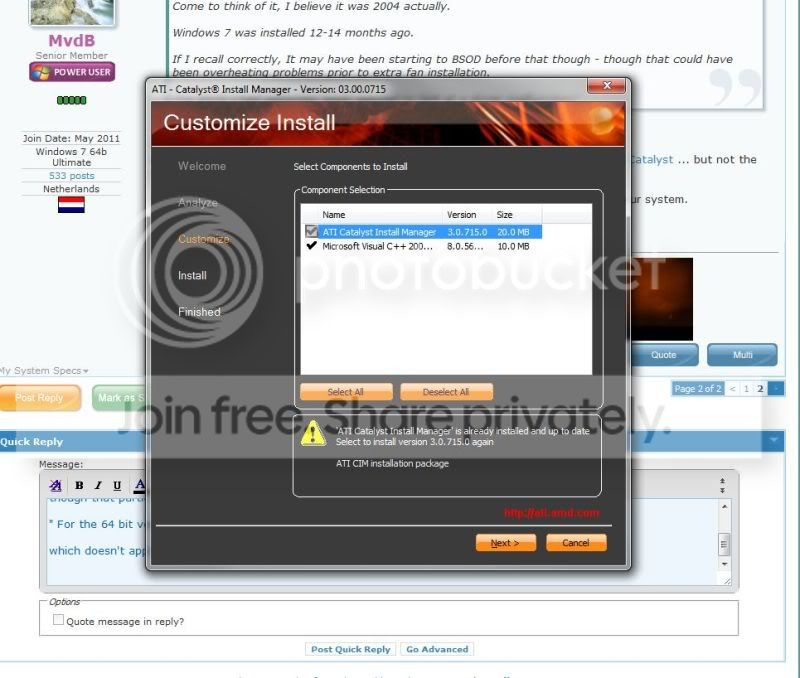
I navigated to 'Individual Downloads' and the first in the list 'Display Driver' but when I click custom Install I get this:
ATI.jpg


Also, which should I choose to download/install for the Intel Chipset from here?

http://downloadcenter.intel.com/SearchResult.aspx?lang=eng&ProductFamily=Chipsets&ProductLine=Desktop+Chipsets&ProductProduct=Intel%C2%AE+4+Series+Chipset&ProdId=2973&LineId=127&FamilyId=40
 

My Computer My Computer

OS
Windows 7 Ultimate 32bit
ATI: since you already have a full catalyst install, try reinstalling it first (for your W7 version)

Intel, hard for me to tel as I don't have full system spec's other that your snips. If I'm not mistaken, Intel has a diagnose tool that can help you identify what you need:
Intel® Driver Update Utility
 

My Computer My Computer

Computer Manufacturer/Model Number
custom build
OS
Windows 7 64b Ultimate
CPU
I7-2600 3.40GHz - testing various OC levels..
Motherboard
ASUS Sabretooth
Memory
2x 4Gb DDR3/1333
Graphics Card(s)
GTX570 - testing OC levels
Sound Card
motherboard 7.1 DIG.
Monitor(s) Displays
2x Ilyama 24" E2409HDS-B1 2ms/DVI
Screen Resolution
1920 x 1080
Hard Drives
120 GB Intel Elmcrest SSD
1 TB SATAII 7200RPM/32MB
External 2TB USB3
PSU
Corsair Pro HX850W
Cooling
Coolermaster Hyper V8
Keyboard
Logitech G110
Mouse
Logitech G700
Internet Speed
25Mb
Other Info
CPU: 7,7 RAM: 7,7 GTX: 7,9 GTX 3D : 7,9 SSD 7,6
Overall 7,6 ...... now to speed up the SSD... ;)

Also use a Dell XPS M1710 on Vista 32b
Asus LT on Vista 32
3 older machines still doing fine on Linux/ubuntu but not used much anymore...
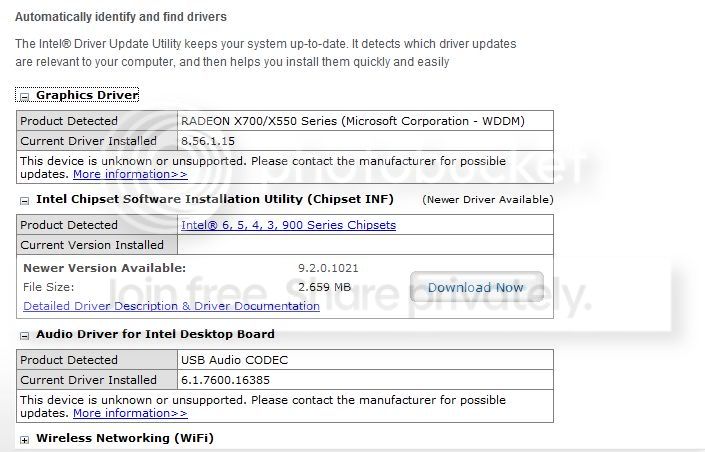
I ran the Intel Driver Update Utility online and it returns this:

intel.jpg


I Downloaded and installed the recommended middle option. (Chipset INF).
 

My Computer My Computer

OS
Windows 7 Ultimate 32bit
Back
Top