Solved BSOD Memory Management on Cold boot

oro77

New member
Local time
12:25 AM
Messages
8
I have recently bought new RAM and since I have some BSOD at cold boot. After the first BSOD, the computer is stable but the first boot (cold) will always fail.
I have done the Windows Memory Management succesfully but not MemTest yet.
I am sure both tests will fail on cold boot but I did not try yet.

Here are my specifications :
i7-860 (no OC)
Asus P7P55D
AD3U1600W4G11-2 [DDR3 PC3-12800 4GB]

As wrotten on the manual of my motherboard, I placed the RAM on the blue slots. I have also tested just one RAM and I had the same BSOD.

For the voltage, I tried the default setting Auto for the RAM then I tried to set it to 1.5V and 1.55V(according to the RAM manual, it should be 1.5V) without any success. I read about memory timing but I am not sure to understand how to set it correctly. Except theses changes, my BIOS uses default values and I have updated it to the latest version.

I wonder why it only happens on cold boot. Is there something I can do about it ? The RAM is not listed on the supported RAM in the manual because it is an old motherboard, is it a compability problem ?
 

My Computer

OS
Vista, Seven
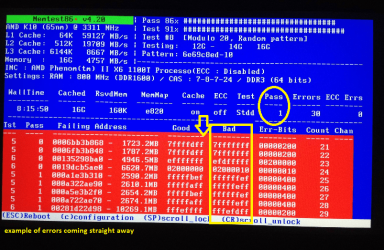
Oro mate run this http://www.sevenforums.com/tutorials/105647-ram-test-memtest86.html as it says you need to make a bootable disk or stick set the BIOS to boot from that source and you must run it for at least 8 passes or you may as well not bother. It does not involve Windows so it will boot ok.
See my pic for what you are looking for and if errors come up straight away then you can stop the test and then proceed to isolate the bad stick/s
 

Attachments

  • MEM.PNG
    MEM.PNG
    796 KB · Views: 0

My Computer

Computer type
PC/Desktop
Computer Manufacturer/Model Number
Own build (new) Desk1 / Asus ROG Win 7 / Desk2 1st build
OS
Desk1 7 Home Prem / Desk2 10 Pro / Main lap Asus ROG 10 Pro 2 laptop Toshiba 7 Pro Asus P2520 7 & 10
CPU
Desk1 i5 3750K / Laptop i7 GTX 860M / Desk2 i5 2500
Motherboard
Desk1 Asus P877-V / Desk2 Gigabyte H67 UD3H / Laptop ?
Memory
Desk1 8GB (1866) / Desk2 16GB (1333) / Laptop 8Gb DDR3
Graphics Card(s)
Desk 1& 2NVidia GTX 650 & Laptops on board Intel
Sound Card
Desk 1 & 2 -XONAR DG Realtek High Def audio Laptop
Monitor(s) Displays
Desk 1 Benq HD 2450 / Desk2 Philips 24" / Laptop 17.5"
Screen Resolution
1920x1080 D1 & D2 & Laptop 1
Hard Drives
Desk1 Samsung 120GB 830 SSD
Asus ROG 256GB 850 Pro SSD
Desk2 Samsung 840 256 SSD
Toshiba 120GB EVO
PSU
Desk 1 Corsair HX 1050/ Laptop ? / Desk 2 Corsair HX 650
Case
Desk 1 Cooler HAF XM ? Toshiba laptop / Desk2 Coolermaster
Cooling
Fans on all Desk1 -2 Desk2 - all Coolermasters 5 Laptop ?
Keyboard
Desk 1 MS Sidewinder X6 Desk 2 MS Sidewinder X 4
Mouse
Desk 1&2 - Gigabyte MS 900 gamer - laptop - Logitec wireless
Internet Speed
ADSL2+
Other Info
One other Desktop (tester) and spare Toshba laptop both with SSD's
Running Kaspersky 2016 ISS on all machines config'd identically
Logitec audio stereo systems on each machine (x3)
Canon MG5250MFC
Router/modem TP-Link running WPA2SK
Thank you but I solved my problem.
I rearranged my sticks, push the MemTest button on my motherboard, cleared the CMOS, updated to the latest BIOS version and everything seems OK now.
 

My Computer

OS
Vista, Seven
Ok mate glad it is fixed now you might be interested in this
http://www.sevenforums.com/tutorials/11728-optimize-windows-7-a.html < full of good tips for making the machine a little more "efficient" if you don't mind losing some of the "bling' like transparency - you don't have to but shutting it off saves a lot of RAM I use all the tips just about on all my machines ;)
 

My Computer

Computer type
PC/Desktop
Computer Manufacturer/Model Number
Own build (new) Desk1 / Asus ROG Win 7 / Desk2 1st build
OS
Desk1 7 Home Prem / Desk2 10 Pro / Main lap Asus ROG 10 Pro 2 laptop Toshiba 7 Pro Asus P2520 7 & 10
CPU
Desk1 i5 3750K / Laptop i7 GTX 860M / Desk2 i5 2500
Motherboard
Desk1 Asus P877-V / Desk2 Gigabyte H67 UD3H / Laptop ?
Memory
Desk1 8GB (1866) / Desk2 16GB (1333) / Laptop 8Gb DDR3
Graphics Card(s)
Desk 1& 2NVidia GTX 650 & Laptops on board Intel
Sound Card
Desk 1 & 2 -XONAR DG Realtek High Def audio Laptop
Monitor(s) Displays
Desk 1 Benq HD 2450 / Desk2 Philips 24" / Laptop 17.5"
Screen Resolution
1920x1080 D1 & D2 & Laptop 1
Hard Drives
Desk1 Samsung 120GB 830 SSD
Asus ROG 256GB 850 Pro SSD
Desk2 Samsung 840 256 SSD
Toshiba 120GB EVO
PSU
Desk 1 Corsair HX 1050/ Laptop ? / Desk 2 Corsair HX 650
Case
Desk 1 Cooler HAF XM ? Toshiba laptop / Desk2 Coolermaster
Cooling
Fans on all Desk1 -2 Desk2 - all Coolermasters 5 Laptop ?
Keyboard
Desk 1 MS Sidewinder X6 Desk 2 MS Sidewinder X 4
Mouse
Desk 1&2 - Gigabyte MS 900 gamer - laptop - Logitec wireless
Internet Speed
ADSL2+
Other Info
One other Desktop (tester) and spare Toshba laptop both with SSD's
Running Kaspersky 2016 ISS on all machines config'd identically
Logitec audio stereo systems on each machine (x3)
Canon MG5250MFC
Router/modem TP-Link running WPA2SK
Back
Top