It is a driver bug.
The computer thinks it is Driver Verifier enabled. Stop code 0xC4 occurs only when it is Driver Verifier enabled.
Code:
*******************************************************************************
*                                                                             *
*                        Bugcheck Analysis                                    *
*                                                                             *
*******************************************************************************
[URL="http://www.carrona.org/bsodindx.html#0x000000C4"]
DRIVER_VERIFIER_DETECTED_VIOLATION (c4)[/URL]
A device driver attempting to corrupt the system has been caught.  This is
because the driver was specified in the registry as being suspect (by the
administrator) and the kernel has enabled substantial checking of this driver.
If the driver attempts to corrupt the system, bugchecks 0xC4, 0xC1 and 0xA will
be among the most commonly seen crashes.
But actually it is not driver verifier enabled. See here ...
Code:
DEFAULT_BUCKET_ID: WIN7_DRIVER_FAULT
If DV is actually enabled, the value would have been "VERIFIER_ENABLED_VISTA_MINIDUMP"
So the situation is not normal, and we have more reason to believe that it is a buggy driver. See here, in the arguments ...
Code:
Arguments:
Arg1: 0000000000000091, [COLOR=Red][B]A driver switched stacks using a method that is not supported by
    the operating system.[/B][/COLOR] The only supported way to extend a kernel
    mode stack is by using KeExpandKernelStackAndCallout.
Arg2: 0000000000000002
Arg3: fffffa8006c04060
Arg4: 0000000000000000
Now, the question is .... which driver is buggy? From the dump data, it is your display driver.
Code:
*******************************************************************************
*                                                                             *
*                        Bugcheck Analysis                                    *
*                                                                             *
*******************************************************************************

Use !analyze -v to get detailed debugging information.

BugCheck C4, {91, 2, fffffa8006c04060, 0}

*** WARNING: Unable to verify timestamp for [URL="http://www.carrona.org/drivers/driver.php?id=nvlddmkm.sys"]nvlddmkm.sys[/URL]
*** ERROR: Module load completed but symbols could not be loaded for [URL="http://www.carrona.org/drivers/driver.php?id=nvlddmkm.sys"]nvlddmkm.sys[/URL]
Probably caused by : [URL="http://www.carrona.org/drivers/driver.php?id=nvlddmkm.sys"]nvlddmkm.sys[/URL] ( nvlddmkm+1b775d )

Followup: MachineOwner
---------
The particular version you have installed and the driver earlier to this one behaves in the same way. We have noticed it many a times in the past. Here what you need to do is to remove the display driver totally from your system, and install the latest one.
Install the latest WHQL only.
- Uninstall All nvidia items in Control Panel > Programs and features
- 3D Vision Control Driver
- 3D Vision Driver
- Graphics Driver
- HD Audio Driver
- PhysX
- nvidia Update
(Are you using nvidia chipset drivers? If so, dont uninstall anything other than those are listed).
- Now follow Drivers - Clean Left over Files after Uninstalling
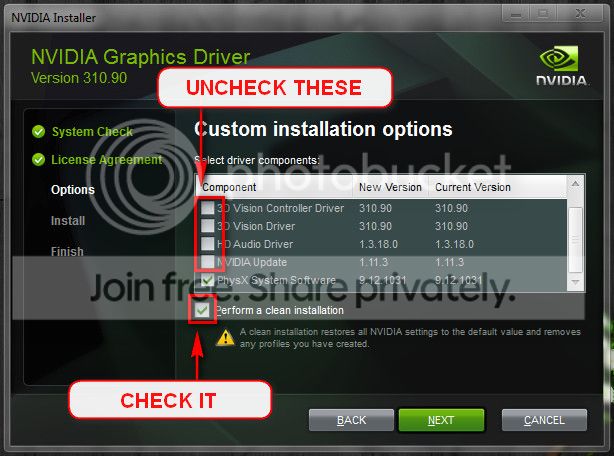
- Boot normally now. Go to Drivers - Download NVIDIA Drivers, Download 320.18 WHQL. While installing, Select Custom (Advanced) install. In the next page, follow this settings:
Daemon Tools, Alcohol 120% and Power Archiver Pro uses
SCSI Pass Through Direct (
SPTD), which is a well known BSOD causer. Uninstall
Daemon Tools at first. Then download SPTD standalone installer from
Disk-Tools.com, and execute the downloaded file as guided below :
- Double click to open it.
- Click this button only:
-
- If it is grayed out, as in the picture, there is no more SPTD in your system, and you just close the window.
Free up the startup. Windows does not need any other program to auto start with it, but the auto start programs often conflicts and causes various problems including BSODs.
- Click on the Start button
- Type “msconfig (without quotes), click the resulting link. It will open the System Configuration window.
- Select the “Startup” tab.
- Deselect all items other than the antivirus.
- Apply > OK
- Accept then restart.
Let us know the results.




 so i think it worked, I'll let you know if it happens again though! Thanks for the help, - Soqu
