
Can only work from safe mode/networking...nothing works in normal boot

Condor27

New member
Local time
10:54 AM
Messages
5
Location
Pennsylvania
Hello,

Brought up system yesterday and no internet connection. First reboot router, no help. I could not even open control panel or anything else so booted into safe mode w/internet. I have internet with that. I did a sfc /scannow in safe mode and it finished fine but cannot do that in regular boot. I can't even get to the cmd prompt. I have run windows defender/hitman pro/ adw cleaner and spybot search and destroy in safe mode and nothing seems wrong. However, I cannot run my kaspersky scan in either. Wanted to try a clean boot per the instructions I have seen elsewhere but I can't do that either. I am out of gas as far as my experience. Anyone else run into this?
 

My Computer My Computer

At a glance

Windows 7 Professional 64bitIntel(R) Core(TM) i7-4790 CPU @ 3.60GHz16.00GBIntel(R) HD Graphics 4600
Computer type
PC/Desktop
Computer Manufacturer/Model Number
Dell
OS
Windows 7 Professional 64bit
CPU
Intel(R) Core(TM) i7-4790 CPU @ 3.60GHz
Motherboard
Dell Inc. 088DT1
Memory
16.00GB
Graphics Card(s)
Intel(R) HD Graphics 4600
Sound Card
(1) Realtek High Definition Audio (2) Intel(R) Display Aud
Antivirus
Kaspersky
Browser
Opera/google chrome
Other Info
I have no info on the other questions.
Condor27

Can you get to last known good configuration?
Start computer, press <F8> at about 1 second intervals, faster or slower and screen won't appear.

Snick
 

My Computer My Computer

At a glance

Win 10 x64, Linux Lite, Win 7 x64, BlackArch,...
Computer type
PC/Desktop
Computer Manufacturer/Model Number
HP Desktop & Compaq Laptop
OS
Win 10 x64, Linux Lite, Win 7 x64, BlackArch, & Kali
Hard Drives
Samsung 850 Pro 256Gb,
Hitachi HDD 1Tb,
Crucial MX SSD 250Gb
Segate 3Tb USB 3.0 Ext. Backup HDD
Internet Speed
150Mbps dn, 20Mbps up
Antivirus
Avast Free, Malwarebytes Anti-Exploit & Anti-Ransomware
Browser
Firefox, Chrome, Opera, & VPN
Hi Snick,

Have not tried that...last night I tried to restore back to Sept 23...it showed that it worked but it did not apparently b/c I still have nothing. I will try the F8...thank you.
 

My Computer My Computer

At a glance

Windows 7 Professional 64bitIntel(R) Core(TM) i7-4790 CPU @ 3.60GHz16.00GBIntel(R) HD Graphics 4600
Computer type
PC/Desktop
Computer Manufacturer/Model Number
Dell
OS
Windows 7 Professional 64bit
CPU
Intel(R) Core(TM) i7-4790 CPU @ 3.60GHz
Motherboard
Dell Inc. 088DT1
Memory
16.00GB
Graphics Card(s)
Intel(R) HD Graphics 4600
Sound Card
(1) Realtek High Definition Audio (2) Intel(R) Display Aud
Antivirus
Kaspersky
Browser
Opera/google chrome
Other Info
I have no info on the other questions.
Condor27

Unfortunately, as you have discovered, Microsoft System Restore is unreliable. I do not use Microsoft's Backup, System Restore or recommend it. Backups, to external hard drive. We recommend AOMEI Backupper Standard or Macrium Reflect, both free backup utilities.

Do you have a recent full disk image/backup that you could use to reimage your drive?
Always prudent to do so, preferably to an external hard drive.
Read blue text in my footer please. I just imaged all my drives, as I do weekly, last evening with AOMEI Backupper Standard (Free)

Being that you can enter safe mode with internet access, you may have a program or programs that run in normal mode that are causing your issue.

Snick
 

My Computer My Computer

At a glance

Win 10 x64, Linux Lite, Win 7 x64, BlackArch,...
Computer type
PC/Desktop
Computer Manufacturer/Model Number
HP Desktop & Compaq Laptop
OS
Win 10 x64, Linux Lite, Win 7 x64, BlackArch, & Kali
Hard Drives
Samsung 850 Pro 256Gb,
Hitachi HDD 1Tb,
Crucial MX SSD 250Gb
Segate 3Tb USB 3.0 Ext. Backup HDD
Internet Speed
150Mbps dn, 20Mbps up
Antivirus
Avast Free, Malwarebytes Anti-Exploit & Anti-Ransomware
Browser
Firefox, Chrome, Opera, & VPN
Windows Vista/ 7/8/8.1 keep a regular backup of the registry handy in case you need to overwrite a corrupted registry. By default, the RegIdleBackup task runs every 10 days, so that’s as far back as you would lose if you replaced the current registry with the automatically backed-up files. You can find the backed-up registry files in \Windows\System32\config\RegBack folder.


Please boot your computer with Windows Setup Media and from Windows Recovery Environment start the Command Prompt.

Please type below command into Command Prompt and press Enter key.

Code:
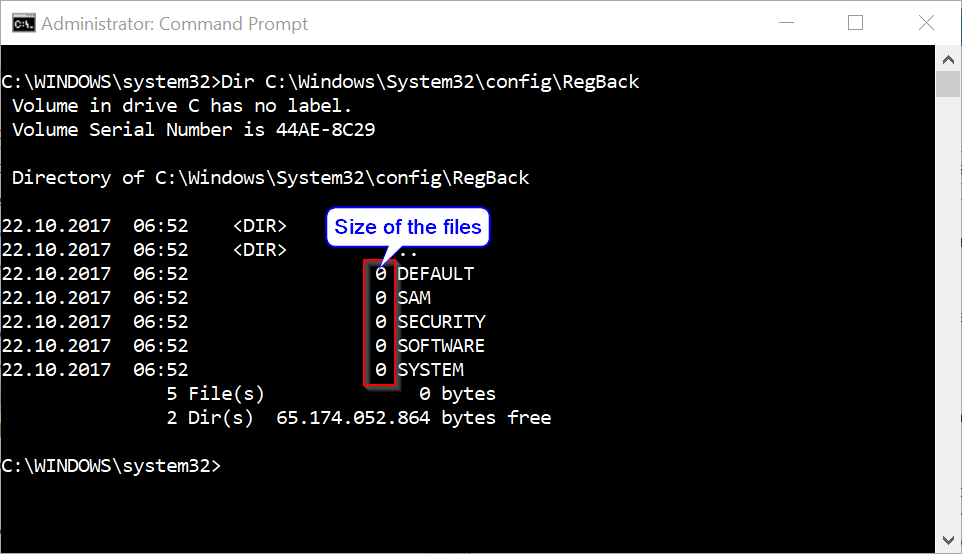
 Dir C:\Windows\System32\config\RegBack


Above command will list files stored within RegBack folder and there file size, make sure files are not zero size if they are do not follow below instructions.

akBT8zC.png


Please replace partition letter C: with Windows installed partition letter. When computer boots into Windows Recovery Environment (WinRE) environment the drive letter assign to Windows partition may not be C: drive letter because Windows 7, 8 and 8.1 creates a separate system partition when it's installed from scratch. The system partition contains boot files WinRE assigns the system partition the C: drive letter and the Windows installed partition will be assign any other drive letter usually D: drive letter is assign to Windows installed partition. The Bcdedit | find "osdevice" command can be use to find out the drive letter of the Windows installed partition the output of the Bcdedit command is similar to this osdevice partition=D:. The drive letter after partition= is the drive letter of the Windows partition.

Please type below commands into Command Prompt and for each command you have typed press Enter key.


Code:
Replace C:\Windows\System32\Config\RegBack\*     C:\Windows\System32\Config

As files are replaced, the Command Prompt displays their filenames on the screen.

This procedure assumes that Windows Vista/7/8/8.1 is installed to the C:\ partition. Make sure to replace C:\ drive letter to the appropriate Windows OS installed partition drive letter if it is a different location.


Above commands renames the registry files at their existing location, and then copies the registry files from the RegBack folder to the C:\Windows\System32\Config folder.
 

My Computer My Computer

At a glance

Windows 10 Pro x64Intel Core i5 6600Corsair Vengeance LPX 16GB 2666MHz DDR4AMD Radeon R9 380 Series
Computer type
PC/Desktop
Computer Manufacturer/Model Number
Custom Build
OS
Windows 10 Pro x64
CPU
Intel Core i5 6600
Motherboard
Gigabyte Technology Z170M-D3H-CF (U3E1)
Memory
Corsair Vengeance LPX 16GB 2666MHz DDR4
Graphics Card(s)
AMD Radeon R9 380 Series
Hard Drives
SSD
HDD
Antivirus
Eset Smart Security
Browser
Mozila Firefox
Snick, I was able to get to last known good configuration and clicked on it....same thing. Then when I rebooted into safe mode, I just got a profile error saying some features will be unavailable and chgs to settings will not be saved. Would it benefit me to try repair my computer? I am truly sick to my stomach and the blue statements you mentioned are absolutely true. I do have a backup from 9/20/20 but I am almost afraid to restore...which, can I do a restore in safe mode? I'm lost. Thank you for taking the time with me....
 

My Computer My Computer

At a glance

Windows 7 Professional 64bitIntel(R) Core(TM) i7-4790 CPU @ 3.60GHz16.00GBIntel(R) HD Graphics 4600
Computer type
PC/Desktop
Computer Manufacturer/Model Number
Dell
OS
Windows 7 Professional 64bit
CPU
Intel(R) Core(TM) i7-4790 CPU @ 3.60GHz
Motherboard
Dell Inc. 088DT1
Memory
16.00GB
Graphics Card(s)
Intel(R) HD Graphics 4600
Sound Card
(1) Realtek High Definition Audio (2) Intel(R) Display Aud
Antivirus
Kaspersky
Browser
Opera/google chrome
Other Info
I have no info on the other questions.
I do have a backup from 9/20/20 but I am almost afraid to restore...which, can I do a restore in safe mode? I'm lost.


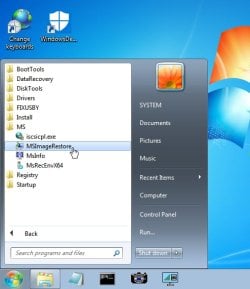
If you have a system image, use boot media to restore it . You can borrow mine ( 64 bit ) 17514x64v24.iso

Best to extract the iso to create a bootable usb using something like this View attachment Usb7ice.zip

Then boot from the usb you just created.


It will boot to a desktop. Under the start menu in the MS folder you will find bmrui (MSImageRestore)

imagerestore1.jpg
 
Last edited:

My Computers My Computers

  • At a glance

    7 X64i5 84002x8gb 3200mhz
    Computer type
    PC/Desktop
    OS
    7 X64
    CPU
    i5 8400
    Motherboard
    gigabyte b365m ds3h
    Memory
    2x8gb 3200mhz
    Hard Drives
    various
    PSU
    pure power 11 400w cm
    Case
    Coolermaster
    Cooling
    cryorig m9i
  • At a glance

    7x64g54008gb ddr4 2400
    Computer type
    PC/Desktop
    OS
    7x64
    CPU
    g5400
    Motherboard
    ga b365m ds3h
    Memory
    8gb ddr4 2400
    PSU
    xfx pro 450w
Glad to see your workin' on this SIW2!
 

My Computer My Computer

At a glance

Win 10 x64, Linux Lite, Win 7 x64, BlackArch,...
Computer type
PC/Desktop
Computer Manufacturer/Model Number
HP Desktop & Compaq Laptop
OS
Win 10 x64, Linux Lite, Win 7 x64, BlackArch, & Kali
Hard Drives
Samsung 850 Pro 256Gb,
Hitachi HDD 1Tb,
Crucial MX SSD 250Gb
Segate 3Tb USB 3.0 Ext. Backup HDD
Internet Speed
150Mbps dn, 20Mbps up
Antivirus
Avast Free, Malwarebytes Anti-Exploit & Anti-Ransomware
Browser
Firefox, Chrome, Opera, & VPN

My Computer My Computer

At a glance

Windows 7 Ultimate x64
Computer type
PC/Desktop
OS
Windows 7 Ultimate x64
If this is not a TCP/IP issue then you can run a clean boot from safe mode. How to perform a clean boot. | Sony USA

Once that is done in safe mode reboot the computer without safe mode and see if it'll boot. If it does we can go further to find out what it may be.
 

My Computer My Computer

At a glance

Windows 7 Ultimate x64
Computer type
PC/Desktop
OS
Windows 7 Ultimate x64
Can only work from safe mode/networking

I want to thank all of you who have responded to me. You have all been most kind. SIW2...thank you for sharing your programs....I will carefully try...but I am so afraid of screwing up my system where I will never recover (lol)...BTW, love your notes....I am a retired Navy Chief and Patriot! To Snick...you have been great for sticking with me...F22 SIMPILOT....tried clean boot...no go. May try nuclear! Some of the things are over my head I'm afraid...especially dealing with registry...that scares me....but I will continue to try your recommendations and keep you posted as I do...again...THANK YOU ALL.
 

My Computer My Computer

At a glance

Windows 7 Professional 64bitIntel(R) Core(TM) i7-4790 CPU @ 3.60GHz16.00GBIntel(R) HD Graphics 4600
Computer type
PC/Desktop
Computer Manufacturer/Model Number
Dell
OS
Windows 7 Professional 64bit
CPU
Intel(R) Core(TM) i7-4790 CPU @ 3.60GHz
Motherboard
Dell Inc. 088DT1
Memory
16.00GB
Graphics Card(s)
Intel(R) HD Graphics 4600
Sound Card
(1) Realtek High Definition Audio (2) Intel(R) Display Aud
Antivirus
Kaspersky
Browser
Opera/google chrome
Other Info
I have no info on the other questions.
Good afternoon everyone! I have been ill since my last reply so I apologize for the late reply here. BUT...today I started again to try and find my problem. You all aren't gonna believe this....it was in my services...cryptographic services were not starting....of course, I also stopped my windows defender service so I suppose it could have been that but the system would not allow internet after that so once I started the crypto svcs, it worked. I am shocked. But again, you all have been great and if you happen to see anyone else with this weird issue, tell em to check that first. I appreciate that you are here and if I ever run into trouble again, I hope you all won't mind if I come here first! I wish everyone well!
 

My Computer My Computer

At a glance

Windows 7 Professional 64bitIntel(R) Core(TM) i7-4790 CPU @ 3.60GHz16.00GBIntel(R) HD Graphics 4600
Computer type
PC/Desktop
Computer Manufacturer/Model Number
Dell
OS
Windows 7 Professional 64bit
CPU
Intel(R) Core(TM) i7-4790 CPU @ 3.60GHz
Motherboard
Dell Inc. 088DT1
Memory
16.00GB
Graphics Card(s)
Intel(R) HD Graphics 4600
Sound Card
(1) Realtek High Definition Audio (2) Intel(R) Display Aud
Antivirus
Kaspersky
Browser
Opera/google chrome
Other Info
I have no info on the other questions.
Back
Top