BSOD (or random restarts) while playing game

Logo

New member
Local time
1:17 PM
Messages
10
Hey there i have again similar problem with my computer randomly restarting usually few minutes after i turn it up every day the game im playing is Runescape which is browser online game (java based)

i did a temp check everything seems to be fine
updated graphic card drivers

and ran out of ideas what else could be done,
last time i ran mem test and have found no errors
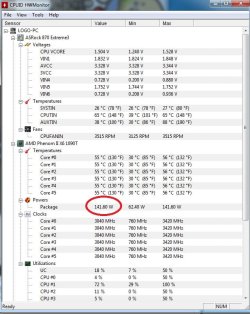
what i just found strange is that CPU is taking 141,60 watt when it´s designed for 125 watt (see pic)

any suggestions greatly appreciated
 

Attachments
My Computer

Computer type
PC/Desktop
Computer Manufacturer/Model Number
Custom Build
OS
Windows7 -64Bit
CPU
amd phenom x6 1090t
Motherboard
Assrock Extreme 3
Memory
16 Gb Corsair Lowprofile
Graphics Card(s)
Amd Radeon x7 200 Series
Antivirus
Eset Nod32
Browser
Firefox
Code:
*******************************************************************************
*                                                                             *
*                        Bugcheck Analysis                                    *
*                                                                             *
*******************************************************************************

Use !analyze -v to get detailed debugging information.

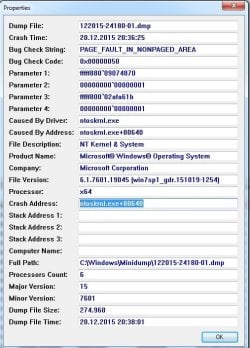
[B][COLOR="Red"]BugCheck 50[/COLOR][/B], {fffff88009074870, 1, fffff80002afa61b, 1}


Could not read faulting driver name
Probably caused by : ntkrnlmp.exe ( nt! ?? ::FNODOBFM::`string'+462e2 )

Followup: MachineOwner
---------
Run a minimum of 8 consecutive passes, preferably overnight, or until errors occur using MemTest86+.

Reference:
http://www.sevenforums.com/tutorials/105647-ram-test-memtest86.html
 

My Computer

Computer type
PC/Desktop
Computer Manufacturer/Model Number
Golden Mk. I.4
OS
Windows 10 Pro x64 ; Xubuntu x64
CPU
Intel i7 860 @ 2.80 GHz O/C'ed to 4.0GHz
Motherboard
Gigabyte P55A-UD3R Rev.1. Award BIOS F13
Memory
16GB Corsair Vengance DDR3 @ 661 MHz Dual Channel (9-9-9-24)
Graphics Card(s)
EVGA NVidia GTX 560 1024MB
Sound Card
Realtek Integrated
Monitor(s) Displays
Dual Samsung SyncMaster 2494HS
Screen Resolution
1920*1080 and 1920*1080
Hard Drives
1*Samsung 840 EVO 120GB SSD;
1*OCZ Vertex 2 60GB SSD;
2*Samsung F3 SpinPoint 1TB in RAID0;
1*Samsung F1 SpinPoint 1TB;
2*Western Digital 1TB External USB 3.0
1*Western Digital 500GB External USB 3.0
1*Seagate 500GB External USB 2.0
PSU
Thermaltake ToughPower QFan 750W
Case
Thermaltake Element S VK60001W2Z
Cooling
Corsair H60 Water Cooling, 2*230mm and 2*80mm case fans
Keyboard
Logitech G110
Mouse
Logitech MX518
I ran the Memtest86+ for 4 hours 20 minutes the test fully passed only once with no errors
however i removed my ram and replaced it with new one (bought today) so far no bsod

ill keep you updated, thanks
 

My Computer

Computer type
PC/Desktop
Computer Manufacturer/Model Number
Custom Build
OS
Windows7 -64Bit
CPU
amd phenom x6 1090t
Motherboard
Assrock Extreme 3
Memory
16 Gb Corsair Lowprofile
Graphics Card(s)
Amd Radeon x7 200 Series
Antivirus
Eset Nod32
Browser
Firefox
Error doesn't happen since i changed ram

can someone tell me how can i find out which one out of the 4 x 4 GB modules is bad ?
my brother wants them should i tell him to stick one by one and replace when the error occurs ?
should he find the bad stick is it possible to use 3 remains sticks at once (12 gb so 3x 4GB) ?
 

My Computer

Computer type
PC/Desktop
Computer Manufacturer/Model Number
Custom Build
OS
Windows7 -64Bit
CPU
amd phenom x6 1090t
Motherboard
Assrock Extreme 3
Memory
16 Gb Corsair Lowprofile
Graphics Card(s)
Amd Radeon x7 200 Series
Antivirus
Eset Nod32
Browser
Firefox
To determine which one is faulty, run a minimum of 8 passes of MemTest86+ on each RAM DiMM individually.
 

My Computer

Computer type
PC/Desktop
Computer Manufacturer/Model Number
Golden Mk. I.4
OS
Windows 10 Pro x64 ; Xubuntu x64
CPU
Intel i7 860 @ 2.80 GHz O/C'ed to 4.0GHz
Motherboard
Gigabyte P55A-UD3R Rev.1. Award BIOS F13
Memory
16GB Corsair Vengance DDR3 @ 661 MHz Dual Channel (9-9-9-24)
Graphics Card(s)
EVGA NVidia GTX 560 1024MB
Sound Card
Realtek Integrated
Monitor(s) Displays
Dual Samsung SyncMaster 2494HS
Screen Resolution
1920*1080 and 1920*1080
Hard Drives
1*Samsung 840 EVO 120GB SSD;
1*OCZ Vertex 2 60GB SSD;
2*Samsung F3 SpinPoint 1TB in RAID0;
1*Samsung F1 SpinPoint 1TB;
2*Western Digital 1TB External USB 3.0
1*Western Digital 500GB External USB 3.0
1*Seagate 500GB External USB 2.0
PSU
Thermaltake ToughPower QFan 750W
Case
Thermaltake Element S VK60001W2Z
Cooling
Corsair H60 Water Cooling, 2*230mm and 2*80mm case fans
Keyboard
Logitech G110
Mouse
Logitech MX518
Back
Top