BSOD playing League of Legends, error 0x3B

Electros

New member
Local time
6:36 AM
Messages
21
Location
Canada
Hello everyone,

I've recently been suffering from a number of BSOD while playing League of Legends and sometimes even when browsing the web or when I'm on Youtube.

I have no idea how to diagnose or fix the problem so any help would be appreciated. Thank You.

I have attached the logs as well as a text file from BlueScreenView if it helps.
 

My Computer My Computer

At a glance

Windows 7 Ultimate 64bitIntel Core i5 3570k @ 3.4GHz4.00GB DDR3 (2GB x 2)Radeon HD 6750
Computer type
PC/Desktop
OS
Windows 7 Ultimate 64bit
CPU
Intel Core i5 3570k @ 3.4GHz
Motherboard
ASRock Z77 Extreme 4
Memory
4.00GB DDR3 (2GB x 2)
Graphics Card(s)
Radeon HD 6750
Hard Drives
1TB @ 7200 RPM
PSU
Cooler Master 650Watt
Case
Fractal Design Arc Midi R2
Cooling
Fan
Keyboard
Razer Lycosa
Mouse
HP Standard (KY619AA)
Internet Speed
27.38 Mbps @ TechSavvy
Antivirus
Microsoft Security Essentials
Browser
Chrome
Welcome to Seven Forums.

Please update to the latest version of ATI driver:
Code:
fffff880`08ac6878  fffff880`057582e5Unable to load image atikmdag.sys, Win32 error 0n2
*** WARNING: Unable to verify timestamp for atikmdag.sys
*** ERROR: Module load completed but symbols could not be loaded for atikmdag.sys
 atikmdag+0xf62e5
Code:
 lmvm atikmdag
start             end                 module name
fffff880`05662000 fffff880`06070000   atikmdag T (no symbols)           
    Loaded symbol image file: atikmdag.sys
    Image path: atikmdag.sys
    Image name: atikmdag.sys
    Timestamp:        Thu Sep 08 23:26:08 2011 (4E68FAB0)
    CheckSum:         009C90BE
    ImageSize:        00A0E000
    Translations:     0000.04b0 0000.04e4 0409.04b0 0409.04e4
Code:
Driver	c:\windows\system32\drivers\atikmpag.sys (8.14.1.6229, 303.50 KB (310,784 bytes), 08/09/2011 12:52 PM)
Sometimes drivers remain, not completely uninstalled. Follow this tutorial for complete removal of drivers of the particular program:
Security software?

We recommended Microsoft Security Essentials from a strict BSOD perspective. Is most compatible & provides most stability compared to other antivirus app/Internet Security Software.
   Warning
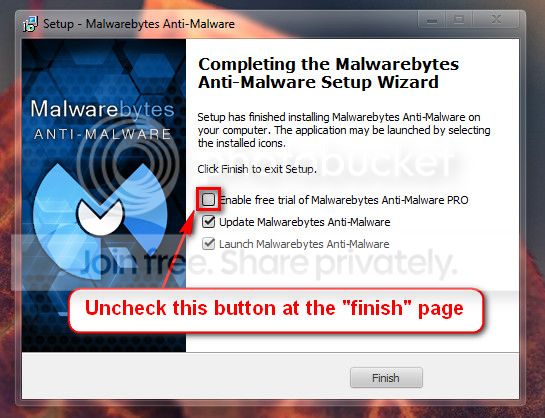
Do not start the free trial of Malware Bytes; remember to deselect that option when prompted.

2013-03-09_224312_zps62dc7c23.jpg

Run a full scan with both (separately) once downloaded, installed and updated.

Perform a System File Check to check the integrity of all protected Windows 7 :
  1. Click on the start :orb:
  2. Type CMD on Search
  3. Left click and Run as Administrator
  4. Type
    Code:
    SFC /scannow
Full tutorial here:
Check your hard drive(s) for errors by running chkdsk
Install all updates including Service Pack 1:
Let us know the results.
 

My Computer My Computer

At a glance

Windows 10 Home 64BitIntel Core i5 10400 @ 2.90GHz8.00GB Single-Channel Unknown @ 1329MHz (16-2...
Computer type
PC/Desktop
Computer Manufacturer/Model Number
Self assembled
OS
Windows 10 Home 64Bit
CPU
Intel Core i5 10400 @ 2.90GHz
Motherboard
Intel Corporation DG41WV (PROCESSOR)
Memory
8.00GB Single-Channel Unknown @ 1329MHz (16-20-20-38)
Sound Card
Realtek High Definition Audio
Monitor(s) Displays
DELL E170S
Screen Resolution
1280x1024 pixels
Hard Drives
931GB TOSHIBA DT01ACA100 (SATA)
238GB TEAM TM8PS7256G (SATA SSD)
Case
Nothing Fancy
Cooling
Fans
Keyboard
A4 Tech Co LTD
Mouse
A4 Tech Co Ltd/Logitech
Internet Speed
25 Mbps
Hello,

Thank you for the informative response. However, I am a bit confused on the driver uninstallation part you mentioned. After downloading Driver Sweeper, do you want me to remove the driver named atikmpag.sys? I have already done all the other things you mentioned and now i just have to uninstall the driver.
 

My Computer My Computer

At a glance

Windows 7 Ultimate 64bitIntel Core i5 3570k @ 3.4GHz4.00GB DDR3 (2GB x 2)Radeon HD 6750
Computer type
PC/Desktop
OS
Windows 7 Ultimate 64bit
CPU
Intel Core i5 3570k @ 3.4GHz
Motherboard
ASRock Z77 Extreme 4
Memory
4.00GB DDR3 (2GB x 2)
Graphics Card(s)
Radeon HD 6750
Hard Drives
1TB @ 7200 RPM
PSU
Cooler Master 650Watt
Case
Fractal Design Arc Midi R2
Cooling
Fan
Keyboard
Razer Lycosa
Mouse
HP Standard (KY619AA)
Internet Speed
27.38 Mbps @ TechSavvy
Antivirus
Microsoft Security Essentials
Browser
Chrome

My Computer My Computer

At a glance

Microsoft Windows 10 Pro Insider Preview 64-bitIntel(R) Core(TM) i3-4130 CPU @ 3.40GHzCorsair Vengence 4GB x2 (8.00GB Dual-Channel ...2047MB GeForce GTS 450 (ZOTAC International)
Computer type
PC/Desktop
Computer Manufacturer/Model Number
Self Assembled
OS
Microsoft Windows 10 Pro Insider Preview 64-bit
CPU
Intel(R) Core(TM) i3-4130 CPU @ 3.40GHz
Motherboard
Gigabyte Technology Co., Ltd. B85M-D3H
Memory
Corsair Vengence 4GB x2 (8.00GB Dual-Channel DDR3 @ 798MHz)
Graphics Card(s)
2047MB GeForce GTS 450 (ZOTAC International)
Sound Card
Onboard (Realtek High Definition Audio)
Monitor(s) Displays
LG Flatron E2040T
Screen Resolution
1600x900
Hard Drives
Western Digital 1 TB
Seagate 500 GB
PSU
Corsair VS550
Case
Cooler Master K380
Cooling
Cooler Master Seidon 120V Plus
Keyboard
Logitech MK260r
Mouse
Logitech MK260r
Internet Speed
PMPL Broadband
Antivirus
Windows Defender + MBAM
Browser
Firefox
Other Info
Dell Studio 15" Laptop
Alright I updated everything and ran the two scans with 0 errors. So far its been 7 hours and no BSOD yet. I continue monitoring it for a while but i think its been fixed. Thank you :D
 

My Computer My Computer

At a glance

Windows 7 Ultimate 64bitIntel Core i5 3570k @ 3.4GHz4.00GB DDR3 (2GB x 2)Radeon HD 6750
Computer type
PC/Desktop
OS
Windows 7 Ultimate 64bit
CPU
Intel Core i5 3570k @ 3.4GHz
Motherboard
ASRock Z77 Extreme 4
Memory
4.00GB DDR3 (2GB x 2)
Graphics Card(s)
Radeon HD 6750
Hard Drives
1TB @ 7200 RPM
PSU
Cooler Master 650Watt
Case
Fractal Design Arc Midi R2
Cooling
Fan
Keyboard
Razer Lycosa
Mouse
HP Standard (KY619AA)
Internet Speed
27.38 Mbps @ TechSavvy
Antivirus
Microsoft Security Essentials
Browser
Chrome
Keep us posted :)
 

My Computer My Computer

At a glance

Windows 10 Home 64BitIntel Core i5 10400 @ 2.90GHz8.00GB Single-Channel Unknown @ 1329MHz (16-2...
Computer type
PC/Desktop
Computer Manufacturer/Model Number
Self assembled
OS
Windows 10 Home 64Bit
CPU
Intel Core i5 10400 @ 2.90GHz
Motherboard
Intel Corporation DG41WV (PROCESSOR)
Memory
8.00GB Single-Channel Unknown @ 1329MHz (16-20-20-38)
Sound Card
Realtek High Definition Audio
Monitor(s) Displays
DELL E170S
Screen Resolution
1280x1024 pixels
Hard Drives
931GB TOSHIBA DT01ACA100 (SATA)
238GB TEAM TM8PS7256G (SATA SSD)
Case
Nothing Fancy
Cooling
Fans
Keyboard
A4 Tech Co LTD
Mouse
A4 Tech Co Ltd/Logitech
Internet Speed
25 Mbps
Bad news :(

I just had another BSOD and its a different stop code than the last one. I've attached the logs below.
 

My Computer My Computer

At a glance

Windows 7 Ultimate 64bitIntel Core i5 3570k @ 3.4GHz4.00GB DDR3 (2GB x 2)Radeon HD 6750
Computer type
PC/Desktop
OS
Windows 7 Ultimate 64bit
CPU
Intel Core i5 3570k @ 3.4GHz
Motherboard
ASRock Z77 Extreme 4
Memory
4.00GB DDR3 (2GB x 2)
Graphics Card(s)
Radeon HD 6750
Hard Drives
1TB @ 7200 RPM
PSU
Cooler Master 650Watt
Case
Fractal Design Arc Midi R2
Cooling
Fan
Keyboard
Razer Lycosa
Mouse
HP Standard (KY619AA)
Internet Speed
27.38 Mbps @ TechSavvy
Antivirus
Microsoft Security Essentials
Browser
Chrome
Take memtest. Run for 8 passes and test each stick in a know good slot for an additional 6 passes.

The goal is to test all the RAM sticks and all the motherboard slots.

Check your motherboard manual to ensure the RAM sticks are in the recommended motherboard slots. Some motherboards have very specific slots required for the number of RAM sticks installed.

If you get errors, stop the test and continue with the next step.

1. Remove all but one stick of RAM from your computer (this will be RAM stick #1), and run Memtest86 again, for 7 passes.
*Be sure to note the RAM stick, use a piece of tape with a number, and note the motherboard slot.
If this stick passes the test then go to step #3.

2. If RAM stick #1 has errors, repeat the test with RAM stick #2 in the same motherboard slot.
*If RAM stick #2 passes, this indicates that RAM stick #1 may be bad. If you want to be absolutely sure, re-test RAM stick #1 in another known good slot.
*If RAM stick #2 has errors, this indicates another possible bad RAM stick, a possible motherboard slot failure or inadequate settings.
3. Test the next stick of RAM (stick #2) in the next motherboard slot.
*If this RAM stick has errors repeat step #2 using a known good stick if possible, or another stick.
*If this RAM stick has no errors and both sticks failed in slot#1, test RAM stick #1 in this slot.
4. If you find a stick that passes the test, test it in all the other motherboard slots.

If Part 2 testing shows errors, and all tests in Part 3 show errors, you will need to test the RAM sticks in another computer and/or test other RAM in your computer to identify the problem.

In this way, you can identify whether it is a bad stick of RAM, a bad motherboard, or incompatibility between the sticks.
   Information
Errors are sometimes found after 8 passes.

   Tip
Do this test overnight, before going to bed.
 

My Computer My Computer

At a glance

Windows 10 Home 64BitIntel Core i5 10400 @ 2.90GHz8.00GB Single-Channel Unknown @ 1329MHz (16-2...
Computer type
PC/Desktop
Computer Manufacturer/Model Number
Self assembled
OS
Windows 10 Home 64Bit
CPU
Intel Core i5 10400 @ 2.90GHz
Motherboard
Intel Corporation DG41WV (PROCESSOR)
Memory
8.00GB Single-Channel Unknown @ 1329MHz (16-20-20-38)
Sound Card
Realtek High Definition Audio
Monitor(s) Displays
DELL E170S
Screen Resolution
1280x1024 pixels
Hard Drives
931GB TOSHIBA DT01ACA100 (SATA)
238GB TEAM TM8PS7256G (SATA SSD)
Case
Nothing Fancy
Cooling
Fans
Keyboard
A4 Tech Co LTD
Mouse
A4 Tech Co Ltd/Logitech
Internet Speed
25 Mbps
I've ran memtest and received 8 passes. Also its been almost 2 weeks and no more BSOD. I believe the issue has been solved and i am going to mark this as solved. Thanks again for all the help :)
 

My Computer My Computer

At a glance

Windows 7 Ultimate 64bitIntel Core i5 3570k @ 3.4GHz4.00GB DDR3 (2GB x 2)Radeon HD 6750
Computer type
PC/Desktop
OS
Windows 7 Ultimate 64bit
CPU
Intel Core i5 3570k @ 3.4GHz
Motherboard
ASRock Z77 Extreme 4
Memory
4.00GB DDR3 (2GB x 2)
Graphics Card(s)
Radeon HD 6750
Hard Drives
1TB @ 7200 RPM
PSU
Cooler Master 650Watt
Case
Fractal Design Arc Midi R2
Cooling
Fan
Keyboard
Razer Lycosa
Mouse
HP Standard (KY619AA)
Internet Speed
27.38 Mbps @ TechSavvy
Antivirus
Microsoft Security Essentials
Browser
Chrome
Good to hear

Let us know if you have further BSODs.
 

My Computer My Computer

At a glance

Windows 10 Home 64BitIntel Core i5 10400 @ 2.90GHz8.00GB Single-Channel Unknown @ 1329MHz (16-2...
Computer type
PC/Desktop
Computer Manufacturer/Model Number
Self assembled
OS
Windows 10 Home 64Bit
CPU
Intel Core i5 10400 @ 2.90GHz
Motherboard
Intel Corporation DG41WV (PROCESSOR)
Memory
8.00GB Single-Channel Unknown @ 1329MHz (16-20-20-38)
Sound Card
Realtek High Definition Audio
Monitor(s) Displays
DELL E170S
Screen Resolution
1280x1024 pixels
Hard Drives
931GB TOSHIBA DT01ACA100 (SATA)
238GB TEAM TM8PS7256G (SATA SSD)
Case
Nothing Fancy
Cooling
Fans
Keyboard
A4 Tech Co LTD
Mouse
A4 Tech Co Ltd/Logitech
Internet Speed
25 Mbps
Hey everyone. Big problem :(

I just started having more BSOD and i was just about to post the dump files. However, in the middle of doing so, my computer had another BSOD and now it wont turn on. Is there anything i can do about it or is my computer doomed?
 

My Computer My Computer

At a glance

Windows 7 Ultimate 64bitIntel Core i5 3570k @ 3.4GHz4.00GB DDR3 (2GB x 2)Radeon HD 6750
Computer type
PC/Desktop
OS
Windows 7 Ultimate 64bit
CPU
Intel Core i5 3570k @ 3.4GHz
Motherboard
ASRock Z77 Extreme 4
Memory
4.00GB DDR3 (2GB x 2)
Graphics Card(s)
Radeon HD 6750
Hard Drives
1TB @ 7200 RPM
PSU
Cooler Master 650Watt
Case
Fractal Design Arc Midi R2
Cooling
Fan
Keyboard
Razer Lycosa
Mouse
HP Standard (KY619AA)
Internet Speed
27.38 Mbps @ TechSavvy
Antivirus
Microsoft Security Essentials
Browser
Chrome
8 hours since your last post.

Have you been able to boot your PC up?
 

My Computer My Computer

At a glance

Windows 10 Home 64BitIntel Core i5 10400 @ 2.90GHz8.00GB Single-Channel Unknown @ 1329MHz (16-2...
Computer type
PC/Desktop
Computer Manufacturer/Model Number
Self assembled
OS
Windows 10 Home 64Bit
CPU
Intel Core i5 10400 @ 2.90GHz
Motherboard
Intel Corporation DG41WV (PROCESSOR)
Memory
8.00GB Single-Channel Unknown @ 1329MHz (16-20-20-38)
Sound Card
Realtek High Definition Audio
Monitor(s) Displays
DELL E170S
Screen Resolution
1280x1024 pixels
Hard Drives
931GB TOSHIBA DT01ACA100 (SATA)
238GB TEAM TM8PS7256G (SATA SSD)
Case
Nothing Fancy
Cooling
Fans
Keyboard
A4 Tech Co LTD
Mouse
A4 Tech Co Ltd/Logitech
Internet Speed
25 Mbps
I just tried to turn it on and i was in the process of creating the dump files but it BSOD before i could finish. :(

If i can boot it up into safe mode, will it still be able to produce the right dump files?
 

My Computer My Computer

At a glance

Windows 7 Ultimate 64bitIntel Core i5 3570k @ 3.4GHz4.00GB DDR3 (2GB x 2)Radeon HD 6750
Computer type
PC/Desktop
OS
Windows 7 Ultimate 64bit
CPU
Intel Core i5 3570k @ 3.4GHz
Motherboard
ASRock Z77 Extreme 4
Memory
4.00GB DDR3 (2GB x 2)
Graphics Card(s)
Radeon HD 6750
Hard Drives
1TB @ 7200 RPM
PSU
Cooler Master 650Watt
Case
Fractal Design Arc Midi R2
Cooling
Fan
Keyboard
Razer Lycosa
Mouse
HP Standard (KY619AA)
Internet Speed
27.38 Mbps @ TechSavvy
Antivirus
Microsoft Security Essentials
Browser
Chrome
Okay so I booted from safe mode and successfully created the dump files :)
 

My Computer My Computer

At a glance

Windows 7 Ultimate 64bitIntel Core i5 3570k @ 3.4GHz4.00GB DDR3 (2GB x 2)Radeon HD 6750
Computer type
PC/Desktop
OS
Windows 7 Ultimate 64bit
CPU
Intel Core i5 3570k @ 3.4GHz
Motherboard
ASRock Z77 Extreme 4
Memory
4.00GB DDR3 (2GB x 2)
Graphics Card(s)
Radeon HD 6750
Hard Drives
1TB @ 7200 RPM
PSU
Cooler Master 650Watt
Case
Fractal Design Arc Midi R2
Cooling
Fan
Keyboard
Razer Lycosa
Mouse
HP Standard (KY619AA)
Internet Speed
27.38 Mbps @ TechSavvy
Antivirus
Microsoft Security Essentials
Browser
Chrome
AMD AHCI Compatible RAID Controller is the problem here.
Code:
fffff880`0a6da918  fffff880`014591ebUnable to load image [URL="http://www.carrona.org/drivers/driver.php?id=ahcix64s.sys"]ahcix64s.sys[/URL], Win32 error 0n2
*** WARNING: Unable to verify timestamp for [URL="http://www.carrona.org/drivers/driver.php?id=ahcix64s.sys"]ahcix64s.sys[/URL]
*** ERROR: Module load completed but symbols could not be loaded for [URL="http://www.carrona.org/drivers/driver.php?id=ahcix64s.sys"]ahcix64s.sys[/URL]
 ahcix64s+0x131eb
And that is really very old.
Code:
fffff880`01446000 fffff880`01496000   ahcix64s T (no symbols)           
    Loaded symbol image file: ahcix64s.sys
    Image path: ahcix64s.sys
[COLOR=Red]    Image name: ahcix64s.sys
    Timestamp:        Tue Mar 17 12:08:19 2009[/COLOR] (49BF455B)
    CheckSum:         00038ADE
    ImageSize:        00050000
    Translations:     0000.04b0 0000.04e4 0409.04b0 0409.04e4
Update it from AMD Support Search

Opt for a BIOS update ....
Code:
BIOS Version/Date    American Megatrends Inc. 6.09, [COLOR=Red]07/09/2010[/COLOR]
If chipset and BIOS are updated at a stage, it is really good for the computer.
 

My Computer My Computer

At a glance

Microsoft Windows 10 Pro Insider Preview 64-bitIntel(R) Core(TM) i3-4130 CPU @ 3.40GHzCorsair Vengence 4GB x2 (8.00GB Dual-Channel ...2047MB GeForce GTS 450 (ZOTAC International)
Computer type
PC/Desktop
Computer Manufacturer/Model Number
Self Assembled
OS
Microsoft Windows 10 Pro Insider Preview 64-bit
CPU
Intel(R) Core(TM) i3-4130 CPU @ 3.40GHz
Motherboard
Gigabyte Technology Co., Ltd. B85M-D3H
Memory
Corsair Vengence 4GB x2 (8.00GB Dual-Channel DDR3 @ 798MHz)
Graphics Card(s)
2047MB GeForce GTS 450 (ZOTAC International)
Sound Card
Onboard (Realtek High Definition Audio)
Monitor(s) Displays
LG Flatron E2040T
Screen Resolution
1600x900
Hard Drives
Western Digital 1 TB
Seagate 500 GB
PSU
Corsair VS550
Case
Cooler Master K380
Cooling
Cooler Master Seidon 120V Plus
Keyboard
Logitech MK260r
Mouse
Logitech MK260r
Internet Speed
PMPL Broadband
Antivirus
Windows Defender + MBAM
Browser
Firefox
Other Info
Dell Studio 15" Laptop
AMD AHCI Compatible RAID Controller is the problem here.
Code:
fffff880`0a6da918  fffff880`014591ebUnable to load image [URL="http://www.carrona.org/drivers/driver.php?id=ahcix64s.sys"]ahcix64s.sys[/URL], Win32 error 0n2
*** WARNING: Unable to verify timestamp for [URL="http://www.carrona.org/drivers/driver.php?id=ahcix64s.sys"]ahcix64s.sys[/URL]
*** ERROR: Module load completed but symbols could not be loaded for [URL="http://www.carrona.org/drivers/driver.php?id=ahcix64s.sys"]ahcix64s.sys[/URL]
 ahcix64s+0x131eb
And that is really very old.
Code:
fffff880`01446000 fffff880`01496000   ahcix64s T (no symbols)           
    Loaded symbol image file: ahcix64s.sys
    Image path: ahcix64s.sys
[COLOR=Red]    Image name: ahcix64s.sys
    Timestamp:        Tue Mar 17 12:08:19 2009[/COLOR] (49BF455B)
    CheckSum:         00038ADE
    ImageSize:        00050000
    Translations:     0000.04b0 0000.04e4 0409.04b0 0409.04e4
Update it from AMD Support Search

Opt for a BIOS update ....
Code:
BIOS Version/Date    American Megatrends Inc. 6.09, [COLOR=Red]07/09/2010[/COLOR]
If chipset and BIOS are updated at a stage, it is really good for the computer.

Hello, first off I would like to say thank you so much for all the help that you have given me. It means a lot. :)

For the AMD AHCI Compatible RAID Controller, under which heading am i searching for a driver exactly? I'm not sure what the RAID Controller actually is. Is this a video card problem or something else?
Also, I'm not exactly sure how to update my BIOS either. I've checked through several sources and they all say that i have to first identify my motherboard, however I've been having trouble with that too :(

Please forgive my lack of computer knowledge. Any further help would be appreciated and thank you again for all the support you have given.
 

My Computer My Computer

At a glance

Windows 7 Ultimate 64bitIntel Core i5 3570k @ 3.4GHz4.00GB DDR3 (2GB x 2)Radeon HD 6750
Computer type
PC/Desktop
OS
Windows 7 Ultimate 64bit
CPU
Intel Core i5 3570k @ 3.4GHz
Motherboard
ASRock Z77 Extreme 4
Memory
4.00GB DDR3 (2GB x 2)
Graphics Card(s)
Radeon HD 6750
Hard Drives
1TB @ 7200 RPM
PSU
Cooler Master 650Watt
Case
Fractal Design Arc Midi R2
Cooling
Fan
Keyboard
Razer Lycosa
Mouse
HP Standard (KY619AA)
Internet Speed
27.38 Mbps @ TechSavvy
Antivirus
Microsoft Security Essentials
Browser
Chrome
Search the driver under chipset, under your chip type. See you can find anything there.

And, after that, go to your system manufacturer's website. If you dont know about your motherboard, we will take the help of our hardware experts.
 

My Computer My Computer

At a glance

Microsoft Windows 10 Pro Insider Preview 64-bitIntel(R) Core(TM) i3-4130 CPU @ 3.40GHzCorsair Vengence 4GB x2 (8.00GB Dual-Channel ...2047MB GeForce GTS 450 (ZOTAC International)
Computer type
PC/Desktop
Computer Manufacturer/Model Number
Self Assembled
OS
Microsoft Windows 10 Pro Insider Preview 64-bit
CPU
Intel(R) Core(TM) i3-4130 CPU @ 3.40GHz
Motherboard
Gigabyte Technology Co., Ltd. B85M-D3H
Memory
Corsair Vengence 4GB x2 (8.00GB Dual-Channel DDR3 @ 798MHz)
Graphics Card(s)
2047MB GeForce GTS 450 (ZOTAC International)
Sound Card
Onboard (Realtek High Definition Audio)
Monitor(s) Displays
LG Flatron E2040T
Screen Resolution
1600x900
Hard Drives
Western Digital 1 TB
Seagate 500 GB
PSU
Corsair VS550
Case
Cooler Master K380
Cooling
Cooler Master Seidon 120V Plus
Keyboard
Logitech MK260r
Mouse
Logitech MK260r
Internet Speed
PMPL Broadband
Antivirus
Windows Defender + MBAM
Browser
Firefox
Other Info
Dell Studio 15" Laptop
Search the driver under chipset, under your chip type. See you can find anything there.

And, after that, go to your system manufacturer's website. If you dont know about your motherboard, we will take the help of our hardware experts.

Really sorry for the inconvenience! :cry:

I am not sure how to check which type of chipset i have and also anything about my motherboard..
 

My Computer My Computer

At a glance

Windows 7 Ultimate 64bitIntel Core i5 3570k @ 3.4GHz4.00GB DDR3 (2GB x 2)Radeon HD 6750
Computer type
PC/Desktop
OS
Windows 7 Ultimate 64bit
CPU
Intel Core i5 3570k @ 3.4GHz
Motherboard
ASRock Z77 Extreme 4
Memory
4.00GB DDR3 (2GB x 2)
Graphics Card(s)
Radeon HD 6750
Hard Drives
1TB @ 7200 RPM
PSU
Cooler Master 650Watt
Case
Fractal Design Arc Midi R2
Cooling
Fan
Keyboard
Razer Lycosa
Mouse
HP Standard (KY619AA)
Internet Speed
27.38 Mbps @ TechSavvy
Antivirus
Microsoft Security Essentials
Browser
Chrome
So I tried to update the BIOS but it seems that my current version is actually the latest one available. Also I think I successfully updated the AMD AHCI Compatible RAID Controller. However I'm still receiving more BSOD and my computer wont stay on for more than an hour without one occurring. Any further assistance would be appreciated :(
 

My Computer My Computer

At a glance

Windows 7 Ultimate 64bitIntel Core i5 3570k @ 3.4GHz4.00GB DDR3 (2GB x 2)Radeon HD 6750
Computer type
PC/Desktop
OS
Windows 7 Ultimate 64bit
CPU
Intel Core i5 3570k @ 3.4GHz
Motherboard
ASRock Z77 Extreme 4
Memory
4.00GB DDR3 (2GB x 2)
Graphics Card(s)
Radeon HD 6750
Hard Drives
1TB @ 7200 RPM
PSU
Cooler Master 650Watt
Case
Fractal Design Arc Midi R2
Cooling
Fan
Keyboard
Razer Lycosa
Mouse
HP Standard (KY619AA)
Internet Speed
27.38 Mbps @ TechSavvy
Antivirus
Microsoft Security Essentials
Browser
Chrome
Code:
*******************************************************************************
*                                                                             *
*                        Bugcheck Analysis                                    *
*                                                                             *
*******************************************************************************

Use !analyze -v to get detailed debugging information.

[COLOR=Red]BugCheck C4[/COLOR], {91, 0, fffffa80099d6640, 0}

Probably caused by : ntkrnlmp.exe ( nt! ?? ::FNODOBFM::`string'+4884 )

Followup: MachineOwner
---------
It is a driver bug.
The computer is assuming that driver verifier is enabled.
Code:
DRIVER_VERIFIER_DETECTED_VIOLATION (c4)
When it is actually not.
Code:
DEFAULT_BUCKET_ID:  WIN7_DRIVER_FAULT
And, which driver is buggy is not clear.
Code:
Probably caused by : ntkrnlmp.exe ( nt! ?? ::FNODOBFM::`string'+4884 )
In such a situation, the only possible way to determine the faulty driver is enabling driver verifier; but that way is already closed, as the computer is assuming it to be driver verifier enabled.

In my best assumption, it is better if you go for a clean reinstall.
 

My Computer My Computer

At a glance

Microsoft Windows 10 Pro Insider Preview 64-bitIntel(R) Core(TM) i3-4130 CPU @ 3.40GHzCorsair Vengence 4GB x2 (8.00GB Dual-Channel ...2047MB GeForce GTS 450 (ZOTAC International)
Computer type
PC/Desktop
Computer Manufacturer/Model Number
Self Assembled
OS
Microsoft Windows 10 Pro Insider Preview 64-bit
CPU
Intel(R) Core(TM) i3-4130 CPU @ 3.40GHz
Motherboard
Gigabyte Technology Co., Ltd. B85M-D3H
Memory
Corsair Vengence 4GB x2 (8.00GB Dual-Channel DDR3 @ 798MHz)
Graphics Card(s)
2047MB GeForce GTS 450 (ZOTAC International)
Sound Card
Onboard (Realtek High Definition Audio)
Monitor(s) Displays
LG Flatron E2040T
Screen Resolution
1600x900
Hard Drives
Western Digital 1 TB
Seagate 500 GB
PSU
Corsair VS550
Case
Cooler Master K380
Cooling
Cooler Master Seidon 120V Plus
Keyboard
Logitech MK260r
Mouse
Logitech MK260r
Internet Speed
PMPL Broadband
Antivirus
Windows Defender + MBAM
Browser
Firefox
Other Info
Dell Studio 15" Laptop
Back
Top