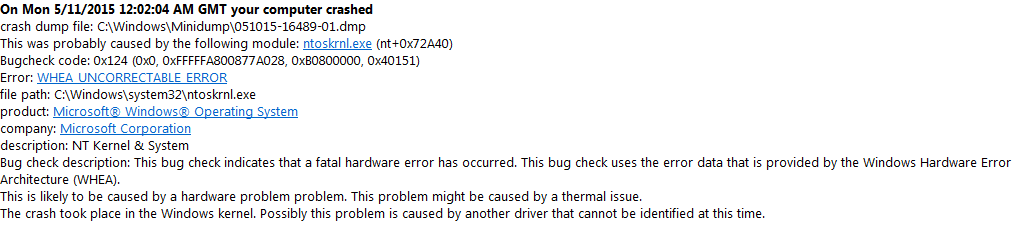
BSOD primarily while gaming, CSGO and GTA 5. Error - 0x124

BeamHD

New member
Local time
6:05 PM
Messages
5
Been having a lot of problems recently when trying to play games. I know nothing is overheating because I monitor temps, Max GPU temp = 66c Max CPU temp = 55c. Last week installed win 7 on new SSHD thinking it may fix itself but hasn't, posted on other forums told me to come here. Most say casue by ntoskrnl.exe so memory may be a problem? It usually takes ~20 mins into a game til it BSOD.
 

My Computer My Computer

At a glance

Windows 7 x64 Home PremiumAMD FX-8350G.SKILL Ripjaws Series 8GB DDR3EVGA GTX 660 Ti FTW+ 3GB
Computer type
PC/Desktop
Computer Manufacturer/Model Number
Custom Build
OS
Windows 7 x64 Home Premium
CPU
AMD FX-8350
Motherboard
ASUS M5A97 R2.0
Memory
G.SKILL Ripjaws Series 8GB DDR3
Graphics Card(s)
EVGA GTX 660 Ti FTW+ 3GB
Hard Drives
Seagate HDD 1TB
Seagate SSHD 2TB
Antivirus
Avast
Browser
Chrome
are we allowed to *bump*?
 

My Computer My Computer

At a glance

Windows 7 x64 Home PremiumAMD FX-8350G.SKILL Ripjaws Series 8GB DDR3EVGA GTX 660 Ti FTW+ 3GB
Computer type
PC/Desktop
Computer Manufacturer/Model Number
Custom Build
OS
Windows 7 x64 Home Premium
CPU
AMD FX-8350
Motherboard
ASUS M5A97 R2.0
Memory
G.SKILL Ripjaws Series 8GB DDR3
Graphics Card(s)
EVGA GTX 660 Ti FTW+ 3GB
Hard Drives
Seagate HDD 1TB
Seagate SSHD 2TB
Antivirus
Avast
Browser
Chrome
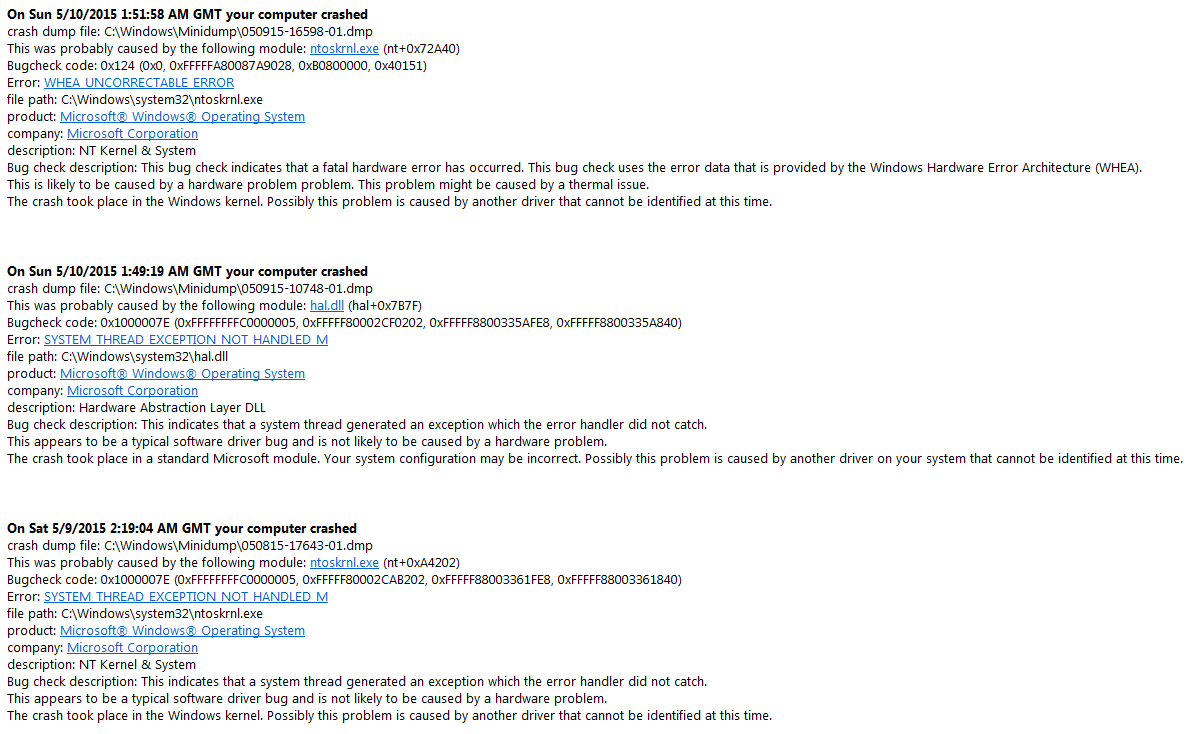
Welcome to 7F. You've received two types of dumps, 0x124 and 0x1000007E. The 0x124s usually indicate a hardware error but often give no clue as to what the problem is. Fortunately yours point towards audiodg.exe.
Code:
WHEA_UNCORRECTABLE_ERROR (124)
A fatal hardware error has occurred. Parameter 1 identifies the type of error
source that reported the error. Parameter 2 holds the address of the
WHEA_ERROR_RECORD structure that describes the error conditon.
Arguments:
Arg1: 0000000000000000, Machine Check Exception
Arg2: fffffa8008f15028, Address of the WHEA_ERROR_RECORD structure.
Arg3: 00000000b0800000, High order 32-bits of the MCi_STATUS value.
Arg4: 0000000000040151, Low order 32-bits of the MCi_STATUS value.

Debugging Details:
------------------


BUGCHECK_STR:  0x124_AuthenticAMD

CUSTOMER_CRASH_COUNT:  1

DEFAULT_BUCKET_ID:  WIN7_DRIVER_FAULT

PROCESS_NAME:  [COLOR=Red]audiodg.exe[/COLOR]

CURRENT_IRQL:  f

ANALYSIS_VERSION: 6.3.9600.17029 (debuggers(dbg).140219-1702) amd64fre
This makes sense when looking at the 0x1000007E which is blaming your Logitech G Series headset. The driver is a couple of years old and could do with updating, check for an updated version here.
Code:
BugCheck 1000007E, {ffffffffc0000005, fffff80002cab202, fffff88003361fe8, fffff88003361840}

[COLOR=Red]*** WARNING: Unable to verify timestamp for ladfGSCamd64.sys
*** ERROR: Module load completed but symbols could not be loaded for ladfGSCamd64.sys[/COLOR]
Probably caused by : ladfGSCamd64.sys ( ladfGSCamd64+52cc )

Followup: MachineOwner
---------

4: kd> lmvm ladfGSCamd64
start             end                 module name
fffff880`06b4a000 fffff880`06bac880   ladfGSCamd64 T (no symbols)           
    Loaded symbol image file: ladfGSCamd64.sys
    Image path: ladfGSCamd64.sys
    Image name: ladfGSCamd64.sys
    Timestamp:        [COLOR=Red]Mon Apr 15 19:39:12 2013[/COLOR] (516C4950)
    CheckSum:         0006DEE3
    ImageSize:        00062880
    Translations:     0000.04b0 0000.04e4 0409.04b0 0409.04e4
Update the driver and test the system, report back with the results.

 

My Computer My Computer

At a glance

W7 Pro x64 SP1 | W10 Pro IP x64 | W8.1 Pro x6...i7-4790k @ 4GHz (4.4GHz Boost)16GB DDR3 Kingston HyperX Fury @ 1600MHz CL 9...EVGA GTX 980 Classified
Computer type
PC/Desktop
Computer Manufacturer/Model Number
Custom Build
OS
W7 Pro x64 SP1 | W10 Pro IP x64 | W8.1 Pro x64 VM | Linux Mint VM
CPU
i7-4790k @ 4GHz (4.4GHz Boost)
Motherboard
ASUS Sabertooth Z87 (BIOS Rev 2004)
Memory
16GB DDR3 Kingston HyperX Fury @ 1600MHz CL 9-9-9-27
Graphics Card(s)
EVGA GTX 980 Classified
Sound Card
Realtek Onboard
Monitor(s) Displays
Samsung S27D390
Screen Resolution
1920 x 1080
Hard Drives
240GB Intel 520 Series SSD |
Samsung 850 EVO 120GB SSD |
2TB WD Caviar Black |
2TB WD Caviar Green
PSU
Corsair HX850-80 Gold Modular
Case
Cooler Master Silencio 650
Cooling
Corsair H80i w/2 x Corsair SP120 | 2 x 120mm Noctua NF-S12B
Keyboard
Microsoft Sidewinder X4
Mouse
Gigabyte M6900 optical
Internet Speed
152mb
Antivirus
F-Secure
Browser
Firefox 38.0
Other Info
Backup Rig: Win 7 Pro 64-bit | AMD A10-5800k | ASUS F2A85-V Pro | 8GB Samsung DDR3 @1600MHz | 120GB Toshiba SDD | 2TB Seagate HDD | Cooler Master Silencio 550
Welcome to 7F. You've received two types of dumps, 0x124 and 0x1000007E. The 0x124s usually indicate a hardware error but often give no clue as to what the problem is. Fortunately yours point towards audiodg.exe.
Code:
WHEA_UNCORRECTABLE_ERROR (124)
A fatal hardware error has occurred. Parameter 1 identifies the type of error
source that reported the error. Parameter 2 holds the address of the
WHEA_ERROR_RECORD structure that describes the error conditon.
Arguments:
Arg1: 0000000000000000, Machine Check Exception
Arg2: fffffa8008f15028, Address of the WHEA_ERROR_RECORD structure.
Arg3: 00000000b0800000, High order 32-bits of the MCi_STATUS value.
Arg4: 0000000000040151, Low order 32-bits of the MCi_STATUS value.

Debugging Details:
------------------


BUGCHECK_STR:  0x124_AuthenticAMD

CUSTOMER_CRASH_COUNT:  1

DEFAULT_BUCKET_ID:  WIN7_DRIVER_FAULT

PROCESS_NAME:  [COLOR=Red]audiodg.exe[/COLOR]

CURRENT_IRQL:  f

ANALYSIS_VERSION: 6.3.9600.17029 (debuggers(dbg).140219-1702) amd64fre
This makes sense when looking at the 0x1000007E which is blaming your Logitech G Series headset. The driver is a couple of years old and could do with updating, check for an updated version here.
Code:
BugCheck 1000007E, {ffffffffc0000005, fffff80002cab202, fffff88003361fe8, fffff88003361840}

[COLOR=Red]*** WARNING: Unable to verify timestamp for ladfGSCamd64.sys
*** ERROR: Module load completed but symbols could not be loaded for ladfGSCamd64.sys[/COLOR]
Probably caused by : ladfGSCamd64.sys ( ladfGSCamd64+52cc )

Followup: MachineOwner
---------

4: kd> lmvm ladfGSCamd64
start             end                 module name
fffff880`06b4a000 fffff880`06bac880   ladfGSCamd64 T (no symbols)           
    Loaded symbol image file: ladfGSCamd64.sys
    Image path: ladfGSCamd64.sys
    Image name: ladfGSCamd64.sys
    Timestamp:        [COLOR=Red]Mon Apr 15 19:39:12 2013[/COLOR] (516C4950)
    CheckSum:         0006DEE3
    ImageSize:        00062880
    Translations:     0000.04b0 0000.04e4 0409.04b0 0409.04e4
Update the driver and test the system, report back with the results.

Well I recently started using those this week, ill try it though!
 

My Computer My Computer

At a glance

Windows 7 x64 Home PremiumAMD FX-8350G.SKILL Ripjaws Series 8GB DDR3EVGA GTX 660 Ti FTW+ 3GB
Computer type
PC/Desktop
Computer Manufacturer/Model Number
Custom Build
OS
Windows 7 x64 Home Premium
CPU
AMD FX-8350
Motherboard
ASUS M5A97 R2.0
Memory
G.SKILL Ripjaws Series 8GB DDR3
Graphics Card(s)
EVGA GTX 660 Ti FTW+ 3GB
Hard Drives
Seagate HDD 1TB
Seagate SSHD 2TB
Antivirus
Avast
Browser
Chrome
Keep us posted.
 

My Computer My Computer

At a glance

W7 Pro x64 SP1 | W10 Pro IP x64 | W8.1 Pro x6...i7-4790k @ 4GHz (4.4GHz Boost)16GB DDR3 Kingston HyperX Fury @ 1600MHz CL 9...EVGA GTX 980 Classified
Computer type
PC/Desktop
Computer Manufacturer/Model Number
Custom Build
OS
W7 Pro x64 SP1 | W10 Pro IP x64 | W8.1 Pro x64 VM | Linux Mint VM
CPU
i7-4790k @ 4GHz (4.4GHz Boost)
Motherboard
ASUS Sabertooth Z87 (BIOS Rev 2004)
Memory
16GB DDR3 Kingston HyperX Fury @ 1600MHz CL 9-9-9-27
Graphics Card(s)
EVGA GTX 980 Classified
Sound Card
Realtek Onboard
Monitor(s) Displays
Samsung S27D390
Screen Resolution
1920 x 1080
Hard Drives
240GB Intel 520 Series SSD |
Samsung 850 EVO 120GB SSD |
2TB WD Caviar Black |
2TB WD Caviar Green
PSU
Corsair HX850-80 Gold Modular
Case
Cooler Master Silencio 650
Cooling
Corsair H80i w/2 x Corsair SP120 | 2 x 120mm Noctua NF-S12B
Keyboard
Microsoft Sidewinder X4
Mouse
Gigabyte M6900 optical
Internet Speed
152mb
Antivirus
F-Secure
Browser
Firefox 38.0
Other Info
Backup Rig: Win 7 Pro 64-bit | AMD A10-5800k | ASUS F2A85-V Pro | 8GB Samsung DDR3 @1600MHz | 120GB Toshiba SDD | 2TB Seagate HDD | Cooler Master Silencio 550
9ac7490849cd073ac849ef36d9268536.png

Been the same thing almost everytime this week...


--BSOD from past week---
0441b3041bb4166e9dab72f90302aa57.png

aa649620029f2a23d05f30c26f41898b.png
 

My Computer My Computer

At a glance

Windows 7 x64 Home PremiumAMD FX-8350G.SKILL Ripjaws Series 8GB DDR3EVGA GTX 660 Ti FTW+ 3GB
Computer type
PC/Desktop
Computer Manufacturer/Model Number
Custom Build
OS
Windows 7 x64 Home Premium
CPU
AMD FX-8350
Motherboard
ASUS M5A97 R2.0
Memory
G.SKILL Ripjaws Series 8GB DDR3
Graphics Card(s)
EVGA GTX 660 Ti FTW+ 3GB
Hard Drives
Seagate HDD 1TB
Seagate SSHD 2TB
Antivirus
Avast
Browser
Chrome
Updated BIOS to most recent update, seems alright for 1 game of CSGO so far. Keep updated for next BSOD.
 

My Computer My Computer

At a glance

Windows 7 x64 Home PremiumAMD FX-8350G.SKILL Ripjaws Series 8GB DDR3EVGA GTX 660 Ti FTW+ 3GB
Computer type
PC/Desktop
Computer Manufacturer/Model Number
Custom Build
OS
Windows 7 x64 Home Premium
CPU
AMD FX-8350
Motherboard
ASUS M5A97 R2.0
Memory
G.SKILL Ripjaws Series 8GB DDR3
Graphics Card(s)
EVGA GTX 660 Ti FTW+ 3GB
Hard Drives
Seagate HDD 1TB
Seagate SSHD 2TB
Antivirus
Avast
Browser
Chrome
Back
Top