
OTL
Hi Donna. When I ran the scan yesterday, it lasted about a second. Today, as soon as I hit Run Fix, the 'Reboot Now' window immediately appeared.
A snip of the C:\_OTL\Moved Files folder is attached. You'll see it's similar to yesterday - there's the OTL.txt and the File Folder with the same name but this time the folder is empty - the PCMatic file is not there.
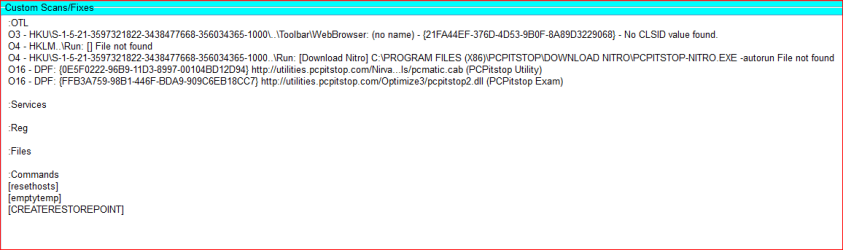
I copied and pasted your scan instructions onto Notepad - attached. I sometimes find that extra empty lines are added but not this time.
Does that mean that you've successfully removed the orphaned stuff?
Hi Donna. When I ran the scan yesterday, it lasted about a second. Today, as soon as I hit Run Fix, the 'Reboot Now' window immediately appeared.
A snip of the C:\_OTL\Moved Files folder is attached. You'll see it's similar to yesterday - there's the OTL.txt and the File Folder with the same name but this time the folder is empty - the PCMatic file is not there.
I copied and pasted your scan instructions onto Notepad - attached. I sometimes find that extra empty lines are added but not this time.
Does that mean that you've successfully removed the orphaned stuff?
Attachments

My Computer
At a glance
Win7 Home Premium (x64), SP12.10 gigahertz Intel Pentium Dual-Core4000 Megabytes Usable Installed Memory
- Computer type
- Laptop
- Computer Manufacturer/Model Number
- Compaq Presario CQ71 Notebook
- OS
- Win7 Home Premium (x64), SP1
- CPU
- 2.10 gigahertz Intel Pentium Dual-Core
- Motherboard
- Quanta 306B 21.12
- Memory
- 4000 Megabytes Usable Installed Memory
- Hard Drives
- SAMSUNG HM320II [Hard drive] (320.07 GB)
- Antivirus
- NIS
- Browser
- IE 11


