
Bsod random times 670 graphics card possible cause?

xvdazvx

New member
Local time
7:57 PM
Messages
3
BEFORE THE FORMAT AND WINDOWS RE-INSTALL EVERYTHING WOULD FREEZE MAKIGN THE MOUSE UNUSABLE AND KEYBOARD SOMETIMES ID GET A POP UP SAYING THE VIDEO DIRVERS HAD UNEXPECTED ERROR AND HAS RESTORED ITSELF (SOMETHING ALONG THEM LINES) I WOULD HAVE TO RESTART THE PROBLEM STILL PERSISTS AFTER THE CLEAN INSTALL AND SOMETIMES I GET BSOD, THE CRASHS/BSOD ARE NO SPECIFIC TIME SOMETIMES THE SYSTEM WILL RUN FINE FOR A FEW DAYS AND IT WILL JUST HAPPEN

A QUICK PRIME95 TORTURE TEST (@THE BIT OF EVERYTHING SETTINGS)
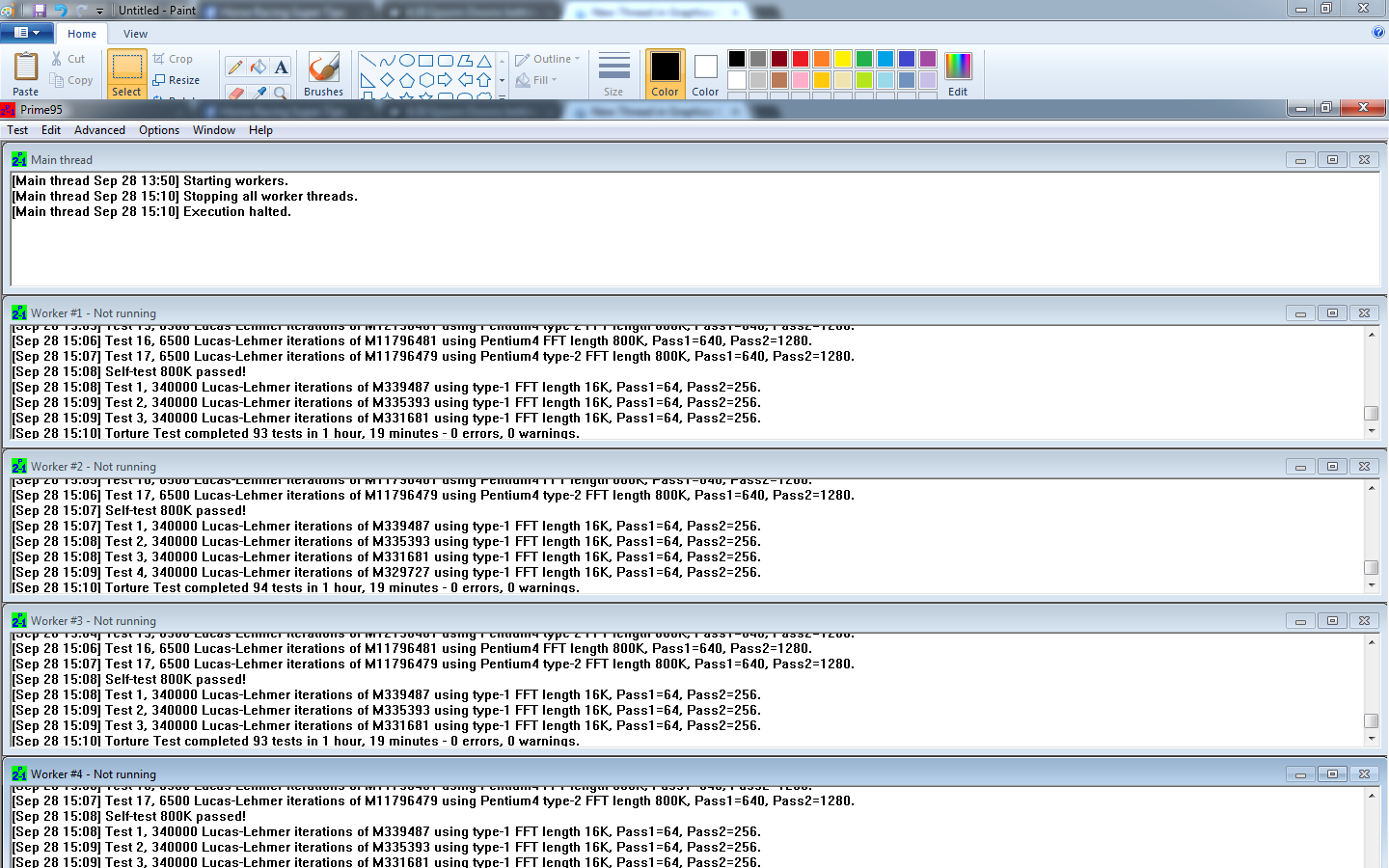
900x900px-LL-e3bf5473_PRIME95.png


Ran a memory test no errors found

Reliability Monitor
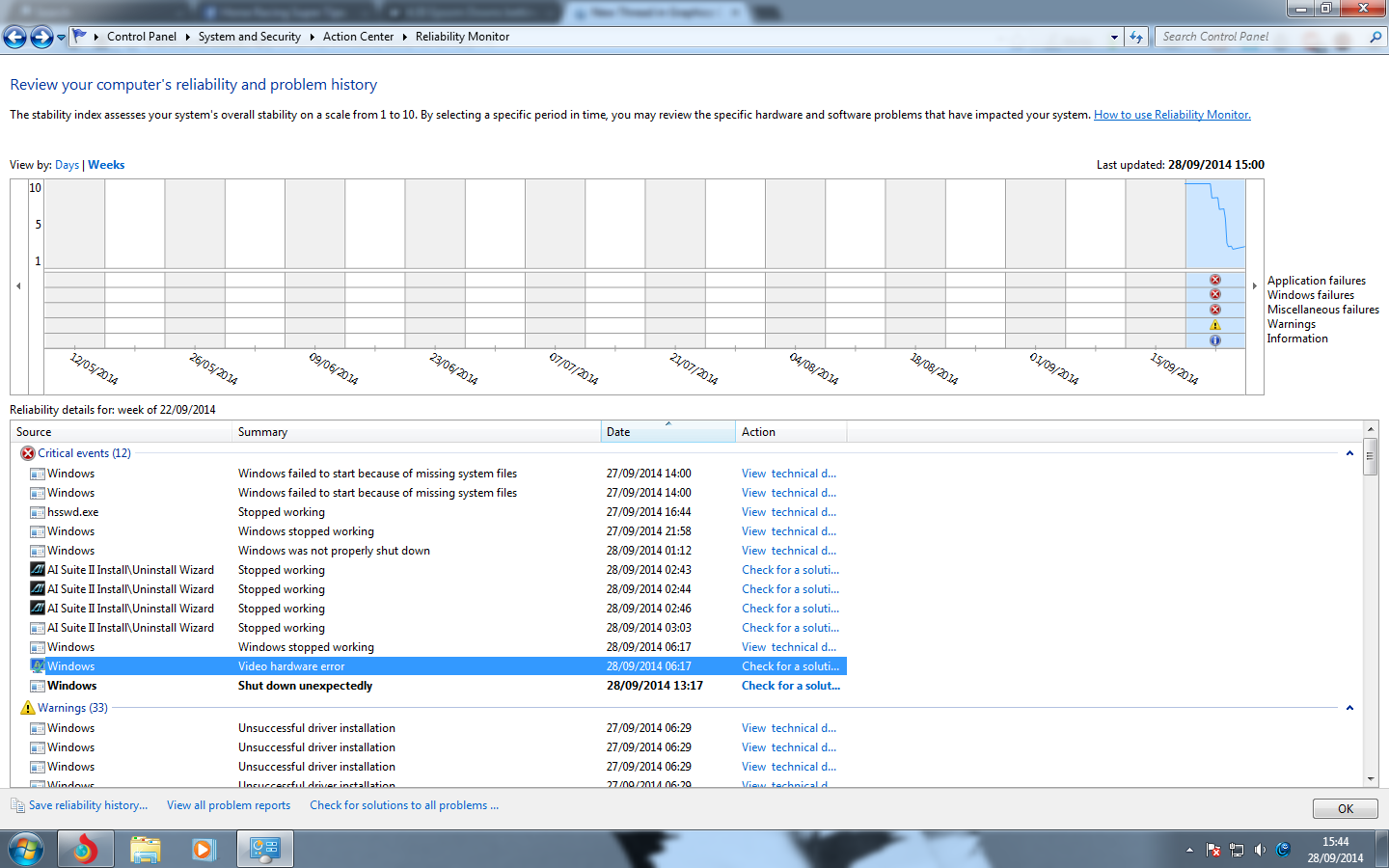
900x900px-LL-f27678a2_Untitled.png

One thing that stands out is the video hardware error, im running a GTX 670 4GB GDDR5

CPU IS NOT BEEN OVERCLOCKED GRAPHICS CARD HAS HAD NO SETTINGS TWEAKED
 

My Computer My Computer

At a glance

Windows 7 Ultimate x64tel Core i5 3570K 3.4GHz Socket 1155 6MB Cach...Corsair Vengeance 8GB (2x4GB) DDR3 1600Mhz CA...GTX 670 GDDR5 4GB
Computer type
PC/Desktop
Computer Manufacturer/Model Number
Custom Build
OS
Windows 7 Ultimate x64
CPU
tel Core i5 3570K 3.4GHz Socket 1155 6MB Cache Retail Boxed
Motherboard
Asus P8Z68-V/GEN3 Socket 1155 DVI VGA HDMI 8 Channel Audio A
Memory
Corsair Vengeance 8GB (2x4GB) DDR3 1600Mhz CAS8 1.5V Non-ECC
Graphics Card(s)
GTX 670 GDDR5 4GB
Hard Drives
Kingston 120GB SSDNow V300 2.5inch SSD
WD 1TB Blue Desktop Drive 3.5" SATA-III 7200RPM 64MB
Antivirus
NONE? ADVANCED SYSTEMCARE?
Browser
TORCH
System just froze up between the time 13.30 and 13.46 had to press restart also graphics drivers crashed(this was after the restart when i opened torch (browser). (i have tried to re-install graphic drivers as instructed on the forum.
 

My Computer My Computer

At a glance

Windows 7 Ultimate x64tel Core i5 3570K 3.4GHz Socket 1155 6MB Cach...Corsair Vengeance 8GB (2x4GB) DDR3 1600Mhz CA...GTX 670 GDDR5 4GB
Computer type
PC/Desktop
Computer Manufacturer/Model Number
Custom Build
OS
Windows 7 Ultimate x64
CPU
tel Core i5 3570K 3.4GHz Socket 1155 6MB Cache Retail Boxed
Motherboard
Asus P8Z68-V/GEN3 Socket 1155 DVI VGA HDMI 8 Channel Audio A
Memory
Corsair Vengeance 8GB (2x4GB) DDR3 1600Mhz CAS8 1.5V Non-ECC
Graphics Card(s)
GTX 670 GDDR5 4GB
Hard Drives
Kingston 120GB SSDNow V300 2.5inch SSD
WD 1TB Blue Desktop Drive 3.5" SATA-III 7200RPM 64MB
Antivirus
NONE? ADVANCED SYSTEMCARE?
Browser
TORCH
335042d1411995105-bsod-random-times-670-graphics-card-possible-cause-jheytjktyk.png


Hi xvdazvx.

What you are having there is not very uncommon. It says that it is a driver failure, but in most of the cases it is not the fact.

Uninstall your installed display Driver (344.11 WHQL) using Display Driver Uninstaller and then use 340.52 WHQL, and observe if the issue repeats back with the other version, too.

As per the BSOD dump, it is not very clear about the cause, but we have to concentrate on the later reported issue at first.
Code:
BugCheck 50, {fffff900c36ffcf0, 0, fffff960002cc69d, 0}


Could not read faulting driver name
Probably caused by : win32k.sys ( win32k!SFMLOGICALSURFACE::OwnsSurfaceCleanup+2d )

Followup: MachineOwner
---------
One more thing, install Service pack 1 and all other windows updates. Otherwise the system will remain vulnerable to threats including BSODs.
Code:
[COLOR=Red]Windows 7 Kernel Version 7600 MP[/COLOR] (4 procs) Free x64
Product: WinNt, suite: TerminalServer SingleUserTS
Built by: 7600.16385.amd64fre.win7_rtm.090713-1255
Learn how to install Windows 7 Service Pack 1 (SP1)
Service Pack and Update Center - Microsoft Windows
 

My Computer My Computer

At a glance

Microsoft Windows 10 Pro Insider Preview 64-bitIntel(R) Core(TM) i3-4130 CPU @ 3.40GHzCorsair Vengence 4GB x2 (8.00GB Dual-Channel ...2047MB GeForce GTS 450 (ZOTAC International)
Computer type
PC/Desktop
Computer Manufacturer/Model Number
Self Assembled
OS
Microsoft Windows 10 Pro Insider Preview 64-bit
CPU
Intel(R) Core(TM) i3-4130 CPU @ 3.40GHz
Motherboard
Gigabyte Technology Co., Ltd. B85M-D3H
Memory
Corsair Vengence 4GB x2 (8.00GB Dual-Channel DDR3 @ 798MHz)
Graphics Card(s)
2047MB GeForce GTS 450 (ZOTAC International)
Sound Card
Onboard (Realtek High Definition Audio)
Monitor(s) Displays
LG Flatron E2040T
Screen Resolution
1600x900
Hard Drives
Western Digital 1 TB
Seagate 500 GB
PSU
Corsair VS550
Case
Cooler Master K380
Cooling
Cooler Master Seidon 120V Plus
Keyboard
Logitech MK260r
Mouse
Logitech MK260r
Internet Speed
PMPL Broadband
Antivirus
Windows Defender + MBAM
Browser
Firefox
Other Info
Dell Studio 15" Laptop
Hi Arc first of all thanks for the reply, i have updated all windows updates including Service pack 1. i will rollback the drivers like u suggested and see how it goes
 

My Computer My Computer

At a glance

Windows 7 Ultimate x64tel Core i5 3570K 3.4GHz Socket 1155 6MB Cach...Corsair Vengeance 8GB (2x4GB) DDR3 1600Mhz CA...GTX 670 GDDR5 4GB
Computer type
PC/Desktop
Computer Manufacturer/Model Number
Custom Build
OS
Windows 7 Ultimate x64
CPU
tel Core i5 3570K 3.4GHz Socket 1155 6MB Cache Retail Boxed
Motherboard
Asus P8Z68-V/GEN3 Socket 1155 DVI VGA HDMI 8 Channel Audio A
Memory
Corsair Vengeance 8GB (2x4GB) DDR3 1600Mhz CAS8 1.5V Non-ECC
Graphics Card(s)
GTX 670 GDDR5 4GB
Hard Drives
Kingston 120GB SSDNow V300 2.5inch SSD
WD 1TB Blue Desktop Drive 3.5" SATA-III 7200RPM 64MB
Antivirus
NONE? ADVANCED SYSTEMCARE?
Browser
TORCH
Back
Top