Solved BSOD startup loop 0x0000007B

drewg

New member
Local time
3:56 AM
Messages
19
Hello.
Getting a BSOD on startup.
Error code in full:
0x0x0000007B (0xFFFFF880009497E8, 0xFFFFFFFFC0000034, 0x0000000000000000, 0x0000000000000000)

My system setup:
Crucial m4 256GB is for Windows and a few programs/games
WD 1TB Black is for media, games and other stuff that I don't want loading like it's on speed.

Gigabyte x68x UD4-B3.
Corsair 1600MHz RAM, 16GB (4x4 GB). <- I did have some BSOD's, that seem to relate to memory, but this specific issue I think is not related to it.

Initially, when booting up, Windows wanted to do a startup repair, I didn't notice any BSOD before this when booting. I let it do it's thing. I come back and I see the BSOD and it reboots loop. So I tried a few of my own things. Chkdsk and the like, to no avail.
I did stop the infinite loops by forcing a disable on BSOD rebooting stuff.

I also tried http://www.sevenforums.com/tutorials/139576-startup-repair-infinite-loop-recovery.html. No luck.
I did a Google. Some things point to my SSD. Others aren't exactly related.
Using Bootrec.exe /RebuildBCD it doesn't find any Windows installations. Yet on the C: drive, I see all of the usual Windows folders like System32 and such.

Startup repair also can't fix. Here's the full result (after it trying to do it twice and apparently "fixing" things.
Code:
Problem Event Name: StartupRepairOffline
Signature 01 and 02 are: 6.1.7600.16385
Signature 03: Unknown
Signature 04: 21200274
Signature 05 Autofailover
Signature 06: 4
Signature 07: Corrupt File
OS Version: 6.1.7600.2.0.0.256.1
Locale ID: 1033

Further information:
I installed Samsung KIES before shutting down. It installed drivers for my Galaxy S5 phone. My Computer wouldn't show the phone unless it was USB under Camera mode. I have an inkling this could be the culprit...

CHKDSK /f 0 bad files found on C.

Tried booting up in IDE - same BSOD.
Currently booting in AHCI like I have been ever since I got the SSD.

I also compressed the E drive. Which basically holds archive media and some emails. It's a partition of my D drive.

There were also no signs of my M4 failing. I was very particular when doing a fresh install of 7. Indexing is turned off. All caching is on D drive. Stuff like that.

I'm basically at a loss.
Any help is appreciated.

Thanks in advance!
 
Last edited:

My Computer

Computer type
PC/Desktop
Computer Manufacturer/Model Number
Custom Build
OS
Windows 7 Ultimate x64
CPU
Intel i5 2500k
Motherboard
gigabyte z68x -ud4-b3
Memory
Corsair 1600Mhz 4x4 GB
Graphics Card(s)
2 x MSI Geforce GTX 680. Windforce OC
Hard Drives
Crucial m4 256GB <- Windows
WD 1TB Black <- files/other
Antivirus
Eset Nod32 Internet Security
Browser
Chrome

My Computer

Computer type
PC/Desktop
Computer Manufacturer/Model Number
Custom
OS
Windows 8.1 Pro x64
CPU
Intel Core i5-4570 CPU @ 3.20GHz
Motherboard
Gigabyte Z87-D3HP-CF
Memory
8GB DDR3-1596 - Dual Channel
Graphics Card(s)
NVIDIA GeForce GTX 750 Ti SC
Sound Card
Onboard
Monitor(s) Displays
Samsung
Screen Resolution
1920x1080
Hard Drives
SSD - 120GB
Second - 1TB
Antivirus
MSE
Browser
Chrome

My Computer

Computer type
PC/Desktop
Computer Manufacturer/Model Number
Custom Build
OS
Windows 7 Ultimate x64
CPU
Intel i5 2500k
Motherboard
gigabyte z68x -ud4-b3
Memory
Corsair 1600Mhz 4x4 GB
Graphics Card(s)
2 x MSI Geforce GTX 680. Windforce OC
Hard Drives
Crucial m4 256GB <- Windows
WD 1TB Black <- files/other
Antivirus
Eset Nod32 Internet Security
Browser
Chrome

My Computer

Computer type
PC/Desktop
Computer Manufacturer/Model Number
Custom
OS
Windows 8.1 Pro x64
CPU
Intel Core i5-4570 CPU @ 3.20GHz
Motherboard
Gigabyte Z87-D3HP-CF
Memory
8GB DDR3-1596 - Dual Channel
Graphics Card(s)
NVIDIA GeForce GTX 750 Ti SC
Sound Card
Onboard
Monitor(s) Displays
Samsung
Screen Resolution
1920x1080
Hard Drives
SSD - 120GB
Second - 1TB
Antivirus
MSE
Browser
Chrome
Forgot to edit that in.
Yes I tried it, same BSOD.
 

My Computer

Computer type
PC/Desktop
Computer Manufacturer/Model Number
Custom Build
OS
Windows 7 Ultimate x64
CPU
Intel i5 2500k
Motherboard
gigabyte z68x -ud4-b3
Memory
Corsair 1600Mhz 4x4 GB
Graphics Card(s)
2 x MSI Geforce GTX 680. Windforce OC
Hard Drives
Crucial m4 256GB <- Windows
WD 1TB Black <- files/other
Antivirus
Eset Nod32 Internet Security
Browser
Chrome
Do you have a disk you can launch from? From the way it sounds, the MBR is corrupt.

-Justin
 

My Computer

Computer type
PC/Desktop
Computer Manufacturer/Model Number
Custom
OS
Windows 8.1 Pro x64
CPU
Intel Core i5-4570 CPU @ 3.20GHz
Motherboard
Gigabyte Z87-D3HP-CF
Memory
8GB DDR3-1596 - Dual Channel
Graphics Card(s)
NVIDIA GeForce GTX 750 Ti SC
Sound Card
Onboard
Monitor(s) Displays
Samsung
Screen Resolution
1920x1080
Hard Drives
SSD - 120GB
Second - 1TB
Antivirus
MSE
Browser
Chrome
Do you have a disk you can launch from? From the way it sounds, the MBR is corrupt.

-Justin

I do.
I did a Bootrec /FIXMBR, FWIW. So it appears it's booting correctly.

What would you suggest when I boot from my W7 disk?
 

My Computer

Computer type
PC/Desktop
Computer Manufacturer/Model Number
Custom Build
OS
Windows 7 Ultimate x64
CPU
Intel i5 2500k
Motherboard
gigabyte z68x -ud4-b3
Memory
Corsair 1600Mhz 4x4 GB
Graphics Card(s)
2 x MSI Geforce GTX 680. Windforce OC
Hard Drives
Crucial m4 256GB <- Windows
WD 1TB Black <- files/other
Antivirus
Eset Nod32 Internet Security
Browser
Chrome

My Computer

Computer type
PC/Desktop
Computer Manufacturer/Model Number
Custom
OS
Windows 8.1 Pro x64
CPU
Intel Core i5-4570 CPU @ 3.20GHz
Motherboard
Gigabyte Z87-D3HP-CF
Memory
8GB DDR3-1596 - Dual Channel
Graphics Card(s)
NVIDIA GeForce GTX 750 Ti SC
Sound Card
Onboard
Monitor(s) Displays
Samsung
Screen Resolution
1920x1080
Hard Drives
SSD - 120GB
Second - 1TB
Antivirus
MSE
Browser
Chrome
No.
Last known good configuration also results in the same BSOD.
 

My Computer

Computer type
PC/Desktop
Computer Manufacturer/Model Number
Custom Build
OS
Windows 7 Ultimate x64
CPU
Intel i5 2500k
Motherboard
gigabyte z68x -ud4-b3
Memory
Corsair 1600Mhz 4x4 GB
Graphics Card(s)
2 x MSI Geforce GTX 680. Windforce OC
Hard Drives
Crucial m4 256GB <- Windows
WD 1TB Black <- files/other
Antivirus
Eset Nod32 Internet Security
Browser
Chrome
My bad. By no I mean I don't have restore points or backups of that sort.
 

My Computer

Computer type
PC/Desktop
Computer Manufacturer/Model Number
Custom Build
OS
Windows 7 Ultimate x64
CPU
Intel i5 2500k
Motherboard
gigabyte z68x -ud4-b3
Memory
Corsair 1600Mhz 4x4 GB
Graphics Card(s)
2 x MSI Geforce GTX 680. Windforce OC
Hard Drives
Crucial m4 256GB <- Windows
WD 1TB Black <- files/other
Antivirus
Eset Nod32 Internet Security
Browser
Chrome
Have you tried actually doing a re-install?
 

My Computer

Computer type
PC/Desktop
Computer Manufacturer/Model Number
Custom
OS
Windows 8.1 Pro x64
CPU
Intel Core i5-4570 CPU @ 3.20GHz
Motherboard
Gigabyte Z87-D3HP-CF
Memory
8GB DDR3-1596 - Dual Channel
Graphics Card(s)
NVIDIA GeForce GTX 750 Ti SC
Sound Card
Onboard
Monitor(s) Displays
Samsung
Screen Resolution
1920x1080
Hard Drives
SSD - 120GB
Second - 1TB
Antivirus
MSE
Browser
Chrome
No.. I was hoping there'd be a different option than having to re-install windows.

Edit: updated SSD firmware. Also did some other stuff.
cc5B3cU.jpg

k4SQtF0.jpg


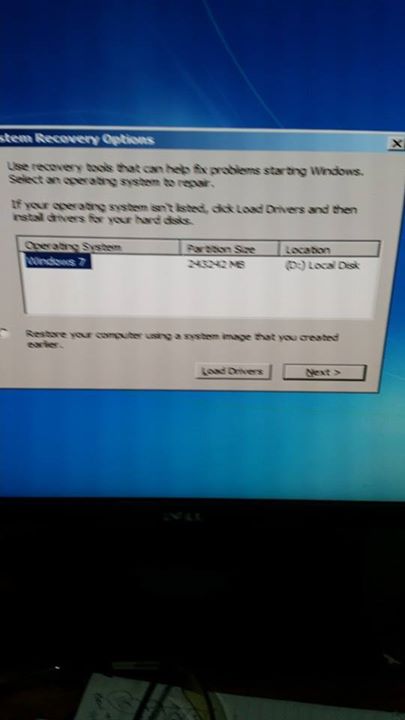
Some results of testing.... Repairing the installation on D (which it isn't on) results in no luck. It seems to not be able to find it despite the disk saying it's there....
 
Last edited:

My Computer

Computer type
PC/Desktop
Computer Manufacturer/Model Number
Custom Build
OS
Windows 7 Ultimate x64
CPU
Intel i5 2500k
Motherboard
gigabyte z68x -ud4-b3
Memory
Corsair 1600Mhz 4x4 GB
Graphics Card(s)
2 x MSI Geforce GTX 680. Windforce OC
Hard Drives
Crucial m4 256GB <- Windows
WD 1TB Black <- files/other
Antivirus
Eset Nod32 Internet Security
Browser
Chrome
Hi drewg.

Stop doing on repairing .... repair should not work for a stop 0x7B right now. Because your boot disc is inaccessible right now.

Boot into your BIOS and see if it detects both of your discs. Are they detected there?

Next, scan the entire system with a bootable antivirus. I would suggest to use Windows 7 Forums is the largest help and support community, providing friendly help and advice for Microsoft Windows 7 Computers such as Dell, HP, Acer, Asus or a custom build. - Search Results for windows defender offline

Malwares not found or malwares found and cleaned, next let us see the boot parameters. Do you have access to another computer right now? If so, download Partition wizard Bootable CD (the last one in the link). Burn it in a blank CD or in a USB flash stick.

Boot into Partition Wizards GUI following this instructions. When you are on the last screen, take a camera snap of the screen and upload the snap here.
Screenshots and Files - Upload and Post in Seven Forums

We need to see the partitions and parameters.

I have another suggestion for you, but not right now .... after seeing these three.
 

My Computer

Computer type
PC/Desktop
Computer Manufacturer/Model Number
Self Assembled
OS
Microsoft Windows 10 Pro Insider Preview 64-bit
CPU
Intel(R) Core(TM) i3-4130 CPU @ 3.40GHz
Motherboard
Gigabyte Technology Co., Ltd. B85M-D3H
Memory
Corsair Vengence 4GB x2 (8.00GB Dual-Channel DDR3 @ 798MHz)
Graphics Card(s)
2047MB GeForce GTS 450 (ZOTAC International)
Sound Card
Onboard (Realtek High Definition Audio)
Monitor(s) Displays
LG Flatron E2040T
Screen Resolution
1600x900
Hard Drives
Western Digital 1 TB
Seagate 500 GB
PSU
Corsair VS550
Case
Cooler Master K380
Cooling
Cooler Master Seidon 120V Plus
Keyboard
Logitech MK260r
Mouse
Logitech MK260r
Internet Speed
PMPL Broadband
Antivirus
Windows Defender + MBAM
Browser
Firefox
Other Info
Dell Studio 15" Laptop
May I slip this in as an option http://support.kaspersky.com/4162 just in case it is something under the covers it will need an other machine to make it obviously you have something and it will scan from power up - everything. If this does not boot then something untoward is happening in the machines hardware.

If it does boot then try this to recover data if you need to

BOOTABLE UBUNTU

Make a bootable Ubuntu disk http://www.ubuntu.com/download

Set the BIOSto boot from the optical when the machine boots it will show you a screen with TRY or INSTALL >select TRY.You can of course remove the hard driveand any other drives when doing this as if the optical alone is the only driveleft in the machine then the BIOS willonly find the optical to boot from.

When it isfinished - it takes very little time you will get a screen like in the pic .

Open thedrive you want > User and dig down until you get to the data / settings you may be able to copy / paste the materialyou want to an external source or other installed drive doing this.

I am notsure if it will but I have recovered tons of data etc using this method both on"dead" or just plain drives that you cannot get data from using Windows.

If you get the data and are going to reinstall then this will give you the freshest version of the Windows you originally had installed
http://www.sevenforums.com/tutorials/219487-clean-reinstall-factory-oem-windows-7-a.html#post1839164
again you will need that other machine. see pics
 

My Computer

Computer type
PC/Desktop
Computer Manufacturer/Model Number
Own build (new) Desk1 / Asus ROG Win 7 / Desk2 1st build
OS
Desk1 7 Home Prem / Desk2 10 Pro / Main lap Asus ROG 10 Pro 2 laptop Toshiba 7 Pro Asus P2520 7 & 10
CPU
Desk1 i5 3750K / Laptop i7 GTX 860M / Desk2 i5 2500
Motherboard
Desk1 Asus P877-V / Desk2 Gigabyte H67 UD3H / Laptop ?
Memory
Desk1 8GB (1866) / Desk2 16GB (1333) / Laptop 8Gb DDR3
Graphics Card(s)
Desk 1& 2NVidia GTX 650 & Laptops on board Intel
Sound Card
Desk 1 & 2 -XONAR DG Realtek High Def audio Laptop
Monitor(s) Displays
Desk 1 Benq HD 2450 / Desk2 Philips 24" / Laptop 17.5"
Screen Resolution
1920x1080 D1 & D2 & Laptop 1
Hard Drives
Desk1 Samsung 120GB 830 SSD
Asus ROG 256GB 850 Pro SSD
Desk2 Samsung 840 256 SSD
Toshiba 120GB EVO
PSU
Desk 1 Corsair HX 1050/ Laptop ? / Desk 2 Corsair HX 650
Case
Desk 1 Cooler HAF XM ? Toshiba laptop / Desk2 Coolermaster
Cooling
Fans on all Desk1 -2 Desk2 - all Coolermasters 5 Laptop ?
Keyboard
Desk 1 MS Sidewinder X6 Desk 2 MS Sidewinder X 4
Mouse
Desk 1&2 - Gigabyte MS 900 gamer - laptop - Logitec wireless
Internet Speed
ADSL2+
Other Info
One other Desktop (tester) and spare Toshba laptop both with SSD's
Running Kaspersky 2016 ISS on all machines config'd identically
Logitec audio stereo systems on each machine (x3)
Canon MG5250MFC
Router/modem TP-Link running WPA2SK
Hi John.

As I replied Justin in that thread where he asked for help on this thread, it might be not possible to clean install windows too; depending on the root cause of the stop 0x7B. We have to determine the source of the issue at first, then plan for possible recovery actions.

drewg I would suggest you to continue with post #13 .... if it is anyhow possible to save the existing installation. I would not give you a guarantee, but possibilities are there.

Cannot say it with certainty till we cannot know what caused the boot device inaccessible. And those tests are needed in order to determine it.
 

My Computer

Computer type
PC/Desktop
Computer Manufacturer/Model Number
Self Assembled
OS
Microsoft Windows 10 Pro Insider Preview 64-bit
CPU
Intel(R) Core(TM) i3-4130 CPU @ 3.40GHz
Motherboard
Gigabyte Technology Co., Ltd. B85M-D3H
Memory
Corsair Vengence 4GB x2 (8.00GB Dual-Channel DDR3 @ 798MHz)
Graphics Card(s)
2047MB GeForce GTS 450 (ZOTAC International)
Sound Card
Onboard (Realtek High Definition Audio)
Monitor(s) Displays
LG Flatron E2040T
Screen Resolution
1600x900
Hard Drives
Western Digital 1 TB
Seagate 500 GB
PSU
Corsair VS550
Case
Cooler Master K380
Cooling
Cooler Master Seidon 120V Plus
Keyboard
Logitech MK260r
Mouse
Logitech MK260r
Internet Speed
PMPL Broadband
Antivirus
Windows Defender + MBAM
Browser
Firefox
Other Info
Dell Studio 15" Laptop
Hi John.

As I replied Justin in that thread where he asked for help on this thread, it might be not possible to clean install windows too; depending on the root cause of the stop 0x7B. We have to determine the source of the issue at first, then plan for possible recovery actions.

drewg I would suggest you to continue with post #13 .... if it is anyhow possible to save the existing installation. I would not give you a guarantee, but possibilities are there.

Cannot say it with certainty till we cannot know what caused the boot device inaccessible. And those tests are needed in order to determine it.
Ok mate no probs.:)
 

My Computer

Computer type
PC/Desktop
Computer Manufacturer/Model Number
Own build (new) Desk1 / Asus ROG Win 7 / Desk2 1st build
OS
Desk1 7 Home Prem / Desk2 10 Pro / Main lap Asus ROG 10 Pro 2 laptop Toshiba 7 Pro Asus P2520 7 & 10
CPU
Desk1 i5 3750K / Laptop i7 GTX 860M / Desk2 i5 2500
Motherboard
Desk1 Asus P877-V / Desk2 Gigabyte H67 UD3H / Laptop ?
Memory
Desk1 8GB (1866) / Desk2 16GB (1333) / Laptop 8Gb DDR3
Graphics Card(s)
Desk 1& 2NVidia GTX 650 & Laptops on board Intel
Sound Card
Desk 1 & 2 -XONAR DG Realtek High Def audio Laptop
Monitor(s) Displays
Desk 1 Benq HD 2450 / Desk2 Philips 24" / Laptop 17.5"
Screen Resolution
1920x1080 D1 & D2 & Laptop 1
Hard Drives
Desk1 Samsung 120GB 830 SSD
Asus ROG 256GB 850 Pro SSD
Desk2 Samsung 840 256 SSD
Toshiba 120GB EVO
PSU
Desk 1 Corsair HX 1050/ Laptop ? / Desk 2 Corsair HX 650
Case
Desk 1 Cooler HAF XM ? Toshiba laptop / Desk2 Coolermaster
Cooling
Fans on all Desk1 -2 Desk2 - all Coolermasters 5 Laptop ?
Keyboard
Desk 1 MS Sidewinder X6 Desk 2 MS Sidewinder X 4
Mouse
Desk 1&2 - Gigabyte MS 900 gamer - laptop - Logitec wireless
Internet Speed
ADSL2+
Other Info
One other Desktop (tester) and spare Toshba laptop both with SSD's
Running Kaspersky 2016 ISS on all machines config'd identically
Logitec audio stereo systems on each machine (x3)
Canon MG5250MFC
Router/modem TP-Link running WPA2SK
In the process of following #13.
Seeing as I installed it on an SSD any important files are on my mechanical disk.

I may end up just doing a fresh install of 7 to just get around all this hassle.
 

My Computer

Computer type
PC/Desktop
Computer Manufacturer/Model Number
Custom Build
OS
Windows 7 Ultimate x64
CPU
Intel i5 2500k
Motherboard
gigabyte z68x -ud4-b3
Memory
Corsair 1600Mhz 4x4 GB
Graphics Card(s)
2 x MSI Geforce GTX 680. Windforce OC
Hard Drives
Crucial m4 256GB <- Windows
WD 1TB Black <- files/other
Antivirus
Eset Nod32 Internet Security
Browser
Chrome
In the process of following #13.
Seeing as I installed it on an SSD any important files are on my mechanical disk.

I may end up just doing a fresh install of 7 to just get around all this hassle.
Probably best idea Drew personally I would use that install link I sent you as you get the freshest version (usually less updates to download :party:) available. Just make sure you get the original version try a higher one and you will get grief.
 

My Computer

Computer type
PC/Desktop
Computer Manufacturer/Model Number
Own build (new) Desk1 / Asus ROG Win 7 / Desk2 1st build
OS
Desk1 7 Home Prem / Desk2 10 Pro / Main lap Asus ROG 10 Pro 2 laptop Toshiba 7 Pro Asus P2520 7 & 10
CPU
Desk1 i5 3750K / Laptop i7 GTX 860M / Desk2 i5 2500
Motherboard
Desk1 Asus P877-V / Desk2 Gigabyte H67 UD3H / Laptop ?
Memory
Desk1 8GB (1866) / Desk2 16GB (1333) / Laptop 8Gb DDR3
Graphics Card(s)
Desk 1& 2NVidia GTX 650 & Laptops on board Intel
Sound Card
Desk 1 & 2 -XONAR DG Realtek High Def audio Laptop
Monitor(s) Displays
Desk 1 Benq HD 2450 / Desk2 Philips 24" / Laptop 17.5"
Screen Resolution
1920x1080 D1 & D2 & Laptop 1
Hard Drives
Desk1 Samsung 120GB 830 SSD
Asus ROG 256GB 850 Pro SSD
Desk2 Samsung 840 256 SSD
Toshiba 120GB EVO
PSU
Desk 1 Corsair HX 1050/ Laptop ? / Desk 2 Corsair HX 650
Case
Desk 1 Cooler HAF XM ? Toshiba laptop / Desk2 Coolermaster
Cooling
Fans on all Desk1 -2 Desk2 - all Coolermasters 5 Laptop ?
Keyboard
Desk 1 MS Sidewinder X6 Desk 2 MS Sidewinder X 4
Mouse
Desk 1&2 - Gigabyte MS 900 gamer - laptop - Logitec wireless
Internet Speed
ADSL2+
Other Info
One other Desktop (tester) and spare Toshba laptop both with SSD's
Running Kaspersky 2016 ISS on all machines config'd identically
Logitec audio stereo systems on each machine (x3)
Canon MG5250MFC
Router/modem TP-Link running WPA2SK
In the process of following #13.
Seeing as I installed it on an SSD any important files are on my mechanical disk.

I may end up just doing a fresh install of 7 to just get around all this hassle.
I suggested all it to you because what you wanted .....

No.. I was hoping there'd be a different option than having to re-install windows.
Unbootable computer in normal course and unbootable computer due to stop 0x7B is totally different; and so planning a clean reinstall will not be the best idea for it at all.

You will be a le to perform a clean reinstall only if the 0x7B is caused due to mismatched/corrupted boot parameters. The other possible reasons of a stop 0x7B will not allow you to perform a clean reinstall, too.

And it is just a mismatch boot parameter, the solution will be easier than anything else. Only setting them back will make everything normal.

We cannot know before you perform the suggestions.

But the final decision is on you, obviously.
 

My Computer

Computer type
PC/Desktop
Computer Manufacturer/Model Number
Self Assembled
OS
Microsoft Windows 10 Pro Insider Preview 64-bit
CPU
Intel(R) Core(TM) i3-4130 CPU @ 3.40GHz
Motherboard
Gigabyte Technology Co., Ltd. B85M-D3H
Memory
Corsair Vengence 4GB x2 (8.00GB Dual-Channel DDR3 @ 798MHz)
Graphics Card(s)
2047MB GeForce GTS 450 (ZOTAC International)
Sound Card
Onboard (Realtek High Definition Audio)
Monitor(s) Displays
LG Flatron E2040T
Screen Resolution
1600x900
Hard Drives
Western Digital 1 TB
Seagate 500 GB
PSU
Corsair VS550
Case
Cooler Master K380
Cooling
Cooler Master Seidon 120V Plus
Keyboard
Logitech MK260r
Mouse
Logitech MK260r
Internet Speed
PMPL Broadband
Antivirus
Windows Defender + MBAM
Browser
Firefox
Other Info
Dell Studio 15" Laptop
Hi drewg.

Stop doing on repairing .... repair should not work for a stop 0x7B right now. Because your boot disc is inaccessible right now.

Boot into your BIOS and see if it detects both of your discs. Are they detected there?

Next, scan the entire system with a bootable antivirus. I would suggest to use Windows 7 Forums is the largest help and support community, providing friendly help and advice for Microsoft Windows 7 Computers such as Dell, HP, Acer, Asus or a custom build. - Search Results for windows defender offline

Malwares not found or malwares found and cleaned, next let us see the boot parameters. Do you have access to another computer right now? If so, download Partition wizard Bootable CD (the last one in the link). Burn it in a blank CD or in a USB flash stick.

Boot into Partition Wizards GUI following this instructions. When you are on the last screen, take a camera snap of the screen and upload the snap here.
Screenshots and Files - Upload and Post in Seven Forums

We need to see the partitions and parameters.

I have another suggestion for you, but not right now .... after seeing these three.


Hi ARC.
Windows defender found 3 viruses. These were cleaned.

I ran the partition program from USB. Initially there was an ext3 filesystem I obviously forgot to delete when giving up on Linux. I deleted that and resized my SSD NTFS filesystem to maximum.

All my camera shots were over the file size limit (and when uploading them here I got a 500 internal server error). So for the sake of easiness I've uploaded them to imgur.

From oldest to newest -
imgur: the simple image sharer

I didn't bother wrapping img tags as they're rather large.
If you need more camera shots let me know.

Thanks for the help thus far guys. Truly appreciated.

Quick edit: windows defender took literally 5 hours for a full scan. That explains the delay!
 

My Computer

Computer type
PC/Desktop
Computer Manufacturer/Model Number
Custom Build
OS
Windows 7 Ultimate x64
CPU
Intel i5 2500k
Motherboard
gigabyte z68x -ud4-b3
Memory
Corsair 1600Mhz 4x4 GB
Graphics Card(s)
2 x MSI Geforce GTX 680. Windforce OC
Hard Drives
Crucial m4 256GB <- Windows
WD 1TB Black <- files/other
Antivirus
Eset Nod32 Internet Security
Browser
Chrome
Back
Top