Solved BSOD startup loop 0x0000007B

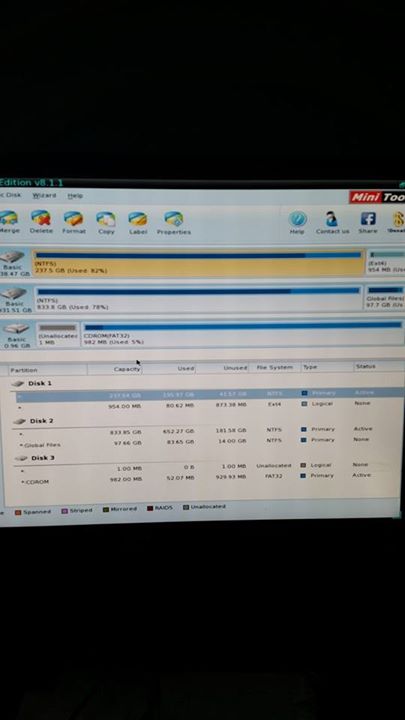
GMa7iiS.jpg

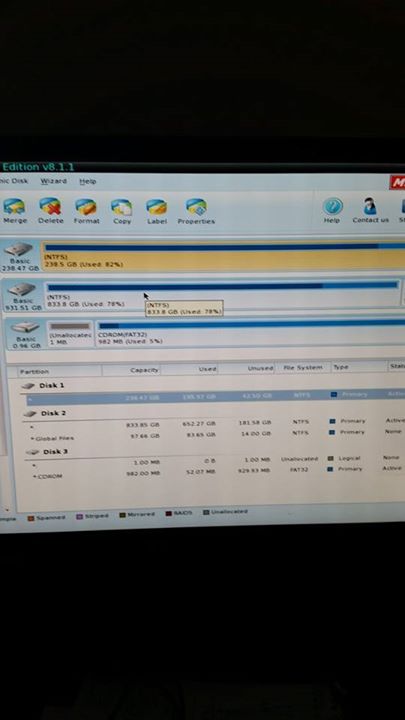
A9ssaEF.jpg


We need these two pics in large size, so that it can be read.
 

My Computer

Computer type
PC/Desktop
Computer Manufacturer/Model Number
Self Assembled
OS
Microsoft Windows 10 Pro Insider Preview 64-bit
CPU
Intel(R) Core(TM) i3-4130 CPU @ 3.40GHz
Motherboard
Gigabyte Technology Co., Ltd. B85M-D3H
Memory
Corsair Vengence 4GB x2 (8.00GB Dual-Channel DDR3 @ 798MHz)
Graphics Card(s)
2047MB GeForce GTS 450 (ZOTAC International)
Sound Card
Onboard (Realtek High Definition Audio)
Monitor(s) Displays
LG Flatron E2040T
Screen Resolution
1600x900
Hard Drives
Western Digital 1 TB
Seagate 500 GB
PSU
Corsair VS550
Case
Cooler Master K380
Cooling
Cooler Master Seidon 120V Plus
Keyboard
Logitech MK260r
Mouse
Logitech MK260r
Internet Speed
PMPL Broadband
Antivirus
Windows Defender + MBAM
Browser
Firefox
Other Info
Dell Studio 15" Laptop
If you dont have a decent camera..... focus in this area only, in landscape orientation ......

Make it sure that none of the texts covering in my snip is going outside of the image.

View attachment 336967
 

My Computer

Computer type
PC/Desktop
Computer Manufacturer/Model Number
Self Assembled
OS
Microsoft Windows 10 Pro Insider Preview 64-bit
CPU
Intel(R) Core(TM) i3-4130 CPU @ 3.40GHz
Motherboard
Gigabyte Technology Co., Ltd. B85M-D3H
Memory
Corsair Vengence 4GB x2 (8.00GB Dual-Channel DDR3 @ 798MHz)
Graphics Card(s)
2047MB GeForce GTS 450 (ZOTAC International)
Sound Card
Onboard (Realtek High Definition Audio)
Monitor(s) Displays
LG Flatron E2040T
Screen Resolution
1600x900
Hard Drives
Western Digital 1 TB
Seagate 500 GB
PSU
Corsair VS550
Case
Cooler Master K380
Cooling
Cooler Master Seidon 120V Plus
Keyboard
Logitech MK260r
Mouse
Logitech MK260r
Internet Speed
PMPL Broadband
Antivirus
Windows Defender + MBAM
Browser
Firefox
Other Info
Dell Studio 15" Laptop
Arc it might be easier to snip it mate How to Use the Snipping Tool in Vista at least I find it easier do that even with camera shots - just pull the photo up and snip what you want out of it :)
 

My Computer

Computer type
PC/Desktop
Computer Manufacturer/Model Number
Own build (new) Desk1 / Asus ROG Win 7 / Desk2 1st build
OS
Desk1 7 Home Prem / Desk2 10 Pro / Main lap Asus ROG 10 Pro 2 laptop Toshiba 7 Pro Asus P2520 7 & 10
CPU
Desk1 i5 3750K / Laptop i7 GTX 860M / Desk2 i5 2500
Motherboard
Desk1 Asus P877-V / Desk2 Gigabyte H67 UD3H / Laptop ?
Memory
Desk1 8GB (1866) / Desk2 16GB (1333) / Laptop 8Gb DDR3
Graphics Card(s)
Desk 1& 2NVidia GTX 650 & Laptops on board Intel
Sound Card
Desk 1 & 2 -XONAR DG Realtek High Def audio Laptop
Monitor(s) Displays
Desk 1 Benq HD 2450 / Desk2 Philips 24" / Laptop 17.5"
Screen Resolution
1920x1080 D1 & D2 & Laptop 1
Hard Drives
Desk1 Samsung 120GB 830 SSD
Asus ROG 256GB 850 Pro SSD
Desk2 Samsung 840 256 SSD
Toshiba 120GB EVO
PSU
Desk 1 Corsair HX 1050/ Laptop ? / Desk 2 Corsair HX 650
Case
Desk 1 Cooler HAF XM ? Toshiba laptop / Desk2 Coolermaster
Cooling
Fans on all Desk1 -2 Desk2 - all Coolermasters 5 Laptop ?
Keyboard
Desk 1 MS Sidewinder X6 Desk 2 MS Sidewinder X 4
Mouse
Desk 1&2 - Gigabyte MS 900 gamer - laptop - Logitec wireless
Internet Speed
ADSL2+
Other Info
One other Desktop (tester) and spare Toshba laptop both with SSD's
Running Kaspersky 2016 ISS on all machines config'd identically
Logitec audio stereo systems on each machine (x3)
Canon MG5250MFC
Router/modem TP-Link running WPA2SK
Deleting the ext4 partition didn't do any good. Now I can't even get past loading operating system :shock:
Hopefully that bit can be fixed. I did a bootrec.exe /fixmbr FWIW.

I took these images with a Digital SLR. You should be able to zoom in quite well.
Let me know any specifics and I'll take some more.
DSLR SCREENS - Imgur

Thanks
 

My Computer

Computer type
PC/Desktop
Computer Manufacturer/Model Number
Custom Build
OS
Windows 7 Ultimate x64
CPU
Intel i5 2500k
Motherboard
gigabyte z68x -ud4-b3
Memory
Corsair 1600Mhz 4x4 GB
Graphics Card(s)
2 x MSI Geforce GTX 680. Windforce OC
Hard Drives
Crucial m4 256GB <- Windows
WD 1TB Black <- files/other
Antivirus
Eset Nod32 Internet Security
Browser
Chrome
Deleting the ext4 partition didn't do any good. Now I can't even get past loading operating system :shock:
Hopefully that bit can be fixed. I did a bootrec.exe /fixmbr FWIW.

I took these images with a Digital SLR. You should be able to zoom in quite well.
Let me know any specifics and I'll take some more.
DSLR SCREENS - Imgur

Thanks
Will not open for me drewg mate the best way is to load the pic to pictures and snip out what you want to send I do it all the time using the SD card from the camera.
 

My Computer

Computer type
PC/Desktop
Computer Manufacturer/Model Number
Own build (new) Desk1 / Asus ROG Win 7 / Desk2 1st build
OS
Desk1 7 Home Prem / Desk2 10 Pro / Main lap Asus ROG 10 Pro 2 laptop Toshiba 7 Pro Asus P2520 7 & 10
CPU
Desk1 i5 3750K / Laptop i7 GTX 860M / Desk2 i5 2500
Motherboard
Desk1 Asus P877-V / Desk2 Gigabyte H67 UD3H / Laptop ?
Memory
Desk1 8GB (1866) / Desk2 16GB (1333) / Laptop 8Gb DDR3
Graphics Card(s)
Desk 1& 2NVidia GTX 650 & Laptops on board Intel
Sound Card
Desk 1 & 2 -XONAR DG Realtek High Def audio Laptop
Monitor(s) Displays
Desk 1 Benq HD 2450 / Desk2 Philips 24" / Laptop 17.5"
Screen Resolution
1920x1080 D1 & D2 & Laptop 1
Hard Drives
Desk1 Samsung 120GB 830 SSD
Asus ROG 256GB 850 Pro SSD
Desk2 Samsung 840 256 SSD
Toshiba 120GB EVO
PSU
Desk 1 Corsair HX 1050/ Laptop ? / Desk 2 Corsair HX 650
Case
Desk 1 Cooler HAF XM ? Toshiba laptop / Desk2 Coolermaster
Cooling
Fans on all Desk1 -2 Desk2 - all Coolermasters 5 Laptop ?
Keyboard
Desk 1 MS Sidewinder X6 Desk 2 MS Sidewinder X 4
Mouse
Desk 1&2 - Gigabyte MS 900 gamer - laptop - Logitec wireless
Internet Speed
ADSL2+
Other Info
One other Desktop (tester) and spare Toshba laptop both with SSD's
Running Kaspersky 2016 ISS on all machines config'd identically
Logitec audio stereo systems on each machine (x3)
Canon MG5250MFC
Router/modem TP-Link running WPA2SK

My Computer

Computer type
PC/Desktop
Computer Manufacturer/Model Number
Custom Build
OS
Windows 7 Ultimate x64
CPU
Intel i5 2500k
Motherboard
gigabyte z68x -ud4-b3
Memory
Corsair 1600Mhz 4x4 GB
Graphics Card(s)
2 x MSI Geforce GTX 680. Windforce OC
Hard Drives
Crucial m4 256GB <- Windows
WD 1TB Black <- files/other
Antivirus
Eset Nod32 Internet Security
Browser
Chrome
No probs mate I am stuck on my crappy old Toshiba laptop too LOL!! but anyway that third drive what on earth is it? 0.96GB?? and it refers to the optical below am not sure what that is.
 

My Computer

Computer type
PC/Desktop
Computer Manufacturer/Model Number
Own build (new) Desk1 / Asus ROG Win 7 / Desk2 1st build
OS
Desk1 7 Home Prem / Desk2 10 Pro / Main lap Asus ROG 10 Pro 2 laptop Toshiba 7 Pro Asus P2520 7 & 10
CPU
Desk1 i5 3750K / Laptop i7 GTX 860M / Desk2 i5 2500
Motherboard
Desk1 Asus P877-V / Desk2 Gigabyte H67 UD3H / Laptop ?
Memory
Desk1 8GB (1866) / Desk2 16GB (1333) / Laptop 8Gb DDR3
Graphics Card(s)
Desk 1& 2NVidia GTX 650 & Laptops on board Intel
Sound Card
Desk 1 & 2 -XONAR DG Realtek High Def audio Laptop
Monitor(s) Displays
Desk 1 Benq HD 2450 / Desk2 Philips 24" / Laptop 17.5"
Screen Resolution
1920x1080 D1 & D2 & Laptop 1
Hard Drives
Desk1 Samsung 120GB 830 SSD
Asus ROG 256GB 850 Pro SSD
Desk2 Samsung 840 256 SSD
Toshiba 120GB EVO
PSU
Desk 1 Corsair HX 1050/ Laptop ? / Desk 2 Corsair HX 650
Case
Desk 1 Cooler HAF XM ? Toshiba laptop / Desk2 Coolermaster
Cooling
Fans on all Desk1 -2 Desk2 - all Coolermasters 5 Laptop ?
Keyboard
Desk 1 MS Sidewinder X6 Desk 2 MS Sidewinder X 4
Mouse
Desk 1&2 - Gigabyte MS 900 gamer - laptop - Logitec wireless
Internet Speed
ADSL2+
Other Info
One other Desktop (tester) and spare Toshba laptop both with SSD's
Running Kaspersky 2016 ISS on all machines config'd identically
Logitec audio stereo systems on each machine (x3)
Canon MG5250MFC
Router/modem TP-Link running WPA2SK
It's a partition of the WD 1TB. I put some archive media on there an emails.

Opticals are an LG BD-RW and a samsung DVD-RW. Not sure on the order though. I'd say he BD-R is the last one in the list, if I had to guess.
 

My Computer

Computer type
PC/Desktop
Computer Manufacturer/Model Number
Custom Build
OS
Windows 7 Ultimate x64
CPU
Intel i5 2500k
Motherboard
gigabyte z68x -ud4-b3
Memory
Corsair 1600Mhz 4x4 GB
Graphics Card(s)
2 x MSI Geforce GTX 680. Windforce OC
Hard Drives
Crucial m4 256GB <- Windows
WD 1TB Black <- files/other
Antivirus
Eset Nod32 Internet Security
Browser
Chrome

My Computer

Computer type
PC/Desktop
Computer Manufacturer/Model Number
Self Assembled
OS
Microsoft Windows 10 Pro Insider Preview 64-bit
CPU
Intel(R) Core(TM) i3-4130 CPU @ 3.40GHz
Motherboard
Gigabyte Technology Co., Ltd. B85M-D3H
Memory
Corsair Vengence 4GB x2 (8.00GB Dual-Channel DDR3 @ 798MHz)
Graphics Card(s)
2047MB GeForce GTS 450 (ZOTAC International)
Sound Card
Onboard (Realtek High Definition Audio)
Monitor(s) Displays
LG Flatron E2040T
Screen Resolution
1600x900
Hard Drives
Western Digital 1 TB
Seagate 500 GB
PSU
Corsair VS550
Case
Cooler Master K380
Cooling
Cooler Master Seidon 120V Plus
Keyboard
Logitech MK260r
Mouse
Logitech MK260r
Internet Speed
PMPL Broadband
Antivirus
Windows Defender + MBAM
Browser
Firefox
Other Info
Dell Studio 15" Laptop
Ok got that mate but gonna have to do some more researching yet. Will be offline for most of tomorrow as my partner is going for surgery so don't think I have just gone away LOL!!
 

My Computer

Computer type
PC/Desktop
Computer Manufacturer/Model Number
Own build (new) Desk1 / Asus ROG Win 7 / Desk2 1st build
OS
Desk1 7 Home Prem / Desk2 10 Pro / Main lap Asus ROG 10 Pro 2 laptop Toshiba 7 Pro Asus P2520 7 & 10
CPU
Desk1 i5 3750K / Laptop i7 GTX 860M / Desk2 i5 2500
Motherboard
Desk1 Asus P877-V / Desk2 Gigabyte H67 UD3H / Laptop ?
Memory
Desk1 8GB (1866) / Desk2 16GB (1333) / Laptop 8Gb DDR3
Graphics Card(s)
Desk 1& 2NVidia GTX 650 & Laptops on board Intel
Sound Card
Desk 1 & 2 -XONAR DG Realtek High Def audio Laptop
Monitor(s) Displays
Desk 1 Benq HD 2450 / Desk2 Philips 24" / Laptop 17.5"
Screen Resolution
1920x1080 D1 & D2 & Laptop 1
Hard Drives
Desk1 Samsung 120GB 830 SSD
Asus ROG 256GB 850 Pro SSD
Desk2 Samsung 840 256 SSD
Toshiba 120GB EVO
PSU
Desk 1 Corsair HX 1050/ Laptop ? / Desk 2 Corsair HX 650
Case
Desk 1 Cooler HAF XM ? Toshiba laptop / Desk2 Coolermaster
Cooling
Fans on all Desk1 -2 Desk2 - all Coolermasters 5 Laptop ?
Keyboard
Desk 1 MS Sidewinder X6 Desk 2 MS Sidewinder X 4
Mouse
Desk 1&2 - Gigabyte MS 900 gamer - laptop - Logitec wireless
Internet Speed
ADSL2+
Other Info
One other Desktop (tester) and spare Toshba laptop both with SSD's
Running Kaspersky 2016 ISS on all machines config'd identically
Logitec audio stereo systems on each machine (x3)
Canon MG5250MFC
Router/modem TP-Link running WPA2SK
View attachment 336991

250 GB is the SSD, right? And windows is installed on it?

There should be a (hidden) 100 MB system Reserved partition, but that is missing there. The boot files are generally stored in that 100 MB partition.

There are other discs with active partitions. So the chance of misplacing the boot files are always there.

Power the computer off. Remove the electrical cables. Open the computer. Unplug the SATA cables from the other discs than the SSD. Now Boot back to Partition wizard. Only the SSD will be shown.

Then rebuild MBR. How to Rebuild MBR with partition manager - Partition Wizard Rebuild MBR Help
Do it for 3 times. Then try to boot to windows. Does it boot? Let us know.

EDIT: One minute ..... it is the fact that the SSD if fully occupied???

View attachment 336992
 

My Computer

Computer type
PC/Desktop
Computer Manufacturer/Model Number
Self Assembled
OS
Microsoft Windows 10 Pro Insider Preview 64-bit
CPU
Intel(R) Core(TM) i3-4130 CPU @ 3.40GHz
Motherboard
Gigabyte Technology Co., Ltd. B85M-D3H
Memory
Corsair Vengence 4GB x2 (8.00GB Dual-Channel DDR3 @ 798MHz)
Graphics Card(s)
2047MB GeForce GTS 450 (ZOTAC International)
Sound Card
Onboard (Realtek High Definition Audio)
Monitor(s) Displays
LG Flatron E2040T
Screen Resolution
1600x900
Hard Drives
Western Digital 1 TB
Seagate 500 GB
PSU
Corsair VS550
Case
Cooler Master K380
Cooling
Cooler Master Seidon 120V Plus
Keyboard
Logitech MK260r
Mouse
Logitech MK260r
Internet Speed
PMPL Broadband
Antivirus
Windows Defender + MBAM
Browser
Firefox
Other Info
Dell Studio 15" Laptop
View attachment 336991

250 GB is the SSD, right? And windows is installed on it?

There should be a (hidden) 100 MB system Reserved partition, but that is missing there. The boot files are generally stored in that 100 MB partition.

There are other discs with active partitions. So the chance of misplacing the boot files are always there.

Power the computer off. Remove the electrical cables. Open the computer. Unplug the SATA cables from the other discs than the SSD. Now Boot back to Partition wizard. Only the SSD will be shown.

Then rebuild MBR. How to Rebuild MBR with partition manager - Partition Wizard Rebuild MBR Help
Do it for 3 times. Then try to boot to windows. Does it boot? Let us know.

EDIT: One minute ..... it is the fact that the SSD if fully occupied???

View attachment 336992

It isn't fully occupied. I have no idea why the partition manager is saying that.
Will do what you said. And Will update.
 

My Computer

Computer type
PC/Desktop
Computer Manufacturer/Model Number
Custom Build
OS
Windows 7 Ultimate x64
CPU
Intel i5 2500k
Motherboard
gigabyte z68x -ud4-b3
Memory
Corsair 1600Mhz 4x4 GB
Graphics Card(s)
2 x MSI Geforce GTX 680. Windforce OC
Hard Drives
Crucial m4 256GB <- Windows
WD 1TB Black <- files/other
Antivirus
Eset Nod32 Internet Security
Browser
Chrome
View attachment 336991

250 GB is the SSD, right? And windows is installed on it?

There should be a (hidden) 100 MB system Reserved partition, but that is missing there. The boot files are generally stored in that 100 MB partition.

There are other discs with active partitions. So the chance of misplacing the boot files are always there.

Power the computer off. Remove the electrical cables. Open the computer. Unplug the SATA cables from the other discs than the SSD. Now Boot back to Partition wizard. Only the SSD will be shown.

Then rebuild MBR. How to Rebuild MBR with partition manager - Partition Wizard Rebuild MBR Help
Do it for 3 times. Then try to boot to windows. Does it boot? Let us know.

EDIT: One minute ..... it is the fact that the SSD if fully occupied???

View attachment 336992

I did as requested. The SSD says it's fully occupied, so I can't rebuild the MBR for some reason....

Edit: mind you I can't even right click and explore files. Maybe the SSD is dead?
 

My Computer

Computer type
PC/Desktop
Computer Manufacturer/Model Number
Custom Build
OS
Windows 7 Ultimate x64
CPU
Intel i5 2500k
Motherboard
gigabyte z68x -ud4-b3
Memory
Corsair 1600Mhz 4x4 GB
Graphics Card(s)
2 x MSI Geforce GTX 680. Windforce OC
Hard Drives
Crucial m4 256GB <- Windows
WD 1TB Black <- files/other
Antivirus
Eset Nod32 Internet Security
Browser
Chrome
I did as requested. The SSD says it's fully occupied, so I can't rebuild the MBR for some reason....

Edit: mind you I can't even right click and explore files. Maybe the SSD is dead?
Not requested, but suggested. All my posts to you are not requests but suggestions.

Do you think that the SSD is really fully occupied? I would say that it is a very very rarest event that there is 0B unused space.

Apparently there is no alternative at this point other than attempting to format the SSD.

We cannot use the conventional disc check tools on a SSD, so we cannot determine its health at this point. If the attempt to format the SSD fails, then you have to accept that the SSD is really dead.

Let us know what you found.
 

My Computer

Computer type
PC/Desktop
Computer Manufacturer/Model Number
Self Assembled
OS
Microsoft Windows 10 Pro Insider Preview 64-bit
CPU
Intel(R) Core(TM) i3-4130 CPU @ 3.40GHz
Motherboard
Gigabyte Technology Co., Ltd. B85M-D3H
Memory
Corsair Vengence 4GB x2 (8.00GB Dual-Channel DDR3 @ 798MHz)
Graphics Card(s)
2047MB GeForce GTS 450 (ZOTAC International)
Sound Card
Onboard (Realtek High Definition Audio)
Monitor(s) Displays
LG Flatron E2040T
Screen Resolution
1600x900
Hard Drives
Western Digital 1 TB
Seagate 500 GB
PSU
Corsair VS550
Case
Cooler Master K380
Cooling
Cooler Master Seidon 120V Plus
Keyboard
Logitech MK260r
Mouse
Logitech MK260r
Internet Speed
PMPL Broadband
Antivirus
Windows Defender + MBAM
Browser
Firefox
Other Info
Dell Studio 15" Laptop
Well suggestions and requests are good, as I am truly stumped by it.
I'll format it later and see what happens.

I mean, I've never had any less than say 20GB spare. So it's quite possible it's simply dead.

Edit: if I do a reinstall using the sevenforums guide, using the D drive for users and such, will my past users files be removed?

Thanks.
 

My Computer

Computer type
PC/Desktop
Computer Manufacturer/Model Number
Custom Build
OS
Windows 7 Ultimate x64
CPU
Intel i5 2500k
Motherboard
gigabyte z68x -ud4-b3
Memory
Corsair 1600Mhz 4x4 GB
Graphics Card(s)
2 x MSI Geforce GTX 680. Windforce OC
Hard Drives
Crucial m4 256GB <- Windows
WD 1TB Black <- files/other
Antivirus
Eset Nod32 Internet Security
Browser
Chrome
Those will not be removed. Only the SSD will be removed.
 

My Computer

Computer type
PC/Desktop
Computer Manufacturer/Model Number
Self Assembled
OS
Microsoft Windows 10 Pro Insider Preview 64-bit
CPU
Intel(R) Core(TM) i3-4130 CPU @ 3.40GHz
Motherboard
Gigabyte Technology Co., Ltd. B85M-D3H
Memory
Corsair Vengence 4GB x2 (8.00GB Dual-Channel DDR3 @ 798MHz)
Graphics Card(s)
2047MB GeForce GTS 450 (ZOTAC International)
Sound Card
Onboard (Realtek High Definition Audio)
Monitor(s) Displays
LG Flatron E2040T
Screen Resolution
1600x900
Hard Drives
Western Digital 1 TB
Seagate 500 GB
PSU
Corsair VS550
Case
Cooler Master K380
Cooling
Cooler Master Seidon 120V Plus
Keyboard
Logitech MK260r
Mouse
Logitech MK260r
Internet Speed
PMPL Broadband
Antivirus
Windows Defender + MBAM
Browser
Firefox
Other Info
Dell Studio 15" Laptop
Those will not be removed. Only the SSD will be removed.

Excellent. Tried installing W7 but it only saw my mechanical. Did a wipe of the SSD and created a new partition, will see how that goes. Currently doing a surface test. But I highly suspect it's on it's last legs. Ordered a new one anyway...

Thanks to everyone for the help, truly and greatly appreciated.
 

My Computer

Computer type
PC/Desktop
Computer Manufacturer/Model Number
Custom Build
OS
Windows 7 Ultimate x64
CPU
Intel i5 2500k
Motherboard
gigabyte z68x -ud4-b3
Memory
Corsair 1600Mhz 4x4 GB
Graphics Card(s)
2 x MSI Geforce GTX 680. Windforce OC
Hard Drives
Crucial m4 256GB <- Windows
WD 1TB Black <- files/other
Antivirus
Eset Nod32 Internet Security
Browser
Chrome
Update: apparently the partition I had for users and such last time - windows in audit mode thinks it's corrupted.
In order to get rid of this annoyance I'm going to grab all important files from it and shove it on a external disk/usb...
Got systemrescue on a bootable USB that can do this.

Unless anyone has any ideas?

FWIW I only put it in after windows 7 was installed, as for some reason it was loading boot from that disk rather than the SSD where windows is installed...
 

My Computer

Computer type
PC/Desktop
Computer Manufacturer/Model Number
Custom Build
OS
Windows 7 Ultimate x64
CPU
Intel i5 2500k
Motherboard
gigabyte z68x -ud4-b3
Memory
Corsair 1600Mhz 4x4 GB
Graphics Card(s)
2 x MSI Geforce GTX 680. Windforce OC
Hard Drives
Crucial m4 256GB <- Windows
WD 1TB Black <- files/other
Antivirus
Eset Nod32 Internet Security
Browser
Chrome
You got me real confused now mate?? booting from a disk??
 

My Computer

Computer type
PC/Desktop
Computer Manufacturer/Model Number
Own build (new) Desk1 / Asus ROG Win 7 / Desk2 1st build
OS
Desk1 7 Home Prem / Desk2 10 Pro / Main lap Asus ROG 10 Pro 2 laptop Toshiba 7 Pro Asus P2520 7 & 10
CPU
Desk1 i5 3750K / Laptop i7 GTX 860M / Desk2 i5 2500
Motherboard
Desk1 Asus P877-V / Desk2 Gigabyte H67 UD3H / Laptop ?
Memory
Desk1 8GB (1866) / Desk2 16GB (1333) / Laptop 8Gb DDR3
Graphics Card(s)
Desk 1& 2NVidia GTX 650 & Laptops on board Intel
Sound Card
Desk 1 & 2 -XONAR DG Realtek High Def audio Laptop
Monitor(s) Displays
Desk 1 Benq HD 2450 / Desk2 Philips 24" / Laptop 17.5"
Screen Resolution
1920x1080 D1 & D2 & Laptop 1
Hard Drives
Desk1 Samsung 120GB 830 SSD
Asus ROG 256GB 850 Pro SSD
Desk2 Samsung 840 256 SSD
Toshiba 120GB EVO
PSU
Desk 1 Corsair HX 1050/ Laptop ? / Desk 2 Corsair HX 650
Case
Desk 1 Cooler HAF XM ? Toshiba laptop / Desk2 Coolermaster
Cooling
Fans on all Desk1 -2 Desk2 - all Coolermasters 5 Laptop ?
Keyboard
Desk 1 MS Sidewinder X6 Desk 2 MS Sidewinder X 4
Mouse
Desk 1&2 - Gigabyte MS 900 gamer - laptop - Logitec wireless
Internet Speed
ADSL2+
Other Info
One other Desktop (tester) and spare Toshba laptop both with SSD's
Running Kaspersky 2016 ISS on all machines config'd identically
Logitec audio stereo systems on each machine (x3)
Canon MG5250MFC
Router/modem TP-Link running WPA2SK
apparently the partition I had for users and such last time - windows in audit mode thinks it's corrupted.
In order to get rid of this annoyance I'm going to grab all important files from it and shove it on a external disk/usb...
Got systemrescue on a bootable USB that can do this.

What you have done for salvaging the user data is OK. There are other ways too, but your plan is good enough. The basic job is equally done in all the methods. If you want to know, most of us in this forum prefer to do it using windows recovery console.

I appreciate you for a good job well done!

FWIW I only put it in after windows 7 was installed, as for some reason it was loading boot from that disk rather than the SSD where windows is installed...
You mean the other HDD?
That is all possible, because that has an active primary partition too. The bootloader may have got installed in that active partition.

That is only why we prefer to disconnect the other (data) discs during windows installation and/or startup repair.

How it is working now?
 

My Computer

Computer type
PC/Desktop
Computer Manufacturer/Model Number
Self Assembled
OS
Microsoft Windows 10 Pro Insider Preview 64-bit
CPU
Intel(R) Core(TM) i3-4130 CPU @ 3.40GHz
Motherboard
Gigabyte Technology Co., Ltd. B85M-D3H
Memory
Corsair Vengence 4GB x2 (8.00GB Dual-Channel DDR3 @ 798MHz)
Graphics Card(s)
2047MB GeForce GTS 450 (ZOTAC International)
Sound Card
Onboard (Realtek High Definition Audio)
Monitor(s) Displays
LG Flatron E2040T
Screen Resolution
1600x900
Hard Drives
Western Digital 1 TB
Seagate 500 GB
PSU
Corsair VS550
Case
Cooler Master K380
Cooling
Cooler Master Seidon 120V Plus
Keyboard
Logitech MK260r
Mouse
Logitech MK260r
Internet Speed
PMPL Broadband
Antivirus
Windows Defender + MBAM
Browser
Firefox
Other Info
Dell Studio 15" Laptop
Back
Top