Solved BSOD, stop codes: F4,7A (Almost Constant)

bancosrs

New member
Member
Local time
6:49 PM
Messages
31
First Occurrence:
At first I thought I had fixed the problem with faulty RAM but unfortunately it was only temporary. The problems are occurring more often. The first occurrence was returning my laptop from sleep mode. As of recent it crashes when my PC is somewhat stressed. It will freeze then unfreeze then freeze again and then eventually crash.

TEST tried:
I have tried everything; Factory reset (multiple times), FURMARK test, Memtest, prime95, Chkdsk, sfc/scannow, seagate tools for windows and all the results come up as being fine (after restoring everything). Given I have only ran these test minimum a amount. Verifier.exe showed nvbridge.kmd failed to load but I just fixed it and it failed shortly after.

When I restore my computer to factory settings my computer runs fine for days, sometimes weeks and then it decides to crash randomly, and once the first Blue screen appears I can barely run my computer again in normal mode before I have to restore it. I can run it in safe mode and have everything work, but if try to check the memory or look at test viewer while running it it will crash. I guess anything that relates to retrieving something off the Hard drive or stressing the PC. I can't even run any ant-viruses or windows updates so once it fails I have limited options.

Every time I have recovered it it has been from the recovery disc. Just last night I recovered it from the recovery partition.

Error codes
0000...F4 and 0000...7A.
BSOD fails to do a crash dump

Recent update:
For awhile I could run my laptop in disable driver signature enforcement but I started to view a youtube video in 720p and it crashed. Now I can get it to crash every time i view a video in 720p on youtube. I am currently running in normal mode with no problems. I have yet to do any updates for anything because I think it first occurred when I updated my GPU driver to the most recent one, but I don't see it as a bad GPU if I can pass a Furmark test.

Specs:
Asus Notebook A53SV
Windows 7 Home Premium x64
Intel Core i5-2410M
6GB RAM
64-bit Windows 7
750 HDD Space
Nvidia Geforce GT540M


I appreciate the help.

[Edit] Alright, I had to do a fresh install of Windows 7. It got to a point where I couldn't do anything. Now with that done what do you guys recommend me doing in regards to drivers, windows updates, hardware tests, etc?
 
Last edited:

My Computer My Computer

Computer type
PC/Desktop
OS
Windows 7 x64
The zip you uploaded does not contain any crash dump.So BSODs are not recording any crash dump?
Follow it: http://www.sevenforums.com/tutorials/174459-dump-files-configure-windows-create-bsod.html
Go to Option Two, Point 2. Download the .reg file and merge it in registry by double clicking it.

Then wait for another system crash. Then search the .dmp files manually in the default path: C:\Windows\Minidump or %SystemRoot%\Minidump. Post it following the Blue Screen of Death (BSOD) Posting Instructions.

Without seeing the SF Diag tools output, it is hard to determine the problem with certainty.

In the mean time, you scan the system for possible virus infection.

Uninstall your existing Antivirus and firewall. Use Microsoft Security Essentials as your antivirus with windows inbuilt firewall, and free MBAM as the on demand scanner.
Download, install and update those, and then run full system scans with both of them, one by one.


Do some disc check .....


  1. Update your SSD's Firmware (skip it, if it is not a SSD)
  2. Re-seat the sata and power.
    72974453_zps85c47d93.jpg
  3. Run chkdsk /f/r, following the option two of the tutorial Disk Check
  4. Seatool for dos: SeaTools | Seagate download
    Burn it in a blank cd. boot from the CD, click on "Accept", wait for it to finish detecting the drives, then in the upper left corner select "Basic Tests", then select "Long Test" and let it run.
Let us know the results.
 

My Computer My Computer

Computer type
PC/Desktop
Computer Manufacturer/Model Number
Self Assembled
OS
Microsoft Windows 10 Pro Insider Preview 64-bit
CPU
Intel(R) Core(TM) i3-4130 CPU @ 3.40GHz
Motherboard
Gigabyte Technology Co., Ltd. B85M-D3H
Memory
Corsair Vengence 4GB x2 (8.00GB Dual-Channel DDR3 @ 798MHz)
Graphics Card(s)
2047MB GeForce GTS 450 (ZOTAC International)
Sound Card
Onboard (Realtek High Definition Audio)
Monitor(s) Displays
LG Flatron E2040T
Screen Resolution
1600x900
Hard Drives
Western Digital 1 TB
Seagate 500 GB
PSU
Corsair VS550
Case
Cooler Master K380
Cooling
Cooler Master Seidon 120V Plus
Keyboard
Logitech MK260r
Mouse
Logitech MK260r
Internet Speed
PMPL Broadband
Antivirus
Windows Defender + MBAM
Browser
Firefox
Other Info
Dell Studio 15" Laptop
F4 BSOD points to hard drives .

I'd do a hard drive test . And if it fails backup all your data ( documents , music , photos , videos , desktop , etc )
 

My Computer My Computer

Computer Manufacturer/Model Number
Custom Built
OS
Windows 7 Ultimate 32-Bit & Windows 7 Ultimate 64-Bit
CPU
Intel Core i7 CPU 950 @ 3.07GHz
Motherboard
ASUS P6T DELUXE V2
Memory
OCZ 6GB (3 x 2GB) 240-Pin DDR3 SDRAM DDR3 1600 OCZ3X1600R2
Graphics Card(s)
ATI Radeon HD 5700 Series
Sound Card
OnBoard
Hard Drives
WD6400AACS-00M3B0 (640GB SATA )
PSU
CORSAIR 850w
Case
NZXT LEXA
Cooling
Intel Stock Heatsink Fan
Keyboard
Microsoft Wireless Laser Keyboard 7000
Mouse
Microsoft Wireless Laser Mouse 7000
F4 BSOD points to hard drives .

I'd do a hard drive test . And if it fails backup all your data ( documents , music , photos , videos , desktop , etc )
F4 points to a storage device for sure, but the access to a storage can be blocked due to various reasons over the physical disc itself .... and specially when it is accompanied by 7A.

We cannot nullify the chance of a virus or an antivirus before seeing the required files.
 

My Computer My Computer

Computer type
PC/Desktop
Computer Manufacturer/Model Number
Self Assembled
OS
Microsoft Windows 10 Pro Insider Preview 64-bit
CPU
Intel(R) Core(TM) i3-4130 CPU @ 3.40GHz
Motherboard
Gigabyte Technology Co., Ltd. B85M-D3H
Memory
Corsair Vengence 4GB x2 (8.00GB Dual-Channel DDR3 @ 798MHz)
Graphics Card(s)
2047MB GeForce GTS 450 (ZOTAC International)
Sound Card
Onboard (Realtek High Definition Audio)
Monitor(s) Displays
LG Flatron E2040T
Screen Resolution
1600x900
Hard Drives
Western Digital 1 TB
Seagate 500 GB
PSU
Corsair VS550
Case
Cooler Master K380
Cooling
Cooler Master Seidon 120V Plus
Keyboard
Logitech MK260r
Mouse
Logitech MK260r
Internet Speed
PMPL Broadband
Antivirus
Windows Defender + MBAM
Browser
Firefox
Other Info
Dell Studio 15" Laptop
As I stated earlier I had to do a factory restore last night and most of the time my computer runs fine for a while after doing so. Unfortunately I will have to postpone posting any failure test douments.

MSE and MBAM are usually my default security providers.

Before restoring I did try to download the reg file to do a crash dump but it still failed.
Stating: Physical memory dump failed with status 0xC0000009C.
I usually never get any error status because it will just say that it failed or not make it past the initialize part

In the meantime I will get all the windows updates and work on it as it is. Upon the first crash I see I will update the thread with all the files.

Once again I apologize for lacking files. I do appreciate all your help
 

My Computer My Computer

Computer type
PC/Desktop
OS
Windows 7 x64
Alright, laptop just crashed twice within an hour. I was watching a video and fell asleep. Woke up to a BSOD (again failed to do a crash dump). Downloaded the .reg file and merged it in registry and after that I did a windows update of 80 some important updates. I did a restart and when it was updating everything while in the restart screen it crashed.

Still unable to do a successful crash dump. This time no code but a Collecting data for crash dump... Initializing disk for crash dump...

I let this run for 45 minutes without it saying anything more than that and had to hold my power button to restart.

Here is what SF_Diagnostic_Tool could manage: View attachment 260012
 

My Computer My Computer

Computer type
PC/Desktop
OS
Windows 7 x64
Without a crash dump, or any other further data, it is tough to debug an issue. It cannot be a guesswork :(
 

My Computer My Computer

Computer type
PC/Desktop
Computer Manufacturer/Model Number
Self Assembled
OS
Microsoft Windows 10 Pro Insider Preview 64-bit
CPU
Intel(R) Core(TM) i3-4130 CPU @ 3.40GHz
Motherboard
Gigabyte Technology Co., Ltd. B85M-D3H
Memory
Corsair Vengence 4GB x2 (8.00GB Dual-Channel DDR3 @ 798MHz)
Graphics Card(s)
2047MB GeForce GTS 450 (ZOTAC International)
Sound Card
Onboard (Realtek High Definition Audio)
Monitor(s) Displays
LG Flatron E2040T
Screen Resolution
1600x900
Hard Drives
Western Digital 1 TB
Seagate 500 GB
PSU
Corsair VS550
Case
Cooler Master K380
Cooling
Cooler Master Seidon 120V Plus
Keyboard
Logitech MK260r
Mouse
Logitech MK260r
Internet Speed
PMPL Broadband
Antivirus
Windows Defender + MBAM
Browser
Firefox
Other Info
Dell Studio 15" Laptop
Sorry guys for the trouble. :(

Managing to get a crash dump is another task of its own, which is equally challenging. It may be up towards a week of time until I get the file.

I apologize for the wait but this thread will have to be on hold until then.
Next update will be either sent for repairs or a successful crash dump file.
 

My Computer My Computer

Computer type
PC/Desktop
OS
Windows 7 x64
It's ok. Take your time :)

In the mean time, install Service pack 1 and other updates.
Code:
Version    6.1.7600 Build [COLOR=Red]7600[/COLOR]
Learn how to install Windows 7 Service Pack 1 (SP1)
Service Pack Center - Microsoft Windows

Free up the startup.

  1. Click on the Start button
  2. Type “msconfig (without quotes), click the resulting link. It will open the System Configuration window.
  3. Select the “Startup” tab.
  4. Deselect all items other than the antivirus.
  5. Apply > OK
  6. Accept then restart.
Uninstall these bloatware:
Code:
Start Menu\Programs\ASUS
Start Menu\Programs\ASUS\ASUS WebStorage
Start Menu\Programs\ASUS Utility
Download and install this version of Intel Rapid Storage.

Do some disc checks.

  1. Reseat the sata and power.
    72974453_zps85c47d93.jpg
  2. Run chkdsk /f/r, following the option two of the tutorial Disk Check
  3. Seatool for dos: SeaTools | Seagate download
    Burn it in a blank cd. boot from the CD, click on "Accept", wait for it to finish detecting the drives, then in the upper left corner select "Basic Tests", then select "Long Test" and let it run.
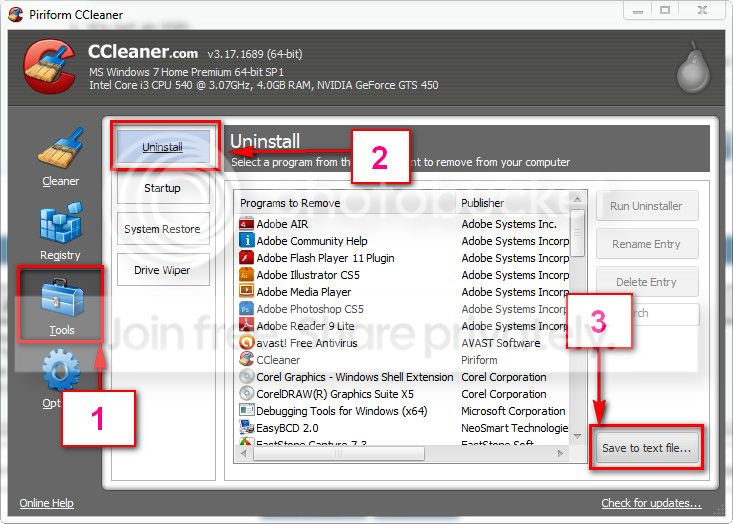
When all these done, download and install CCleaner. Then run it.
Go to "Tools" .... by default it will open the "uninstall" tab.
Click on save as text file. Save it on your desktop.
Upload the text file for us.
2012-11-02_224417.jpg
 

My Computer My Computer

Computer type
PC/Desktop
Computer Manufacturer/Model Number
Self Assembled
OS
Microsoft Windows 10 Pro Insider Preview 64-bit
CPU
Intel(R) Core(TM) i3-4130 CPU @ 3.40GHz
Motherboard
Gigabyte Technology Co., Ltd. B85M-D3H
Memory
Corsair Vengence 4GB x2 (8.00GB Dual-Channel DDR3 @ 798MHz)
Graphics Card(s)
2047MB GeForce GTS 450 (ZOTAC International)
Sound Card
Onboard (Realtek High Definition Audio)
Monitor(s) Displays
LG Flatron E2040T
Screen Resolution
1600x900
Hard Drives
Western Digital 1 TB
Seagate 500 GB
PSU
Corsair VS550
Case
Cooler Master K380
Cooling
Cooler Master Seidon 120V Plus
Keyboard
Logitech MK260r
Mouse
Logitech MK260r
Internet Speed
PMPL Broadband
Antivirus
Windows Defender + MBAM
Browser
Firefox
Other Info
Dell Studio 15" Laptop
Alright, I did everything step by step. Again I appreciate all the help.

Results: I did a first round of updates. On the second download and boot up of updates I got the BSOD.
After that I ran the rest of the test. (Haven't gotten the BSOD since)

Seagate test found erros on the first pass. On the second it said it passed with the repairs.
Note: I had to change my hard drive from AHCI to IDE in BIOS so that Seagate DOS could detect my harddrive. (I have yet to switch back to AHCI) - I don't know if this matters

Here is Ccleaner docs:View attachment 260601
 

My Computer My Computer

Computer type
PC/Desktop
OS
Windows 7 x64
There is no bad programs installed. As the Seatools found, it might be the problem of the HDD only. Hopefully Seatools fixed it.

If you get more BSODs, let us know :)
 

My Computer My Computer

Computer type
PC/Desktop
Computer Manufacturer/Model Number
Self Assembled
OS
Microsoft Windows 10 Pro Insider Preview 64-bit
CPU
Intel(R) Core(TM) i3-4130 CPU @ 3.40GHz
Motherboard
Gigabyte Technology Co., Ltd. B85M-D3H
Memory
Corsair Vengence 4GB x2 (8.00GB Dual-Channel DDR3 @ 798MHz)
Graphics Card(s)
2047MB GeForce GTS 450 (ZOTAC International)
Sound Card
Onboard (Realtek High Definition Audio)
Monitor(s) Displays
LG Flatron E2040T
Screen Resolution
1600x900
Hard Drives
Western Digital 1 TB
Seagate 500 GB
PSU
Corsair VS550
Case
Cooler Master K380
Cooling
Cooler Master Seidon 120V Plus
Keyboard
Logitech MK260r
Mouse
Logitech MK260r
Internet Speed
PMPL Broadband
Antivirus
Windows Defender + MBAM
Browser
Firefox
Other Info
Dell Studio 15" Laptop
Alright, once again I appreciate all the help! Can't say it enough :)

It has been a week and I haven't moved all my files over yet but so far everything has been working fine. I do have some freezes here and there that I have never had before but I have NOT gotten the BSOD since.

I am going to go ahead and say this is solved by SEAGATE tools for DOS from boot to CD repair.
 

My Computer My Computer

Computer type
PC/Desktop
OS
Windows 7 x64
OK mate :)
For any further issue, let us know.
 

My Computer My Computer

Computer type
PC/Desktop
Computer Manufacturer/Model Number
Self Assembled
OS
Microsoft Windows 10 Pro Insider Preview 64-bit
CPU
Intel(R) Core(TM) i3-4130 CPU @ 3.40GHz
Motherboard
Gigabyte Technology Co., Ltd. B85M-D3H
Memory
Corsair Vengence 4GB x2 (8.00GB Dual-Channel DDR3 @ 798MHz)
Graphics Card(s)
2047MB GeForce GTS 450 (ZOTAC International)
Sound Card
Onboard (Realtek High Definition Audio)
Monitor(s) Displays
LG Flatron E2040T
Screen Resolution
1600x900
Hard Drives
Western Digital 1 TB
Seagate 500 GB
PSU
Corsair VS550
Case
Cooler Master K380
Cooling
Cooler Master Seidon 120V Plus
Keyboard
Logitech MK260r
Mouse
Logitech MK260r
Internet Speed
PMPL Broadband
Antivirus
Windows Defender + MBAM
Browser
Firefox
Other Info
Dell Studio 15" Laptop
Hello. I wasnt sure if I should make a new thread but I am getting the BSOD again. My last BSOD in this thread was due to my HDD. I ended up purchasing a new one. It has worked since the last post of this thread until now.

I am getting a 1A error code. It just happened and when I restarted and went to try and do windows update/event viewer I got it again.

This is my dump file. View attachment 271607
 

My Computer My Computer

Computer type
PC/Desktop
OS
Windows 7 x64

My Computer My Computer

Computer Manufacturer/Model Number
Custom Built
OS
Windows 7 Ultimate 32-Bit & Windows 7 Ultimate 64-Bit
CPU
Intel Core i7 CPU 950 @ 3.07GHz
Motherboard
ASUS P6T DELUXE V2
Memory
OCZ 6GB (3 x 2GB) 240-Pin DDR3 SDRAM DDR3 1600 OCZ3X1600R2
Graphics Card(s)
ATI Radeon HD 5700 Series
Sound Card
OnBoard
Hard Drives
WD6400AACS-00M3B0 (640GB SATA )
PSU
CORSAIR 850w
Case
NZXT LEXA
Cooling
Intel Stock Heatsink Fan
Keyboard
Microsoft Wireless Laser Keyboard 7000
Mouse
Microsoft Wireless Laser Mouse 7000
Sighhh... First had to replace the HDD. NOW I have to replace one of the sticks.. I followed the tutorial and confirmed that it was my 4gb RAM stick. My 2GB one works.

I appreciate the help :)
 

My Computer My Computer

Computer type
PC/Desktop
OS
Windows 7 x64
If its a dual channel kit . Replace both sticks . If its still under warranty open up an RMA to get the kit replaced . If its out of warranty then buy a new dual channel memory kit .

With kits you can't replace one memory stick you would have to purchase a new kit .
 

My Computer My Computer

Computer Manufacturer/Model Number
Custom Built
OS
Windows 7 Ultimate 32-Bit & Windows 7 Ultimate 64-Bit
CPU
Intel Core i7 CPU 950 @ 3.07GHz
Motherboard
ASUS P6T DELUXE V2
Memory
OCZ 6GB (3 x 2GB) 240-Pin DDR3 SDRAM DDR3 1600 OCZ3X1600R2
Graphics Card(s)
ATI Radeon HD 5700 Series
Sound Card
OnBoard
Hard Drives
WD6400AACS-00M3B0 (640GB SATA )
PSU
CORSAIR 850w
Case
NZXT LEXA
Cooling
Intel Stock Heatsink Fan
Keyboard
Microsoft Wireless Laser Keyboard 7000
Mouse
Microsoft Wireless Laser Mouse 7000
Is it alright to just run my laptop with one stick in then? I think that is what I will do until I find it necessary to purchase more RAM.
 
Last edited:

My Computer My Computer

Computer type
PC/Desktop
OS
Windows 7 x64
It will work . But its better to run dual channel memory in pairs
 

My Computer My Computer

Computer Manufacturer/Model Number
Custom Built
OS
Windows 7 Ultimate 32-Bit & Windows 7 Ultimate 64-Bit
CPU
Intel Core i7 CPU 950 @ 3.07GHz
Motherboard
ASUS P6T DELUXE V2
Memory
OCZ 6GB (3 x 2GB) 240-Pin DDR3 SDRAM DDR3 1600 OCZ3X1600R2
Graphics Card(s)
ATI Radeon HD 5700 Series
Sound Card
OnBoard
Hard Drives
WD6400AACS-00M3B0 (640GB SATA )
PSU
CORSAIR 850w
Case
NZXT LEXA
Cooling
Intel Stock Heatsink Fan
Keyboard
Microsoft Wireless Laser Keyboard 7000
Mouse
Microsoft Wireless Laser Mouse 7000
Also, I am not sure how to exactly determine if I have dual channel or not. My MSINFO32 gives me a model of K53SV.

Googling that it brings me to these specification: DDR3 1333 MHz SDRAM, 2 x SO-DIMM socket for expansion up to 8 G SDRAM

Also, downloading CPU-Z and going to memory shows Channel# Single. However, that is with only one stick of RAM.
Installing the broken stick (4gb) back into my laptop and checking cpu-z again gives me Channel# Dual and 6gb total (what I originally had).
 
Last edited:

My Computer My Computer

Computer type
PC/Desktop
OS
Windows 7 x64
Back
Top