
BSOD Upgrading Win 7 Home Premium to Win 7 Ultimate. Using USB.

Shargor

New member
Local time
10:59 AM
Messages
1
Hello,

My girlfriend just bought a new HP Pavilion HPE Series desktop. The HP Desktop currently runs Windows 7 Home Premium. I am trying to upgrade her Desktop to Ultimate for the language pack features. I have an OEM Version of Ultimate that I have bought for myself and I have successfully done this upgrade on 2 of my laptops and 2 of my desktops.

Her system:

Manufacturer : HP
Model: H8-1212
Processor: AMD FX-6120 Six Core 3.50 GHz
RAM: 8 GB
Video Card: AMD Radeon HD 7450

I am using a WM Passport 500GB as a bootable install for ultimate and have gone thru the process of making this external bootable using Win to Flash. Like I said, I have used this same Flash Drive before and succeeded.

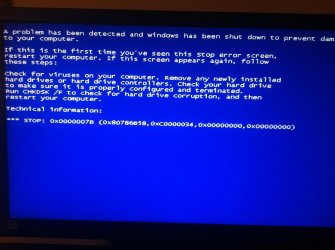
My problem occurs after the Windows Ultimate Setup has copied all necessary files and extracted them. It is at this time when the setup requires the FIRST reboot of the system and when the system boots back up and tries to enter windows "Starting Windows Screen" I get the BSOD. ( Please See Attachment For Screen Shot Of BSOD )

Error :*** STOP: 0x0000007B (0x80786B58, 0xc0000034, 0x00000000, 0x00000000)

Any help would be nice. I am new to this forum, if additional details are needed please let me know. Also, please feel free to critique my thread as I am brand new here.

Thank You,

Shargor
 

Attachments
  • photo.jpg
    photo.jpg
    310.5 KB · Views: 5

My Computer My Computer

At a glance

Windows 7 Ultimate x64
OS
Windows 7 Ultimate x64
Are you sure you want to waste an OEM license on preinstalled HP which already comes with a Premium license? The affordable way to do this if you don't have Technet/MSDN is to buy an Anytime Upgrade to unlock the few extra features in Ultimate. Otherwise you'll permanently lose the OEM license which becomes locked to the mobo it's first installed upon. It really should be saved for a PC you build.

If you're intend upon wasting it on this PC then use Windows Anytime Upgrade - How to - Windows 7 Forums and just insert the Ultimate Product Key to unlock the few extra versions. Note again that Ultimate will be permanently locked to that mobo and unable to migrate, even if you revert to the $100+ license which came with the HP.
 
That does seem a terrible waste. On the old case here while still being able to use the Vista OEM Home Premium disk for seeing a few fresh installs on an older laptop the key was still used for the old custom build itself. For a full upgrade of features the new license is the cost efficient approach to keep the OEM disk available.

As for replacing the factory preinstall you may have to nuke the original C primary and put Ultimate on a brand new primary in order to see a clean install performed. That will help in getting past drive errors due to things lingering on the present C volume.

That reminds me I wouldn't mind upgrading the 7 laptop around here to at least Pro since it will then support the XP mode.
 

My Computers My Computers

  • At a glance

    W7 Ultimate x64/W10 Pro x64/W11 Pro Triple Bo...AMD Phenom II X4 975 Deneb 3.6ghz - 965 2nd r...Kingston Hyper X DDR3 1600 1.5v 16gb - Hyper ...MSI HD Radeon 5750 1gb - MSI HD Radeon 6450 o...
    Computer type
    PC/Desktop
    Computer Manufacturer/Model Number
    Custom builds = 2
    OS
    W7 Ultimate x64/W10 Pro x64/W11 Pro Triple Boot - Main PC W7 Remote PC Micro ATX W7 Pro x64/W11 Pro
    CPU
    AMD Phenom II X4 975 Deneb 3.6ghz - 965 2nd remote pc
    Motherboard
    Gigabyte GA-790XTA-UD4-Gigabyte GA-880GM-D2H remote pc
    Memory
    Kingston Hyper X DDR3 1600 1.5v 16gb - Hyper X Fury 8gb 2nd
    Graphics Card(s)
    MSI HD Radeon 5750 1gb - MSI HD Radeon 6450 on mini tower
    Sound Card
    Creative Labs X-Fi Xtreme Audio P - Realtek onooard 2nd case
    Monitor(s) Displays
    ASUS VW199T-P 19" HP 2082a Main-HP 2082a 20" remote pc
    Screen Resolution
    Asus 1440x900 - HP 1600x900
    Hard Drives
    WD Black 1TB HD per OS W7, W10, and pending W11 presently on 500gb OS Drive - Pending Triple 1TB HDs for Spanned Storage/backup volume
    Single 2TB external USB enclosure, single 1TB System 7 Host/Boot drive, Pending 8TB external HD for system image b
    PSU
    Corsair 750TX - primary / Corsair CX600 - second
    Case
    Antec 900-2 - SSD compatible / NZXT Vulcan mini tower
    Cooling
    Zalman CNPS9900A
    Keyboard
    AZIO L70 Backlit Letters Gaming - ONN Cordless/USB
    Mouse
    MSI DS200 Programmable, Logitech Cordless
    Internet Speed
    30mbps upgrade - primary hard wired - mini tower usb WiFi
    Antivirus
    GFI VIPRE Internet Security 2014 on W7 2016 beta on W10,
    Browser
    Cyberfox, WaterFox 64bit FF variants, FireFox x64, Pale Moon
    Other Info
    Accomdata fan cooled usb 2.0 PIDE/Sata II, III external enclosure.
    Sambient usb/eSata PATA/Sata II, III external enclosure.
  • At a glance

    W7 Pro x64/W11 ProAMD Deneb 3.6ghz - 965Kingston Hyper X Fury 8gbMSI HD Radeon 6450 DVI Output
    Computer type
    PC/Desktop
    System Manufacturer/Model Number
    CUSTOM ASSEMBLY
    OS
    W7 Pro x64/W11 Pro
    CPU
    AMD Deneb 3.6ghz - 965
    Motherboard
    Gigabyte GA-880GM-D2H remote pc
    Memory
    Kingston Hyper X Fury 8gb
    Graphics Card(s)
    MSI HD Radeon 6450 DVI Output
    Sound Card
    Realtek onooard Creative or Other separate PENDING
    Monitor(s) Displays
    VIZIO 32" LCD TV Separate LCD Pending
    Screen Resolution
    1600x1080
    Hard Drives
    WD 500GB OS Host/Boot WD Green 1TB Storage/Backup
    PSU
    Corsair 600W - THERMALTAKE 600W spare case
    Case
    NZXT Vulcan mini tower
    Cooling
    Twin 120mm Top Fans - 240mm Side Cover
    Keyboard
    ONN Cordless/USB Logitech Cordless
    Mouse
    ONN USB/Cordless - Logitech Cordless
    Internet Speed
    DSL 5G
    Browser
    MS Edge, FireFox, WaterFox x64, FireFox Nightly
    Other Info
    OS Testing-Remote Access to Main TeamViewer
Back
Top