Hello and welcome to SF DECKER06

.
Unfortunately files are missing, so I'm not getting the full picture.
Please run the
SFDT again and let it run its course it can take 15min at times to collect all the data necessary.
If you're using
OPTION ONE, there should be eight files generated not including the dumps.
As of now it appears to be an issue with the HDD HDS721680PLA380 by the looks of it
it is very old, how old is the drive?
Also you're using a RDP (Remote Desktop Connection), is the software or some of the storage
are located the PC locally or on the remote PC?
Code:
BugCheck F4, {3, fffffa80093eeb30, fffffa80093eee10, fffff80002d947b0}
EXCEPTION_CODE: (NTSTATUS) 0xc0000006 - The instruction at 0x%p referenced memory at 0x%p. The required data was not placed into memory because of an I/O error status of 0x%x.

BUGCHECK_STR:  0xF4_IOERR
Code:
KERNEL_DATA_INPAGE_ERROR (7a)
The requested page of kernel data could not be read in.  Typically caused by
a bad block in the paging file or disk controller error. Also see
KERNEL_STACK_INPAGE_ERROR.
If the error status is 0xC000000E, 0xC000009C, 0xC000009D or 0xC0000185,
it means the disk subsystem has experienced a failure.
If the error status is 0xC000009A, then it means the request failed because
a filesystem failed to make forward progress.
Arguments:
Arg1: 0000000000000020, lock type that was held (value 1,2,3, or PTE address)
Arg2: ffffffffc000009d, error status (normally i/o status code)
Arg3: fffffa80086037c8, current process (virtual address for lock type 3, or PTE)
Arg4: 0000000000000000, virtual address that could not be in-paged (or PTE contents if arg1 is a PTE address)

ERROR_CODE: (NTSTATUS) 0xc000009d - STATUS_DEVICE_NOT_CONNECTED

DISK_HARDWARE_ERROR: There was error with disk hardware

BUGCHECK_STR:  0x7a_c000009d
Warning
The Following Method Should NOT Be Performed On An SSD!
Testing the HDD:
- Perform a Disk Check | Disk Check- Scroll down to OPTION TWO of the tutorial and use the /R switch in the CHKDSK command | chkdsk C: /R.
- Then Post the Disk Check results following | This Tutorial.
- Once back in Windows, download Crystal Disk Info and post a screenshot (multiple shots if you have more than one drive).
- Download SeaTools for DOS if you don't want to use a CD to test the HDD you can use YUMI – Multiboot USB Creator to create a bootable USB (instructions are found at the bottom of both pages).
- If SeaTools for DOS is unable to recognize your HDD:
- Visit HDDdiag and follow the instructions | Or follow the instructions below.
If SeaTools For DOS does not recognize the drive;
Boot into the BIOS using the
*Fx key.
Look for an entry called
SATA Mode (or something similar), it should be set to
IDE / AHCI.
It's probably set to
AHCI which is why SeaTools doesn't recognize them in the DOS environment.
Set it to
IDE then save and exit usually by pressing the
F10 key.
Now boot into SeaTools and it should detect the drives.
Start the
Long Test and let it run.
Upon completion don't try to boot into Windows as it will only result in a BSOD, go back into the BIOS
and change the SATA setting back to what it was in the first place.
Re-seat the sata and power.
Let us know the results.
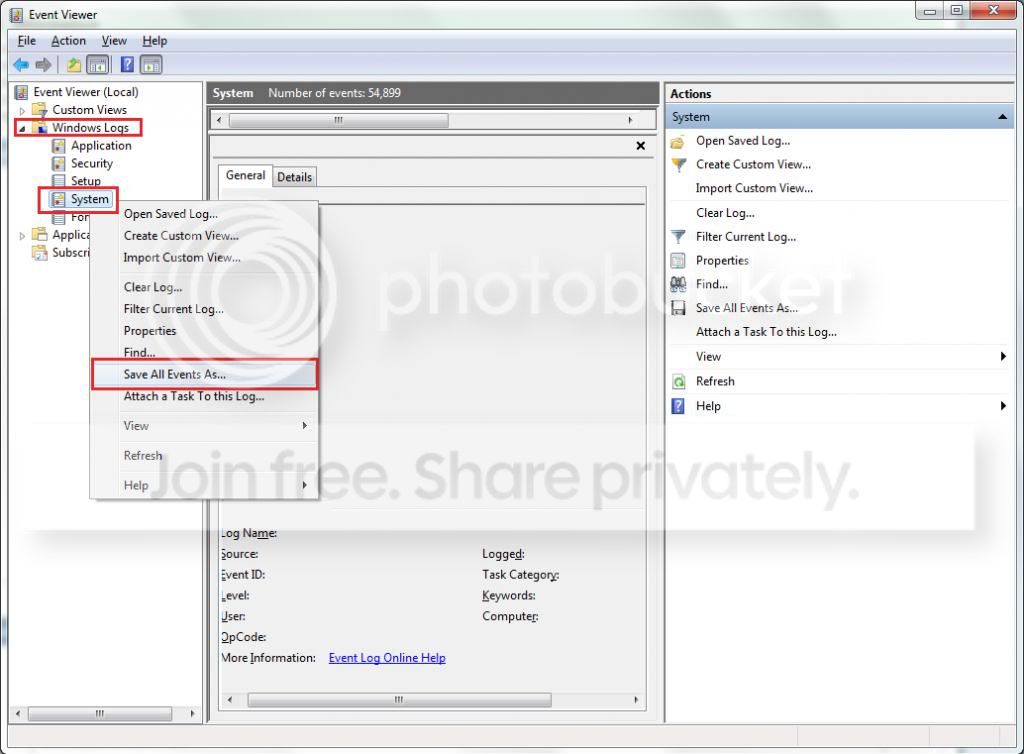
Please export and upload your system event log.
 rb: Start → type eventvwr → hit Enter.
- Toggle open the triangle to the left of Windows Logs, right-click on System and choose Save All Events As...
- A dialogue box will pop up asking you to name the file and select the save directory, name the file the same as your Seven Forums user-name and save it to the desktop.
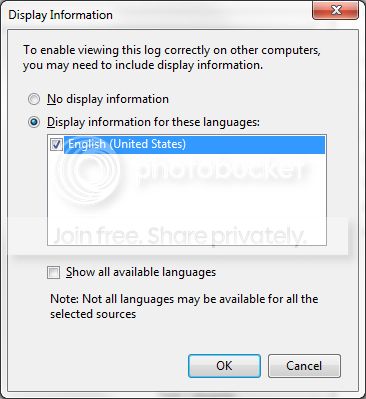
- A second dialogue box will appear asking you to select the Display Information, select Display information for these languages and check the box next to English (if you don't have English automatically offered check the box at the bottom to display additional languages - Show all available languages and check English).
- Wait a few moments until the cursor returns to normal. The file will now be on your desktop (given it's the directory it was saved to) UserName.evtx, next to it there will be a folder called LocaleMetaData select both the .evtx file as well as the folder and compress them using Winrar / 7zip and attach it in your next post.