Hi and welcome to SF andreassyz

.
You appear to have had several bug checks but only one is uploaded, if there are more please upload
the rest. Manually check the minidump folder.
If dump files are present in that folder
copy them to the Desktop, zip and upload in your next post.
:ar:
Start by disabling Driver Verifier:
The bug check appears to have been caused due to a very old driver.
Code:
lmvm ifsmount
start    end        module name
917dc000 917ed000   ifsmount T (no symbols)
    Loaded symbol image file: ifsmount.sys
    Image path: ifsmount.sys
    Image name: ifsmount.sys
    Timestamp:        [COLOR=Red][U]Thu Aug 28 23:47:56 2008[/U][/COLOR]
What do you use
Ext2fs for? is it vital?, If not, please remove it completely.
:ar: Please reset your pagefile, you can afford it.
Code:
Drive    C:
Free Space    215.26 GB (231,131,619,328 bytes)


Installed Physical Memory (RAM)    4.00 GB
Page File Space    [COLOR=Red][U]300 MB[/U][/COLOR]
:ar:
Reset your Page File:
1. 
rb:Start Menu> Run >type
control.exe system
and press the
Enter key.
A windows will open and on the Left hand side you will see
Advanced system settings, click it.
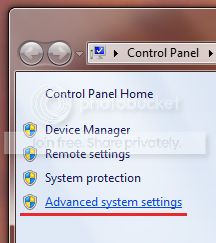
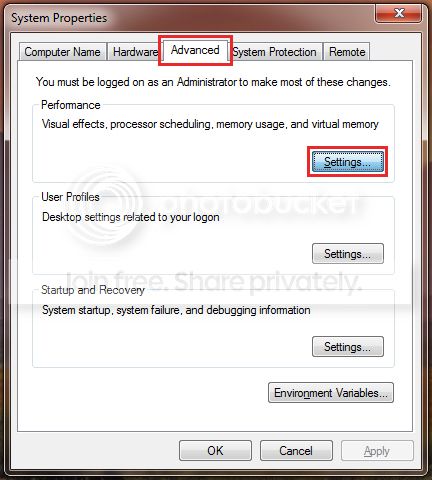
2. Next click on the
Advanced tab and
Settings which correspond to the
Performance section;
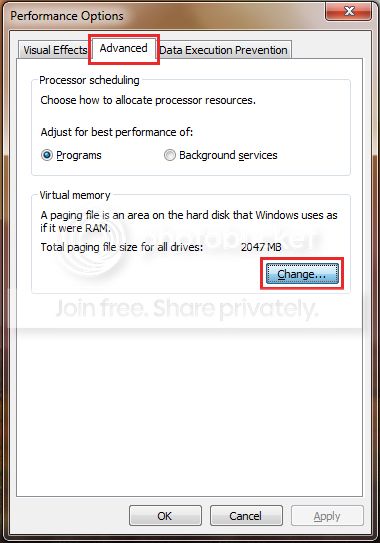
 3.
3. Then the
Advanced tab once more and click on the
Change button;
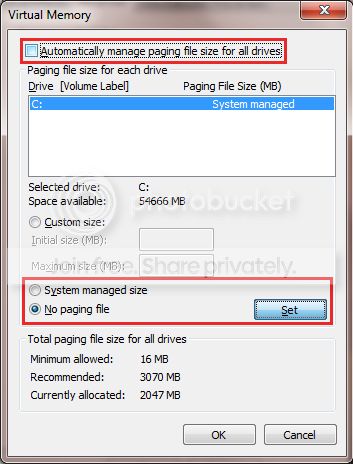
 4.
4. Untick the checkbox next to
Automatically manage paging file size for all drives;
Select
No paging file and Click on the
Set button;
 5.
5. Confirm all the windows.
6. Restart the PC.
7. Reverse the procedure, by following steps
1-3, only this time select
System managed size
and click the
Set button;
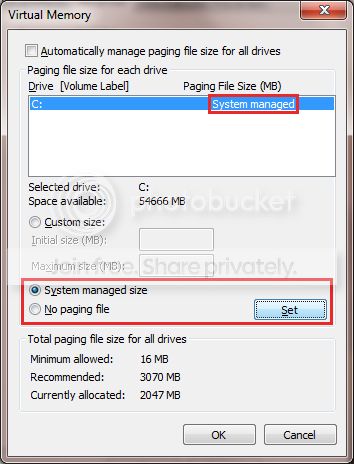 8.
8. Recheck the box next to
Automatically manage paging file size for all drives
and exit the windows by clicking the
OK button;
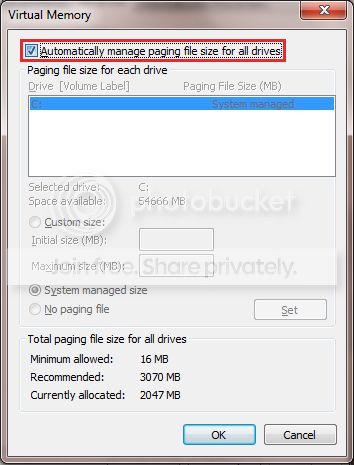 9.
9. Confirm all of the remaining windows by click the
OK button
and restart the PC once again to take affect.
Post back with the results
.



 and your reply as well.
