
BSOD when booting. Error 0x00000101

christof21

New member
Local time
4:42 AM
Messages
20
Hi guys, I posted this question up over the weeked and it looks like my thread got taken down. I suspect for not complying with the BSOD posting rules.

However I'm unable to post any sort of dump files or log files, as my BSOD is preventing me from booting into the computer either normally or in safe mode.

When ever I boot up normally I get to the windows log on screen, and it hangs then re-boots giving the BSOD error. When I try to boot into safe mode, it gets to the splash screen then re-boots to the same BSOD.

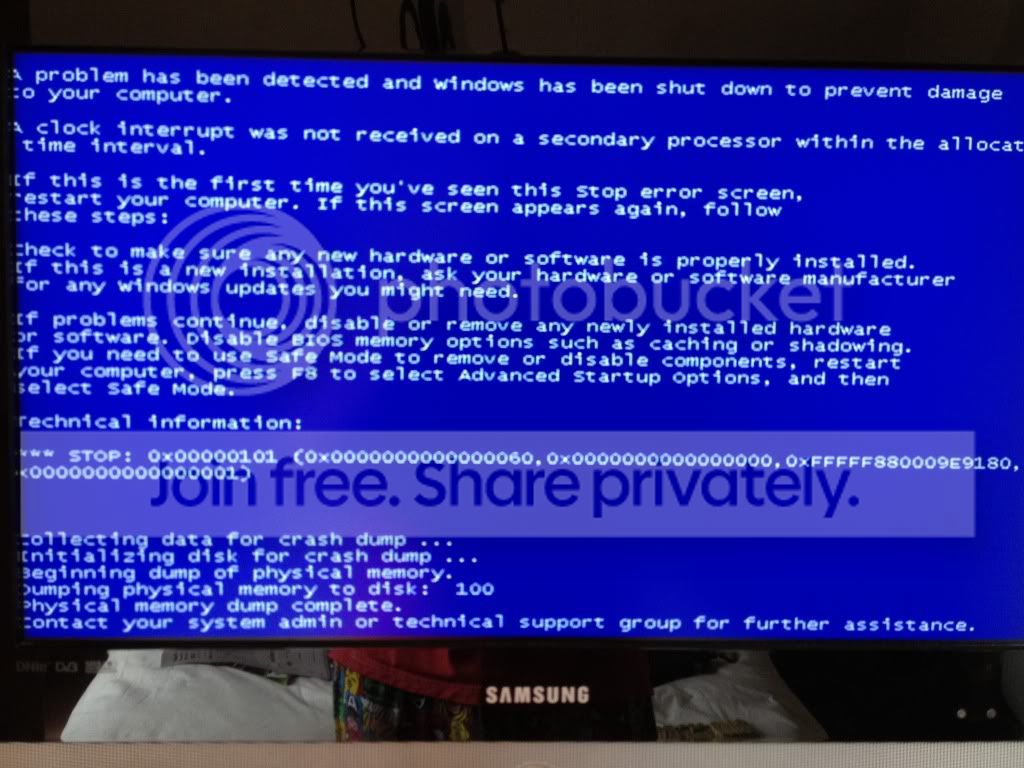
All I can do is post a picture of the BSOD details, which I'll pop at the bottom of this thread.

System Spec
--------------

Windows 7 Pro x64.
Downloaded from the MS website
The system is custom built
AMD Athlon X2 3200
4gb DDR2 800
MSI M/B
512mb PCI-e graphics

I have already removed the gfx card, and trying to boot with alternate sticks of DDR2 installed to eliminate faults with those pieces of hardware. Still get the same BSOD.

The errors started of with the machine re-booting every 30 mins or so, either under load when streaming a movie, or when turned on and sat idle doing nothing. Then it progressed to the stage it's at now, where I can't even get the machine to boot into windows.

I hope this is sufficient information for some help or advice, and sorry for not posting any error logs, but like I said, I can't get into windows in full or safe mode.

ctaylor3_2007
IMG_0949.jpg


Last edited:

My Computer My Computer

Computer Manufacturer/Model Number
Custom
OS
Windows 7 Pro x64
CPU
AMD Athlon 64x2
Motherboard
MSI
Memory
OCZ
Graphics Card(s)
ATI onboard
Sound Card
AC97 onboard
Monitor(s) Displays
17" Digimate TFT
Hard Drives
1tb Seagate Barracuda
PSU
Custom
Case
CoolerMaster
Cooling
Stock
Internet Speed
65MB down 18MB up
Hi again. Just wondering whether anybody has any opinions or advice on this for me?
 

My Computer My Computer

Computer Manufacturer/Model Number
Custom
OS
Windows 7 Pro x64
CPU
AMD Athlon 64x2
Motherboard
MSI
Memory
OCZ
Graphics Card(s)
ATI onboard
Sound Card
AC97 onboard
Monitor(s) Displays
17" Digimate TFT
Hard Drives
1tb Seagate Barracuda
PSU
Custom
Case
CoolerMaster
Cooling
Stock
Internet Speed
65MB down 18MB up
Just wondering whether anybody has any advice at all on this?
 

My Computer My Computer

Computer Manufacturer/Model Number
Custom
OS
Windows 7 Pro x64
CPU
AMD Athlon 64x2
Motherboard
MSI
Memory
OCZ
Graphics Card(s)
ATI onboard
Sound Card
AC97 onboard
Monitor(s) Displays
17" Digimate TFT
Hard Drives
1tb Seagate Barracuda
PSU
Custom
Case
CoolerMaster
Cooling
Stock
Internet Speed
65MB down 18MB up

My Computer My Computer

Computer Manufacturer/Model Number
HP Pavilion e9110t
OS
Windows 7 Home Premium 64 Bit
CPU
Intel(R) Core(TM)2 Quad CPU Q9550 @ 2.83GHz
Motherboard
Pegatron IPIEL-LA3
Memory
6.00 GB Hundai HMT125U6BFR8C-H9
Graphics Card(s)
ATI Radeon HD 4850
Sound Card
Realtek High Definition Audio/ATI High Definition Audio
Monitor(s) Displays
Acer AL2216W
Screen Resolution
1680x1050
Hard Drives
Hitachi HDP725050GLA360 ATA Device 500 GB
PSU
Unknown/installed by HP
Case
HP generic case
Cooling
Intel Stock Cooling
Keyboard
HP Keyboard
Mouse
HP Mouse
Internet Speed
Download: 19.15 Mbps Upload: 1.67 Mbps
Other Info
Network Adapter Realtek RTL8168D/8111D Family PCI-E Gigabit Ethernet NIC (NDIS 6.20)
Network Adapter 802.11n Wireless PCI Express Card LAN Adapter
http://www.sevenforums.com/crash-lo...0x101-clock_watchdog_timeout-troubleshtg.html

Start with the above and post back if you need help after reading through that guide.

Thanks for the reply, it's nice that someone out of the 150+ that have viewed my thread, has actually taken the time to offer some help.

I've read those posts you have linked, and I have a couple of issues.

1) My BSOD screen doesn't mention the clock watchdog timeout anywhere, so I'm a little confused as to whether this is the same error or not.

2) I can't run any of those stress tests or driver test as my machine won't boot to the desktop at all. Even in safe mode. I've done some hardware diagnosis on the memory modules and gfx card, by removing them from the M/B and seeing if that maybe is a reason for the BSOD. Like a faulty memory module, or gfx card, but the same BSOD error happens. So short of doing a clean install of the OS or buying a new CPU, I'm sort of at a loss personally now.

And if it is the CPU, which is hardware, I don't actually see what doing a full re-install of my OS will do. I don't ever remember a piece of software being able to magically repair a piece of faulty hardware.
 

My Computer My Computer

Computer Manufacturer/Model Number
Custom
OS
Windows 7 Pro x64
CPU
AMD Athlon 64x2
Motherboard
MSI
Memory
OCZ
Graphics Card(s)
ATI onboard
Sound Card
AC97 onboard
Monitor(s) Displays
17" Digimate TFT
Hard Drives
1tb Seagate Barracuda
PSU
Custom
Case
CoolerMaster
Cooling
Stock
Internet Speed
65MB down 18MB up
As you can see in the link I gave, I found out that a clean re-install can resolve the error you are getting. In most cases, a 0x101 BugCheck is due to a hardware problem, but there are some times when the clock interrupt is caused by a faulty driver, software conflict, or a damaged Windows installation.

And yes, your blue screen image you attached is consistent with the Watchdog Timeout crash.


You may want to read through http://www.sevenforums.com/tutorials/219487-clean-reinstall-factory-oem-windows-7-a.html#post1839164 which will guide you in backing up any important data you have on the system and doing a fresh install of Windows 7. Hopefully you are one of the rare cases where the 0x101 BugCheck is software related and not hardware related. Best of luck!
 

My Computer My Computer

Computer Manufacturer/Model Number
HP Pavilion e9110t
OS
Windows 7 Home Premium 64 Bit
CPU
Intel(R) Core(TM)2 Quad CPU Q9550 @ 2.83GHz
Motherboard
Pegatron IPIEL-LA3
Memory
6.00 GB Hundai HMT125U6BFR8C-H9
Graphics Card(s)
ATI Radeon HD 4850
Sound Card
Realtek High Definition Audio/ATI High Definition Audio
Monitor(s) Displays
Acer AL2216W
Screen Resolution
1680x1050
Hard Drives
Hitachi HDP725050GLA360 ATA Device 500 GB
PSU
Unknown/installed by HP
Case
HP generic case
Cooling
Intel Stock Cooling
Keyboard
HP Keyboard
Mouse
HP Mouse
Internet Speed
Download: 19.15 Mbps Upload: 1.67 Mbps
Other Info
Network Adapter Realtek RTL8168D/8111D Family PCI-E Gigabit Ethernet NIC (NDIS 6.20)
Network Adapter 802.11n Wireless PCI Express Card LAN Adapter
As you can see in the link I gave, I found out that a clean re-install can resolve the error you are getting. In most cases, a 0x101 BugCheck is due to a hardware problem, but there are some times when the clock interrupt is caused by a faulty driver, software conflict, or a damaged Windows installation.

And yes, your blue screen image you attached is consistent with the Watchdog Timeout crash.


You may want to read through http://www.sevenforums.com/tutorials/219487-clean-reinstall-factory-oem-windows-7-a.html#post1839164 which will guide you in backing up any important data you have on the system and doing a fresh install of Windows 7. Hopefully you are one of the rare cases where the 0x101 BugCheck is software related and not hardware related. Best of luck!

Cheers. I'll have a read of the info now and see what I decide to do.
 

My Computer My Computer

Computer Manufacturer/Model Number
Custom
OS
Windows 7 Pro x64
CPU
AMD Athlon 64x2
Motherboard
MSI
Memory
OCZ
Graphics Card(s)
ATI onboard
Sound Card
AC97 onboard
Monitor(s) Displays
17" Digimate TFT
Hard Drives
1tb Seagate Barracuda
PSU
Custom
Case
CoolerMaster
Cooling
Stock
Internet Speed
65MB down 18MB up
So, this morning I've managed to boot into safe mode only. Any attempt to boot into Windows normally fails every time. So as I can only boot into safe mode, I"m unable to run a system health report as that function isn't available in safe mode.

I can try and attach the .dmp file to this post if i'm quick before it crashes on me. Even in safe mode. If that's any help
 

My Computer My Computer

Computer Manufacturer/Model Number
Custom
OS
Windows 7 Pro x64
CPU
AMD Athlon 64x2
Motherboard
MSI
Memory
OCZ
Graphics Card(s)
ATI onboard
Sound Card
AC97 onboard
Monitor(s) Displays
17" Digimate TFT
Hard Drives
1tb Seagate Barracuda
PSU
Custom
Case
CoolerMaster
Cooling
Stock
Internet Speed
65MB down 18MB up
Managed to be able to boot into the desktop for long enough to run the performance test. So I've attached it to this post now. The .dmp files have been attached to the previous post. Hope this can help me get some more specific info
 

My Computer My Computer

Computer Manufacturer/Model Number
Custom
OS
Windows 7 Pro x64
CPU
AMD Athlon 64x2
Motherboard
MSI
Memory
OCZ
Graphics Card(s)
ATI onboard
Sound Card
AC97 onboard
Monitor(s) Displays
17" Digimate TFT
Hard Drives
1tb Seagate Barracuda
PSU
Custom
Case
CoolerMaster
Cooling
Stock
Internet Speed
65MB down 18MB up
All crashes were 0x124 or 0x101 crashes. It is safe to say this is a hardware issue. I gave you the 0x101 crash information in a previous post with the link: http://www.sevenforums.com/crash-lo...0x101-clock_watchdog_timeout-troubleshtg.html


BugCheck 0x124

You have a 0x124 hardware bugcheck. If the system is still under warranty, I would recommend sending it in to have diagnostic tests done and any bad hardware replaced.

   Warning
Before you proceed with the following, answer these two questions: Are you still under warranty? Does your warranty allow you to open up the machine to check hardware? If you are unsure of the answers to these questions, contact your system manufacturer. :warn:WARNING: The steps that follow can void your warranty!!!

For your hardware stop 0x124 crash, read through http://www.sevenforums.com/crash-lockup-debug-how/35349-stop-0x124-what-means-what-try.html and use the following hardware checks to supplement that link.

  • If you are overclocking any hardware, please stop.

  • If you have an SSD, make sure the following are up to date:
    • SSD firmware
    • BIOS Version
    • Chipset Drivers
    • Hard disk controller drivers/SATA drivers
    • If you have a Marvell IDE ATA/ATAPI device, make sure the drivers are up to date from the Intel site or Marvell site and not from your motherboard/vendor support site.

  • Run all but the advanced tests with SeaTools for HDDs.
  • Monitor temperatures during the following tests.
    Use the following programs to monitor the temperatures.​

  • Run the boot version of Memtest86+ paying close attention to Parts 2 and 3 of the tutorial. Also, in case Memtest86+ misses anything and comes up with no errors, run the extended version of the Windows Memory Diagnostics Tool for at least five passes. These you may want to run overnight since they take a long time to complete (run them an hour before bed each of the next two nights and check before going to sleep that they are still running).

    For Part 3: If You Have Errors: If you swap any memory components, follow these steps for ESD safety:
    1. Shut down and turn off your computer.
    2. Unplug all power supplies to the computer (AC Power then battery for laptops, AC power for desktops)
    3. Hold down the power button for 30 seconds to close the circuit and ensure all power drains from components.
    4. Make sure you are grounded by using proper grounding techniques, i.e. work on an anti-static workbench, anti-static desk, or an anti-static pad. Hold something metallic while touching it to the anti-static surface, or use an anti-static wristband to attach to the anti-static material while working. If you do not have an anti-static workbench, desk, or pad, you can use your computer tower/case by finding a metal hold in it, such as a drive bay.
    Once these steps have been followed, it is safe to remove and replace components within your computer.

Remember to read closely through http://www.sevenforums.com/crash-lockup-debug-how/35349-stop-0x124-what-means-what-try.html for the crash.
 

My Computer My Computer

Computer Manufacturer/Model Number
HP Pavilion e9110t
OS
Windows 7 Home Premium 64 Bit
CPU
Intel(R) Core(TM)2 Quad CPU Q9550 @ 2.83GHz
Motherboard
Pegatron IPIEL-LA3
Memory
6.00 GB Hundai HMT125U6BFR8C-H9
Graphics Card(s)
ATI Radeon HD 4850
Sound Card
Realtek High Definition Audio/ATI High Definition Audio
Monitor(s) Displays
Acer AL2216W
Screen Resolution
1680x1050
Hard Drives
Hitachi HDP725050GLA360 ATA Device 500 GB
PSU
Unknown/installed by HP
Case
HP generic case
Cooling
Intel Stock Cooling
Keyboard
HP Keyboard
Mouse
HP Mouse
Internet Speed
Download: 19.15 Mbps Upload: 1.67 Mbps
Other Info
Network Adapter Realtek RTL8168D/8111D Family PCI-E Gigabit Ethernet NIC (NDIS 6.20)
Network Adapter 802.11n Wireless PCI Express Card LAN Adapter
My machine is a custom build machine that I built myself. The parts in it are probably around 3 or 4 years old. I know for a fact that the processor is out of warranty as I've already filled in the RMA paperwork for AMD and they've come back to me to say it's out of warranty.

I'm running a chkdsk now on the hard disk to see what that comes up with. While I was able to get some stability this afternoon I was able to make sure all the drivers were updated which is another thing that is ticked off the list.

I'm not getting enough stability to run some of the other tests in terms of graphics and CPU, as I'm lucky if I get 15 mins out of it before it re-boots today. Which to be fair is 15 mins more than I've been getting that past 2 weeks.
 

My Computer My Computer

Computer Manufacturer/Model Number
Custom
OS
Windows 7 Pro x64
CPU
AMD Athlon 64x2
Motherboard
MSI
Memory
OCZ
Graphics Card(s)
ATI onboard
Sound Card
AC97 onboard
Monitor(s) Displays
17" Digimate TFT
Hard Drives
1tb Seagate Barracuda
PSU
Custom
Case
CoolerMaster
Cooling
Stock
Internet Speed
65MB down 18MB up
update: Just a little update from my last post. Unable to run a full chkdsk as it crashed out to BSOD before it had finished. Putting it away for the day now. Been at it for the better part of the day on and off, and it's just annoying me now.

Time for a break and come back to it another day with a clear head.
 

My Computer My Computer

Computer Manufacturer/Model Number
Custom
OS
Windows 7 Pro x64
CPU
AMD Athlon 64x2
Motherboard
MSI
Memory
OCZ
Graphics Card(s)
ATI onboard
Sound Card
AC97 onboard
Monitor(s) Displays
17" Digimate TFT
Hard Drives
1tb Seagate Barracuda
PSU
Custom
Case
CoolerMaster
Cooling
Stock
Internet Speed
65MB down 18MB up
Taking a break is a good troubleshooting step sometimes. Sometimes it lets you go at it from different angles and work more patiently. Frustration is always a danger when debugging system issues, and it is usually counterproductive.

Let us know how things go. Glad you are taking a break. :)
 

My Computer My Computer

Computer Manufacturer/Model Number
HP Pavilion e9110t
OS
Windows 7 Home Premium 64 Bit
CPU
Intel(R) Core(TM)2 Quad CPU Q9550 @ 2.83GHz
Motherboard
Pegatron IPIEL-LA3
Memory
6.00 GB Hundai HMT125U6BFR8C-H9
Graphics Card(s)
ATI Radeon HD 4850
Sound Card
Realtek High Definition Audio/ATI High Definition Audio
Monitor(s) Displays
Acer AL2216W
Screen Resolution
1680x1050
Hard Drives
Hitachi HDP725050GLA360 ATA Device 500 GB
PSU
Unknown/installed by HP
Case
HP generic case
Cooling
Intel Stock Cooling
Keyboard
HP Keyboard
Mouse
HP Mouse
Internet Speed
Download: 19.15 Mbps Upload: 1.67 Mbps
Other Info
Network Adapter Realtek RTL8168D/8111D Family PCI-E Gigabit Ethernet NIC (NDIS 6.20)
Network Adapter 802.11n Wireless PCI Express Card LAN Adapter
So back to it today to see if I can nail this problem once and for all, or just ditch Windows, and go get me a MAC!

Installed Core Temp to check what's going on with the cores, and off the bat it looks like Core #0 runs a little hotter than Core #1 while doing stuff. It starts pushing 51degrees, which is close to the 52degrees max on the app.
 

My Computer My Computer

Computer Manufacturer/Model Number
Custom
OS
Windows 7 Pro x64
CPU
AMD Athlon 64x2
Motherboard
MSI
Memory
OCZ
Graphics Card(s)
ATI onboard
Sound Card
AC97 onboard
Monitor(s) Displays
17" Digimate TFT
Hard Drives
1tb Seagate Barracuda
PSU
Custom
Case
CoolerMaster
Cooling
Stock
Internet Speed
65MB down 18MB up
Oooooh interesting update to report.

I've been troubleshooting this all day again. Took out all none essential internals. Took out individual sticks of ram and tested, and still got the 0x101 error. So I decided to just use one of my old spare hard drives and try a clean install on that. Part way through the install, and got the BSOD 101 error again.

So I'm now of the opinion that it is definately a hardware issue. It's either CPU or motherboard. As I haven't got a spare CPU or motherboard to test, it's looking like a shopping trip for some upgrades.
 

My Computer My Computer

Computer Manufacturer/Model Number
Custom
OS
Windows 7 Pro x64
CPU
AMD Athlon 64x2
Motherboard
MSI
Memory
OCZ
Graphics Card(s)
ATI onboard
Sound Card
AC97 onboard
Monitor(s) Displays
17" Digimate TFT
Hard Drives
1tb Seagate Barracuda
PSU
Custom
Case
CoolerMaster
Cooling
Stock
Internet Speed
65MB down 18MB up
Good troubleshooting. That does likely point to the CPU or motherboard.

For further confirmation, please check compatibility of your CPU and RAM: Download and install CPU-Z and Upload screenshots of the CPU, Mainboard, Memory, and SPD tabs. In the SPD tab, upload an image of each slot.
 

My Computer My Computer

Computer Manufacturer/Model Number
HP Pavilion e9110t
OS
Windows 7 Home Premium 64 Bit
CPU
Intel(R) Core(TM)2 Quad CPU Q9550 @ 2.83GHz
Motherboard
Pegatron IPIEL-LA3
Memory
6.00 GB Hundai HMT125U6BFR8C-H9
Graphics Card(s)
ATI Radeon HD 4850
Sound Card
Realtek High Definition Audio/ATI High Definition Audio
Monitor(s) Displays
Acer AL2216W
Screen Resolution
1680x1050
Hard Drives
Hitachi HDP725050GLA360 ATA Device 500 GB
PSU
Unknown/installed by HP
Case
HP generic case
Cooling
Intel Stock Cooling
Keyboard
HP Keyboard
Mouse
HP Mouse
Internet Speed
Download: 19.15 Mbps Upload: 1.67 Mbps
Other Info
Network Adapter Realtek RTL8168D/8111D Family PCI-E Gigabit Ethernet NIC (NDIS 6.20)
Network Adapter 802.11n Wireless PCI Express Card LAN Adapter
Good troubleshooting. That does likely point to the CPU or motherboard.

For further confirmation, please check compatibility of your CPU and RAM: Download and install CPU-Z and Upload screenshots of the CPU, Mainboard, Memory, and SPD tabs. In the SPD tab, upload an image of each slot.

I know for sure that my memory is compatible with my motherboard. I built this machine and sourced the parts myself, and this isn't the first PC build I've done. So I know about making sure that hardware is compatible with each other.
 

My Computer My Computer

Computer Manufacturer/Model Number
Custom
OS
Windows 7 Pro x64
CPU
AMD Athlon 64x2
Motherboard
MSI
Memory
OCZ
Graphics Card(s)
ATI onboard
Sound Card
AC97 onboard
Monitor(s) Displays
17" Digimate TFT
Hard Drives
1tb Seagate Barracuda
PSU
Custom
Case
CoolerMaster
Cooling
Stock
Internet Speed
65MB down 18MB up

My Computer My Computer

Computer Manufacturer/Model Number
HP Pavilion e9110t
OS
Windows 7 Home Premium 64 Bit
CPU
Intel(R) Core(TM)2 Quad CPU Q9550 @ 2.83GHz
Motherboard
Pegatron IPIEL-LA3
Memory
6.00 GB Hundai HMT125U6BFR8C-H9
Graphics Card(s)
ATI Radeon HD 4850
Sound Card
Realtek High Definition Audio/ATI High Definition Audio
Monitor(s) Displays
Acer AL2216W
Screen Resolution
1680x1050
Hard Drives
Hitachi HDP725050GLA360 ATA Device 500 GB
PSU
Unknown/installed by HP
Case
HP generic case
Cooling
Intel Stock Cooling
Keyboard
HP Keyboard
Mouse
HP Mouse
Internet Speed
Download: 19.15 Mbps Upload: 1.67 Mbps
Other Info
Network Adapter Realtek RTL8168D/8111D Family PCI-E Gigabit Ethernet NIC (NDIS 6.20)
Network Adapter 802.11n Wireless PCI Express Card LAN Adapter
Well done! You are ahead of many I help on here in that regard. :)

There are some CPU tests included with Hiren's Boot CD and Ultimate Boot CD that you may be able to do if you cannot get Windows to stay up long enough to run such tests.

Hiren's BootCD 15.1 - All in one Bootable CD » www.hiren.info

Ultimate Boot CD - Overview

Thanks a lot of those links. Invaluable. I'll see if I can make a bootable USB drive with them on.

I've been building/upgrading PCs since back in the old 386sx days. I've done pretty well when I can honestly say this is the first major hardware failure I've had on any machine I've either upgraded or built for myself or anyone else. I've had the usual windows issues, virus's, MBR issues etc, but this is the first hardware failure.

I've found that the pace of technology improvements has pretty much outstripped the life of the machines and what people want to do on them.

And true to form, this is the first PC build where I've gone without any form of optical drive, installed. When I built it going on 4 years ago, I pretty much saw everything moving towards online storage or portable storage, so I've been building up my USB tools library, down to full windows install USB's, but CPU tools is one I've been missing. So thanks ;)
 

My Computer My Computer

Computer Manufacturer/Model Number
Custom
OS
Windows 7 Pro x64
CPU
AMD Athlon 64x2
Motherboard
MSI
Memory
OCZ
Graphics Card(s)
ATI onboard
Sound Card
AC97 onboard
Monitor(s) Displays
17" Digimate TFT
Hard Drives
1tb Seagate Barracuda
PSU
Custom
Case
CoolerMaster
Cooling
Stock
Internet Speed
65MB down 18MB up
You're welcome. I have both of those tools in my library, and they have served me well in the past.

Best of luck tracking down the problem. Let us know if you find out what it is.
 

My Computer My Computer

Computer Manufacturer/Model Number
HP Pavilion e9110t
OS
Windows 7 Home Premium 64 Bit
CPU
Intel(R) Core(TM)2 Quad CPU Q9550 @ 2.83GHz
Motherboard
Pegatron IPIEL-LA3
Memory
6.00 GB Hundai HMT125U6BFR8C-H9
Graphics Card(s)
ATI Radeon HD 4850
Sound Card
Realtek High Definition Audio/ATI High Definition Audio
Monitor(s) Displays
Acer AL2216W
Screen Resolution
1680x1050
Hard Drives
Hitachi HDP725050GLA360 ATA Device 500 GB
PSU
Unknown/installed by HP
Case
HP generic case
Cooling
Intel Stock Cooling
Keyboard
HP Keyboard
Mouse
HP Mouse
Internet Speed
Download: 19.15 Mbps Upload: 1.67 Mbps
Other Info
Network Adapter Realtek RTL8168D/8111D Family PCI-E Gigabit Ethernet NIC (NDIS 6.20)
Network Adapter 802.11n Wireless PCI Express Card LAN Adapter
Back
Top