Hello

.
What you're experiencing is called a TDR (Timeout Detection & Recovery) and its not a
real crash
in the sense that something wrong occurred in the Kernel.
"Display driver xxxxx stopped responding and was recovered"
Timeout Detection & Recovery (TDR) = "Display Driver Stopped Responding and was Recovered" is a useful feature that started in Vista and is also in W7 that allows the OS to try and recover from a video timeout so that the system does not crash to a bluescreen. Symptoms included a screen flash with the TDR message appearing one or more times or the screen blinking out to black. If the system cannot recover it will crash (Stop Error 116 typical). The issue is that the video card is not responding as expected.
.
.
.
.
There are numerous reports of hardware solutions to TDR's. The most common are:
- Poor Cooling
- Problems with the power supply
- Overclocking Issues
- Bad System memory or incorrect memory timings
- Defective PC Components
- More details HERE, please read.
What kind of games are you playing?
I'll be honest with you the Geforce GT 240 is a re-brand and not a very powerful card, so it might
be that you're expecting a little more than it can deliver.
What is the make an model of your PSU?
Fill out this form and post back the result:
Good practice, open up the case and re-seat all types of connection.
- SATA Cables (HDD/SSD/ODD).
- SATA-Power.
- Motherboard 24-pin.
- Motherboard 4/8-pin (CPU).
- Re-seat the RAM.
- Re-seat the GPU.
Make sure that every slot / cable head is free of dust or other obstruction.
Make sure that every connection is seating properly and firmly in-place.
- Download Speccy and post a Screenshot of the summary window, one at idle and another while putting load on the PC Furmark.
You're using a somewhat old drivers now;
Code:
Driver Version 9.18.1[COLOR=Blue][U][B]3.1106[/B][/U][/COLOR]
Code:
lmvm nvlddmkm
start             end                 module name
fffff880`04abb000 fffff880`05562000   nvlddmkm T (no symbols)
    Loaded symbol image file: nvlddmkm.sys
    Image path: \SystemRoot\system32\DRIVERS\nvlddmkm.sys
    Image name: nvlddmkm.sys
    Timestamp:        [COLOR=Red][U][B]Fri Jan 18 15:22:15 2013[/B][/U][/COLOR]
Update the GPU driver:
Install the 314.22 WHQL only.
- Uninstall All nvidia items in Control Panel > Programs and features
- 3D Vision Control Driver
- 3D Vision Driver
- Graphics Driver
- HD Audio Driver
- PhysX
- nvidia Update
(Are you using nvidia chipset drivers? If so, dont uninstall anything other than those are listed).
- Now follow Drivers - Clean Left over Files after Uninstalling
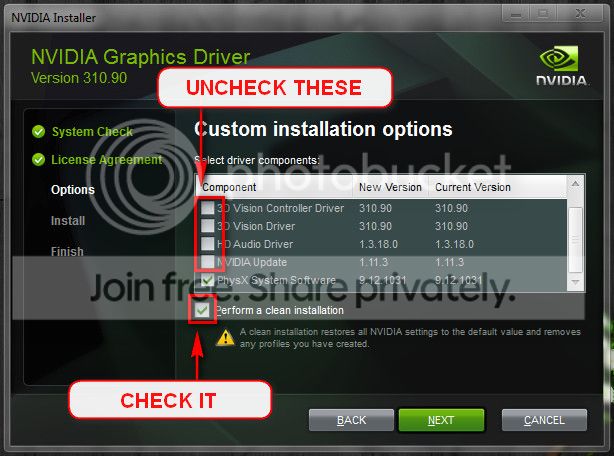
- Boot normally now. Download 314.22 WHQL. While installing, Select Custom (Advanced) install. In the next page, follow this settings:
Testing the RAM:
Test and Diagnose RAM Issues with Memtest86+:
Tip
- :info: Pay close attention to part 3 of the tutorial "If you have errors"
- :tip: Test the RAM with Memtest86+ for at least 7-10 passes. It may take up to 22 passes to find problems. Make sure to run it once after the system has been on for a few hours and is warm, and then also run it again when the system has been off for a few hours and is cold.
When done with the testing procedure take a picture and upload it here.
Also a potential troublemaker:
Code:
OVERLAPPED_MODULE: Address regions for '[COLOR=Red][U][B]EX64[/B][/U][/COLOR]' and '[COLOR=Red][B][U]ENG64[/U][/B][/COLOR].SYS' overlap
Code:
0: kd> lmvm ENG64
start             end                 module name
fffff880`0b090000 fffff880`0b0b2000   ENG64      (deferred)
    Image path: \??\[COLOR=Red][U][B]C:\ProgramData\Norton[/B][/U][/COLOR]\{0C55C096-0F1D-4F28-AAA2-85EF591126E7}
\N360_20.1.0.24\Definitions\VirusDefs\20131003.065\[COLOR=Red][U][B]ENG64[/B][/U][/COLOR].SYS
    Image name: ENG64.SYS
    Timestamp:        Thu Aug 22 23:38:20 2013 (521676BC)
    CheckSum:         00020BBA
    ImageSize:        00022000
    Translations:     0000.04b0 0000.04e4 0409.04b0 0409.04e4
0: kd> lmvm EX64
start             end                 module name
fffff880`0ae8a000 fffff880`0b090000   EX64       (deferred)
    Image path: \??\[COLOR=Red][U][B]C:\ProgramData\Norton[/B][/U][/COLOR]\{0C55C096-0F1D-4F28-AAA2-85EF591126E7}
\N360_20.1.0.24\Definitions\VirusDefs\20131003.065\[COLOR=Red][B][U]EX64[/U][/B][/COLOR].SYS
    Image name: EX64.SYS
    Timestamp:        Thu Aug 22 23:36:51 2013 (52167663)
    CheckSum:         0020D6C9
    ImageSize:        00206000
    Translations:     0000.04b0 0000.04e4 0409.04b0 0409.04e4
I recommend removing Norton Anti-Virus and installing Microsoft Security Essentials
as a reliable Anti-Virus engine.
Let us know the results!



