
Hello!
Today I got a sound card (Sound Blaster Z) I wanted to try out. I never installed anything on a computer before, so I made an extremely rookie mistake of installing it into the wrong slot. I was in such a rush, but I know I should have done some more research before just jumping into it... ugh. For some reason I thought the text was explaining what the above slot is, but I know that's wrong now.
Here's a picture of my motherboard.
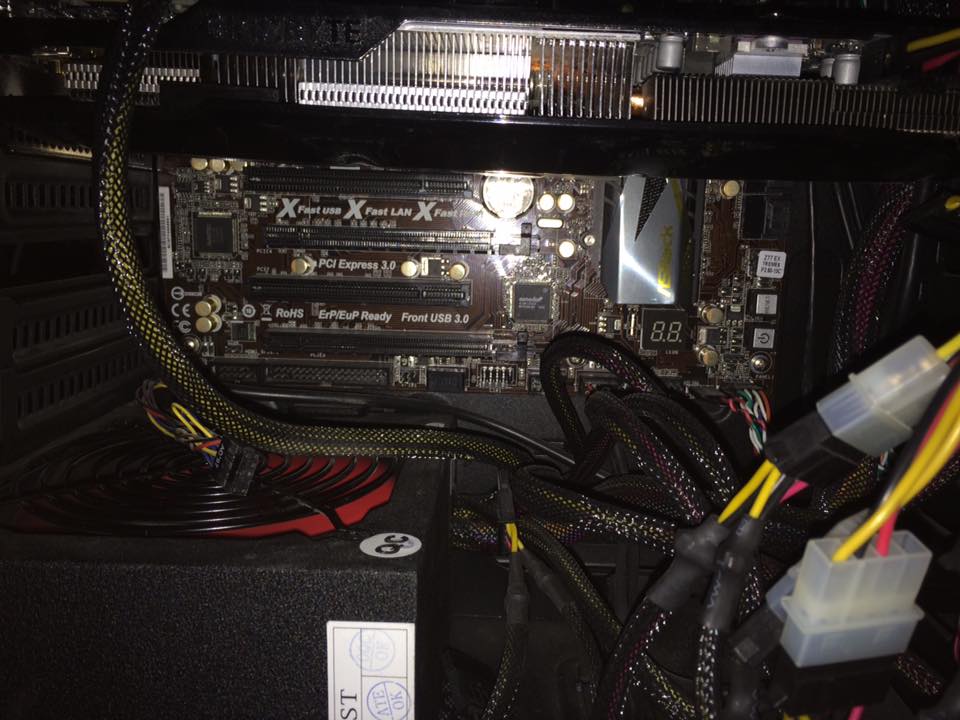
I should have installed it in the slot under PCI Express 2.0 (right?), but without thinking I ended up putting it in the slot above it. It fit even though there was a lot of extra space, so I didn't think anything was wrong...
Then I turned it on and got the blue screen.
The weird thing is, the computer starts up in safe mode and safe mode with networking, but when I try to start windows up normally, I get this blue screen. It goes all the way to the windows flag and the "welcome" screen would come next, but instead I'm welcomed (heh) with a blue screen.
I noticed that I could do a system restore from safe mode and bring my computer back to August 29th, so after backing up some files on an external harddrive I tried that, but nothing changed at all.
Here's a picture I took of the blue screen upon the latest startup.
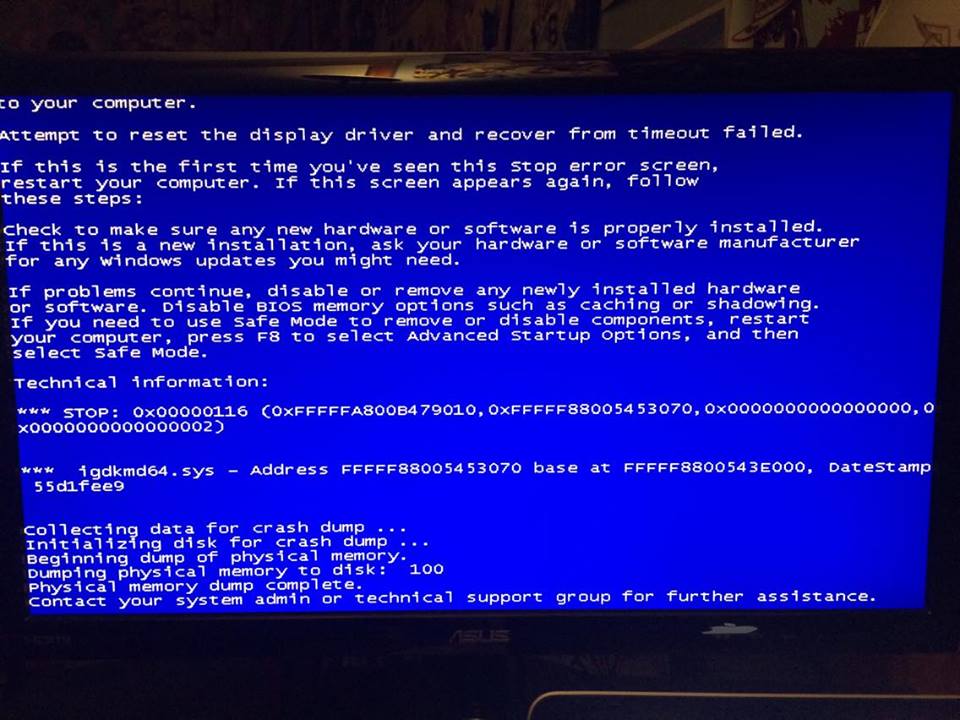
I also did dust out my computer with a can of compressed air, but I made sure many times that nothing was lose and everything was plugged in properly, so I think it was due to the sound card.
Here's my DxDiag from a few days ago:
DxDiag - Pastebin.com
My most recent DxDiag is in the Zip file below.
I hope I didn't do anything to fry my motherboard and permanently damage the computer.
Any help would be greatly, greatly appreciated!
Thank you very much!
Edit: I didn't make it clear in my post, but after the first blue screen, I did take the sound card out. The blue screen still persist now even with the sound card out.
Today I got a sound card (Sound Blaster Z) I wanted to try out. I never installed anything on a computer before, so I made an extremely rookie mistake of installing it into the wrong slot. I was in such a rush, but I know I should have done some more research before just jumping into it... ugh. For some reason I thought the text was explaining what the above slot is, but I know that's wrong now.
Here's a picture of my motherboard.
I should have installed it in the slot under PCI Express 2.0 (right?), but without thinking I ended up putting it in the slot above it. It fit even though there was a lot of extra space, so I didn't think anything was wrong...
Then I turned it on and got the blue screen.
The weird thing is, the computer starts up in safe mode and safe mode with networking, but when I try to start windows up normally, I get this blue screen. It goes all the way to the windows flag and the "welcome" screen would come next, but instead I'm welcomed (heh) with a blue screen.
I noticed that I could do a system restore from safe mode and bring my computer back to August 29th, so after backing up some files on an external harddrive I tried that, but nothing changed at all.
Here's a picture I took of the blue screen upon the latest startup.
I also did dust out my computer with a can of compressed air, but I made sure many times that nothing was lose and everything was plugged in properly, so I think it was due to the sound card.
Here's my DxDiag from a few days ago:
DxDiag - Pastebin.com
My most recent DxDiag is in the Zip file below.
I hope I didn't do anything to fry my motherboard and permanently damage the computer.
Any help would be greatly, greatly appreciated!
Thank you very much!
Edit: I didn't make it clear in my post, but after the first blue screen, I did take the sound card out. The blue screen still persist now even with the sound card out.
Last edited:
My Computer
At a glance
Windows 7 64 bit
- Computer type
- PC/Desktop
- OS
- Windows 7 64 bit


