BSOD when turning off the computer

muzzz

New member
Local time
3:35 PM
Messages
5
Well, just like in the title, the computer BSOD every time you turn it off, sleep does not cause a BSOD.
I've attached the debug zip to the post.
Help would be greatly appreciated.
 

My Computer

Computer type
PC/Desktop
Computer Manufacturer/Model Number
custom build
OS
Windows 7 Ultimate 64-bit SP1
CPU
Intel Core i7 Extreme 975
Motherboard
Gigabyte Technology Co., Ltd. X58A-OC (Socket 1366)
Memory
16.0GB Dual-Channel DDR3
Graphics Card(s)
NVIDIA GeForce GT 430
Hard Drives
232GB Western Digital WDC WD2500AAKS-00F0A0 ATA Device (SATA)
465GB Hitachi HDS725050KLA360 ATA Device (SATA)
Antivirus
Avast
Browser
Nightly
Good news. All of your current dmp files point to the same thing. You have an IO Error. This means that the data can't be read from your HDD. Please run a HDD diagnostic tool to check your HDD. This tool would be HDD manufacturer specific.
 

My Computer

Computer type
PC/Desktop
Computer Manufacturer/Model Number
Custome Built
OS
Microsoft Windows 7 Ultimate 64-bit 7601 Multiprocessor Free Service Pack 1
CPU
Intel(R) Core(TM) i7 CPU 950 @ 3.07GHz
Motherboard
ASUSTeK Computer INC. SABERTOOTH X58 (LGA1366)
Memory
16.0GB Dual-Channel DDR3 @ 534MHz (8-8-8-20)
Graphics Card(s)
1023MB NVIDIA GeForce GTX 650 (EVGA)
Sound Card
(1) NVIDIA High Definition Audio (2) High Definition Audio
Monitor(s) Displays
HP W2072a LED Backlit
Screen Resolution
1920x1080@60Hz
Hard Drives
(1) SAMSUNG MMCRE28G5MXP-0VB SCSI Disk Device
(2) ST1000DM 003-1CH162 SCSI Disk Device
(3) WDC WD10EURX-73FH1Y0 SCSI Disk Device
PSU
XION XON-1000P14F
Cooling
Fans
Antivirus
Windows Security Essentials
Browser
Mozilla Firefox
Other Info
BIOS Version/Date
American Megatrends Inc. 1402, 8/9/2012
SMBIOS Version 2.5
Good news. All of your current dmp files point to the same thing. You have an IO Error. This means that the data can't be read from your HDD. Please run a HDD diagnostic tool to check your HDD. This tool would be HDD manufacturer specific.
Thanks gandalf, i did an extended test to both my drives with "Data Lifeguard Diagnostic" from wd, also did a chkdsk for both, all the results were fine, with no problem at all.
what now?
 

My Computer

Computer type
PC/Desktop
Computer Manufacturer/Model Number
custom build
OS
Windows 7 Ultimate 64-bit SP1
CPU
Intel Core i7 Extreme 975
Motherboard
Gigabyte Technology Co., Ltd. X58A-OC (Socket 1366)
Memory
16.0GB Dual-Channel DDR3
Graphics Card(s)
NVIDIA GeForce GT 430
Hard Drives
232GB Western Digital WDC WD2500AAKS-00F0A0 ATA Device (SATA)
465GB Hitachi HDS725050KLA360 ATA Device (SATA)
Antivirus
Avast
Browser
Nightly
We wait. You might have fixed the problem or it might happen again. If it does, send the dmp and I'll scratch my head for a while. :D
 

My Computer

Computer type
PC/Desktop
Computer Manufacturer/Model Number
Custome Built
OS
Microsoft Windows 7 Ultimate 64-bit 7601 Multiprocessor Free Service Pack 1
CPU
Intel(R) Core(TM) i7 CPU 950 @ 3.07GHz
Motherboard
ASUSTeK Computer INC. SABERTOOTH X58 (LGA1366)
Memory
16.0GB Dual-Channel DDR3 @ 534MHz (8-8-8-20)
Graphics Card(s)
1023MB NVIDIA GeForce GTX 650 (EVGA)
Sound Card
(1) NVIDIA High Definition Audio (2) High Definition Audio
Monitor(s) Displays
HP W2072a LED Backlit
Screen Resolution
1920x1080@60Hz
Hard Drives
(1) SAMSUNG MMCRE28G5MXP-0VB SCSI Disk Device
(2) ST1000DM 003-1CH162 SCSI Disk Device
(3) WDC WD10EURX-73FH1Y0 SCSI Disk Device
PSU
XION XON-1000P14F
Cooling
Fans
Antivirus
Windows Security Essentials
Browser
Mozilla Firefox
Other Info
BIOS Version/Date
American Megatrends Inc. 1402, 8/9/2012
SMBIOS Version 2.5
Tried turning off the computer, and the BSOD came and slapped me across the face...
attaching the dmp file fresh from the oven, careful it's hot!
 

My Computer

Computer type
PC/Desktop
Computer Manufacturer/Model Number
custom build
OS
Windows 7 Ultimate 64-bit SP1
CPU
Intel Core i7 Extreme 975
Motherboard
Gigabyte Technology Co., Ltd. X58A-OC (Socket 1366)
Memory
16.0GB Dual-Channel DDR3
Graphics Card(s)
NVIDIA GeForce GT 430
Hard Drives
232GB Western Digital WDC WD2500AAKS-00F0A0 ATA Device (SATA)
465GB Hitachi HDS725050KLA360 ATA Device (SATA)
Antivirus
Avast
Browser
Nightly
I've asked for assistance with this dmp. Nothing but the best for you Muzzz.
 

My Computer

Computer type
PC/Desktop
Computer Manufacturer/Model Number
Custome Built
OS
Microsoft Windows 7 Ultimate 64-bit 7601 Multiprocessor Free Service Pack 1
CPU
Intel(R) Core(TM) i7 CPU 950 @ 3.07GHz
Motherboard
ASUSTeK Computer INC. SABERTOOTH X58 (LGA1366)
Memory
16.0GB Dual-Channel DDR3 @ 534MHz (8-8-8-20)
Graphics Card(s)
1023MB NVIDIA GeForce GTX 650 (EVGA)
Sound Card
(1) NVIDIA High Definition Audio (2) High Definition Audio
Monitor(s) Displays
HP W2072a LED Backlit
Screen Resolution
1920x1080@60Hz
Hard Drives
(1) SAMSUNG MMCRE28G5MXP-0VB SCSI Disk Device
(2) ST1000DM 003-1CH162 SCSI Disk Device
(3) WDC WD10EURX-73FH1Y0 SCSI Disk Device
PSU
XION XON-1000P14F
Cooling
Fans
Antivirus
Windows Security Essentials
Browser
Mozilla Firefox
Other Info
BIOS Version/Date
American Megatrends Inc. 1402, 8/9/2012
SMBIOS Version 2.5

My Computer

Computer type
PC/Desktop
Computer Manufacturer/Model Number
Self Assembled
OS
Microsoft Windows 10 Pro Insider Preview 64-bit
CPU
Intel(R) Core(TM) i3-4130 CPU @ 3.40GHz
Motherboard
Gigabyte Technology Co., Ltd. B85M-D3H
Memory
Corsair Vengence 4GB x2 (8.00GB Dual-Channel DDR3 @ 798MHz)
Graphics Card(s)
2047MB GeForce GTS 450 (ZOTAC International)
Sound Card
Onboard (Realtek High Definition Audio)
Monitor(s) Displays
LG Flatron E2040T
Screen Resolution
1600x900
Hard Drives
Western Digital 1 TB
Seagate 500 GB
PSU
Corsair VS550
Case
Cooler Master K380
Cooling
Cooler Master Seidon 120V Plus
Keyboard
Logitech MK260r
Mouse
Logitech MK260r
Internet Speed
PMPL Broadband
Antivirus
Windows Defender + MBAM
Browser
Firefox
Other Info
Dell Studio 15" Laptop

My Computer

Computer type
PC/Desktop
Computer Manufacturer/Model Number
Custome Built
OS
Microsoft Windows 7 Ultimate 64-bit 7601 Multiprocessor Free Service Pack 1
CPU
Intel(R) Core(TM) i7 CPU 950 @ 3.07GHz
Motherboard
ASUSTeK Computer INC. SABERTOOTH X58 (LGA1366)
Memory
16.0GB Dual-Channel DDR3 @ 534MHz (8-8-8-20)
Graphics Card(s)
1023MB NVIDIA GeForce GTX 650 (EVGA)
Sound Card
(1) NVIDIA High Definition Audio (2) High Definition Audio
Monitor(s) Displays
HP W2072a LED Backlit
Screen Resolution
1920x1080@60Hz
Hard Drives
(1) SAMSUNG MMCRE28G5MXP-0VB SCSI Disk Device
(2) ST1000DM 003-1CH162 SCSI Disk Device
(3) WDC WD10EURX-73FH1Y0 SCSI Disk Device
PSU
XION XON-1000P14F
Cooling
Fans
Antivirus
Windows Security Essentials
Browser
Mozilla Firefox
Other Info
BIOS Version/Date
American Megatrends Inc. 1402, 8/9/2012
SMBIOS Version 2.5
After following Arc's advice,

Is there a Windows.old on your C:\ drive?

Check that all cables are secure in the SATA ports - reseat if necessary
Which ports are you using?

Please post information about your drives so that a member can determine if there is a misconfiguration. Having this information also makes it easier to a discuss course of action.
See: http://www.sevenforums.com/tutorials/274797-disk-management-post-screen-capture-image.html

Please also follow this tutorial:
http://www.sevenforums.com/tutorials/92394-sf-diagnostic-tool-using-troubleshooting.html and attach the SF_DD_MM_YYYY zip folder to a new post on this thread.

Thanks
 

My Computer

Computer type
Laptop
Computer Manufacturer/Model Number
HP Pavilion dv6-6c10us
OS
x64 (6.3.9600) Win8.1 Pro & soon dual boot x64 (6.1.7601) Win7_SP1 HomePrem
CPU
AMD A6-3420M APU with Radeon(tm) HD Graphics
Motherboard
Hewlett-Packard 1805
Memory
6.00 GB
Graphics Card(s)
AMD Radeon(TM) HD 6520G
Sound Card
(1) AMD High Definition Audio Device (2) IDT High Definiti
Monitor(s) Displays
HP W2072a 20" LCD (1600 x 900) @ 60 Hz
Screen Resolution
1366 x 768 x 32 bits (4294967296 colors) @ 60 Hz
Hard Drives
ST640LM0 00 HM641JI SATA Disk Device
Keyboard
Logitech k520 wireless KB
Mouse
Logitech m320 wireless mouse (bundled with KB)
Internet Speed
15/5 | 54 MB Wireless 'n'
Antivirus
Realtime: Defender or Avast | On-demand: Malwarebytes, ESET
Browser
IE 11 on Win8, IE 10 on win 7
Other Info
Media: [Gimp, Audacity, VLC] || Comm: [WEmail 2012, Skype] || Productivity: [OpenOffice,| Textpad] || Utils: [Sysinternals, cCleaner, Speccy, Defraggler]
Hi muzzz.

Test the 250 GB WD Blue HDD using Data Lifeguard Diagnostic for Windows.

And, it is running off free space.

ITEM|VALUE
Drive | C:
Size | 232.88 GB (250,056,704,000 bytes)
Free Space | 3.08 GB (3,306,156,032 bytes)
Free up some space. Get at least 25 GB free.
http://www.sevenforums.com/tutorials/129976-hard-disk-space-free-up-recover.html

Report us back for any further BSOD after doing these two.

i already scanned with this tool but i cleared about 50Gb and scanned again, it passed, but the BSOD persists...


After following Arc's advice,

Is there a Windows.old on your C:\ drive?

Check that all cables are secure in the SATA ports - reseat if necessary
Which ports are you using?

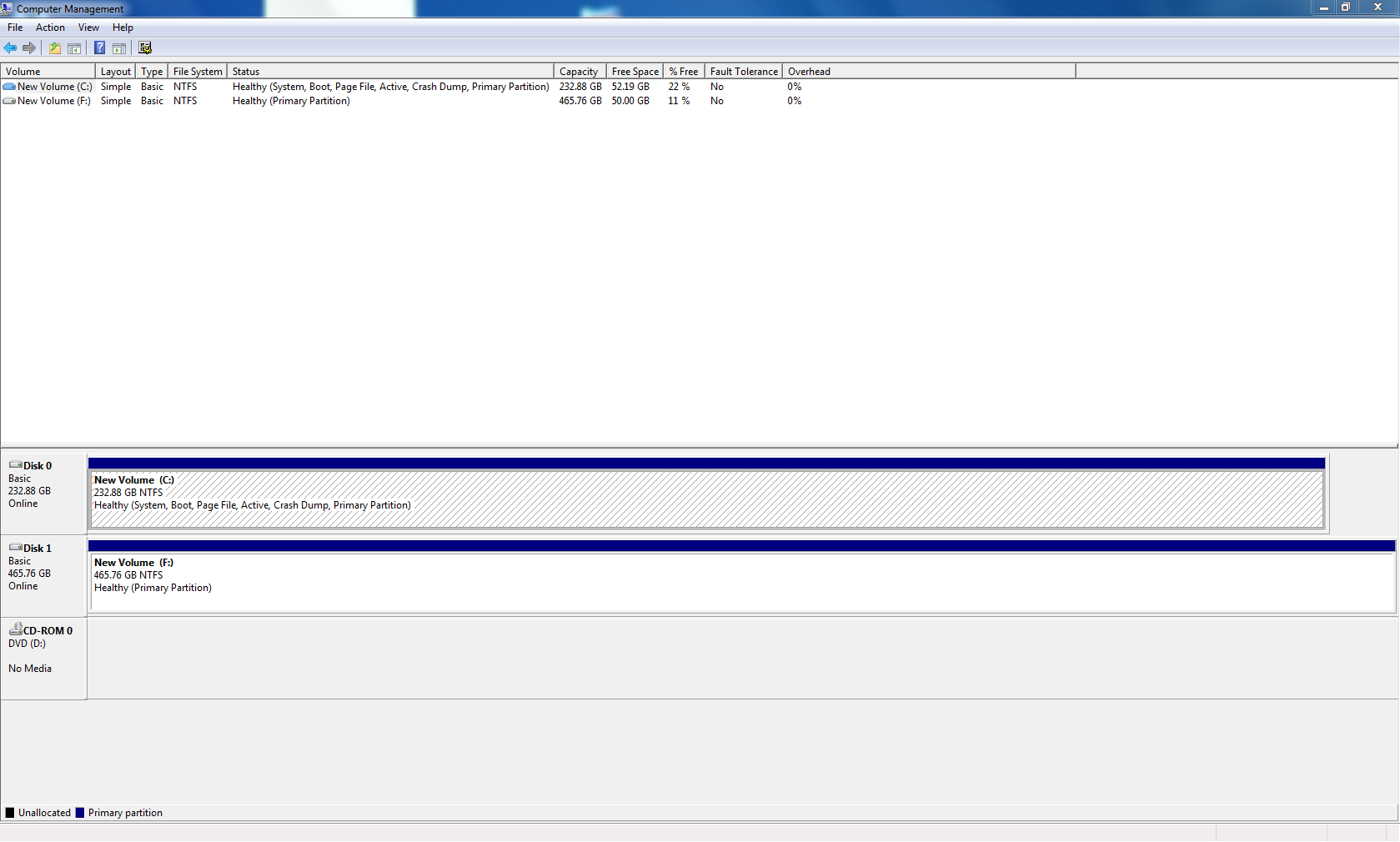
Please post information about your drives so that a member can determine if there is a misconfiguration. Having this information also makes it easier to a discuss course of action.
See: http://www.sevenforums.com/tutorials/274797-disk-management-post-screen-capture-image.html

Please also follow this tutorial:
http://www.sevenforums.com/tutorials/92394-sf-diagnostic-tool-using-troubleshooting.html and attach the SF_DD_MM_YYYY zip folder to a new post on this thread.

Thanks

no windows.old, sata ports are ok, im using 0,1, and 2.

53a8dd5fa730111ce45cc4d7c02c6da6.png
 

My Computer

Computer type
PC/Desktop
Computer Manufacturer/Model Number
custom build
OS
Windows 7 Ultimate 64-bit SP1
CPU
Intel Core i7 Extreme 975
Motherboard
Gigabyte Technology Co., Ltd. X58A-OC (Socket 1366)
Memory
16.0GB Dual-Channel DDR3
Graphics Card(s)
NVIDIA GeForce GT 430
Hard Drives
232GB Western Digital WDC WD2500AAKS-00F0A0 ATA Device (SATA)
465GB Hitachi HDS725050KLA360 ATA Device (SATA)
Antivirus
Avast
Browser
Nightly
The BSOD crash dump says:
Code:
BugCheck F4, {3, fffffa800ca96600, fffffa800ca968e0, fffff800035847b0}

----- ETW minidump data unavailable-----
[COLOR=Red]Probably caused by : lsass.exe[/COLOR]

Followup: MachineOwner
---------
The location of the file is ...
Code:
"c:\users\מחשב\appdata\local\[U][B]temp[/B][/U]\lsass.exe"
Download, Install and Run CCleaner, Temp will be cleaned.

But my question is ... what the programs are? They are auto-starting with windows.

  • ef6805c25b5a2f877bc96e021971597e ef6805c25b5a2f877bc96e021971597e.exe ASAF\מחשב Startup
  • ef6805c25b5a2f877bc96e021971597e "c:\users\מחשב\appdata\local\temp\lsass.exe" .. ASAF\מחשב HKU\S-1-5-21-3037542322-3080866099-3372102490-1000\SOFTWARE\Microsoft\Windows\CurrentVersion\Run
Its a malware. And it is the source of the issue. It is faking itself as Local Security Authority Subsystem Service (LSASS).
Because lsass.exe is a crucial system file, its name is often faked by malware. The lsass.exe file used by Windows is located in the folder C:\Windows\System32. If it is running from any other location, that lsass.exe is most likely a virus, spyware, trojan or worm.

Scan the system for possible virus infection with the following programs.

Free up the startup. Windows does not need any other program to auto start with it, but the auto start programs often conflicts and causes various problems including BSODs.

  1. Click on the Start button
  2. Type “msconfig (without quotes), click the resulting link. It will open the System Configuration window.
  3. Select the “Startup” tab.
  4. Deselect all items other than the antivirus.
  5. Apply > OK
  6. Accept then restart.
Daemon Tools, Alcohol 120% and Power Archiver Pro uses SCSI Pass Through Direct (SPTD), which is a well known BSOD causer. Uninstall Daemon Tools at first. Then download SPTD standalone installer from Disk-Tools.com, and execute the downloaded file as guided below :

  • Double click to open it.
  • Click this button only:
  • 2012-12-13_224441.jpg
  • If it is grayed out, as in the picture, there is no more SPTD in your system, and you just close the window.
Let us know the results.
 

My Computer

Computer type
PC/Desktop
Computer Manufacturer/Model Number
Self Assembled
OS
Microsoft Windows 10 Pro Insider Preview 64-bit
CPU
Intel(R) Core(TM) i3-4130 CPU @ 3.40GHz
Motherboard
Gigabyte Technology Co., Ltd. B85M-D3H
Memory
Corsair Vengence 4GB x2 (8.00GB Dual-Channel DDR3 @ 798MHz)
Graphics Card(s)
2047MB GeForce GTS 450 (ZOTAC International)
Sound Card
Onboard (Realtek High Definition Audio)
Monitor(s) Displays
LG Flatron E2040T
Screen Resolution
1600x900
Hard Drives
Western Digital 1 TB
Seagate 500 GB
PSU
Corsair VS550
Case
Cooler Master K380
Cooling
Cooler Master Seidon 120V Plus
Keyboard
Logitech MK260r
Mouse
Logitech MK260r
Internet Speed
PMPL Broadband
Antivirus
Windows Defender + MBAM
Browser
Firefox
Other Info
Dell Studio 15" Laptop
muzz: Thank you for the feedback.

Arc: You beat me to malware. More scanners that might be necessary, but let's see what TDSSKiller and MDO find.

When you think the threat has been removed, I suggest an SFC run.
But not until all scanners have done their job.


Side commentary only -> I am not suggesting that muzz change course or that any of the utilities listed below be used in this thread.

I am listing the following as reference only.

Old timer-TFC is a powerful stand alone application that cleans up Temp files/Folders.
A three pronged temporary file cleanup approach is probably best
I also found a nice utility, StartupLite, published by Malwarebytes that 'repairs' startup RUN items. It's BETA, ... more real world testing will determine when an RTM becomes available.

I tested it on my system but of course there was nothing to correct :geek:

What StartupLite considers when processing startup entries: Malwarebytes forum post
Download StartupLite from Malwarebytes

StartupLite Usage (from the download page):
  • Simply download StartUpLight from the link above and save it to a convenient location
  • Double click StartUpLITE.exe
  • Select all options you would like executed and select continue
    :note: I didn't see any options, it just reported "No unnecessary startups found!"
    The continue button was inactive, the X close worked ;)
There are two things I have not tested
  • Restore changes (uses msconfig)
  • Custom list
The user should manually check the MSCONGIG Services tab and Startup tab after running StartupLite and report items that remain.

Bill
.
 

My Computer

Computer type
Laptop
Computer Manufacturer/Model Number
HP Pavilion dv6-6c10us
OS
x64 (6.3.9600) Win8.1 Pro & soon dual boot x64 (6.1.7601) Win7_SP1 HomePrem
CPU
AMD A6-3420M APU with Radeon(tm) HD Graphics
Motherboard
Hewlett-Packard 1805
Memory
6.00 GB
Graphics Card(s)
AMD Radeon(TM) HD 6520G
Sound Card
(1) AMD High Definition Audio Device (2) IDT High Definiti
Monitor(s) Displays
HP W2072a 20" LCD (1600 x 900) @ 60 Hz
Screen Resolution
1366 x 768 x 32 bits (4294967296 colors) @ 60 Hz
Hard Drives
ST640LM0 00 HM641JI SATA Disk Device
Keyboard
Logitech k520 wireless KB
Mouse
Logitech m320 wireless mouse (bundled with KB)
Internet Speed
15/5 | 54 MB Wireless 'n'
Antivirus
Realtime: Defender or Avast | On-demand: Malwarebytes, ESET
Browser
IE 11 on Win8, IE 10 on win 7
Other Info
Media: [Gimp, Audacity, VLC] || Comm: [WEmail 2012, Skype] || Productivity: [OpenOffice,| Textpad] || Utils: [Sysinternals, cCleaner, Speccy, Defraggler]
Arc: You beat me to malware.
Slartybart, I did not beat you. I pointed to it only.

Better luck next time, when I will not be there. :)

Edit: Muzzz's post #5. Points the same thing that I posted in my post #11.
BugCheck F4, {3, fffffa800c9af750, fffffa800c9afa30, fffff8000358c7b0}

----- ETW minidump data unavailable-----
Probably caused by : lsass.exe

Followup: MachineOwner
---------
Honestly saying, I totally overlooked it at my post #7, which later rectified.

You had post #9 in between. If you said it there, I would not have the chance to beat you. ;)
 

My Computer

Computer type
PC/Desktop
Computer Manufacturer/Model Number
Self Assembled
OS
Microsoft Windows 10 Pro Insider Preview 64-bit
CPU
Intel(R) Core(TM) i3-4130 CPU @ 3.40GHz
Motherboard
Gigabyte Technology Co., Ltd. B85M-D3H
Memory
Corsair Vengence 4GB x2 (8.00GB Dual-Channel DDR3 @ 798MHz)
Graphics Card(s)
2047MB GeForce GTS 450 (ZOTAC International)
Sound Card
Onboard (Realtek High Definition Audio)
Monitor(s) Displays
LG Flatron E2040T
Screen Resolution
1600x900
Hard Drives
Western Digital 1 TB
Seagate 500 GB
PSU
Corsair VS550
Case
Cooler Master K380
Cooling
Cooler Master Seidon 120V Plus
Keyboard
Logitech MK260r
Mouse
Logitech MK260r
Internet Speed
PMPL Broadband
Antivirus
Windows Defender + MBAM
Browser
Firefox
Other Info
Dell Studio 15" Laptop
Yeah, I missed my window on post# 9 - I'm working on it, but my posts are already lengthy. :p

As long as the issue on muzzz's machine gets resolved.... that's why we're all here.

I'll go back to watching the thread and let my BSOD sensei do his work (it's not magic if...)

Bill
.
 

My Computer

Computer type
Laptop
Computer Manufacturer/Model Number
HP Pavilion dv6-6c10us
OS
x64 (6.3.9600) Win8.1 Pro & soon dual boot x64 (6.1.7601) Win7_SP1 HomePrem
CPU
AMD A6-3420M APU with Radeon(tm) HD Graphics
Motherboard
Hewlett-Packard 1805
Memory
6.00 GB
Graphics Card(s)
AMD Radeon(TM) HD 6520G
Sound Card
(1) AMD High Definition Audio Device (2) IDT High Definiti
Monitor(s) Displays
HP W2072a 20" LCD (1600 x 900) @ 60 Hz
Screen Resolution
1366 x 768 x 32 bits (4294967296 colors) @ 60 Hz
Hard Drives
ST640LM0 00 HM641JI SATA Disk Device
Keyboard
Logitech k520 wireless KB
Mouse
Logitech m320 wireless mouse (bundled with KB)
Internet Speed
15/5 | 54 MB Wireless 'n'
Antivirus
Realtime: Defender or Avast | On-demand: Malwarebytes, ESET
Browser
IE 11 on Win8, IE 10 on win 7
Other Info
Media: [Gimp, Audacity, VLC] || Comm: [WEmail 2012, Skype] || Productivity: [OpenOffice,| Textpad] || Utils: [Sysinternals, cCleaner, Speccy, Defraggler]
Back
Top