
Solved BSOD while playing Dota 2

intes2010

New member
Local time
10:23 PM
Messages
2
Currently experienced BSOD while playing Dota 2, this happened just now.
I am abit worried that this could happen again in the future, so i wanted to isolate the culprit of this problem as soon as possible.

Before the bluescreen happened, my in game audio became weird producing a buzzing sound then BSOD.
I am confused on what caused this, because on other games i never experienced this.

Here's my system specs:
CPU: i5 4670
Board: MSI z87 GD-65 GAMING
GPU: HD6850
RAM: G.Skill 2 x 2gb DDR3 1333

Screenshot taken from BlueScreenView:
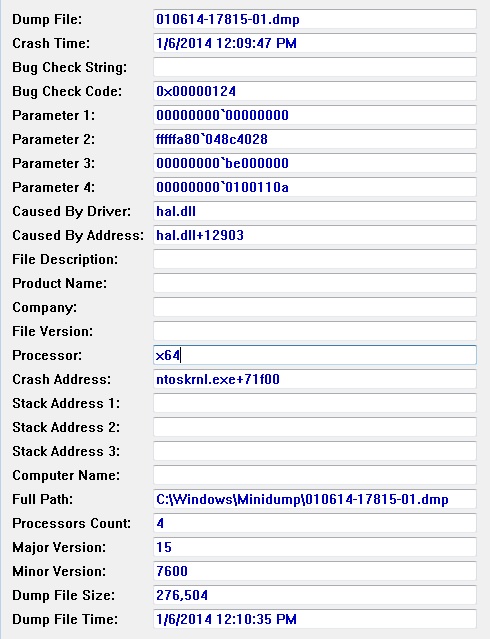
ZxjVhU5.jpg


I have attached the file taken from SF_Diagnostic_Tool.
 
Last edited:

My Computer

Computer type
PC/Desktop
Computer Manufacturer/Model Number
custom build
OS
Windows 7 Ultimate x64
CPU
i5 4670
Motherboard
MSI z87 GD65 GAMING
Memory
G.Skill 2 x 2 gb DDR3 1333
Graphics Card(s)
HD6850
Hard Drives
500gb Seagate
Antivirus
Avira
Browser
Firefox
Some info is missing.

Run this bat file as administrator - it will place a zip folder to your desktop. Upload it in your next reply.

View attachment 300525
 

My Computer

Computer type
PC/Desktop
Computer Manufacturer/Model Number
Golden Mk. I.4
OS
Windows 10 Pro x64 ; Xubuntu x64
CPU
Intel i7 860 @ 2.80 GHz O/C'ed to 4.0GHz
Motherboard
Gigabyte P55A-UD3R Rev.1. Award BIOS F13
Memory
16GB Corsair Vengance DDR3 @ 661 MHz Dual Channel (9-9-9-24)
Graphics Card(s)
EVGA NVidia GTX 560 1024MB
Sound Card
Realtek Integrated
Monitor(s) Displays
Dual Samsung SyncMaster 2494HS
Screen Resolution
1920*1080 and 1920*1080
Hard Drives
1*Samsung 840 EVO 120GB SSD;
1*OCZ Vertex 2 60GB SSD;
2*Samsung F3 SpinPoint 1TB in RAID0;
1*Samsung F1 SpinPoint 1TB;
2*Western Digital 1TB External USB 3.0
1*Western Digital 500GB External USB 3.0
1*Seagate 500GB External USB 2.0
PSU
Thermaltake ToughPower QFan 750W
Case
Thermaltake Element S VK60001W2Z
Cooling
Corsair H60 Water Cooling, 2*230mm and 2*80mm case fans
Keyboard
Logitech G110
Mouse
Logitech MX518
Here it is.
 

My Computer

Computer type
PC/Desktop
Computer Manufacturer/Model Number
custom build
OS
Windows 7 Ultimate x64
CPU
i5 4670
Motherboard
MSI z87 GD65 GAMING
Memory
G.Skill 2 x 2 gb DDR3 1333
Graphics Card(s)
HD6850
Hard Drives
500gb Seagate
Antivirus
Avira
Browser
Firefox
Code:
Host Name:                 INTES-PC
OS Name:                   Microsoft Windows 7 Ultimate 
OS Version:                6.1.7600 N/A Build 7600
OS Manufacturer:           Microsoft Corporation
OS Configuration:          Standalone Workstation
OS Build Type:             Multiprocessor Free
Registered Owner:          INTES
Registered Organization:   
Product ID:                [COLOR="Red"][B]00426-OEM-8992662-00400[/B][/COLOR]
Install a genuine version of Windows 7 to minimise issues with your system - a Dell OEM installed to a retail motherboard violates the EULa and is considered a counterfeit installation. You will have less issues if you use genuine software.
 

My Computer

Computer type
PC/Desktop
Computer Manufacturer/Model Number
Golden Mk. I.4
OS
Windows 10 Pro x64 ; Xubuntu x64
CPU
Intel i7 860 @ 2.80 GHz O/C'ed to 4.0GHz
Motherboard
Gigabyte P55A-UD3R Rev.1. Award BIOS F13
Memory
16GB Corsair Vengance DDR3 @ 661 MHz Dual Channel (9-9-9-24)
Graphics Card(s)
EVGA NVidia GTX 560 1024MB
Sound Card
Realtek Integrated
Monitor(s) Displays
Dual Samsung SyncMaster 2494HS
Screen Resolution
1920*1080 and 1920*1080
Hard Drives
1*Samsung 840 EVO 120GB SSD;
1*OCZ Vertex 2 60GB SSD;
2*Samsung F3 SpinPoint 1TB in RAID0;
1*Samsung F1 SpinPoint 1TB;
2*Western Digital 1TB External USB 3.0
1*Western Digital 500GB External USB 3.0
1*Seagate 500GB External USB 2.0
PSU
Thermaltake ToughPower QFan 750W
Case
Thermaltake Element S VK60001W2Z
Cooling
Corsair H60 Water Cooling, 2*230mm and 2*80mm case fans
Keyboard
Logitech G110
Mouse
Logitech MX518
Back
Top