BSOD while playing games

popodc

New member
Local time
9:12 PM
Messages
16
I tried updating my driver from NVIDIA website (latest release and the BETA) but no luck.

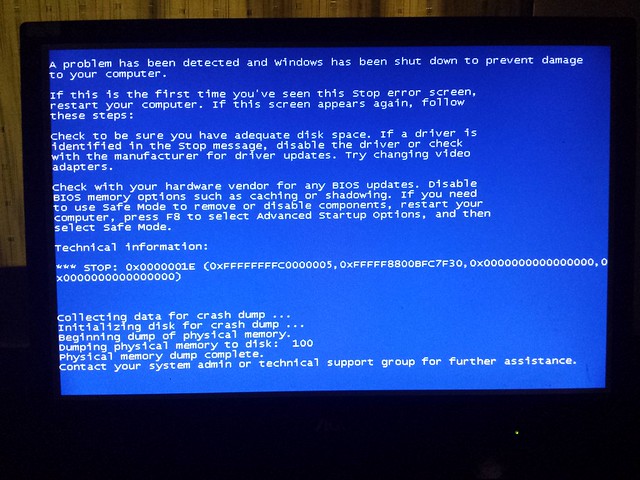
I also added the BSOD on the attachments.
 

My Computer

Computer type
PC/Desktop
Computer Manufacturer/Model Number
custom
OS
windows 7
CPU
i5
Memory
16gb
Graphics Card(s)
nvidia geforce
vnlddmkm.sys is the display driver, and it is the latest version installed there; but still the display driver is failing. Install the NVIDIA DRIVERS 314.22WHQL only.

  • Uninstall All nvidia items in Control Panel > Programs and features
    • 3D Vision Control Driver
    • 3D Vision Driver
    • Graphics Driver
    • HD Audio Driver
    • PhysX
    • nvidia Update
    (Are you using nvidia chipset drivers? If so, dont uninstall anything other than those are listed).
  • Now follow Drivers - Clean Left over Files after Uninstalling
  • Download 314.22 WHQL. While installing, Select Custom (Advanced) install. In the next page, follow this settings:

Let us know the results.
 

My Computer

Computer type
PC/Desktop
Computer Manufacturer/Model Number
Self Assembled
OS
Microsoft Windows 10 Pro Insider Preview 64-bit
CPU
Intel(R) Core(TM) i3-4130 CPU @ 3.40GHz
Motherboard
Gigabyte Technology Co., Ltd. B85M-D3H
Memory
Corsair Vengence 4GB x2 (8.00GB Dual-Channel DDR3 @ 798MHz)
Graphics Card(s)
2047MB GeForce GTS 450 (ZOTAC International)
Sound Card
Onboard (Realtek High Definition Audio)
Monitor(s) Displays
LG Flatron E2040T
Screen Resolution
1600x900
Hard Drives
Western Digital 1 TB
Seagate 500 GB
PSU
Corsair VS550
Case
Cooler Master K380
Cooling
Cooler Master Seidon 120V Plus
Keyboard
Logitech MK260r
Mouse
Logitech MK260r
Internet Speed
PMPL Broadband
Antivirus
Windows Defender + MBAM
Browser
Firefox
Other Info
Dell Studio 15" Laptop
I followed the steps but now i'm getting freeze.
 

My Computer

Computer type
PC/Desktop
Computer Manufacturer/Model Number
custom
OS
windows 7
CPU
i5
Memory
16gb
Graphics Card(s)
nvidia geforce
This is the new BSOD i am getting now

10468838456_aae75f69cc_z.jpg
 

My Computer

Computer type
PC/Desktop
Computer Manufacturer/Model Number
custom
OS
windows 7
CPU
i5
Memory
16gb
Graphics Card(s)
nvidia geforce

My Computer

Computer type
PC/Desktop
Computer Manufacturer/Model Number
Self Assembled
OS
Microsoft Windows 10 Pro Insider Preview 64-bit
CPU
Intel(R) Core(TM) i3-4130 CPU @ 3.40GHz
Motherboard
Gigabyte Technology Co., Ltd. B85M-D3H
Memory
Corsair Vengence 4GB x2 (8.00GB Dual-Channel DDR3 @ 798MHz)
Graphics Card(s)
2047MB GeForce GTS 450 (ZOTAC International)
Sound Card
Onboard (Realtek High Definition Audio)
Monitor(s) Displays
LG Flatron E2040T
Screen Resolution
1600x900
Hard Drives
Western Digital 1 TB
Seagate 500 GB
PSU
Corsair VS550
Case
Cooler Master K380
Cooling
Cooler Master Seidon 120V Plus
Keyboard
Logitech MK260r
Mouse
Logitech MK260r
Internet Speed
PMPL Broadband
Antivirus
Windows Defender + MBAM
Browser
Firefox
Other Info
Dell Studio 15" Laptop
Please see attached
 

My Computer

Computer type
PC/Desktop
Computer Manufacturer/Model Number
custom
OS
windows 7
CPU
i5
Memory
16gb
Graphics Card(s)
nvidia geforce
The BSOD is caused by Network Driver Interface Specification (NDIS) 6.0 miniport driver for VIA Rhine Family Fast Ethernet Adapter.
Code:
fffff880`0bfc7ed8  fffff880`02c31711Unable to load image \SystemRoot\system32\DRIVERS\fet6x64.sys, Win32 error 0n2
*** WARNING: Unable to verify timestamp for [URL="http://www.carrona.org/drivers/driver.php?id=fet6x64.sys"]fet6x64.sys[/URL]
*** ERROR: Module load completed but symbols could not be loaded for [URL="http://www.carrona.org/drivers/driver.php?id=fet6x64.sys"]fet6x64.sys[/URL]
 fet6x64+0x8711
And it is extremely old.
Code:
fffff880`02c29000 fffff880`02c34b00   fet6x64  T (no symbols)           
    Loaded symbol image file: fet6x64.sys
    Image path: \SystemRoot\system32\DRIVERS\fet6x64.sys
[COLOR=Red]    Image name: fet6x64.sys
    Timestamp:        Thu Jun 19 17:10:18 2008 [/COLOR](485A45A2)
    CheckSum:         00016513
    ImageSize:        0000BB00
    Translations:     0000.04b0 0000.04e4 0409.04b0 0409.04e4
Update it from VIA Drivers Download - VIA Technologies, Inc. .
 

My Computer

Computer type
PC/Desktop
Computer Manufacturer/Model Number
Self Assembled
OS
Microsoft Windows 10 Pro Insider Preview 64-bit
CPU
Intel(R) Core(TM) i3-4130 CPU @ 3.40GHz
Motherboard
Gigabyte Technology Co., Ltd. B85M-D3H
Memory
Corsair Vengence 4GB x2 (8.00GB Dual-Channel DDR3 @ 798MHz)
Graphics Card(s)
2047MB GeForce GTS 450 (ZOTAC International)
Sound Card
Onboard (Realtek High Definition Audio)
Monitor(s) Displays
LG Flatron E2040T
Screen Resolution
1600x900
Hard Drives
Western Digital 1 TB
Seagate 500 GB
PSU
Corsair VS550
Case
Cooler Master K380
Cooling
Cooler Master Seidon 120V Plus
Keyboard
Logitech MK260r
Mouse
Logitech MK260r
Internet Speed
PMPL Broadband
Antivirus
Windows Defender + MBAM
Browser
Firefox
Other Info
Dell Studio 15" Laptop
Hi Arc,

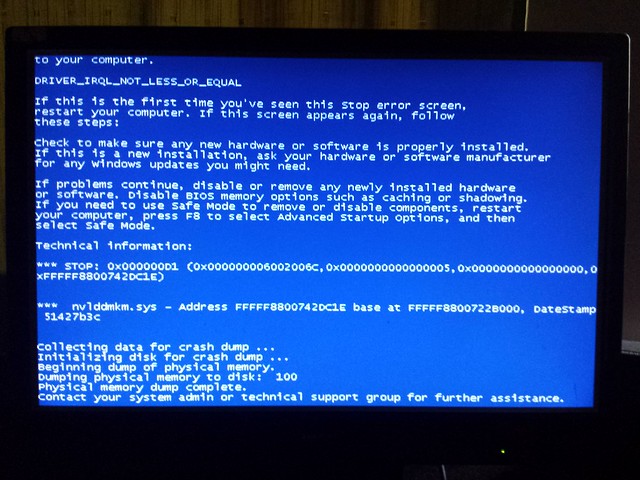
I have updated the ethernet controller adapter and seems like im getting the original BSOD i had. See attached.

10471714484_9118403342_z.jpg
 

My Computer

Computer type
PC/Desktop
Computer Manufacturer/Model Number
custom
OS
windows 7
CPU
i5
Memory
16gb
Graphics Card(s)
nvidia geforce
Well, Stop 0xD1 is basically a driver issue. You installed the display driver 314.22 lately, and this one never fails itself. So seeing the screenshot I was astonished.

But, seeing the crash dump, the situation is clear to me now. It indicates to hardware clearly.
Code:
*******************************************************************************
*                                                                             *
*                        Bugcheck Analysis                                    *
*                                                                             *
*******************************************************************************

Use !analyze -v to get detailed debugging information.

BugCheck D1, {6002006c, 5, 0, fffff8800742dc1e}

*** WARNING: Unable to verify timestamp for nvlddmkm.sys
*** ERROR: Module load completed but symbols could not be loaded for nvlddmkm.sys
[COLOR=Red]Probably caused by : hardware [/COLOR]( nvlddmkm+202c1e )

Followup: MachineOwner
---------
A graphics failure caused by hardware ... it may be caused by the GPU itself, or the power supply, or dust+heat. Let us check those elements one by one.

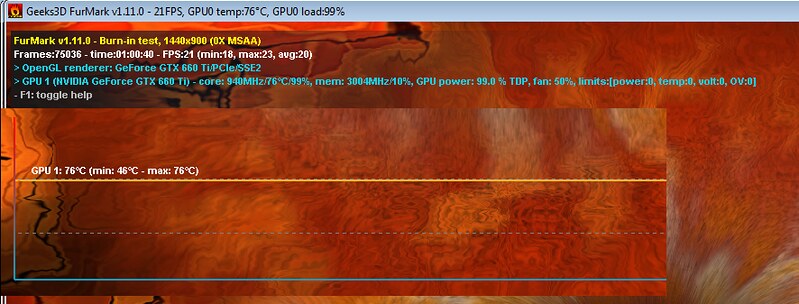
Stress test the Graphics Card using Furmark.
Video Card - Stress Test with Furmark

Check if the Power Supply Unit (PSU) supplying adequate power to the computer or not.
eXtreme Power Supply Calculator
Also let us know the wattage of your PSU.

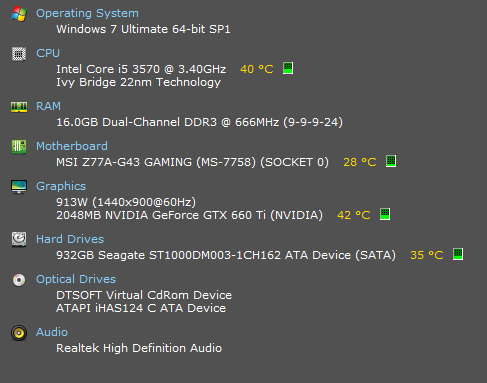
Is the computer hot? Report us the heat of the computer after a couple of hours of your normal usage. Upload a screenshot of the summery tab of Speccy.

Do one more test .... Test your RAM modules for possible errors.
How to Test and Diagnose RAM Issues with Memtest86+
Run memtest for at least 8 passes, preferably overnight.

If it start showing errors/red lines, stop testing. A single error is enough to determine that something is going bad there.

Let us know the results.

 

My Computer

Computer type
PC/Desktop
Computer Manufacturer/Model Number
Self Assembled
OS
Microsoft Windows 10 Pro Insider Preview 64-bit
CPU
Intel(R) Core(TM) i3-4130 CPU @ 3.40GHz
Motherboard
Gigabyte Technology Co., Ltd. B85M-D3H
Memory
Corsair Vengence 4GB x2 (8.00GB Dual-Channel DDR3 @ 798MHz)
Graphics Card(s)
2047MB GeForce GTS 450 (ZOTAC International)
Sound Card
Onboard (Realtek High Definition Audio)
Monitor(s) Displays
LG Flatron E2040T
Screen Resolution
1600x900
Hard Drives
Western Digital 1 TB
Seagate 500 GB
PSU
Corsair VS550
Case
Cooler Master K380
Cooling
Cooler Master Seidon 120V Plus
Keyboard
Logitech MK260r
Mouse
Logitech MK260r
Internet Speed
PMPL Broadband
Antivirus
Windows Defender + MBAM
Browser
Firefox
Other Info
Dell Studio 15" Laptop
Please see below result

Stress test the Graphics Card using Furmark.
10474387784_478fb79f23_c.jpg


Check if the Power Supply Unit (PSU) supplying adequate power to the computer or not.
---Upon checking PSU, it only consumes around 330W
---PSU: Aerocool Strike-x 500W Bonze Modular Power Supply

Speecy Summary
10474594443_68dd769323_o.png


Full PC Specs:
Proc: i5-3570 (3.4GHz) LGA1155 Processor
Board: MSI Z77A-G43 Gaming S1155/4DDr3/PCIE/3PCI/Crossfire/Killer E220
HDD: Seagate 1TB
VGA: Inno3d GTX660 Ti 2GB GDDR5 192 Bit Hercules
PSU: Aerocool Strike-x 500W Bonze Modular Power Supply
MEM: Gskills Ripjaws X-Red 16gb (2x8gb) DDR3 1600Mhz F3-12800CL10D-16GBXL
OS: Windows 7 Ultimate 64bit
BIOS: 1.0 (MSI)
 

My Computer

Computer type
PC/Desktop
Computer Manufacturer/Model Number
custom
OS
windows 7
CPU
i5
Memory
16gb
Graphics Card(s)
nvidia geforce
After 3 weeks, my video card has been replaced. I tested again by playing games but it still freezes. Is there anyway to stress test my motherboard? I think the problem is my motherboard.
 

My Computer

Computer type
PC/Desktop
Computer Manufacturer/Model Number
custom
OS
windows 7
CPU
i5
Memory
16gb
Graphics Card(s)
nvidia geforce
Unfortunately there is no way to test the board itself without replacing it :(
 

My Computer

Computer type
PC/Desktop
Computer Manufacturer/Model Number
Self Assembled
OS
Microsoft Windows 10 Pro Insider Preview 64-bit
CPU
Intel(R) Core(TM) i3-4130 CPU @ 3.40GHz
Motherboard
Gigabyte Technology Co., Ltd. B85M-D3H
Memory
Corsair Vengence 4GB x2 (8.00GB Dual-Channel DDR3 @ 798MHz)
Graphics Card(s)
2047MB GeForce GTS 450 (ZOTAC International)
Sound Card
Onboard (Realtek High Definition Audio)
Monitor(s) Displays
LG Flatron E2040T
Screen Resolution
1600x900
Hard Drives
Western Digital 1 TB
Seagate 500 GB
PSU
Corsair VS550
Case
Cooler Master K380
Cooling
Cooler Master Seidon 120V Plus
Keyboard
Logitech MK260r
Mouse
Logitech MK260r
Internet Speed
PMPL Broadband
Antivirus
Windows Defender + MBAM
Browser
Firefox
Other Info
Dell Studio 15" Laptop
Back
Top