Bubbles Screen Saver - Change Settings

How to Change the "Bubbles Screen Saver" Settings in Windows 7 and Windows 8


   Information
By default the Bubbles screen saver has no settings to set in the Screen Saver Settings window in Windows 7 and Windows 8. However, you can change the Bubbles screen saver settings through the registry instead. This will show you how to.

   Note
The default location of the Bubbles screen saver file is at:

C:\Windows\System32\Bubbles.scr.
   Tip
You will just need to play with the settings below and adjust the Value Data (step 8) until you get the desired affect from the selected DWORD Name (step 5).


EXAMPLE: Bubbles Screen SaverBubbles.jpg


OPTION ONE

To Restore the Default Bubbles Screen Saver Settings

1. Click/tap on the download button below to download the file below.Restore_Default_Bubbles.reg


Download


2. Save the .reg file to your desktop.

3. Double click/tap on the downloaded .reg file to merge it.

4. Click/tap on Run, Yes (UAC), Yes, and OK when prompted.

5. When finished, you can delete the downloaded .reg if you like.


OPTION TWO

To Customize the Bubbles Screen Saver Settings

1. Press the Windows+R keys to open the Run dialog, type regedit, and press Enter.

2. If prompted by UAC, then click /tap on Yes.

3. In regedit, navigate to the location below. (See screenshot below)

Code:
HKEY_CURRENT_USER\Software\Microsoft\Windows\CurrentVersion\Screensavers\Bubbles
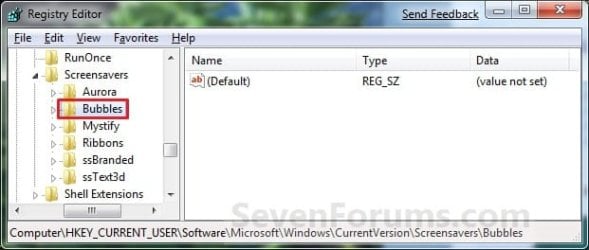
Reg_Bubbles.jpg

4. In the right pane, right click on a empty area, and click/tap on New and DWORD (32-bit) Value. (see screenshot above)

5. Type in a DWORD Name from the table below that you want to change and press Enter.

DWORD NameValue DataDescription
MaterialGlass0 or 1Set this value to 0 for solid bubbles, 1 for transparent bubbles.
Radius1130000000 to 1090000000For smaller or larger bubbles. Higher value number for larger bubbles.
ShowBubbles0 or 1Set this value to 1 for current desktop background, 0 for black desktop background.
ShowShadows0 or 1Set this value to 1 to enable, 0 to disable bubble shadows.
SphereDensity1000000000 to 2100000000For more or less bubbles on screen. Higher value number for more bubbles.
TurbulenceForce1000000000 to 2000000000How strong the "wind" is on your screen. 1000000000 = No turbulence, and bubbles move inertially in straight lines until they hit something. 1100000000 = very slight turbulence, not really noticeable but enough to keep the pattern changing. 1150000000 = noticeable turbulence; the screen starts to look as if small gusts of wind are batting the bubbles about. 1200000000 = strong turbulence, with whirls of bubbles whipping about all over the place.
TurbulenceNumOctaves1 to 255For how fast the bubble colors are distributed on the screen. Higher value number for faster color change.
TurbulenceSpeed1000000000 to 2000000000Affects how quickly colors change across the screen. This is most noticeable with a screen well packed with little bubbles. 1000000000 = bubble that's stationary or barely moving will change color very slowly. 2000000000 = stationary bubble will change quite rapidly.

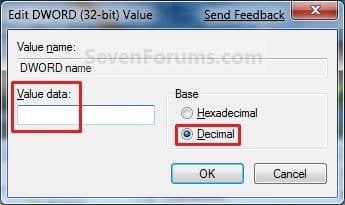
6. Double click/tap on the DWORD Name (from step 5) to modify it.

7. Dot Decimal, type in the Value Data you want in the table above, and click/tap on OK. (see example screenshot below)Modify.jpg

8. Repeat steps 4 to 7 to change another available DWORD Name option.
NOTE: You can add and customize one, a few, or all of the available options if you like (see table below step 6), but only add one instance of each DWORD Name in step 5 to prevent problems.

9. Close Regedit when done.

That's it,
Shawn Brink


Attachments

Last edited:
Nice work unlocking all these settings, do you think you can post a download link for all the mods in place as well, Thanks heaps!!!
 

My Computer

Computer Manufacturer/Model Number
Home Brew
OS
Windows 7 Ultimate Vista Ultimate x64
CPU
Core 2 Duo E8500 3.16Ghz @ 3.8Ghz
Motherboard
eVGA 750i FTW
Memory
2x2Gigs Patriot PC2-6400 LL
Graphics Card(s)
Inno3D GeForce GTX260 216 SP
Monitor(s) Displays
ASUS VW222U 22" 2ms Response time
Screen Resolution
1680x1050
Hard Drives
SATA 150GB
SATA II 250GB
USB IDE 750GB Ext.
PSU
HYTEC 600W & Thermaltake 650W Toughpower Power Exp
Case
Thermaltake Armor LCS (Liquid Cooling System)
Cooling
Liquid Cooling System
Keyboard
Logitech G15 Gaming Keyboard
Mouse
Logitech G9 Gaming Mouse
Hi Mr GRiM,

I do not know,they may be to variable and subjective to. :(

Folks would only want to add the DWORD names that they want to change, then they may like a different setting.
 

My Computer

Computer type
PC/Desktop
Computer Manufacturer/Model Number
Self built custom
OS
64-bit Windows 11 Pro for Workstations
CPU
Intel i7-8700K OC'd to 5 GHz
Motherboard
ASUS ROG Maximus XI Formula Z390
Memory
64 GB (4x16GB) G.SKILL TridentZ RGB DDR4 3600 MHz
Graphics Card(s)
ASUS ROG-STRIX-GTX1080TI-O11G-GAMING
Sound Card
Integrated
Monitor(s) Displays
2 x Samsung Odyssey G7 27"
Screen Resolution
2560x1440
Hard Drives
1TB Samsung 990 PRO M.2,
4TB Samsung 990 PRO PRO M.2,
TerraMaster F8 SSD Plus NAS
PSU
Seasonic Prime Titanium 850W
Case
Thermaltake Core P3
Cooling
Corsair Hydro H115i
Keyboard
Logitech wireless K800
Mouse
Logitech MX Master 4
Internet Speed
2 Gb/s Download and 100 Mb/s Upload
Antivirus
Malwarebyte Anti-Malware Premium
Browser
Google Chrome
Other Info
Logitech Z625 speaker system,
Logitech BRIO 4K Pro webcam,
HP Color LaserJet Pro MFP M477fdn,
APC SMART-UPS RT 1000 XL - SURT1000XLI,
Galaxy S23 Plus phone
I will do some Beta testing for you if you like, lol
 

My Computer

Computer Manufacturer/Model Number
Home Brew
OS
Windows 7 Ultimate Vista Ultimate x64
CPU
Core 2 Duo E8500 3.16Ghz @ 3.8Ghz
Motherboard
eVGA 750i FTW
Memory
2x2Gigs Patriot PC2-6400 LL
Graphics Card(s)
Inno3D GeForce GTX260 216 SP
Monitor(s) Displays
ASUS VW222U 22" 2ms Response time
Screen Resolution
1680x1050
Hard Drives
SATA 150GB
SATA II 250GB
USB IDE 750GB Ext.
PSU
HYTEC 600W & Thermaltake 650W Toughpower Power Exp
Case
Thermaltake Armor LCS (Liquid Cooling System)
Cooling
Liquid Cooling System
Keyboard
Logitech G15 Gaming Keyboard
Mouse
Logitech G9 Gaming Mouse
LOL, there's nothing to test though. ;)
 

My Computer

Computer type
PC/Desktop
Computer Manufacturer/Model Number
Self built custom
OS
64-bit Windows 11 Pro for Workstations
CPU
Intel i7-8700K OC'd to 5 GHz
Motherboard
ASUS ROG Maximus XI Formula Z390
Memory
64 GB (4x16GB) G.SKILL TridentZ RGB DDR4 3600 MHz
Graphics Card(s)
ASUS ROG-STRIX-GTX1080TI-O11G-GAMING
Sound Card
Integrated
Monitor(s) Displays
2 x Samsung Odyssey G7 27"
Screen Resolution
2560x1440
Hard Drives
1TB Samsung 990 PRO M.2,
4TB Samsung 990 PRO PRO M.2,
TerraMaster F8 SSD Plus NAS
PSU
Seasonic Prime Titanium 850W
Case
Thermaltake Core P3
Cooling
Corsair Hydro H115i
Keyboard
Logitech wireless K800
Mouse
Logitech MX Master 4
Internet Speed
2 Gb/s Download and 100 Mb/s Upload
Antivirus
Malwarebyte Anti-Malware Premium
Browser
Google Chrome
Other Info
Logitech Z625 speaker system,
Logitech BRIO 4K Pro webcam,
HP Color LaserJet Pro MFP M477fdn,
APC SMART-UPS RT 1000 XL - SURT1000XLI,
Galaxy S23 Plus phone
Shmecksy. :D
 

My Computer

Computer Manufacturer/Model Number
Dell Dimension e520
OS
Windows 7 Ultimate Beta 32bit, Windows Vista Home Premium 32bit, Ubuntu 8.04 32bit
CPU
Intel Core 2 Duo 6300 1.86GHz
Memory
4gb DDR2 4200 533mHz
Graphics Card(s)
NVIDIA 7300 LE
Sound Card
SigmaTel High Def Audio
Screen Resolution
1360x768
PSU
305W
Cooling
Fan
Keyboard
Dell Multi-media Keyboard
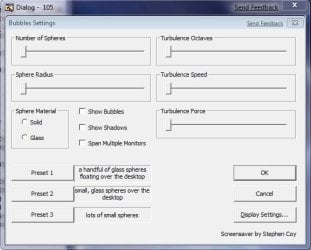
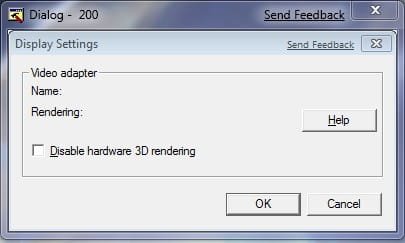
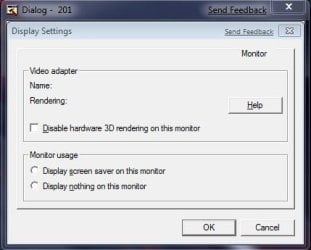
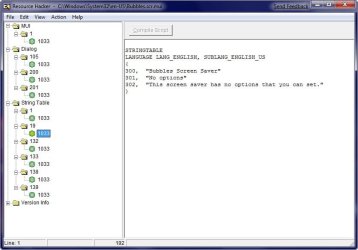
I was having a look around and I came across an interesting file C:\Windows\System32\en-US\Bubbles.scr.mui which I opened with ResHacker and I took some screenshots to show you and I would like to know if you can some how enable these options.

2009-01-19_064233.jpg2009-01-19_064247.jpg

2009-01-19_064311.jpg2009-01-19_064406.jpg
 

My Computer

Computer Manufacturer/Model Number
Home Brew
OS
Windows 7 Ultimate Vista Ultimate x64
CPU
Core 2 Duo E8500 3.16Ghz @ 3.8Ghz
Motherboard
eVGA 750i FTW
Memory
2x2Gigs Patriot PC2-6400 LL
Graphics Card(s)
Inno3D GeForce GTX260 216 SP
Monitor(s) Displays
ASUS VW222U 22" 2ms Response time
Screen Resolution
1680x1050
Hard Drives
SATA 150GB
SATA II 250GB
USB IDE 750GB Ext.
PSU
HYTEC 600W & Thermaltake 650W Toughpower Power Exp
Case
Thermaltake Armor LCS (Liquid Cooling System)
Cooling
Liquid Cooling System
Keyboard
Logitech G15 Gaming Keyboard
Mouse
Logitech G9 Gaming Mouse
Hi MR GRiM,

I do believe that cannot be enabled without MS doing it. The tutorial will allow you to set these through the registry though. The display settings here would have to be done through the normal display settings if available with the driver. :(
 

My Computer

Computer type
PC/Desktop
Computer Manufacturer/Model Number
Self built custom
OS
64-bit Windows 11 Pro for Workstations
CPU
Intel i7-8700K OC'd to 5 GHz
Motherboard
ASUS ROG Maximus XI Formula Z390
Memory
64 GB (4x16GB) G.SKILL TridentZ RGB DDR4 3600 MHz
Graphics Card(s)
ASUS ROG-STRIX-GTX1080TI-O11G-GAMING
Sound Card
Integrated
Monitor(s) Displays
2 x Samsung Odyssey G7 27"
Screen Resolution
2560x1440
Hard Drives
1TB Samsung 990 PRO M.2,
4TB Samsung 990 PRO PRO M.2,
TerraMaster F8 SSD Plus NAS
PSU
Seasonic Prime Titanium 850W
Case
Thermaltake Core P3
Cooling
Corsair Hydro H115i
Keyboard
Logitech wireless K800
Mouse
Logitech MX Master 4
Internet Speed
2 Gb/s Download and 100 Mb/s Upload
Antivirus
Malwarebyte Anti-Malware Premium
Browser
Google Chrome
Other Info
Logitech Z625 speaker system,
Logitech BRIO 4K Pro webcam,
HP Color LaserJet Pro MFP M477fdn,
APC SMART-UPS RT 1000 XL - SURT1000XLI,
Galaxy S23 Plus phone
Curious

Please explain the necessity for the merge. Would it work the same by going directly to the registry and making the changes?
 

My Computer

Computer Manufacturer/Model Number
Visionman Slim Intel Desktop Computer
OS
Windows 7 Home Premium 32bit
CPU
Intel Pentium Dual Core E2180
Motherboard
Biostar P4M900-M7 SE
Memory
2GB DDR2-667
Graphics Card(s)
NVIDIA 8400GS 256MB
Sound Card
Realtek
Monitor(s) Displays
Viewsonic VX1940w LCD Display
Screen Resolution
1280 x 800
Hard Drives
WD 250GB SATA-2 HDD
Keyboard
Kensington Comfort Type (ergonomic)
Mouse
I have mice.....a collection.
Hello Kitti Ritter, and welcome to Seven Forums.

Yes, you can manually restore the default settings in the registry if you like. The REG file (contents below) download is just to make restoring the default settings easier to do. That's all.

Code:
Windows Registry Editor Version 5.00
 
[-HKEY_CURRENT_USER\Software\Microsoft\Windows\CurrentVersion\Screensavers\Bubbles]
 
[HKEY_CURRENT_USER\Software\Microsoft\Windows\CurrentVersion\Screensavers\Bubbles]
 
[HKEY_CURRENT_USER\Software\Microsoft\Windows\CurrentVersion\Screensavers\Bubbles\Screen 1]
 
[HKEY_CURRENT_USER\Software\Microsoft\Windows\CurrentVersion\Screensavers\Bubbles\Screen 2]
 

My Computer

Computer type
PC/Desktop
Computer Manufacturer/Model Number
Self built custom
OS
64-bit Windows 11 Pro for Workstations
CPU
Intel i7-8700K OC'd to 5 GHz
Motherboard
ASUS ROG Maximus XI Formula Z390
Memory
64 GB (4x16GB) G.SKILL TridentZ RGB DDR4 3600 MHz
Graphics Card(s)
ASUS ROG-STRIX-GTX1080TI-O11G-GAMING
Sound Card
Integrated
Monitor(s) Displays
2 x Samsung Odyssey G7 27"
Screen Resolution
2560x1440
Hard Drives
1TB Samsung 990 PRO M.2,
4TB Samsung 990 PRO PRO M.2,
TerraMaster F8 SSD Plus NAS
PSU
Seasonic Prime Titanium 850W
Case
Thermaltake Core P3
Cooling
Corsair Hydro H115i
Keyboard
Logitech wireless K800
Mouse
Logitech MX Master 4
Internet Speed
2 Gb/s Download and 100 Mb/s Upload
Antivirus
Malwarebyte Anti-Malware Premium
Browser
Google Chrome
Other Info
Logitech Z625 speaker system,
Logitech BRIO 4K Pro webcam,
HP Color LaserJet Pro MFP M477fdn,
APC SMART-UPS RT 1000 XL - SURT1000XLI,
Galaxy S23 Plus phone
Thanks for the tutorial. My bubbles are just the way I like them now. :D
 

My Computer

Computer Manufacturer/Model Number
Visionman Slim Intel Desktop Computer
OS
Windows 7 Home Premium 32bit
CPU
Intel Pentium Dual Core E2180
Motherboard
Biostar P4M900-M7 SE
Memory
2GB DDR2-667
Graphics Card(s)
NVIDIA 8400GS 256MB
Sound Card
Realtek
Monitor(s) Displays
Viewsonic VX1940w LCD Display
Screen Resolution
1280 x 800
Hard Drives
WD 250GB SATA-2 HDD
Keyboard
Kensington Comfort Type (ergonomic)
Mouse
I have mice.....a collection.
You're most welcome Kitti. Just don't pop to many now. ;)
 

My Computer

Computer type
PC/Desktop
Computer Manufacturer/Model Number
Self built custom
OS
64-bit Windows 11 Pro for Workstations
CPU
Intel i7-8700K OC'd to 5 GHz
Motherboard
ASUS ROG Maximus XI Formula Z390
Memory
64 GB (4x16GB) G.SKILL TridentZ RGB DDR4 3600 MHz
Graphics Card(s)
ASUS ROG-STRIX-GTX1080TI-O11G-GAMING
Sound Card
Integrated
Monitor(s) Displays
2 x Samsung Odyssey G7 27"
Screen Resolution
2560x1440
Hard Drives
1TB Samsung 990 PRO M.2,
4TB Samsung 990 PRO PRO M.2,
TerraMaster F8 SSD Plus NAS
PSU
Seasonic Prime Titanium 850W
Case
Thermaltake Core P3
Cooling
Corsair Hydro H115i
Keyboard
Logitech wireless K800
Mouse
Logitech MX Master 4
Internet Speed
2 Gb/s Download and 100 Mb/s Upload
Antivirus
Malwarebyte Anti-Malware Premium
Browser
Google Chrome
Other Info
Logitech Z625 speaker system,
Logitech BRIO 4K Pro webcam,
HP Color LaserJet Pro MFP M477fdn,
APC SMART-UPS RT 1000 XL - SURT1000XLI,
Galaxy S23 Plus phone
Is there a list of add on screen savers here at SevenForums?
 

My Computer

Computer type
PC/Desktop
Computer Manufacturer/Model Number
Built them myself, Science Experiments !
OS
Win7 Enterprise, Win7 x86 (Ult 7600), Win7 x64 Ult 7600, TechNet RTM on AMD x64 (2.8Ghz)
CPU
AMD fx8350 4ghz, AMD-32 2400mhz, AMD-64 3200mhz, AMDx64 2.8G
Motherboard
SIS 755, ECS-K8M890M-M (Ult 7600), GigaByte & others
Memory
2gb, 4gb on the Ult 7600, 4gb on Technet RTM, 32gb on FX8350
Graphics Card(s)
Draw my own Graphics, several nVidia cards
Sound Card
on motherboard
Monitor(s) Displays
19" flat scr, 28" I-Inc widescr,22" Emprex Widescr, 23" Acer
Screen Resolution
1280 x 1024, 1440 x 900, 1920 x 1080
Hard Drives
6 pata Ide HD's & 2 Sata HD's
added 80gb external on Ult 7600 computer,
numerous extra 1tb, 2TB, 3Tb SATA HD's
A collection of ext HD Docks w/ HDs
PSU
430w, 550w, 600w, 700, 800, etc
Case
All Generic Full Towers
Cooling
Open Air & a few fans, some w/ colored LEDs
Keyboard
Compaq & Dell recycled from GoodWill
Mouse
Made in China Optical Wired Mouse
Internet Speed
Fast Cable InterNet
Antivirus
AVG Free on 24 different Desktops, NO Problems!
Browser
IE 8 is preferred, but use FireFox sometimes
Other Info
Linksys Routers, switches, & Hubs
Too Many USB Flash Drives to count, Biggest is 64GB !
Eight computers in my home network.
Sixteen computers at my business network.
Linked via TeamViewer !
Lots of old used spare computer parts everywhere!

My Computer

Computer type
PC/Desktop
Computer Manufacturer/Model Number
Self built custom
OS
64-bit Windows 11 Pro for Workstations
CPU
Intel i7-8700K OC'd to 5 GHz
Motherboard
ASUS ROG Maximus XI Formula Z390
Memory
64 GB (4x16GB) G.SKILL TridentZ RGB DDR4 3600 MHz
Graphics Card(s)
ASUS ROG-STRIX-GTX1080TI-O11G-GAMING
Sound Card
Integrated
Monitor(s) Displays
2 x Samsung Odyssey G7 27"
Screen Resolution
2560x1440
Hard Drives
1TB Samsung 990 PRO M.2,
4TB Samsung 990 PRO PRO M.2,
TerraMaster F8 SSD Plus NAS
PSU
Seasonic Prime Titanium 850W
Case
Thermaltake Core P3
Cooling
Corsair Hydro H115i
Keyboard
Logitech wireless K800
Mouse
Logitech MX Master 4
Internet Speed
2 Gb/s Download and 100 Mb/s Upload
Antivirus
Malwarebyte Anti-Malware Premium
Browser
Google Chrome
Other Info
Logitech Z625 speaker system,
Logitech BRIO 4K Pro webcam,
HP Color LaserJet Pro MFP M477fdn,
APC SMART-UPS RT 1000 XL - SURT1000XLI,
Galaxy S23 Plus phone
Hello,

Nice Tut. I have one problem trying these effect. I don't have the bubbles folder in my registry. Sorry for the large photo I'm not very good at inserting images.

Desktop1.png
 

My Computer

OS
Windows 7 Ultimate 32 bit
CPU
AMD Phenom 8450 Triple Core 2.1GHz
Motherboard
MSI MS-7388
Memory
Corsair 4GB
Graphics Card(s)
ATI Radeon HD3650 1GB
Sound Card
Onboard 7.1
Monitor(s) Displays
Samsung 24" LCD - Philips 42" LCD
Screen Resolution
1600 x 900 32bit @60Hz
Hard Drives
Maxtor 120GB IDE - Hitachi 1TB SATA
PSU
650w
Hello Tyenot,

Doing OPTION ONE in the tutorial will restore the "Bubbles" key for you. Afterwards, you should be able to change the settings in OPTION TWO.

Hope this helps,
Shawn
 

My Computer

Computer type
PC/Desktop
Computer Manufacturer/Model Number
Self built custom
OS
64-bit Windows 11 Pro for Workstations
CPU
Intel i7-8700K OC'd to 5 GHz
Motherboard
ASUS ROG Maximus XI Formula Z390
Memory
64 GB (4x16GB) G.SKILL TridentZ RGB DDR4 3600 MHz
Graphics Card(s)
ASUS ROG-STRIX-GTX1080TI-O11G-GAMING
Sound Card
Integrated
Monitor(s) Displays
2 x Samsung Odyssey G7 27"
Screen Resolution
2560x1440
Hard Drives
1TB Samsung 990 PRO M.2,
4TB Samsung 990 PRO PRO M.2,
TerraMaster F8 SSD Plus NAS
PSU
Seasonic Prime Titanium 850W
Case
Thermaltake Core P3
Cooling
Corsair Hydro H115i
Keyboard
Logitech wireless K800
Mouse
Logitech MX Master 4
Internet Speed
2 Gb/s Download and 100 Mb/s Upload
Antivirus
Malwarebyte Anti-Malware Premium
Browser
Google Chrome
Other Info
Logitech Z625 speaker system,
Logitech BRIO 4K Pro webcam,
HP Color LaserJet Pro MFP M477fdn,
APC SMART-UPS RT 1000 XL - SURT1000XLI,
Galaxy S23 Plus phone
Thanks Brink.

Worked like a charm.
 

My Computer

OS
Windows 7 Ultimate 32 bit
CPU
AMD Phenom 8450 Triple Core 2.1GHz
Motherboard
MSI MS-7388
Memory
Corsair 4GB
Graphics Card(s)
ATI Radeon HD3650 1GB
Sound Card
Onboard 7.1
Monitor(s) Displays
Samsung 24" LCD - Philips 42" LCD
Screen Resolution
1600 x 900 32bit @60Hz
Hard Drives
Maxtor 120GB IDE - Hitachi 1TB SATA
PSU
650w
You're most welcome Tyenot. I'm happy to hear that you got it sorted. :)
 

My Computer

Computer type
PC/Desktop
Computer Manufacturer/Model Number
Self built custom
OS
64-bit Windows 11 Pro for Workstations
CPU
Intel i7-8700K OC'd to 5 GHz
Motherboard
ASUS ROG Maximus XI Formula Z390
Memory
64 GB (4x16GB) G.SKILL TridentZ RGB DDR4 3600 MHz
Graphics Card(s)
ASUS ROG-STRIX-GTX1080TI-O11G-GAMING
Sound Card
Integrated
Monitor(s) Displays
2 x Samsung Odyssey G7 27"
Screen Resolution
2560x1440
Hard Drives
1TB Samsung 990 PRO M.2,
4TB Samsung 990 PRO PRO M.2,
TerraMaster F8 SSD Plus NAS
PSU
Seasonic Prime Titanium 850W
Case
Thermaltake Core P3
Cooling
Corsair Hydro H115i
Keyboard
Logitech wireless K800
Mouse
Logitech MX Master 4
Internet Speed
2 Gb/s Download and 100 Mb/s Upload
Antivirus
Malwarebyte Anti-Malware Premium
Browser
Google Chrome
Other Info
Logitech Z625 speaker system,
Logitech BRIO 4K Pro webcam,
HP Color LaserJet Pro MFP M477fdn,
APC SMART-UPS RT 1000 XL - SURT1000XLI,
Galaxy S23 Plus phone
This is great information! When I initially installed Win 7 I had the bubbles flaoting over our desktop, and we loved it. Mysteriously, after reinstalling most of our applications, the bubbles went back to the black background. I have tried the registery edits, and an HTML based GUI program, I even ran the zip found here to return to the defaults. I can change all parameters except the background, very frustrating as that is the only parameter I wanted to change in the first place.
Any suggestions? One thing I noted. In my regiistry under Bubbles there are Screen 1 and Screen 2. I have a dual screen card card, but am running only one monitor right now.
 

My Computer

Computer Manufacturer/Model Number
HP
OS
Windows 7 Home Premium 64 bit
CPU
AMD
Hello NoTopo, and welcome to Seven Forums.

Usually the background should be whatever it was when the screensaver is turned on with the bubbles floating over it as you descibed.

You might see if uninstalling anything that you installed since it was working properly to see if one of them may be the cause if the screen saver works properly after the progam was uninstalled.

You could also do a system restore using a restore point date when the screen saver worked properly, then start installing the programs one by one and test after each one to see if it still works or not.

Hope this may help,
Shawn
 

My Computer

Computer type
PC/Desktop
Computer Manufacturer/Model Number
Self built custom
OS
64-bit Windows 11 Pro for Workstations
CPU
Intel i7-8700K OC'd to 5 GHz
Motherboard
ASUS ROG Maximus XI Formula Z390
Memory
64 GB (4x16GB) G.SKILL TridentZ RGB DDR4 3600 MHz
Graphics Card(s)
ASUS ROG-STRIX-GTX1080TI-O11G-GAMING
Sound Card
Integrated
Monitor(s) Displays
2 x Samsung Odyssey G7 27"
Screen Resolution
2560x1440
Hard Drives
1TB Samsung 990 PRO M.2,
4TB Samsung 990 PRO PRO M.2,
TerraMaster F8 SSD Plus NAS
PSU
Seasonic Prime Titanium 850W
Case
Thermaltake Core P3
Cooling
Corsair Hydro H115i
Keyboard
Logitech wireless K800
Mouse
Logitech MX Master 4
Internet Speed
2 Gb/s Download and 100 Mb/s Upload
Antivirus
Malwarebyte Anti-Malware Premium
Browser
Google Chrome
Other Info
Logitech Z625 speaker system,
Logitech BRIO 4K Pro webcam,
HP Color LaserJet Pro MFP M477fdn,
APC SMART-UPS RT 1000 XL - SURT1000XLI,
Galaxy S23 Plus phone
Back
Top