Bubbles Screen Saver - Change Settings

How to Change the "Bubbles Screen Saver" Settings in Windows 7 and Windows 8


   Information
By default the Bubbles screen saver has no settings to set in the Screen Saver Settings window in Windows 7 and Windows 8. However, you can change the Bubbles screen saver settings through the registry instead. This will show you how to.

   Note
The default location of the Bubbles screen saver file is at:

C:\Windows\System32\Bubbles.scr.
   Tip
You will just need to play with the settings below and adjust the Value Data (step 8) until you get the desired affect from the selected DWORD Name (step 5).


EXAMPLE: Bubbles Screen SaverBubbles.jpg


OPTION ONE

To Restore the Default Bubbles Screen Saver Settings

1. Click/tap on the download button below to download the file below.Restore_Default_Bubbles.reg


Download


2. Save the .reg file to your desktop.

3. Double click/tap on the downloaded .reg file to merge it.

4. Click/tap on Run, Yes (UAC), Yes, and OK when prompted.

5. When finished, you can delete the downloaded .reg if you like.


OPTION TWO

To Customize the Bubbles Screen Saver Settings

1. Press the Windows+R keys to open the Run dialog, type regedit, and press Enter.

2. If prompted by UAC, then click /tap on Yes.

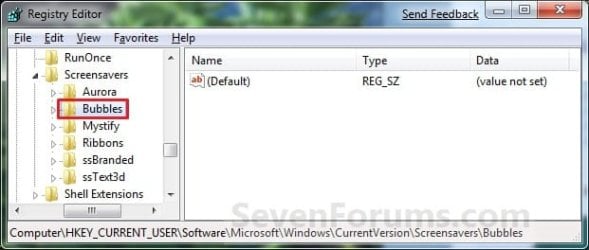
3. In regedit, navigate to the location below. (See screenshot below)

Code:
HKEY_CURRENT_USER\Software\Microsoft\Windows\CurrentVersion\Screensavers\Bubbles
Reg_Bubbles.jpg

4. In the right pane, right click on a empty area, and click/tap on New and DWORD (32-bit) Value. (see screenshot above)

5. Type in a DWORD Name from the table below that you want to change and press Enter.

DWORD NameValue DataDescription
MaterialGlass0 or 1Set this value to 0 for solid bubbles, 1 for transparent bubbles.
Radius1130000000 to 1090000000For smaller or larger bubbles. Higher value number for larger bubbles.
ShowBubbles0 or 1Set this value to 1 for current desktop background, 0 for black desktop background.
ShowShadows0 or 1Set this value to 1 to enable, 0 to disable bubble shadows.
SphereDensity1000000000 to 2100000000For more or less bubbles on screen. Higher value number for more bubbles.
TurbulenceForce1000000000 to 2000000000How strong the "wind" is on your screen. 1000000000 = No turbulence, and bubbles move inertially in straight lines until they hit something. 1100000000 = very slight turbulence, not really noticeable but enough to keep the pattern changing. 1150000000 = noticeable turbulence; the screen starts to look as if small gusts of wind are batting the bubbles about. 1200000000 = strong turbulence, with whirls of bubbles whipping about all over the place.
TurbulenceNumOctaves1 to 255For how fast the bubble colors are distributed on the screen. Higher value number for faster color change.
TurbulenceSpeed1000000000 to 2000000000Affects how quickly colors change across the screen. This is most noticeable with a screen well packed with little bubbles. 1000000000 = bubble that's stationary or barely moving will change color very slowly. 2000000000 = stationary bubble will change quite rapidly.

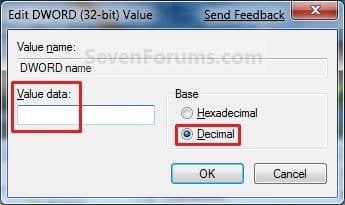
6. Double click/tap on the DWORD Name (from step 5) to modify it.

7. Dot Decimal, type in the Value Data you want in the table above, and click/tap on OK. (see example screenshot below)Modify.jpg

8. Repeat steps 4 to 7 to change another available DWORD Name option.
NOTE: You can add and customize one, a few, or all of the available options if you like (see table below step 6), but only add one instance of each DWORD Name in step 5 to prevent problems.

9. Close Regedit when done.

That's it,
Shawn Brink


Attachments

Last edited:
I can enter a value, in this case there is the option of 0 or 1. I can enter either one when the decimal button is pressed. The 0 value is supposed to make the background black.

Again, this works on my computer but I have tried it repeatedly on my sister's computer and it will not remove the desktop image from the bubbles screensaver.
My sister's computer is not available to me at this time so I am unable to send any screenshots.

John

It appears that the hex/decimal option is working just fine then.

For now, use OPTION ONE to reset the settings to default, and try one more time to see if it may have just been some missed mistake.
 
Last edited:

My Computer

Computer type
PC/Desktop
Computer Manufacturer/Model Number
Self built custom
OS
64-bit Windows 11 Pro for Workstations
CPU
Intel i7-8700K OC'd to 5 GHz
Motherboard
ASUS ROG Maximus XI Formula Z390
Memory
64 GB (4x16GB) G.SKILL TridentZ RGB DDR4 3600 MHz
Graphics Card(s)
ASUS ROG-STRIX-GTX1080TI-O11G-GAMING
Sound Card
Integrated
Monitor(s) Displays
2 x Samsung Odyssey G7 27"
Screen Resolution
2560x1440
Hard Drives
1TB Samsung 990 PRO M.2,
4TB Samsung 990 PRO PRO M.2,
TerraMaster F8 SSD Plus NAS
PSU
Seasonic Prime Titanium 850W
Case
Thermaltake Core P3
Cooling
Corsair Hydro H115i
Keyboard
Logitech wireless K800
Mouse
Logitech MX Master 4
Internet Speed
2 Gb/s Download and 100 Mb/s Upload
Antivirus
Malwarebyte Anti-Malware Premium
Browser
Google Chrome
Other Info
Logitech Z625 speaker system,
Logitech BRIO 4K Pro webcam,
HP Color LaserJet Pro MFP M477fdn,
APC SMART-UPS RT 1000 XL - SURT1000XLI,
Galaxy S23 Plus phone
problem solved

I did what you suggested. I started from the beginning and now bubbles are on a black background.
Thanks
JOhn
 

My Computer

OS
windows 7 home premium
You're welcome John. I'm happy to hear that it's working now. :)
 

My Computer

Computer type
PC/Desktop
Computer Manufacturer/Model Number
Self built custom
OS
64-bit Windows 11 Pro for Workstations
CPU
Intel i7-8700K OC'd to 5 GHz
Motherboard
ASUS ROG Maximus XI Formula Z390
Memory
64 GB (4x16GB) G.SKILL TridentZ RGB DDR4 3600 MHz
Graphics Card(s)
ASUS ROG-STRIX-GTX1080TI-O11G-GAMING
Sound Card
Integrated
Monitor(s) Displays
2 x Samsung Odyssey G7 27"
Screen Resolution
2560x1440
Hard Drives
1TB Samsung 990 PRO M.2,
4TB Samsung 990 PRO PRO M.2,
TerraMaster F8 SSD Plus NAS
PSU
Seasonic Prime Titanium 850W
Case
Thermaltake Core P3
Cooling
Corsair Hydro H115i
Keyboard
Logitech wireless K800
Mouse
Logitech MX Master 4
Internet Speed
2 Gb/s Download and 100 Mb/s Upload
Antivirus
Malwarebyte Anti-Malware Premium
Browser
Google Chrome
Other Info
Logitech Z625 speaker system,
Logitech BRIO 4K Pro webcam,
HP Color LaserJet Pro MFP M477fdn,
APC SMART-UPS RT 1000 XL - SURT1000XLI,
Galaxy S23 Plus phone
OK guys, you just made my Wifes day. THANKS

My wife is less technical than a cat cause our old cat, liked to walk on my KBs or chase Cursors.

She on the other hand, will not touch a computer. That is 'mans' work to her so that means me.

We were looking for a Fench tutor, we stopped for a minute and magically BUBBLES appears on my 40" screen and she screamed with delight as she loves BUBBLES. BOUNCING AROUND, CHANGING COLORS,.....

At her [mine too] age, it is nice to see her get excited. :D

WHO ever, WHAT ever put the BUBBLES on my screen,

THANK YOU.
 

My Computer

Computer Manufacturer/Model Number
HP pavilion
OS
windows 7 ultimate
CPU
2 quads @ 2.4
Memory
3gb
Monitor(s) Displays
tv
Hard Drives
many vendors
I know that it has been awhile since this thread was created. Firstly I want to Thank Shawn for this tut. Outstanding contribution.
Secondly, do you know if there is a key that can be created which would change the location of where the bubbles spawn on the screen (presently bottom left)?
 

My Computer

OS
Windows 7 Ultimate 64-bit
You're most welcome Reido. I'm afraid that I'm not aware of a setting for that. :(
 

My Computer

Computer type
PC/Desktop
Computer Manufacturer/Model Number
Self built custom
OS
64-bit Windows 11 Pro for Workstations
CPU
Intel i7-8700K OC'd to 5 GHz
Motherboard
ASUS ROG Maximus XI Formula Z390
Memory
64 GB (4x16GB) G.SKILL TridentZ RGB DDR4 3600 MHz
Graphics Card(s)
ASUS ROG-STRIX-GTX1080TI-O11G-GAMING
Sound Card
Integrated
Monitor(s) Displays
2 x Samsung Odyssey G7 27"
Screen Resolution
2560x1440
Hard Drives
1TB Samsung 990 PRO M.2,
4TB Samsung 990 PRO PRO M.2,
TerraMaster F8 SSD Plus NAS
PSU
Seasonic Prime Titanium 850W
Case
Thermaltake Core P3
Cooling
Corsair Hydro H115i
Keyboard
Logitech wireless K800
Mouse
Logitech MX Master 4
Internet Speed
2 Gb/s Download and 100 Mb/s Upload
Antivirus
Malwarebyte Anti-Malware Premium
Browser
Google Chrome
Other Info
Logitech Z625 speaker system,
Logitech BRIO 4K Pro webcam,
HP Color LaserJet Pro MFP M477fdn,
APC SMART-UPS RT 1000 XL - SURT1000XLI,
Galaxy S23 Plus phone
Cool. If I ever stumble across a way to do it, I will come back and share.
Thanks again and Cheers.
 

My Computer

OS
Windows 7 Ultimate 64-bit
here is another way:

Download this version of the bubbles screensaver and install it
Download flow Bubbles screensaver
With this you get the settings in the standard-screensaver-options-window and more optiomns then the standard bubbles screensaver has got.
For example you can put your own pictures into the bubbles.
I fliied them with self drawn Kites
 
Last edited by a moderator:

My Computer

Computer type
PC/Desktop
OS
windows 8
Bubbles Screensaver in Windows 8 fix...

I followed the instructions in option one and it was so fast and easy and worked like a charm!
 
Last edited by a moderator:

My Computer

Computer type
Laptop
Computer Manufacturer/Model Number
hp pavilion g6
OS
8x64
Browser
firefox
More options for Bubbles

There are a couple more options available in the registry for Bubbles.scr, at least on Windows 7 Pro.

TurbulenceSpeed also affects how quickly the colors change. TurbulenceNumOctaves controls how colors are distributed on the screen, but TurbulenceSpeed controls how fast the colors shift across the screen. (This is most noticeable with a screen well packed with little bubbles.) TurbulenceSpeed = 1000000000 means a bubble that's stationary or barely moving will change color very slowly; TurbulenceSpeed = 2000000000 means a stationary bubble will change quite rapidly.

TurbulenceForce is more interesting; this seems to represent how strong the "wind" is on your screen. Normal values seem to range from 1000000000 to perhaps 1250000000. 1000000000 means no turbulence; bubbles move inertially, in straight lines until they hit something. 1100000000 gives very slight turbulence, not really noticeable but enough to keep the pattern changing. 1150000000 gives noticeable turbulence; the screen starts to look as if small gusts of wind are batting the bubbles about. 1200000000 gives strong turbulence, with whirls of bubbles whipping about all over the place. (Higher values may give a stronger effect; I can't judge.)

Two other values: TurbulenceForce = 0 causes all bubbles to be gray, with straight-line motion. TurbulenceForce from about 500000000 to 900000000 again gives straight-line movement but bubbles are light blue, occasionally turning gray.
 

My Computer

Computer type
PC/Desktop
Computer Manufacturer/Model Number
Shop built
OS
Windows 7 Professional
Thank you Davidson, and welcome to Seven Forums. Tutorial updated. :)
 

My Computer

Computer type
PC/Desktop
Computer Manufacturer/Model Number
Self built custom
OS
64-bit Windows 11 Pro for Workstations
CPU
Intel i7-8700K OC'd to 5 GHz
Motherboard
ASUS ROG Maximus XI Formula Z390
Memory
64 GB (4x16GB) G.SKILL TridentZ RGB DDR4 3600 MHz
Graphics Card(s)
ASUS ROG-STRIX-GTX1080TI-O11G-GAMING
Sound Card
Integrated
Monitor(s) Displays
2 x Samsung Odyssey G7 27"
Screen Resolution
2560x1440
Hard Drives
1TB Samsung 990 PRO M.2,
4TB Samsung 990 PRO PRO M.2,
TerraMaster F8 SSD Plus NAS
PSU
Seasonic Prime Titanium 850W
Case
Thermaltake Core P3
Cooling
Corsair Hydro H115i
Keyboard
Logitech wireless K800
Mouse
Logitech MX Master 4
Internet Speed
2 Gb/s Download and 100 Mb/s Upload
Antivirus
Malwarebyte Anti-Malware Premium
Browser
Google Chrome
Other Info
Logitech Z625 speaker system,
Logitech BRIO 4K Pro webcam,
HP Color LaserJet Pro MFP M477fdn,
APC SMART-UPS RT 1000 XL - SURT1000XLI,
Galaxy S23 Plus phone
I followed Option 2 and set my radius to decimal 1,110,000,000 (without the commas) and my SphereDensity to decimal 1,050,000,000 (without the commas).

Works like a charm. It hasn't gone hyper for me yet!

Thanks for your help.

Siena
 

My Computer

Computer type
PC/Desktop
OS
Windows 8 64-bit pro
Glad it could help Siena, and welcome to Seven Forums. :)
 

My Computer

Computer type
PC/Desktop
Computer Manufacturer/Model Number
Self built custom
OS
64-bit Windows 11 Pro for Workstations
CPU
Intel i7-8700K OC'd to 5 GHz
Motherboard
ASUS ROG Maximus XI Formula Z390
Memory
64 GB (4x16GB) G.SKILL TridentZ RGB DDR4 3600 MHz
Graphics Card(s)
ASUS ROG-STRIX-GTX1080TI-O11G-GAMING
Sound Card
Integrated
Monitor(s) Displays
2 x Samsung Odyssey G7 27"
Screen Resolution
2560x1440
Hard Drives
1TB Samsung 990 PRO M.2,
4TB Samsung 990 PRO PRO M.2,
TerraMaster F8 SSD Plus NAS
PSU
Seasonic Prime Titanium 850W
Case
Thermaltake Core P3
Cooling
Corsair Hydro H115i
Keyboard
Logitech wireless K800
Mouse
Logitech MX Master 4
Internet Speed
2 Gb/s Download and 100 Mb/s Upload
Antivirus
Malwarebyte Anti-Malware Premium
Browser
Google Chrome
Other Info
Logitech Z625 speaker system,
Logitech BRIO 4K Pro webcam,
HP Color LaserJet Pro MFP M477fdn,
APC SMART-UPS RT 1000 XL - SURT1000XLI,
Galaxy S23 Plus phone
Hi everybody...

I downloaded Option 1, and it worked for me on Win 10, 64 bit !!!

Thanks a lot...

Rick...
 

My Computer

Computer type
PC/Desktop
OS
Win 10 64 bit
Thank you for confirming Rick, and welcome to Seven Forums. :)
 

My Computer

Computer type
PC/Desktop
Computer Manufacturer/Model Number
Self built custom
OS
64-bit Windows 11 Pro for Workstations
CPU
Intel i7-8700K OC'd to 5 GHz
Motherboard
ASUS ROG Maximus XI Formula Z390
Memory
64 GB (4x16GB) G.SKILL TridentZ RGB DDR4 3600 MHz
Graphics Card(s)
ASUS ROG-STRIX-GTX1080TI-O11G-GAMING
Sound Card
Integrated
Monitor(s) Displays
2 x Samsung Odyssey G7 27"
Screen Resolution
2560x1440
Hard Drives
1TB Samsung 990 PRO M.2,
4TB Samsung 990 PRO PRO M.2,
TerraMaster F8 SSD Plus NAS
PSU
Seasonic Prime Titanium 850W
Case
Thermaltake Core P3
Cooling
Corsair Hydro H115i
Keyboard
Logitech wireless K800
Mouse
Logitech MX Master 4
Internet Speed
2 Gb/s Download and 100 Mb/s Upload
Antivirus
Malwarebyte Anti-Malware Premium
Browser
Google Chrome
Other Info
Logitech Z625 speaker system,
Logitech BRIO 4K Pro webcam,
HP Color LaserJet Pro MFP M477fdn,
APC SMART-UPS RT 1000 XL - SURT1000XLI,
Galaxy S23 Plus phone
Back
Top