Bug in Windows 7 RTM

Some people like to "collect RAM" but hate to use it, in case it gets worn out and loses its resale value ... :sarc:

If you are referring to me, I WANT to use all my RAM. I just don't a bug to ruin any of my prized hardware or software.

Also Muad Dib, Thanks for the info. I read the whole thread. It appears there is no real solution. I have up-to-date drivers for my chipset. I will have to run it sooner of later but don't want to waste 2 hours and get a BSOD. I am getting write errors on my external drive trying to create a disk image so I have a feeling I need to run it.
 

My Computer

Computer Manufacturer/Model Number
Keeps changing - (Custom)
OS
Windows 7 Professional x64
CPU
Intel Core i7 860
Motherboard
Gigabyte GA-P55-UD4P
Memory
4GB DDR3 Mushkin 1600Mhz @ 7-8-7-20
Graphics Card(s)
MSI GTS250 1GB DDR3 Twin Frozr
Sound Card
Onboard realtek
Monitor(s) Displays
Samsung SyncMaster 24" P2450 + Samsung 20" 2033
Screen Resolution
1920 X 1080 and 1600 X 900 (#2 system 1440 X 900)
Hard Drives
Patriot Inferno 120GB SSD + 3 WD Blue 640GB drives
PSU
Corsair 750 HX Modular
Case
Lancool PC-K62
Cooling
Cooler Master TX3 CPU cooler and 4-140mm and 1-120mm case
Keyboard
Gigabyte USB keyboard
Mouse
Microsoft wireless laser mouse 5000
Internet Speed
7 Mb down 1.5 up
Other Info
System #2: AMD Phenom II X6 1055T (Freezer 7 Pro cooler) - Gigabyte 880GMA-UD2H - WD 500GB Black - 9500GT (1GB) 500W OCZ modular PSU - Antec 200 case. System #3 (LapTop) Core 2 Duo T6670 - 320GB 7200RPM HD - 4GB DDR3 RAM.
what's so bad about RAM getting used? doesn't it normally always go back down? and i don't see myself using this function when i get windows 7 and i only have one hard drive.

You will run it sooner or later, directly or indirectly. It does not hurt to run it periodically as a maintenance check. I usually run it after an image backup(s).

Some people like to "collect RAM" but hate to use it, in case it gets worn out and loses its resale value ... :sarc:

I like to keep all my bits new and shiny. The used ones I save in a bit bucket and put in a yard sale. :)
 

My Computer

OS
XP Pro & Vista Home Premium (x86); Windows Ultimate 7600 x64 Retail
Again, here we go, it turns out to be DRIVERS for certain Chipsets.
It is not the OS. I have ran chkdsk /f on all 8 of my HDDS, and nothing has happened BAD. it just keep on chugging.
 
Again, here we go, it turns out to be DRIVERS for certain Chipsets.
It is not the OS. I have ran chkdsk /f on all 8 of my HDDS, and nothing has happened BAD. it just keep on chugging.

The issue is with /r not /f.

The intermittent BSODs reported may be related to the non-standard lack of a page file on systems where chkdsk /r is executed.

The BSODs reported may also be another example of unsourced citations.

Please provide a source for "it turns out to be DRIVERS for certain Chipsets". My challenge of your previous claim remains unanswered. I can source a rebuttal from MS that the claim is unsubstantiated.
 
several notices

http://www.pcworld.com/businesscenter/article/169823/windows_7_bug_is_no_showstopper.html
[QUOTE]A killer Windows 7 bug? Sorry, no | Ed Bott's Microsoft Report ...
But when you look more carefully, it's arguably a feature, not a bug, and the likelihood that .... Gee, I use chkdsk /f on occasion AnythingButViista | 08/06/09 .... The only show-stopper here is the average consumer... *NEW* vulpine@. ...
blogs.zdnet.com/Bott/?p=1235 [/QUOTE]
Microsoft denies CHKDSK bug is 'critical show stopper' Microsoft denies CHKDSK bug is 'critical show stopper' ... Sinofsky went on to say that this is not a big issue but that Microsoft will ...
www.afterdawn.com/news/archive/18762.cfm

Seems that most ppl do not have any problems.. with CHKDSK
PS:
CHKDSK [volume[[path]filename]]] [/F] [/V] [/R] [/X] [/I] [/C] [/L[:size]] [/B]

volume Specifies the drive letter (followed by a colon),
mount point, or volume name.
filename FAT/FAT32 only: Specifies the files to check for fragmentatio
.
/F Fixes errors on the disk.
/V On FAT/FAT32: Displays the full path and name of every file
on the disk.
On NTFS: Displays cleanup messages if any.
/R Locates bad sectors and recovers readable information
(implies /F).
last but not least:
Ryan Price's Blog » Major chkdsk Bug in Windows 7 RTM
Aug 3, 2009 ... Simply update the chipset drivers, including your controller drivers and your chkdsk /r will complete without BSOD's or system slowdowns. ...
www.bluescreenofdeath.org/?p=94
 
In the ZDNet article, the author quotes Sinofsky from the interview where Sinofsky rebuffed the chipset driver claim. The same applies to the AfterDawn article. The PC World article does not cite source - but you can be certain it is, however far removed, extracted from the Sinofsky interview.

Sinofsky rebuffed the chipset driver claim.

There is no MS report, no MS announcment, no MS statement, no MS publication claiming an issue with chipset drivers.

Also /f is not inclusive of /r. /r is inclusive of /f

/F Fixes errors on the disk.
Means - Reads files only

/R Locates bad sectors and recovers readable information (implies /F).
Means - Reads every sector including those with and without files.

With the possible exception of those machines without a page file, there is no bug.
 
Yes, all in all it really would be rather hard for MS to make a 100% comment on a OS's that is not officially released to the General Public.

The chats with and or about such a problem are actually NULL and Void.
but still nice to chat/speculate about.
 
True. I really got on to this story earlier in the week, just before the big buzz. No question, this forum has the most exhaustive examination that I could find. Much credit or Muad Dib for an anlysis that provided the light bulb.

Chipset drivers as a cause has been logically disproven anyway.
 
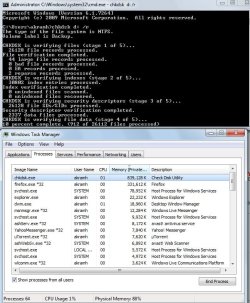
just tried this myself, and the problem is present on my 7264 x64 build as well... has this been resolved yet through a patch or something?

here is a screeny:
windows 7 7264 chkdsk bug.jpg

As you can see, it is taking over 800MB of memory as soon as it starts, which isthe available free memory.. this is terrible...
 

My Computer

Computer Manufacturer/Model Number
home made
OS
Windows 7 7264x64(main), 7260x86(secendary), XP SP3 Triple Boot
CPU
Intel Core 2 Duo E7400 2.8Mhz
Motherboard
Intel G33 express chipset
Memory
2GB DD2 667
Graphics Card(s)
Intel(R) 82G33 Graphics and Memory Controller Hub
Sound Card
Realtek Built into the G31
Monitor(s) Displays
19"
Screen Resolution
1280x1024
Hard Drives
320GB SATA (Main), 160GB IDE (Backup)
Case
Gigabyte SETTO
Keyboard
Genius
Mouse
Logitech
Internet Speed
1MB Download, 128k Upload
just tried this myself, and the problem is present on my 7264 x64 build as well... has this been resolved yet through a patch or something?

here is a screeny:
View attachment 22953

As you can see, it is taking over 800MB of memory as soon as it starts, which isthe available free memory.. this is terrible...
Do you have a pagefile on your system? It seems to affect only a select amount of people
 

My Computer

Computer Manufacturer/Model Number
Compal JFT02 (Custom Build Laptop)
OS
Windows 7 Home Premium x64 - Mac OS X 10.6.4 x64
CPU
Intel Core 2 Duo T9300 2.5 GHz
Motherboard
JFT02
Memory
4GB Kingston DDR2-800
Graphics Card(s)
NVIDIA Geforce 8600M GT (512MB Model)
Sound Card
Realtek HD Audio
Monitor(s) Displays
WUXGA Standard Laptop Display
Screen Resolution
1680*1050
Hard Drives
Toshiba 320GB 5400RPM Laptop HD
PSU
Standard Laptop Power Supply
Case
Standard Laptop Case
Cooling
Standard Laptop Cooling
Keyboard
Standard Laptop 105 Key-Keyboard
Mouse
Synaptics Touchpad
Internet Speed
Verizion Online DSL 3360/864 kbs (dl/up)
just tried this myself, and the problem is present on my 7264 x64 build as well... has this been resolved yet through a patch or something?

here is a screeny:
View attachment 22953

As you can see, it is taking over 800MB of memory as soon as it starts, which isthe available free memory.. this is terrible...

1) Did you allow it to complete and did it complete successfully?

2) Did you read the entire thread?

It is not a bug, nor is it a problem. It is the way Win7 CHKDSK /R works.
 

My Computer

OS
XP Pro & Vista Home Premium (x86); Windows Ultimate 7600 x64 Retail
1) Did you allow it to complete and did it complete successfully?

2) Did you read the entire thread?

It is not a bug, nor is it a problem. It is the way Win7 CHKDSK /R works.
I think that age old thing that using alot of RAM at once in a computer is a bad thing has stuck with most people...if you have 4GB of RAM but freak out if it is ever used in a great amount makes no sense...if you have it than use it...it is no like you won't get it back:p
 

My Computer

Computer Manufacturer/Model Number
Compal JFT02 (Custom Build Laptop)
OS
Windows 7 Home Premium x64 - Mac OS X 10.6.4 x64
CPU
Intel Core 2 Duo T9300 2.5 GHz
Motherboard
JFT02
Memory
4GB Kingston DDR2-800
Graphics Card(s)
NVIDIA Geforce 8600M GT (512MB Model)
Sound Card
Realtek HD Audio
Monitor(s) Displays
WUXGA Standard Laptop Display
Screen Resolution
1680*1050
Hard Drives
Toshiba 320GB 5400RPM Laptop HD
PSU
Standard Laptop Power Supply
Case
Standard Laptop Case
Cooling
Standard Laptop Cooling
Keyboard
Standard Laptop 105 Key-Keyboard
Mouse
Synaptics Touchpad
Internet Speed
Verizion Online DSL 3360/864 kbs (dl/up)
Maybe the only bug is that "Cancel" does not cancel?

I did another test run from the disk Properties>Tools>Error-Checking option.

The Explorer process started and all memory was promptly used, page faulting began, etc. as in other tests.

I clicked the "Cancel" button (twice maybe?), and the dialog box closed. However, the Explorer process continued on. This time I let it run to completion and monitored it rather than abort it manually. When it completed the memory was freed, system performance returned to normal and a successful CHKDSK event was entered in the Application event log.

If this glitch still exists in the v7600 RTM (I'm still on 7232) then "Cancel" not canceling could be a source for confusion and irritation but hardly a showstopper.

........

FYI. An update on my previous observation described above.

I have since done a clean install of the Win7 Ultimate "retail" 7600 download from Technet. It is an activated and updated installation.

Running the same test that was run with v7232 I can report:

a) Then "Cancel" button now executes correctly and cancels the "CHKDSK /R" prcess when executed from the TOOLS>ERROR-CHECKING dialog.

b) The process created to execute the CHKDSK /R function is now a DLLHOST process not an EXPLORER process.
 

My Computer

OS
XP Pro & Vista Home Premium (x86); Windows Ultimate 7600 x64 Retail
Maud Dib, I finally got around to using another computer to run a chkdsk /r on my external drive. I keep getting write errors trying to create a system image with macrium and paragon. It went to 10% pretty quickly but now it's going VERY slowly. I will let it go all day and finish. I have 4GB of RAM and a page file on this other system.

I wonder if this will fix the drive. The write errors are getting old.
 

My Computer

Computer Manufacturer/Model Number
Keeps changing - (Custom)
OS
Windows 7 Professional x64
CPU
Intel Core i7 860
Motherboard
Gigabyte GA-P55-UD4P
Memory
4GB DDR3 Mushkin 1600Mhz @ 7-8-7-20
Graphics Card(s)
MSI GTS250 1GB DDR3 Twin Frozr
Sound Card
Onboard realtek
Monitor(s) Displays
Samsung SyncMaster 24" P2450 + Samsung 20" 2033
Screen Resolution
1920 X 1080 and 1600 X 900 (#2 system 1440 X 900)
Hard Drives
Patriot Inferno 120GB SSD + 3 WD Blue 640GB drives
PSU
Corsair 750 HX Modular
Case
Lancool PC-K62
Cooling
Cooler Master TX3 CPU cooler and 4-140mm and 1-120mm case
Keyboard
Gigabyte USB keyboard
Mouse
Microsoft wireless laser mouse 5000
Internet Speed
7 Mb down 1.5 up
Other Info
System #2: AMD Phenom II X6 1055T (Freezer 7 Pro cooler) - Gigabyte 880GMA-UD2H - WD 500GB Black - 9500GT (1GB) 500W OCZ modular PSU - Antec 200 case. System #3 (LapTop) Core 2 Duo T6670 - 320GB 7200RPM HD - 4GB DDR3 RAM.
Maud Dib, I finally got around to using another computer to run a chkdsk /r on my external drive. I keep getting write errors trying to create a system image with macrium and paragon. It went to 10% pretty quickly but now it's going VERY slowly. I will let it go all day and finish. I have 4GB of RAM and a page file on this other system.

I wonder if this will fix the drive. The write errors are getting old.

Maybe, maybe not.... how old is the drive? They do eventually die. :(
 

My Computer

OS
XP Pro & Vista Home Premium (x86); Windows Ultimate 7600 x64 Retail
Hey Maud, it finally finished. It took about 3 hours for a 250GB HD. It found everything to be fine. I don't know why I am getting a write error every time I try to create an image with Macium on this one machine. I think the disk is okay. (I just realized it works on other machines)

The machine in question had XP on it and I did a clean install with an upgrade version of Vista Emachines sent me free. Maybe it has something to do with the install, I don't know.

Anyway, the disk is only 6 months old. I guess it's fine. I will have to use a different imaging program to see if Macrium is the problem.
 

My Computer

Computer Manufacturer/Model Number
Keeps changing - (Custom)
OS
Windows 7 Professional x64
CPU
Intel Core i7 860
Motherboard
Gigabyte GA-P55-UD4P
Memory
4GB DDR3 Mushkin 1600Mhz @ 7-8-7-20
Graphics Card(s)
MSI GTS250 1GB DDR3 Twin Frozr
Sound Card
Onboard realtek
Monitor(s) Displays
Samsung SyncMaster 24" P2450 + Samsung 20" 2033
Screen Resolution
1920 X 1080 and 1600 X 900 (#2 system 1440 X 900)
Hard Drives
Patriot Inferno 120GB SSD + 3 WD Blue 640GB drives
PSU
Corsair 750 HX Modular
Case
Lancool PC-K62
Cooling
Cooler Master TX3 CPU cooler and 4-140mm and 1-120mm case
Keyboard
Gigabyte USB keyboard
Mouse
Microsoft wireless laser mouse 5000
Internet Speed
7 Mb down 1.5 up
Other Info
System #2: AMD Phenom II X6 1055T (Freezer 7 Pro cooler) - Gigabyte 880GMA-UD2H - WD 500GB Black - 9500GT (1GB) 500W OCZ modular PSU - Antec 200 case. System #3 (LapTop) Core 2 Duo T6670 - 320GB 7200RPM HD - 4GB DDR3 RAM.
Back
Top