
Build 7229 x64 Explorer.exe memory issue

pillainp

New member
Power User
VIP
Local time
2:04 AM
Messages
282
As you can see from my system specs, I am running Windows 7 Build 7229 x64, and am having no major issues so far.

There is one little niggle that I have noticed, though:

With Explorer set to open windows in separate processes, a new process is opened whenever a new explorer window is opened (as expected).

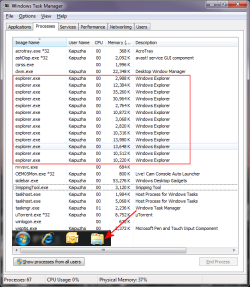
However, as you can see from the attached screenshot, the individual processes for the multiple instances of explorer.exe are not terminated once the instances are closed. The persist as running processes and the only way to reclaim the RAM is to kill them manually.

However, when the "separate processes" option is turned off (ie All explorer windows open within a single process), the original process consumes more and more RAM as each new instance is opened. When all the instances are then closed, explorer still retains the RAM without releasing it, until the process is killed and restarted.

Is this a bug? If so, is there a solution?

This was more or less an accidental finding, since there is no appreciable effect on system performance when this happens.
 

Attachments
  • Capture.PNG
    Capture.PNG
    29.7 KB · Views: 192

My Computers

System One System Two

  • Computer type
    Laptop
    Computer Manufacturer/Model Number
    Custom
    OS
    Windows 10 Professional 64-Bit
    CPU
    Intel Core i7 8700K
    Motherboard
    Asus Maximus X Code
    Memory
    G.Skill TridentZ RGB DDR4 4000 F4-4000C18D-16GTZR
    Graphics Card(s)
    Zotac GeForce GTX-1660 Ti AMP 6GB
    Sound Card
    ROG SupremeFX S1220 (Onboard)
    Monitor(s) Displays
    Dell UP2716D
    Screen Resolution
    2560x1440
    Hard Drives
    Samsung 980 Pro PCIe NVMe 500GB
    Samsung 970 Evo PCIe NVMe 250GB
    Samsung 860 Evo SATA III 2TB
    WD Black WD2003FZEX 2TB x 3
    ODD - GH24NSC0
    PSU
    Coolermaster V1000
    Case
    Corsair Obsidian 450D
    Cooling
    Corsair H115i - Corsair SP140 Red x 2
    Keyboard
    Logitech G213
    Mouse
    Logitech G102
    Internet Speed
    100 Mbps (Supposedly) - Asianet India FTTH
    Antivirus
    Avast Free!
    Browser
    Maxthon Cloud Browser 5.xx
    Other Info
    Asus FX-553VD (960 Evo, 860 Evo, 16GB)
    Samsung Galaxy C9 Pro
    Canon EOS 70D
  • Computer type
    Laptop
    System Manufacturer/Model Number
    Asus FX503VD
    OS
    Windows 10 Pro x64
    CPU
    Intel Core i7 7700HQ
    Memory
    2 x 8GB Samsung DDR4 2400
    Graphics Card(s)
    GTX 1050
    Screen Resolution
    1920 x 1080
    Hard Drives
    Samsung 960 Evo PCIe NVMe 250GB Boot
    Samsung 840 Pro Series 256 GB SSD (MZ-7PD256BW);
You can install build 7232 and and it may fix the problem.
 

My Computer

Computer Manufacturer/Model Number
MasterB/Custom
OS
Windows 7 Professional x64
CPU
QuadCore AMD Phenom II X4 Black Edition 955 3.2 GHz
Motherboard
Asus M4A785TD-V Evo
Memory
8 GB Crucial DDR3
Graphics Card(s)
SAPPHIRE Radeon HD 4890 1GB HDMI New Edition
Sound Card
VIA VT1708S HD Audio 7.1 onboard/ ATI HDMI video card
Monitor(s) Displays
Acer H233H 23'' LCD HDMI
Screen Resolution
1920x1080
Hard Drives
1x 500GB and 1x 1TB 7200RPM 32MB Cache WD Caviar Black
PSU
CORSAIR CMPSU-620HX 620W
Case
COOLER MASTER Storm Scout SGC-2000
Cooling
2x 140mm and 1x 120mm case fans, Stock CPU fan
Keyboard
Logitech MX 3200
Mouse
Logitech MX 3200
Internet Speed
15 Mbps
Other Info
My first build!
As you can see from my system specs, I am running Windows 7 Build 7229 x64, and am having no major issues so far.

There is one little niggle that I have noticed, though:

With Explorer set to open windows in separate processes, a new process is opened whenever a new explorer window is opened (as expected).

However, as you can see from the attached screenshot, the individual processes for the multiple instances of explorer.exe are not terminated once the instances are closed. The persist as running processes and the only way to reclaim the RAM is to kill them manually.

However, when the "separate processes" option is turned off (ie All explorer windows open within a single process), the original process consumes more and more RAM as each new instance is opened. When all the instances are then closed, explorer still retains the RAM without releasing it, until the process is killed and restarted.

Is this a bug? If so, is there a solution?

This was more or less an accidental finding, since there is no appreciable effect on system performance when this happens.

By launching windows in their own process I assume you are talking about the option in the view tab of folder options "Launch folder windows in a separate process." So if you are talking about something else then most of my response will be irrelevant.

I tested this on
7068 x86
7201 x64
7229 x64

Single Explorer:
On all three of them when the not using separate processes the memory on explorer didn't dump right away, but over time it did return down to a similar memory level. My guess is this has to do with their memory management and it not freeing memory right off the bat. But I did see that it didn't free it up instantly...

Multiple Explorer:
Now each time you open up an explorer window it doesn't open up a new Explorer process, but it will have 1 extra explorer process open that will handle folders specifically... And on all 3 builds I tested it would open when I opened my first window and subsequent windows would just increase the memory of that process. When all windows were closed it would hang around, but after a minute or two it would terminate.

Personal Opinion:
My guess is maybe your explorer is getting confused or locked and is unable to close properly, but it believes it is in a closing or closed state. Hence why you had so many explorer processes. And I'm not sure what could be causing this, my guess would be a virus scan software, or some other intrusive software that integrates itself into explorer. I don't know if you have anything like this, but you might check it out! Good Luck.
 

My Computer

Computer Manufacturer/Model Number
fakeasdf (c)
OS
Win 7 Pro x64 x 3, Win 7 Pro x86, Ubuntu 9.04
CPU
2 x C2D [email protected] Ghz, C2D [email protected] ghz, P4 @ 3.0 ghz,
Motherboard
GIGABYTE GA-EP35-DS3P LGA 775 Intel P35 ATX Dynamic Energy S
Memory
2x8 GB Corsair, 4GB Kingston, 2GB GSkill
Graphics Card(s)
ATI Radeon 4670 1 GB DDR3, 2600 Pro, 2400 Pro, Intel 965
Sound Card
I don't care... Connected using Optical on Media Center
Monitor(s) Displays
Panasonic Viera 50" Plasma, 2x 19"
Screen Resolution
1080P, 1280x1024's
Hard Drives
4 Terabytes
Case
Antec P182 Gun Metal Black
Internet Speed
20 Mbit U/D
I just opened a slew of explorer windows after turning on that option and I'm only getting three seperate explorer processes.

?

But I'm on 7100 heh.
 

My Computer

OS
7264x64/7260x86
Back
Top