Building my PC

My Computer My Computer

Computer type
PC/Desktop
Computer Manufacturer/Model Number
Custom Build
OS
Windows 8.1 PRO
CPU
Intel Core i7 - 4770k
Motherboard
Asus Z87 - PRO LGA 1150
Memory
8 GB Corsair
Graphics Card(s)
EVGA GTX - 760 SC 4GB
Screen Resolution
1440x900
Hard Drives
Samsung PRO 128GB
PSU
Seasonic G - Series 650 Watts
Case
Cooler Master Storm Trooper
Cooling
Corsair H105
To clean thermal paste and surfaces I'd definitely use high purity Isopropyl alcohol. I believe it is readily sourced in the US (eg. "Drug Stores"). I'd go for 99% purity and again use coffee filter bags as lint free cleaning wipes. Cleaning both the heat sink and CPU top should be carried out.
Given all the money you've spent I'd personally go for Artic Silver 5 thermal paste for the final install.
Arctic Silver, Inc. - Intel® Application Methods
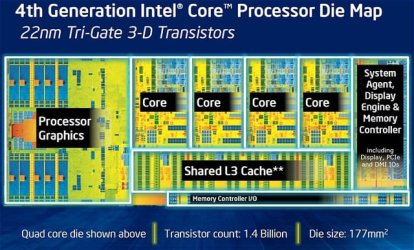
Note for many Intel CPUs including the Haswell i7s they recommend the thin line paste application which covers all cores as opposed to the central "pea blob approach". Make sure the line is correctly oriented. If you are using a heat pipe style heat sink then they also recommend filling the crevices in the heat sink base with a light coat of thermal paste.
ku-xlarge.jpg
 

My Computer My Computer

Computer type
PC/Desktop
Computer Manufacturer/Model Number
Own build
OS
Windows 7x64 Home Premium SP1
CPU
Intel i7 2600k
Motherboard
ASUS P8Z68 Deluxe
Memory
G.Skill Ripjaws (DDR3-1600) 2x4GB
Graphics Card(s)
Nvidia GeForce GTS 450; Intel HD Graphics 3000(GT2+)
Monitor(s) Displays
Dell Ultrasharp IPS panel U2311H, Samsung SyncMaster P2350
Screen Resolution
1920x1080
Hard Drives
Samsung 850 Pro SSD 256GB, Samsung SSD 840 120GB, Seagates 1TB Barracuda ST31000528AS x2
PSU
Seasonic M12II 520W
Case
Lian Li Lancool PC-K60
Cooling
Case: 1x120mm, 3x140mm CPU: Hyper 212+
Keyboard
Logitech MK520 (wireless)
Mouse
Logitech MK520
Internet Speed
6-7 Mbps
Antivirus
Norton Security Premium, Malwarebytes on 2 (MSE on 3rd PC)
Browser
FireFox
Other Info
Audio: Logitech Z523 2.1
91% or better Isopropyl Alcohol is easily obtained at drug stores and Wally World (WalMart) here in the U.S. I wouldn't use 70%.
 

My Computer My Computer

Computer type
PC/Desktop
Computer Manufacturer/Model Number
Custom Build
OS
Win 7 Ultimate 64 bit
CPU
Intel i7-3930K
Motherboard
ASUS P9X79 WS
Memory
Kingston HyperX Genesis 32GB Kit (8x4GB Modules) 1600MHz DDR
Graphics Card(s)
MSI R7850 Twin Frozr 2GD5/OC Radeon HD 7850 2GB 256-bit GDDR
Sound Card
Asus Xonar Essence STX
Monitor(s) Displays
3x Asus VG248QE 24", Vizio 32" TV
Screen Resolution
1920 x 1080, ?
Hard Drives
Samsung 128GB 840 Pro SSD (1),
Samsung 4TB 850 EVO SSDs (4)
Samsung 4TB 850 EVO SSDs (16) external backup drives used in 2.5" hot swap bays in the computer.
PSU
Corsair HX750w
Case
Antec Two Hundred v2 (modified)
Cooling
Cooler Master GeminII S524 120mm (fan replaced with a 140mm)
Keyboard
Logitech G510s
Mouse
Logitech M525 (two in use)
Internet Speed
=< 32Mbps down, 8Mbps up
Antivirus
AVAST!, MBAM, SAS, Spybot S&D (all but MBAM free) Glary Util
Browser
IE11
Other Info
LSI 9211-8i HBA card (8 SATA III ports), 2.5" & 3.5" Hot Swap Bays, HooToo HT-CR001 PCI-E to USB 3.0 Internal Hub + 6 Slot Card Reader, and LG Model CH12LS28 BD-ROM Optical Drive. Also, ScanSnap S1500 ADF duplexing scanner, Canon 9000F flat bed scanner, Corsair SP2500 2.1 speakers, Samsung CLP 415nw laser color printer, Cyberpower PP2200SW UPS
Then I should wait till tomorrow to buy 91% :(

Are you guys sure 70% will not work?
 

My Computer My Computer

Computer type
PC/Desktop
Computer Manufacturer/Model Number
Custom Build
OS
Windows 8.1 PRO
CPU
Intel Core i7 - 4770k
Motherboard
Asus Z87 - PRO LGA 1150
Memory
8 GB Corsair
Graphics Card(s)
EVGA GTX - 760 SC 4GB
Screen Resolution
1440x900
Hard Drives
Samsung PRO 128GB
PSU
Seasonic G - Series 650 Watts
Case
Cooler Master Storm Trooper
Cooling
Corsair H105
Then I should wait till tomorrow to buy 91% :(

Are you guys sure 70% will not work?

I don't know if 70% won't work. What I do know is I've only seen people who know what they are doing recommend 91% or better and never recommend 70%. After all the money you have spent for parts, do you really want to risk ruining something because you didn't want to wait until tomorrow to buy the recommend solvent?
 

My Computer My Computer

Computer type
PC/Desktop
Computer Manufacturer/Model Number
Custom Build
OS
Win 7 Ultimate 64 bit
CPU
Intel i7-3930K
Motherboard
ASUS P9X79 WS
Memory
Kingston HyperX Genesis 32GB Kit (8x4GB Modules) 1600MHz DDR
Graphics Card(s)
MSI R7850 Twin Frozr 2GD5/OC Radeon HD 7850 2GB 256-bit GDDR
Sound Card
Asus Xonar Essence STX
Monitor(s) Displays
3x Asus VG248QE 24", Vizio 32" TV
Screen Resolution
1920 x 1080, ?
Hard Drives
Samsung 128GB 840 Pro SSD (1),
Samsung 4TB 850 EVO SSDs (4)
Samsung 4TB 850 EVO SSDs (16) external backup drives used in 2.5" hot swap bays in the computer.
PSU
Corsair HX750w
Case
Antec Two Hundred v2 (modified)
Cooling
Cooler Master GeminII S524 120mm (fan replaced with a 140mm)
Keyboard
Logitech G510s
Mouse
Logitech M525 (two in use)
Internet Speed
=< 32Mbps down, 8Mbps up
Antivirus
AVAST!, MBAM, SAS, Spybot S&D (all but MBAM free) Glary Util
Browser
IE11
Other Info
LSI 9211-8i HBA card (8 SATA III ports), 2.5" & 3.5" Hot Swap Bays, HooToo HT-CR001 PCI-E to USB 3.0 Internal Hub + 6 Slot Card Reader, and LG Model CH12LS28 BD-ROM Optical Drive. Also, ScanSnap S1500 ADF duplexing scanner, Canon 9000F flat bed scanner, Corsair SP2500 2.1 speakers, Samsung CLP 415nw laser color printer, Cyberpower PP2200SW UPS
Then I should wait till tomorrow to buy 91% :(

Are you guys sure 70% will not work?

I don't know if 70% won't work. What I do know is I've only seen people who know what they are doing recommend 91% or better and never recommend 70%. After all the money you have spent for parts, do you really want to risk ruining something because you didn't want to wait until tomorrow to buy the recommend solvent?

Ok My excitement goes down tonight lol. hahaha I will buy tomorrow then
 

My Computer My Computer

Computer type
PC/Desktop
Computer Manufacturer/Model Number
Custom Build
OS
Windows 8.1 PRO
CPU
Intel Core i7 - 4770k
Motherboard
Asus Z87 - PRO LGA 1150
Memory
8 GB Corsair
Graphics Card(s)
EVGA GTX - 760 SC 4GB
Screen Resolution
1440x900
Hard Drives
Samsung PRO 128GB
PSU
Seasonic G - Series 650 Watts
Case
Cooler Master Storm Trooper
Cooling
Corsair H105
Shoppers Drugmart is still open. I will be right back LOL. How do I install the Corsair H105 do I install that last when the mobo is mounted?
 

My Computer My Computer

Computer type
PC/Desktop
Computer Manufacturer/Model Number
Custom Build
OS
Windows 8.1 PRO
CPU
Intel Core i7 - 4770k
Motherboard
Asus Z87 - PRO LGA 1150
Memory
8 GB Corsair
Graphics Card(s)
EVGA GTX - 760 SC 4GB
Screen Resolution
1440x900
Hard Drives
Samsung PRO 128GB
PSU
Seasonic G - Series 650 Watts
Case
Cooler Master Storm Trooper
Cooling
Corsair H105
I've cleaned and applied thermal paste a number of times and did a bit of homework beforehand but I prefer to err on the side of caution. The CPUs are expensive. But as suggested earlier, you can do an out of case test install using the stock cooler which comes with its own self applied paste. When it's all ticking over you can do the case install with a better after market cooler. Just make sure you clean the top of the CPU well.

My vague recollection is that lower purity isopropyl alcohol can leave a surface residue which reduces thermal conduction. I'd just go for the high purity cheap as chips alcohol for the final install.
 

My Computer My Computer

Computer type
PC/Desktop
Computer Manufacturer/Model Number
Own build
OS
Windows 7x64 Home Premium SP1
CPU
Intel i7 2600k
Motherboard
ASUS P8Z68 Deluxe
Memory
G.Skill Ripjaws (DDR3-1600) 2x4GB
Graphics Card(s)
Nvidia GeForce GTS 450; Intel HD Graphics 3000(GT2+)
Monitor(s) Displays
Dell Ultrasharp IPS panel U2311H, Samsung SyncMaster P2350
Screen Resolution
1920x1080
Hard Drives
Samsung 850 Pro SSD 256GB, Samsung SSD 840 120GB, Seagates 1TB Barracuda ST31000528AS x2
PSU
Seasonic M12II 520W
Case
Lian Li Lancool PC-K60
Cooling
Case: 1x120mm, 3x140mm CPU: Hyper 212+
Keyboard
Logitech MK520 (wireless)
Mouse
Logitech MK520
Internet Speed
6-7 Mbps
Antivirus
Norton Security Premium, Malwarebytes on 2 (MSE on 3rd PC)
Browser
FireFox
Other Info
Audio: Logitech Z523 2.1
Very good idea to test it all outside the case, just in case. Here's how I did my current system before putting it in a case.

Do Not lay the board on the anti-static bag, it's conductive on the outside.

224861d1344136880-show-us-your-rig-3-23-testing.jpg
The advice on the conductivity of the antistatic bag is a good one!! I'd incorrectly assumed it was just the inside of the bag. I'm guessing Britton30 is suggesting lay the motherboard on its box.
 

My Computer My Computer

Computer type
PC/Desktop
Computer Manufacturer/Model Number
Own build
OS
Windows 7x64 Home Premium SP1
CPU
Intel i7 2600k
Motherboard
ASUS P8Z68 Deluxe
Memory
G.Skill Ripjaws (DDR3-1600) 2x4GB
Graphics Card(s)
Nvidia GeForce GTS 450; Intel HD Graphics 3000(GT2+)
Monitor(s) Displays
Dell Ultrasharp IPS panel U2311H, Samsung SyncMaster P2350
Screen Resolution
1920x1080
Hard Drives
Samsung 850 Pro SSD 256GB, Samsung SSD 840 120GB, Seagates 1TB Barracuda ST31000528AS x2
PSU
Seasonic M12II 520W
Case
Lian Li Lancool PC-K60
Cooling
Case: 1x120mm, 3x140mm CPU: Hyper 212+
Keyboard
Logitech MK520 (wireless)
Mouse
Logitech MK520
Internet Speed
6-7 Mbps
Antivirus
Norton Security Premium, Malwarebytes on 2 (MSE on 3rd PC)
Browser
FireFox
Other Info
Audio: Logitech Z523 2.1
Ok. Thanks guys. Will continue tomorrow its 12am here already LOL. Do you guys suggest to do put the corsair H105 at the very last when the MOBO is mounted? and also do I push or Pull config?
 
Last edited:

My Computer My Computer

Computer type
PC/Desktop
Computer Manufacturer/Model Number
Custom Build
OS
Windows 8.1 PRO
CPU
Intel Core i7 - 4770k
Motherboard
Asus Z87 - PRO LGA 1150
Memory
8 GB Corsair
Graphics Card(s)
EVGA GTX - 760 SC 4GB
Screen Resolution
1440x900
Hard Drives
Samsung PRO 128GB
PSU
Seasonic G - Series 650 Watts
Case
Cooler Master Storm Trooper
Cooling
Corsair H105
It has been suggested to me that mounting the cooler pump on the board before putting in the case is a good idea. Just be very careful to support the radiator so it doesn't fall on the board or anything else.

I would mount it so the fans pull cool air in from outside the case, with the fans mounted to the case, the rad to the fans. Ganjiry had a good idea for this. First use two normal fan mount screws and mount them to the case with two screws each. Then you have a free hand to insert the longer screws to mount the radiator with. Then remove the normal screws and use the longer ones to make it permanent.
 

My Computer My Computer

Computer type
PC/Desktop
Computer Manufacturer/Model Number
Home Built Desktop By DataTech
OS
Windows 7 Ultimate X64 SP1
CPU
Intel i5-2550K, Differing ~4.4-4.8GHz No built in GPU
Motherboard
ASUS P8Z68-V PRO/GEN3
Memory
16GB G.Skill Sniper 1866MHz @ 2133MHz 2x8GB
Graphics Card(s)
ASUS GTX650TIB-DC2OC-2GD5, (650TI Boost)
Sound Card
Onboard Realtek 5-1
Monitor(s) Displays
Samsung P2570HD
Screen Resolution
1920x1080
Hard Drives
Samsung 840 Pro 256GB SSD for OS, 500GB Seagate Constellation (Enterprise drive) for Data
PSU
Corsair HX650W
Case
Inwin Dragon Rider
Cooling
Hyper 212 EVO w/two Noctua fans, push-pull, @1300 RPM
Keyboard
E-Z Eyes, bright yellow keys with large characters
Mouse
steelseries SENSEI Laser Pro Gaming
Internet Speed
48-51Mbs Mbs down, 11 Mbs up Xfinity Cable
Antivirus
Norton Internet Security 2013
Browser
IE 10, Opera, Pale Moon if needed
Other Info
4 case fans, LG BluRay-RE, ASUS DVD-RW, Mr. Fusion power supply, 1.21 gigawatts.
It has been suggested to me that mounting the cooler pump on the board before putting in the case is a good idea. Just be very careful to support the radiator so it doesn't fall on the board or anything else.

I would mount it so the fans pull cool air in from outside the case, with the fans mounted to the case, the rad to the fans. Ganjiry had a good idea for this. First use two normal fan mount screws and mount them to the case with two screws each. Then you have a free hand to insert the longer screws to mount the radiator with. Then remove the normal screws and use the longer ones to make it permanent.

Are you saying mount the Fans outside of the case to pull cool air and the radiator inside top of the case?
 

My Computer My Computer

Computer type
PC/Desktop
Computer Manufacturer/Model Number
Custom Build
OS
Windows 8.1 PRO
CPU
Intel Core i7 - 4770k
Motherboard
Asus Z87 - PRO LGA 1150
Memory
8 GB Corsair
Graphics Card(s)
EVGA GTX - 760 SC 4GB
Screen Resolution
1440x900
Hard Drives
Samsung PRO 128GB
PSU
Seasonic G - Series 650 Watts
Case
Cooler Master Storm Trooper
Cooling
Corsair H105
No, fans will be inside.
 

My Computer My Computer

Computer type
PC/Desktop
Computer Manufacturer/Model Number
Home Built Desktop By DataTech
OS
Windows 7 Ultimate X64 SP1
CPU
Intel i5-2550K, Differing ~4.4-4.8GHz No built in GPU
Motherboard
ASUS P8Z68-V PRO/GEN3
Memory
16GB G.Skill Sniper 1866MHz @ 2133MHz 2x8GB
Graphics Card(s)
ASUS GTX650TIB-DC2OC-2GD5, (650TI Boost)
Sound Card
Onboard Realtek 5-1
Monitor(s) Displays
Samsung P2570HD
Screen Resolution
1920x1080
Hard Drives
Samsung 840 Pro 256GB SSD for OS, 500GB Seagate Constellation (Enterprise drive) for Data
PSU
Corsair HX650W
Case
Inwin Dragon Rider
Cooling
Hyper 212 EVO w/two Noctua fans, push-pull, @1300 RPM
Keyboard
E-Z Eyes, bright yellow keys with large characters
Mouse
steelseries SENSEI Laser Pro Gaming
Internet Speed
48-51Mbs Mbs down, 11 Mbs up Xfinity Cable
Antivirus
Norton Internet Security 2013
Browser
IE 10, Opera, Pale Moon if needed
Other Info
4 case fans, LG BluRay-RE, ASUS DVD-RW, Mr. Fusion power supply, 1.21 gigawatts.

My Computer My Computer

Computer type
PC/Desktop
Computer Manufacturer/Model Number
Custom Build
OS
Windows 8.1 PRO
CPU
Intel Core i7 - 4770k
Motherboard
Asus Z87 - PRO LGA 1150
Memory
8 GB Corsair
Graphics Card(s)
EVGA GTX - 760 SC 4GB
Screen Resolution
1440x900
Hard Drives
Samsung PRO 128GB
PSU
Seasonic G - Series 650 Watts
Case
Cooler Master Storm Trooper
Cooling
Corsair H105
Yes and yes, here's a video. He has the fans on bottom though.


My Computer My Computer

Computer type
PC/Desktop
Computer Manufacturer/Model Number
Home Built Desktop By DataTech
OS
Windows 7 Ultimate X64 SP1
CPU
Intel i5-2550K, Differing ~4.4-4.8GHz No built in GPU
Motherboard
ASUS P8Z68-V PRO/GEN3
Memory
16GB G.Skill Sniper 1866MHz @ 2133MHz 2x8GB
Graphics Card(s)
ASUS GTX650TIB-DC2OC-2GD5, (650TI Boost)
Sound Card
Onboard Realtek 5-1
Monitor(s) Displays
Samsung P2570HD
Screen Resolution
1920x1080
Hard Drives
Samsung 840 Pro 256GB SSD for OS, 500GB Seagate Constellation (Enterprise drive) for Data
PSU
Corsair HX650W
Case
Inwin Dragon Rider
Cooling
Hyper 212 EVO w/two Noctua fans, push-pull, @1300 RPM
Keyboard
E-Z Eyes, bright yellow keys with large characters
Mouse
steelseries SENSEI Laser Pro Gaming
Internet Speed
48-51Mbs Mbs down, 11 Mbs up Xfinity Cable
Antivirus
Norton Internet Security 2013
Browser
IE 10, Opera, Pale Moon if needed
Other Info
4 case fans, LG BluRay-RE, ASUS DVD-RW, Mr. Fusion power supply, 1.21 gigawatts.
I would remove and install the new cooler retention plate on the back of the mobo before installing the mobo in the case. then you can apply thermal paste just before installing the screws and pump head to the now installed plate. Go slow and as even a tightening as you can to just snug.......then gently tighten and let rest maybe to just a little pump wiggle and then a final snug but not over tight and your good.
 

My Computer My Computer

Computer type
PC/Desktop
Computer Manufacturer/Model Number
A blend of brains, brawn and dumb luck.
OS
Windows 7 Ultimate 64
CPU
i7 3770k OC'd 4.6 @ 1.17v, also FX 8120 & i5 miniITX
Motherboard
MSI P67A-GD80 b3
Memory
32 gb G.Skill Sniper DDR3 10-12-12-31 @ 2133
Graphics Card(s)
XFX Radeon 7870 2GB DDR5
Sound Card
Sound Blaster Z Series Card
Monitor(s) Displays
(2) LG LED 23" 1920 x 1080 2ms Monitors via mini d-port
Screen Resolution
1680 X 1050 p
Hard Drives
Samsung 256 gb 830 SSD sata III
(1) 1 tb WD Black
(2) 1 tb Hitachi deskmates/sata II
(2) 1 tb WD green/sata II
(2) 3 tb Seagate Barracuda
(1) 120 gb OCZ Vertex SS
(1) Drobo 5N w/5 Seagate 3tb
PSU
EVGA modular 1000G2 80% gold rating & APC 1200 RS
Case
CoolerMaster Storm Styker
Cooling
7 case fans 140mm & 120mm, NZXT Kraken X60
Keyboard
(2) Logitech Illuminated Keyboards (1) usb (1) wireless
Mouse
Logitech G700 & T-BC21 - nano nx for the laptop
Internet Speed
Basic 120mbps down
Antivirus
Trend Micro Titanium Max Security & Malwarebytes Premium
Browser
Chrome and IE 10
Other Info
5 Noctua case fans + 3 Noctua in p/p on NZXT cooler
Integrated hot swap drive bays for 2.5" Drives
(2) Lite-on dvd/cd/Blu Ray optical 22X
Integrated fan controller and led on/off
HP Officejet Pro 8630 all-n-one
Hot-swappable 3.5" hard drive bay
Netgear Nighthawk router
Asus USB 3 & sata 6 PCIe card
Vantec IDE to sata adptr./Ultra sata adptr
Lenovo L420 i5 lappy with m sata
Drobo 5N advanced NAS
The shield giving me a hard time lol
 

My Computer My Computer

Computer type
PC/Desktop
Computer Manufacturer/Model Number
Custom Build
OS
Windows 8.1 PRO
CPU
Intel Core i7 - 4770k
Motherboard
Asus Z87 - PRO LGA 1150
Memory
8 GB Corsair
Graphics Card(s)
EVGA GTX - 760 SC 4GB
Screen Resolution
1440x900
Hard Drives
Samsung PRO 128GB
PSU
Seasonic G - Series 650 Watts
Case
Cooler Master Storm Trooper
Cooling
Corsair H105
The I/O shield that goes in the back of the case?
 

My Computer My Computer

Computer type
PC/Desktop
Computer Manufacturer/Model Number
Home Built Desktop By DataTech
OS
Windows 7 Ultimate X64 SP1
CPU
Intel i5-2550K, Differing ~4.4-4.8GHz No built in GPU
Motherboard
ASUS P8Z68-V PRO/GEN3
Memory
16GB G.Skill Sniper 1866MHz @ 2133MHz 2x8GB
Graphics Card(s)
ASUS GTX650TIB-DC2OC-2GD5, (650TI Boost)
Sound Card
Onboard Realtek 5-1
Monitor(s) Displays
Samsung P2570HD
Screen Resolution
1920x1080
Hard Drives
Samsung 840 Pro 256GB SSD for OS, 500GB Seagate Constellation (Enterprise drive) for Data
PSU
Corsair HX650W
Case
Inwin Dragon Rider
Cooling
Hyper 212 EVO w/two Noctua fans, push-pull, @1300 RPM
Keyboard
E-Z Eyes, bright yellow keys with large characters
Mouse
steelseries SENSEI Laser Pro Gaming
Internet Speed
48-51Mbs Mbs down, 11 Mbs up Xfinity Cable
Antivirus
Norton Internet Security 2013
Browser
IE 10, Opera, Pale Moon if needed
Other Info
4 case fans, LG BluRay-RE, ASUS DVD-RW, Mr. Fusion power supply, 1.21 gigawatts.
It's there for your protection ! :roflmao:
 

My Computer My Computer

Computer type
PC/Desktop
Computer Manufacturer/Model Number
A blend of brains, brawn and dumb luck.
OS
Windows 7 Ultimate 64
CPU
i7 3770k OC'd 4.6 @ 1.17v, also FX 8120 & i5 miniITX
Motherboard
MSI P67A-GD80 b3
Memory
32 gb G.Skill Sniper DDR3 10-12-12-31 @ 2133
Graphics Card(s)
XFX Radeon 7870 2GB DDR5
Sound Card
Sound Blaster Z Series Card
Monitor(s) Displays
(2) LG LED 23" 1920 x 1080 2ms Monitors via mini d-port
Screen Resolution
1680 X 1050 p
Hard Drives
Samsung 256 gb 830 SSD sata III
(1) 1 tb WD Black
(2) 1 tb Hitachi deskmates/sata II
(2) 1 tb WD green/sata II
(2) 3 tb Seagate Barracuda
(1) 120 gb OCZ Vertex SS
(1) Drobo 5N w/5 Seagate 3tb
PSU
EVGA modular 1000G2 80% gold rating & APC 1200 RS
Case
CoolerMaster Storm Styker
Cooling
7 case fans 140mm & 120mm, NZXT Kraken X60
Keyboard
(2) Logitech Illuminated Keyboards (1) usb (1) wireless
Mouse
Logitech G700 & T-BC21 - nano nx for the laptop
Internet Speed
Basic 120mbps down
Antivirus
Trend Micro Titanium Max Security & Malwarebytes Premium
Browser
Chrome and IE 10
Other Info
5 Noctua case fans + 3 Noctua in p/p on NZXT cooler
Integrated hot swap drive bays for 2.5" Drives
(2) Lite-on dvd/cd/Blu Ray optical 22X
Integrated fan controller and led on/off
HP Officejet Pro 8630 all-n-one
Hot-swappable 3.5" hard drive bay
Netgear Nighthawk router
Asus USB 3 & sata 6 PCIe card
Vantec IDE to sata adptr./Ultra sata adptr
Lenovo L420 i5 lappy with m sata
Drobo 5N advanced NAS

My Computer My Computer

Computer type
PC/Desktop
Computer Manufacturer/Model Number
Home Built Desktop By DataTech
OS
Windows 7 Ultimate X64 SP1
CPU
Intel i5-2550K, Differing ~4.4-4.8GHz No built in GPU
Motherboard
ASUS P8Z68-V PRO/GEN3
Memory
16GB G.Skill Sniper 1866MHz @ 2133MHz 2x8GB
Graphics Card(s)
ASUS GTX650TIB-DC2OC-2GD5, (650TI Boost)
Sound Card
Onboard Realtek 5-1
Monitor(s) Displays
Samsung P2570HD
Screen Resolution
1920x1080
Hard Drives
Samsung 840 Pro 256GB SSD for OS, 500GB Seagate Constellation (Enterprise drive) for Data
PSU
Corsair HX650W
Case
Inwin Dragon Rider
Cooling
Hyper 212 EVO w/two Noctua fans, push-pull, @1300 RPM
Keyboard
E-Z Eyes, bright yellow keys with large characters
Mouse
steelseries SENSEI Laser Pro Gaming
Internet Speed
48-51Mbs Mbs down, 11 Mbs up Xfinity Cable
Antivirus
Norton Internet Security 2013
Browser
IE 10, Opera, Pale Moon if needed
Other Info
4 case fans, LG BluRay-RE, ASUS DVD-RW, Mr. Fusion power supply, 1.21 gigawatts.
Back
Top