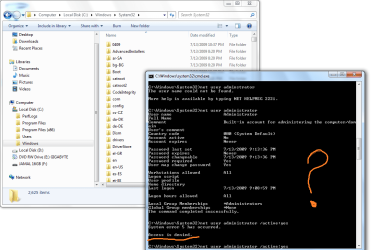
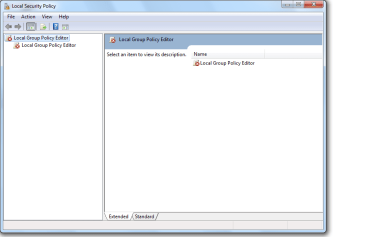
Built-in Administrator Account - Enable or Disable

How to Enable or Disable the Built-in Elevated Administrator Account in Windows 7

   Information
This tutorial will show you how to enable or disable the built-in elevated Administrator account in Windows 7.

You must be logged in as an administrator to be able to do the options in this tutorial.

   Note
Standard user (Users) - The standard account is an unelevated restricted users account. It can help protect your computer by preventing users from making changes that affect everyone who uses the computer, such as deleting files that are required for the computer to work. It is recommend to create a standard account for each user instead of an administrator account for the user. When you are logged on to Windows with a standard account, you can do almost anything that you can do with an administrator account, but if a standard user wanted to do something that requires elevated rights that affects other users of the computer, such as installing software or changing security settings, Windows will give the standard user a UAC prompt to enter the password of an administrator account for approval and confirmation before allowing the action.

administrator user - Is an unelevated administrator account that is created by default during the installation of Windows 7, or is already setup or you on a OEM (ex: Dell) computer. An administrator account has complete access to the computer, and can make any desired changes. To help make the computer more secure, this administrator account type will be prompted by UAC by default to give confirmation before allowed to make any changes that require elevated administrator rights. Such as those that affect the system, other users, or when running anything elevated (Run as Administrator) since running elevated will allow it to have access to the entire computer.

Built-in "Administrator" - Is the hidden elevated administrator account that has full unrestricted access rights and permission on the computer. By default, this elevated "Administrator" account is not prompted by UAC by default to provide confirmation before allowed to make any changes that require elevated administrator permissions since it is an elevated account.

   Warning
If you enable the built-in Administrator account, then it is recommended to create a password for better security.

For additional security purposes, it is also not recommended to leave the built-in Administrator account always enabled, or to use it for everyday purposes.


:note: For the updated Windows 10 tutorial, please see here: Administrator account - Enable or Disable in Windows 10 - Windows 10 User Accounts Tutorials


OPTION ONE

Enable built-in Administrator in Local Users and Groups


NOTE: This option will only be available in the Windows 7 Professional, Ultimate, and Enterprise editions.
1. Open the Local Users and Groups manager.

2. In the left pane, click on the Users folder. (See screenshot below step 3)

3. In the middle pane, right click on Administrator and click on Properties. (See screenshot below)
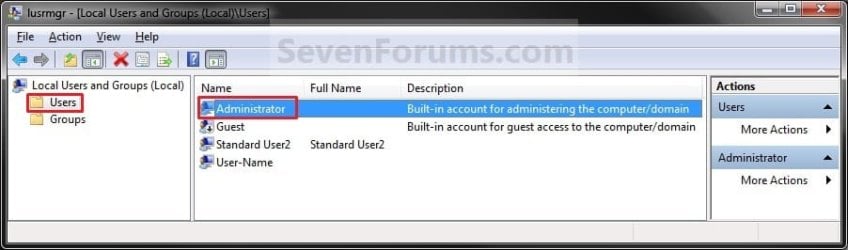
Local_Users_and_Group.jpg
4. To Enable the Built-in Elevated Administrator Account
A) Uncheck the Account is disabled box. (See screenshot below step 6)

B) Go to step 6.
5. To Disable the Built-in Elevated Administrator Account
NOTE: This is the default setting.
A) Check the Account is disabled box. (See screenshot below step 6)
6. Click on OK. (See screenshot below)
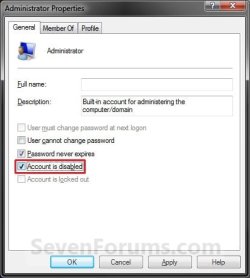
Properties.jpg
7. Close the Local Users and Groups window. (See screenshot below step 3)

8. Log off, and you will now see the built-in Administrator account log on icon added (enabled) or removed (disabled) from the log on screen. (See screeenshot below)
NOTE: Click on the Administrator icon to log on to the built-in Administrator account.
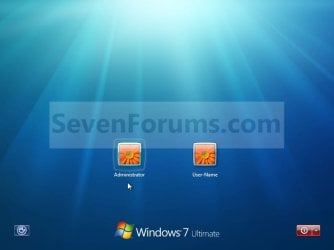
Log-on.jpg


OPTION TWO

Enable built-in Administrator in an Elevated Command Prompt


NOTE: This option can be used in all editions of Windows 7. If your Windows 7 uses another language than English, then you may need to translate the word administrator part of the commands below to your language to use instead.
1. Open an elevated command prompt, and do step 2, 3, or 4 below for what you want to do.

2. To Enable the Hidden Built-in Elevated Administrator Account
A) In the elevated command prompt, copy and paste the command below and press Enter, and go to step 5 below. (See screenshot below)
NOTE: If you had previously renamed the built-in "Administrator" account's name, then you will need to substitute administrator in the command below with the new name instead.
net user administrator /active:yes
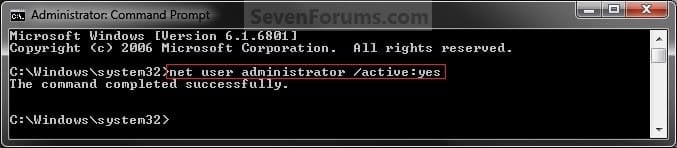
Command_Enable.jpg
3. To Enable the Hidden Built-in Elevated Administrator Account with Password
A) In the elevated command prompt, copy and paste the command below and press Enter, and go to step 5 below. (See screenshot below)
NOTE: If you had previously renamed the built-in "Administrator" account's name, then you will need to substitute administrator in the command below with the new name instead.
net user administrator password /active:yes

   Note
Substitute password in the command above with the password you want to use to log on to the built-in Administrator account.


4. To Disable the Hidden Built-in Elevated Administrator Account
NOTE: This is the default setting.
A) In the elevated command prompt, copy and paste the command below and press Enter, and go to step 5 below. (See screenshot below)
NOTE: If you had previously renamed the built-in "Administrator" account's name, then you will need to substitute administrator in the command below with the new name instead.
net user administrator /active:no
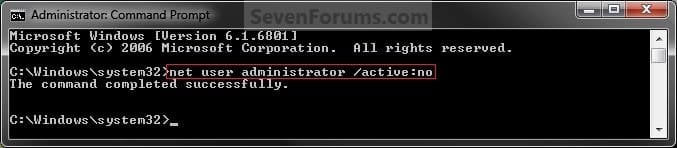
Command_Disable.jpg
5. Close the elevated command prompt.

6. Log off, and you will now see the built-in Administrator account log on icon added (enabled) or removed (disabled) from the log on screen. (See screeenshot below)
NOTE: Click on the Administrator icon to log on to the built-in Administrator account.
Log-on.jpg


OPTION THREE

Enable built-in Administrator in Local Security Policy


NOTE: This option will only be available in the Windows 7 Professional, Ultimate, and Enterprise editions.
1. Open the Local Security Policy editor.

2. In the left pane, expand Local Policies, and click on Security Options. (See screenshot below)
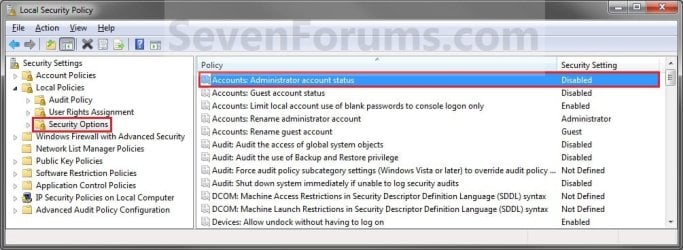
Secpol-1.jpg
3. In the right pane, right click on Accounts: Administrator account status and click on Properties. (See screenshot above)

4. To Enable the Hidden Built-in Elevated Administrator Account
A) Select (dot) Enabled. (See screenshot below step 6)

B) Go to step 6.
5. To Disable the Hidden Built-in Elevated Administrator Account
NOTE: This is the default setting.
A) Select (dot) Disabled. (See screenshot below step 6)
6. Click on OK. (See screenshot below)
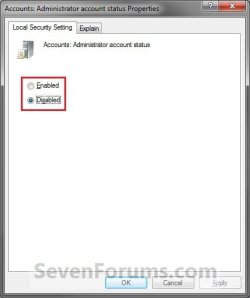
Secpol-2.jpg
7. Close the Local Security Policy window. (See screenshot below step 2)

8. Log off, and you will now see the built-in Administrator account log on icon added (enabled) or removed (disabled) from the log on screen. (See screeenshot below)
NOTE: Click on the Administrator icon to log on to the built-in Administrator account.
Log-on.jpg


OPTION FOUR

Enable built-in Administrator from System Recovery (WinRE) at Boot


1. For how, see: How to Enable the Built-in Administrator Account from WinRE
That's it,
Shawn


Last edited:
Thank you very much… J It was very useful. Option three was easy and perfect for me.
 

My Computer My Computer

At a glance

Windows 7 Ultimate 32bit
OS
Windows 7 Ultimate 32bit
You're most welcome Akhildev, and welcome to Seven Forums. :)
 

My Computer My Computer

At a glance

64-bit Windows 11 Pro for WorkstationsIntel i7-8700K OC'd to 5 GHz64 GB (4x16GB) G.SKILL TridentZ RGB DDR4 3600...ASUS ROG-STRIX-GTX1080TI-O11G-GAMING
Computer type
PC/Desktop
Computer Manufacturer/Model Number
Self built custom
OS
64-bit Windows 11 Pro for Workstations
CPU
Intel i7-8700K OC'd to 5 GHz
Motherboard
ASUS ROG Maximus XI Formula Z390
Memory
64 GB (4x16GB) G.SKILL TridentZ RGB DDR4 3600 MHz
Graphics Card(s)
ASUS ROG-STRIX-GTX1080TI-O11G-GAMING
Sound Card
Integrated
Monitor(s) Displays
2 x Samsung Odyssey G7 27"
Screen Resolution
2560x1440
Hard Drives
1TB Samsung 990 PRO M.2,
4TB Samsung 990 PRO PRO M.2,
TerraMaster F8 SSD Plus NAS
PSU
Seasonic Prime Titanium 850W
Case
Thermaltake Core P3
Cooling
Corsair Hydro H115i
Keyboard
Logitech wireless K800
Mouse
Logitech MX Master 4
Internet Speed
2 Gb/s Download and 100 Mb/s Upload
Antivirus
Malwarebyte Anti-Malware Premium
Browser
Google Chrome
Other Info
Logitech Z625 speaker system,
Logitech BRIO 4K Pro webcam,
HP Color LaserJet Pro MFP M477fdn,
APC SMART-UPS RT 1000 XL - SURT1000XLI,
Galaxy S23 Plus phone
Alright, so I got the command prompt method to work, and I've successfully enabled the admin account. Thing is, everything, my entire desktop, shortcuts, all that stuff, is back on the other "admin" account. Is there any way, if possible at all, to transfer all my configurations from that other account to this REAL admin account?

I understand the risks associated, but I prefer to be in total control of my computer.
 

My Computer My Computer

At a glance

Windows 7
OS
Windows 7
Hello InTheDark, and welcome to Seven Forums.

You could manually copy over anything you wanted from your old account to your new one. For example, files from within the user folders, shortcuts, shortcuts in the Start Menu, etc.....

Unfortunately, any other settings will need to be changed again in the new built-in Administrator account.

Hope this helps,
Shawn
 

My Computer My Computer

At a glance

64-bit Windows 11 Pro for WorkstationsIntel i7-8700K OC'd to 5 GHz64 GB (4x16GB) G.SKILL TridentZ RGB DDR4 3600...ASUS ROG-STRIX-GTX1080TI-O11G-GAMING
Computer type
PC/Desktop
Computer Manufacturer/Model Number
Self built custom
OS
64-bit Windows 11 Pro for Workstations
CPU
Intel i7-8700K OC'd to 5 GHz
Motherboard
ASUS ROG Maximus XI Formula Z390
Memory
64 GB (4x16GB) G.SKILL TridentZ RGB DDR4 3600 MHz
Graphics Card(s)
ASUS ROG-STRIX-GTX1080TI-O11G-GAMING
Sound Card
Integrated
Monitor(s) Displays
2 x Samsung Odyssey G7 27"
Screen Resolution
2560x1440
Hard Drives
1TB Samsung 990 PRO M.2,
4TB Samsung 990 PRO PRO M.2,
TerraMaster F8 SSD Plus NAS
PSU
Seasonic Prime Titanium 850W
Case
Thermaltake Core P3
Cooling
Corsair Hydro H115i
Keyboard
Logitech wireless K800
Mouse
Logitech MX Master 4
Internet Speed
2 Gb/s Download and 100 Mb/s Upload
Antivirus
Malwarebyte Anti-Malware Premium
Browser
Google Chrome
Other Info
Logitech Z625 speaker system,
Logitech BRIO 4K Pro webcam,
HP Color LaserJet Pro MFP M477fdn,
APC SMART-UPS RT 1000 XL - SURT1000XLI,
Galaxy S23 Plus phone
I go through this process for a lot of machines. I'm looking to create a batch file to make this go smoother and quickly. Any help?
 

My Computer My Computer

At a glance

Windows 7 Pro x64
OS
Windows 7 Pro x64
Hell Endergonic, and welcome to Seven Forums.

You could create the .bat files using the commands from OPTION TWO in the tutorial with one command (enable/disable) per .bat file. To use, you would right click on the .bat file you wanted to do and click on Run as administrator. :)

Hope this helps,
Shawn
 

My Computer My Computer

At a glance

64-bit Windows 11 Pro for WorkstationsIntel i7-8700K OC'd to 5 GHz64 GB (4x16GB) G.SKILL TridentZ RGB DDR4 3600...ASUS ROG-STRIX-GTX1080TI-O11G-GAMING
Computer type
PC/Desktop
Computer Manufacturer/Model Number
Self built custom
OS
64-bit Windows 11 Pro for Workstations
CPU
Intel i7-8700K OC'd to 5 GHz
Motherboard
ASUS ROG Maximus XI Formula Z390
Memory
64 GB (4x16GB) G.SKILL TridentZ RGB DDR4 3600 MHz
Graphics Card(s)
ASUS ROG-STRIX-GTX1080TI-O11G-GAMING
Sound Card
Integrated
Monitor(s) Displays
2 x Samsung Odyssey G7 27"
Screen Resolution
2560x1440
Hard Drives
1TB Samsung 990 PRO M.2,
4TB Samsung 990 PRO PRO M.2,
TerraMaster F8 SSD Plus NAS
PSU
Seasonic Prime Titanium 850W
Case
Thermaltake Core P3
Cooling
Corsair Hydro H115i
Keyboard
Logitech wireless K800
Mouse
Logitech MX Master 4
Internet Speed
2 Gb/s Download and 100 Mb/s Upload
Antivirus
Malwarebyte Anti-Malware Premium
Browser
Google Chrome
Other Info
Logitech Z625 speaker system,
Logitech BRIO 4K Pro webcam,
HP Color LaserJet Pro MFP M477fdn,
APC SMART-UPS RT 1000 XL - SURT1000XLI,
Galaxy S23 Plus phone
According to the Oxford English Dictionary, that is the correct way of spelling it. Definition for built-in - Oxford Dictionaries Online (World English)

I must admit that there are some words that I find confusing, and have been known to spell them differently at times, depending upon whether the spelling variant I used at the time seemed right at the time of writing.
 

My Computer My Computer

At a glance

Windows 8.1 Pro RTM x64Intel Core-i5-3570K 4-core @ 3.4GHz (Ivy Brid...4 x 4GB DDR3-1600 Corsair Vengeance CMZ8GX3M2...MSI GeForce GTX770 Gaming OC 2GB
Computer type
PC/Desktop
Computer Manufacturer/Model Number
Dwarf Dwf/11/2012 r09/2013
OS
Windows 8.1 Pro RTM x64
CPU
Intel Core-i5-3570K 4-core @ 3.4GHz (Ivy Bridge) (OC 4.4GHz)
Motherboard
ASRock Z77 Extreme4-M
Memory
4 x 4GB DDR3-1600 Corsair Vengeance CMZ8GX3M2A1600C9B (16GB)
Graphics Card(s)
MSI GeForce GTX770 Gaming OC 2GB
Sound Card
Realtek High Definition on board solution (ALC 898)
Monitor(s) Displays
ViewSonic VA1912w Widescreen (VGA)
Screen Resolution
1440x900
Hard Drives
OCZ Agility 3 SSD 120GB SATA III x2 (RAID 0)
Samsung HD501LJ 500GB SATA II x2
Hitachi HDS721010CLA332 1TB SATA II
Iomega 1.5TB Ext USB 2.0
WD 2.0TB Ext USB 3.0
PSU
XFX Pro Series 850W Semi-Modular
Case
Gigabyte IF233
Cooling
1 x 120mm Front Inlet 1 x 120mm Rear Exhaust
Keyboard
Microsoft Comfort Curve Keyboard 3000 (USB)
Mouse
Microsoft Comfort Mouse 3000 for Business (USB)
Internet Speed
NetGear DG834Gv3 ADSL Modem/Router (Ethernet) ~4.0 Mb/s (O2)
Antivirus
Avast! 8.0.1497
Browser
IE 11
Other Info
Optical Drive: HL-DT-ST BD-RE BH10LS30 SATA Bluray
Lexmark S305 Printer/Scanner/Copier (USB)
WEI Score: 8.1/8.1/8.5/8.5/8.25
Asus Eee PC 1011PX Netbook (Windows 7 x86 Starter)
I go into Safe Mode and Built-in administrator account enabled temporarily.
 

My Computer My Computer

At a glance

Windows 7 Home Premium Service Pack 1 32-bit ...AMD C-50 Processor 1.0 Ghz2 GB DDR3 RAM (1.73 usable in System Properties)AMD Radeon HD 6200 series Graphics
Computer Manufacturer/Model Number
Acer Aspire One 722 (AO722)
OS
Windows 7 Home Premium Service Pack 1 32-bit Build 7601
CPU
AMD C-50 Processor 1.0 Ghz
Memory
2 GB DDR3 RAM (1.73 usable in System Properties)
Graphics Card(s)
AMD Radeon HD 6200 series Graphics
Sound Card
High Definition Audio Device
Monitor(s) Displays
Generic PnP Monitor
Screen Resolution
1366 x 768 (recommended)
Hard Drives
320 GB HDD storage
298.09 GB in Disk Management (REAL)
Keyboard
Built-in on my laptop
Mouse
External mouse
Other Info
Installed Windows 7 Service Pack 1 by 9/9/2012
Hi Shawn (or anybody please!),

Using the "Local Users and Groups", I enabled the Admin by unticking "Account is disabled".

As a result, (1) The "yes" button for UAC messages when you download/install/uninstall/etc. are gray and I can't proceed; (2) I can't access System and Security, User Accounts and Appearance and Personalization in the Control Panel.

I tried the options 1-3 above and got the following results (Option 4 is beyond me):
1. Through Local Users and Groups - Access is Denied
2. In a Elevated Command Prompt - The default C prompt is "C:\Users\lenovo>". As such, I can't type
"C:\Windows\system32>net user administrator /active:yes".
3. Through Local Security Policy - Access is Denied

I am really going NUTS. I've read other stuff but I think I probably erased something that's why none of the online solutions are working for me. HELP PLEASE! THANK YOU!
 

My Computer My Computer

At a glance

windows 7 ultimate
OS
windows 7 ultimate
Hello JBN, and welcome to Seven Forums.

Not sure what's causing it, but you might see if you may be able to do a system restore at boot using a restore point (if available) dated before this happened.

Hope this helps, :)
Shawn
 

My Computer My Computer

At a glance

64-bit Windows 11 Pro for WorkstationsIntel i7-8700K OC'd to 5 GHz64 GB (4x16GB) G.SKILL TridentZ RGB DDR4 3600...ASUS ROG-STRIX-GTX1080TI-O11G-GAMING
Computer type
PC/Desktop
Computer Manufacturer/Model Number
Self built custom
OS
64-bit Windows 11 Pro for Workstations
CPU
Intel i7-8700K OC'd to 5 GHz
Motherboard
ASUS ROG Maximus XI Formula Z390
Memory
64 GB (4x16GB) G.SKILL TridentZ RGB DDR4 3600 MHz
Graphics Card(s)
ASUS ROG-STRIX-GTX1080TI-O11G-GAMING
Sound Card
Integrated
Monitor(s) Displays
2 x Samsung Odyssey G7 27"
Screen Resolution
2560x1440
Hard Drives
1TB Samsung 990 PRO M.2,
4TB Samsung 990 PRO PRO M.2,
TerraMaster F8 SSD Plus NAS
PSU
Seasonic Prime Titanium 850W
Case
Thermaltake Core P3
Cooling
Corsair Hydro H115i
Keyboard
Logitech wireless K800
Mouse
Logitech MX Master 4
Internet Speed
2 Gb/s Download and 100 Mb/s Upload
Antivirus
Malwarebyte Anti-Malware Premium
Browser
Google Chrome
Other Info
Logitech Z625 speaker system,
Logitech BRIO 4K Pro webcam,
HP Color LaserJet Pro MFP M477fdn,
APC SMART-UPS RT 1000 XL - SURT1000XLI,
Galaxy S23 Plus phone
Hey Shawn,

Let me just revise some things I said earlier. Sorry, got too dazed with confusion when I wrote initially =(

1. I disabled the built-in administrator through Local Security Policy (LSP) NOT Local Users and Groups. Not sure if this will affect your response to my problem. FYI, now i can't access LSP also.

2. I can't access Change your account type under User Accounts. In the UAC message "Do you want to allow the following program to make the following changes to this computer?", the "Yes" button is gray.

I need to restore the built-in admin again because I can't download/install/uninstall/etc. when that UAC message above appears.

I can't do any of the system restore options you mentioned because I can't even get pass the UAC message. Only "No" is the active reply *sniff*sniff*

Is there any other way? Thanks again for your help... and tons of patience =)
 

My Computer My Computer

At a glance

windows 7 ultimate
OS
windows 7 ultimate
Are you able to do the system restore at boot?
 

My Computer My Computer

At a glance

64-bit Windows 11 Pro for WorkstationsIntel i7-8700K OC'd to 5 GHz64 GB (4x16GB) G.SKILL TridentZ RGB DDR4 3600...ASUS ROG-STRIX-GTX1080TI-O11G-GAMING
Computer type
PC/Desktop
Computer Manufacturer/Model Number
Self built custom
OS
64-bit Windows 11 Pro for Workstations
CPU
Intel i7-8700K OC'd to 5 GHz
Motherboard
ASUS ROG Maximus XI Formula Z390
Memory
64 GB (4x16GB) G.SKILL TridentZ RGB DDR4 3600 MHz
Graphics Card(s)
ASUS ROG-STRIX-GTX1080TI-O11G-GAMING
Sound Card
Integrated
Monitor(s) Displays
2 x Samsung Odyssey G7 27"
Screen Resolution
2560x1440
Hard Drives
1TB Samsung 990 PRO M.2,
4TB Samsung 990 PRO PRO M.2,
TerraMaster F8 SSD Plus NAS
PSU
Seasonic Prime Titanium 850W
Case
Thermaltake Core P3
Cooling
Corsair Hydro H115i
Keyboard
Logitech wireless K800
Mouse
Logitech MX Master 4
Internet Speed
2 Gb/s Download and 100 Mb/s Upload
Antivirus
Malwarebyte Anti-Malware Premium
Browser
Google Chrome
Other Info
Logitech Z625 speaker system,
Logitech BRIO 4K Pro webcam,
HP Color LaserJet Pro MFP M477fdn,
APC SMART-UPS RT 1000 XL - SURT1000XLI,
Galaxy S23 Plus phone
Hi Shawn,

I just tried it now. "Do you want to allow the following program..." appears when I attempt to make the System Repair Disc either through the recdisc.exe method or the create system repair disc method. But since the "yes" button is gray, I can't even accomplish step 1. Unfortunately, I don't have the Windows installation disc. Looks like I really messed up my pc =(

Hope you have other thoughts... Thank you!
 

My Computer My Computer

At a glance

windows 7 ultimate
OS
windows 7 ultimate
If needed, you can create a System Repair Disc on another computer and still be able to use it on yours. Just be sure that it's the same 32-bit or 64-bit Windows as yours.
 

My Computer My Computer

At a glance

64-bit Windows 11 Pro for WorkstationsIntel i7-8700K OC'd to 5 GHz64 GB (4x16GB) G.SKILL TridentZ RGB DDR4 3600...ASUS ROG-STRIX-GTX1080TI-O11G-GAMING
Computer type
PC/Desktop
Computer Manufacturer/Model Number
Self built custom
OS
64-bit Windows 11 Pro for Workstations
CPU
Intel i7-8700K OC'd to 5 GHz
Motherboard
ASUS ROG Maximus XI Formula Z390
Memory
64 GB (4x16GB) G.SKILL TridentZ RGB DDR4 3600 MHz
Graphics Card(s)
ASUS ROG-STRIX-GTX1080TI-O11G-GAMING
Sound Card
Integrated
Monitor(s) Displays
2 x Samsung Odyssey G7 27"
Screen Resolution
2560x1440
Hard Drives
1TB Samsung 990 PRO M.2,
4TB Samsung 990 PRO PRO M.2,
TerraMaster F8 SSD Plus NAS
PSU
Seasonic Prime Titanium 850W
Case
Thermaltake Core P3
Cooling
Corsair Hydro H115i
Keyboard
Logitech wireless K800
Mouse
Logitech MX Master 4
Internet Speed
2 Gb/s Download and 100 Mb/s Upload
Antivirus
Malwarebyte Anti-Malware Premium
Browser
Google Chrome
Other Info
Logitech Z625 speaker system,
Logitech BRIO 4K Pro webcam,
HP Color LaserJet Pro MFP M477fdn,
APC SMART-UPS RT 1000 XL - SURT1000XLI,
Galaxy S23 Plus phone
Built-in Admin Ac

Very useful tips.
Thanks and Regards,
 

My Computer My Computer

At a glance

Windows 7 Ultimate x32Core2Deo4GBDDR2Inbuilt
Computer Manufacturer/Model Number
Lenovo
OS
Windows 7 Ultimate x32
CPU
Core2Deo
Motherboard
Intel
Memory
4GBDDR2
Graphics Card(s)
Inbuilt
Sound Card
Inbuilt
hi brink/shawn! FINALLY! logging under the "safe mode" allowed me to enable my administrator again. PHEW! good thing no need for the recovery disc thing. the internet cafe guy gave me that idea (i went there to make the rec disc but their pc won't allow it so we got to talking about my problem). but i still want to thank you for all the possible solutions you put here, which by the way are very thorough but concise. big help to non-it pips like me.

keep up the good work! THANKS AGAIN!WAAAH. i am just sooo relieved.
 

My Computer My Computer

At a glance

windows 7 ultimate
OS
windows 7 ultimate
You're most welcome JBN. I'm happy to hear that you got it enabled. :)
 

My Computer My Computer

At a glance

64-bit Windows 11 Pro for WorkstationsIntel i7-8700K OC'd to 5 GHz64 GB (4x16GB) G.SKILL TridentZ RGB DDR4 3600...ASUS ROG-STRIX-GTX1080TI-O11G-GAMING
Computer type
PC/Desktop
Computer Manufacturer/Model Number
Self built custom
OS
64-bit Windows 11 Pro for Workstations
CPU
Intel i7-8700K OC'd to 5 GHz
Motherboard
ASUS ROG Maximus XI Formula Z390
Memory
64 GB (4x16GB) G.SKILL TridentZ RGB DDR4 3600 MHz
Graphics Card(s)
ASUS ROG-STRIX-GTX1080TI-O11G-GAMING
Sound Card
Integrated
Monitor(s) Displays
2 x Samsung Odyssey G7 27"
Screen Resolution
2560x1440
Hard Drives
1TB Samsung 990 PRO M.2,
4TB Samsung 990 PRO PRO M.2,
TerraMaster F8 SSD Plus NAS
PSU
Seasonic Prime Titanium 850W
Case
Thermaltake Core P3
Cooling
Corsair Hydro H115i
Keyboard
Logitech wireless K800
Mouse
Logitech MX Master 4
Internet Speed
2 Gb/s Download and 100 Mb/s Upload
Antivirus
Malwarebyte Anti-Malware Premium
Browser
Google Chrome
Other Info
Logitech Z625 speaker system,
Logitech BRIO 4K Pro webcam,
HP Color LaserJet Pro MFP M477fdn,
APC SMART-UPS RT 1000 XL - SURT1000XLI,
Galaxy S23 Plus phone
Hi Brink,

in my case, i just have one user who doesn't have any of the permissions and thus I'm not able to apply any of these methods!

what might be the solution?

best

Jamal
 

Attachments

  • Untitled.png
    Untitled.png
    49.4 KB · Views: 185
  • 4.png
    4.png
    16.8 KB · Views: 165
  • 3.png
    3.png
    14.2 KB · Views: 159

My Computer My Computer

At a glance

Windows 7 Ultimate x64
OS
Windows 7 Ultimate x64
Hello Jamal,

What happened to your normal administrator account?

You might give OPTION FOUR a try at boot.
 

My Computer My Computer

At a glance

64-bit Windows 11 Pro for WorkstationsIntel i7-8700K OC'd to 5 GHz64 GB (4x16GB) G.SKILL TridentZ RGB DDR4 3600...ASUS ROG-STRIX-GTX1080TI-O11G-GAMING
Computer type
PC/Desktop
Computer Manufacturer/Model Number
Self built custom
OS
64-bit Windows 11 Pro for Workstations
CPU
Intel i7-8700K OC'd to 5 GHz
Motherboard
ASUS ROG Maximus XI Formula Z390
Memory
64 GB (4x16GB) G.SKILL TridentZ RGB DDR4 3600 MHz
Graphics Card(s)
ASUS ROG-STRIX-GTX1080TI-O11G-GAMING
Sound Card
Integrated
Monitor(s) Displays
2 x Samsung Odyssey G7 27"
Screen Resolution
2560x1440
Hard Drives
1TB Samsung 990 PRO M.2,
4TB Samsung 990 PRO PRO M.2,
TerraMaster F8 SSD Plus NAS
PSU
Seasonic Prime Titanium 850W
Case
Thermaltake Core P3
Cooling
Corsair Hydro H115i
Keyboard
Logitech wireless K800
Mouse
Logitech MX Master 4
Internet Speed
2 Gb/s Download and 100 Mb/s Upload
Antivirus
Malwarebyte Anti-Malware Premium
Browser
Google Chrome
Other Info
Logitech Z625 speaker system,
Logitech BRIO 4K Pro webcam,
HP Color LaserJet Pro MFP M477fdn,
APC SMART-UPS RT 1000 XL - SURT1000XLI,
Galaxy S23 Plus phone
Hello Jamal,

What happened to your normal administrator account?

You might give OPTION FOUR a try at boot.


Many thanks Brink

I’m not sure how I got stuck there!

· the machine has only one user at start/log off/ switch user
· This user has no administrative privileges!

What does “option four” refer to? Is it F4?

Best

Jamal
 

My Computer My Computer

At a glance

Windows 7 Ultimate x64
OS
Windows 7 Ultimate x64
Back
Top