Built-in Administrator Account - Enable or Disable

How to Enable or Disable the Built-in Elevated Administrator Account in Windows 7

   Information
This tutorial will show you how to enable or disable the built-in elevated Administrator account in Windows 7.

You must be logged in as an administrator to be able to do the options in this tutorial.

   Note
Standard user (Users) - The standard account is an unelevated restricted users account. It can help protect your computer by preventing users from making changes that affect everyone who uses the computer, such as deleting files that are required for the computer to work. It is recommend to create a standard account for each user instead of an administrator account for the user. When you are logged on to Windows with a standard account, you can do almost anything that you can do with an administrator account, but if a standard user wanted to do something that requires elevated rights that affects other users of the computer, such as installing software or changing security settings, Windows will give the standard user a UAC prompt to enter the password of an administrator account for approval and confirmation before allowing the action.

administrator user - Is an unelevated administrator account that is created by default during the installation of Windows 7, or is already setup or you on a OEM (ex: Dell) computer. An administrator account has complete access to the computer, and can make any desired changes. To help make the computer more secure, this administrator account type will be prompted by UAC by default to give confirmation before allowed to make any changes that require elevated administrator rights. Such as those that affect the system, other users, or when running anything elevated (Run as Administrator) since running elevated will allow it to have access to the entire computer.

Built-in "Administrator" - Is the hidden elevated administrator account that has full unrestricted access rights and permission on the computer. By default, this elevated "Administrator" account is not prompted by UAC by default to provide confirmation before allowed to make any changes that require elevated administrator permissions since it is an elevated account.

   Warning
If you enable the built-in Administrator account, then it is recommended to create a password for better security.

For additional security purposes, it is also not recommended to leave the built-in Administrator account always enabled, or to use it for everyday purposes.


:note: For the updated Windows 10 tutorial, please see here: Administrator account - Enable or Disable in Windows 10 - Windows 10 User Accounts Tutorials


OPTION ONE

Enable built-in Administrator in Local Users and Groups


NOTE: This option will only be available in the Windows 7 Professional, Ultimate, and Enterprise editions.
1. Open the Local Users and Groups manager.

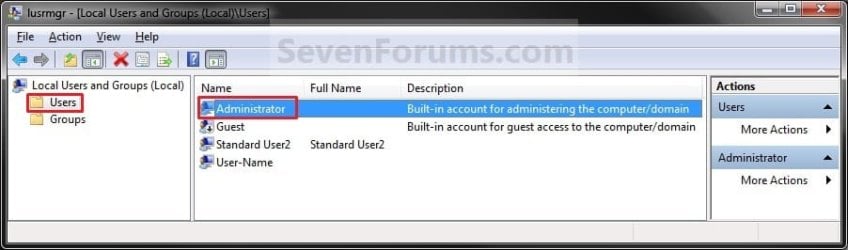
2. In the left pane, click on the Users folder. (See screenshot below step 3)

3. In the middle pane, right click on Administrator and click on Properties. (See screenshot below)
Local_Users_and_Group.jpg
4. To Enable the Built-in Elevated Administrator Account
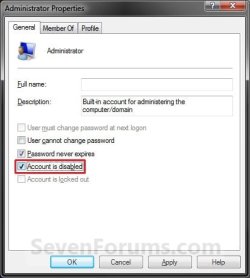
A) Uncheck the Account is disabled box. (See screenshot below step 6)

B) Go to step 6.
5. To Disable the Built-in Elevated Administrator Account
NOTE: This is the default setting.
A) Check the Account is disabled box. (See screenshot below step 6)
6. Click on OK. (See screenshot below)
Properties.jpg
7. Close the Local Users and Groups window. (See screenshot below step 3)

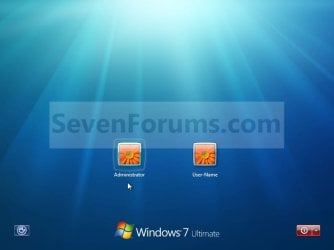
8. Log off, and you will now see the built-in Administrator account log on icon added (enabled) or removed (disabled) from the log on screen. (See screeenshot below)
NOTE: Click on the Administrator icon to log on to the built-in Administrator account.
Log-on.jpg


OPTION TWO

Enable built-in Administrator in an Elevated Command Prompt


NOTE: This option can be used in all editions of Windows 7. If your Windows 7 uses another language than English, then you may need to translate the word administrator part of the commands below to your language to use instead.
1. Open an elevated command prompt, and do step 2, 3, or 4 below for what you want to do.

2. To Enable the Hidden Built-in Elevated Administrator Account
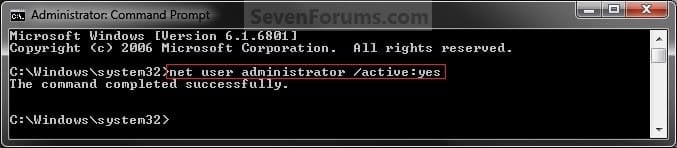
A) In the elevated command prompt, copy and paste the command below and press Enter, and go to step 5 below. (See screenshot below)
NOTE: If you had previously renamed the built-in "Administrator" account's name, then you will need to substitute administrator in the command below with the new name instead.
net user administrator /active:yes
Command_Enable.jpg
3. To Enable the Hidden Built-in Elevated Administrator Account with Password
A) In the elevated command prompt, copy and paste the command below and press Enter, and go to step 5 below. (See screenshot below)
NOTE: If you had previously renamed the built-in "Administrator" account's name, then you will need to substitute administrator in the command below with the new name instead.
net user administrator password /active:yes

   Note
Substitute password in the command above with the password you want to use to log on to the built-in Administrator account.


4. To Disable the Hidden Built-in Elevated Administrator Account
NOTE: This is the default setting.
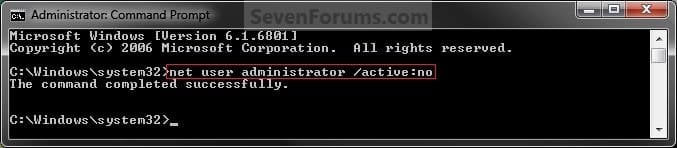
A) In the elevated command prompt, copy and paste the command below and press Enter, and go to step 5 below. (See screenshot below)
NOTE: If you had previously renamed the built-in "Administrator" account's name, then you will need to substitute administrator in the command below with the new name instead.
net user administrator /active:no
Command_Disable.jpg
5. Close the elevated command prompt.

6. Log off, and you will now see the built-in Administrator account log on icon added (enabled) or removed (disabled) from the log on screen. (See screeenshot below)
NOTE: Click on the Administrator icon to log on to the built-in Administrator account.
Log-on.jpg


OPTION THREE

Enable built-in Administrator in Local Security Policy


NOTE: This option will only be available in the Windows 7 Professional, Ultimate, and Enterprise editions.
1. Open the Local Security Policy editor.

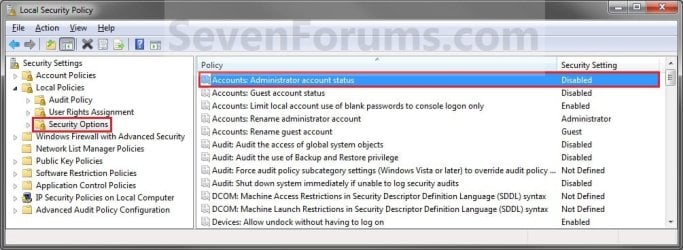
2. In the left pane, expand Local Policies, and click on Security Options. (See screenshot below)
Secpol-1.jpg
3. In the right pane, right click on Accounts: Administrator account status and click on Properties. (See screenshot above)

4. To Enable the Hidden Built-in Elevated Administrator Account
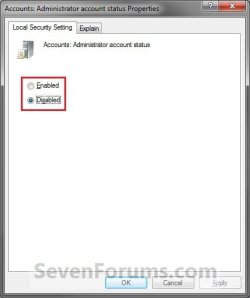
A) Select (dot) Enabled. (See screenshot below step 6)

B) Go to step 6.
5. To Disable the Hidden Built-in Elevated Administrator Account
NOTE: This is the default setting.
A) Select (dot) Disabled. (See screenshot below step 6)
6. Click on OK. (See screenshot below)
Secpol-2.jpg
7. Close the Local Security Policy window. (See screenshot below step 2)

8. Log off, and you will now see the built-in Administrator account log on icon added (enabled) or removed (disabled) from the log on screen. (See screeenshot below)
NOTE: Click on the Administrator icon to log on to the built-in Administrator account.
Log-on.jpg


OPTION FOUR

Enable built-in Administrator from System Recovery (WinRE) at Boot


1. For how, see: How to Enable the Built-in Administrator Account from WinRE
That's it,
Shawn


Last edited:
Hello Jamal,

What happened to your normal administrator account?

You might give OPTION FOUR a try at boot.


Many thanks Brink

I’m not sure how I got stuck there!

· the machine has only one user at start/log off/ switch user
· This user has no administrative privileges!

What does “option four” refer to? Is it F4?

Best

Jamal


Option Four is the last option in the tutorial on the first page.

It's to enable the built-in Administrator at boot.
 

My Computer My Computer

At a glance

64-bit Windows 11 Pro for WorkstationsIntel i7-8700K OC'd to 5 GHz64 GB (4x16GB) G.SKILL TridentZ RGB DDR4 3600...ASUS ROG-STRIX-GTX1080TI-O11G-GAMING
Computer type
PC/Desktop
Computer Manufacturer/Model Number
Self built custom
OS
64-bit Windows 11 Pro for Workstations
CPU
Intel i7-8700K OC'd to 5 GHz
Motherboard
ASUS ROG Maximus XI Formula Z390
Memory
64 GB (4x16GB) G.SKILL TridentZ RGB DDR4 3600 MHz
Graphics Card(s)
ASUS ROG-STRIX-GTX1080TI-O11G-GAMING
Sound Card
Integrated
Monitor(s) Displays
2 x Samsung Odyssey G7 27"
Screen Resolution
2560x1440
Hard Drives
1TB Samsung 990 PRO M.2,
4TB Samsung 990 PRO PRO M.2,
TerraMaster F8 SSD Plus NAS
PSU
Seasonic Prime Titanium 850W
Case
Thermaltake Core P3
Cooling
Corsair Hydro H115i
Keyboard
Logitech wireless K800
Mouse
Logitech MX Master 4
Internet Speed
2 Gb/s Download and 100 Mb/s Upload
Antivirus
Malwarebyte Anti-Malware Premium
Browser
Google Chrome
Other Info
Logitech Z625 speaker system,
Logitech BRIO 4K Pro webcam,
HP Color LaserJet Pro MFP M477fdn,
APC SMART-UPS RT 1000 XL - SURT1000XLI,
Galaxy S23 Plus phone
Hello Jamal,

What happened to your normal administrator account?

You might give OPTION FOUR a try at boot.


Many thanks Brink

I’m not sure how I got stuck there!

· the machine has only one user at start/log off/ switch user
· This user has no administrative privileges!

What does “option four” refer to? Is it F4?

Best

Jamal


Option Four is the last option in the tutorial on the first page.

It's to enable the built-in Administrator at boot.

Many thanks Brink.

I to try it and see if it works with me

Best

Jamal
 

My Computer My Computer

At a glance

Windows 7 Ultimate x64
OS
Windows 7 Ultimate x64
hi great tutorial as I had to use it for first time to take ownership of folder to stop a dcom error from new network printer driver errors on Canon's new photo printer 7220. Now that is out of the way I used the COMMAND PROMPT option shown in tutorial.

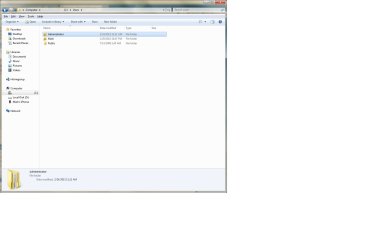
My issue is now in C:/Users I see 3 folders when I only saw 2 before they are Administrator - Mark - Public. the admin and the mark ones show a lock on them (btw i have system setup to NOT show hidden files by default) anyhow the admin when i rite click for properties shows the date of its creation as the day and time I used command prompt to access hidden admin account for first time..

I have uploaded a screenshot.... just don't ever remember seeing this folder and its contents which are duplicates of folders, contacts.favs, etc.... and each only contain one file which would be "contacts/admin contacts file".....

I do believe prior to using admin acct the only time i would see that admin folder is if i unchecked show hidden folders. is this correct?

Thanks in advance for any insight. Windows 7 64 bit pro
 

Attachments

  • users_folder.jpg
    users_folder.jpg
    53.6 KB · Views: 204

My Computer My Computer

At a glance

Wiindows 7 Professional 64biti7-94012 GBS Kingston HyperX @ 1600XFX GTS250 512mb
Computer type
PC/Desktop
Computer Manufacturer/Model Number
Puget Systems
OS
Wiindows 7 Professional 64bit
CPU
i7-940
Motherboard
Asus P6T Deluxe
Memory
12 GBS Kingston HyperX @ 1600
Graphics Card(s)
XFX GTS250 512mb
Sound Card
Asus Xonar D2X
Monitor(s) Displays
HP lp2475w
Screen Resolution
1920 x 1200 24"
Hard Drives
Velicoraptor 150gbs- OS/Programs
WD Black 640gbs-Music/Pictures/Cache/Temp Files
PSU
Corsair 750
Case
P182 Gunmetal Grey
Cooling
Corsair H60 Cooler and couple 3 speed Antec Fans
Keyboard
MS 3000
Mouse
MS 6000
Internet Speed
Comcast Cable Business Grade :~)
Other Info
box built by Puget Systemsback in late Dec 2008 early i7 guy. had it built for my photography work with large raw files from Nikon D700 using Nikon NX2 and some lite music work from bundle that came with Xonar card.... Sonar, Ableton, Cakewalk, etc.

Stable as can be average around 9 to 10 using Windows 7 64 Reliability History.
Hello chevysales,

The "C:\Users\Administrator" profile folder is normal. It is added after you have enabled the built-in Administrator account and logged on to it the first time.

It's profile folder will remain there even after disabling the built-in Administrator account. The profile folder will contain all personal settings for that account. This way it can be used again the next time you enable the built-in Administrator account instead of having to do the whole "preparing account" from scratch again.

However, if you like, you can safely delete the "C:\Users\Administrator" folder after disabling the built-in Administrator account.

Hope this helps, :)
Shawn
 

My Computer My Computer

At a glance

64-bit Windows 11 Pro for WorkstationsIntel i7-8700K OC'd to 5 GHz64 GB (4x16GB) G.SKILL TridentZ RGB DDR4 3600...ASUS ROG-STRIX-GTX1080TI-O11G-GAMING
Computer type
PC/Desktop
Computer Manufacturer/Model Number
Self built custom
OS
64-bit Windows 11 Pro for Workstations
CPU
Intel i7-8700K OC'd to 5 GHz
Motherboard
ASUS ROG Maximus XI Formula Z390
Memory
64 GB (4x16GB) G.SKILL TridentZ RGB DDR4 3600 MHz
Graphics Card(s)
ASUS ROG-STRIX-GTX1080TI-O11G-GAMING
Sound Card
Integrated
Monitor(s) Displays
2 x Samsung Odyssey G7 27"
Screen Resolution
2560x1440
Hard Drives
1TB Samsung 990 PRO M.2,
4TB Samsung 990 PRO PRO M.2,
TerraMaster F8 SSD Plus NAS
PSU
Seasonic Prime Titanium 850W
Case
Thermaltake Core P3
Cooling
Corsair Hydro H115i
Keyboard
Logitech wireless K800
Mouse
Logitech MX Master 4
Internet Speed
2 Gb/s Download and 100 Mb/s Upload
Antivirus
Malwarebyte Anti-Malware Premium
Browser
Google Chrome
Other Info
Logitech Z625 speaker system,
Logitech BRIO 4K Pro webcam,
HP Color LaserJet Pro MFP M477fdn,
APC SMART-UPS RT 1000 XL - SURT1000XLI,
Galaxy S23 Plus phone
Hello chevysales,

The "C:\Users\Administrator" profile folder is normal. It is added after you have enabled the built-in Administrator account and logged on to it the first time.

It's profile folder will remain there even after disabling the built-in Administrator account. The profile folder will contain all personal settings for that account. This way it can be used again the next time you enable the built-in Administrator account instead of having to do the whole "preparing account" from scratch again.

However, if you like, you can safely delete the "C:\Users\Administrator" folder after disabling the built-in Administrator account.

Hope this helps, :)
Shawn


Thank you very much shawn.
 

My Computer My Computer

At a glance

Wiindows 7 Professional 64biti7-94012 GBS Kingston HyperX @ 1600XFX GTS250 512mb
Computer type
PC/Desktop
Computer Manufacturer/Model Number
Puget Systems
OS
Wiindows 7 Professional 64bit
CPU
i7-940
Motherboard
Asus P6T Deluxe
Memory
12 GBS Kingston HyperX @ 1600
Graphics Card(s)
XFX GTS250 512mb
Sound Card
Asus Xonar D2X
Monitor(s) Displays
HP lp2475w
Screen Resolution
1920 x 1200 24"
Hard Drives
Velicoraptor 150gbs- OS/Programs
WD Black 640gbs-Music/Pictures/Cache/Temp Files
PSU
Corsair 750
Case
P182 Gunmetal Grey
Cooling
Corsair H60 Cooler and couple 3 speed Antec Fans
Keyboard
MS 3000
Mouse
MS 6000
Internet Speed
Comcast Cable Business Grade :~)
Other Info
box built by Puget Systemsback in late Dec 2008 early i7 guy. had it built for my photography work with large raw files from Nikon D700 using Nikon NX2 and some lite music work from bundle that came with Xonar card.... Sonar, Ableton, Cakewalk, etc.

Stable as can be average around 9 to 10 using Windows 7 64 Reliability History.
You're most welcome chevysales. :)
 

My Computer My Computer

At a glance

64-bit Windows 11 Pro for WorkstationsIntel i7-8700K OC'd to 5 GHz64 GB (4x16GB) G.SKILL TridentZ RGB DDR4 3600...ASUS ROG-STRIX-GTX1080TI-O11G-GAMING
Computer type
PC/Desktop
Computer Manufacturer/Model Number
Self built custom
OS
64-bit Windows 11 Pro for Workstations
CPU
Intel i7-8700K OC'd to 5 GHz
Motherboard
ASUS ROG Maximus XI Formula Z390
Memory
64 GB (4x16GB) G.SKILL TridentZ RGB DDR4 3600 MHz
Graphics Card(s)
ASUS ROG-STRIX-GTX1080TI-O11G-GAMING
Sound Card
Integrated
Monitor(s) Displays
2 x Samsung Odyssey G7 27"
Screen Resolution
2560x1440
Hard Drives
1TB Samsung 990 PRO M.2,
4TB Samsung 990 PRO PRO M.2,
TerraMaster F8 SSD Plus NAS
PSU
Seasonic Prime Titanium 850W
Case
Thermaltake Core P3
Cooling
Corsair Hydro H115i
Keyboard
Logitech wireless K800
Mouse
Logitech MX Master 4
Internet Speed
2 Gb/s Download and 100 Mb/s Upload
Antivirus
Malwarebyte Anti-Malware Premium
Browser
Google Chrome
Other Info
Logitech Z625 speaker system,
Logitech BRIO 4K Pro webcam,
HP Color LaserJet Pro MFP M477fdn,
APC SMART-UPS RT 1000 XL - SURT1000XLI,
Galaxy S23 Plus phone
a system error 5 has occured. access denied. command prompt didnt work.

I did a cmd in start, right clicked, ran as administrator. I dont have admin access, which is the problem I'm trying to solve.
 

My Computer My Computer

At a glance

Win 7 Pro, Mac OS Sierra
Computer type
PC/Desktop
OS
Win 7 Pro, Mac OS Sierra
Internet Speed
fast. ;)
Antivirus
panda free
Browser
firefox mostly, safari, anything but IE. IE sucks!
Other Info
Mac user 27+, but I like windows 7. Very Mac like. My A+ cert is from 2008 and I don't work on computers every day, so i'm getting rusty. This forum is a BIG help.
When you right click on CMD and choose Run as administrator . On the User Access Control window does it ask for a password ? Or a Yes button ?
 

My Computer My Computer

At a glance

Windows 7 Ultimate 32-Bit & Windows 7 Ultimat...Intel Core i7 CPU 950 @ 3.07GHzOCZ 6GB (3 x 2GB) 240-Pin DDR3 SDRAM DDR3 160...ATI Radeon HD 5700 Series
Computer Manufacturer/Model Number
Custom Built
OS
Windows 7 Ultimate 32-Bit & Windows 7 Ultimate 64-Bit
CPU
Intel Core i7 CPU 950 @ 3.07GHz
Motherboard
ASUS P6T DELUXE V2
Memory
OCZ 6GB (3 x 2GB) 240-Pin DDR3 SDRAM DDR3 1600 OCZ3X1600R2
Graphics Card(s)
ATI Radeon HD 5700 Series
Sound Card
OnBoard
Hard Drives
WD6400AACS-00M3B0 (640GB SATA )
PSU
CORSAIR 850w
Case
NZXT LEXA
Cooling
Intel Stock Heatsink Fan
Keyboard
Microsoft Wireless Laser Keyboard 7000
Mouse
Microsoft Wireless Laser Mouse 7000
right click on cmd just opened to the dos prompt. c:windows/system32>
 

My Computer My Computer

At a glance

Win 7 Pro, Mac OS Sierra
Computer type
PC/Desktop
OS
Win 7 Pro, Mac OS Sierra
Internet Speed
fast. ;)
Antivirus
panda free
Browser
firefox mostly, safari, anything but IE. IE sucks!
Other Info
Mac user 27+, but I like windows 7. Very Mac like. My A+ cert is from 2008 and I don't work on computers every day, so i'm getting rusty. This forum is a BIG help.
Type net user administrator /active:yes

Press <ENTER>key
You should get a message " The command completed successfully "

That command will enable the built in administrator ( hidden account )
 

My Computer My Computer

At a glance

Windows 7 Ultimate 32-Bit & Windows 7 Ultimat...Intel Core i7 CPU 950 @ 3.07GHzOCZ 6GB (3 x 2GB) 240-Pin DDR3 SDRAM DDR3 160...ATI Radeon HD 5700 Series
Computer Manufacturer/Model Number
Custom Built
OS
Windows 7 Ultimate 32-Bit & Windows 7 Ultimate 64-Bit
CPU
Intel Core i7 CPU 950 @ 3.07GHz
Motherboard
ASUS P6T DELUXE V2
Memory
OCZ 6GB (3 x 2GB) 240-Pin DDR3 SDRAM DDR3 1600 OCZ3X1600R2
Graphics Card(s)
ATI Radeon HD 5700 Series
Sound Card
OnBoard
Hard Drives
WD6400AACS-00M3B0 (640GB SATA )
PSU
CORSAIR 850w
Case
NZXT LEXA
Cooling
Intel Stock Heatsink Fan
Keyboard
Microsoft Wireless Laser Keyboard 7000
Mouse
Microsoft Wireless Laser Mouse 7000
not working.

system error 5 has occurred. access is denied.
 

My Computer My Computer

At a glance

Win 7 Pro, Mac OS Sierra
Computer type
PC/Desktop
OS
Win 7 Pro, Mac OS Sierra
Internet Speed
fast. ;)
Antivirus
panda free
Browser
firefox mostly, safari, anything but IE. IE sucks!
Other Info
Mac user 27+, but I like windows 7. Very Mac like. My A+ cert is from 2008 and I don't work on computers every day, so i'm getting rusty. This forum is a BIG help.
Inside Command prompt what is the path its opened to ?
 

My Computer My Computer

At a glance

Windows 7 Ultimate 32-Bit & Windows 7 Ultimat...Intel Core i7 CPU 950 @ 3.07GHzOCZ 6GB (3 x 2GB) 240-Pin DDR3 SDRAM DDR3 160...ATI Radeon HD 5700 Series
Computer Manufacturer/Model Number
Custom Built
OS
Windows 7 Ultimate 32-Bit & Windows 7 Ultimate 64-Bit
CPU
Intel Core i7 CPU 950 @ 3.07GHz
Motherboard
ASUS P6T DELUXE V2
Memory
OCZ 6GB (3 x 2GB) 240-Pin DDR3 SDRAM DDR3 1600 OCZ3X1600R2
Graphics Card(s)
ATI Radeon HD 5700 Series
Sound Card
OnBoard
Hard Drives
WD6400AACS-00M3B0 (640GB SATA )
PSU
CORSAIR 850w
Case
NZXT LEXA
Cooling
Intel Stock Heatsink Fan
Keyboard
Microsoft Wireless Laser Keyboard 7000
Mouse
Microsoft Wireless Laser Mouse 7000
Administrators in 7 professional

This has been great. I've finally captured control of my computer!! However, I still need your help:

1) I've enabled the administrator levels and created a new user as an administrator (me). I can see both of these user accounts. I cannot see my original UAC which was set up for me as guest (don't ask as I don't know either)! I was able to link my new admin UAC to my original UAC.

I'm not able to log out of the administrator levels and return to my guest level. Can someone provide the command to do so?

2). What action did I mistakenly take 2 days ago that resulted I computer hijack????? Never before was I required to log in as an admin in order to accept updates from software providers except Microsoft for Windows. At some level, that distinction really irritates me!! I'd kite to make sure that this never happens again!!

Thanks ya'll!!
 

My Computer My Computer

At a glance

Windows 7 professional 64bit
Computer type
PC/Desktop
Computer Manufacturer/Model Number
Dell
OS
Windows 7 professional 64bit
Hello Sillygirlmagic, and welcome to Seven Forums.

I assume you meant that you enabled the built-in elevated "Administator" account to use?

When you say "I cannot see my original UAC", do you mean "user account" for UAC and not the usual meaning of "User Account Control" prompt?

Do you mean that you are unable to log in to your original "unelevated" administrator account when you say "not able to return to my guest level"?

A guest account would not be able to accept updates if that is the type of account you are logged in to at the time.

If you would, please open User Accounts in the Control Panel (icons view), click on Manage another account, and post a screenshot showing "Manage Accounts" to see what accounts are listed and what type they are. :)
 

My Computer My Computer

At a glance

64-bit Windows 11 Pro for WorkstationsIntel i7-8700K OC'd to 5 GHz64 GB (4x16GB) G.SKILL TridentZ RGB DDR4 3600...ASUS ROG-STRIX-GTX1080TI-O11G-GAMING
Computer type
PC/Desktop
Computer Manufacturer/Model Number
Self built custom
OS
64-bit Windows 11 Pro for Workstations
CPU
Intel i7-8700K OC'd to 5 GHz
Motherboard
ASUS ROG Maximus XI Formula Z390
Memory
64 GB (4x16GB) G.SKILL TridentZ RGB DDR4 3600 MHz
Graphics Card(s)
ASUS ROG-STRIX-GTX1080TI-O11G-GAMING
Sound Card
Integrated
Monitor(s) Displays
2 x Samsung Odyssey G7 27"
Screen Resolution
2560x1440
Hard Drives
1TB Samsung 990 PRO M.2,
4TB Samsung 990 PRO PRO M.2,
TerraMaster F8 SSD Plus NAS
PSU
Seasonic Prime Titanium 850W
Case
Thermaltake Core P3
Cooling
Corsair Hydro H115i
Keyboard
Logitech wireless K800
Mouse
Logitech MX Master 4
Internet Speed
2 Gb/s Download and 100 Mb/s Upload
Antivirus
Malwarebyte Anti-Malware Premium
Browser
Google Chrome
Other Info
Logitech Z625 speaker system,
Logitech BRIO 4K Pro webcam,
HP Color LaserJet Pro MFP M477fdn,
APC SMART-UPS RT 1000 XL - SURT1000XLI,
Galaxy S23 Plus phone
Built In Admin Account

Hi Brink,

Thanks for your quick response. Apologies for sloppy usage of terms!

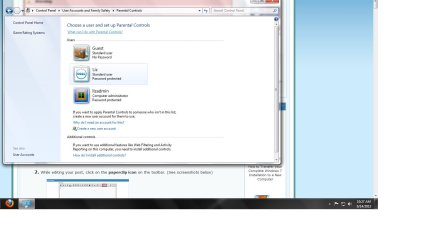
Yes, I did enable the built-in elevated 'Administrator' account to use. The only way to gain control. I cannot see my original user account at this level. Meaning, there is no icon for me to log into when I log off of both of the Administrator accounts available. At this 'level' I've only been able to locate my original user account, 'Dell/Liz' under Parental Controls. See attachment #1.

Now, I have 3 accounts at this 'level' - Administrator, Admin-Liz, and Guest User. I will disable the Guest User as I don't see a real purpose for it.

Not sure what else to call where I am other than 'level'.

When my computer what set up, I was set up as a Guest User. Note that the Dell/Liz Icon now has the label of 'standard user'. Not really sure what that means. I tried to change my user profile from 'Guest to Admin' but that didn't work either.

If this all make sense to you, I'm happy! Just need to know how to get back to Dell/Liz Icon and never, ever, ever do what ever it is I did 24 hours ago so that I can just continue to be a limited=knowledge user!

Thanks -))

:party:
 

Attachments

  • Parental Controls.jpg
    Parental Controls.jpg
    77.4 KB · Views: 165

My Computer My Computer

At a glance

Windows 7 professional 64bit
Computer type
PC/Desktop
Computer Manufacturer/Model Number
Dell
OS
Windows 7 professional 64bit
Ah, ok. "Level" would be "type" instead for the actual technical term, but I understand what you meant. :)

By default, the built-in Administrator account is named "Administrator" and not "lizadmin". Did you rename it?

Is this computer part of a domain?

You should be able to log in to the "lizadmin" account to be able to change the "Liz" account to be an administrator type of account.
http://www.sevenforums.com/tutorials/103538-user-account-type-change.html
 

My Computer My Computer

At a glance

64-bit Windows 11 Pro for WorkstationsIntel i7-8700K OC'd to 5 GHz64 GB (4x16GB) G.SKILL TridentZ RGB DDR4 3600...ASUS ROG-STRIX-GTX1080TI-O11G-GAMING
Computer type
PC/Desktop
Computer Manufacturer/Model Number
Self built custom
OS
64-bit Windows 11 Pro for Workstations
CPU
Intel i7-8700K OC'd to 5 GHz
Motherboard
ASUS ROG Maximus XI Formula Z390
Memory
64 GB (4x16GB) G.SKILL TridentZ RGB DDR4 3600 MHz
Graphics Card(s)
ASUS ROG-STRIX-GTX1080TI-O11G-GAMING
Sound Card
Integrated
Monitor(s) Displays
2 x Samsung Odyssey G7 27"
Screen Resolution
2560x1440
Hard Drives
1TB Samsung 990 PRO M.2,
4TB Samsung 990 PRO PRO M.2,
TerraMaster F8 SSD Plus NAS
PSU
Seasonic Prime Titanium 850W
Case
Thermaltake Core P3
Cooling
Corsair Hydro H115i
Keyboard
Logitech wireless K800
Mouse
Logitech MX Master 4
Internet Speed
2 Gb/s Download and 100 Mb/s Upload
Antivirus
Malwarebyte Anti-Malware Premium
Browser
Google Chrome
Other Info
Logitech Z625 speaker system,
Logitech BRIO 4K Pro webcam,
HP Color LaserJet Pro MFP M477fdn,
APC SMART-UPS RT 1000 XL - SURT1000XLI,
Galaxy S23 Plus phone
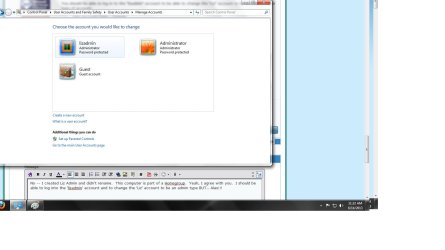
No -- I created Liz Admin and didn't rename. This computer is part of a Homegroup. Yeah, I agree with you. I should be able to log into the 'lizadmin' account and to change the 'Liz' account to be an admin type BUT.. Alas!!!

I am unable to 'see' the Liz account from any other screen then under Parental Controls. WhatdidIdo?? -)) PS -- I am logged in as LizAdmin -)))))
 

Attachments

  • Changing an account.jpg
    Changing an account.jpg
    71.7 KB · Views: 138

My Computer My Computer

At a glance

Windows 7 professional 64bit
Computer type
PC/Desktop
Computer Manufacturer/Model Number
Dell
OS
Windows 7 professional 64bit
Let's check in Local Users and Groups (lusrmgr.msc) in the "Users" folder like below to see if the "Liz" account is listed. If it is, check to make sure that the account is not disabled, and see if you may be able to add the account to be a member of the "Administrators" group.

(Option One)
http://www.sevenforums.com/tutorials/181426-user-account-enable-disable.html

(Option Five)
http://www.sevenforums.com/tutorials/103538-user-account-type-change.html


170268d1313358390-user-account-type-change-lusrmgr-1.jpg
 

My Computer My Computer

At a glance

64-bit Windows 11 Pro for WorkstationsIntel i7-8700K OC'd to 5 GHz64 GB (4x16GB) G.SKILL TridentZ RGB DDR4 3600...ASUS ROG-STRIX-GTX1080TI-O11G-GAMING
Computer type
PC/Desktop
Computer Manufacturer/Model Number
Self built custom
OS
64-bit Windows 11 Pro for Workstations
CPU
Intel i7-8700K OC'd to 5 GHz
Motherboard
ASUS ROG Maximus XI Formula Z390
Memory
64 GB (4x16GB) G.SKILL TridentZ RGB DDR4 3600 MHz
Graphics Card(s)
ASUS ROG-STRIX-GTX1080TI-O11G-GAMING
Sound Card
Integrated
Monitor(s) Displays
2 x Samsung Odyssey G7 27"
Screen Resolution
2560x1440
Hard Drives
1TB Samsung 990 PRO M.2,
4TB Samsung 990 PRO PRO M.2,
TerraMaster F8 SSD Plus NAS
PSU
Seasonic Prime Titanium 850W
Case
Thermaltake Core P3
Cooling
Corsair Hydro H115i
Keyboard
Logitech wireless K800
Mouse
Logitech MX Master 4
Internet Speed
2 Gb/s Download and 100 Mb/s Upload
Antivirus
Malwarebyte Anti-Malware Premium
Browser
Google Chrome
Other Info
Logitech Z625 speaker system,
Logitech BRIO 4K Pro webcam,
HP Color LaserJet Pro MFP M477fdn,
APC SMART-UPS RT 1000 XL - SURT1000XLI,
Galaxy S23 Plus phone
Will do now -- I think that's How I got to 'Administrator' yesterday.. brb
 

My Computer My Computer

At a glance

Windows 7 professional 64bit
Computer type
PC/Desktop
Computer Manufacturer/Model Number
Dell
OS
Windows 7 professional 64bit
WHOOP!!!!

Brink, YOU ROCK!! Are you in Central Texas? Should I bring you a homemade pie? Thank you!

Liz was enabled; I was able to add Liz under the Administrator Group. Now, the final question:

HOW DID THIS HAPPEN???? Why, all of a sudden, did 'Liz' User not have the ability to download even Java updates??

Thanks so much.

:party::party::party::party::party::party::party::party::party::party::party::party::party::party::party:
 

My Computer My Computer

At a glance

Windows 7 professional 64bit
Computer type
PC/Desktop
Computer Manufacturer/Model Number
Dell
OS
Windows 7 professional 64bit
Back
Top