Built in Microsoft gadgets "cannot connect to service"

poomobile

New member
Local time
1:21 PM
Messages
2
Installed Windows 7 Home premium on a new build...just like I have done a million times before, and for some reason, the weather gadget and currency exchange gadget disable the error "cannot connect to service".

I have tried every single fix that I could find on google and nothing. I know Microsoft doesnt support them anymore, but I still like them....and I hate Windows 8 with a passion (not interested in a debate though). Is it possible that microsoft killed them? They still work on my other machines. I just don't get it...can someone please help.

Thanks
 

My Computer My Computer

At a glance

windows 7 home premiumi716gb corsairevga 650
OS
windows 7 home premium
CPU
i7
Motherboard
p8z77-v
Memory
16gb corsair
Graphics Card(s)
evga 650
Monitor(s) Displays
dell u2410
Hard Drives
ocz ssd
PSU
coolermaster
Case
corsair 600t
Cooling
corsair h80
Welcome to sevenforums poomobile.
I think MS have killed the service as both my weather and currency gadgets show the same message.
they worked not so long ago,
i use firefox and have an add on that when i highlight the currency i want to convert and right clic,k it shows the conversion in my context menu. you choose what currency you want it to convert to in the settings, i also have a bookmark for my location on a weather site.
the weather site is better as it gives a hourly breakdown and more detail forecast for the week also.
those gadgets became redundant to me a while back.
there may be other currency and weather gadgets that dont rely on MS to work,
 

My Computer My Computer

At a glance

Microsoft Windows 7 Home Premium 64-bit 7600IIx4 amd athelon 635 processor2x2gbati radeon HD 5450
Computer Manufacturer/Model Number
Hewlett packard/p6512uk
OS
Microsoft Windows 7 Home Premium 64-bit 7600
CPU
IIx4 amd athelon 635 processor
Motherboard
FOXCONN 2AA9
Memory
2x2gb
Graphics Card(s)
ati radeon HD 5450
Sound Card
(1) Realtek High Definition Audio (2) AMD High Definition
Monitor(s) Displays
samsung lcd tv 32"
Screen Resolution
1360x 768
Hard Drives
(1) WDC WD10 01FAES-60Z2A0 SATA Disk Device (2) Maxtor OneTouch USB Device (3) ST310003 33AS USB Device (4) WD My Book 1111 USB Device
PSU
?
Cooling
air!
Keyboard
wireless hp
Mouse
wireless Hp,optical
Internet Speed
1.10mb/s
Antivirus
MSE
Browser
Firefox
Thanks for your reply. The problem is that on all my other systems, they are running just fine. I wonder if they have done something to machines that have activated windows 7 in 2013?

I'm tempted to reinstall windows to try it....
 

My Computer My Computer

At a glance

windows 7 home premiumi716gb corsairevga 650
OS
windows 7 home premium
CPU
i7
Motherboard
p8z77-v
Memory
16gb corsair
Graphics Card(s)
evga 650
Monitor(s) Displays
dell u2410
Hard Drives
ocz ssd
PSU
coolermaster
Case
corsair 600t
Cooling
corsair h80
Same Boat :P

... The problem is that on all my other systems, they are running just fine. I wonder if they have done something to machines that have activated windows 7 in 2013?

I'm tempted to reinstall windows to try it....

I have no advice as I am in a similar situation. I just re-installed Win7 Ult 32 this morning and am now finding my factory-included Windows Weather gadget is giving the same "cannot connect to service" message.

Re-installed the widget between restarts and cleared app data caches without anti-virus and checked connection, as well as various adjustments in User Account Control. I should note that I cleaned my excess Winsxs files from prior to the SP1 update; but I dont see how that would affect it. It was working fine yesterday during yet another OS re-install.

I had just got done tweaking the last program; about 7 hours work, so it was especially disappointing not knowing if it is my end or MSNs weather service.

It might be worth noting that reading another post, I decided to try my factory-included currency converter and it failed to connect as well.

I also downloaded and tried a nearly identical weather widget that is frankly basically the same thing (iWeather Gadget) and it failed to connect also. However my NWS Radar gadget is updating fine.

The issue is ultimately : is it just me or the other end?

I would ask if you are certain the gadget is operating on your other systems or are they just not updating and frozen on the last update, as happens sometimes, making them look functional. • It can be checked, of course, by re-entering your location or a new one and seeing if they are indeed updating/refreshing.

I'm afraid I'm not much help, but I thought I would try to contribute a bit and let you know that another in a very similar situation is having the same problem; you aren't alone.

Kind regards.

:)
 
Last edited:

My Computer My Computer

At a glance

Windows 7 Ultimate 32bit SP1AMD Sempron 140 2.7 Ghz2Gig DDR2 DIMM (240-pin) PC2-6400 MB/secGPU NVIDIA GeForce 6150SE nForce 430
Computer type
PC/Desktop
Computer Manufacturer/Model Number
HP Compaq Presario CQ5500Y
OS
Windows 7 Ultimate 32bit SP1
CPU
AMD Sempron 140 2.7 Ghz
Motherboard
M2N68-LA (Narra5)
Memory
2Gig DDR2 DIMM (240-pin) PC2-6400 MB/sec
Graphics Card(s)
GPU NVIDIA GeForce 6150SE nForce 430
Sound Card
Integrated Realtek ALC888S Audio
Monitor(s) Displays
Dell SE178WFP LCD monitor 17"
Screen Resolution
1400 x 900
Hard Drives
ST350041 8AS SCSI - SATA 7200 rpm
Keyboard
Logitech K360 Wireless Keyboard
Mouse
Logitech Anywhere MX Wireless Laser Mouse
Internet Speed
Time Warner Roadrunner 3 mb (Down) 1 mb (Up) [Residential]
Antivirus
Microsoft Security Essentials
An update: I can't get the Weather Gadget to work; but I have accepted a work-around: a substitute gadget.

This website - MSN Weather 2.0 - Windows Sidebar Gadget Gallery - offers a weather Gadget that is equally tasteful and attractive, and perhaps even broader and better in function.

It is called MSN Weather 2.0, and it appears to work just fine on my humble clunky PC. It appears to be patterned off the old gadget, art-wise.

It does trouble me somewhat that I still don't know why the old gadget didn't work, but I am quite happy to use this new one (if for no other reason than it serves to let me escape my attempt at yet another perfect OS re-install), and it seems to be perhaps even nicer.

It would have been nice to know what the problem was with the old one and perhaps learned something, but at least now I can still have a fine desktop weather gadget, and can check over time later to see if the old one ever corrected itself.

I am sorry I cannot provide a more direct solution or answers, but hopefully this provides you with some relief and comfort with our frustrating problem.

Kind regards. ♥

:)
 
Last edited:

My Computer My Computer

At a glance

Windows 7 Ultimate 32bit SP1AMD Sempron 140 2.7 Ghz2Gig DDR2 DIMM (240-pin) PC2-6400 MB/secGPU NVIDIA GeForce 6150SE nForce 430
Computer type
PC/Desktop
Computer Manufacturer/Model Number
HP Compaq Presario CQ5500Y
OS
Windows 7 Ultimate 32bit SP1
CPU
AMD Sempron 140 2.7 Ghz
Motherboard
M2N68-LA (Narra5)
Memory
2Gig DDR2 DIMM (240-pin) PC2-6400 MB/sec
Graphics Card(s)
GPU NVIDIA GeForce 6150SE nForce 430
Sound Card
Integrated Realtek ALC888S Audio
Monitor(s) Displays
Dell SE178WFP LCD monitor 17"
Screen Resolution
1400 x 900
Hard Drives
ST350041 8AS SCSI - SATA 7200 rpm
Keyboard
Logitech K360 Wireless Keyboard
Mouse
Logitech Anywhere MX Wireless Laser Mouse
Internet Speed
Time Warner Roadrunner 3 mb (Down) 1 mb (Up) [Residential]
Antivirus
Microsoft Security Essentials

My Computer My Computer

At a glance

Windows 10 Pro. 64/ version 1709 Windows 7 Pr...Intel i7-6800K @ 4.3Corsair Platinum 16 gig @2400EVGA GTX 1070 OC
Computer type
PC/Desktop
Computer Manufacturer/Model Number
Home made Desktop
OS
Windows 10 Pro. 64/ version 1709 Windows 7 Pro/64
CPU
Intel i7-6800K @ 4.3
Motherboard
ASUS X-99 Deluxe II
Memory
Corsair Platinum 16 gig @2400
Graphics Card(s)
EVGA GTX 1070 OC
Monitor(s) Displays
Asus 27" LED LCD/VE278Q
Screen Resolution
1920-1080 or 1280-720 HDMI
Hard Drives
INTEL SSD 730-240 Gb Sata 3.0/
PSU
EVGA Platium 1200W
Case
Phanteks Luxe Tempered Glass 8 fans/ one radiator
Cooling
XSPC/ Water Cooled CPU
Keyboard
Das 4 Professional
Mouse
Logitech M705/MX Anywhere 2-S
Internet Speed
100 mbits
Antivirus
Microsoft Security Essentials/ Malwarebytes Premium 3.0/ SAS
Browser
I.E. 11 default/Firefox/ ISP Time Warner Cable/Spectrum
Other Info
LG BluRay Burner/
Sound system-KLipsch-THX/
Icy Dock ssd Hot Swap bays.
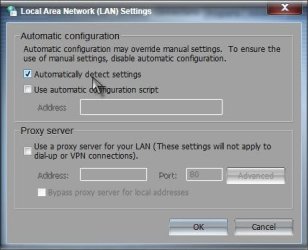
Try this:

Start> Control panel> Internet options> Connections tab> LAN settings> Uncheck Automatically detect settings

LAN.jpg

See if that helps. If no help

Open Internet Explorer> File in menu bar> Make sure Work offline is not checked


A Guy
 

My Computer My Computer

At a glance

Windows 10 Home x64INTEL Core i5-750 Quad-Core 3.37GHzHyperX Fury Black Series 8GB (2 x 4GB) 1866MhzEVGA GeForce GTX 750 Superclocked 1GB 128-Bit...
Computer type
PC/Desktop
OS
Windows 10 Home x64
CPU
INTEL Core i5-750 Quad-Core 3.37GHz
Motherboard
ASUS P7P55D
Memory
HyperX Fury Black Series 8GB (2 x 4GB) 1866Mhz
Graphics Card(s)
EVGA GeForce GTX 750 Superclocked 1GB 128-Bit GDDR5
Monitor(s) Displays
LG 32MA68HY 32" IPS
Screen Resolution
1920 x 1080
Hard Drives
Samsung 840 Evo 120GB, SEAGATE 500GB Barracuda® 7200.12, SATA 3 Gb/s, 7200 RPM, 16MB cache
PSU
ANTEC TruePower New TP-550, 80 PLUS, 550W
Case
ANTEC Three Hundred Illusion
Cooling
COOLER MASTER Hyper 212 Plus, 4 x 120mm 1 x 140mm Noctua's
Internet Speed
85 + Mbps
Antivirus
Avast
Browser
Vivaldi
Thanks for your reply. The problem is that on all my other systems, they are running just fine. I wonder if they have done something to machines that have activated windows 7 in 2013?

I'm tempted to reinstall windows to try it....

i dont think it is to do with windows7 activated in 2013 as mine was activated a couple of years ago, i think it could possibly be an update that has stopped the services or the server that supplies the up to date info,currency and up to the minute weather .

heres the HTC Home weather gadget it looks good .


HTC Home for Windows - Download
 

My Computer My Computer

At a glance

Microsoft Windows 7 Home Premium 64-bit 7600IIx4 amd athelon 635 processor2x2gbati radeon HD 5450
Computer Manufacturer/Model Number
Hewlett packard/p6512uk
OS
Microsoft Windows 7 Home Premium 64-bit 7600
CPU
IIx4 amd athelon 635 processor
Motherboard
FOXCONN 2AA9
Memory
2x2gb
Graphics Card(s)
ati radeon HD 5450
Sound Card
(1) Realtek High Definition Audio (2) AMD High Definition
Monitor(s) Displays
samsung lcd tv 32"
Screen Resolution
1360x 768
Hard Drives
(1) WDC WD10 01FAES-60Z2A0 SATA Disk Device (2) Maxtor OneTouch USB Device (3) ST310003 33AS USB Device (4) WD My Book 1111 USB Device
PSU
?
Cooling
air!
Keyboard
wireless hp
Mouse
wireless Hp,optical
Internet Speed
1.10mb/s
Antivirus
MSE
Browser
Firefox
Same situation here, it works perfectly on 3 of my other ps`c. I have changed locations on all those machines and followed the weather for days and they work fine.

It just started happening on my XFX board and I can not fix it. Tried Vista, 7 32, 7 64 none work. Throw 8 on there and it works fine. I hate 8. I have done no changes to 7 and it has always worked flawless for me. Then it just stopped working on the XFX. Found another weather gadget, that`s easy. I never have problems with 7 and this pissed me off. :confused: Why does it not connect on only this 1 machine and why just recently :huh: ugh !!

Grab the MSN 2.0 gadget from here it looks just like it, and guess what it works :party:

http://www.thoosje.com/Windows-7-gadgets-weather.html

And here`s another

http://www.adni18.com/gallery/details.php?image_id=276

Or you could just look out the window :p

This is a shot of it from my Compaq
 
Last edited:

My Computer My Computer

At a glance

Windows 10 Pro x64Intel Core i7 6700KGSkill TridentZ RGB 16GB 3600 16-16-16-36EVGA GTX 980 Ti SC x2
Computer type
PC/Desktop
Computer Manufacturer/Model Number
Skylake Special #666
OS
Windows 10 Pro x64
CPU
Intel Core i7 6700K
Motherboard
Asus Sabertooth Z170 Mark 1
Memory
GSkill TridentZ RGB 16GB 3600 16-16-16-36
Graphics Card(s)
EVGA GTX 980 Ti SC x2
Sound Card
Realtek High Definition
Monitor(s) Displays
AOC G2460PG
Screen Resolution
1920 x 1080 144Hz
Hard Drives
Samsung 860 Pro 256GB, Seagate Barracuda 4TB x2
PSU
EVGA 1000 P2, EVGA White Custom Braided Cables
Case
Corsair Vengeance C70 Gunmetal Black
Cooling
Corsair H100i v2, Corsair ML120 x2, Thermal Grizzly Kryonaut
Keyboard
Logitech G910 Orion Spectrum
Mouse
Logitech G700s
Internet Speed
Verizon Fios Quantum Gateway 75/75
Antivirus
Windows Defender, Malwarebytes Free 3.8.3
Browser
Chrome
Other Info
Corsair SP120 x4, LG Blu-ray Drive, Durabrand HT-395 100 Watt Dolby Digital Amp, Corsair H2100 Wireless 7.1 Headset
Just an update:

It started working on it's own. I thought I would check it yesterday and for some reason it was working again.

But now I am using the MSN weather gadget and like it much more.

Thank you to all who suggested ideas and the nice new gadgets.

:3
 

My Computer My Computer

At a glance

Windows 7 Ultimate 32bit SP1AMD Sempron 140 2.7 Ghz2Gig DDR2 DIMM (240-pin) PC2-6400 MB/secGPU NVIDIA GeForce 6150SE nForce 430
Computer type
PC/Desktop
Computer Manufacturer/Model Number
HP Compaq Presario CQ5500Y
OS
Windows 7 Ultimate 32bit SP1
CPU
AMD Sempron 140 2.7 Ghz
Motherboard
M2N68-LA (Narra5)
Memory
2Gig DDR2 DIMM (240-pin) PC2-6400 MB/sec
Graphics Card(s)
GPU NVIDIA GeForce 6150SE nForce 430
Sound Card
Integrated Realtek ALC888S Audio
Monitor(s) Displays
Dell SE178WFP LCD monitor 17"
Screen Resolution
1400 x 900
Hard Drives
ST350041 8AS SCSI - SATA 7200 rpm
Keyboard
Logitech K360 Wireless Keyboard
Mouse
Logitech Anywhere MX Wireless Laser Mouse
Internet Speed
Time Warner Roadrunner 3 mb (Down) 1 mb (Up) [Residential]
Antivirus
Microsoft Security Essentials
Hi,

i got the same problem after the official update by Microsoft about cancellation of the gadgets !

i tried new one

MSN Weather 2.0 - Windows Sidebar Gadget Gallery

just given in old post and it i working very fine for me !

thanks for the help and the new gadget is tested personally !
 

My Computer My Computer

At a glance

Microsoft Windows 7 UltimateIntel Core 2 Quad CPU Q6600 @ 2.40GHz @ 2.40GHz4GBIntel(R) G965 Express
Computer type
PC/Desktop
Computer Manufacturer/Model Number
Gigabyte Technology Co., Ltd.
OS
Microsoft Windows 7 Ultimate
CPU
Intel Core 2 Quad CPU Q6600 @ 2.40GHz @ 2.40GHz
Motherboard
Gigabyte Technology Co., Ltd.
Memory
4GB
Graphics Card(s)
Intel(R) G965 Express
Sound Card
Realtek HD 8-Channel High Definition Audio
Monitor(s) Displays
Dell LED
Screen Resolution
1026x768
Hard Drives
300GB With External 800GB
PSU
Intel 800W
Case
mpc Client Pro
Cooling
stock cpu, 120mm rear, 140mm top
Keyboard
Compaq
Mouse
Accer
Internet Speed
ADSL 24Mb/sec
Antivirus
ESET NOD32
Browser
Firefox
The solution for Gadgets "Service Not Available" which worked for me today is here:
Weather gadget not working- Cannot connect to service - Microsoft Community

A) Copy the following files and folder from a Windows 7 machine with a working stock weather gadget to a flash drive or network file share:

1. %localappdata%\affected user\local\microsoft\windows\windows live\services\cache\config.xml (just copy the file)

2. %localappdata%\affected user\local\microsoft\windows\windows sidebar\cache\168522d5-1082-4df2-b2f6-9185c31f9472 (copy entire folder which should contain one or more xml files)

3. %localappdata%\affected user\local\microsoft\windows\windows sidebar\settings.ini (just copy the file)


B) Paste (OVERWRITING if necessary) the copied folder and files into the same locations on the machine whose stock weather gadget is not working.


C) Drag the weather gadget back out and this time it should be working
This fixed both my Dad's Weather and Stock gadget.
 
It’s interesting as I have only experienced this trouble as of November 1, 2014 with the currency gadget (which makes me wonder if Microsoft was telling the truth about the cancellation date). All the currencies except for the US dollar disappeared and I already know that US$1=US$1! Upon reloading, it gives US$1=€1 (which is definitely not true!). A helpful user on the MS forum suggested switching off the gadget platform, then removing the gadget cache, then restarting the gadget platform, but that’s when I got ‘Cannot connect to service’.

The LAN settings suggestion earlier didn’t work for me. The fact it stopped on November 1 exactly makes me wonder if that was the end-of-life date for the gadgets.
 
Last edited:

My Computer My Computer

At a glance

Windows 7 Home Premium 64-bitIntel Core i5-2500 at 3·3 GHz8 GbyteNvidia GeForce GTX550Ti
Computer type
PC/Desktop
Computer Manufacturer/Model Number
Custom build with Asus motherboard
OS
Windows 7 Home Premium 64-bit
CPU
Intel Core i5-2500 at 3·3 GHz
Memory
8 Gbyte
Graphics Card(s)
Nvidia GeForce GTX550Ti
Browser
Firefox 20
Thank you, Greg! I will check it out!
 

My Computer My Computer

At a glance

Windows 7 Home Premium 64-bitIntel Core i5-2500 at 3·3 GHz8 GbyteNvidia GeForce GTX550Ti
Computer type
PC/Desktop
Computer Manufacturer/Model Number
Custom build with Asus motherboard
OS
Windows 7 Home Premium 64-bit
CPU
Intel Core i5-2500 at 3·3 GHz
Memory
8 Gbyte
Graphics Card(s)
Nvidia GeForce GTX550Ti
Browser
Firefox 20
Back
Top