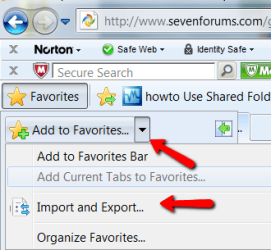
I am have a difficult time trying to import all of my Favorites from Windows XP Internet Explorer 8 to Windows 7 Favorites.
I have read many threads in this forum but none seem to provide me with the answer.
I copied all of my Favorites to a disc then copied them to Windows 7 Desktop.
Following all explained procedures still leaves me pulling what hair I have left on my head.
Can this be done easily? If so I need some kind soul to give me a step by step procedure as to how to do this.
Thanks for any help from out there.
Tegiro
I have read many threads in this forum but none seem to provide me with the answer.
I copied all of my Favorites to a disc then copied them to Windows 7 Desktop.
Following all explained procedures still leaves me pulling what hair I have left on my head.
Can this be done easily? If so I need some kind soul to give me a step by step procedure as to how to do this.
Thanks for any help from out there.
Tegiro
My Computer
At a glance
Windows 7 Home Premium (x64) (build 7600)2.80 gigahertz Intel Core i7 8608184 Megabytes Usable Installed MemoryNVIDIA GeForce GT 320 [Display adapter]
- Computer Manufacturer/Model Number
- Acer Aspire M5910
- OS
- Windows 7 Home Premium (x64) (build 7600)
- CPU
- 2.80 gigahertz Intel Core i7 860
- Motherboard
- Board: Acer Aspire M5910
- Memory
- 8184 Megabytes Usable Installed Memory
- Graphics Card(s)
- NVIDIA GeForce GT 320 [Display adapter]
- Sound Card
- NVIDIA High Definition Audio (4x)
- Monitor(s) Displays
- Acer X203W [Monitor] (20.0"vis, s/n LAN080244200, October 20
- Screen Resolution
- 1280x800
- Hard Drives
- 1728.88 Gigabytes Usable Hard Drive Capacity
1529.51 Gigabytes Hard Drive Free Space
- PSU
- 500 W (PFC, 80Plus-certified, more than 20% efficiency)
- Case
- Desktop PC Tower
- Cooling
- ?
- Keyboard
- Acer keyboard (USB Connected)
- Mouse
- Acer mouse (USB Connected)
- Internet Speed
- High Speed LAN (Cable Service)