
Chrome Browser - Import Favorites from Internet Explorer

How to Import Internet Explorer Favorites into Google Chrome Browser

   Information
This tutorial will show you how to import Internet Explorer Favorites into Google Chrome browser bookmarks.

   Note
If you haven't created any bookmarks in Chrome yet, the bookmarks you import will show up directly on the bookmarks bar under the address bar. If you already have bookmarks within Chrome, the bookmarks you import will appear in a new folder called Imported from IE located at the end of the bookmarks bar.

You can also find your bookmarks by clicking on the Chrome menu Chrome_menu.png button, and selecting Bookmarks.

   Tip
Google Chrome saves your bookmarks as the Bookmarks file in the hidden folder below. You could open the file in notepad to see it's contents.

C:\Users\(user-name)\AppData\Local\Google\Chrome\User Data\Default


Here's How:

1. In Chrome, click/tap on the Chrome menu Chrome_menu.png button, and do step 2 or 3 below.

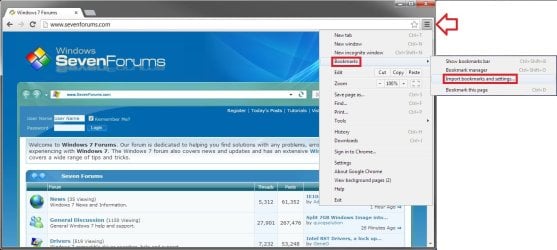
2. Click/tap on Bookmarks and Import bookmarks and settings, then go to step 4 below. (see screenshot below)
Chrome-1.jpg
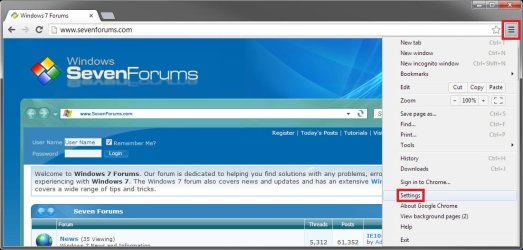
3. Click/tap on Settings. (see screenshot below)
Settings-1.jpg

A) In the Settings tab under Users, click/tap on Import bookmarks and settings, then go to step 4 below. (see screenshot below)
Settings-2.jpg
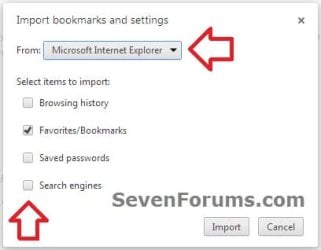
4. Select Microsoft Internet Explorer from the drop down menu, check Favorites/Bookmarks and any other item you want to import, then click/tap on Import. (see screenshot below)
Import-1.jpg
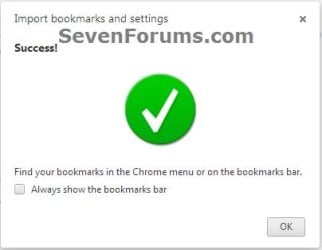
5. When the import has been successfully completed, click on OK. (see screenshot below)
NOTE: If you like, you can check or uncheck the Always show the bookmarks bar box to turn it on or off.
Import-2.jpg
6. If open, you can close the Settings tab if you like.


That's it,
Shawn


Last edited:
Is it possible to Keep Favorites bar open similar to Explorer

Having Imported my Favorites from Explorer 9 into Chrome it appears not possible to have the Favorites Drop down list permanently open. Currently in Chrome it takes several cursor movements to first get the drop down then to have to scroll down Favorites list to find and open any desired location. There must be an easier way....surely?
 

My Computer My Computer

At a glance

Windows 7 32 bitIntel Core 2 Duo 6600 @ 2.4gHz2 x 1gB DDR 2 PC2 5300 (333MHz)ATI Radeon X1300 Pro 256mB
Computer Manufacturer/Model Number
Dell Dimension DX061 - XPS210
OS
Windows 7 32 bit
CPU
Intel Core 2 Duo 6600 @ 2.4gHz
Memory
2 x 1gB DDR 2 PC2 5300 (333MHz)
Graphics Card(s)
ATI Radeon X1300 Pro 256mB
Sound Card
Sigmatel High Definition Audio Codec
Monitor(s) Displays
22" Flat Panel Model SP2208 WFP
Screen Resolution
1680 x 1050
Hard Drives
1 x Hitachi Deskstar SATA 500 gByte
Case
XPS
Keyboard
Logitech EX100 wireless
Mouse
Logitech wireless
Internet Speed
Absymal
Last edited by a moderator:

My Computer My Computer

At a glance

Windows 10 Pro x64 ; Xubuntu x64Intel i7 860 @ 2.80 GHz O/C'ed to 4.0GHz16GB Corsair Vengance DDR3 @ 661 MHz Dual Cha...EVGA NVidia GTX 560 1024MB
Computer type
PC/Desktop
Computer Manufacturer/Model Number
Golden Mk. I.4
OS
Windows 10 Pro x64 ; Xubuntu x64
CPU
Intel i7 860 @ 2.80 GHz O/C'ed to 4.0GHz
Motherboard
Gigabyte P55A-UD3R Rev.1. Award BIOS F13
Memory
16GB Corsair Vengance DDR3 @ 661 MHz Dual Channel (9-9-9-24)
Graphics Card(s)
EVGA NVidia GTX 560 1024MB
Sound Card
Realtek Integrated
Monitor(s) Displays
Dual Samsung SyncMaster 2494HS
Screen Resolution
1920*1080 and 1920*1080
Hard Drives
1*Samsung 840 EVO 120GB SSD;
1*OCZ Vertex 2 60GB SSD;
2*Samsung F3 SpinPoint 1TB in RAID0;
1*Samsung F1 SpinPoint 1TB;
2*Western Digital 1TB External USB 3.0
1*Western Digital 500GB External USB 3.0
1*Seagate 500GB External USB 2.0
PSU
Thermaltake ToughPower QFan 750W
Case
Thermaltake Element S VK60001W2Z
Cooling
Corsair H60 Water Cooling, 2*230mm and 2*80mm case fans
Keyboard
Logitech G110
Mouse
Logitech MX518
Hi Golden
Thanks for prompt for your reply. I have checked the Option tab and see it allows me to 'Show Bookmarks bar'. That bar, in turn displays horizontal bar across top of browser. In order then to show list of drop down 'Bookmarks' it requires another cursor movement to show 'Favorites' (US spelling), but when I come out of Chrome, the 'Favorites' list disappears and Chrome has to be instructed to show drop down before access next time. I don't see any command that keeps 'favorites' permanently displayed when Chrome is re-loaded...or am I missing something?
 

My Computer My Computer

At a glance

Windows 7 32 bitIntel Core 2 Duo 6600 @ 2.4gHz2 x 1gB DDR 2 PC2 5300 (333MHz)ATI Radeon X1300 Pro 256mB
Computer Manufacturer/Model Number
Dell Dimension DX061 - XPS210
OS
Windows 7 32 bit
CPU
Intel Core 2 Duo 6600 @ 2.4gHz
Memory
2 x 1gB DDR 2 PC2 5300 (333MHz)
Graphics Card(s)
ATI Radeon X1300 Pro 256mB
Sound Card
Sigmatel High Definition Audio Codec
Monitor(s) Displays
22" Flat Panel Model SP2208 WFP
Screen Resolution
1680 x 1050
Hard Drives
1 x Hitachi Deskstar SATA 500 gByte
Case
XPS
Keyboard
Logitech EX100 wireless
Mouse
Logitech wireless
Internet Speed
Absymal
Hello nimrod8,

The "bookmarks bar" should always be on in Chrome when you have that option checked.

Are you able to click on a folder or arrows (far left) on the bookmarks bar to see the menu of bookmarks?
 

My Computer My Computer

At a glance

64-bit Windows 11 Pro for WorkstationsIntel i7-8700K OC'd to 5 GHz64 GB (4x16GB) G.SKILL TridentZ RGB DDR4 3600...ASUS ROG-STRIX-GTX1080TI-O11G-GAMING
Computer type
PC/Desktop
Computer Manufacturer/Model Number
Self built custom
OS
64-bit Windows 11 Pro for Workstations
CPU
Intel i7-8700K OC'd to 5 GHz
Motherboard
ASUS ROG Maximus XI Formula Z390
Memory
64 GB (4x16GB) G.SKILL TridentZ RGB DDR4 3600 MHz
Graphics Card(s)
ASUS ROG-STRIX-GTX1080TI-O11G-GAMING
Sound Card
Integrated
Monitor(s) Displays
2 x Samsung Odyssey G7 27"
Screen Resolution
2560x1440
Hard Drives
1TB Samsung 990 PRO M.2,
4TB Samsung 990 PRO PRO M.2,
TerraMaster F8 SSD Plus NAS
PSU
Seasonic Prime Titanium 850W
Case
Thermaltake Core P3
Cooling
Corsair Hydro H115i
Keyboard
Logitech wireless K800
Mouse
Logitech MX Master 4
Internet Speed
2 Gb/s Download and 100 Mb/s Upload
Antivirus
Malwarebyte Anti-Malware Premium
Browser
Google Chrome
Other Info
Logitech Z625 speaker system,
Logitech BRIO 4K Pro webcam,
HP Color LaserJet Pro MFP M477fdn,
APC SMART-UPS RT 1000 XL - SURT1000XLI,
Galaxy S23 Plus phone
Back
Top