Burning DVD's doesnt work.

My Computer

Computer type
PC/Desktop
Computer Manufacturer/Model Number
Home Built Desktop By DataTech
OS
Windows 7 Ultimate X64 SP1
CPU
Intel i5-2550K, Differing ~4.4-4.8GHz No built in GPU
Motherboard
ASUS P8Z68-V PRO/GEN3
Memory
16GB G.Skill Sniper 1866MHz @ 2133MHz 2x8GB
Graphics Card(s)
ASUS GTX650TIB-DC2OC-2GD5, (650TI Boost)
Sound Card
Onboard Realtek 5-1
Monitor(s) Displays
Samsung P2570HD
Screen Resolution
1920x1080
Hard Drives
Samsung 840 Pro 256GB SSD for OS, 500GB Seagate Constellation (Enterprise drive) for Data
PSU
Corsair HX650W
Case
Inwin Dragon Rider
Cooling
Hyper 212 EVO w/two Noctua fans, push-pull, @1300 RPM
Keyboard
E-Z Eyes, bright yellow keys with large characters
Mouse
steelseries SENSEI Laser Pro Gaming
Internet Speed
48-51Mbs Mbs down, 11 Mbs up Xfinity Cable
Antivirus
Norton Internet Security 2013
Browser
IE 10, Opera, Pale Moon if needed
Other Info
4 case fans, LG BluRay-RE, ASUS DVD-RW, Mr. Fusion power supply, 1.21 gigawatts.
i was up at 7 but then went back to bed :D whats its friday :P

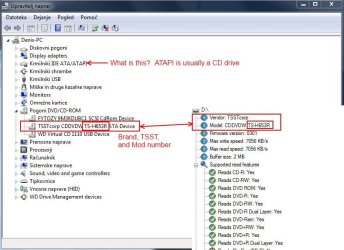
So i tell him that i need a toshiba TS-H653R ?

That translates to "controllers" picture below.
 

Attachments

  • Zajeta slika.JPG
    Zajeta slika.JPG
    13.3 KB · Views: 4

My Computer

Computer type
PC/Desktop
Computer Manufacturer/Model Number
HP
OS
Windows 7 64Bit
CPU
Intel (R) Core (TM) 2 Duo CPU 2.80GHz
Memory
4,00 GB
Graphics Card(s)
NVIDIA Geforce GT 220
Monitor(s) Displays
Samsung
Screen Resolution
1280x1024
Hard Drives
1t

My Computer

Computer type
PC/Desktop
Computer Manufacturer/Model Number
Home Built Desktop By DataTech
OS
Windows 7 Ultimate X64 SP1
CPU
Intel i5-2550K, Differing ~4.4-4.8GHz No built in GPU
Motherboard
ASUS P8Z68-V PRO/GEN3
Memory
16GB G.Skill Sniper 1866MHz @ 2133MHz 2x8GB
Graphics Card(s)
ASUS GTX650TIB-DC2OC-2GD5, (650TI Boost)
Sound Card
Onboard Realtek 5-1
Monitor(s) Displays
Samsung P2570HD
Screen Resolution
1920x1080
Hard Drives
Samsung 840 Pro 256GB SSD for OS, 500GB Seagate Constellation (Enterprise drive) for Data
PSU
Corsair HX650W
Case
Inwin Dragon Rider
Cooling
Hyper 212 EVO w/two Noctua fans, push-pull, @1300 RPM
Keyboard
E-Z Eyes, bright yellow keys with large characters
Mouse
steelseries SENSEI Laser Pro Gaming
Internet Speed
48-51Mbs Mbs down, 11 Mbs up Xfinity Cable
Antivirus
Norton Internet Security 2013
Browser
IE 10, Opera, Pale Moon if needed
Other Info
4 case fans, LG BluRay-RE, ASUS DVD-RW, Mr. Fusion power supply, 1.21 gigawatts.
Have you tried burning at the slowest speed possible? Sometimes you have to do that.
 

My Computer

Computer Manufacturer/Model Number
ME
OS
Win7 Home Premium 64 bit
CPU
AMD Phenom II X2 555 Black
Motherboard
Gigabyte GA-MA770-UD3
Memory
4 GB Kingston DDR2 800
Graphics Card(s)
Sapphire ATI Raedon HD6570 2GB DDR3
Sound Card
Built in
Monitor(s) Displays
HP 2010i
Screen Resolution
1600x900
Hard Drives
2 WD 500GB Caviar blue
1 WD 250GB
1 WD 80GB (usb)
Case
Antec P-160
Cooling
Hyper 212 EVO
Keyboard
Logitech K320
Mouse
Logitech Trackman Wheel Optical
I don't think TSST makes.supplies drive anymore. If you can remove yours and take it to the store, they could match it up. It is likely one like this and may have brackets attached to it for securing to your computer.

Newegg.com - Computer Hardware, CD / DVD Burners & Media, CD / DVD Burners, Slim DVD Burner
So if i only bring them the number and model wont be eneugh ?

Is there any difference in dvd+r and dvd-r ? couse i never understood why 2 types of dvd'.s

Have you tried burning at the slowest speed possible? Sometimes you have to do that.
I alyway's burn 1 below maximum..But will try the lovest speed right now.
 

My Computer

Computer type
PC/Desktop
Computer Manufacturer/Model Number
HP
OS
Windows 7 64Bit
CPU
Intel (R) Core (TM) 2 Duo CPU 2.80GHz
Memory
4,00 GB
Graphics Card(s)
NVIDIA Geforce GT 220
Monitor(s) Displays
Samsung
Screen Resolution
1280x1024
Hard Drives
1t
A quick guide and vid explaining the differences between the +R and -R disks.
DVD+R vs DVD-R - Difference and Comparison | Diffen
Most all burners for the last 5-6 years can read/write both. Prices now seem to be the same too.
They should be able to ascertain a replcement from just the model number, I thought it might be prudent to take you old one with you, just in case.
 

My Computer

Computer type
PC/Desktop
Computer Manufacturer/Model Number
Home Built Desktop By DataTech
OS
Windows 7 Ultimate X64 SP1
CPU
Intel i5-2550K, Differing ~4.4-4.8GHz No built in GPU
Motherboard
ASUS P8Z68-V PRO/GEN3
Memory
16GB G.Skill Sniper 1866MHz @ 2133MHz 2x8GB
Graphics Card(s)
ASUS GTX650TIB-DC2OC-2GD5, (650TI Boost)
Sound Card
Onboard Realtek 5-1
Monitor(s) Displays
Samsung P2570HD
Screen Resolution
1920x1080
Hard Drives
Samsung 840 Pro 256GB SSD for OS, 500GB Seagate Constellation (Enterprise drive) for Data
PSU
Corsair HX650W
Case
Inwin Dragon Rider
Cooling
Hyper 212 EVO w/two Noctua fans, push-pull, @1300 RPM
Keyboard
E-Z Eyes, bright yellow keys with large characters
Mouse
steelseries SENSEI Laser Pro Gaming
Internet Speed
48-51Mbs Mbs down, 11 Mbs up Xfinity Cable
Antivirus
Norton Internet Security 2013
Browser
IE 10, Opera, Pale Moon if needed
Other Info
4 case fans, LG BluRay-RE, ASUS DVD-RW, Mr. Fusion power supply, 1.21 gigawatts.
So yesterday i tried another brand and it didnt work. So then i tryed the lowest possible spead and its working.Atleast for 2 dvd's didnt have more to burn. So does this mean that it isnt broken ?
 

My Computer

Computer type
PC/Desktop
Computer Manufacturer/Model Number
HP
OS
Windows 7 64Bit
CPU
Intel (R) Core (TM) 2 Duo CPU 2.80GHz
Memory
4,00 GB
Graphics Card(s)
NVIDIA Geforce GT 220
Monitor(s) Displays
Samsung
Screen Resolution
1280x1024
Hard Drives
1t
So yesterday i tried another brand and it didnt work. So then i tryed the lowest possible spead and its working.Atleast for 2 dvd's didnt have more to burn. So does this mean that it isnt broken ?

I would try a few more but I'd say that was your problem. One of the tricks I learned years ago when I first started burning disks after making a few coasters is to always burn at the slowest speed possible.
 

My Computer

Computer Manufacturer/Model Number
ME
OS
Win7 Home Premium 64 bit
CPU
AMD Phenom II X2 555 Black
Motherboard
Gigabyte GA-MA770-UD3
Memory
4 GB Kingston DDR2 800
Graphics Card(s)
Sapphire ATI Raedon HD6570 2GB DDR3
Sound Card
Built in
Monitor(s) Displays
HP 2010i
Screen Resolution
1600x900
Hard Drives
2 WD 500GB Caviar blue
1 WD 250GB
1 WD 80GB (usb)
Case
Antec P-160
Cooling
Hyper 212 EVO
Keyboard
Logitech K320
Mouse
Logitech Trackman Wheel Optical
So yesterday i tried another brand and it didnt work. So then i tryed the lowest possible spead and its working.Atleast for 2 dvd's didnt have more to burn. So does this mean that it isnt broken ?
A definite maybe Denis. It should burn successfully at any speed, and there's the issue of the noise...
How many coaster sets do you need? ;)
 

My Computer

Computer type
PC/Desktop
Computer Manufacturer/Model Number
Home Built Desktop By DataTech
OS
Windows 7 Ultimate X64 SP1
CPU
Intel i5-2550K, Differing ~4.4-4.8GHz No built in GPU
Motherboard
ASUS P8Z68-V PRO/GEN3
Memory
16GB G.Skill Sniper 1866MHz @ 2133MHz 2x8GB
Graphics Card(s)
ASUS GTX650TIB-DC2OC-2GD5, (650TI Boost)
Sound Card
Onboard Realtek 5-1
Monitor(s) Displays
Samsung P2570HD
Screen Resolution
1920x1080
Hard Drives
Samsung 840 Pro 256GB SSD for OS, 500GB Seagate Constellation (Enterprise drive) for Data
PSU
Corsair HX650W
Case
Inwin Dragon Rider
Cooling
Hyper 212 EVO w/two Noctua fans, push-pull, @1300 RPM
Keyboard
E-Z Eyes, bright yellow keys with large characters
Mouse
steelseries SENSEI Laser Pro Gaming
Internet Speed
48-51Mbs Mbs down, 11 Mbs up Xfinity Cable
Antivirus
Norton Internet Security 2013
Browser
IE 10, Opera, Pale Moon if needed
Other Info
4 case fans, LG BluRay-RE, ASUS DVD-RW, Mr. Fusion power supply, 1.21 gigawatts.
Yes and No.

An optical disk drive requires some precise calibration to work within specs. If the pickup heads, servos, or the laser(s) themselves are out of adjustment then the drive stops working in one manner or another. Total failure is only one of the possible symptoms.

So your drive is "fully functional" but cannot read or burn at the maximum speeds it was designed for, just at a very low speed where it can overcome the maladjustment. This condition may stabilize as is, or it could further degrade. Whether or not this condition is acceptable is up to you.

There is little chance of being able to correct the alignment on an optical drive manually. Believe me I have tried! That is why I always give my usual advice: when they start acting up just replace them.

From Wikipedia:
The most important part of an optical disc drive is an optical path, placed in a pickup head usually consisting of semiconductor laser, a lens for guiding the laser beam, and photo-diodes detecting the light reflection from disc's surface.http://en.wikipedia.org/wiki/Optical_disk_drive#cite_note-cd-2
Initially, CD lasers with a wavelength of 780 nm were used, being within infrared range. For DVDs, the wavelength was reduced to 650 nm (red color), and the wavelength for Blu-ray Disc was reduced to 405 nm (violet color).
Two main servomechanisms are used, the first one to maintain a correct distance between lens and disc, and ensure the laser beam is focused on a small laser spot on the disc. The second servo moves a head along the disc's radius, keeping the beam on a groove, a continuous spiral data path.
If any of the above is out of spec then the drive will no longer function properly.
 

My Computer

Computer type
PC/Desktop
Computer Manufacturer/Model Number
Home Built - Jan 2013
OS
Windows 7 64 Bit Home Premium SP1
CPU
i7-3820
Motherboard
Asus P9X79-PRO - Bios 4608
Memory
GSkill F3-14900CL9Q - 16GB
Graphics Card(s)
EVGA GeForce GTX660 - Driver 352.86
Sound Card
On board Realtek ALC898
Monitor(s) Displays
Acer S271HL
Screen Resolution
1920 x 1080
Hard Drives
#1- Samsung 840 Pro Series
#2- Western Digital WD1002FAEX Sata3 Black
#3- Western Digital WD1002FAEX Sata3 Black
PSU
Corsair CMPSU-850TX-V2 - 850 watt (by Seasonic)
Case
Corsair Obsidian 550D
Cooling
Standard 3 120mm case fans, Cooler Master Hyper 212 EVO
Keyboard
MS KC-0405
Mouse
Intellimouse 5-button
Internet Speed
56 Mbits/Sec (on a good day)
Antivirus
Avast & Malwarebytes
Browser
Firefox
Other Info
Asus DVD - DRW-24B1ST 24X
I would try a few more but I'd say that was your problem. One of the tricks I learned years ago when I first started burning disks after making a few coasters is to always burn at the slowest speed possible.
I have been burning at 1 lvl under maximum. Hope it will work now. Thank you.

A definite maybe Denis. It should burn successfully at any speed, and there's the issue of the noise...
How many coaster sets do you need? ;)
Well the noise isnt there at this moment so i have my figners crosed :D

Coaster sets ?
Yes and No.

An optical disk drive requires some precise calibration to work within specs. If the pickup heads, servos, or the laser(s) themselves are out of adjustment then the drive stops working in one manner or another. Total failure is only one of the possible symptoms.

So your drive is "fully functional" but cannot read or burn at the maximum speeds it was designed for, just at a very low speed where it can overcome the maladjustment. This condition may stabilize as is, or it could further degrade. Whether or not this condition is acceptable is up to you.

There is little chance of being able to correct the alignment on an optical drive manually. Believe me I have tried! That is why I always give my usual advice: when they start acting up just replace them.

From Wikipedia:
The most important part of an optical disc drive is an optical path, placed in a pickup head usually consisting of semiconductor laser, a lens for guiding the laser beam, and photo-diodes detecting the light reflection from disc's surface.
Initially, CD lasers with a wavelength of 780 nm were used, being within infrared range. For DVDs, the wavelength was reduced to 650 nm (red color), and the wavelength for Blu-ray Disc was reduced to 405 nm (violet color).
Two main servomechanisms are used, the first one to maintain a correct distance between lens and disc, and ensure the laser beam is focused on a small laser spot on the disc. The second servo moves a head along the disc's radius, keeping the beam on a groove, a continuous spiral data path.
If any of the above is out of spec then the drive will no longer function properly.
As long as it works its fine by me. Even if it means that i have to wait for like 50 min for 1 dvd. I burn and then check if the data is burned so it takes longer.
 

My Computer

Computer type
PC/Desktop
Computer Manufacturer/Model Number
HP
OS
Windows 7 64Bit
CPU
Intel (R) Core (TM) 2 Duo CPU 2.80GHz
Memory
4,00 GB
Graphics Card(s)
NVIDIA Geforce GT 220
Monitor(s) Displays
Samsung
Screen Resolution
1280x1024
Hard Drives
1t
coaster: n, CD or DVD that doesn't work after burned
 

My Computer

Computer type
PC/Desktop
Computer Manufacturer/Model Number
Home Built Desktop By DataTech
OS
Windows 7 Ultimate X64 SP1
CPU
Intel i5-2550K, Differing ~4.4-4.8GHz No built in GPU
Motherboard
ASUS P8Z68-V PRO/GEN3
Memory
16GB G.Skill Sniper 1866MHz @ 2133MHz 2x8GB
Graphics Card(s)
ASUS GTX650TIB-DC2OC-2GD5, (650TI Boost)
Sound Card
Onboard Realtek 5-1
Monitor(s) Displays
Samsung P2570HD
Screen Resolution
1920x1080
Hard Drives
Samsung 840 Pro 256GB SSD for OS, 500GB Seagate Constellation (Enterprise drive) for Data
PSU
Corsair HX650W
Case
Inwin Dragon Rider
Cooling
Hyper 212 EVO w/two Noctua fans, push-pull, @1300 RPM
Keyboard
E-Z Eyes, bright yellow keys with large characters
Mouse
steelseries SENSEI Laser Pro Gaming
Internet Speed
48-51Mbs Mbs down, 11 Mbs up Xfinity Cable
Antivirus
Norton Internet Security 2013
Browser
IE 10, Opera, Pale Moon if needed
Other Info
4 case fans, LG BluRay-RE, ASUS DVD-RW, Mr. Fusion power supply, 1.21 gigawatts.

My Computer

Computer type
PC/Desktop
Computer Manufacturer/Model Number
HP
OS
Windows 7 64Bit
CPU
Intel (R) Core (TM) 2 Duo CPU 2.80GHz
Memory
4,00 GB
Graphics Card(s)
NVIDIA Geforce GT 220
Monitor(s) Displays
Samsung
Screen Resolution
1280x1024
Hard Drives
1t
Back
Top