
Buying some RAM

32 bit versions of windows have memory limitations while 64 bit will use more. With 32 bit (x86) you will get most of the 4gb available with two 2gb sticks.
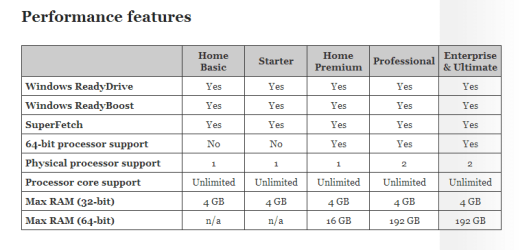
ram chart.PNG
 

My Computer

Computer type
PC/Desktop
Computer Manufacturer/Model Number
Dude Build
OS
Windows 10 Pro X64
CPU
Intel(R) Core(TM) i5-3570K CPU OC@ 4.5GHZ Turbo
Motherboard
MSI Z77A-G45 Gaming
Memory
8.00 GB DDR3 1600Mhz
Graphics Card(s)
MSI Gaming X GTX 1070
Sound Card
Realtek High Definition
Monitor(s) Displays
Dell S23O9W, HP L1710
Screen Resolution
DELL-1920 x 1080 HP-1280 x1024
Hard Drives
Crucial m4 256 SSD, WD 7200RPM 500GB WD 1TB
PSU
Seasonic X650 GOLD
Case
Zalman Z12
Cooling
Antec Kuhler 920
Keyboard
Logitech
Mouse
MSI DS100 Interceptor
Internet Speed
50 down and 5 up
Antivirus
MSE
Browser
Chrome, IE 11
Other Info
Logitech X-620 Speakers
And is a 3GB setup "acceptable"? It was said no but I'd like to listen to more opinions
 

My Computer

Computer type
PC/Desktop
Computer Manufacturer/Model Number
Custom Build
OS
Windows 7 Ultimate x64
CPU
Intel Core2 Quad Q6600 @ 2.4GHz
Motherboard
Foxconn P35A02
Memory
4GB DDR2 @ 400MHz
Graphics Card(s)
nVidia GeForce 9600 GT 1GB
Sound Card
Realtek HD Audio
Monitor(s) Displays
Samsung SyncMaster 172v
Screen Resolution
1280x1024
Hard Drives
Samsung Spinpoint F1 750GB HDD
Keyboard
Microsoft Comfort Curve 2000
Mouse
Microsoft Wheel Mouse Optical
Internet Speed
10 Mbps
Antivirus
Microsoft Security Essentials
Browser
Mozilla Firefox
Some laptops have limitations on RAM density per slot. Some slots can't handle 2GB sticks but can handle 1GB sticks. But, I have learned that the manufacturer is often conservative and when they say Max Memory is 2GB that may be a bit misleading. Do some research on that laptop and see if people have been putting 2GB sticks in and look at that Crucial website to see what it recommends.
 

My Computer

Computer type
PC/Desktop
Computer Manufacturer/Model Number
Custom Built
OS
Windows 7 Professional 64bit SP1
CPU
Intel Core i5-3570K @ 4.5GHz
Motherboard
Asus Sabertooth Z77
Memory
Corsair Vengeance 16GB (4x4) @1866MHz CL 9-9-9-24 1T
Graphics Card(s)
EVGA GTX 750 Ti FTW
Sound Card
Onboard Audio
Monitor(s) Displays
Dell S2309W
Screen Resolution
1920x1080
Hard Drives
Samsung 830 128GB SSD - OS
(4) Seagate 5TB HDD
(1) Seagate 2TB HDD
PSU
Seasonic X750 80+ Gold Full Modular
Case
Antec Eleven Hundred Super Mid Tower
Cooling
Intel Liquid Cooler
Keyboard
Max Nighthawk X8 Mechanical keyboard
Mouse
Mionix Naos 7000
Internet Speed
50 Mbps Down / 10 Mbps Up
Antivirus
Microsoft Security Essentials/Malwarebytes Anti-Malware
Browser
Chrome/Firefox
Other Info
Klipsch ProMedia 2.1's
Asus RT-N66R Wireless Router
Some laptops have limitations on RAM density per slot. Some slots can't handle 2GB sticks but can handle 1GB sticks. But, I have learned that the manufacturer is often conservative and when they say Max Memory is 2GB that may be a bit misleading. Do some research on that laptop and see if people have been putting 2GB sticks in and look at that Crucial website to see what it recommends.

Some people have put 4GB slots, but my friend won't care much for speed. I guess I'll save him £13 and get one 1GB stick.
 

My Computer

Computer type
PC/Desktop
Computer Manufacturer/Model Number
Custom Build
OS
Windows 7 Ultimate x64
CPU
Intel Core2 Quad Q6600 @ 2.4GHz
Motherboard
Foxconn P35A02
Memory
4GB DDR2 @ 400MHz
Graphics Card(s)
nVidia GeForce 9600 GT 1GB
Sound Card
Realtek HD Audio
Monitor(s) Displays
Samsung SyncMaster 172v
Screen Resolution
1280x1024
Hard Drives
Samsung Spinpoint F1 750GB HDD
Keyboard
Microsoft Comfort Curve 2000
Mouse
Microsoft Wheel Mouse Optical
Internet Speed
10 Mbps
Antivirus
Microsoft Security Essentials
Browser
Mozilla Firefox
Let me tell you, each slot takes up to 2GB RAM, 4GB total. Not that you haven't understood that in the first place, just want to make sure
And, if I can put 1GB RAM on the empty slot, why can't I put 2GB?

When the data sheet shows a 2 gb max., maybe a bios update has allowed for more ram but as money is so tight maybe purchasing 2x2 gb on a whim isn't the best approach. I hope people with this lappy have success with more than 2gb but checking Crucial shows 2 gb as well ! Maybe go slow and get a single 2gb stick and see if it plays nice with the 1 gb and then choose to try a 2nd 2gb stick.

http://www.crucial.com/upgrade/Fujitsu-memory/Esprimo+Mobile/Esprimo+Mobile+V5515-upgrades.html
 

My Computer

Computer type
PC/Desktop
Computer Manufacturer/Model Number
A blend of brains, brawn and dumb luck.
OS
Windows 7 Ultimate 64
CPU
i7 3770k OC'd 4.6 @ 1.17v, also FX 8120 & i5 miniITX
Motherboard
MSI P67A-GD80 b3
Memory
32 gb G.Skill Sniper DDR3 10-12-12-31 @ 2133
Graphics Card(s)
XFX Radeon 7870 2GB DDR5
Sound Card
Sound Blaster Z Series Card
Monitor(s) Displays
(2) LG LED 23" 1920 x 1080 2ms Monitors via mini d-port
Screen Resolution
1680 X 1050 p
Hard Drives
Samsung 256 gb 830 SSD sata III
(1) 1 tb WD Black
(2) 1 tb Hitachi deskmates/sata II
(2) 1 tb WD green/sata II
(2) 3 tb Seagate Barracuda
(1) 120 gb OCZ Vertex SS
(1) Drobo 5N w/5 Seagate 3tb
PSU
EVGA modular 1000G2 80% gold rating & APC 1200 RS
Case
CoolerMaster Storm Styker
Cooling
7 case fans 140mm & 120mm, NZXT Kraken X60
Keyboard
(2) Logitech Illuminated Keyboards (1) usb (1) wireless
Mouse
Logitech G700 & T-BC21 - nano nx for the laptop
Internet Speed
Basic 120mbps down
Antivirus
Trend Micro Titanium Max Security & Malwarebytes Premium
Browser
Chrome and IE 10
Other Info
5 Noctua case fans + 3 Noctua in p/p on NZXT cooler
Integrated hot swap drive bays for 2.5" Drives
(2) Lite-on dvd/cd/Blu Ray optical 22X
Integrated fan controller and led on/off
HP Officejet Pro 8630 all-n-one
Hot-swappable 3.5" hard drive bay
Netgear Nighthawk router
Asus USB 3 & sata 6 PCIe card
Vantec IDE to sata adptr./Ultra sata adptr
Lenovo L420 i5 lappy with m sata
Drobo 5N advanced NAS
2GB with a Ready boosted USB pen drive (cheap 4 or 8gig one is fine) and he doesn't have a speed demon system, ANYWAY, it will run much better with 2.
1GB is horrible on 7, even just turned on my system is using 1.6 gigs

I would look on your ebay for this on the cheap, and consider 2x1 so you have exactly the same type/speed/model for dual channel is considerably better.

I have an old 2008 Sony VAIO [2 gig max], 2 gigs is fine for the basics and very modest casual gaming, it has a SD card slot and using a 4 gig 10 rated SD card (highest) for the ready boost drive, and it hits that drive A LOT! [so I am not talking from lack of experience] :) [It's stuck with Vista-32, though, but was helpful for A+ exams.]
 

My Computer

Computer type
PC/Desktop
Computer Manufacturer/Model Number
Self Built Custom
OS
Windows 7 Ultimate Retail Box (64-bit installed) + Service Pack 1
CPU
AMD FX-8350 CPU v1.15 (or 1.0F) BIOS was required!
Motherboard
MSI 890FXA-GD70
Memory
8G CAS-7 G-Skill DDR3 @1333 (2 fours) [mobo nonOC max rec'd]
Graphics Card(s)
Radeon HD 7950 [3 gigs of GDDR5] MSI Twin Frozr model
Sound Card
Realtek High Definition Audio (onboard mobo, ALC-889 chip)
Monitor(s) Displays
2 WS LED Monitors: One LG One Viewsonic
Screen Resolution
1920 by 1080
Hard Drives
SSD for OS: Samsung 840 Pro
SSD for VM and utilities: Adata SX900
7200 RPM SATA HDs for the rest: Hitachi and Seagate
PSU
Corsair TX850 - 850W max, in service since August 2010.
Case
Thermaltake Armor A90
Cooling
Thermaltake Spin Q CPU Cooler, in service since August 2010
Keyboard
Logitech G11
Mouse
Logitech M310 Wireless
Internet Speed
100 Megabit broadband supposedly upgraded from 50 (Cable)
Antivirus
Bitdefender Internet Security 2014 suite
Browser
Pale Moon 64-bit main, also IceDragon, Opera, and Maxthon.
Other Info
CompTIA A+ certified (220-800 series) in July 2013.
Back
Top