
Hello, my desktop has two very strange symptoms:
Last night Action Center was giving a maintenance warning that there is a problem with "Kitten Cannon" and I need to go to Spiral Orbit and download the latest update. That warning just disappeared a few minutes ago.
and
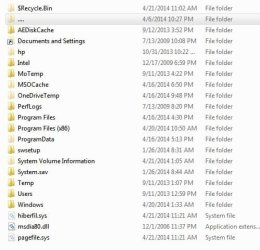
When I choose to show protected operating system files, there is a new folder named "...",
inside that file all the C Drive folders are replicated. They are empty and when I try to open them I get this error: "C:\...AEDiskCache refers to a location that is unavailable".
Two things happened before I noticed these problems:
I was cleaning up an external hard drive for a friend and tried to open a PDF, it threw a pop-up saying that I needed to get an update for Adobe Reader. I automatically clicked on it, and then realized that the pop-up looked suspicious, I canceled but probably too late. Stupid.
I installed a program from CNET, Wise File Hider. I uninstalled this A.M.
I scanned the ext. hard drive with Security Essentials before opening.
I have not been able to find any information on either of these issues.
Sec. Ess. reports clean - Sophos Root Kit reports clean.
AutoRuns doesn't show any suspicious services as far as I can tell...I'm stumped.
Also, there was a hidden shortcut icon in my documents folder for Remote Desktop Sharing.
I have remote sharing turned off. Is this from Team viewer?
Last night Action Center was giving a maintenance warning that there is a problem with "Kitten Cannon" and I need to go to Spiral Orbit and download the latest update. That warning just disappeared a few minutes ago.
and
When I choose to show protected operating system files, there is a new folder named "...",
inside that file all the C Drive folders are replicated. They are empty and when I try to open them I get this error: "C:\...AEDiskCache refers to a location that is unavailable".
Two things happened before I noticed these problems:
I was cleaning up an external hard drive for a friend and tried to open a PDF, it threw a pop-up saying that I needed to get an update for Adobe Reader. I automatically clicked on it, and then realized that the pop-up looked suspicious, I canceled but probably too late. Stupid.
I installed a program from CNET, Wise File Hider. I uninstalled this A.M.
I scanned the ext. hard drive with Security Essentials before opening.
I have not been able to find any information on either of these issues.
Sec. Ess. reports clean - Sophos Root Kit reports clean.
AutoRuns doesn't show any suspicious services as far as I can tell...I'm stumped.
Also, there was a hidden shortcut icon in my documents folder for Remote Desktop Sharing.
I have remote sharing turned off. Is this from Team viewer?
Last edited:
My Computer
- Computer type
- PC/Desktop
- Computer Manufacturer/Model Number
- HP
- OS
- Windows 7 Home Premium 64bit
- CPU
- i7
- Memory
- 14Gb
- Graphics Card(s)
- NVIDIA GTX 260
- Antivirus
- Security Essentials
- Browser
- ie 11, Firefox, Chrome


![Screenshot_C_....[][][][][]JPG.JPG](https://www.sevenforums.com/data/attachments/172/172414-d17f6fd761b22bf5d99f8bee763964ab.jpg?hash=3hbhlgoPue "Screenshot_C_....[][][][][]JPG.JPG")
