
Search in hidden folders?

Rathori

New member
Member
Local time
3:05 PM
Messages
23
Is there a way to disable searching in hidden folders?
I have some non-hidden files in hidden folders on my HDD (so I can access the files by typing the right path in address bar, without changing any visibility settings), and I don't want any of these files to be shown in search results at all.
 
Last edited:

My Computer My Computer

OS
Windows 7 Ultimate x64
CPU
Core 2 Quad Q6600
Motherboard
ASRock P43DE
Memory
8GB DDR2-800 GEIL Black Dragon
Graphics Card(s)
GeForce 8800GTX
Monitor(s) Displays
LG L226WTQ 22" 16:10
Screen Resolution
1680x1050
Hard Drives
Seagate Barracudas ST31000333AS, ST31000340AS, ST3320620AS, ST3500320NS.
PSU
Gigabyte ODIN GT 800W
Cooling
Zalman CNPS9500 CU
Keyboard
Logitech G15 (Blue)
Mouse
Microsoft SideWinder
Internet Speed
ADSL 6144/768 kbit/s
Other Info
Nothing is overclocked, I'm tired of figuring out whether it's a poorly written software or overclocking that causes problems.

My Computer My Computer

Computer type
PC/Desktop
Computer Manufacturer/Model Number
Self built custom
OS
64-bit Windows 11 Pro for Workstations
CPU
Intel i7-8700K OC'd to 5 GHz
Motherboard
ASUS ROG Maximus XI Formula Z390
Memory
64 GB (4x16GB) G.SKILL TridentZ RGB DDR4 3600 MHz
Graphics Card(s)
ASUS ROG-STRIX-GTX1080TI-O11G-GAMING
Sound Card
Integrated
Monitor(s) Displays
2 x Samsung Odyssey G7 27"
Screen Resolution
2560x1440
Hard Drives
1TB Samsung 990 PRO M.2,
4TB Samsung 990 PRO PRO M.2,
TerraMaster F8 SSD Plus NAS
PSU
Seasonic Prime Titanium 850W
Case
Thermaltake Core P3
Cooling
Corsair Hydro H115i
Keyboard
Logitech wireless K800
Mouse
Logitech MX Master 4
Internet Speed
2 Gb/s Download and 100 Mb/s Upload
Antivirus
Malwarebyte Anti-Malware Premium
Browser
Google Chrome
Other Info
Logitech Z625 speaker system,
Logitech BRIO 4K Pro webcam,
HP Color LaserJet Pro MFP M477fdn,
APC SMART-UPS RT 1000 XL - SURT1000XLI,
Galaxy S23 Plus phone
None of these folders are indexed, and I have also tried unchecking "Allow files on this drive to have contents indexed in addition to file properties" in drive properties. Both hidden folder and files they contain still show up in search results.

Is there a way to disable searching in non-indexed locations?
 

My Computer My Computer

OS
Windows 7 Ultimate x64
CPU
Core 2 Quad Q6600
Motherboard
ASRock P43DE
Memory
8GB DDR2-800 GEIL Black Dragon
Graphics Card(s)
GeForce 8800GTX
Monitor(s) Displays
LG L226WTQ 22" 16:10
Screen Resolution
1680x1050
Hard Drives
Seagate Barracudas ST31000333AS, ST31000340AS, ST3320620AS, ST3500320NS.
PSU
Gigabyte ODIN GT 800W
Cooling
Zalman CNPS9500 CU
Keyboard
Logitech G15 (Blue)
Mouse
Microsoft SideWinder
Internet Speed
ADSL 6144/768 kbit/s
Other Info
Nothing is overclocked, I'm tired of figuring out whether it's a poorly written software or overclocking that causes problems.
Are hidden files visible?
 

My Computer My Computer

Computer type
PC/Desktop
Computer Manufacturer/Model Number
Alienware Aurora ALX R4
OS
Windows 10 Pro (x64)
CPU
Intel Core i7-3930K (3.2GHz - 4.5GHz)
Motherboard
Alienware Aurora-R4 x79
Memory
4x Samsung 4GB PC3-12800 DDR3 (16GB 1600MHz)
Graphics Card(s)
Nvidia Geforce GTX 690
Sound Card
SteelSeries Siberia Elite
Monitor(s) Displays
Dell UltraSharp U3011
Screen Resolution
2560x1600
Hard Drives
Samsung 850 Pro 256 GB, Seagate 1TB Desktop Hybrid HDD, 2x Western Digital 4TB Green HDD
PSU
875W Some Dell PSU <.<
Case
Alienware Aurora ALX
Cooling
Custom Liquid Cooling (EK CPU & GPU blocks) dual EK 480RAD
Keyboard
Logitech G710+ Mechanical
Mouse
Logitech G700s
Internet Speed
Verizon Fios (50 mbps average)
Other Info
Server: Intel NUC D54250WYK: i5-4250U, 16GB, 256 GB mSATA, Windows Server 2012 R2
The files are visible and are not hidden. The folder that contains those files is hidden and is not visible. I have visibility settings set to "Don't show hidden files and folders". The hidden folders don't show up in search results, but their contents do.
 

My Computer My Computer

OS
Windows 7 Ultimate x64
CPU
Core 2 Quad Q6600
Motherboard
ASRock P43DE
Memory
8GB DDR2-800 GEIL Black Dragon
Graphics Card(s)
GeForce 8800GTX
Monitor(s) Displays
LG L226WTQ 22" 16:10
Screen Resolution
1680x1050
Hard Drives
Seagate Barracudas ST31000333AS, ST31000340AS, ST3320620AS, ST3500320NS.
PSU
Gigabyte ODIN GT 800W
Cooling
Zalman CNPS9500 CU
Keyboard
Logitech G15 (Blue)
Mouse
Microsoft SideWinder
Internet Speed
ADSL 6144/768 kbit/s
Other Info
Nothing is overclocked, I'm tired of figuring out whether it's a poorly written software or overclocking that causes problems.
Rathori,

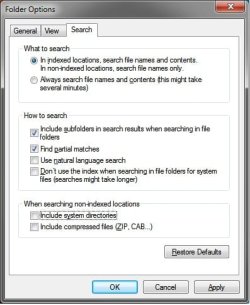
Double check to see if having your Search Options set like below may help.

Search_Settings.jpg
 

My Computer My Computer

Computer type
PC/Desktop
Computer Manufacturer/Model Number
Self built custom
OS
64-bit Windows 11 Pro for Workstations
CPU
Intel i7-8700K OC'd to 5 GHz
Motherboard
ASUS ROG Maximus XI Formula Z390
Memory
64 GB (4x16GB) G.SKILL TridentZ RGB DDR4 3600 MHz
Graphics Card(s)
ASUS ROG-STRIX-GTX1080TI-O11G-GAMING
Sound Card
Integrated
Monitor(s) Displays
2 x Samsung Odyssey G7 27"
Screen Resolution
2560x1440
Hard Drives
1TB Samsung 990 PRO M.2,
4TB Samsung 990 PRO PRO M.2,
TerraMaster F8 SSD Plus NAS
PSU
Seasonic Prime Titanium 850W
Case
Thermaltake Core P3
Cooling
Corsair Hydro H115i
Keyboard
Logitech wireless K800
Mouse
Logitech MX Master 4
Internet Speed
2 Gb/s Download and 100 Mb/s Upload
Antivirus
Malwarebyte Anti-Malware Premium
Browser
Google Chrome
Other Info
Logitech Z625 speaker system,
Logitech BRIO 4K Pro webcam,
HP Color LaserJet Pro MFP M477fdn,
APC SMART-UPS RT 1000 XL - SURT1000XLI,
Galaxy S23 Plus phone
I have set search options like that, it doesn't help - the files keep keep showing up in search results.
 

My Computer My Computer

OS
Windows 7 Ultimate x64
CPU
Core 2 Quad Q6600
Motherboard
ASRock P43DE
Memory
8GB DDR2-800 GEIL Black Dragon
Graphics Card(s)
GeForce 8800GTX
Monitor(s) Displays
LG L226WTQ 22" 16:10
Screen Resolution
1680x1050
Hard Drives
Seagate Barracudas ST31000333AS, ST31000340AS, ST3320620AS, ST3500320NS.
PSU
Gigabyte ODIN GT 800W
Cooling
Zalman CNPS9500 CU
Keyboard
Logitech G15 (Blue)
Mouse
Microsoft SideWinder
Internet Speed
ADSL 6144/768 kbit/s
Other Info
Nothing is overclocked, I'm tired of figuring out whether it's a poorly written software or overclocking that causes problems.
Strange. Are you sure that you have the hidden system files set like this below in Folder Options?
Folder_Options.jpg
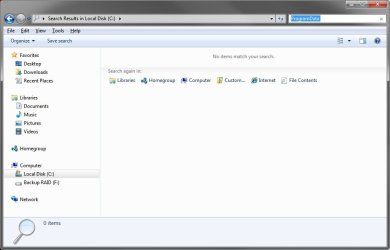
With these settings and the ones above for Search Options, this is the search results I get for the hidden "ProgramData" system folder.
Search.jpg
If they still show up, then as a test, you might create a new administrator account to see if the search results are the way you wanted them instead.
 

My Computer My Computer

Computer type
PC/Desktop
Computer Manufacturer/Model Number
Self built custom
OS
64-bit Windows 11 Pro for Workstations
CPU
Intel i7-8700K OC'd to 5 GHz
Motherboard
ASUS ROG Maximus XI Formula Z390
Memory
64 GB (4x16GB) G.SKILL TridentZ RGB DDR4 3600 MHz
Graphics Card(s)
ASUS ROG-STRIX-GTX1080TI-O11G-GAMING
Sound Card
Integrated
Monitor(s) Displays
2 x Samsung Odyssey G7 27"
Screen Resolution
2560x1440
Hard Drives
1TB Samsung 990 PRO M.2,
4TB Samsung 990 PRO PRO M.2,
TerraMaster F8 SSD Plus NAS
PSU
Seasonic Prime Titanium 850W
Case
Thermaltake Core P3
Cooling
Corsair Hydro H115i
Keyboard
Logitech wireless K800
Mouse
Logitech MX Master 4
Internet Speed
2 Gb/s Download and 100 Mb/s Upload
Antivirus
Malwarebyte Anti-Malware Premium
Browser
Google Chrome
Other Info
Logitech Z625 speaker system,
Logitech BRIO 4K Pro webcam,
HP Color LaserJet Pro MFP M477fdn,
APC SMART-UPS RT 1000 XL - SURT1000XLI,
Galaxy S23 Plus phone
Yes, that's the way I have my folder options set.
Hidden folders and files don't show up as search results, but non-hidden files which are located in hidden folders do, and I want them to not be shown.
 

My Computer My Computer

OS
Windows 7 Ultimate x64
CPU
Core 2 Quad Q6600
Motherboard
ASRock P43DE
Memory
8GB DDR2-800 GEIL Black Dragon
Graphics Card(s)
GeForce 8800GTX
Monitor(s) Displays
LG L226WTQ 22" 16:10
Screen Resolution
1680x1050
Hard Drives
Seagate Barracudas ST31000333AS, ST31000340AS, ST3320620AS, ST3500320NS.
PSU
Gigabyte ODIN GT 800W
Cooling
Zalman CNPS9500 CU
Keyboard
Logitech G15 (Blue)
Mouse
Microsoft SideWinder
Internet Speed
ADSL 6144/768 kbit/s
Other Info
Nothing is overclocked, I'm tired of figuring out whether it's a poorly written software or overclocking that causes problems.
Do you happen to have store and display recently opened items enabled in the start menu? If so, disable it and see if you continue to have hidden items show up.
 

My Computer My Computer

Computer Manufacturer/Model Number
Dell XPS 15 L502x
OS
Windows 7 Ultimate x64 SP1
CPU
Core i7-2670QM
Memory
8GB DDR3 PC3-10600
Graphics Card(s)
Intel HD Graphics 3000 + GeForce GT 540M
Screen Resolution
1920x1080
Hard Drives
1TB 5400RPM Seagate
Yes, that's the way I have my folder options set.
Hidden folders and files don't show up as search results, but non-hidden files which are located in hidden folders do, and I want them to not be shown.

Ah, I thought that you were saying that the hidden files and folders were showing up despite having your settings set like above.

As a workaround, you can just set the individual files or folders like this to be hidden using OPTION ONE in the turorial below.

Hidden Files and Folders - Vista Forums
 

My Computer My Computer

Computer type
PC/Desktop
Computer Manufacturer/Model Number
Self built custom
OS
64-bit Windows 11 Pro for Workstations
CPU
Intel i7-8700K OC'd to 5 GHz
Motherboard
ASUS ROG Maximus XI Formula Z390
Memory
64 GB (4x16GB) G.SKILL TridentZ RGB DDR4 3600 MHz
Graphics Card(s)
ASUS ROG-STRIX-GTX1080TI-O11G-GAMING
Sound Card
Integrated
Monitor(s) Displays
2 x Samsung Odyssey G7 27"
Screen Resolution
2560x1440
Hard Drives
1TB Samsung 990 PRO M.2,
4TB Samsung 990 PRO PRO M.2,
TerraMaster F8 SSD Plus NAS
PSU
Seasonic Prime Titanium 850W
Case
Thermaltake Core P3
Cooling
Corsair Hydro H115i
Keyboard
Logitech wireless K800
Mouse
Logitech MX Master 4
Internet Speed
2 Gb/s Download and 100 Mb/s Upload
Antivirus
Malwarebyte Anti-Malware Premium
Browser
Google Chrome
Other Info
Logitech Z625 speaker system,
Logitech BRIO 4K Pro webcam,
HP Color LaserJet Pro MFP M477fdn,
APC SMART-UPS RT 1000 XL - SURT1000XLI,
Galaxy S23 Plus phone
One other thing you may want to try is to re-index the system - if these files were ever indexed, unless you manually delete them or re-index they will remain in the database.
 

My Computers My Computers

System One System Two

  • Computer type
    PC/Desktop
    Computer Manufacturer/Model Number
    ChillBlast - Custom to my design
    OS
    Windows 11 Pro x64 [Latest Release and Release Preview]
    CPU
    Ryzen 9 5950X, 3.8 - 5.2 MHz
    Motherboard
    Asus Prime X570-Pro
    Memory
    64GB [2 x 32GB] DDR4 3200MHz
    Graphics Card(s)
    4GB NVIDIA GEFORCE GTX 1650 Ti
    Sound Card
    On-board SPDIF to 5.1 System + HDMI [5.1 system]
    Monitor(s) Displays
    32" UHD 32 Bit HDR Monitor + 43" UHD 4K 32Bit HDR TV
    Screen Resolution
    2 x 3840 x 2160 @60Hz
    Hard Drives
    1TB M2 SSD OS, 500GB Fast Access SSD, 2 x 8TB Data + Various Externals from 1TB to 4TB, 10TB NAS
    PSU
    NZXT C750 80 PLUS Gold 750W Modular PSU
    Case
    Workstation Case [Matt Black]
    Cooling
    NZXT Kraken X63 280mm CPU Cooler +2x Quiet Case fans
    Keyboard
    Logitech Wireless MX Keys & K400 + others
    Mouse
    Logitech Wireless MX Master 3S
    Internet Speed
    920 MB Down 50 MB Up
    Antivirus
    BitDefender Total Security Pro
    Browser
    Chrome (always run latest Non-Beta)
    Other Info
    Also run ...
    Laptop - Quad 8GB - Windows 10 Pro x64
    Nexus 7 Android tablet x2
    Samsung 10.2" tablet
    Blackview TAB 8 4G Android Tablet c/w Keyboard
    Wacom Intuos Pro Medium Pen Pad
    Wacom Intuos Pro Small Pen Pad
    Wacom Expresskeys Remote
    Loopdeck+ Graphics Controller
    Shuttle Pro v2 Control
  • Computer type
    Laptop
    System Manufacturer/Model Number
    Dell XPS 17 10750H
    OS
    Windows 11 Pro x64 Latest RP
    CPU
    Intel I7 10750H 5.0GHz
    Motherboard
    Dell XPS
    Memory
    32GB [2x16GB] DDR4 2933 MHz
    Graphics Card(s)
    nVidia GTX1650Ti 4 GB GDDR6
    Sound Card
    Stock [Realtek] 4 Speaker
    Monitor(s) Displays
    17" IPS UHD+ Infinity Edge Touchscreen
    Screen Resolution
    3840 x 2400
    Hard Drives
    2TB M2 NVMe, 4TB External + various 500GB & 1TB External NVMe (also have access to spinner HDD from
    PSU
    Stock
    Case
    Stock XPS Aluminium & Carbon Fibre
    Cooling
    Stock - Active Fan Control
    Keyboard
    Backlit + Various Logitech
    Mouse
    Stock Track Pad + Logitech MX Trackball
    Internet Speed
    72 MB Down 18MB Up
    Browser
    Chrome
    Other Info
    Also run ...
    Laptop - Quad 8GB - Windows 10 Pro x64
    Nexus 7 Android tablet x2
    10.2" tablet
    Sony Z3 Android Smartphone
    Wacom Intuos Pro Medium Pen Pad
    Wacom Intuos Pro Small Pen Pad
    Wacom Expresskeys Remote
    Loopdeck+ Graphics Controller
    Shuttle Pro v2 Control Pad
    10TB NAS
As a workaround, you can just set the individual files or folders like this to be hidden.

I don't want to change my visibility settings, but I hoped there is a way to keep windows search engine away from what I store in hidden folders.

Since it seems to be impossible, I'll just keep the things the way they are now.

Thanks for trying to help.
 

My Computer My Computer

OS
Windows 7 Ultimate x64
CPU
Core 2 Quad Q6600
Motherboard
ASRock P43DE
Memory
8GB DDR2-800 GEIL Black Dragon
Graphics Card(s)
GeForce 8800GTX
Monitor(s) Displays
LG L226WTQ 22" 16:10
Screen Resolution
1680x1050
Hard Drives
Seagate Barracudas ST31000333AS, ST31000340AS, ST3320620AS, ST3500320NS.
PSU
Gigabyte ODIN GT 800W
Cooling
Zalman CNPS9500 CU
Keyboard
Logitech G15 (Blue)
Mouse
Microsoft SideWinder
Internet Speed
ADSL 6144/768 kbit/s
Other Info
Nothing is overclocked, I'm tired of figuring out whether it's a poorly written software or overclocking that causes problems.
As a workaround, you can just set the individual files or folders like this to be hidden.

I don't want to change my visibility settings, but I hoped there is a way to keep windows search engine away from what I store in hidden folders.

Since it seems to be impossible, I'll just keep the things the way they are now.

Thanks for trying to help.

Did you read my post, and did you try it?
 

My Computer My Computer

Computer Manufacturer/Model Number
Dell XPS 15 L502x
OS
Windows 7 Ultimate x64 SP1
CPU
Core i7-2670QM
Memory
8GB DDR3 PC3-10600
Graphics Card(s)
Intel HD Graphics 3000 + GeForce GT 540M
Screen Resolution
1920x1080
Hard Drives
1TB 5400RPM Seagate

My Computer My Computer

OS
Windows 7 Ultimate x64
CPU
Core 2 Quad Q6600
Motherboard
ASRock P43DE
Memory
8GB DDR2-800 GEIL Black Dragon
Graphics Card(s)
GeForce 8800GTX
Monitor(s) Displays
LG L226WTQ 22" 16:10
Screen Resolution
1680x1050
Hard Drives
Seagate Barracudas ST31000333AS, ST31000340AS, ST3320620AS, ST3500320NS.
PSU
Gigabyte ODIN GT 800W
Cooling
Zalman CNPS9500 CU
Keyboard
Logitech G15 (Blue)
Mouse
Microsoft SideWinder
Internet Speed
ADSL 6144/768 kbit/s
Other Info
Nothing is overclocked, I'm tired of figuring out whether it's a poorly written software or overclocking that causes problems.
Back
Top